

Earlier this year, Google released its AI Mode tool to the public, providing users with a more immersive AI-powered search and chat experience.
Monique De Leon, Ignite Visibility’s Associate Director of SEO, knows the importance of optimizing your SEO efforts and content for this AI tool to boost visibility on Google. In this blog, she’ll look deeper into the new Google AI Mode and some ways to optimize your content to show up on the platform.
What You’ll Learn:
- Understanding Google’s AI Mode
- The Shift in Search Dynamics
- Earned Media KPIs in the Age of AI Search in SEO
- Strategies to Bridge the Gap
My Expert Opinion on Google AI Mode
Ever since the introduction of Google Gemini, Google has worked to integrate this AI tool into just about every aspect of its products. Most notably, it’s changing the way people search, especially as it gets better and better at interpreting queries and relaying information.
While Google’s AI does still make mistakes here and there, I’ve found that it’s quickly drifted from the almost laughably inaccurate AI Overviews—like the one telling people to put glue in a pizza recipe—to an increasingly reliable tool that’s streamlining the search experience and consolidating sources.
While AI Overviews are convenient enough, AI Mode is essentially putting ChatGPT right into the search function, encouraging users to abandon traditional search results pages (SERPs) almost entirely. It’s also changing the way people engage with Google and conduct searches.
Based on this transition, I can’t stress enough the importance of generative engine optimization (GEO) to supplement regular SEO efforts. By optimizing your content to connect more organically with audiences using Google AI search, you can make sure people still see you regardless of the platform they’re using.
More specifically, you must take into account how AI searches are more conversational and context-based, as users will have the chance to share more details to optimize high-intent searches. As such, it’s crucial to focus on setting your website apart from competitors and ensure your content reflects this distinction on every platform.
Understanding Google’s AI Mode
Google’s AI Mode is a tool with the intention of expanding on Google’s AI Overviews with more advanced capabilities and interactions. It uses generative AI and multimodal search to give users the ability to make more extensive searches, getting them to dig deeper for more information on a given topic.
Multimodal search means that the platform can use different types of search formats. For example, it can provide more information or similar results when someone uploads a photo into a Google AI search.
When performing an ordinary Google search, AI Mode appears at the top of the page.

In this mode, AI provides users with more in-depth information on a topic they’re interested in, complete with a list of cited sources for each part of the overall response.

The more comprehensive also means that people are searching differently. They’re requesting more information and want to dig deeper into topics with a more interactive platform that works a lot like ChatGPT and Copilot.
Specific Features
- Enhanced search: Natural language understanding, detailed summaries and responses, and multimodal search with visual search capabilities. These advancements make Google AI Mode easy to use via conversational search using AI assistants like Siri and Google Home.
- Improved personalization: Enhanced user interaction, including voice search, predictive capabilities that learn from user search patterns, and intuitive, adaptable interfaces.
- Camera and photography features: Scene and object recognition to optimize camera settings, image quality enhancement, and various editing tools.
- Optimized productivity: Automated task management, real-time language translation, and predictive maintenance.
- Accessibility features: Screen readers and voice command and control.
- Integration with other Google services: Works with Google Drive, Google Photos, and other services to optimize various tasks.
- Advanced reasoning capabilities: Integrates specifically with Gemini 2.5 to allow it to comprehend and compile information from several online sources, going beyond the basic search experience.
Check out this insightful video where John Lincoln breaks down what Google’s AI Mode is, how conversational AI search works, and what it means for SEO, digital marketing, and PPC advertising:
How to Access Google AI Mode
There are a couple of shortcuts that allow users to access Google AI Mode.
On the main website’s homepage, you can now enter your search query and click on the Google AI Mode shortcut on the right.

Meanwhile, on the mobile app, you can do the same by tapping on the magnifying glass icon on the right of the search bar.

Google search in AI Mode is available on just about every platform, including desktop browsers, mobile browsers, and the Google App for both iOS and Android devices.
Using Google AI Mode in Chrome
Soon, Google AI Mode will be coming to the Chrome browser to further integrate into the browsing experience, allowing people to conduct a Google search in AI Mode and much more.
Specifically, the Google AI Mode launch on Chrome will be able to connect users to this tool in almost every way. Chrome users can simply click on the new button in their address bar, enabling them to meet AI Mode wherever they are online, whether for the purpose of conducting a search, helping them summarize information on a web page, completing their online shopping, or performing other tasks.
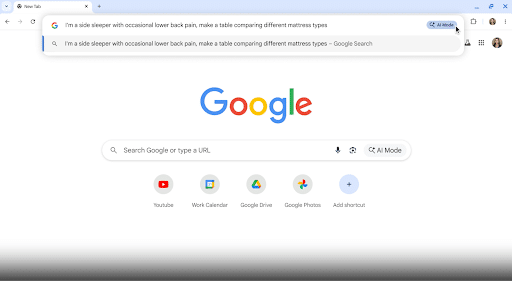
With the help of an AI panel that appears within your browser, you can interact with AI Mode to dig deeper results, help you better understand the content on a page, and take search to the next level.
From Google AI Mode on Reddit to ordering groceries, this development will truly elevate Google Gemini’s presence online.
So, what does this mean for marketers? Here are a couple of key tips on how to rank in AI Mode for marketers using this feature:
- Test content visibility by conducting a search using Google’s new AI Mode on Chrome.
- Observe AI Mode outputs and see if your content or site appears in any context.
Keep in mind that this implementation will change the way people interact with not just Google AI Mode, but also search, making it more convenient than ever for Chrome users to bypass search engines entirely.
The Shift in Search Dynamics
In recent years, with the development of various AI tools, AI and machine learning have begun to change the way people interact with search engines.
Historically, people would enter a basic query and see a list of results based on relevance, including rich results, but that largely changed with AI Overviews.
These summaries provide users with a concise summary of information based on queries right on top of organic results, making them the focus in many cases.

While these overviews may provide users with the information they need to the point of voiding any results below, they do include links to cited sources meaning optimizing for these overviews is crucial.
One significant way Google AI search is changing this behavior is the length of queries. For example, according to Google, the average AI Mode query is about twice the length of traditional Search queries.
A recent Ahrefs case study also found some interesting statistics about AI and user behavior, including:
- AI chatbots account for 0.17% of the average website’s traffic.
- 63% of websites receive AI traffic.
- 50% of all AI traffic comes from ChatGPT, while only 17.6% comes from Gemini (although this is likely to change with the introduction of AI Mode)
Now, with Google AI Mode in place, users get a lot more than a simple summary—they can enter queries that yield more expansive information about topics, encouraging them to engage in more of a conversation than a search. Think of it as Google transitioning into an AI chat tool.
When people conduct a search, they’ll be far more inclined to do a deep dive on a topic. They’ll also be less inclined to click on links in many cases if all the information they need is in one place.
Of course, this presents certain challenges for marketers vying for attention from organic searches.
Some of the principal challenges that come with Google AI for SEO include:
- Decreased Organic Traffic and Clicks: AI Overviews and the new mode will lead to more zero-click searches, as people get the information they need more frequently from summaries and listed information. Even if you appear on the first page of traditional results, competitors on page two could get people’s attention in AI-generated responses.
- Difficulties Adapting a Strategy: Marketers will also need to appeal to Google’s E-E-A-T guidelines for consistent quality and appeal to more conversational searches, especially as voice search grows in popularity.
- Technical SEO and Crawlability: Additionally, marketers may struggle if their content isn’t both crawlable and understandable from the point of view of search engine bots and AI tools.
- Measurement and Analytics: AI search results provide marketers with limited data for use in traditional SEO and analytics tools, which can make measurement tricky.
Navigating these challenges the right way can help you succeed with your efforts as more users adopt Google AI Mode and other tools.
Best Practices for Optimization
You might wonder, “How do I access Google AI?” Well, there are multiple ways you can go about this, including:
Organize Content and Structure
To begin, answer the most asked questions on Google in your industry with a direct answer that takes no more than a couple of sentences.
Also, structure content for readability using header tags (H1s, H2s, and H3s) and bullet points, enabling more readability and organization for Google search in AI Mode.
Paying attention to user intent with naturally incorporated search queries throughout will further help you answer more questions and ensure you show up when people dig for deeper results with AI search.
Build Trust and Authority
Create rich content with plenty of sources to support it, demonstrating your E-E-A-T in Google’s eyes. Backing up any claims with validated data, case studies, expert quotes, and more will help you get ahead of less authoritative competitors with Google AI Mode.
Optimize Technical SEO
In addition to high-quality content, focus on the technical SEO side of things. Structured data gives AI more context, while fast loading times and mobile optimization will create a great user experience that Google likes to see as much as visitors.
Also, ensure your site is easy to crawl with robots.txt and XML or HTML sitemaps when appropriate.
Use Multimodal and Unique Content
Go beyond basic text content with a mix of media, including videos, images, audio, and more, with keyword-optimized alt text and transcriptions.
Additionally, make sure your content is as unique as it is valuable and in-depth, especially when making product comparisons, case studies, or other similar content.
Case Studies Following Google’s AI Mode Launch
There are many ways different brands could adapt to Google AI Mode with their strategies.
Let’s look at some examples.
One real-world case could include a home service company that develops a wide range of content to connect with AI Mode, including many blog topics around DIY topics and when to hire a home remodeler or renovator. In addition to blogs, this company might create high-quality videos that supplement AI search results, showcasing the company’s expertise and ample knowledge to help its target audience.
Meanwhile, a healthcare provider might prioritize customer reviews and local expertise, optimizing for queries like “best urgent care facility near me” and “emergency treatment with short wait times.” A medical blog could also answer many questions related to users’ health and, ultimately, indicate when it’s time to see a medical professional, again demonstrating a commitment to E-E-A-T in this industry.
In the ecommerce industry, a brand might want to try to show up for more visual searches with high-quality images, helping them show up for queries like “the best running shoes for men” or even in Google Shopping via searches like “top running shoes for sale.”

Earned Media KPIs in the Age of AI Search in SEO
You might ask: Does GA4 show Google AI Mode as a referrer? The short answer is no, but you may be able to determine whether your organic traffic is coming from a Google search in AI Mode in certain ways.
Based on the implications of Google AI on SEO, you need to rethink the way you measure campaign performance.
When measuring SEO efforts, you may often rely on critical key performance indicators (KPIs) like reach, engagement, and conversions.
However, AI search in SEO is changing the landscape and what could define success with these campaigns.
With AI Mode on Google, it’s going to be harder to maximize the visibility of traditional web pages. When people perform a Google AI Mode search, they’ll be less likely to scroll down past that initial result, and even if they review the cited sources list, they may not click through to each page if the information is right there in the AI Mode response.
These challenges make it important to know how to measure performance in some potentially new ways and optimize your site to appeal to Google AI Mode.
The following are some ways to adapt to Google’s new AI Mode as you measure your optimization efforts.
Reach
For one, reach as you previously knew it, may not matter as much in gauging success, as people aren’t as guaranteed to click through AI-generated results, especially when they get into a “conversation” with AI Mode. Traditional rankings also won’t matter as much, as people might see responses using sources that fall far below you in rankings simply because their content is more relevant or authoritative.
Instead, you could measure reach based on appearances in cited sources for AI Overviews or Mode responses.
Engagement
You will also need to take into account how users engage with AI-generated search results. People will engage more frequently with AI search results than cited websites.
On the other hand, the people who do engage with your website through these results could be more likely to convert, especially if they find your content the most helpful and trustworthy.
The level of engagement will depend largely on how you capture people’s intent with more conversational queries and content.
Conversions
Of course, reduced traffic can lead to reduced conversions from SEO strategies. It can also be difficult to attribute conversions to AI results, as AI Overviews and other such results are often challenging to isolate.
Overcoming these potential issues is a matter of honing your conversion optimization strategy and developing a clear map to conversion through your site.
Here are some critical ways to optimize your content to appeal to AI Mode summarization and answer generation:
- Maintain Clean Code: Make sure AI crawlers can understand your page’s content by including relevant elements like <article> and <section> where appropriate.
- Write Clear Headings: Create a comprehensible hierarchy of content, with headers ranging from H1 to H6, with H1 tags being your page’s title, H2s comprising subtopics, H3s labeling subtopics for each subtopic, etc.
- Implement Structured Data: Give Google AI Mode context when crawling your site by using structured data, which helps AI Mode and search engine crawlers understand what your content is about. We’ll get more into how to use structured data below.
Comparative Analysis With Other AI-Powered Search Tools
AI Mode on Google competes with multiple similar generative engines, including Perplexity AI and OpenAI’s SearchGPT.
Here is a comparison of AI Mode Google search vs. some of the main competitors out there:
Perplexity AI
This tool functions very similarly to Google Search and AI Mode, allowing users to enter a query to retrieve in-depth information on any topic.
It synthesizes and summarizes information, but it goes arguably more in-depth than an AI Mode Google search. While Google AI Mode provides an organized outline of information in text format, Perplexity goes beyond that to show images of certain subjects and a list of related queries.
At the same time, it can take a bit longer to load results with Perplexity than with Google’s platform.

Bing Copilot
Another alternative to Google’s new AI Mode is Copilot, which is Microsoft’s generative engine.
Using Bing AI and Copilot, you can also look up any topic and get an organized, in-depth response.
What makes Copilot different is its more “friendly” persona, as it acts more as a chat agent who’s happy to help you find the information you want, whereas Google AI Mode search results function as just that: search results.
However, unlike Google AI Mode, Copilot doesn’t automatically cite sources for some results, making it potentially less reliable.

SearchGPT
SearchGPT functions much like both Google AI Mode and Perplexity AI, with fast answers and multiple features, including images and a list of sources.

Here is a comparison table of each of these tools and their various features:
| Feature | Google AI Mode | Perplexity AI | Bing Copilot | SearchGPT |
| Speed | Can handle complex queries at fast speeds, breaking them up into subtopics and searching for each all at once, although it can take slightly longer than other tools because of its comprehensiveness | Typically the fastest for quick responses via a lean retrieval-based architecture | Slower than complexity due to its more thorough searches | Extremely fast with an emphasis on speed and ease of use, especially when conducting conversational searches |
| Citations | Provides links to sources for all results, albeit with different levels of visibility depending on whether using AI Mode or AI Overviews | Transparent citations for nearly every line of text, with the ability to view them by hovering over text | Cited sources in responses with cross-checked information to verify data | In-depth citations with a source button at the top of the responses listing all sources |
| Interactivity | Highly interactive using a conversational experience that enables users to ask additional questions, with the ability to view an “AI Mode history” | Conversational Copilot mode is included with the Pro plan for increased interactivity, but the free version is less conversational and more of a search utility | Capable of comprehensive conversation using natural language | Like AI Mode, this tool offers highly conversational interactions with the ability to ask follow-up questions with volleying conversation |
| Multimodal Support | Advanced multimodal content capabilities, with Google Lens integration that supports image, voice, and text | Enables users to upload images and other files for analysis, including PDF documents | Image and file inputs allowed along with creative generation to generate all types of content | Also supports a wide range of content types, including voice search and image-based queries along with video results |
Keeping these tools in mind, you can successfully optimize for AI search even if users figure out how to turn off AI Mode on Google, helping you determine how to rank in AI Mode’s many competitors.
Strategies to Bridge the Gap
If you want to successfully optimize for Google Search’s AI Mode, here are some strategies to implement and change your approach to SEO:
Enhance Content Quality
As mentioned, Google’s E-E-A-T is the guideline to which all of your content should adhere to appeal to Google Gemini and traditional search. It stands for Experience, Expertise, Authority, and Trustworthiness, all of which qualities are essential for all content.
As such, your content must be of the highest quality as consistently as possible. Don’t focus on optimizing for various terms; instead, it’s all about providing people with valuable, accurate, and in-depth information, from your main web pages to your blog posts.
The more engaging your readers find your content, the more likely it will show up in all search results.
When it comes to AI, “conversational” is another word synonymous with quality. By using conversational keyword phrases and overall content, you’ll more readily connect with platforms using natural language processing (NLP).
Leverage Structured Data
Another important aspect to consider is how search engine bots and AI platforms interpret your website’s content.
This is where structured data and Schema markup come into play. Structured data is the language that search engines like Google can understand, giving context to the content they crawl and index.
Schema is a specific vocabulary of structured data that can help you define all of your web page’s content. For example, using Schema, you could indicate to bots that a page details a recipe for a particular meal.
Structured data has historically helped pages appear in rich results that people are more likely to click than traditional results, but it can now also help you show up for AI-generated results.
You can also use Google’s structured data testing tools to see how search engines interpret your content, or get some assistance adding structured data markup to a page with Google’s Structured Data Markup Helper.

Build Authoritative Backlinks
Backlinks are also integral to a successful website. If an authoritative website links back to yours, this signals to search engines that your website is also authoritative and subsequently rank-worthy.
The key here is a balance of quality and quantity. The more high-quality links you get on other reputable sites, the better your linked pages and site overall will perform.
For example, you could get links to your site in a guest post on an industry-related blog or online publication. You could also include backlinks in social media posts that drive a lot of engagement from your followers.
Utilize Helpful AI Tools
It’s also best to use AI-powered analytics and predictive tools to help you supercharge your SEO campaigns.
There are plenty of tools you can use for SEO to get the best results, including:
- Semrush: This all-in-one SEO analytics platform can help with everything from keyword research and ranking tracking to competitor analysis and content optimization.
- Surfer SEO: This tool assesses top-ranking content based on the keywords you want to target and can guide you regarding content structure, keyword placement, and other aspects of your site for better optimization.
- Clearscope: When drafting content, Clearscope can ensure it aligns with search intent with the help of advanced NLP models.
- Alli AI: Using Alli AI, you can automate on-page and technical SEO optimization, with the ability to analyze and identify issues applying to metadata, canonical tags, and other elements.
Integrate AI Insights
Be sure to incorporate the insights you glean from AI into your overarching marketing strategy, which will help keep everything aligned with ever-evolving search algorithms.
In turn, you’ll be able to more readily stay ahead of the competition as you stay on top of the latest trends.
Optimize for Google AI Mode With Ignite Visibility
Want to succeed in the world of AI Search in SEO? Ignite Visibility has the expertise and resources needed to help you climb to and stay on top of the competition. From traditional search and AI Overviews to AI Mode, we understand what it takes to keep up with the perpetually changing SEO landscape.
When you work with our experts, you can:
- Develop a comprehensive SEO campaign with an intent-based keyword strategy
- Stay updated with the latest changes in Google and other algorithms
- Create and curate high-quality content that connects with AI and traditional search results
- Analyze and measure the results for continual optimization
- And much more!
Like that idea? Get in touch with us today to speak with our team for help with your next strategy.

