

While optimizing for AI Mode on Google can boost your brand’s visibility, it doesn’t guarantee a website visit or lead; in addition to visibility, you need to build more trust through consistent appearances in AI search, outshining competitors with helpful content that eventually drives action.
Monique De Leon, Ignite Visibility’s Associate Director of SEO, knows the importance of optimizing your SEO efforts and content for this AI tool to boost visibility on Google. In this blog, she’ll look deeper into Google AI Mode and some ways to optimize your content to show up on the platform, with guidance on increasing visibility, prioritizing helpful and well-optimized content, and measuring the results of your efforts.
What You’ll Learn:
- Which Recent AI Mode Changes Matter to Marketers?
- The Shift in Search Dynamics
- Earned Media KPIs in the Age of AI Search in SEO
- Strategies to Bridge the Gap
TL;DR
- Google AI Mode turns search into a conversation, giving users deeper answers, follow-up questions, and personalized results powered by Gemini.
- Visibility matters more than rankings alone. AI Mode can cite content from many sources, but appearances don’t always translate into clicks or leads.
- Optimize for helpful, trustworthy content. Original insights, expert perspectives, strong E-E-A-T signals, and accurate business information improve AI visibility.
- Technical SEO still matters. Crawlability, indexing, structured data, and clean site architecture help AI systems understand and surface your content.
- Measure more than traffic. Track AI visibility, citations, leads, bookings, and revenue to understand the real business impact of AI search.
What Is AI Mode, and How Does It Work?
To start, what is AI Mode? Google AI Mode is a conversational Search experience on Google that lets users ask more detailed questions and get follow-ups on their queries.
When people perform a search using Google Search AI Mode, query fan-out takes place, as Google may run related searches to put together a more extensive answer.
For example, a prospective customer of a roofing company might start by comparing roofing materials, in which case AI Mode would list the best options based on certain criteria to go beyond that basic search.
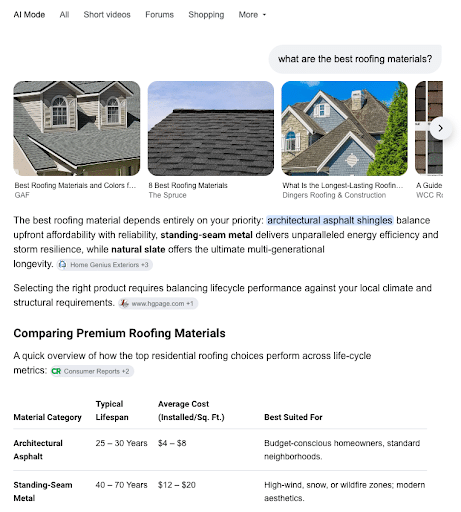
This user also compares the cost of each material before making a decision, followed by comparing different local roofing companies.
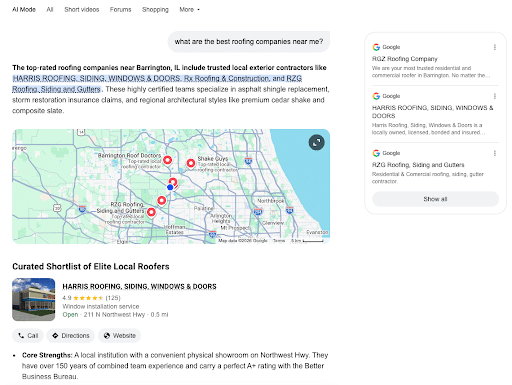
Google AI Mode then brings up a list of the top-rated local roofers, with details about location and each business’s strengths, specialties, and customer opinions.
As you can see in that first search, supporting links from different pages appear in citations for each part of the answer, building credibility for those sources and encouraging people to click through to learn more from each one.
However, not every answer will necessarily be accurate, and not every statement may come with a citation.
AI Mode vs. AI Overviews vs. Gemini
Marketers should understand the difference between Google AI Mode and other aspects of Google’s AI search experience.
Google Gemini refers to Google’s AI engine, which governs all AI search interactions with this search engine, including AI Mode and AI Overviews.
Users can access Gemini in Google’s dedicated app or within the Chrome web browser, with Gemini fully integrated into both platforms now.
AI Overviews provide summaries for information in traditional search results, appearing at the top of the page for many informational searches.
While the search may end with an AI Overview, people can also dive deeper in AI Mode with follow-up questions directly from an Overview.
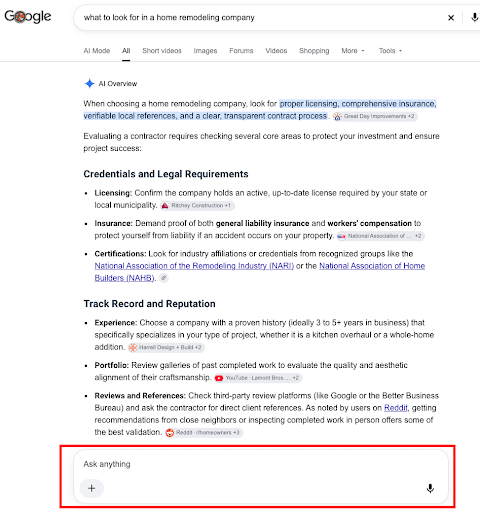
Which Recent AI Mode Changes Matter to Marketers?
Google’s AI Mode is a tool with the intention of expanding on Google’s AI Overviews with more advanced capabilities and interactions. It uses generative AI and multimodal search to give users the ability to make more extensive searches, getting them to dig deeper for more information on a given topic.
Multimodal search means that the platform can use different types of search formats. For example, it can provide more information or similar results when someone uploads a photo into a Google AI search.
When performing an ordinary Google search, AI Mode appears at the top of the page.

In this mode, AI provides users with more in-depth information on a topic they’re interested in, complete with a list of cited sources for each part of the overall response.

The more comprehensive also means that people are searching differently. They’re requesting more information and want to dig deeper into topics with a more interactive platform that works a lot like ChatGPT and Copilot.
Using Google AI Mode, users can also optimize searches with richer inputs, including images, uploaded files, videos, and open Chrome tabs.
This level of potential personalization based on inputs and search intent can lead each user to get considerably different answers when engaging with AI Mode in search.
Specific Features
The following are some of the key features that users can experience when they dive deeper in AI Mode:
- Enhanced search: Natural language understanding, detailed summaries and responses, and multimodal search with visual search capabilities. These advancements make Google AI Mode easy to use via conversational search using AI assistants like Siri and Google Home.
- Improved personalization: Enhanced user interaction, including voice search, predictive capabilities that learn from user search patterns, and intuitive, adaptable interfaces.
- Expanded booking and business-calling capabilities: While a business may announce availability, this could be outdated, while AI Mode can confirm availability more effectively based on real-time call and booking data in connected calendar and phone tools.
- Accessibility features: Screen readers and voice command and control.
- Integration with other Google services: Works with Google Drive, Google Photos, and other services to optimize various tasks.
- Advanced reasoning capabilities: Integrates specifically with Gemini 2.5 to allow it to comprehend and compile information from several online sources, going beyond the basic search experience.
Check out this insightful video where John Lincoln breaks down what Google’s AI Mode is, how conversational AI search works, and what it means for SEO, digital marketing, and PPC advertising:
How to Access Google AI Mode
There are a couple of shortcuts that allow users to access Google AI Mode.
On the main website’s homepage, you can now enter your search query and click on the Google AI Mode shortcut on the right.

Meanwhile, on the mobile app, you can do the same by tapping on the magnifying glass icon on the right of the search bar.

Google search in AI Mode is available on just about every platform, including desktop browsers, mobile browsers, and the Google App for both iOS and Android devices.
Using Google AI Mode in Chrome
You can also access Google Search with AI Mode directly in the Chrome browser, with an “Ask Gemini” button on the top right that allows users to explore the contents of a particular webpage or other topics in a conversational format, taking users away from the traditional search experience entirely.

So, what does this mean for marketers? Here are a couple of key tips on how to rank in AI Mode for marketers using this feature:
- Test content visibility by conducting a search using Google’s new AI Mode on Chrome.
- Observe AI Mode outputs and see if your content or site appears in any context.
My Expert Opinion on Google AI Mode
Ever since the introduction of Google Gemini, Google has worked to integrate this AI tool into just about every aspect of its products. Most notably, it’s changing the way people search, especially as it gets better and better at interpreting queries and relaying information.
While Google’s AI does still make mistakes here and there, I’ve found that it’s quickly drifted from the almost laughably inaccurate AI Overviews, like the one telling people to put glue in a pizza recipe, to an increasingly reliable tool that’s streamlining the search experience and consolidating sources.
While AI Overviews are convenient enough, AI Mode is essentially putting ChatGPT right into the search function, encouraging users to abandon traditional search results pages (SERPs) almost entirely. It’s also changing the way people engage with Google and conduct searches.
I’ve seen numerous clients benefit from AI SEO to optimize for not only Google Search AI Mode, but also other answer engines, with one client boosting its AI-generated traffic to 10.15% of all traffic, up from 5.46%, and another achieving the #1 ranked automotive franchise in AI search among competitors, with a 25% increase in mentions and a 24% boost in AI citations.
Understanding more about how Google Search AI Mode works and how to optimize for it can help you achieve better overall results with your SEO strategy.
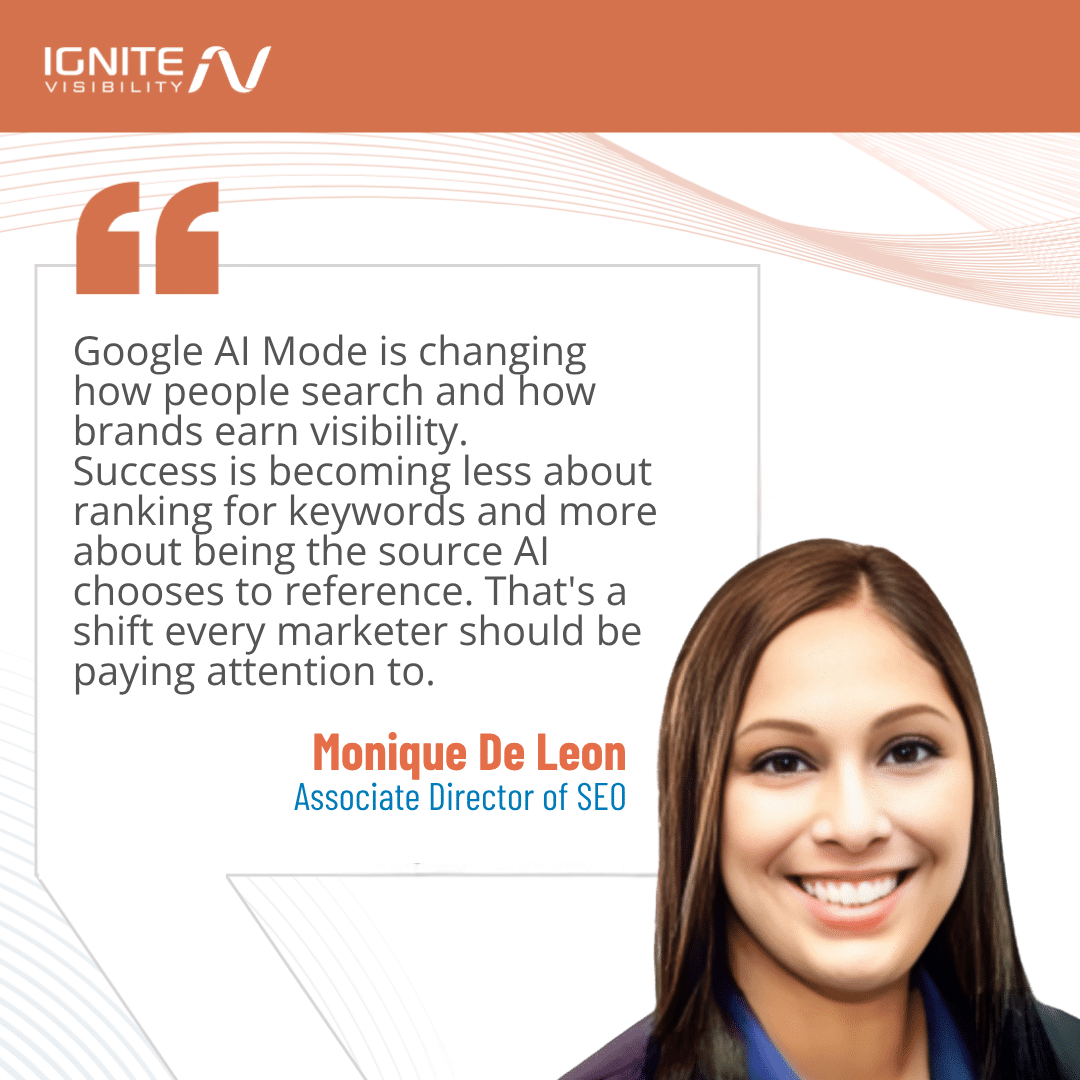
The Shift in Search Dynamics
In recent years, with the development of various AI tools, AI and machine learning have begun to change the way people interact with search engines.
Historically, people would enter a basic query and see a list of results based on relevance, including rich results, but that largely changed with AI Overviews.
These summaries provide users with a concise summary of information based on queries right on top of organic results, making them the focus in many cases.

While these overviews may provide users with the information they need to the point of voiding any results below, they do include links to cited sources meaning optimizing for these overviews is crucial.
One significant way Google AI search is changing this behavior is the length of queries. For example, according to Google, the average AI Mode query is about twice the length of traditional Search queries.
Now, with Google AI Mode in place, users get a lot more than a simple summary, they can enter queries that yield more expansive information about topics, encouraging them to engage in more of a conversation than a search. Think of it as Google transitioning into an AI chat tool.
When people conduct a search, they’ll be far more inclined to do a deep dive on a topic. They’ll also be less inclined to click on links in many cases if all the information they need is in one place.
Of course, this presents certain challenges for marketers vying for attention from organic searches.
Some of the principal challenges that come with Google AI for SEO include:
- Decreased Organic Traffic and Clicks: AI Overviews and the new mode will lead to more zero-click searches, as people get the information they need more frequently from summaries and listed information. Even if you appear on the first page of traditional results, competitors on page two could get people’s attention in AI-generated responses.
- Difficulties Adapting a Strategy: Marketers will also need to appeal to Google’s E-E-A-T guidelines for consistent quality and appeal to more conversational searches, especially as voice search grows in popularity.
- Technical SEO and Crawlability: Additionally, marketers may struggle if their content isn’t both crawlable and understandable from the point of view of search engine bots and AI tools.
- Measurement and Analytics: AI search results provide marketers with limited data for use in traditional SEO and analytics tools, which can make measurement tricky.
Navigating these challenges the right way can help you succeed with your efforts as more users adopt Google AI Mode and other tools.
Does AI Mode Reduce Website Clicks? What the New Study Found
A recent study involving 1,100 Google users found that AI Mode in search results led to an 18.8% lower share of searches leading to external sites. The study involved a seven-day intervention after a baseline period and concluded that news sites were heavily affected, with the share of users clicking through those sites dropping by 12.5%, while Reddit and Wikipedia saw a 21.2% and 9.9% reduction, respectively.
Additionally, researchers found that users experienced reduced satisfaction and trust, along with an increased use of competing search engines.
What the Findings Do (and Don’t) Mean for Your Business
While this study may make it look like Google AI Mode is more of a problem than anything on the surface, there’s more to it than meets the eye.
This particular study only looked at people whose searches had redirected into AI Mode instead of voluntarily using it.
This study also technically took place in March 2026, with a preprint released in August.
The results may appear troubling for many sites, but this one looked more specifically at news publishers and platforms like Reddit and Wikipedia, so bear in mind that these results may not apply to your specific industry or website.
Also, fewer clicks do not translate into a bad customer experience; they are not mutually exclusive.
Instead, the big takeaway from this study should be that it’s crucial to evaluate your own traffic, lead quality, and revenue from AI search experiences before changing budgets. You may find that AI actually helps more people land on your site and move through to a conversion.
Identify Which Customer Searches Deserve Your Attention
Before optimizing for Google Search with AI Mode, group your search queries into different categories, including:
- Quick answers to top-level questions
- Comparisons of pricing, features, etc.
- Local service selection
- Purchase decisions
Once you’ve collected these target queries, prioritize the ones connected to qualified leads or sales.
You can then build a small test set using the best AI Mode tracking tools like Search Console, sales calls platforms, and customer question data.
For instance, a potential customer might start with a quick search for “best siding for a humid climate,” which leads them to find that fiber cement siding is the best option. Next, this customer might search for “cost of fiber cement siding,” which eventually leads them to search for information about fiber cement siding warranties and local installers who use this material.
At the same time, you should avoid publishing a separate page for every possible follow-up; try to group relevant topics into groups like pillar pages, which can cover a single topic extensively while branching out into blog posts covering subtopics in greater depth, with FAQs covering many related questions on a single page.
How to Improve Your Website’s Eligibility and Visibility
To improve your AI visibility on Google, implement the following checklist:
- Technical Access: Make sure you have Search generative AI control toggled to Include in Google Search Console, and allow Googlebot to crawl your site with robots.txt.
- Useful Content: AI search engines also tend to seek out helpful content that’s unique from generic “commodity” content, including first-hand experiences, insights, and case studies.
- Supporting Evidence: Support any claims in your content with original proof points like data tables and charts, with expert bylines where appropriate and schema markup connecting concepts to specific entities.
- Accurate Business Information: Google connects the information on your website to various sources across the web for verification, making it necessary to maintain accurate information about your business at every source, including your name, address, and phone number (NAP) in a Google Business Profile and all other local listings.
Remember, traditional SEO practices are just as important as they’ve ever been. Everything from on-page SEO to technical elements like structured data can help you rank for both conventional search results and their AI counterparts, coupled with common content marketing best practices that build your website as an informational and industry authority.
Check Indexing, Crawl Access, and AI Inclusion Settings
Once you’ve created your content and optimized it to appeal to AI search, confirm that all target pages are indexed and eligible for search snippets.
Audit accidental robots.txt blocks that might prevent bots from crawling and indexing pages, along with potential noindex directives, rendering issues that might compromise Core Web Vitals, and weak internal links.
Finally, ensure you have Google Search Console’s Search generative AI control on the “Include” setting, including inherited property settings.
Just keep in mind that eligibility doesn’t guarantee appearance in AI results, whether as a citation or mention.
Publish Information Customers Cannot Get From a Generic Summary
As mentioned earlier, your content should stand apart from what Google considers “commodity” content that’s like the rest of your competitors’.
To provide Google and its users with more unique information they can’t find elsewhere, add elements like original research, firsthand examples from industry experts, documented results in the form of charts or studies, and expert analysis.
In producing this content, also cover details that people are likely to look for in AI search, such as:
- Product and service costs
- Trade-offs
- Limitations
- Suitability for different use cases
- Alternatives
Throughout your content, use clear H1, H2, and other subheadings and comparison tables when they can help readers.
As you write and structure your content, it’s also important to keep things natural; avoid rigid answer-length formulas and artificial “AI-friendly” content blocks created for the sole purpose of achieving AI mentions or citations.
Let’s look at an example of a website that appears to appeal to Google’s content needs:
This one comes from someone searching “what is the average cost of roofing services in Illinois,” which relays a specific range from Modernize Home Services at the top of the results in an AI search.
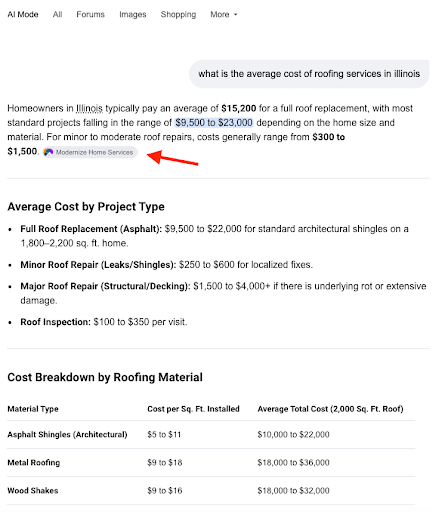
Going to that page, you can see not only the numbers highlighted, but also plenty of other supporting data around factors influencing the cost of roofing in Illinois, with a table comparing the cost-per-square-foot for different regions across the state.
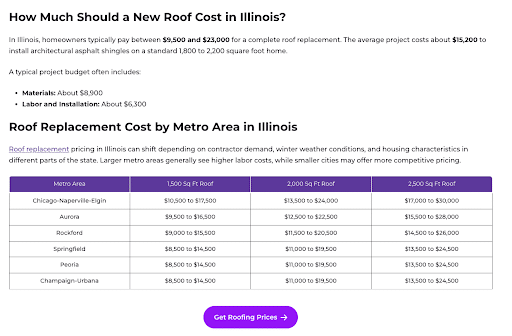
Modernize Home Services also hosts a team of experts to support the information it relays, complete with bios for each expert.

With unique and credible data, along with plenty of information expanding on decision-influencing searches, you’ll be able to increase your chances of getting a top placement in AI results.
Make Your Claims Easy to Verify
You should also make your claims verifiable by identifying authors and relevant experience, as Modernize Home Services does in the above example.
Cite original sources and explain any research methods where appropriate, detailing how you came up with industry figures, statistics, and other data that might be unique to your content.
Additionally, if any information changes based on your sources, update them accordingly, including any prices, specifications, or claims.
Use authentic photos, demonstrations, and supporting video footage where needed to further support your content, adding visual elements that can enhance both SEO and readability while boosting credibility.
Keep Local and Product Information Accurate
To further establish your business as an authority, keep all local and product details correct across platforms.
Here are some steps to take for businesses in a few key industries:
- Multi-Location Brands: Align each location’s Google Business Profiles, location pages, services and products, hours, and booking information, updating these details if they change at any point for specific locations.
- Home Services: Detail specific service areas, project suitability, and estimate processes that help people determine whether your business is the right fit.
- Ecommerce: Online sellers should maintain accurate product details and specifications, availability, and Google Merchant Center availability, with automatic product feed updates to keep all information current.
Relevant structured data applies to these and other industries, but remember that there is no “special” AI schema that can give content the upper hand in AI search results.
Give Customers a Reason to Visit, and Convert
Once people find your business via AI search, give them compelling reasons to not only visit your website but convert into satisfied customers.
Some next steps for prospects might include:
- Obtaining project estimates based on their needs
- Checking for availability in their area or from a specific location
- Conducting detailed comparisons of offerings and businesses near them
- Requesting demos
- Booking consultations
Match every landing page to the question that brought the visitor there, which will keep them moving down the funnel.
In the process, all mobile forms, calls, and booking paths must be easy to complete to create a seamless experience across the customer journey.
For example, a home services company specializing in siding might have a siding comparison page detailing the different types of materials, which then leads users to a relevant project-estimate request page with natural calls to action.
Just don’t assume AI visitors are more likely to convert because of their high-intent searches. Always test conversion rates, qualified-lead rates, and revenue to determine whether your AI traffic is actually converting into paying customers.
Measure AI Visibility Without Overstating Attribution
It’s important to look at visibility, website engagement, and business outcomes as separate metrics when gauging effectiveness.
In your reports, citations and mentions should be separate, as brand mentions don’t necessarily include links that lead to clicks to a site.
In addition to traffic, the best AI Mode SEO tracking software can help you measure crucial metrics like qualified inquiries, bookings, and sales to measure profitability and ROI.
As you measure the results of your optimization efforts, avoid attributing every change in organic traffic to AI search, as other factors might influence this metric, such as shifts in traditional rankings and seasonal trends.
Use Current Search Console Reporting
Google Search Console remains one of the best AI Mode tracking tools to use for measurement, and it’s only becoming more capable with continual updates.
On June 3, 2026, Google announced the inclusion of Generative AI performance reports in Search Console, which saw a worldwide rollout by the end of August.
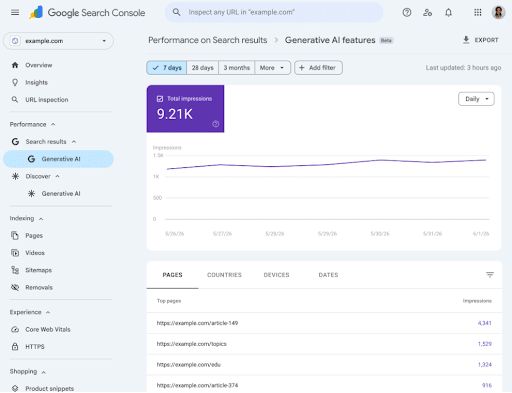
In these reports, marketers can gain insights into reported impressions and breakdowns by page, country, device, and date, showing how often your site and individual pages appear in AI results on Google.
The report covers both Google AI Mode and AI Overviews, along with other supported AI Search features.
You can also pair this visibility reporting with Google Analytics 4 (GA4) and CRM outcomes, but know that there may still be certain gaps that keep you from directly attributing AI impressions to website interactions and conversions.
Monitor Recommendations and Brand Accuracy
Here are some additional steps you can take to monitor brand recommendations and maintain accurate data as you optimize for AI experiences:
- Repeat a consistent set of commercially relevant prompts that might attract more qualified leads.
- Record dates, locations, devices, and relevant personalization conditions.
- Track all cited URLs, recommended brands, and inaccurate claims to inform your content strategy.
- Treat third-party tracking as sampled observations instead of a complete audience measurement.
- Compare changes over time for more accurate reporting; avoid considering a single screenshot an example of declarable success.
Earned Media KPIs in the Age of AI Search in SEO
You might ask: Does GA4 show Google AI Mode as a referrer? The short answer is no, but you may be able to determine whether your organic traffic is coming from a Google search in AI Mode in certain ways.
Based on the implications of Google AI on SEO, you need to rethink the way you measure campaign performance.
When measuring SEO efforts, you may often rely on critical key performance indicators (KPIs) like reach, engagement, and conversions.
However, AI search in SEO is changing the landscape and what could define success with these campaigns.
With AI Mode on Google, it’s going to be harder to maximize the visibility of traditional web pages. When people perform a Google AI Mode search, they’ll be less likely to scroll down past that initial result, and even if they review the cited sources list, they may not click through to each page if the information is right there in the AI Mode response.
These challenges make it important to know how to measure performance in some potentially new ways and optimize your site to appeal to Google AI Mode.
The following are some ways to adapt to Google’s new AI Mode as you measure your optimization efforts.
Reach
For one, reach as you previously knew it, may not matter as much in gauging success, as people aren’t as guaranteed to click through AI-generated results, especially when they get into a “conversation” with AI Mode. Traditional rankings also won’t matter as much, as people might see responses using sources that fall far below you in rankings simply because their content is more relevant or authoritative.
Instead, you could measure reach based on appearances in cited sources for AI Overviews or Mode responses.
Engagement
You will also need to take into account how users engage with AI-generated search results. People will engage more frequently with AI search results than cited websites.
On the other hand, the people who do engage with your website through these results could be more likely to convert, especially if they find your content the most helpful and trustworthy.
The level of engagement will depend largely on how you capture people’s intent with more conversational queries and content.
Conversions
Of course, reduced traffic can lead to reduced conversions from SEO strategies. It can also be difficult to attribute conversions to AI results, as AI Overviews and other such results are often challenging to isolate.
Overcoming these potential issues is a matter of honing your conversion optimization strategy and developing a clear map to conversion through your site.
Here are some critical ways to optimize your content to appeal to AI Mode summarization and answer generation:
- Maintain Clean Code: Make sure AI crawlers can understand your page’s content by including relevant elements like <article> and <section> where appropriate.
- Write Clear Headings: Create a comprehensible hierarchy of content, with headers ranging from H1 to H6, with H1 tags being your page’s title, H2s comprising subtopics, H3s labeling subtopics for each subtopic, etc.
- Implement Structured Data: Give Google AI Mode context when crawling your site by using structured data, which helps AI Mode and search engine crawlers understand what your content is about. We’ll get more into how to use structured data below.
Strategies to Bridge the Gap
If you want to successfully optimize for Google Search’s AI Mode, here are some strategies to implement and change your approach to SEO:
Enhance Content Quality
As mentioned, Google’s E-E-A-T is the guideline to which all of your content should adhere to appeal to Google Gemini and traditional search. It stands for Experience, Expertise, Authority, and Trustworthiness, all of which qualities are essential for all content.
As such, your content must be of the highest quality as consistently as possible. Don’t focus on optimizing for various terms; instead, it’s all about providing people with valuable, accurate, and in-depth information, from your main web pages to your blog posts.
The more engaging your readers find your content, the more likely it will show up in all search results.
When it comes to AI, “conversational” is another word synonymous with quality. By using conversational keyword phrases and overall content, you’ll more readily connect with platforms using natural language processing (NLP).
Leverage Structured Data
Another important aspect to consider is how search engine bots and AI platforms interpret your website’s content.
This is where structured data and Schema markup come into play. Structured data is the language that search engines like Google can understand, giving context to the content they crawl and index.
Schema is a specific vocabulary of structured data that can help you define all of your web page’s content. For example, using Schema, you could indicate to bots that a page details a recipe for a particular meal.
Structured data has historically helped pages appear in rich results that people are more likely to click than traditional results, but it can now also help you show up for AI-generated results.
You can also use Google’s structured data testing tools to see how search engines interpret your content, or get some assistance adding structured data markup to a page with Google’s Structured Data Markup Helper.

Build Authoritative Backlinks
Backlinks are also integral to a successful website. If an authoritative website links back to yours, this signals to search engines that your website is also authoritative and subsequently rank-worthy.
The key here is a balance of quality and quantity. The more high-quality links you get on other reputable sites, the better your linked pages and site overall will perform.
For example, you could get links to your site in a guest post on an industry-related blog or online publication. You could also include backlinks in social media posts that drive a lot of engagement from your followers.
Utilize Helpful AI Tools
It’s also best to use AI-powered analytics and predictive tools to help you supercharge your SEO campaigns.
There are plenty of tools you can use for SEO to get the best results, including:
- Semrush: This all-in-one SEO analytics platform can help with everything from keyword research and ranking tracking to competitor analysis and content optimization.
- Surfer SEO: This tool assesses top-ranking content based on the keywords you want to target and can guide you regarding content structure, keyword placement, and other aspects of your site for better optimization.
- Clearscope: When drafting content, Clearscope can ensure it aligns with search intent with the help of advanced NLP models.
- Alli AI: Using Alli AI, you can automate on-page and technical SEO optimization, with the ability to analyze and identify issues applying to metadata, canonical tags, and other elements.
Integrate AI Insights
Be sure to incorporate the insights you glean from AI into your overarching marketing strategy, which will help keep everything aligned with ever-evolving search algorithms.
In turn, you’ll be able to more readily stay ahead of the competition as you stay on top of the latest trends.
Google AI Mode FAQs
1. Can businesses advertise in AI Mode?
Google is introducing ads to this feature, allowing advertisers to promote brands and offerings directly within answers. Google is currently testing different formats to integrate relevant ads naturally into search content, which can significantly boost visibility and engagement among AI search users.
2. Can I exclude my website from AI answers without leaving Search entirely?
Yes, businesses can exclude their websites from AI search results in Google without compromising traditional rankings. Using Google Search Console, you can choose Exclude within the Search generative AI control settings, which will keep text and links from appearing as inputs or previews in AI results while maintaining standard search results, ads, and Merchant Center appearances.
3. Do I need llms.txt or special AI schema?
Google doesn’t require llms.txt or any AI-specific schema for websites to appear in AI search results. Standard schema markup will help Googlebot understand a site’s content to help with optimization, but it won’t guarantee appearances in AI search, making strong traditional SEO essential for optimization.
Optimize for Google AI Mode With Ignite Visibility
Want to succeed in the world of AI Search in SEO? Ignite Visibility has the expertise and resources needed to help you climb to and stay on top of the competition. From traditional search and AI Overviews to AI Mode, we understand what it takes to keep up with the perpetually changing SEO landscape.
When you work with our experts, you can:
- Develop a comprehensive SEO campaign with an intent-based keyword strategy
- Stay updated with the latest changes in Google and other algorithms
- Create and curate high-quality content that connects with AI and traditional search results
- Analyze and measure the results for continual optimization
- And much more!
Like that idea? Learn more about our AI SEO services to find out how to maximize visibility for AI Mode in search.

