

Marketers can find several uses for Bing AI today, as it now functions as a productivity tool, search interface, and AI visibility channel. As a result, knowing how to both use and optimize for Bing artificial intelligence can significantly boost your marketing efforts.
In this guide, Karen Devlin, VP of AI SEO, will guide you through how to use Bing AI for a variety of marketing-based applications.
What You’ll Learn:
- What Is Bing AI and How Does It Work?
- How to Access Bing AI
- Creating the Perfect Bing AI Prompts
- Bing AI for Writers
- Bing AI for Creative Support
- Bing AI for Marketers
- Practical Limitations Marketers Should Know
- Bing AI Alternatives
- FAQs
What Is Bing AI and How Does It Work?
Bing AI is a generative tool that can produce different types of AI-generated content, including text, images, and videos.
Launched by Microsoft in 2023, Bing AI, or bing.com chat, runs on GPT technology, the same foundational model powering ChatGPT, but with Microsoft’s proprietary customizations and safeguards. As part of Microsoft’s broader Copilot product family, it excels at providing comprehensive answers that help with creative and informational tasks.
Bing’s AI capabilities operate using Microsoft Copilot as its core AI assistant. Bing Search is integrated with Copilot now in the form of Copilot Search, showing AI summaries for certain searches, much like Google’s AI Overviews.
Copilot and Bing AI also integrate into Microsoft Edge, Microsoft’s dedicated web browser, with a built-in Copilot sidebar that summarizes web pages, writes drafts, and answers questions that users might have about websites. Additionally, Copilot works with Microsoft 365, the productivity suite that includes Word, Excel, and PowerPoint, enabling users to organize all types of data for spreadsheet analysis, meeting summarizations, and more.
Users can also chat with Copilot directly like they would with Google’s AI Mode or ChatGPT, asking detailed questions that yield equally detailed answers with summaries and citations.

Bing AI has two key features:
- Bing Chat AI: Generate conversational responses or creative content through text prompts.
- Bing Image Creator: Design visuals based on specific text inputs, ideal for branding and marketing purposes.

How to Access Bing AI
You can access Bing AI on the following platforms, depending on how you want to use it:
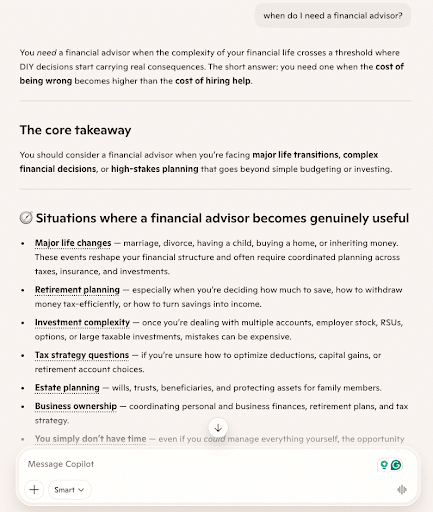
Copilot
You can access Bing’s AI tool using Copilot on the Microsoft Copilot website, allowing you to interact with the AI chat interface in any web browser.
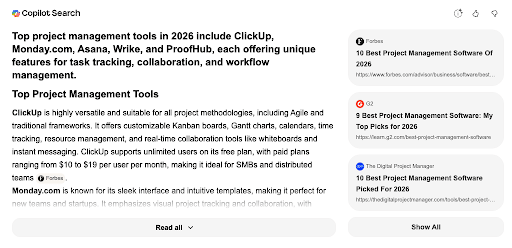
Bing
You can also access Bing AI search on the Bing search engine in a section called “Copilot Search.” This block can appear toward the top or middle of search results to summarize information with a citations list on the right.
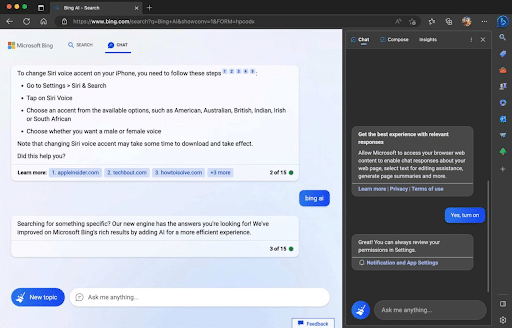
Edge
Another way to implement Microsoft Bing AI is through the Microsoft Edge browser, which includes an integrated sidebar that allows users to explore web pages with AI chat.
Mobile App
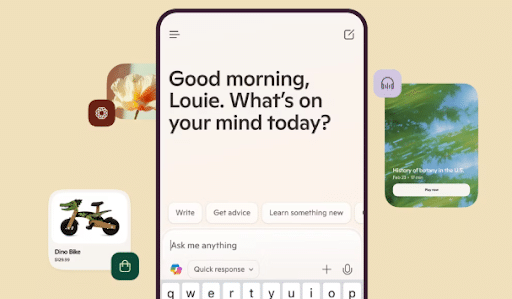
By downloading the Copilot app for Android or iPhone devices, you can chat directly with Bing’s AI, use the Bing AI image generator, and access other features. Many other apps also include a Copilot functionality.
Microsoft 365
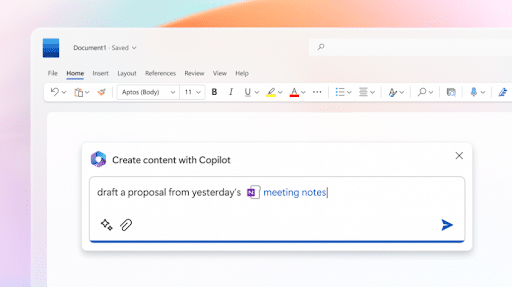
The Microsoft 365 suite now uses Microsoft Bing AI in Word, Excel, PowerPoint, and Outlook to help with everything from summarization to drafting and Bing AI art creation.
My Expert Insights on Bing AI
AI generators like Bing’s and other platforms can help you create all types of content, making production more efficient without compromising quality.
The key to getting the most out of the platform is to create in-depth and highly specific prompts, indicating precisely what you want the tool to create. The more detailed your instructions, the better the results: Specify tone, style, or constraints to ensure precise outputs.
A common question I get in relation to marketing is, “Can you use Bing AI images for commercial use?” While Microsoft had an explicit “non-commercial use” policy in the past, the company has since updated its terms: Microsoft doesn’t claim ownership of your creations, and commercial use is permitted, though you remain responsible for making sure your images don’t infringe on trademarks, copyrights, or anyone’s likeness.
Of course, Bing AI search is equally important to consider, as it often relays summaries of information directly within search results, contributing to the ongoing shift toward AI-assisted and zero-click search experiences.
When optimizing for Bing’s AI summaries, you should also keep in mind that visuals are particularly important to include in your content, as around 52% of summary responses include images or charts vs. 33% on Google. AI summaries have also gone mainstream: according to Pew Research Center, 65% of U.S. adults at least sometimes encounter AI summaries in their search results.
Using all Bing AI features the right way in your marketing can help you get the best results from it, whether using it to produce content or boost your online visibility.
Creating the Perfect Bing AI Prompts
The key to succeeding with Bing AI is to create the best prompts. Good prompts will be highly specific, conveying the exact idea you have in mind and giving the AI clear indicators.
The more specific you get, the more likely you’ll be to get the results you want. Rather than asking “Tell me about marketing,” try “Explain three current digital marketing trends for small e-commerce businesses in 2026.” The more context and parameters you provide, the more detailed your response will be.

When using Bing generative AI for business, frame your prompts with clear objectives. Instead of “Help with my presentation,” try “Create an outline for a 10-minute sales presentation highlighting our new CRM software’s three key benefits for financial advisors.” This gives the tool the structure and audience information it needs to generate relevant content.
When conducting research, use prompts that specify your information needs and preferred format. For example: “Summarize the latest findings on renewable energy storage technologies from the past two years, organized by technology type with their efficiency rates.”
Content creators can maximize Bing AI by including tone and audience specifications: “Write an engaging introduction for a blog post about sustainable fashion targeted at environmentally-conscious millennials using a conversational but informative tone.”
Here are some examples of prompts you can use for different aspects of your marketing efforts:
- SEO Audits: “Perform a complete technical SEO audit for www.example.com. Cover crawlability, indexation, Core Web Vitals, site architecture, internal linking, redirect chains, canonicalization, thin and duplicate content, schema markup, and AI-answer visibility, with prioritized fixes for each based on impact and difficulty.”
- Content Briefs: “Create a complete SEO content brief for the keyword [keyword], including search intent, audience profile, header tag structure, outline, external sources, internal links, schema suggestions, SERP feature targeting recommendations, and commonly searched FAQs.”
- Paid Ad Variations: “Give me 10 Google and Bing ad variations for [product/service] targeting [audience]. Provide logical, emotional, value-driven, and urgency-based angles, with matching headlines, descriptions, and CTA variations.”
- Competitive Research: “Locate the top organic competitors for www.example.com in [country] ranked by traffic share and keyword overlap.”
Local Landing Page Analysis: “Generate local keyword clusters for [service] in [city], with intent-specific, geo-targeted, and neighborhood specific variations.”
Remember that repetitive prompting often yields the best results. Don’t hesitate to refine your initial prompt and ask again if the original response is not exactly what you need.
How Content Teams Should Use Bing AI Responsibly
Bing AI’s tools have transformed the writing landscape, providing valuable assistance at every stage of the content creation process. A smart Bing AI writer would use the tool to improve their writing process in the following ways:
1. Use AI for Inspiration and Brainstorming
One way to use Bing Chat AI is to generate all kinds of story ideas, creative angles, and blog post outlines to assist with content creation.
For example, a food blogger might look for ideas using Copilot for a post about nutritious meals that readers can easily prepare at home.

As you can see, Copilot conveniently lists different options that fit the criteria, including breakfast, lunch, and dinner options along with ideas for an introduction.
2. Simplifying Writing Workflows
In addition to creating content ideas, writers can also use Bing AI to perform grammar checks, rewrites, and summarization.
An example here is creating a short summary for the aforementioned blog post above.

3. Shift The Tone Of Your Writing
Another way writers can use AI on Bing is to change the tone of writing. For example, someone might want some ideas for how to make a blog post more humorous or playful.

Disclaimer: As a digital marketing agency focused on developing human-based marketing content, we do not recommend using AI for content output, especially with the intention of boosting organic search rankings.
4. Streamline the Drafting and Editing Phases
Bing AI is also helpful during the drafting process. If you’re experiencing some writer’s block, use it to request outlines or section breakdowns. For example, asking “Create a detailed outline for a 1500-word blog post about indoor gardening for beginners” will provide you with a structure to start your project while still leaving room for personal expertise and style.
Bing AI creator can also help edit your finished work. Use it to refine awkward phrasing, suggest stronger word choices, and identify inconsistencies. A writer might prompt: “Improve the clarity and flow of this paragraph while maintaining its key points.”
5. General SEO Ideas
With Bing AI, SEO research becomes more efficient as well. Writers can analyze keyword opportunities with prompts like “What are the top-performing keywords for digital marketing blogs in 2026?” or “Create a list of long-tail keywords related to ‘nutritious meals’ and ‘easy to prepare meals’.”
For instance, the same food blogger might want to find keywords to target within that blog post and use Copilot to come up with some ideas.

The writer can then look for high-volume keywords in this list using other keyword tools like Google’s Keyword Planner.
Writers can also use the tool to assist with things like meta descriptions, alt-image tags, and other technical SEO aspects. For meta descriptions, the prompt might look something like this: “Generate three SEO-optimized meta descriptions for my article about remote work tools.”

6. Fact Checking
Never go by the words of AI alone, even if they can sound entirely practical and convincing. AI still gets things wrong, making fact-checking just as important as it’s ever been.
Develop a checklist for editors to confirm the following when using the Bing AI generator:
- Timelines and dates
- Numbers and statistics
- Quotes and attributions
- Scientific and technical claims
- Regulatory and compliance-related statements
7. Source Validation
Check to ensure your information comes from valid, reputable sources with every piece of research.
Reject any unattributed claims, broken or unverifiable links, or other unreliable sources.
Editors should ultimately confirm that their source actually contains the referenced info, that it’s credible with a good reputation, and that the information is current.
8. Brand Voice Consistency
When using Bing AI features to help with text content production, you should also make sure it adapts to your unique brand voice.
AI platforms often have the ability to mimic your specific voice, but only if you clearly define it and maintain brand consistency on your end.
You can define your brand voice for AI building a profile establishing:
- Tone of voice
- Vocabulary
- Sentence structure preferences
- Rules for formatting
You can also train AI with various brand materials as examples, such as blog posts, social media posts, and landing pages.
Editors can then check for consistency, accuracy, and compliance with brand or industry guidelines.
9. Expert Review
When drafting content using AI, always have a subject matter expert review it to keep it accurate, credible, and nuanced with the human touch.
Experts should review content that involves:
- In-depth landing pages with a lot of information
- Medical, financial, or legal topics
- Technical content
- High-stakes landing pages
Expert review can come at the end of the content production process, following editor refinement. If the expert has any changes they would like to add, editors can implement them.
What will help give your content that “human touch” are elements like real-world examples, firsthand experiences, industry insights, and clarifications that AI might not be able to provide. Ironically, these human aspects can help you maximize AI visibility in Google and Bing AI search.
Pros and Cons of Using Bing AI for Your Writing Process
Now that you know what the tool can do, let’s talk about some of the biggest pros and cons of using Bing AI to help with SEO research.
| Pros | Cons |
| Accelerates idea generation | May produce generic content without specific guidance |
| Helps overcome writer’s block | Cannot replace human creativity and expertise |
| Streamlines research process | Requires fact-checking and verification |
| Suggests SEO optimizations | May not capture brand voice without training |
| Provides instant feedback on drafts | Works best as a complement, not replacement |
The most successful writers approach Bing AI as a collaborative assistant rather than a replacement. They combine AI efficiency with human creativity, emotional intelligence, and subject expertise.
Bing AI for Creative Support
In addition to writers, Bing AI can also benefit designers. Its integration with DALL·E image generation allows creators to transform text descriptions into visual concepts within seconds. Designers can rapidly prototype ideas by typing detailed prompts, such as “minimalist logo for an eco-friendly coffee shop with green and brown color scheme” or “social media post template for summer fashion sale with vibrant colors.”
You can use this platform for:
- Image ideation with Bing AI image generator
- Ad mockups with Bing AI art
- Thumbnails
- Storyboards
You may also use the tool for brand quality assurance (QA) to make sure all of your visuals adhere to your brand standards and maintain overall compliance.
To get started, simply log in and use the text-to-image field.
Let’s look at an example; a designer might want to create a banner image for an automotive website, which could look something like:

You can then see each image in full and download it, or continually tweak the prompt to get potentially even better results.
You could also include modifiers in your prompts to create images with different stylistic options, from “photorealistic” to “cartoon” or “animated.” Toying with different prompts can help you produce the perfect design, which you can then integrate with tools like Adobe Illustrator to optimize and truly make your own.
Here are a few tips to help you fully integrate Bing Designer AI into your content:
- Optimize image size and format to work well with your website’s layout and maintain performance.
- Use design tools to add elements or change style to ensure the image is aligned with your web design and branding.
- You can further enhance Bing AI images with your design software’s own AI capabilities, such as Adobe’s AI Photo Editor.
AI Bing Art and Commercial Use
AI Bing art is highly accessible, allowing users to create a wide range of visual content quickly and efficiently. However, many marketers and business owners still ask, “Can you use Bing AI images for commercial use?”
As mentioned, Bing’s terms previously prevented commercial use, but now Microsoft’s current terms permit both personal and commercial use of your creations. That said, Microsoft doesn’t guarantee that outputs won’t infringe third-party rights, so the legal responsibility for how you use them falls on you.
Caution: Always review Microsoft’s latest terms, brand guidelines, and legal policies before using AI-generated content in marketing campaigns. It’s also important to evaluate outputs for potential copyright, trademark, likeness, or other rights issues. Taking these precautions can help ensure responsible use of AI-generated assets while reducing legal and reputational risk.
Is Bing AI Image Generator Free?
Generally, yes, the platform is free to all users with certain limits. However, there are some Bing image creator free usage limits. If you’re looking for a more robust version with more features, you can choose from one of the paid options. There are three Microsoft 365 Copilot plans for business to choose from:
- Microsoft 365 Business Premium with Copilot (no Teams) – $28.80 a month, per user, paid yearly
- Microsoft 365 Business Standard with Copilot (no Teams) – $20.30 a month, per user, paid yearly
- Microsoft 365 Copilot Business – $18.00 a month, per user, paid yearly
Some of these options also include access to other popular apps, such as Microsoft Word, Excel, PowerPoint, and Outlook. It’s a good way to combine your business tools with popular AI features.
Bing AI for Marketers
Marketers also benefit from Bing creator AI tools to produce many types of content or help with audience targeting.
For example, marketers could use these solutions to help with the following workflow:
- Research: Bing can accelerate the research process by synthesizing information pulled from multiple credible sources, but always fact-check and, if covering technical or sensitive topics like medical research, make sure it undergoes expert review.
- SEO: Bing also has the ability to help with SEO by assisting with keyword research, content optimization, and more to prepare your content for both traditional and AI search.
- Content: Use Bing to help with content creation, including drafting outlines or pages, but check for brand voice consistency and always include a more nuanced human perspective to make the content truly yours.
- Paid Media: Marketers can implement Bing for ad mockups and other aspects of ad ideation, such as providing multiple keyword-optimized lines of ad copy for use in your campaigns.
- Creative: Bing can give you ideas for developing creative assets, and the Bing AI image generator can provide you with images to customize and edit for use in blog posts, ads, and other media.
- Local: Get help with local optimization through geo-specific keyword research, local landing page analysis, and more.
- Reporting: Bing can help you organize reports, indicate AI citation share, and explain why performance changed, not just what changed.
Let’s take, for example, a marketer looking to advertise services for a bank with ads. Using Copilot, the marketer might want to generate multiple pieces of ad copy targeting different demographics for personalized messaging:

That same marketer could then ask for a few email templates targeting audiences at different stages of the buyer’s journey:

Notice how Copilot still automatically goes with the theme of banking services, as it retains the context of your conversation throughout the chat session.
Ultimately, this illustrates how marketers can easily segment audiences and personalize messaging with Bing AI’s help.
Of course, while it has the potential to make things easier, sometimes it’s best to call in a professional. If this is the case, an agency such as Ignite Visibility, with a strong background in digital marketing, a history of success, and a forward-thinking approach to AI usage, would make more sense.
Bing Audience Insights
It is also a potentially essential tool in helping marketers target audiences with Microsoft Advertising.
Copilot integrates directly with the Microsoft Advertising platform, which can get you in front of Bing’s audience of more than 3.3+ billion monthly visitors. Every day, the platform sees 900 million searches, and it holds a 4.22% share of all search engine traffic. Bing is also quite popular among older users, with 58% of people aged 35+.
Using Microsoft Advertising, you can easily integrate images and other content from Copilot and the Image Creator into your ad campaigns.
Additionally, Microsoft Advertising’s audience insights can help you determine whether you’re reaching your target market, and you identify certain search behaviors to figure out how to more effectively reach your audiences.

Practical Limitations Marketers Should Know
When Bing AI first launched, there were strict token guidelines and limits to follow. However, since the platform has evolved, so has the token process. Now the Bing Image Creator free usage limits are generally relaxed enough that most everyday users would be fine using the free version through the web or mobile apps. However, there are a few limitations to be aware of:
- Large language models operate within finite context windows, meaning they can only process a certain amount of information during a single interaction. In tools like Microsoft Copilot, this limit includes your prompt, system instructions, retrieved sources, conversation history, and the model’s generated response. When too much information is introduced at once, the model may prioritize, truncate, or omit content to stay within its available context window. As a result, the amount of information Copilot can effectively analyze and reference in a single response is constrained, even as underlying model capabilities continue to evolve.
- When using the free version of Bing AI, you can only upload 3 files per 24 hours. Each file can only be up to 512 MB.
- Prompt length limits vary depending on the Copilot entry point and your plan, so very long prompts may be simplified or truncated.
- Hallucinations can occur when AI “makes up” its own information, which is why fact-checking and source validation are so crucial, especially when AI relays information without citations.
- Source quality may not always be consistent, so you’ll want to verify all sources before accepting any statistics or other information.
- Bing also has strict privacy boundaries, meaning it won’t use private data unless you give it permission to, and it cannot pull customer-level data from ad platforms, CRMs, or analytics.
- While long prompts can yield specific results, there are prompt limits in place, e.g., Bing may simplify or truncate particularly long prompts, and it cannot process extremely large datasets without summarization.
- You may encounter rights issues with images, making it important to confirm that you own the rights to images you create with the Bing AI generator or that you can license copyrighted images.
- Brand consistency only works if you provide Bing with details about your voice, tone, vocabulary, visual elements, and other aspects of your brand.
Bing AI Alternatives
If you aren’t completely sold on Bing AI, there are plenty of other tools for you to try using different generative engines for AI content production.
Some of these Bing AI alternatives include:
- ChatGPT: Many people tend to use ChatGPT for personal use because of its versatility, ability to produce long-form content, and compatibility with many plugins.
- Google Gemini: This tool is ideal for users who want deep reasoning and integrated media support. It has strong multimodal capabilities and academic benchmark dominance.
- Perplexity: This search-focused AI tool blends real-time web results with concise answers. It’s great for fact-checking and quick summaries, but lacks depth when it comes to complicated tasks.
- Claude: Created by Anthropic, it is praised for its calm tone and document analysis skills. Claude Pro is especially good at summarizing PDFs and generating accurate citations.
Is Bing AI better than ChatGPT and other solutions? It really depends on what you want to achieve with the tool. In most cases, professionals will benefit from taking full advantage of Bing AI image and text content, but other tools can enhance your content, from creating AI videos to producing top-quality images.
Let’s compare some of the most popular tools:
| AI Tool | Strengths | Weaknesses | Best Use Case |
| Bing AI | Web-integrated, GPT-5, fast UX | Limited customization | Search optimization, insights, and enterprise-grade marketing workflows |
| Google Gemini | Multimodal, top academic scores | Less intuitive for casual use | Optimizing for YouTube, Google Ads, and the Google Search ecosystem |
| ChatGPT | Creative, coding, plugin support | Free tier has a limited model | Creative, content writing assistance, and ideation |
| Perplexity | Real-time search, concise answers | Shallow on complex reasoning | Fast and accurate research and citations |
| Claude | Calm town, PDF summarization | Occasional citation errors | Long-form strategy and analysis, along with working with any sensitive content |
While AI integration is great to have on your side, it’s important to strike a balance between human and AI content. Relying solely on AI images, text, and communication could make your content feel more distant, cold, and robotic, but when used in collaboration with human-generated content, it can go a long way in connecting with audiences through a personal touch.
FAQs
1. What is Bing AI?
Does Bing use AI? Like Google, Bing has its own AI engine within the Microsoft search ecosystem. It uses Copilot to help with everything from research to content creation, with the ability to summarize data pulled from multiple sources across the web.
2. Is Bing AI the Same as Microsoft Copilot?
AI on Bing uses Microsoft Copilot as its core engine. Copilot has integrations in Bing, along with a dedicated app and integrations in Microsoft Edge and Microsoft 365, allowing people to interact with this interface on many platforms.
3. How does Bing AI affect SEO?
Like other AI answer engines, AI on Bing is changing the way people search and marketers optimize SEO, as the goal for businesses is to optimize content to appear in AI-generated summaries instead of mainly traditional search results.
4. How do you optimize for Bing AI or Copilot Search?
There are many ways to increase your chances of appearing in AI searches on Bing, such as:
- Implementing structured data
- Structuring content with short blocks of text and organized headers
- Using a Q&A format
- Breaking up content with bullets and lists
- Building brand authority with strong data, expert perspectives, and a large network of high-quality backlinks on other websites
5. Can marketers use Bing AI for content creation?
Yes, marketers can use Bing AI art and ideation to help with the content creation process, with the ability to brainstorm topics, develop outlines for blogs, identify target keywords, draft content, and generate unique graphics.
6. Is Bing AI better than ChatGPT?
ChatGPT is neither better nor worse than Bing’s AI platform, only different. ChatGPT can help more with creative ideation as a “reasoning-first” engine, while Microsoft Copilot functions as a “research-first” platform that can assist more with research workflows.
7. How do I measure Bing AI visibility?
With the help of Bing Webmaster Tools, you can monitor visibility in AI summaries on Bing based on total citations, average cited pages, and grounding queries that led AI to cite your pages. Microsoft has also expanded this AI Performance report with Intents, Topics, Citation Share, and Compare views for deeper analysis.
Harness the Power of Bing AI With Ignite Visibility
With a better idea of how to use Bing AI in writing, creative design, and marketing, you can make full use of this tool to optimize your content. For some additional help, there’s always Ignite Visibility. Our team can help you utilize Bing AI and other solutions for content marketing, advertising, and more, helping streamline your efforts while using AI responsibly and ethically.
When you entrust us with creative design and more, you’ll benefit from:
- High-quality content to improve your marketing
- Personalized visuals and messaging to reach your target audiences
- In-depth market research to identify your audiences and segment them
- Maximize reach with everything from website design and SEO to paid media advertising
- And more!
Like the sound of that? Check out our AI SEO services to discover how we can implement AI to your advantage.

