

When building your website, you want to indicate to Google and other search engines which versions of your content should appear in search results. The key to this is canonicalization, which uses specific HTML tags to label certain pages as indexable.
Proper canonicalization helps search engines “understand” which URL is the preferred version when multiple pages contain the same or similar content. Unlike “noindex” or robots.txt, URL canonicalization is a kind of signal, not a directive.
In this blog, SEO Strategist, Kate Ganzha, will explain the importance of canonicalization SEO strategies and how to use canonical tags with practical tips.
What You’ll Learn
- What is Canonicalization?
- Reviewing Canonicalization Signals
- Do I Have Duplicate Content On My Site? Where?
- How to Implement Canonicalization Properly
- Common Mistakes with Canonicalization
- FAQs on Canonicalization
What is Canonicalization In SEO?
Canonicalization is an optimization technique used to prevent search engines from treating identical or very similar web pages as separate entities. This technique ensures that search engines understand which version of a page is the preferred or “canonical” one to index, reducing the risk of duplicate content issues.
While it’s not as surefire as using robots.txt or other directives, canonicalization gives Google certain signals that can influence indexing and, subsequently, page rankings.
For example, you might have multiple URLs stemming from “www.example.com/product” based on different parameters, such as “/product?utm_source=email” when people visit from email and “/product?color=blue” when people view the blue-colored version of the product, in which case you would canonicalize the “/product” URL to indicate to Google that this is the official page.
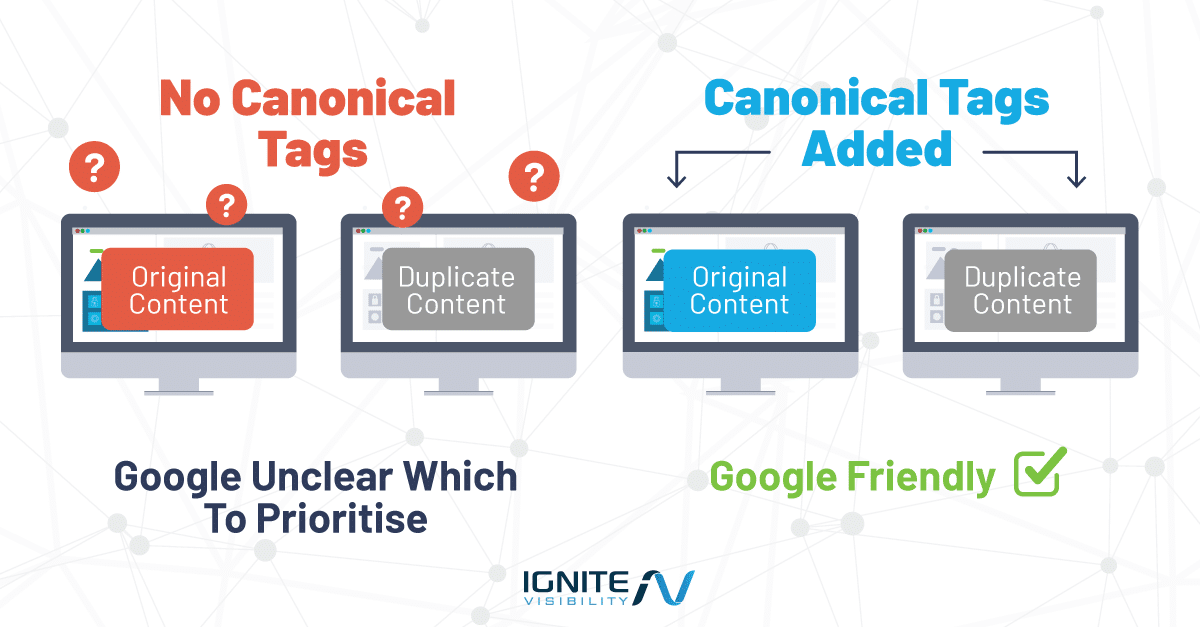
By indicating which page is the original in your SEO strategy, canonicalization has the ability to lend more authority to that page while preventing potential cannibalization or even penalties for inadvertently using duplicate content.
This strategy is critical if you have multiple pages featuring the same or similar content. In addition to preventing issues with duplicate content, canonicalization can help with link equity by channeling the authority of similar or duplicate pages to the preferred version. It can also help optimize the crawl budget to enable faster indexing and ranking.
Another benefit of canonicalization is the ability to improve the user experience, as having a definitive page show up in search engines can eliminate any confusion among potential visitors to your website, directing them to the information they seek as soon as they seek it.
So, How Does Canonicalization Work?
- Identification of Duplicate Content—Website owners identify pages with duplicate or highly similar content. Duplicate content can arise from various sources, such as printer-friendly versions, URL parameters, or slight variations in page URLs.
- Canonical Tag Implementation—For the identified duplicate pages, website owners add a “canonical” link element in the HTML header of each page. This tag specifies the preferred or canonical URL of the content.
- Search Engine Interpretation—When search engines crawl the website, they encounter these canonical tags. They use the information provided by the canonical tags to understand which page should be considered the primary or original version.
- Indexing and Ranking—Search engines then index the canonical page and attribute its content and ranking signals to it. This helps in consolidating the SEO value of the duplicate pages onto the canonical page.
- User Experience—From a user’s perspective, they still see duplicate pages, but behind the scenes, search engines understand which one to prioritize in search results.
- Eliminating Duplicate Content Issues—By implementing canonicalization, website owners help search engines avoid the confusion of indexing multiple similar pages, which could otherwise lead to lower rankings or exclusion from search results.
Preventing Duplicate Content with Canonical Tags
The rel=canonical tag may look a bit strange, but it serves a key role in the world of SEO. It’s an HTML element that functions much like a citation.
Imagine it as a way to tell search engines, “This content isn’t original; the true source is found elsewhere.” This tag is a powerful tool to prevent search engines from treating similar content as duplicates, thereby helping you evade potential SEO penalties.
So, what does this tag actually look like? Here’s a representation:
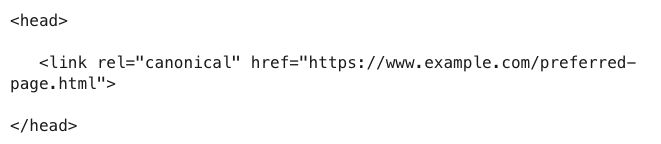
It’s a <link> element with the rel attribute set to “canonical,” and the href attribute points to the URL where the genuine content resides.
Search engines will prioritize indexing and ranking that particular URL over any others containing similar content. This approach not only enhances the accuracy of search results but also helps you steer clear of duplicate content issues and potential SEO drawbacks.
The Broader SEO Benefits of Proper Canonicalization
The right approach to canonicalization can lead to better SEO in the long term. Resolving various issues can ultimately lead to significantly higher rankings in different ways.
The following are some of the main benefits of canonicalization for SEO:
- Increased overall visibility and indexability for pages that serve as the main versions of pages
- Consolidated link equity as pages with authority retain that authority, whereas duplicate or similar pages might otherwise lead to more unevenly distributed equity
- The more people find and engage with your canonicalized pages, the higher these pages will rank due to a better user experience
It’s also possible to integrate canonicalization with other types of SEO strategies, namely on-page SEO components. In addition to canonical tags, you should optimize your domain name and slugs with relevant keywords, when possible, incorporate optimized H1 and other headers on your pages, title tags and meta descriptions that appear on Google, and natural keyword instances within your content. Also, interlinking can further assist with link equity as your pages link to each other across the website.
Like other SEO efforts, you should consistently track the SEO impact of your canonicalization strategy using tools like Google Analytics 4 and Google Search Console. For instance, you might measure keyword rankings, organic traffic, click-through rates, and conversions, all of which could indicate the visibility of your pages in Google search results.
Why Canonicalization Matters for Marketing Teams
Canonicalizing pages offers the following benefits for marketers:
- Protects Preferred Landing Pages: When you canonicalize URLs, you help maintain the rankings for the best version of your pages, prevent unwanted or broken URL variations from appearing in search results, and bring more traffic to every desired landing page to boost engagement and conversions.
- Consolidates Link Equity: Canonicalized pages also help to more evenly distribute “SEO juice” across your website, as duplicate or similar pages channel their authority to the canonical version for better rankings.
- Prevents Competing URL Variants: When you canonicalize your URLs, you keep them from cannibalizing each other in rankings by helping Google pinpoint the preferred page. As a result, you can channel all of your SEO strength into winning pages.
- Improves Reporting Clarity: Canonicalization also optimizes reports by cleaning up website traffic data, gathering all visits under a single URL, and giving clear insight into page performance.
- Supports Migrations: During a website migration, establishing a canonical version for each page helps preserve link equity and authority, indicating to Google where old pages have moved.
- Helps Ecommerce Crawl Efficiency: Canonicalizing pages helps Google save time on crawling large ecommerce stores, and it keeps robots from getting stuck while crawling hundreds or even thousands of product filters. Additionally, you make it easier for search engines to index and rank new products on launch.
Expert Opinion on Canonicalization
If you have a lot of similar or duplicate pages on your website, this can confuse search engines like Google as they struggle to identify the preferred page. In some cases, factors like product page filters can create many versions of a single page, which can hurt your SEO as each version appears in search results.
With the help of URL canonicalization, you can clarify which pages you want search engine crawlers to target. Unlike robots.txt or noindex, which are directives, canonicalization works as a recommendation, but when implemented correctly, it’s a consistent and reliable signal Google respects.
Duplicate content is a significant issue for SEO, with one study finding that over 70% of analyzed websites displayed duplicate content signals, from metadata like title tags to entire page contents.
Using reliable tools to simplify this process, you can properly implement canonicalized pages to make it easier to build and sustain rankings. Knowing more about the different types of URL canonicalization signals and the right steps for technical implementation will help you benefit fully from your strategy.
What Are Canonicalization Signals?
The canonicalization process relies on a variety of signals to help search engines like Google identify the preferred version of a web page. There are around 20 distinct signals that play a role in this determination. These signals include several factors:
- Duplicates—Identifying duplicate content across the web.
- Canonical Link Elements—The presence of canonical link elements in web page HTML.
- Sitemap URLs—Information contained in XML sitemaps, which can specify canonical URLs.
- Internal Links—How a website’s internal links are structured and which pages they prioritize.
- External Links—The influence of external links pointing to a page.
- Redirects—Use 301 redirects to permanently direct traffic from one URL to another.
- Hreflang—Signals related to language and regional targeting for international websites.
- PageRank—The distribution of PageRank, Google’s ranking algorithm, across various pages.
- HTTPS > HTTP—Favoring secure HTTPS pages over non-secure HTTP ones.
- Shorter URLs > Longer URLs—A preference for concise URL structures.
- Original Content Source—Where content was first published or initially seen.
- Site-Level Signals—Factors like a history of scraped content at the website level.
- Pages > PDFs—Prioritizing web pages over PDF documents.
These signals collectively inform Google’s decision on which version of a page to assign as the canonical one.
The decision-making process is carried out by a machine learning system, which evaluates and weighs these signals to determine the most appropriate canonical version of a web page.
This approach ensures that users will receive the most relevant and high-quality content in their search results.
Do I Have Duplicate Content On My Site?
You might be thinking, “Do I really have duplicate content on my website? Is canonicalization even relevant to me?” Well, duplicate content can sneak onto your site without you even realizing it.
Here is a table breaking down each type of duplicate content and how to address them:
| Duplicate Content Type | Example URL Variation | Common Cause | How to Fix |
| Region Variants | example.com/en-us vs. example.com/en-uk | Same language content published on URLs for different regions, e.g. US vs. UK | Use hreflang annotations to specify preferred target regions and languages to search engines |
| Device Variants | m.example.com vs. example.com | Using different HTML layouts for desktop and mobile versions | Implement responsive web design or consolidate variants with a rel=canonical link element |
| Protocol Variants | http://example.com vs. https://example.com | Both versions of a site under different protocols are available to users | Use 301 redirects to re-route all HTTP traffic to the HTTPS version |
| Site Functions | example.com/?sort=price-asc or example.com /?color=blue | CMS systems produce unique URLs based on factors like pagination, filtering, and sorting | Make your primary page the canonical version with tags or block category/filtered pages with robots.txt |
| Accidental Variants | staging.example.com vs. example.com | Developers accidentally leave demo, staging, or development environments live and indexable, or they may contain erroneous capitalization or other parameters | Fix all errors in URL variants or protect staging sites with password protection, using robots.txt or noindex directives to block them |
| Non-WWW and WWW Variants | https://example.com vs. https://www.example.com | Search engines can readily access both WWW and non-WWW versions of a site | Determine the preferred domain and use 301 redirects to route all traffic to it |
| URLs and Trailing Slashes | example.com/page vs. example.com/page/ | Servers enable slash and non-slash versions to work as separate pages | Choose a single format and use 301 redirects where appropriate to establish the preferred version |
| URLs With and Without Capital Letters | example.com/Page vs. example.com/page | Erroneously using capitalization for two versions of a page can lead to separate URLs, particularly with operating systems like Linux that are case-sensitive | Avoid using capitalization in URLs and standardize internal linking to direct to lowercase URLs |
| Default vs. Alternative Versions | example.com/index.html vs. example.com/index.php | Default pages like index pages and their alternatives could conflict with each other | Configure your server correctly to strip trailing index files and redirect to the main URL |
| URL Parameters | example.com/page/?lang=en and example.com/page/utm_source=facebook | Having multiple parameters for a single page, such as tracking and filters, creates duplicates | Use canonical tags to direct users to a clean URL or manage parameters in Google Search Console |
| Scraped or Syndicated Content | N/A | Sites may use scraped or syndicated content from other sources, which can lead to issues with duplicate content | Avoid using scraped content, request content removal from scrapers, or implement rel=canonical tags on syndicated content |
How Do I Implement Canonicalization Properly?
There are a few different ways to implement canonical URLs.
The following are some key steps based on the hierarchy of implementation:
Use rel=canonical HTTP Header
Utilizing the rel=canonical HTTP header offers an alternative approach, albeit a more technically involved one.
This method entails configuring a name/value pair within the HTTP response. While effective, it requires advanced web development knowledge and may not be the most user-friendly option for everyone.
To manually add a rel=canonical tag to your website, take the following steps:
1. Choose the page you want to canonicalize. For example, you might have the following two URLs that contain the same content:

2. Add the rel=canonical tag manually to the meta tag within the designated page’s HTML header. The resulting tag would look like: <link rel=”canonical” href=”https://example.com/wordpress/seo-plugin/” />
Implement HTTP Headers for Non-HTML Files
To avoid issues with duplicate content when using non-HTML files like PDFs, images, and other content, canonicalize them with HTTP headers.
For instance, on a page with a PDF document, you can use a rel=”canonical” tag to indicate the preferred version, e.g., the following rule added to your .htaccess file in an Apache configuration:

Maintain Sitemap Consistency
Your HTML and XML sitemaps must also contain only your preferred URLs for good canonicalization SEO.
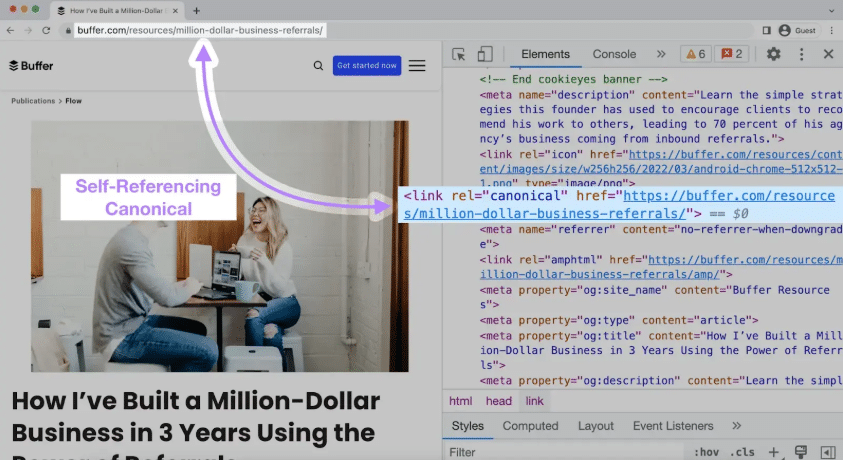
Make sure all URLs linked within the sitemap match their own self-referencing canonical tags.
Also, avoid including any links that yield a 301 or 302 redirect, and make sure they don’t go to any URLs that return a 404 (Not Found) or 500 (Server Error) status code.
URLs in the sitemap should also contain no robots.txt files or noindex tags that block them from search crawlers.
Finally, ensure the protocol (HTTPS://) and WWW or non-WWW domain versions match your preferred settings.
Add Self-Referencing Canonicals
When you canonicalize pages, the canonical version’s tag must be self-referencing to point to the main URL.
Do this regardless of whether a page has no clear duplicates. Taking this step can safeguard your canonicalization efforts in the event that redirects, sitemap inclusions, or other elements fail to help.
Properly Set Platform-Specific Configurations
Your CMS must use the right configurations for effective canonicalization.
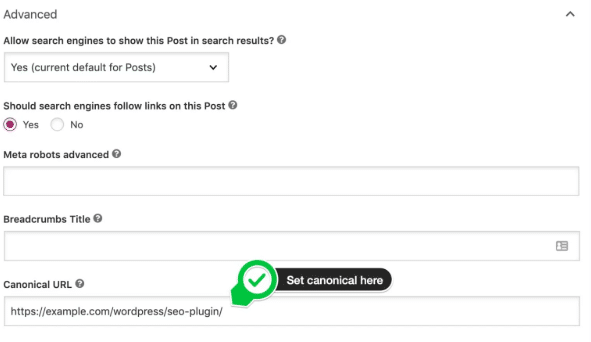
For example, you can use the Yoast plugin on WordPress sites to establish canonicalization for SEO.
This method is user-friendly and doesn’t demand extensive technical expertise.
Popular SEO plugins like Yoast often provide easy-to-use interfaces for adding rel=canonical tags, simplifying the process for website owners and content creators.
Verify Canonical URLs in Google Search Console
One way to establish a preferred canonical URL is through Google Search Console, a straightforward process that applies to your entire website.
However, it primarily addresses domain-specific issues, such as resolving the www vs. non-www URL preference. Keep in mind that this method exclusively impacts Google’s indexing and may not address other search engines.
Here are some steps you can follow to implement one or multiple canonical tags using Google Search Console:
1. Log into Google Search Console.
2. Access the URL Inspection Tool in the left dashboard menu.

3. In the top search bar, enter the URL you would like to inspect to verify its canonical status.
4. Click “Test Live URL” to see the current indexing status.
5. Review the Google-selected canonical field in the results. This displays the URL Google has determined to be the canonical version; you cannot set the canonical using this tool.
6. If you notice any canonicalization issues, Google will provide an explanation to help you resolve them.

Rely on 301 Redirects
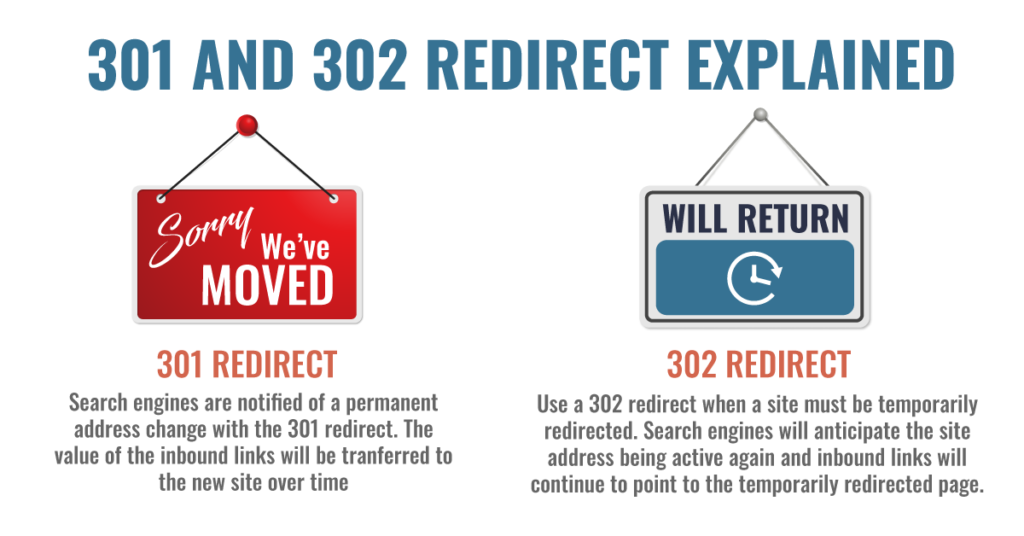
While various redirect types exist, 301 redirects are the only type that reliably influences canonicalization. They function as a permanent “forwarding” mechanism, signaling to search engines that a page has moved for good and that the new URL should be treated as the preferred version.
For example, if someone lands on https://www.mysite.com/my-content, they will be automatically redirected to https://mysite.com/my-content.
301 redirect is the industry standard for signaling a permanent move. Other redirect types, like 302 or 303, are generally temporary and do not provide the same strong signal for influencing canonicalization in search engine indexing.
Address Canonicalization Issues With International Websites
If you have a website targeting international audiences, you may use hreflang tags to translate your web pages into different languages.
Here, it’s crucial to ensure that your canonical and hreflang tags are for the same URL.
So, if you notice that you have conflicting hreflang and rel canonical tags, be sure to update the hreflang URL with the desired canonical URL to prevent potential content issues. In turn, both the original page and hreflang versions all support that canonical page.
JavaScript Considerations for Canonicalization
When working with a website that primarily uses JavaScript to render content, canonicalize the preferred pages within the raw HTML or, alternatively, you could apply it after JavaScript.
Otherwise, if canonical tags appear only in rendered Document Object Models (DOMs), search engines may struggle to crawl and index canonical pages.
Here is a checklist to help you diagnose certain canonicalization issues and resolve them:
- Check Canonical Tags on Each Page Type: Utilize Google Search Console’s URL Inspection Tool and other solutions to verify your website’s URLs and indexability, and address any issues that require correction.
- Verify Tag Placement and Syntax: The <link rel=”canonical”> tag must be properly placed on each canonical page, either directly within the HTML code or in another equivalent placement, depending on the type of page and the platform you use. Also, ensure the code is devoid of any typos or that your tags are for broken links.
- Identify Instances of Duplicate Content: Google Search Console’s “Pages” report can indicate if there are any duplicate pages you need to address. For instance, you might see pages labeled as “Duplicate, Google chose a different canonical” or “Duplicate without user-selected canonical.” You can also perform a “site:example.com” search on Google to see if multiple identical pages appear in search results.
- Review Server Configuration and URLs: You may also spot issues with server configuration when handling redirects to canonicalized pages, or you could experience issues with URL structure, such as conflicting www and non-www versions of your site, plus multiple HTTPS and HTTP versions you need to consolidate.
Common Mistakes With Canonicalization
Canonicalization is a powerful SEO tool, but it’s important to wield it correctly.
Here is an audit checklist to help you when canonicalizing your URLs:
- Setting a Canonical to 4xx/5xx Errors: Make sure your canonical tags point to a live and relevant page, not ones returning an error.
- Setting a Canonical to Redirected URLs: Another critical error occurs when a canonical tag points to a URL that has a 301 or 302 redirect, which can create mixed signals for search engines. Check that each canonical tag points to the destination page.
- Using Multiple Canonical Tags on One Page: CMSs or overlapping plugins implement two or more rel=”canonical” tags for one page, potentially leading search engines to either randomly choose one or ignore them all. Check for multiple canonicals and ensure each page has only one with proper configuration.
- Including Canonical Tags in the Body: Canonical tags must be in the <head> code for search engines to read them, not the <body> of the page.
- Creating a noindex and Canonical Conflict: Using both a noindex and canonical tag on a page can relay contradictory instructions, telling search engines not to index a page while also instructing them to channel their ranking value to the canonical page. Either drop the noindex tag if you want to rely on a canonical, or vice versa.
- Using Canonical Chains: Sometimes Page A may contain a canonical tag that goes to Page B, which canonicalizes Page C (and so on), which could lead search engines to stop crawling along the chain or loop. Avoid this issue by channeling all canonicals to the ultimate destination page.

FAQs About Canonicalization
1. When should I use a canonical tag instead of a 301 redirect?
Use a canonical tag when you want to specify the preferred version of a page with similar content, but you don’t need to change the URL that users see. Use a 301 redirect when you’re permanently moving a page to a new URL, and you want both users and search engines to be directed to the new URL.
2. Can I have multiple canonical tags on a single page?
No, it’s not recommended to have multiple canonical tags on a single page. Having multiple conflicting canonical tags can confuse search engines and may not yield the desired results. Stick to a single, clear canonical tag to specify the preferred URL.
3. What are common mistakes to avoid when using canonical tags?
Common mistakes include blocking canonicalized URLs via robots.txt, setting canonicalized URLs to “noindex,” and not keeping canonicalization signals consistent across various elements.
4. Are canonical tags necessary for every type of website?
Canonical tags are particularly useful for websites with duplicate or similar content issues. However, not every website will face these issues. It’s essential to assess your site’s content structure and use canonical tags as needed to improve SEO.
5. Is canonicalization relevant for mobile websites?
Yes, canonicalization is relevant for mobile websites. If you have mobile and desktop versions of your site with similar content, canonical tags can help search engines understand the relationship between these versions and rank them appropriately.
6. Does Google penalize for incorrect canonicalization?
Google doesn’t penalize for incorrect canonicalization, but it may lead to SEO issues. Incorrect implementation can result in the wrong page being indexed or ranking lower. It’s essential to use canonical tags correctly to avoid such issues.
7. How do I monitor the effectiveness of my canonical tags?
To monitor the effectiveness of canonical tags, regularly check your website’s index status in Google Search Console. Ensure that the canonical URLs are being indexed as intended. You can also use SEO tools to analyze your website’s canonicalization and identify any potential issues that need correction.
8. Why does Google sometimes ignore the canonical URL?
Google may ignore your canonical tag if it doesn’t trust it, often due to significant content differences between canonical and alternate URLs, inconsistent internal linking, or technical issues like unnecessary 301 redirects. If you link to the non-canonical version, Google may choose a different URL to index. To avoid this, ensure your canonicals are clean, content is consistent, and internal links point to the correct URLs.
Start Improving Your SEO Now
Understanding canonicalization is crucial for optimizing your website’s search performance. Failing to grasp this concept may restrict your site’s visibility in search results, but Ignite Visibility has you covered.
The digital marketing company is known for its outstanding SEO services. From technical SEO to content creation, 0ur digital marketing experts can help you rank high in search engine results.
Here are some of the specific ways we can help:
- Identifying canonicalization issues such as multiple canonical tags or redirects to outdated domains
- Resolving issues with proper implementations
- Continuous tracking of efforts to gauge impact
- Continuous optimization of other SEO elements to maximize rankings, traffic, and conversions
- Integration into other digital marketing solutions
Ready to get started?
Find out how we can help with canonicalization with our SEO services today!

