

Whether you’re a marketing manager or a franchise marketer, you need to do what you can to maximize your WordPress website’s visibility. Good WordPress SEO can be the key to getting found and connecting with your target audience.
However, there are many factors to consider for SEO optimization on WordPress that can impact time-to-implement. In this blog, Anthony DiSalvo, Sr. SEO Project Manager, will help you develop the perfect roadmap to effectively improve SEO for WordPress, helping you stay on top of your competitors.
What We’ll Cover:
- Setting Up Your WordPress SEO and Indexability
- Site Architecture and URL Strategy
- Page Builders
- Technical Performance and Core Web Vitals
- Structured Data and Advanced Schema
- Monitoring, Measuring, and Pruning
- FAQs
My Expert Opinion on WordPress SEO
Improving SEO on WordPress is a multi-faceted and continuous process; it’s no longer about simply adding keywords into content and producing a high volume of content. Instead, you need to appeal to Google’s guidelines for content quality and Experience, Expertise, Authority, and Trustworthiness (E-E-A-T), creating well-optimized content that’s helpful to users.
Many factors will contribute to good SEO optimization on WordPress, from on-page elements like organically incorporated short-tail and long-tail keywords, backlinks leading back to your site on other reputable platforms, and technical SEO components like structured data and Core Web Vitals compliance.
Knowing how to improve SEO on WordPress the right way can help you maximize your brand’s visibility online while ensuring you consistently connect with your target audience.
The following are the main components to help improve WordPress SEO and how to approach each in your strategy.
Setting Up Your WordPress SEO and Indexability
To kick things off for your WordPress SEO, you need to make sure Google’s bots can crawl and index your website with initial setup.
Here are some key steps to take during the setup process for your WordPress site:
1. Encourage Search Engines in Settings
When initially developing your site, you can take steps to make sure you are not preventing search engines from indexing your site:
- Navigate to Settings → Reading
- Locate the Search Engine Visibility option.
- Make sure this is NOT checked “Discourage search engines from indexing this site” box.
- Click on Save Changes.
2. Establish Permalinks
You must also create permalinks that give your web pages stable and unchanging URLs, which will make your site more accessible to both users and search engines.
To create permalinks, take the following approach:
- Navigate to Settings → Permalinks.
- In Common Settings, choose Post name (appearing as /%postname%/).
- Don’t use date-based or “Plain” structures that are less user-friendly and potentially less modern.
- Click on Save Changes.
3. Manage Robots.txt
WordPress automatically creates a robots.txt file that allows search engines to crawl and index your site.
If you decide to make your site invisible to search engines during development, this file will contain a Disallow that you can deactivate later.
Generally, most robots.txt files look like this:
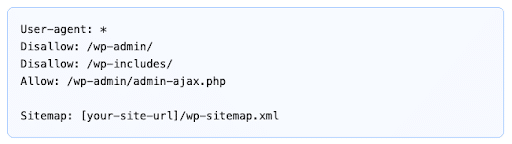
To view your robots.txt file, simply add “/robots.txt” to your site’s URL, e.g., “www.example.com/robots.txt.”
In most cases, especially with extensions like Yoast and AIOSEO, you won’t need to manually manage this file.
4. Conduct an XML Sitemap Check
Like robots.txt files, WordPress automatically generates an XML sitemap to help indicate your website’s architecture and page hierarchy.
You can view your sitemap by adding “wp-sitemap.xml” to your URL in your browser (www.example.com/wp-sitemap.xml).
Within this file, you should see a list of your sitemap index.
SEO Plugins Setup and Key Configs
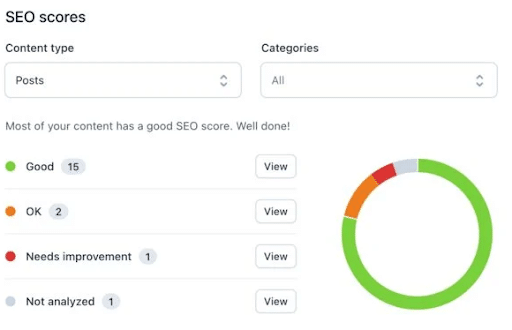
To make WordPress SEO easier than ever, the platform works with multiple SEO plugins that you can use to effectively add SEO to WordPress sites.
The main extensions you can use today include Yoast, All-in-One SEO (AIOSEO), and Rank Math.
Here is a comparison of each and their various features:
| Feature | Yoast SEO | AIOSEO | Rank Math |
| Canonical tags | Auto-generated using the current page URL, with no manual entry needed | Automatically adds “rel=”canonical”” tag to all content | Self-referencing with the post URL, with easy manual override using the meta box |
| Breadcrumbs | Disabled by default, with the ability to enable them in advanced settings and a code snippet | Disabled by default, but you can enable them in general settings with provided shortcodes | Disabled by default, but you can enable them within basic settings, adding schema markup automatically in the process |
| Sitemaps | Auto-enabled with a standard sitemap file | Auto-enabled with News, RSS, and Video sitemap options | Auto-enabled, allowing for advanced customization; recommended 200 links for each sitemap |
| RSS Settings | Auto-added in the form of default footer crediting original source | Customizable for adding custom tags and HTML before or after RSS content | Customizable with standard “Content after each post” to refer to original source |
Additionally, you’ll want to change these elements based on the following circumstances:
- Canonical: When duplicate content appears across multiple URLs and you want to tell search engines where to send traffic.
- Breadcrumbs: When you need to improve user navigation, improve crawlability and optimize for rich snippets on Google.
- Sitemaps: When pages have duplicate or thin content that you don’t want search engines to crawl or index
- RSS Settings: When other websites appear to be “scraping” your site’s content for their own content strategy
For more help choosing the right plugin to add SEO to WordPress, check out our guide to the best WordPress SEO plugins.
Site Architecture and URL Strategy
Another element to consider to improve WordPress SEO is your overall site architecture and URL pattern.
Here are some specific aspects to think about here:
Categories vs. Tags
Both categories and tags are helpful for SEO optimization on WordPress, but they work slightly differently.
Categories are groups under which your blog posts fit, with their own subcategories to help create a hierarchy. Typically, it’s best to relegate each blog post on your site to one or two categories at most.
Meanwhile, tags detail even more about what each blog post covers. You may add around three to 10 tags to specify content and help boost SEO for WordPress blogs.
For example, a recipe for a chocolate mousse might fall under the category of “Recipes” and “Desserts,” with tags like “chocolate,” “mousse,” and “quick-prep” adding more granular detail.
URL Patterns
If you want to learn how to improve SEO on WordPress, you need to effectively structure your URLs.
Today, it’s best to implement short and descriptive URLs with relevant keywords to boost your WordPress SEO. They might include the category if they are blog posts, with hyphens separating words instead of spaces or underscores. You should try to match your URLs with the Title Tags and Headers to improve optimization.
For example, the above recipe blog post’s URL might look like “www.example.com/recipes/quick-prep-chocolate-mousse/”.
Try to avoid including dates when possible to make your content evergreen, and always stick with lowercase letters.
Page Builders
1. Elementor
Why it’s helpful:
Very popular and beginner-friendly drag-and-drop interface with a large ecosystem of widgets, templates, and integrations. There’s a free version and a Pro tier with advanced tools.
SEO advantages:
- Visual page editing speeds content production and reduces errors.
- Built-in Theme Builder lets you create SEO-optimized global headers/footers, blog templates, and archive layouts without code.
- Responsive controls (mobile/tablet/desktop) help with Core Web Vitals and user experience.
- Works with popular SEO plugins (Yoast, Rank Math), so title/meta management stays streamlined.
Why it’s easy for SEO updates:
You can edit page layout, headings, alt text, and CTAs directly on the page — no backend coding needed.
2. Bricks Builder
Why it’s helpful:
A newer builder that emphasizes performance and clean code output. It’s built for speed and flexibility, often showing very high PageSpeed scores out of the box.
SEO advantages:
- Very lightweight HTML/DOM structure makes it easier for search engines to crawl content.
- Good mobile performance and customizable breakpoints aid Core Web Vitals (speed + stability).
- Supports dynamic data and custom fields (ACF), helping SEO teams surface optimized content across templates.
Why it’s easy for SEO updates:
Once you set up global templates, you can update content or structure across many pages quickly. The clean code also reduces technical SEO overhead.
3. Beaver Builder
Why it’s helpful: Known for stability and clean code with a straightforward front-end editor. It’s less flashy than some alternatives but dependable for professional sites.
SEO advantages:
- Generates leaner HTML output compared to older builders with lots of nested elements, helping load times.
- Works well with WordPress SEO plugins and theme builders to create consistent on-page structure.
- Ideal for content-heavy or large sites where consistency matters.
- Why it’s easy for SEO updates: Editor is intuitive with minimal learning curve, letting non-technical users update page text, schema-ready sections, and headings without errors.
Breadcrumbs Setup
With the help of breadcrumbs, WordPress sites can increase their chances of showing up in “rich snippets” within search results.
To get the best results from breadcrumbs, follow these key tips:
- Position breadcrumbs near the top of the page, above the H1 header but below the navigation.
- Make sure the path reflects your taxonomy, following the logic of “Home > Category > Subcategory > Post Title.”
The BreadcrumbList schema markup should also be active within your SEO plugin.
Taxonomy Hygiene
Your taxonomy should also be clean and clear.
To avoid potential issues with taxonomy, avoid using the same word for a category and tag, set tags to noindex if a tag has a minimal number of posts to optimize crawl budget, and regularly audit to identify obsolete tags or redundant, mergeable categories.
Technical Performance and Core Web Vitals
On the technical side of WordPress SEO, you need to appeal to Google’s Core Web Vitals, which apply to your site’s user experience and other aspects of technical performance.
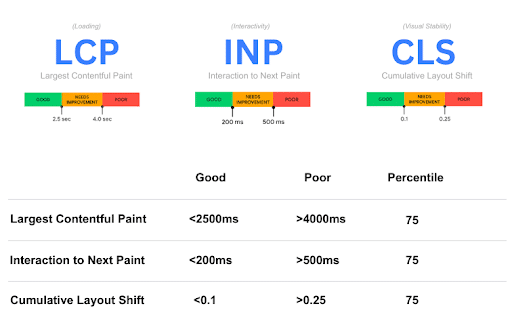
Specifically, Core Web Vitals helps determine whether a site is “healthy” based on the following three factors:
- Largest Contentful Paint (LCP): Determines loading performance of objects on each page, with an ideal LCP falling at around 2.5 seconds.
- Interaction To Next Paint (INP): Measures responsiveness to clicks, taps, and other user interactions, specifically determining if there’s a delay between user input and visual feedback. Generally, your INP should come in at under 200 milliseconds.
- Cumulative Layout Shift (CLS): Gauges visual stability based on layout shifts that occur on a page as the user explores it. This metric should be no more than 0.1.
Here are some critical fixes to help improve each of these metrics:
- Hosting: Try to avoid shared hosting when possible, instead opting for dedicated, managed, or cloud-based hosting to improve Time to First Byte (TTFB), which you can often get with reliable SEO services for WordPress.
- Image Optimization: Compress image files and use more efficient file formats like AVIF and WebP, and use responsive images when doable to optimize image sizes based on screen resolution.
- Caching: Use “Cache-Control” headers for images that can keep them cached in users’ browsers for a long period of time to make repeat visits more efficient.
- Preconnect: Implement “preconnect” for third-party origins like content delivery networks (CDNs) for early handshakes to optimize efficiency.
- Defer JS: The “defer” attribute can prevent non-essential scripts from blocking browsers from rendering pages.
- Critical CSS: Determine what kind of CSS you will need for above-the-fold content and inline it within the <head> tag to accelerate initial paint, which will optimize for LCP.
- Font Loading: Preload critical fonts for faster fetching when loading the page.
On-Page Optimization
In learning how to improve SEO with WordPress, you must also consider on-page SEO elements.
These aspects include keyword-optimized titles, metadata, headings, and calls-to-action (CTAs) that supplement more technical and off-site elements.
Let’s look closer at each:
Title Tags
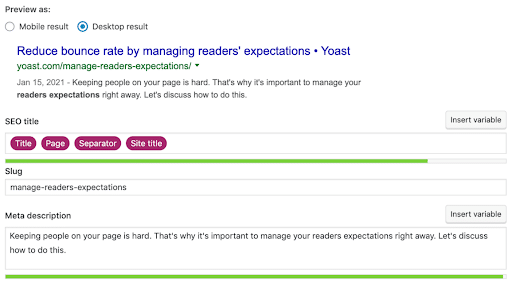
These items appear in search results as the titles of the pages they represent, allowing people to click on them in the form of links.
Be sure to optimize your title with relevant keywords and accurate topic representation. However, you should keep your title at around 55 to 60 characters to keep Google from cutting it off.
In many cases, you might separate multiple terms in a title tag with a pipe symbol (|) between them.
Some examples include:
- [Main Keyword] | [Secondary Keyword]
- [Blog Post Title] | [Company Name]
- [Service Page Title] | [City/State-Optimized Keyword]
Meta Descriptions
You must also optimize meta descriptions to supplement those title tags. These descriptions appear just beneath the title tag to describe the page’s content more in depth.
Meta descriptions typically contain a brief summary of the page topic and a call to action at the end. They also normally sit at around 150 to 160 characters to ensure all text fits into search results.
For example, a meta description for a financial calculator page might read: “Determine your budget with this finance calculator from [brand name]. Contact us today to speak with an expert about our financial advisory services.”
Sometimes that call to action might apply to the specific page, e.g. “Learn more here in this complete guide.”
You can easily use Yoast to create well-optimized title tags and descriptions.
Headers
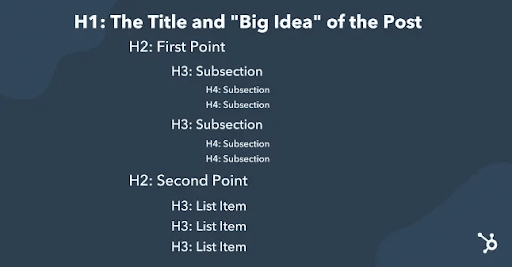
The headers on your page will depend on the hierarchy you have in place. H1 tags are the highest, serving as page titles at the top of the page, with all other headers falling under H2, H3, or lower.
All subsections within your pages will be H2 at the highest level. Subtopics within those subsections will use the H3 format, and subsections for those will use H4, and so on.
Ideally, headers will contain relevant keywords to help improve WordPress SEO, including the ability to rank for rich snippets, AI Overviews, and AI Mode with shorter and snippier subsections.
CTAs
Web pages, blog posts, and meta descriptions should all implement compelling CTAs to encourage viewers to take action.
There are plenty of types of CTAs out there that you can use for your content, including:
- “Contact Us”
- Lead generation
- Sales
- Engagement
- Feedback
- Social sharing
Footer Optimization
Footer optimization plays an important role in SEO because it helps search engines and users better understand a site’s structure, credibility, and accessibility. A well-optimized footer should include essential trust and navigation elements such as:
- Privacy policy
- HTML sitemap
- Top page links
- NAP (Name, Address, Phone Number)
- Social media links
- FAQ page
- Terms & Conditions
- Contact Us
Including these elements in the footer improves internal linking, reinforces trust and compliance signals, and supports both local and organic SEO. It also enhances user experience by making important information easy to find, which can positively impact engagement and overall site performance.
Structured Data and Advanced Schema
Don’t neglect to use structured data and schema markup to give search engines more context about your content.
Incorporating structured data and schema entails adding compatible code to your web pages based on the type of content they contain.
Here are some examples of JSON-LD code you can use to add schema structured data for SEO on WordPress:
Breadcrumbs
Want to know how to improve SEO with WordPress breadcrumbs? Implement the following JSON-LD code:
<script type=”application/ld+json”>
{
“@context”: “https://schema.org”,
“@type”: “BreadcrumbList”,
“itemListElement”: [
{
“@type”: “ListItem”,
“position”: 1,
“name”: “Home”,
“item”: “https://example.com/”
},
{
“@type”: “ListItem”,
“position”: 2,
“name”: “Products”,
“item”: “https://example.com/products”
},
{
“@type”: “ListItem”,
“position”: 3,
“name”: “Electronics”,
“item”: “https://example.com/products/electronics”
}
]
}
</script>
FAQ Pages
If you have an FAQ page you would like to register as such to Google, incorporate this code:
<script type=”application/ld+json”>
{
“@context”: “https://schema.org”,
“@type”: “FAQPage”,
“mainEntity”: [
{
“@type”: “Question”,
“name”: “What is JSON-LD?”,
“acceptedAnswer”: {
“@type”: “Answer”,
“text”: “JSON-LD (JavaScript Object Notation for Linked Data) is a lightweight format for structuring data for search engines.”
}
},
{
“@type”: “Question”,
“name”: “Why use FAQ schema?”,
“acceptedAnswer”: {
“@type”: “Answer”,
“text”: “It helps your questions and answers appear directly in Google search results as rich snippets, improving visibility.”
}
}
]
}
</script>
How-To Articles
If you have a how-to article with specific steps, you can use the following structure:
<script type=”application/ld+json”>
{
“@context”: “https://schema.org”,
“@type”: “HowTo”,
“name”: “Bake a Chocolate Cake”,
“description”: “A simple recipe for baking a delicious chocolate cake.”,
“step”: [
{
“@type”: “HowToStep”,
“text”: “Preheat oven to 350°F (175°C) and grease two 9-inch round pans.”
},
{
“@type”: “HowToStep”,
“text”: “In a large bowl, mix flour, sugar, cocoa, baking soda, and salt.”
},
{
“@type”: “HowToStep”,
“text”: “Add eggs, milk, oil, and vanilla; beat for 2 minutes.”
}
]
}
</script>
Articles
General article structures can use code like:
<script type=”application/ld+json”>
{
“@context”: “https://schema.org”,
“@type”: “NewsArticle”,
“headline”: “Title of a News Article”,
“image”: [
“https://example.com/photos/1×1/photo.jpg”,
“https://example.com/photos/4×3/photo.jpg”,
“https://example.com/photos/16×9/photo.jpg”
],
“datePublished”: “2015-02-05T08:00:00+08:00”,
“dateModified”: “2015-02-05T09:20:00+08:00”,
“author”: [{
“@type”: “Person”,
“name”: “Jane Doe”,
“url”: “https://example.com/profile/janedoe123”
},{
“@type”: “Person”,
“name”: “John Doe”,
“url”: “https://example.com/profile/johndoe123”
}]
}
</script>
To use structured data for WordPress SEO, you can either use plugins like Rank Math or Schema Pro, or you may manually add it within functions.php.
Plugins can automatically generate the required JSON-LD code, but you may want to implement custom code if needed for even more control.
Plugins are generally more efficient and can help mitigate the risk of error with structured data inputs.
Internal Linking and Content Hub Mechanics
No WordPress site is complete without a strong internal linking strategy, coupled with a solid content strategy using topic clusters.
Here are some rules for linking to other pages within your site:
- Use descriptive and keyword-rich anchor text to support the linked page
- Make sure internal links appear naturally within the content
- Only include around three to five relevant links per 1,000 words, avoiding link spamming
- Give every page a minimum of one incoming internal link to prevent orphaned pages
- Regularly audit to eliminate broken links and redirect chains
In many cases, it’s effective to develop a content structure that incorporates a pillar page that branches out into other pages covering subtopics within that pillar.
For example, a blog post for a financial business might extensively cover basic personal finance considerations in a lengthy pillar post. From there, multiple blog posts might branch from that hub as “spokes” that explore subtopics in greater depth, such as “how to start budgeting” and “best saving strategies.”
That pillar would then link to those spoke pages, and vice versa, helping distribute link equity.
Monitoring, Measuring, and Pruning
Based on your specific goals, you should regularly monitor your website’s performance to further determine how to increase SEO on WordPress.
Some example metrics to track with Google Search Console and Analytics include:
- Impressions: These refer to the number of times links to your site appear in search results.
- Click-Through Rate (CTR): The rate at which people click through search results to your pages or links on your pages to others, such as CTA links.
- Coverage Issues: Problems with robots.txt or other aspects that mitigate the ability for search engines to crawl and index pages.
- Core Web Vitals: The elements discussed above that apply to Google’s measurement of page quality based on responsiveness and the overall user experience.
Pages seeing declines in any of these areas greater than 20% are likely in need of serious intervention to help them recover.
Based on the results you uncover, you can determine steps for continually improving SEO on WordPress.
FAQs
1. What is the easiest way to improve WordPress SEO?
If you want to know how to improve SEO on WordPress, one of the easiest ways to do so is to implement one or more SEO plugins—such as Yoast, AIOSEO, and Rank Math—that can simplify optimization with various settings and inputs.
2. How do Core Web Vitals affect WordPress SEO?
Google’s Core Web Vitals are critical for improving SEO on WordPress, as they influence rankings based on multiple key factors, including user experience, responsiveness, visual stability, and loading times. Optimizing for these elements can subsequently boost performance in search results.
3. Which WordPress SEO plugin is best?
You can add SEO to WordPress development with multiple SEO plugins, with the best being Yoast, Rank Math, and AIOSEO. These plugins offer various features to fully charge your SEO on WordPress, including everything from content analysis and structured data to sitemap generation and metadata optimization.
4. How do I add structured data to WordPress?
It’s possible to add structured data to WordPress using either plugins or manual input of JSON-LD code. For instance, you can use Yoast or AIOSEO to easily add schema markup, or you may use tools like Google’s Structured Data Markup Helper to copy code based on content type.
5. How should marketers measure WordPress SEO success?
Marketers can track the progress of their strategies and determrine how to increase SEO on WordPress with the help of Google Analytics, Google Search Console, and other tools to measure key metrics based on their goals. Metrics could include keyword rankings, organic traffic, user engagement, click-through rate, and more.
Optimize SEO for WordPress With Ignite Visibility
With the help of the most reliable SEO services for WordPress sites, you can get the best results from your platform as you dominate the competition in your industry.
There are many elements to cover that Ignite Visibility can help with, such as:
- Initial setup of everything from robots.txt to your XML sitemap
- SEO plugin integration using Yoast, Rank Math, or other options
- Keyword research to inform content and page optimization
- Structured data implementation
- Title tag and meta description optimization
- Technical performance and Core Web Vital compliance
- And more!
Get started today with a free proposal and find out what our experts can do for you.

