

By now, you already know about the importance of running SEO tests. They help you determine effective strategies, eliminate wasteful spending, and uncover new opportunities.
But there are countless different types of SEO tests that you can run. Which ones are right for your business?
In this article, I’ll answer that question by covering 24 SEO tests you should be running.

-
SEO Tests: Change Your Title Tags
Sometimes the simplest changes can be the most effective.
Change the title tag on one of your blog posts. You could do that by creating a whole new title or using a similar title with a variant of the keyword.
After some time, check Google Search Console to see if your click-through rate (CTR) has improved. If so, then try the same strategy on other blog posts and see if a trend develops.
Also, check your overall traffic stats for the post. An improved CTR doesn’t necessarily mean an increase in traffic (especially if the post dropped in rank).
If you notice an increase in the CTR and an increase in traffic, then you’ve got a winning strategy.
-
Change Your Title Tag for Entire Segments
If you’ve got a lot of content on your site, then it’s likely you have whole segments with a similar theme. Why not change the title tag on a segment of pages and see what happens?
Again, you could change the titles with keyword variants or rework them completely.
Alternatively, you could update the titles in a way that’s consistent across the board. For example, you might change all the titles so that they include more power words.
Once again, wait for your changes to get indexed and check Google Search Console. If your rankings go up, then consider making similar changes on other segments.
Let me show you an example.
See this headline from Travelocity?
Here is the template
<County> <Category> from <Price> – Cheap <City> – Travelocity

So that template is used on hundreds of page titles.
Why not test this instead.
Hotels In San Diego from $56! – Best Options You’ll Love
Hotels In San Diego from $56! – 500+ Quality Options
Best Hotels In San Diego! 500+ Options. Read Reviews
You get the idea. There is a good chance you can out perform the current template.
-
SEO Tests: Increase the Number of Reviews
Social proof is one of the best ways to seal the deal once you get people to your website. But can more positive reviews also help with SEO?
You can answer that question by adding some reviews to your pages. There are two ways to do that.
One of those ways is with review markup.
The other way you can add reviews is to snatch them from other sites like Yelp. Just make sure you don’t mark up those reviews. Instead, include them just as you would any other kind of content.
Thankfully, Google says it’s okay to include third-party reviews on your site.
Here is the best way to do it.
- Have unique reviews
- Make sure they have the keyword you are trying to rank for in some of them.
- Expand the reviews until you have 2,000 words of text on the page.
- If you have longer content, you will probably rank better.
- The more fresh the reviews, the better chance you have to rank.
- Make sure to use Schema.
-
Expand the Length of Your Content
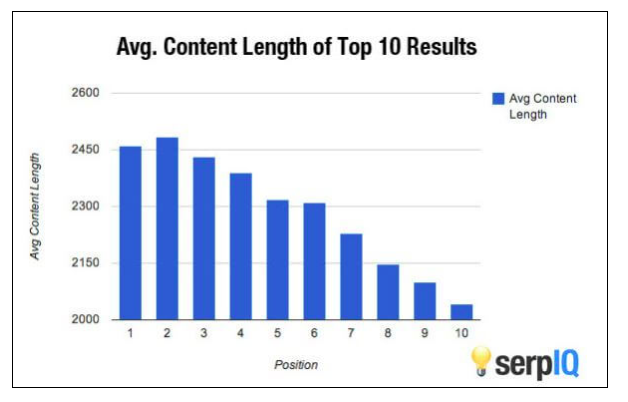
Longform content can boost your rank. That’s why you should expand the length of blog posts with low word counts.
Take a look at some of your older articles. You’ll likely find that you’re more knowledgeable about some of those subjects now.
If so, share that additional knowledge with expanded content in those articles.
Also, read some of your own blog posts. As you’re reading, you might find points that you wish you’d developed a little further.
Develop those points with additional content. See if it makes any difference in your rank.
-
Expand the Number of Items in a Category
When it comes to SEO, you’re not just trying to rank single pages of content, you’re also trying to rank categories. That’s why you should experiment with ways to improve the rank of category pages.
Remember, categories are used to sort and group content into different, related sections.
For example, as a digital marketing company, we have categories dedicated to AMP, analytics, apps, Bing, etc.
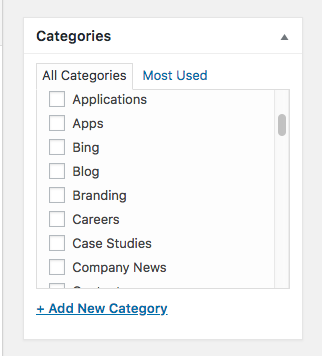
One of the ways to improve the rank of your category pages is by increasing the number of items in a category. Look for some pages or articles that could be added to an existing category and add them to it.
Keep in mind: you don’t have to remove those pages from existing categories. Content management systems like WordPress allow you to add multiple categories per page.
With categories, Google crawls them just like any web page. So you want fresh, longform content with keywords. Think about that when adding your category excerpts.
-
SEO Tests: Try New Technologies AMP and CDN
It’s not always a great idea to dress up your website with the latest bells and whistles, but sometimes it is.
If you haven’t yet adopted Accelerated Mobile Pages (AMP), do so now.
AMP, in case you’re unfamiliar with it, is a way to serve up your web pages quickly on mobile platforms. That’s important because page speed is a mobile ranking factor.
If you decide to pull the trigger on AMP, you’ll need to delegate that task to a qualified development team. It’s no easy feat.
Another tech change you could roll out is to serve up images with a content distribution network (CDN).
CDNs generally speed up the delivery of content, which will likely give you a faster load time and might even improve your rank.
But you won’t know if you don’t test.
-
Move a Segment to the Main Domain
Maybe you have an older website that still uses subdomains. For example, your blog might be located at blog.mydomain.com.
If that’s the case, consider moving the blog (or any other segment on a subdomain) to your main domain.
That’s a significant effort. Get a qualified project manager to oversee the whole transition or you could create more problems than you solve.
Once you’ve moved the segment, check out your traffic and rank metrics. If you see an improvement, move other segments to your main domain.
-
Add Optimized Images
There are actually two steps in this test.
First, add more images to your content. Do that by finding relevant royalty-free images with a Google or Bing search.
Alternatively, if you have an account with a stock photo service, grab some relevant images that way.
Once you’ve added the images, optimize them.
Set the alt tag. Enter a description. Give the image a file name relevant to the keyword associated with the content.
You also want to make sure you’re using the right file type (think JPEG, PNG, or GIF) and that the file is compressed properly.
Overly large images are one of the biggest causes of slow page load times (and frustrated users), so do a check to make sure yours aren’t causing any problems.
As an added bonus, you might find that keyword-optimized images give you more traffic from Google or Bing image searches.
-
SEO Tests: Add More Schema Markup to a Segment of Pages
Pick a segment that’s attracting traffic to your site. Go over some of the content in that segment and look for opportunities to add more schema.org markup.
For example, you might notice that on some of your pages you never used the about markup. Since that markup identifies the subject of the content, it’s a good idea to add it.
Go through other schema.org markup types and look for more properties you can add.
For more on how to properly markup your site with schema.org, check out my guide here.
-
Add a Rel Canonical
Maybe you have several similar web pages on your site. If that’s the case, consider linking them with a rel canonical.
If you’re unfamiliar with rel canonical, it’s a way to encode your page so that you avoid any duplicate content issues. But you can also use it if you have content that’s similar.
Fortunately, it’s fairly easy to add a rel canonical. If you’ve never done it before, you should probably use the rel=”canonical” link method.
Google has instructions on how to do that.
-
Change the Meta Description for a Page
The Googlebot crawls your meta description to gain insight into the contents of your web page. It’s difficult to overstate the importance of optimizing that tag.
You might find that you can improve your CTR or your rank (or both) with just a few tweaks to the meta description tag.
Check your content to make sure that your meta description tags are using the right keywords. If not, change them and check the results.
Remember, the meta description tag sometimes appears as the snippet in search results. That means it becomes the description that people read when they’re thinking about whether or not they should click on your link.
If you create a great, keyword-rich description with some great text, you could see a significant bump in your CTR.
-
SEO Tests: Show the Number of Results for a Category
It’s good design to show people how many pages or products there are in a category on your website. If you’re not doing so already, show the number of results in the title or description.
Why would that make a difference? Because Google is obsessed with user experience.
If the Googlebot sees that you’re showing “223 Results” for a category, you might get rewarded with a lift in rank.
Again, though, you won’t know unless you perform an SEO test.
-
Add a Link in the Footer
Identify an important page on your website. If there’s not already a link to it in the footer, add one.
Typically, you’ll see links to specific products or services or About Us links in the footer.
These generally highlight pages that promote your business or already rank well in the SERPs.
By linking to it from every other page on your site, it’s possible that Google will give it weight with a better rank.
Pro tip: don’t just include these links in the footer. A link that’s included in the primary navigation or in the content of the page will give it more weight.
-
Add Content Links to an Important Page
Again, identify an important page on your site. Sprinkle links to that page throughout your existing content.
Keep in mind: the links to your page should look natural. Google will notice if you’re trying to force-fit a link into a place where it doesn’t belong. That will likely hurt, rather than help, your rank.
If you have a blog that’s updated regularly with fresh content, you should have no trouble finding a few great places where a link to that important page would fit in perfectly.
-
SEO Tests: Add Keyword Density
Keyword density is a tricky discipline.
If you add too many keywords to your content, you risk getting penalized for keyword stuffing. If you add too few, you could have trouble getting a good rank.
Fortunately, you can test your keyword density.
There are free tools you can use (Small SEO Tools, SEO Book, etc.) to help find some content that’s using keywords but maybe not using them enough.
Add more keywords to that article and check your rank after some time.
If you find your results improve, try adjusting the keyword density on other pages as well.
-
Add Schema for Rich Results
You can probably improve your CTR by making sure that your content stands out in the search results. One way to do that is with markup that creates rich snippets.
If you’re unfamiliar with rich snippets, they provide additional details about a web page in the search results. For example, you might sometimes see the aggregate rating for a product when you’re doing a search. That rating comes from markup on the web page.
In fact, adding rating markup is one of the easiest ways to make your site stand out in the search engine results pages (SERPs). Just make sure that your ratings are generally positive or your CTR will drop.
If you’re running an ecommerce site, you can also mark up your product images so that they show up in the search results.
Experiment with different ways to mark up your content for rich results. Then, check your rank.
-
Split Test With Google Optimize
Google Optimize is a tool that will run split-tests on your site. If you haven’t used it yet, then get signed up today.
Fortunately, you can start using it for free.
Once you’re signed up, launch some A/B tests. Update a page by using a different call to action, changing colors, or moving some elements around.
Half of your visitors will see the change that you made. The other half will see the “old” version of the page.
The version that gets you the most conversions wins.
-
SEO Tests: Add an FAQ to a Page
Find a page that’s drawing traffic to your site. Think about questions that people might have after reading the content.
Then, create an FAQ and add it at the end of the article.
This is especially effective because Google often pulls directly from FAQs when deciding which webpage will be displayed in the coveted features snippet (otherwise known as position 0) spot.
There’s a catch here, though: make sure that your FAQ uses keywords relevant to the page, and included questions that your audience is actively searching for.
Otherwise, you’re not likely to see much of a boost in rank.
I recommend taking a look at Google Related Searches and Answer the Public for ideas on what to include in your FAQ.
-
Block Bad Links in a Disavow File
It’s possible that you have some spammy backlinks pointing to your site. If that’s the case, disavow them.
Keep in mind: you should only disavow links if you absolutely, positively know what you’re doing.
Otherwise, your site’s appearance in the search results could suffer.
If you do decide to pull the trigger on this test, be sure to follow Google’s instructions on how to disavow backlinks.
-
Add New Search Terms
You might get a bump in traffic by just adding new search terms to your content. That’s especially the case if you’re running a local business.
For example, you might have optimized your site for keywords related to your niche. But have you optimized for “near me” searches?
If not, then now is the time to do so.
Look for other keywords that you could work into your content as well, such as landmarks, street names, and the names of public parks in your area.
Of course, this applies to businesses across the board, not just local.
A quick look with a tool like SEMRush can help you identify any related terms you can incorporate into your existing content.
-
SEO Tests: Remove Blocks of Links
Some SEO pros think that including blocks of links on a page is a “quick win.” It provides additional internal linking and enables visitors to quickly navigate to other important pages on the site.
But sometimes those link blocks do more harm than good.
For example, they might distract people from the content on the page. Some visitors might click one of the links and not finish reading the article.
That kind of behavior reduces your dwell time.
Remove those blocks of links and see if your traffic improves.
-
Add or Remove Social Share Buttons
It’s usually a good idea to make it as easy as possible for people to share your content. That’s why you probably have one or more social share buttons on your site.
There might be some times when it’s not good to have those buttons, though.
Why? Because they can be a negative indicator as well as a positive one.
If people see that one of your articles has only been shared on Facebook 3 times, they might think it’s unpopular. As a result, your visitors might be reluctant to share, or even read, your content.
It’s well worth an SEO test.
-
SEO Tests: Remove Dates From Search Results
Believe it or not, you might improve your rank by removing article publication dates from search results and URLs.
According to a case study by Shout Me Loud, adding dates can reduce your web traffic significantly. In that test, traffic dropped by 40% when dates were added.
The reasoning here is this: say you wrote a piece of evergreen content (content that stays relevant) back in 2012.
Even though that content is still good and applicable, someone browsing through the SERPs may see the date and think it’s old news, and pass it up in favor a newer article.
This can be true even of articles you’ve updated recently. If they’re displaying an older date, they may not get the same amount of clicks.
If your site is displaying dates in the SERPs, remove them and check your traffic stats after a little while. You could see a nice bump.
-
SEO Tests: Use (or Remove) Nofollow Links
You might think that nofollow links have absolutely no value. But that’s not necessarily the case.
Generally speaking, you should use nofollow links for:
- Links to untrusted content
- Paid links
- Crawl prioritization
But make sure you’re not overusing these links.
In the past, many have used nofollow links to prioritize internal crawling and try to sculpt PageRank, but Google’s not on board with that method.
If that sounds like you, try removing some of the nofollow links and look for any improvements.
Wrapping Up SEO Tests
Remember the ABT principle: Always Be Testing. That’s how you’ll ensure that you have a website that reaches its potential.
If you haven’t run one of these tests on your own site yet, why not get started today?
