


Whether you have a niche blog or a budding ecommerce site, good SEO is a must.
Running a successful WordPress website can be an intimidating process that most would rather leave to the experts.
Fortunately, there are plenty of simple SEO plugin options to give you the edge over your competitors, even if you’re not a coding connoisseur. The best SEO plugin for WordPress will depend on what you want to achieve, with today’s plugins accounting for modern SEO trends like AI-powered search, user-centric optimization, voice search, and visual content optimization for visual search.
In this article, Sr. SEO Strategist, Ray Day, will cover the best WordPress SEO plugins and SEO best practices that tackle the following categories:
What We’ll Cover:
- The Importance of SEO Plugins
- Best WordPress SEO Plugins for All-in-One
- Best WordPress SEO Plugin for Page Speed
- Best WordPress SEO Plugin for Sitemaps
- Best WordPress SEO Plugin for Core Web Vitals
- Best WordPress SEO Plugin for Analytics and Reports
- Best WordPress SEO Plugin for Broken Links
- Plugin Feature Comparison
- Choosing the Right Plugin
- Installation and Setup Tips
- Advanced SEO Strategies
- Common Mistakes to Avoid
My Expert Opinion on the Best SEO Plugin for WordPress
WordPress remains one of the most popular web hosting platforms for businesses of all types, but to get the most from your WordPress development, you need strong SEO.
There are also many facets to SEO in 2025 that you must keep in mind, from on-page and technical SEO to optimization for Google’s AI Overviews and other AI-generated search results.
Thankfully, the top SEO plugins for WordPress make it easy to fully optimize your site from top to bottom, helping boost visibility.
Whether you’re looking for an all-in-one SEO WP plugin or the best WordPress SEO options to optimize specific elements, knowing more about the different plugins can help you make the right choice.
The Importance of SEO Plugins
In trying to automate many tasks, the best WordPress extensions and plugins are critical to have.
There are several advantages of using SEO plugins for your WP site, such as:
- Ease of optimization with simple fields and options
- Higher overall search engine rankings
- Better keyword optimization
- An optimized user experience
- Help with sitemap generation
- Integrations into Google Analytics and other analytical tools to track performance
Ultimately, the best SEO plugin for WordPress can help with everything or a specific aspect, depending on your needs. In addition to other on-page elements, some plugins can assist with schema markup, which can help search engines better comprehend your site’s content. Meanwhile, others can improve site performance with faster loading times and other components.
Best WordPress SEO Plugins for All-in-One
The following are some of the best all-in-one SEO WP plugins to meet all of your needs:
Yoast SEO + Yoast Premium
With over 11 million active installs to date, Yoast reigns supreme as the ultimate WordPress SEO plugin. It comes with a feature-packed free version, as well as YOAST Premium, which offers more data, tools, and overall keyword optimization. YOAST also does real-time SEO analysis of your copy (even while drafting) and offers free courses to users to learn more about SEO.
Key Features:
- Edit SEO titles, meta descriptions, and more
- Real-time SEO analysis
- Use Google to suggest focus keywords
- Optimize content for blogs, social media, and e-commerce
- Automatically set up sitemaps
- Permalink cleanups
Pros:
- Accessible and user-friendly
- Prevents your RSS feed from content scrapers
- Enhances content readability
Cons:
- Doesn’t understand the intent
- Inability to control structure of the site
- Slow site speed
Rank Math
Rank Math is one of the newer WordPress SEO plugins to hit the market. Like YOAST, Rank Math can help you manage all the technical aspects of SEO like titles and meta, in addition to analysis and research. Plus, you can see which keywords you’re ranking for, the search impressions your site is getting, and the types of errors Google sees on your site, all in one place.
Key Features:
- Pre-selected optimal settings
- Google Search Console integration
- Advanced SEO analysis tool
- Social media optimization
- Inbuilt XML Sitemap module
- Automated Image SEO
Pros:
- Completely free plugin
- Clean user interface
- Great customer support
Cons:
- No income model
- Conflicts with other plugins
- Limited to exact match for keyword analysis
All-in-One SEO
As one of the best WordPress SEO plugins on this list, the All-in-One SEO is pretty similar to YOAST. It’s active on more than 2 million WordPress sites and currently boasts a 4.4-star rating. While All-in-One SEO isn’t ideal for helping you analyze your content for SEO, it’s great for those already familiar with things like setting titles and descriptions.
Key Features:
- User-friendly interface
- RSS content
- Local SEO
- “Bad bot” blocker
- Automated and customizable XML maps
- Rich social media options
Pros:
- Simple to use and set up
- Easily edit title and description
- Multiple advanced features with the free plan
Cons:
- No customer support with the free version
- No content analysis
- Cannot easily import data from Google Search Console features
SEOPress
SEOPress is another new-ish WordPress SEO plugin that’s been gaining steam in recent years. Like its predecessor Yoast, it aims to collect all the necessary elements of SEO and categorize them within a single plugin. It’s the brainchild of Benjamin Denis, the same developer who created 2 other WordPress Plugins—WPCloudy and WP Admin UI.
Key Features:
- Offers breadcrumbs optimized for SEO
- 404 monitoring
- Custom Canonical URL
- Image SEO option
- Google Knowledge Graph
- Full control of titles and meta descriptions
Pros:
- Full-featured
- Beginner-friendly setup
- Affordable premium version available
Cons:
- Not as well-known as other plugins
- Learning curve
- Conflicts with Nginx servers
Squirrly
Squirrly is a great tool for an up-and-coming WordPress website owner looking for a basic plugin to boost their SEO ranking. The bonus of this particular WordPress SEO plugin is that it’s very much automated thanks to its backbone of AI technology. It also features the same live stoplight (red, yellow, green) rating system on your pages prior to publishing, so you know when your content is properly optimized.
Key Features:
- Auto content recycling
- Schema markup
- Live assistant
- Google Analytics integration
- Social media monitoring
- Custom Robot.txt for site crawlers
Pros:
- Detailed SEO audit for 1st page ranking
- Free coaching sessions
- Advanced ecommerce features
Cons:
- Limited pricing options
- No live chat is available
- Outdated user interface
The SEO Framework
Another great all-in-one SEO WP tool is The SEO Framework, which gives you all of the conveniently centralized settings needed to fully optimize your website. It might just be the best SEO WP plugin for you if you need a comprehensive solution with an easy-to-navigate menu.
Key Features:
- A single compiled list of items in an SEO menu
- Hints to inform you of what each feature does
- General SEO settings
- Title and description settings
- Social metadata settings
- Robots meta settings
- Sitemap settings
- Homepage settings
- Schema.org settings
Pros:
- Lightweight and fast to maintain website speed
- Preconfigured settings for simple setup
- A clean and easy-to-use interface
Cons:
- Fewer features than Yoast
- Two-site minimum for the premium version
- Infrequent updates
Best WordPress SEO Plugin for Page Speed
Page speed has become an integral part of Google’s Core Web Vitals and it isn’t going anywhere anytime soon.
W3 Total Cache
Launched in 2009, W3 Total Cache is among the oldest caching plugins for WordPress. It’s also pretty popular, with a 4.4 rating and over a million users. For each page on your site, W3 Total Cache creates a static HTML page to ensure loading time isn’t an issue.
Key Features:
- Page caching
- Browser caching
- Database caching
- Object caching support
- Minification of HTML, CSS and JavaScript files
- Vanish and network performance
Pros:
- Compatible with shared hosting and dedicated servers
- Google AMP and Secure Socket Layer (SSL) support
- Non-blocking JavaScript embedding
Cons:
- Not beginner-friendly
- No database optimization
- Configuring plugins can be overwhelming
Best WordPress SEO Plugin for Sitemaps
For businesses trying to optimize their website for search engines, utilizing this software for WordPress is one of those SEO best practices you simply can’t afford to overlook.
Google XML Sitemaps
Despite its name, the Google XML Sitemap plugin isn’t just limited to Google. It’s actually readable by any search engine, including Bing, Yahoo, and Ask.com. With 9 years of active development, it has become one of the best WordPress SEO plugins for sitemaps, allowing search engines to index websites more effectively.
Key Features:
- Builds dynamic sitemaps
- No PHP skills or file changes needed
- Calculates a priority for every post based on the number of comments
- Supports WordPress generated pages
- Supports custom URLs
- Available in 35 languages
Pros:
- Completely free plugin
- Doesn’t take up much space
- Gives you full control over which web pages are crawled
Cons:
- Incompatible with older versions of WordPress
- Numerous outstanding bugs
- Vulnerable to cross-site scripting
Best WordPress SEO Plugin for Core Web Vitals
If you’re wondering how the Core Web Vitals update from Google will affect your site, you can meet Google’s update head-on with this SEO plugin.
Jetpack Boost
Jetpack Boost was created by Automattic, the same people who launched WordPress itself. Instead of installing multiple plugins to enhance your website functionality, Jetpack Boost is packed with enough features to ensure you just need one site to do it all. It consists of multiple modules that users can leverage to enhance and manage their self-hosted WordPress site.
Key Features:
- Local critical CSS
- Defer non-essential JavaScript
- Lazy image loading
- Traffic growth
- Centralized management
- Image delivery via CDN
Pros:
- Easy to use
- Fortified security
- Well-categorized interface
Cons:
- Slows site performance if all features are enabled
- Depends on WordPress.com
- Conflicts with other plugins
Best WordPress SEO Plugin for Analytics and Reports
Reporting not only improves your site’s functionality over time but will also help you build ranking dominance for SEO.
MonsterInsights
The MonsterInsights plugin is hands-down the most popular Google Analytics for WordPress websites. Unlike other Google Analytics plugins, with MonsterInsights, you can enable as many advanced Google Analytics tracking features as you want without the help of a developer. It’s no wonder millions of small businesses and big-name companies like Microsoft, Bloomberg, Subway, Yelp, and FedEx all use MonsterInsights on their WordPress sites.
Key Features:
- Displays easy-to-read analytics reports on your WordPress dashboard
- Connects to Google Search Console
- Tracks your site’s top keywords
- Delivers reports on mobile traffic with Google AMP
- Custom dimensions
- Cross-domain tracking
Pros:
- Completely free plugin
- Easy to use
- Personalized reports
Cons:
- More expensive compared to other plugins
- Limited free version
- Complex data privacy regulations
Best WordPress SEO Plugin for Broken Links
With broken links decreasing the ability of a search engine to rank your content, an SEO plugin is your best bet to secure a high spot on search engines.
Broken Link Checker
With more than 700,000 active installations, Broken Link Checker essentially scans your website and informs you of any issues that are hurting your search engine results. Once installed, the plugin will parse through your posts, bookmarks, and other content looking for broken links, redirects, and nofollow links. It also verifies HTTP status response codes of your web content, links, and images.
Key Features:
- Monitor external and internal links
- Prevents search engines from following broken links
- Search and filter links according to URL
- Edit links directly from the plugin’s page
- Highly configurable
- Uses basic HTTP and YouTube API
Pros:
- Completely free plugin
- High-quality user interface
- Notifies you through the dashboard or via email
Cons:
- Resource-intensive
- Slows down the server if kept active
- Frequent hiccups with URLs
Plugin Feature Comparison
To help you decide on the best SEO plugin for WordPress, check out the following table comparing the features of Rank Math vs. Yoast and other platforms:
| Tool | Key Features |
| Yoast SEO + Yoast Premium |
|
| Rank Math |
|
| All-in-One SEO |
|
| SEOPress |
|
| The SEO Framework |
|
| W3 Total Cache |
|
| Google XML Sitemaps |
|
| Squirrly |
|
| Jetpack Boost |
|
| MonsterInsights |
|
| Broken Link Checker |
|
Choosing the Right Plugin
When looking for the best SEO plugin for WordPress, there are multiple factors to point you in the right direction:
Features and Functionality
The top SEO plugins for WordPress will depend on the specific features you require. As mentioned, there are all-in-one options that can cover all your bases. Meanwhile, the best SEO plugin for WordPress might have one core functionality you need in other cases.
For example, an ecommerce brand might want to focus more exclusively on meta titles and descriptions for hundreds of product pages, while a blog might need a more extensive tool that can handle all aspects of content optimization.
Compare and contrast the different features to decide on the right tool for you.
Ease of Use
Another factor that can help you select the best WordPress plugins is overall ease of use.
For instance, you might want to opt for a tool with a comprehensible interface that’s not confusing or difficult to navigate.
Some tools are also designed for more advanced users, while others are ideal for SEO beginners. Tools like All-in-One SEO and SEOPress are best for more novice users, while a more advanced expert might go with something like Rank Math, which is one of the best SEO plugins for WordPress customization.
Performance Impact
In some instances, the best WordPress extensions might offer more lightweight installation to have a minimal impact on site performance.
Many tools use lightweight code to keep your site running fast, and certain solutions can optimize file size and offer caching to further improve performance.
Compatibility
The best SEO WP plugin will also be compatible with your version of WordPress. Ideally, the right plugin will regularly update to keep up with the latest WordPress updates.
Also, your plugin should work with other plugins on the backend, as well as your current WordPress theme. Otherwise, you might run into certain errors or limited functionality.
Cost and Scalability
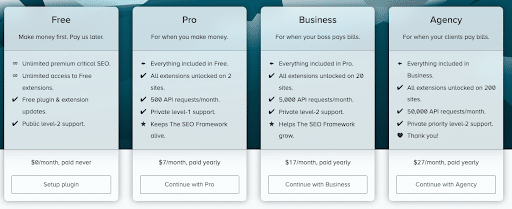
While many of the best SEO WordPress plugins are free to use, you might need to implement something more robust.
Many tools like Yoast offer premium versions that offer more features, with some offering tiered pricing to help you stay within your budget.
Additionally, consider scalability. Many tiered WordPress SEO options are better to go with, so you can upgrade or downgrade accordingly.
Installation and Setup Tips
Once you’ve found the best WordPress plugin for your site, take the following basic steps to install it:
1. Log in to Your WordPress Dashboard
To start with, go to WordPress.org and log in to your dashboard, where you will be able to access and install plugins.
2. Find the Right Plugin Through Search
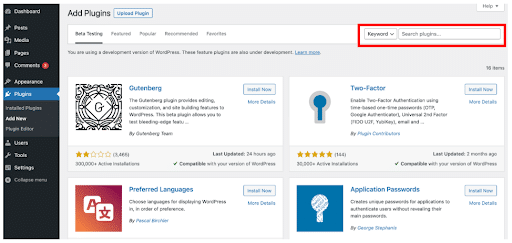
One method to add new plugins is to go to the Plugins tab in your menu, where you can see a list of existing plugins and look for a new one with the search bar.
You can find many plugins this way, and it’s arguably the easiest way to install a plugin, as you can simply click on “Install Now.”
3. Upload a Plugin
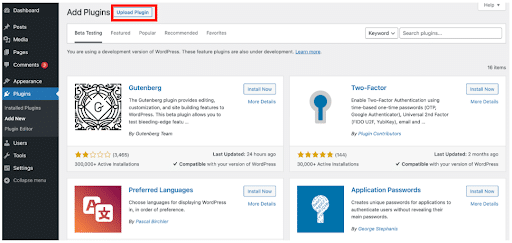
One alternative way to install a plugin is to upload a plugin that you’ve downloaded, which you can do by taking the following basic steps:
- Download the plugin from its source as a .zip file.
- Click on “Upload Plugin” within the Plugins tab on your WP dashboard.
- Click “Choose File” and select your .zip.
- Click “Open” and “Install Now.”
- Select “Activate Plugin” after installation.
4. Install Manually Via FTP
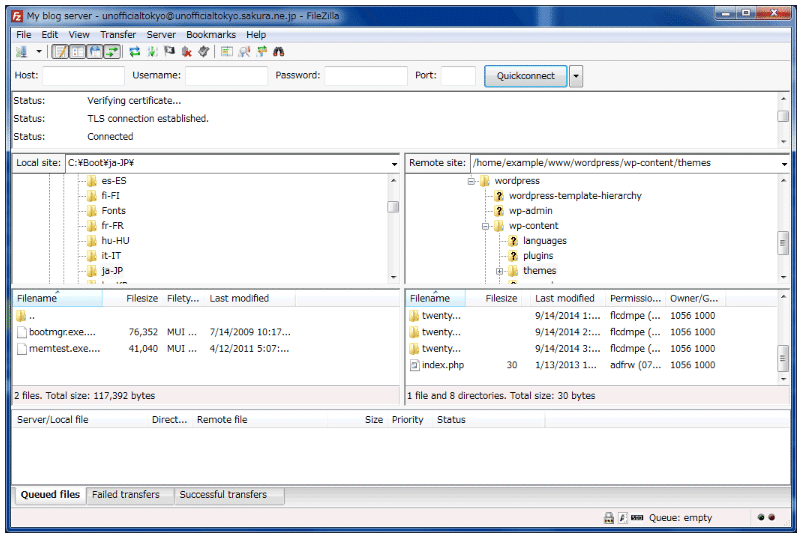
Another method for advanced users is to install using a third-party FTP client like FileZilla.
To do so, take these steps:
- Download the .zip file version of the plugin.
- Log in to your FTP client to access your WordPress server.
- Go to the FTP’s “wp-content/plugins/” folder.
- Upload the unzipped plugin folder to the directory.
- Log in to your WP dashboard.
- Go to “Installed Plugins” within the Plugins tab.
- Click on “Activate” to make the plugin active.
Before installing any WordPress plugin, always ensure the plugin is legitimate and comes from a valid, reputable source. Otherwise, you could compromise your website’s security.
Also, back up your website before you install any plugins, as this can help you recover in the event of harm to your site’s functionality or loss of data.
Advanced SEO Strategies
Some of the top SEO plugins for WordPress allow you to engage in more advanced SEO techniques for total control over optimization.
Some of these features could include:
- Schema Markup: Structured data, including Schema markup, tells search engines what your website and web pages are about using a language that Google and other platforms can understand. Optimizing for this will give search engines more context, which can help optimize for everything from traditional search results to AI Overviews and AI Mode.
- AMP Support: Another crucial feature to consider is mobile optimization, as you must have a mobile-responsive version of your website to do well in search results.
- Integration With Analytics Tools: To help you consistently track your website’s SEO performance and gauge the effectiveness of your plugins, choose tools with Google Analytics or other analytics integrations.
- Image Optimization: Image alt text improves your website’s accessibility by reading the contents of images aloud for visually impaired users, but it can also give Google even more context about your image content.
Common Mistakes to Avoid
Even if you’ve found the best SEO WP plugin, there are some critical mistakes to avoid when installing, such as:
- Plugin Conflicts: Installing multiple SEO plugins, especially those with overlapping features, could lead to conflicts that hinder performance. In fact, conflicting plugins could even hurt your SEO efforts and lead to lower rankings.
- Failing to Submit XML Sitemaps: Although many SEO plugins make it easy to generate XML sitemaps for your site, you must submit those sitemaps to Google Search Console and other search engines to enable crawling and indexing.
- Over-Optimization: Stuffing keywords and incorporating too many optimization elements in other ways could also hurt rather than help your site’s SEO. Instead of optimizing for search engines, focus on optimizing for the user, with naturally incorporated keyword inclusions and high-quality content.
- Overlooking Mobile Friendliness: As more and more people rely on mobile devices to conduct searches and access websites, you need to optimize for mobile users alongside desktop visitors.
- Neglecting to Conduct Regular Audits: To get the most from your plugins, it’s also essential to conduct SEO audits to gauge performance. Connect your plugins to Google Analytics or other analytics software, and generate frequent reports to determine what needs improvement.
- Using Outdated Plugins: Another item to consider is the status of your plugins. Always use the latest version of your extensions and plugins, as well as the latest version of WordPress. Doing so will ensure your plugins and website remain functional and secure.
Looking for Tips to Enhance your WordPress?
Take Full Advantage of the Best SEO Plugin for WordPress With Ignite Visibility
Even if you’ve found and installed the best SEO plugin on WordPress, you need to know how to effectively utilize it. If you don’t have a lot of experience with SEO, it pays to have experts by your side who can help you locate and fully implement the right plugins and other tools.
With Ignite Visibility, you can:
- Identify the best plugins based on your needs
- Maintain your WordPress site, including all content and technical elements
- Build high-quality, well-optimized content
- Get assistance with design and development
- And more!
Get in touch with our experts today to find out what we can do for your WordPress SEO and other aspects of digital marketing.

