

While “Google penalties” can happen, it’s important to remember that not every traffic drop is a Google penalty. In fact, according to Google reports, less than 1% of indexed sites actually receive manual penalties.
Automated penalties can happen with algorithm updates, but they can result from multiple causes, from failure to adhere to Google guidelines to mere technical SEO issues that keep search engine crawlers from finding your content.
In this blog, Eric Solomon, Associate Director of SEO, will discuss what causes Google penalties, the different types of Google Manual Action penalty, how to check if a domain is penalized, and how to make a full Google penalty recovery.
What We’ll Cover:
- What is a Google Penalty?
- How to Identify a Manual Action
- List of Google Penalties
- What to Do If You Get Hit With a Google Penalty
- FAQs About Google Penalties
What is a Google Penalty?
A Google penalty refers to the event when a website or individual page experiences a drop in rankings due to quality issues, whether through manual or automated penalties.
The only true penalty, according to Google, is what’s known as a manual action. Today, many SEOs still use the term “Google penalties” to refer to major ranking losses.
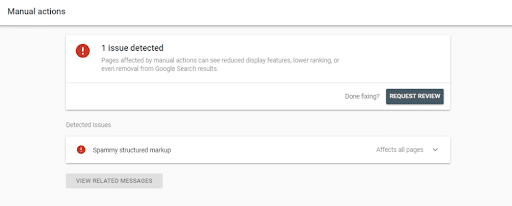
This means that a human reviewer has looked over your website and issued a penalty for violating some aspect of the Google Search Essentials, formerly known as the Webmaster Quality Guidelines.
Google penalties vary from site to site and differ based on the severity of the violation. If you receive one, you’ll need to take action and submit a reconsideration request to get back in the search engine’s good graces.
Algorithmic vs. Manual Penalties
It’s important to note that a loss of traffic caused by an algorithm update isn’t the same thing as a penalty, though for site owners reeling from huge hits to organic traffic, the word penalty seems to fit just fine.
That said, the key difference between an algorithmic devaluation and a penalty is that the penalty requires a reconsideration request. Coming back from an algorithmic downgrade does not require any communication with a webmaster.
Think of it this way: An algorithmic ranking drop is automated, while a manual penalty involves a direct penalty resulting from a violation of Google Search Essentials.
How to Identify a Google Manual Action
If you suspect a Google Manual Action has impacted your site, you can check for a Google penalty with the following resources:
- Manual Actions Report: Within Google Search Console, you can use the Manual Actions report in the left sidebar to see whether your site has any manual actions and the specific pages or URL patterns affected.
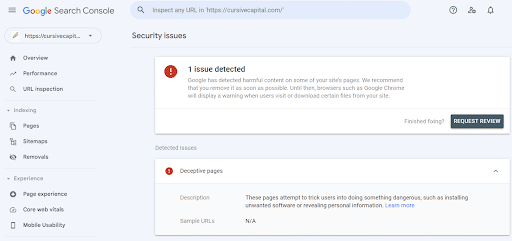
- Security Issues Report: Also in Google Search Console, you can access the Security Issues report on the same left sidebar, which will indicate whether factors like hacking, phishing, or malware have compromised your SEO performance.
- Search Console Messages: Another way to check for a Google penalty is to look at any messages you received directly from Google Search Console. You can check for messages by tapping the bell icon in the upper right of your dashboard, and you can see if you have any warnings from Google about indexing issues, policy violations, or other problems affecting your site.
- Google Analytics Organic Traffic: Within Google Analytics 4, you can see organic traffic in the Traffic Acquisition report and look for any signs of a sudden drop in website visitors.
- Search Console Performance Report: The Performance tab in Search Console will help identify Google penalties based on Total Clicks and Total Impressions over a set period; a drop in impressions will indicate that your site or certain pages have lost ranking visibility.
- Index Coverage: The Pages report within the Indexing tab on Google Search Console will show whether any pages are “Excluded” or a drop in “Indexed” pages, either of which issues could indicate indexing problems like server errors, improper robots.txt, or 404 errors.
- Affected URL Patterns: View the Google Search Console Performance report with the Pages filter, which will allow you to compare traffic both before and after a sudden drop. In turn, you could determine whether Google SEO penalties have impacted either your entire site or a particular subdirectory.
- Recent Site Changes: If you want to know how to check if a domain is penalized, another way is to audit for any changes made to your website, whether it’s a domain migration or a change to a single page’s technical SEO or content.
Common Causes of Google Penalties
If you’re wondering why you’re experiencing a Google Manual Action penalty, a Google penalty checker might reveal one of the following underlying causes:
- Buying or Selling Backlinks: A Google penalty check might indicate that there are some unnatural links with the intention of manipulating rankings, such as purchased links, link schemes, and a large number of rapid link exchanges.
- Thin or AI-generated Spam Content: Google doesn’t necessarily punish AI-generated content, but it will take action if it notices an abundance of low-quality and automated content that appears spammy.
- Cloaking: This is a tactic that entails showing search engines one version of a page and human visitors another, usually in an attempt to deceive algorithms.
- Hidden Text or Keyword Stuffing: Another black hat tactic that could lead to Google penalties is hidden text, which could involve using white text on a white background or minimizing font sizes, or keyword stuffing, which occurs when a page contains a large number of repetitive keyword inclusions, compromising readability.
- Pure Spam: Using aggressive spamming techniques like cloaking, scraped content, and automated text could come across as “pure spam” and contribute to Google SEO penalties.
- User-generated Spam: Unmoderated comments, profiles, and forums will also lead to a penalized website in many cases.
- Structured Data Abuse: If you use schema markup in a way that search engines deem deceptive, such as including too much structured data or labeling page contents as something they’re not, this may also lead to a penalty.
- Sneaky Redirects: You may also get a penalty if your site redirects users to another URL that’s different from the one search engine crawlers see, a technique that’s often used to redirect users to malicious or unrelated pages.
Expert Insight into Google Penalties
An apparent Google penalty can be a scary thing, especially if it catches you entirely off guard and you don’t know the cause. While some penalties are the result of human review and deliberate punishment for quality issues, not every hit is a Google Manual Action penalty.
In some cases, a penalty might result from extensive issues that indicate a failure to comply with Google’s guidelines for quality, but other sudden drops in ranking might simply be the result of technical issues and recent site changes that can easily make a full Google penalty recovery.
However, regardless of the type of penalty, you need to work fast to find the cause and address it, or your lost rankings could have a serious impact on your site’s integrity. Multiple studies have found that the top position in search results gets 27-28% of all clicks, with that number dropping significantly even at the #2 position (15%) and the #3 spot (11%).
Taking steps to identify an issue and even anticipate potential hits from an algorithm change could save your site and preserve your rankings in the long term.
Now, I’d like to explore more about the different types of Google Manual Action penalty, automatic algorithm devaluation, and how to check if a domain is penalized, as well as steps for recovery.

Manual Action vs. Security Issues vs. Algorithm Updates vs. Technical Issues
First, let’s review the different types of Google Manual Action penalty and other factors contributing to rank droppings.
Manual Action
In these instances, one of Google’s human reviewers will look at a website to determine whether it’s in violation of Google guidelines, potentially resulting in a penalty.
Manual actions are rare, as mentioned, with most penalties occurring due to algorithmic updates or technical issues.
You can address a manual action by fixing any issues affecting your site, documenting them, and submitting a detailed reconsideration request to Google’s Search Quality team.
Some symptoms of a manual action include:
- Sudden drops in organic traffic
- De-indexing or clear ranking drops
- Search Console notifications in the Manual Actions report
- Your site only appears for branded searches
There are also many possible causes of manual actions, including:
1. Unnatural Links to Your Site
Links to your website from other sources could be unnatural, in which case Google will punish your site.
These are links to your site that Google thinks you have control over. This could mean that you’ve purchased links or participated in a link scheme, or there are a lot of links coming from irrelevant directories or content that holds little authority.
When Google detects unnatural links that have been artificially created by you or someone else on your website, it will penalize the unnatural links by devaluing them.
In this case, Google says to clean up the links if you can, but it shouldn’t hurt your website (they are a little unclear on this one, unfortunately).
Instead, they state that they’ll apply a targeted action on any unnatural links pointing to your site that appear to be out of your control. In this case, they will penalize your entire website as well as the links. This is a tough one, read about it here.
2. Unnatural Outbound Links
Unnatural outbound links can also lead to Google penalties. These links appear on other websites through link buying and selling, guest posts with links leading back to your site, submitting your website to illegitimate directories, or commenting with links.
If you are selling links, you’re in violation of Google’s rules and your website will get hit with a manual Google penalty.
As Google states, “The consequences for a linkselling site start with losing trust in Google’s search results, as well as reduction of the site’s visible PageRank in the Google Toolbar. The consequences can also include lower rankings for that site in Google’s search results.”
While selling links still comes with the risk of a Manual Action, the penalty doesn’t carry as much weight as it has in the past. While the search engine won’t actively punish your site for unnatural links, keep in mind that leaving low-quality links on your site may lower your E-E-A-T score, as it may undermine the authority of your content.
Generally, we recommend avoiding link-selling entirely if you want to avoid a penalty on Google of any form. Instead, try to build outbound links naturally.
3. Hacked Website
Hacking involves malicious third parties getting into a website, often to sneak in malicious content that enables them to install viruses, malware, or other dangerous programs or obtain people’s personal information through phishing. In any case, hacked content spam is on the Google penalties list.
If Google thinks your site has been hacked, it will be penalized.
The Google penalty is applied to sites where hackers have added malicious content without the owner’s consent. While the site owner isn’t responsible for adding spam to the site, Google holds them accountable for failing to provide sufficient security, as visitors could be at risk, too.
In this case, you’ll not only need to clean up any spammy content left by hackers, but you’ll also need to identify the vulnerability and make sure it’s patched. Also, take the right measures to prevent the reoccurrence of hacking, which will protect your site in the long term. There are also some ideas on how to check the security of your software.
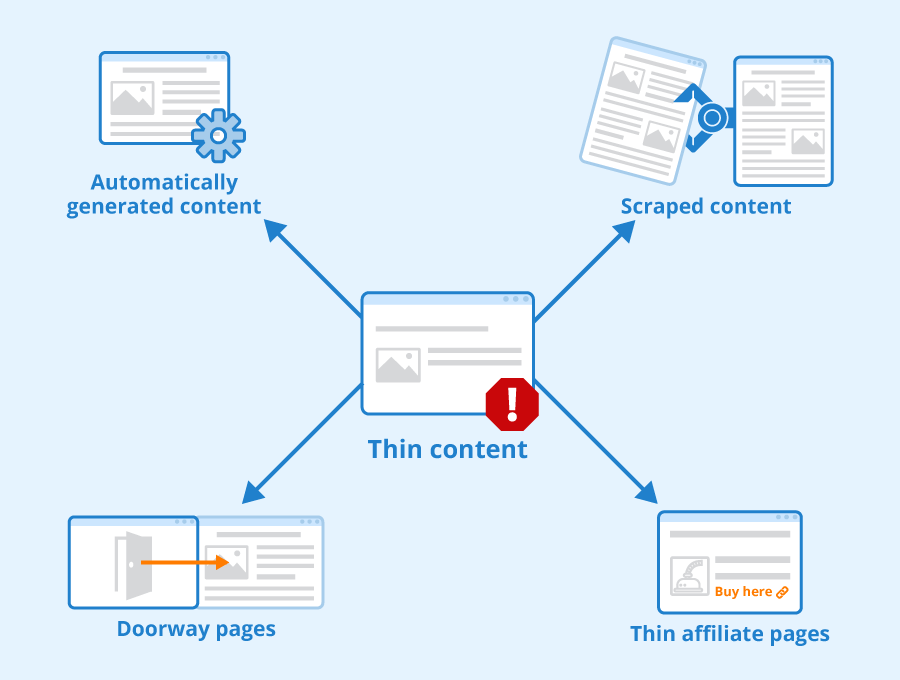
4. Thin or Shallow Content
Increasingly, Google algorithms put a premium on the quality of content.
Thin or shallow content can include minimal, scraped, or otherwise low-quality content that doesn’t add any value to the website.
Because of this lack of value, thin and shallow content are both subject to Google penalties. They will be considered spam and treated accordingly.
So, what exactly is thin content? Well, Google defines it as content with little or no added value. Examples include content scraped from other sites, duplicate content, or affiliate posts that offer nothing but promotional links.
Their rationale here is, that content should be relevant and valuable to readers, and as a result, short, throwaway blog posts that fail to answer questions or say anything of substance are getting the boot.
To avoid a Google penalty due to thin or shallow content, make sure your website includes high-quality, fresh, and helpful content that truly benefits your visitors.
5. Pure Spam
Google hates spam. Spam, according to Google, is any kind of “deceptive or manipulative behavior” that attempts to help websites perform better on search engines without providing value to users.
Websites crammed with filler text, cloaked pages, scraped content, or other gibberish will draw a quick penalty.
According to Google, avoiding manual actions on web spam means following some basic principles. For example, avoid deceiving users with false information and click-bait headlines.
Avoid tricks aimed at improving rankings like link schemes or automatically generated content.
The point is, that everything on your site should work toward creating a better experience for your users, and adding spam in the hopes that you’ll move up in the SERPs will only work against you.
6. User-Generated Spam
Typically applied to websites where users create spam, such as forums, this earns the same penalty as user-generate spam.
For instance, people might post spammy comments, add spam content to forum threads, or include spam in user profiles. These types of user-generated content (UGC) are quite different from conventional, helpful UGC.
Google recommends taking various steps to eliminate and prevent UGC spam. One step is to look on your existing pages for any content from users that might be spammy or inappropriate, removing it as needed. You can also look for profiles on your site with commercial usernames or spammy posts.
You can also conduct a “Site:” search for your website on Google and include any terms that are commercial, adult, or otherwise irrelevant to your business and industry. Doing so will help you further avoid Google penalties resulting from UGC spam.
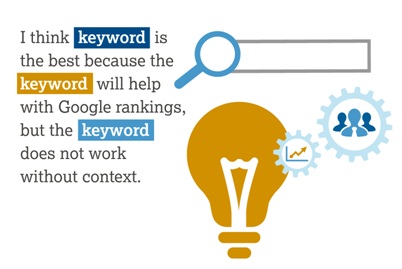
7. Keyword Stuffing
Excessive use of keywords can also get you into trouble, particularly now that voice search has made the SEO landscape more conversational. Use too many keywords now and the Google “refs” will throw the yellow flag and penalize your site.
People have historically been able to increase their rankings on Google with an abundance of keywords, but this practice is no longer effective and will just lead to a decrease in rankings more than anything, especially when users don’t find your content helpful or readable.
That said, there’s no upper limit for how many keywords you can use in your content, the idea is that it needs to sound natural. If you’re unsure, try reading your content out loud. Does it sound like something a normal person might say? If so, you’re in good shape.
8. Google Penalty: Hidden Text
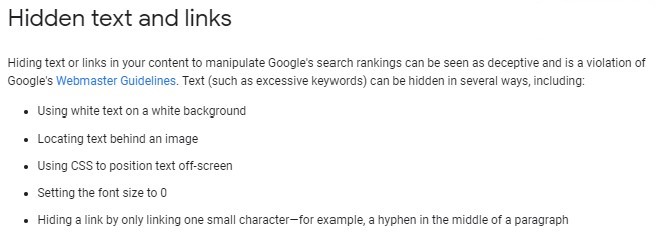
Search engines are like accounting auditors – they want to see everything out in the open, with nothing hidden. This is true even with text that your readers may not want or need to see.
You can hide text in many different ways, such as making the font the same color as the background. Regardless of the technique, Google will consider it spam and may penalize your site accordingly.
To avoid Google penalties resulting from hidden text, ensure you’re not hiding anything. Keep your text out in the open and don’t try to work the system by including keyword-stuffed text or other types of concealed content.
9. Cloaking
Cloaking is a sophisticated black hat technique that attempts to show search engines a different version of the website than the one visitors see.
While minor offenses are often accidental (think Ajax or Javascript rich sites), Google considers cloaking to be a deliberate attempt to manipulate its search results. Get caught cloaking and be prepared to suffer the consequences – up to and including a full ban.
You can avoid issues with cloaking by taking steps such as reviewing website elements to maintain a contrast of 4.5 to one, looking for hidden text in JavaScript, and seeking hidden CSS using certain site crawling tools.
10. Spammy Free Website Hosts
If you offer a free web hosting service that includes multiple websites, some websites might include spam content.
When Google detects spam on multiple websites hosted by the same host, it usually penalizes all the websites. This can then result in your hosting service suffering due to the irresponsible actions of other site owners.
To prevent this problem from affecting your hosting service and all websites under it, take steps to eliminate spam content. Google recommends removing spammy accounts from your service and implementing strict policies that prevent the abuse of your service.
11. Paid Links
Google’s rule on this one is crystal clear – no buying or selling links in a way that passes on search engine ranking credit.
Google dislikes this practice so much that they have banned companies like J.C. Penney and Overstock for months at a time. Paid links may seem like a cost-effective way to improve search rankings, but get caught doing it by Google and you’re bound to get hit with an SEO penalty. (Hint: don’t believe programs that tell you their paid links can escape Google detection.)
You can report paid links here.
Generally, it’s in your best interest to avoid paid links entirely. Stick with legitimate SEO and PPC campaigns that keep you on top of the Google SERP.
12. Automatically Generated Content
Automatically generated content, also known as auto-generated content, is content that a code or program automatically creates. Companies and individuals might use this black-hat technique to get ahead on search engines, but it’s also liable to land Google penalties.
Some may use AI to generate this kind of content, but keep in mind that not all AI content is punishable. Google allows AI content to rank, as long as it’s high-quality, helpful, and doesn’t violate any of its guidelines.
So, if you’re going to use AI-generated content, just ensure it’s not spammy and meant solely for optimization through black-hat SEO techniques. Otherwise, your content could contain common spam that lands you in trouble.
Are you having a program create content on your website? Learn more.
13. Sneaky Redirects
Websites sometimes attempt to gain illegitimate clicks from people by redirecting them from misspelled domains to the advertiser’s site.
This is a type of fraud called web attribution fraud in which a malicious publisher redirects users to an advertiser’s site, collecting a commission from sales made via the redirect. They could also redirect users on mobile devices to unrelated URLs that are different from the content that desktop users access.
Not all redirects are bad—some websites might have changed their domain, for example, and want to redirect people from the old domain to the new one. Some pages may also no longer exist, leading the website to direct users to the most relevant existing page from the non-existent page.
Google specifically punishes sites that redirect mobile device users to content that search engines can’t crawl. Directing users to an unrelated URL on mobile devices can result in a bad user experience, which is why this issue is on the Google penalties list.
14. Doorway Pages
Google defines doorway pages as “sites or pages created to rank for specific, similar search queries.” Often, these pages lead to content that isn’t as helpful as the endpoint. For instance, some pages may exist only to funnel visitors to relevant or usable parts of a website.
These pages could also have malicious behavior behind them, such as pages designed to install programs or codes on people’s computers.
Any type of doorway page could lead to Google penalties if you’re not careful. If you’re using doorway pages on your site, you’ll do well to eliminate them and instead push high-quality content on your other existing pages.
15. Scraped Content
Are you stealing content from other websites and re-purposing it as your own? If so, stop. Scraped content includes:
- Copying or republishing content from other sites.
- Taking content from other sources and switching it up with a few synonyms or slight modifications.
- Embedding media content from other sites with no added value to the user.
Of course, sometimes third parties might steal your content, leading Google to detect duplicate content and subsequently punish pages. This is why you should also check to ensure no one else is scraping your content.
Google points out that duplicate content doesn’t directly impact a website’s presence in search engines. Instead, the system filters duplicate content out.
Avoid getting penalized for scraping by making sure all content on your website is original.
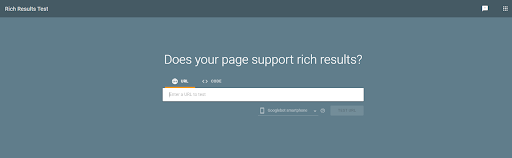
16. Incorrect Rich Snippets Markup
Structured data is becoming a bigger part of the SERPs, and as a result, some website owners are aiming to game the system by abusing structured data in an effort to achieve position zero.
Because snippets are so competitive, Google takes snippet abuse pretty seriously. If you highlight the wrong structured data, your snippets will be removed from the search results. Worse, even if you take steps to right your wrongs, regaining position zero is rare.
That said, if you do get hit with a spammy markup penalty, there are some things you can do to fix it. You can also identify any errors in snippets with Google’s Rich Result Reports.
17. Algorithmic Penalties
You can thank Hollywood and the recording industry for this one. Google considers piracy and copyright violations to be serious issues.
In response to pressure from these powerhouse industries (and the government), Google now penalizes sites that receive multiple requests to remove copyrighted material.
If you post content on your site that might fall within this domain, it’s a good idea to regularly check your Google Console Account for any DMCA takedown notifications.
18. Fishy Terms
If your content includes any fishy terms, be sure to eliminate them.
Chances are your site has been hacked if you see these unexpectedly, especially when they include spammy links.
Some comments from users could also include these terms and corresponding spam links, so make sure your comments sections are cleaned up.
19. Top-Heavy Layout
Google understands that website visitors don’t want to have to slog through a mountain of ads in order to find the information they’re searching for.
While you might want to generate more ad revenue by having ads front and center, this practice can do more harm than good.
If Google’s page layout algorithm can’t identify enough useful content “above the fold,” it will lower your ranking. Users will also click away more quickly if they don’t find your content to be immediately helpful and informative.
To maintain high rankings, don’t make your readers search for content. Keep things simple and user-friendly, which will go a long way in helping your site avoid a penalty on Google.
20. Expired Domain Abuse
This problem involves buying an expired domain that had authority for the purpose of publishing low-quality and spammy content.
You can resolve this issue by populating the domain with original, high-value content.
21. Site Reputation Abuse
Also called “parasite SEO,” this problem refers to the act of hosting low-quality and third-party content like sponsored reviews or coupon codes to leech off the host domain’s authority.
Resolving this problem involves removing third-party content and adding a noindex tag to impacted pages. In some cases, you may need to rewrite entire pages.
22. Policy Circumvention
This is the practice of using certain techniques to deceive Google search bots or otherwise avoid penalization.
Cloaking falls under this umbrella, along with changing site structures and creating new domains to evade penalties affecting previous sites.
Fix this problem by removing any hidden text, deceptive code, and sneaky redirects, maintaining consistent transparency across pages.
23. Scam and Fraud Content
Some content may have the intention of deceiving, misleading, or actually harming users financially with malware, phishing, and other malicious content.
In these instances, Google’s manual action will result in the entire domain being removed from search results for user protection.
Remediation efforts here will require the complete removal of any fraudulent code and content from your host server, along with consistent security auditing in the event of hacked sites or malware.
Security Issues
There are many security issues that could lead to a penalty, some of which could become apparent in Google Search Console’s Security Issues report.
Security issues could involve hacked content and defacement, malware distribution (often with compromised sites), phishing and deceptive pages, code and content injection, and a lack of HTTPS and SSL encryption to protect users.
Some symptoms to watch for here include:
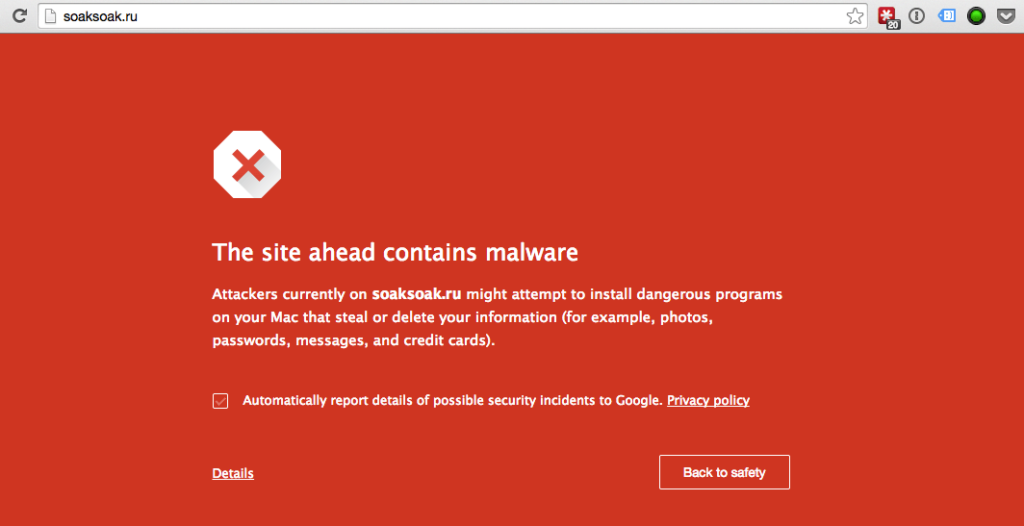
- SERP warnings like “This site may be hacked” or “This site may harm your computer”
- Browser warnings for visitors, like a full-page red warning via Google Safe Browsing
- Email alerts from Google Search Console indicating spam injections, malicious code, and unnatural backlinks
- Sudden traffic drops
- Site disappearance
- Unfamiliar pages
- User-generated spam
Again, if your penalty involves a manual action, you may be able to resolve this issue and restore your site with a reconsideration request.
Google Search Console’s Security Issues report should also detail steps to take to resolve any security problems. You may then use Google’s free Transparency Report to confirm its safety.
Algorithm Updates
Some penalties might not be manual, in which case they count as algorithmic ranking drops. These penalties are automatic and won’t appear in Google Search Console reports, and you’ll be unable to submit a reconsideration request if your site gets hit.
You might be able to detect an algorithmic devaluation by looking at traffic in Google Analytics. If you notice a decrease and yet there isn’t any manual penalty, your site may be the victim of a ranking decline after an update.
The following are some symptoms of algorithm updates:
- Sudden drops in traffic
- Ranking fluctuations, positive or negative
- Competitor ranking shifts
- Increased number of crawl errors
- Lost visibility for certain content
To confirm whether you’re suffering (or benefiting) from an algorithm update, check the algorithm timeline via your Google Search Status Dashboard, which will indicate whether a core update took place.
There’s also a good chance that sudden changes to your site or individual pages could signify an algorithm change if you don’t receive a manual action notice.
Technical Issues
One last potential problem that could result in Google penalties is a technical issue.
For example, you might have improperly configured robots.txt files that are blocking Googlebot, or you might use a testing subdomain that accidentally winds up indexed instead of the official domain.
Other technical issues could include a poor user experience and failed optimization for Google’s Core Web Vitals. A lack of mobile-responsiveness could also compromise results for mobile users.
Here are some symptoms of technical site issues:
- Severe indexation collapse, including sitewide de-indexing
- User experience failures and mismatched content delivery
- Server timeout drops
- Drops in mobile rankings and traffic
To recover from these issues, you can take numerous steps, such as fixing indexation blocks and preventing Google from indexing staging environments, fixing canonical tags, fixing 500-level server errors, and auditing your JavaScript rendering.
Like algorithm updates and security issues, you will be unable to submit a reconsideration request for these problems if a manual action doesn’t factor into a penalty.
What to Do if You Get Hit with a Google Penalty
Google understands that violations, especially minor ones, can be unintentional, and they’ve gotten better about alerting website owners when there’s a Manual Action on their account. Make sure you check your Google Search Console report regularly to keep an eye out for any penalties you may have missed.
You can then take the following actions to enable Google penalty recovery:
1. Confirm the Issue
First, you must identify the specific issue impacting your site, whether it’s a manual action, algorithm update, security issue, or a technical issue.
To fix a manual action, Google recommends following these steps to get your site back on track:
- Expand the manual action description panel for details.
- There, you’ll see the type of issue and a short description, as well as which pages have been hit with the action.
- Fix the issue on all affected pages (don’t worry, they’ll give you a list of steps). Keep in mind, that fixing only some of the pages won’t help you get back in the search results.
- Make sure Google can reach your pages. This means they cannot be blocked by a paywall, noindex directive, or robots.txt. Use the URL inspection tool to make sure the crawlers can reach all pages in question.
- Once you’ve fixed all of the issues listed in your report, you’ll need to submit a reconsideration request. In the request, you’ll need to explain why you received a Manual Action, the steps taken to amend the issue, and proof that you’ve successfully resolved the problem.
For other issues, you can look at your website’s analytics and other platforms to determine what the problem is and how to address it.
2. Document the Baseline
Before taking any other steps, document the current status with screenshots and reports.
Take note of your current rankings and other relevant metrics, including organic traffic and affected URLs.
You will be able to use this documentation to establish a “before and after” comparison following your fixes.
3. Identify the Scope of the Penalty
Using Google Search Console or other Google penalty checkers, you can see how far-reaching the problem really is.
Make a list of every URL in violation (or potential violation) of Google’s search quality guidelines.
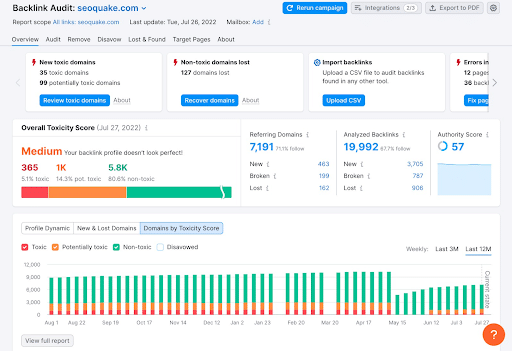
If you experience an issue with unnatural links specifically, conduct a backlink audit with a solution like Ahrefs Site Explore or Semrush Backlink Audit, which will help identify any toxic links hurting your off-page SEO efforts.
4. Fix the Root Cause
The next step is to fix the issue causing your site to suffer organically.
For example, you may need to eliminate or rewrite content that comes across as spammy, or you could consolidate duplicate content.
Meanwhile, for poor backlink profiles, you can request webmasters to remove any spammy links from their content or use Google’s Disavow Tool to direct bots not to crawl them.
5. Collect Evidence of Fixes
After fixing the issue at hand, log your efforts with screenshots and other documentation.
Be sure to list all of the affected URLs and the precise actions you took to fix them and make them compliant, complete with the date on which you made the fix.
Also, retain copies of link removal outreach emails and other correspondence related to your fixes.
6. Validate Your Site’s Crawlability
You can use Google Search Console’s URL Inspection tool to see if your fixed URLs allow Googlebot to render them correctly.
In addition, ensure your robots.txt file on each page doesn’t block search engine crawlers.
7. Submit Your Reconsideration Request
If a manual action caused your penalty, you can submit a reconsideration request with all supporting documentation and explanations for fixes.
This letter should be formal and detailed, with a complete list of all changes that could affect Google search quality guideline compliance.
Keep in mind, that reconsideration takes some time. According to Google, the process can take several days, sometimes a week. They also mention that you should not resubmit your request until the process is complete, they’ll keep you updated via email.
You can also learn more about how to recover from a Google update and other automated penalties.
We’ve provided a template and checklist for your reconsideration request below.
8. Monitor Google’s Response
Await Google’s response to your reconsideration request and/or fixes. Practice some patience here.
You can monitor the response in Google Search Console and keep a lookout for any status updates or requests for additional information.
9. Rebuild SEO Health
If Google decides to lift the penalty, keep monitoring your website’s organic traffic and work to maintain compliance.
Continue to perform Google penalty checks by watching the Security and Manual Actions reports.
Another step you can take here is to submit new XML sitemaps to index and rank fresh content.
Continue to optimize your site’s SEO with high-quality content, proper keyword inclusion, and a user-friendly design without any deceptive tactics.
A Reconsideration Request Template to Increase Your Chances of Success
To help you make a complete Google penalty recovery after a manual action, here is a template for a reconsideration request that you can use:
Hello Google Search Quality Team,
We received your response regarding the manual action affecting our domain, www.example.com. We have since worked to address [specific issue] and believe we have successfully prevented the issue from reoccurring, and upon repeated review of Google’s search quality guidelines, we believe our domain is now compliant.
Here are the specific changes we made to our domain to restore our site to compliant status:
[list of changes]
If your team still determines that our website is noncompliant with Google’s guidelines, we would appreciate specific examples still impacting our status so that we can fix any remaining issues.
Thank you for your time and consideration.
Sincerely,
[Name]
Additionally, you can follow these steps before you submit and when submitting your request:
- Fix detailed issues and include a step-by-step explanation for resolution.
- Explain other attempts to improve your website’s quality.
- Include supporting evidence to prove that you addressed all relevant issues, such as screenshots, code samples, URL lists, and log files or reports.
FAQs About Google Penalties
1. What is a Google penalty?
Google penalties occur when a website suffers from a sudden drop in rankings due to either a manual action or an algorithm update. Penalties often result from a violation of Google’s guidelines for site quality, resulting from attempts to manipulate rankings using spammy or deceptive tactics.
2. What is a Google Manual Action?
A Google Manual Action penalty involves a human at Google reviewing a site and issuing a manual penalty due to violations of Google guidelines. These actions are rare, but when they do occur, webmasters have the option of submitting a reconsideration request to Google.
3. How do I know if Google penalized my site?
You can perform a Google penalty check using certain tools like Google Search Console and your own site metrics. Based on symptoms like suddenly lost rankings and sitewide or page-specific issues, or a direct message on Google Search Console, you can determine whether Google has penalized your website.
4. What is the difference between a manual action and an algorithm update?
A manual action occurs when a website undergoes a review from a person working for Google to assess its compliance with Google guidelines. Meanwhile, an algorithm update could result in a drop in rankings as search engine crawlers revisit, reindex, and rank web pages, potentially because of technical issues instead of guideline violations.
5. Can AI content cause a Google penalty?
AI content won’t directly cause Google to penalize your website, but it could cause a problem if your content is spammy and of poor quality, such as when developing multiple pages of duplicate or keyword-stuffed content.
6. How do you recover from a manual action?
If you confirm that a manual action has penalized your site, you can submit a reconsideration request to Google once you’ve identified and addressed any issues indicated in Google Search Console. This action may restore your rankings if Google accepts your request and reasons that you are compliant with Google guidelines.
7. How long does a Google manual action last?
Once you diagnose and fix the issue behind the manual action, and you’ve submitted a reconsideration request, it can take days to weeks to recover from a penalty, but the overall length will depend on the complexity and severity of the issue.
8. Do Google penalties affect paid ads?
Yes, a penalty could impact paid ad campaigns if they directly penalize organic results, as Google Ads cross-references manual actions affecting organic rankings. Specifically, Google will disapprove ads pointing to the pages or sites that a manual action penalized.
Be Proactive! Start Avoiding Penalties on Google
While this Google penalties guide can help you identify and avoid penalties affecting your website on Google, you might need some help. In addition to this ultimate guide to Google penalties, you can turn to the experts at Ignite Visibility for assistance with this.
We’ll work with you to:
- Identify specific potential penalties
- Optimize your website to avoid penalties
- Help you climb in rankings with good SEO
- Cover every aspect of your digital marketing
Want to find out more about what we can do for your website? Learn about our SEO services and how they can keep you on top of search results.
