

Did you know that 38.8 million Americans use voice search for shopping-related activities?
That’s why voice search optimization should be part of your SEO strategy. If it’s not, you’re missing out on all of the traffic coming from those voice assistants!
In this blog, our Associate Director of SEO, Monique De Leon, will walk you through what voice search SEO is and provide you with 7 actionable strategies to try.
What You’ll Learn:
- How Voice Search Differs from Typed Search
- Voice Search Optimization: Important Voice Search Ranking Signals
- 7 Ways to Target Conversational Keywords
- How to Track SEO for Voice Search Traffic & ROI
- FAQs: Voice Search SEO
SEO for Voice Search: Quick Trends & Why It Still Matters
With 20.5% of adults worldwide using voice search, it continues to reshape how consumers find information online.
This isn’t specific to just one demographic or device. The majority of 18-64 year olds who use voice search say they will use it more in the future, whether on their smartphone, a stand-alone speaker, a tablet, or a wearable device.
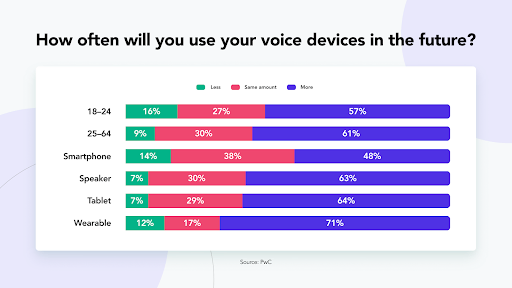
One of the reasons is the ease of voice assistants. No matter where you are, chances are, you’ll have access to a device that can perform a voice search.
They’re also incredibly reliable. The accuracy of these platforms has reached impressive levels, with Google Assistant understanding queries with 100% accuracy and delivering correct answers 92.9% of the time.
This growing reliability, combined with the convenience factor, explains why the voice search market is projected to reach $45 billion by 2028. With numbers like that you must optimize your content and invest in voice search optimization services in 2026.
Our Expert Insights on Voice Search Optimization
Voice search isn’t a new trend, but it’s grown in popularity over the last few years. For most people, asking a question is more convenient than typing it out.
Voice search is forcing companies to rethink their traditional SEO strategies. One of the most critical things to remember is to ensure that the content uses natural language, focusing on question phrases with a good volume, and using foundational SEO best practices for your website. When you do all these things and consider the intent of voice searchers, you can gain rankings that lead to engagement and conversions.
How Voice Search Differs from Typed Search
Understanding the fundamental differences between voice and typed search is critical for creating content that performs well across both channels. When users speak their queries instead of typing them, their behavior shifts in predictable ways that directly impact your SEO strategy. This creates some pretty unique voice SEO factors.
Let’s look at some of the key behavioral differences you should be aware of when learning how to optimize your website for voice search:
High Local Intent: Voice Search and “Near Me” Posts
Voice search also coincides with “near me” searches. Voice search users are more likely to ask questions about local businesses, often including the near-me descriptor.

To capitalize on this, you’ll want to use many of the same strategies for “near me” searches, including:
- Creating and optimizing your Google Business profile
- Encouraging more reviews from customers as they impact your rankings
- Ensuring your site is fast and mobile-friendly
Additionally, you want to understand the most searched questions about your industry, product, or service. Then, create content that ties this in along with any “near me” attributes.
Query Length is Getting Longer
A voice search query is different from a text one. It’s much more conversational. Typing in a query is by phrase with no attention to grammar. Voice searching almost always involves asking a question and is much longer.
Voice searches average 3-5 words longer than their typed counterparts. While someone might type “best pizza Chicago,” they’re more likely to ask their voice assistant, “Where can I find the best deep-dish pizza in downtown Chicago?”
Because of the shift, search engines rely less on keywords and more on Natural Language Processing (NLP) to inform search results. NLP is artificial intelligence (AI) that helps computers understand and interpret human language.
In consideration of these differences, you’ll need a new approach to keyword research. SEO tools now have a “questions” tab when doing research. These results will advise you on what questions to focus on in optimization.
Question-Based Formats
Voice queries overwhelmingly take the form of questions, with “how,” “what,” “where,” “when,” and “why” leading most searches. This question-based approach stems from the conversational nature of voice interaction. People naturally ask questions when speaking rather than stating keyword fragments.
Search Intent Continues to Grow Increasingly Important
Search intent is crucial in any type of SEO. When it comes to voice search SEO, people are asking questions to solve a specific problem or need. There are several intent categories to consider:
- Informational: The intent of these searches is research. The person hasn’t made up their mind about a product and wants to gather information. An example would be, “What’s the best foundation for oily skin?”
- Navigational: Searchers want to go to a physical or virtual place. Someone may ask, “What are the directions to the closest McDonald’s?”
- Commercial: Users are looking for information on a topic or product that can be simple or complex, like, “What are the best vegetables to grow in a garden?”
- Transactional: People ask questions indicating they are ready to purchase, such as “How do I start a Hulu subscription?”
In formulating your voice search SEO plans, consider how all these intent categories align with your content. If there are gaps, you know what to add to your content calendar.
User Experience is Dependent on Instant Answers
As with any aspect of search, how users perceive the experience depends on the answers. You may rank for a question search term but see high bounce rates. That can indicate that people didn’t find your answer detailed or useful.
In most cases, voice searchers need information on the spot. Most of these happen on smartphones, so people are often actively seeking a location urgently.
Keep the need for fast answers in mind. Be sure they are concise and easy for Google and humans to understand. Much of the time, a format like FAQs works well for these.
Featured Snippet Optimization
Voice assistants frequently pull answers directly from featured snippets (position zero) and other SERP features. When Google Assistant or Siri reads an answer aloud, it’s typically sourcing that information from the snippet box.
That makes getting your site into those coveted boxes even more important.
Typed vs. Voice Query Examples
Let’s take a look at how some of these searches would look when typed vs. when a searcher uses voice search.
| Typed Search | Voice Search |
| “Weather Miami” | “What’s the weather like in Miami today?” |
| “Plumber near me” | “Who’s the best-rated plumber open right now near me?” |
| “Chocolate chip cookie recipe” | “How do I make chocolate chip cookies from scratch?” |
| “iPhone 17 reviews” | “What are people saying about the iPhone 17?” |
| “Office hours DMV” | “When does the DMV close on Saturday?” |
Notice how the voice searches provide more context, include complete sentences, and often specify the user’s exact intent? That’s because the queries are phrased as you would say it in real life to another person, rather than how you would quickly type it into a Google search.
Recommended Content Style for Voice Search
You can optimize your content to account for these behavior differences by approaching your content with these styles:
- FAQ-Style Formatting: Write sections of content as direct question-and-answer pairs that mirror how people actually speak. Use the exact questions your audience asks as H2 or H3 headings, then provide clear, concise answers immediately below.
- Natural Language Throughout: Write as if you’re having a conversation with your reader rather than stuffing keywords into awkward phrases. Your content should sound natural when read aloud. You can test this by actually reading it out loud and seeing if it flows smoothly.
- Concise Answer Paragraphs: While long-form content remains valuable for SEO and user consumption, you should still directly answer your primary question within the first 2-3 sentences of each section. This increases your chances of being selected for featured snippets that voice assistants read aloud.
- Schema Markup: Implement FAQ schema, How-To schema, and Local Business schema to help search engines understand your content structure and increase the likelihood of appearing in voice search results.
Voice Search Optimization: Important Voice Search Ranking Signals
Now that you know about how people use voice search, let’s explore how Google handles voice search rankings.
Here are some of the best voice SEO factors and how you can use them to your advantage.
Structured Data
Structured data markup increases your chances of appearing in featured snippets and helps voice assistants parse your content accurately.
Pages with FAQ schema are significantly more likely to be read aloud as voice search answers because they provide clear question-and-answer pairs that match conversational query patterns.
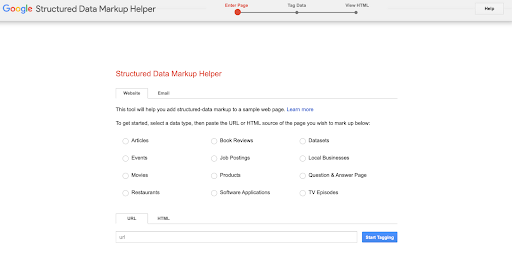
Improve your page by using Google’s Structured Data Markup Helper to generate JSON-LD code for your FAQ, QAPage, or HowTo content. Add the schema to your page’s <head> section or immediately after the <body> tag, then validate it using Google’s Rich Results Test tool. Focus first on pages that already answer common questions in your niche.
Page Speed
Page speed is a confirmed ranking factor, and voice search users on mobile are even less patient than typical visitors. Pages that load in under 2 seconds are more likely to achieve higher voice search rankings. Poor Core Web Vitals scores (LCP, FID, CLS) directly reduce your visibility in mobile and voice search results.

Run your site through Google PageSpeed Insights and prioritize fixing the issues flagged in red. Start with quick wins: compress and convert images to WebP format, enable browser caching, minimize CSS/JavaScript, and implement lazy loading for images below the fold. Aim for an LCP under 2.5 seconds and a CLS score below 0.1.
Security
HTTPS is a confirmed ranking signal and a trust factor that Google weighs heavily for all searches, including voice. Voice assistants are less likely to surface results from non-secure sites, particularly for queries involving personal information, local businesses, or transactions. Sites without HTTPS may see up to 5% lower rankings across the board.
Purchase an SSL certificate from your hosting provider (many offer free SSL through Let’s Encrypt) and install it on your server. Update all internal links to use HTTPS, set up 301 redirects from HTTP to HTTPS versions of your pages, and update your sitemap and Google Search Console settings to reflect the secure protocol.
Page and Domain Authority
Page and domain authority impact rankings. It’s a score based on algorithms that look at the quality of inbound links, organic traffic, relevance of content, and more factors. Your entire domain has a score, and each page does. It’s a 100-point scale. A score of at least 50 is considered good.
You can improve these by:
- Increasing quality backlinks
- Using internal links to optimized pages
- Freshness of content
- Quality of content
Long-Form Content
Even though voice search provides short answers to questions, they originate from long-form content. While word count isn’t a direct SEO ranking factor, it still factors in, as search engines want to deliver the most credible and relevant results. Much of that time, content that performs well has 2,000 words or more.
The reason is all about context. With more words, there are more details that a search engine can absorb to find the best answer to the spoken query.
Readability
Readability should be on your SEO radar. Simple is better in terms of word choice. Aim for clear, concise content written at an 8th-9th grade reading level, with shorter sentences and paragraphs to make things easier for search engines and humans to digest. Using subheaders and bullets also breaks up big walls of text.
Edit your content to place the direct answer to each question in the first paragraph, ideally within 2-3 sentences of 40-60 words total. Use the Hemingway Editor or similar tools to check readability scores and simplify complex sentences. Break up dense paragraphs, use bullet points for lists, and eliminate jargon unless your audience specifically expects technical language.

Featured Snippets
Featured snippets are highlighted excerpts of your text that will appear at the top of the search engine results in position 0. They provide users with a quick, clear answer to their search query, making them very valuable.
Improve your featured snippet opportunities by:
- Keeping content fresh
- Including questions on FAQ pages, as well as in blog posts, web copy, and beyond
- Marking up questions using H2 headers
- Answering customer questions
Local Signals – GBP and NAP
Local signals are critical for voice search and a complete, optimized Google Business Profile increases your chances of appearing in those sought-after search results.
Consistent NAP (Name, Address, Phone) citations across the web build trust signals that boost local pack rankings.
To improve your chances, claim your Google Business Profile if you haven’t already, then complete every section: business category, hours, services, photos, and business description. Ensure your NAP information is identical across your website, GBP, Facebook, Yelp, and other major directories. Add location-specific content to your website and encourage customers to leave Google reviews, and then respond to each review promptly.
7 Ways to Target Conversational Keywords
Voice search optimization begins with identifying the right conversational keywords. This requires a different approach from traditional keyword research, focusing on question-based queries and longer, more natural phrasing.
When clients come to me for voice search optimization services, here are the action items to follow:
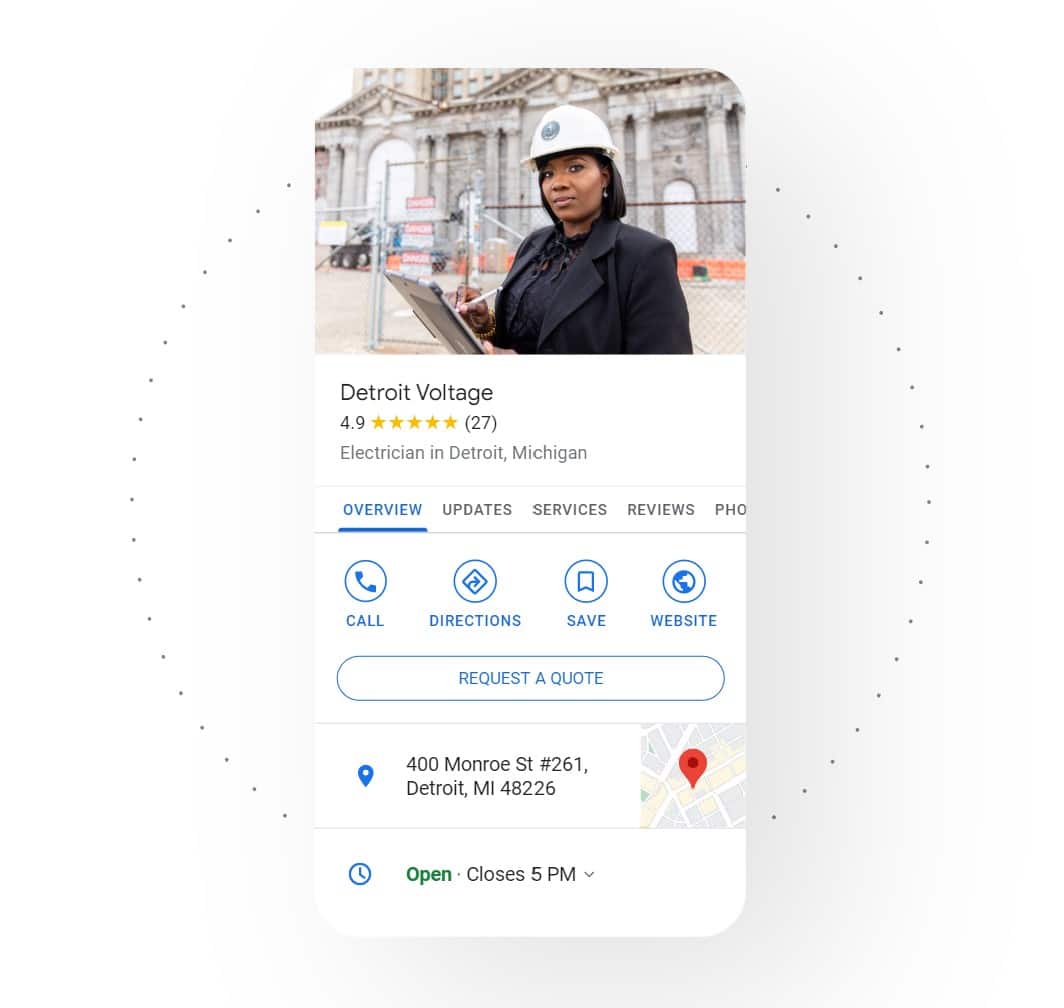
1. Register Your Google Business Profile
Your Google Business Profile is critical for local and voice SEO. According to Statista, 77% of consumers use Google for local businesses. All those local audiences you want to reach may use voice versus text.
Potential customers are submitting queries right now to find you. This must be on your priority list if you want to rank well for voice search on Google. Continue to improve it as you broaden products, services, and locations.
2. Identify Your Seed Topics
Start with your core topics, products, or services as seed keywords. These are the foundational terms around which you’ll build your conversational keyword list.
For a plumbing business, seed topics might include “water heater repair,” “drain cleaning,” and “emergency plumber.”
For an e-commerce store selling running shoes, seeds could be “marathon training shoes,” “trail running footwear,” and “beginner running shoes.”
3. Mine Question-Based Queries
Use question mining tools to discover how people actually ask about your seed topics.
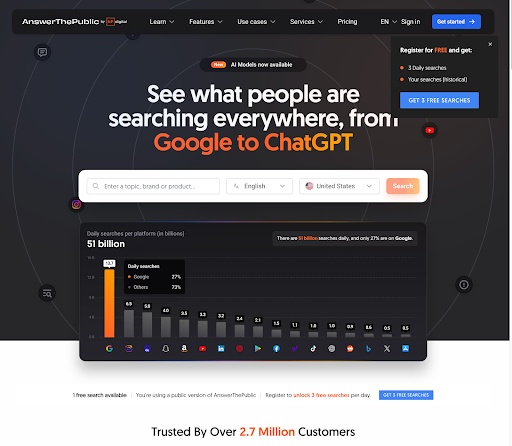
Enter each seed keyword into AnswerThePublic to generate visualizations of question-based searches organized by question word (what, when, where, why, how). The free version provides dozens of question variations for each seed term, showing you the exact phrasing people use.
4. Leverage “People Also Ask” Boxes
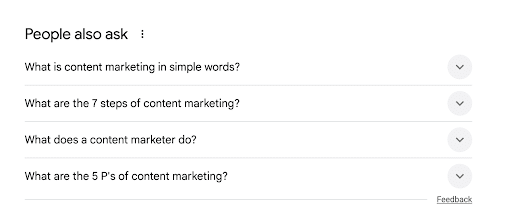
Search Google for your seed keywords and review the “People Also Ask” (PAA) section in the results. Click each question to expand additional related questions. Google dynamically loads more as you interact with it.
5. Use Professional Keyword Tools for Question Reports
Tools like Ahrefs, SEMrush, or KeySearch, can help you find questions that people are asking. This is one of the most important comprehensive voice SEO tactics to add to your strategy.
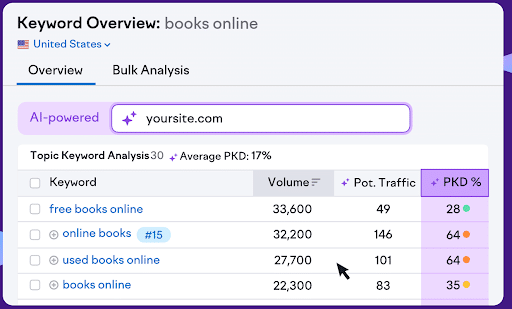
These tools reveal search volume, difficulty scores, and trending question keywords that might not appear in free tools.
Some of the paid options will also help you find what people are asking AI. You can use all of this information to optimize your content and increase your chances of appearing in search results across the board.
6. Create Your Conversational Phrasing List
Compile all discovered questions into a spreadsheet with columns for: exact question phrase, search volume (if available), question type (what/when/where/why/how), and local intent (yes/no).
Then expand each question with natural variations. If you found “how to fix a leaky faucet,” add variations like “how do I repair a dripping faucet” and “what’s the best way to stop a faucet leak.”
Answering the “right” questions will deliver the most value for your company in delivering relevant leads and conversions. You could rank well for many questions that have little relevance to what your customers actually want to know.
7. Prioritize by Voice Search Likelihood
Score each keyword based on voice search probability. Questions starting with “how,” “what,” and “where” are more likely to be asked via voice. Phrases containing “near me,” “open now,” or “best” also indicate high voice search intent. Focus first on questions that sound natural when spoken aloud and provide clear, actionable answers.
How to Track SEO for Voice Search Traffic & ROI
As with any marketing metric, you should always measure your share of voice SEO results.
By tracking specific signals and patterns, you can effectively measure the impact of your voice search optimization efforts and demonstrate tangible ROI. Here are some ways to keep track of your success.
Set Up GA4 Events for Voice Landing Pages
In Google Analytics 4, you can monitor things like
- Page views
- Average engagement time,
- Scroll depth
- Conversion actions
Voice search users often have higher intent, so tracking whether they complete desired actions (form fills, phone calls, purchases) helps demonstrate ROI. Create a custom exploration report in GA4 that segments traffic to voice-optimized pages versus standard content to compare performance.
You can set this up in GA4 by creating custom events to track engagement on pages optimized for voice search. Navigate to Configure > Events > Create Event, then set up event parameters that trigger when users land on FAQ pages, question-formatted content, or pages optimized for conversational keywords. Name the event something descriptive like “voiceoptimizedpage_view” and add parameters for page path and content type.
Track Query Landing Pages
You can also track query landing pages by setting up URL parameter tracking to identify which specific queries are driving traffic to your content.
In GA4, go to Configure > Data Streams, select your website, then click “Configure tag settings” > “Show all” > “Define internal traffic.” While GA4 doesn’t show exact query strings anymore due to privacy updates, you can track landing page paths to infer query intent.
While there, you can create a custom dimension for landing page categories (FAQ pages, how-to guides, local service pages) and monitor which content types receive the highest traffic during peak voice search hours (typically early morning and evening for mobile, throughout the day for smart speakers).
Compare bounce rates and session durations across different content types to identify which formats best satisfy voice search intent.
Use Search Console Query Reports Filtered for Question Keywords
In Google Search Console, you can focus on impressions, clicks, CTR, and average position for question-based queries.
Look for questions where you have high impressions but low CTR. These represent opportunities to improve your title tags and meta descriptions for more conversational phrasing. Track position changes over time to measure whether your voice optimization efforts are improving voice search rankings for conversational queries.
To set this up, simply navigate to Performance > Search Results, then click “+ NEW” under the search bar to add a query filter. Select “Queries containing” and add question words one at a time: “how,” “what,” “where,” “when,” “why,” “who,” and “which.” Export each filtered dataset and combine them in a spreadsheet to create a comprehensive question keyword performance report.
Monitor Impressions & CTR for FAQ Pages
FAQ pages optimized for voice search should show increasing impressions as Google identifies them as relevant for more queries. Monitor CTR specifically. If impressions rise but CTR doesn’t, your meta descriptions may need to be more conversational.
Track the appearance of rich results and featured snippets using the “Search Appearance” filter, as FAQ schema often triggers these SERP features that voice assistants read aloud.
To set this up, create a separate filter in Search Console using the “Page” filter to isolate your FAQ pages, question-formatted content, and pages with FAQ schema markup. Set the date range to compare the same period before and after implementing voice search optimizations to establish a baseline and measure improvement.
Test Via A/B Content Experiments
When testing A/B content, always be sure to compare:
- Organic traffic volume
- Average position for target keywords
- Featured snippet appearances
- Conversion rates between the two approaches
Use GA4’s comparison feature to segment users by device type (mobile vs. desktop) and time of day to identify patterns consistent with voice search behavior. Document which formatting approaches (direct answers, FAQ sections, numbered lists) perform best for different query types, then scale successful patterns across your entire content library.
You can do this by developing two versions of similar content: one optimized for traditional typed search with keyword-focused headings, and another formatted for voice search with question-based headings and conversational answers. Publish them on separate but comparable pages (e.g., two different blog posts on related topics) and track performance over 60-90 days.
FAQs: Voice Search SEO
1. What is voice search SEO?
Voice search SEO is the process of optimizing your website content to appear in voice search results on smartphones, smart speakers, and voice assistants. It focuses on conversational, question-based keywords and natural language patterns that mirror how people actually speak, rather than the shorter keyword phrases used in typed searches.
2. How do I optimize my website for voice search?
Optimize your website for voice search by using unique voice SEO factors such as creating FAQ-style content that answers specific questions in 40-60 words, implementing structured data markup (FAQ, HowTo, QAPage schema), and improving mobile page speed to under 2.5 seconds. Focus on conversational, long-tail keywords that start with question words like “how,” “what,” and “where,” and ensure your content uses natural language that sounds authentic when read aloud.
3. Does schema markup help voice search?
Yes, schema markup is one of the most vital voice SEO strategies available. It significantly helps voice search by providing structured data that voice assistants can easily parse and understand. FAQ schema, HowTo schema, and QAPage markup increase your chances of appearing in featured snippets, which voice assistants frequently use as their source for spoken answers.
4. Are featured snippets required for voice answers?
Featured snippets are not strictly required for voice answers, but they dramatically increase your chances of being selected as the voice search result. Google Assistant and other voice assistants pull the majority of their spoken answers directly from featured snippets (position zero), making snippet optimization one of the most effective voice search strategies.
5. How do I measure voice search performance?
Measure voice search performance by filtering Google Search Console query reports for question-based keywords (how, what, where, when, why) and monitoring impressions, CTR, and position for these conversational queries. Track engagement metrics in GA4 for FAQ pages and voice-optimized content, monitor featured snippet appearances, and look for increased mobile traffic during peak voice search hours (early morning and evening commutes).
Voice Search and SEO for Your Brand
Any industry can benefit from voice search optimization, as your audience is likely searching this way. The use of voice searches will grow as digital assistants become more ingrained in our daily lives.
Along with voice search optimization, Ignite Visibility can help you:
- Target relevant keywords
- Set up your Google Business Profile Page
- Rank high in local SEO searches
- And more!
If SEO for voice search is a priority for you, my team of SEO experts can help.
Sound like a good plan? Get started by requesting a consultation.

