


Looking for ways to discover trending SEO keywords and topics in your industry? Google Trends can be one of the most effective tools to help you get ahead.
In this blog, our VP of Product and Marketing, Danny Conlon, will explain how Google Trends works and cover practical tips on using this tool in your SEO strategy to help meet your digital marketing goals.
What You’ll Learn:
- What is Google Trends?
- Google Search Functions to Know
- 7 Ways to Use Google Trends in Your SEO Strategy
My Expert Insight on Google Trends
There are three main scenarios in which I use Google Trends the most. The first is essentially the scenario above. Google Trends gives real-time insights into trending topics and keywords—enabling content and strategy optimization that your audience is currently looking for.
The second scenario is to plan content throughout the year to capitalize on when certain topics are the most popular and inform my strategy of seasonality trends.
The third is as a reporting tool to inform brand awareness of how seasonality may have impacted metrics. For example, if my website saw a huge increase in traffic but keyword rankings stayed the same, I can check on Google Trends to see if my brand or main keywords were suddenly more popular during that period. It also allows you to see the effects of traditional branding campaigns on your online presence.
I recommend regularly checking Google Trends for updates in your industry and incorporating your findings into your content calendar, ensuring your marketing efforts are as current and relevant as possible.
Now let’s dive into some more specifics.

What Is Google Trends?
Google Trends is a free, interactive tool by Google that allows you to see how often keywords have been searched over time. Additional useful data includes:
- Geographical Insights – Google Trends will tell you where the query is most popular. You can search by country and then sort by subregion, metro or city.
- Related Queries and Topics – This tells you what users who searched for that term are also searching for. This can be viewed by “top,”which is the most popular topic, or “rising,” which has the biggest increase in search frequency since the last period.
- Comparison – This feature lets you compare search volumes of up to 5 terms to see how they trend against each other over time.
Imagine you’re curious about what’s stirring up conversation in your digital neighborhood. Google Trends is like your friendly neighborhood watch, keeping an eye on topics that are getting the most chatter.
Checking Google website trends can help you better understand your audience’s search behavior and various online patterns, keeping your website and content consistently relevant while boosting SEO.
Google Trends Search Functions to Know
The more refined you make your search, the more useful it may be.
You can customize keyword data using Google Trends in the following ways:
- Adjusting Time Range: Google Trends allows you to adjust the timeframe for your search term, ranging from ‘Past Hour’ to ‘2004 – present’. This flexibility enables you to observe short bursts of interest or longer-term trends.
- Selecting Regions: You can specify the geographical region for your search query from worldwide down to individual cities. This feature is particularly valuable for conducting research for local markets, helping you gather targeted insights. You’ll want to focus on specific locations here, from global to national to local, each of which will offer its own unique market insights.
- Choosing Categories: Google Trends enables you to refine the category for your search terms, useful when studying trends within very specific topics or industries. Try to filter categories by industry or topic based on your individual niche.
- Choosing a Type of Search: Select between web search, image search, Google Shopping, or YouTube search.
How to Use Google Trends for SEO
Ready to turn trends into action? Let’s explore how to use Google Trends to boost your SEO efforts:
#1: Google Trends for Keyword Research
The foundation of SEO strategy is choosing the right keywords to target, and with Google Trends, you get to see which terms are gaining popularity.
The bedrock of SEO strategy is choosing the right keywords and with Google Trends, you get to see which terms are gaining traction.
How Google Trends Works
Start by entering a keyword and watch the magic happen—Google Trends will show you how interest in that term has fluctuated over time. This is your cue to select keywords that are on the rise or consistently popular, ensuring your content stays visible and relevant.
In particular, it’s a great tool not only for finding the popularity of a given search term but also for finding long-tail keywords to help inform your content strategy.
Comparing Keyword Popularity
Google Trends also gives you the ability to compare the popularity of two or more keywords alongside each other.
For research, this is a great way to rank your target keywords in order of importance. You can pick out the most valuable keywords for your business, decide which phrases to prioritize, and evaluate whether different keywords deserve their content.
For example, you could look up the difference in popularity between related terms like “SEO” and “PPC.”
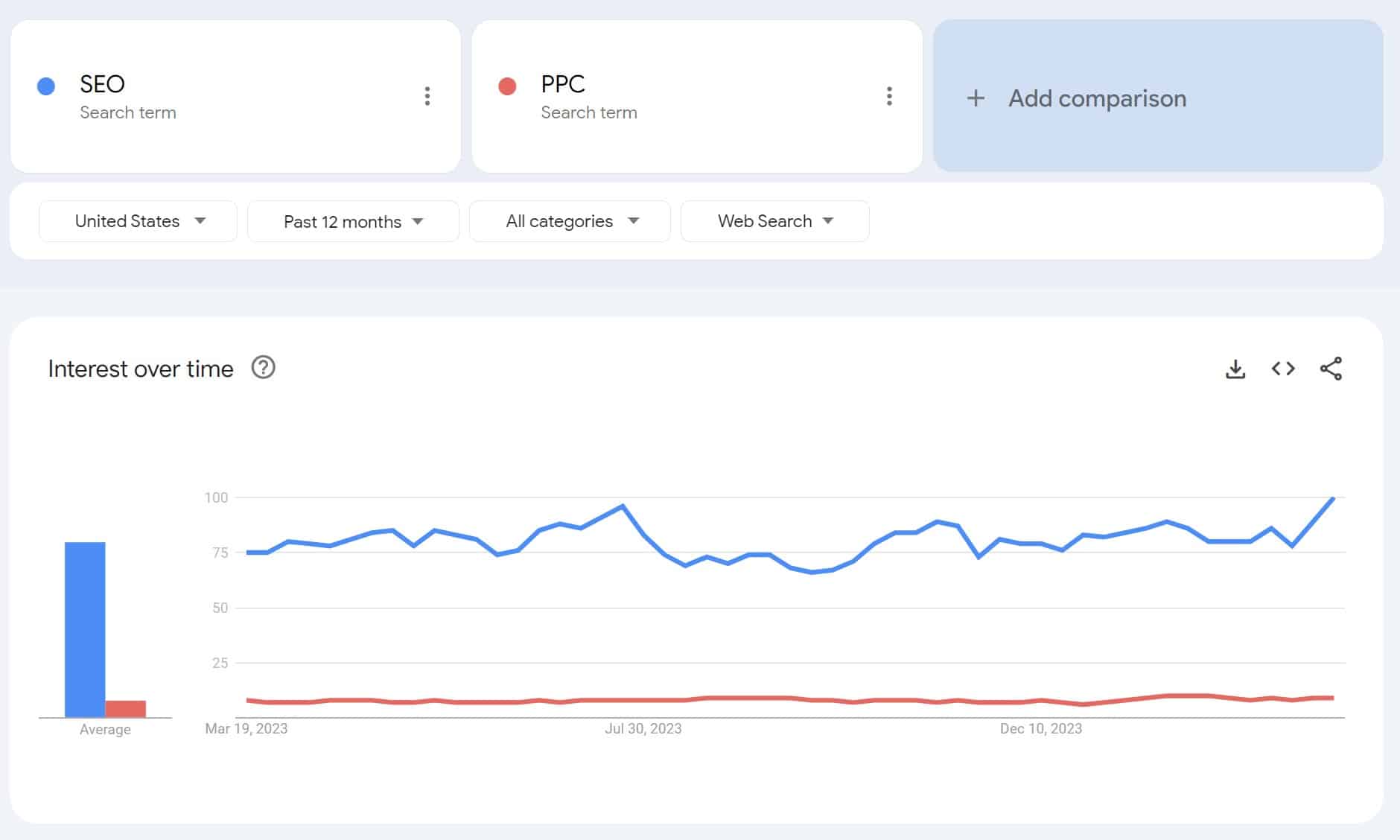
From there, you would want to do further research into the overall search volume and competition level. You may very well find that because SEO is more popular, it also comes with much steeper competition. Remember that popularity can hinder almost as much as it helps!
Rather than targeting a highly competitive term, it may be more beneficial to go after the less popular of the two if you find it still has a relatively high search volume.
For example, to start with keyword research, a home remodeling company might look up “kitchen remodeling” and “bathroom remodeling,” comparing the two over a 12-month period.

Both appear to be extremely popular and have increased in popularity in recent months, but “kitchen remodeling” less competitive, as Google Keyword Planner shows.

Key Takeaways:
- View interest for specific SEO terms looked up on Google
- Focus on valuable long-tail keywords
- Compare two or more keywords to see how they perform
- View “Interest over time” to see Google keyword trends for a particular period
- Look at related queries for additional ideas
#2: Content and Topic Ideas
Stuck in a rut for what to write about next? Google Trends can be your muse.
Tapping into Trending Queries
By exploring trending queries, you can tap into topics that are current and likely to engage your readers. Use this tool to gauge what’s capturing public interest right now or look at historical data to predict future trends.
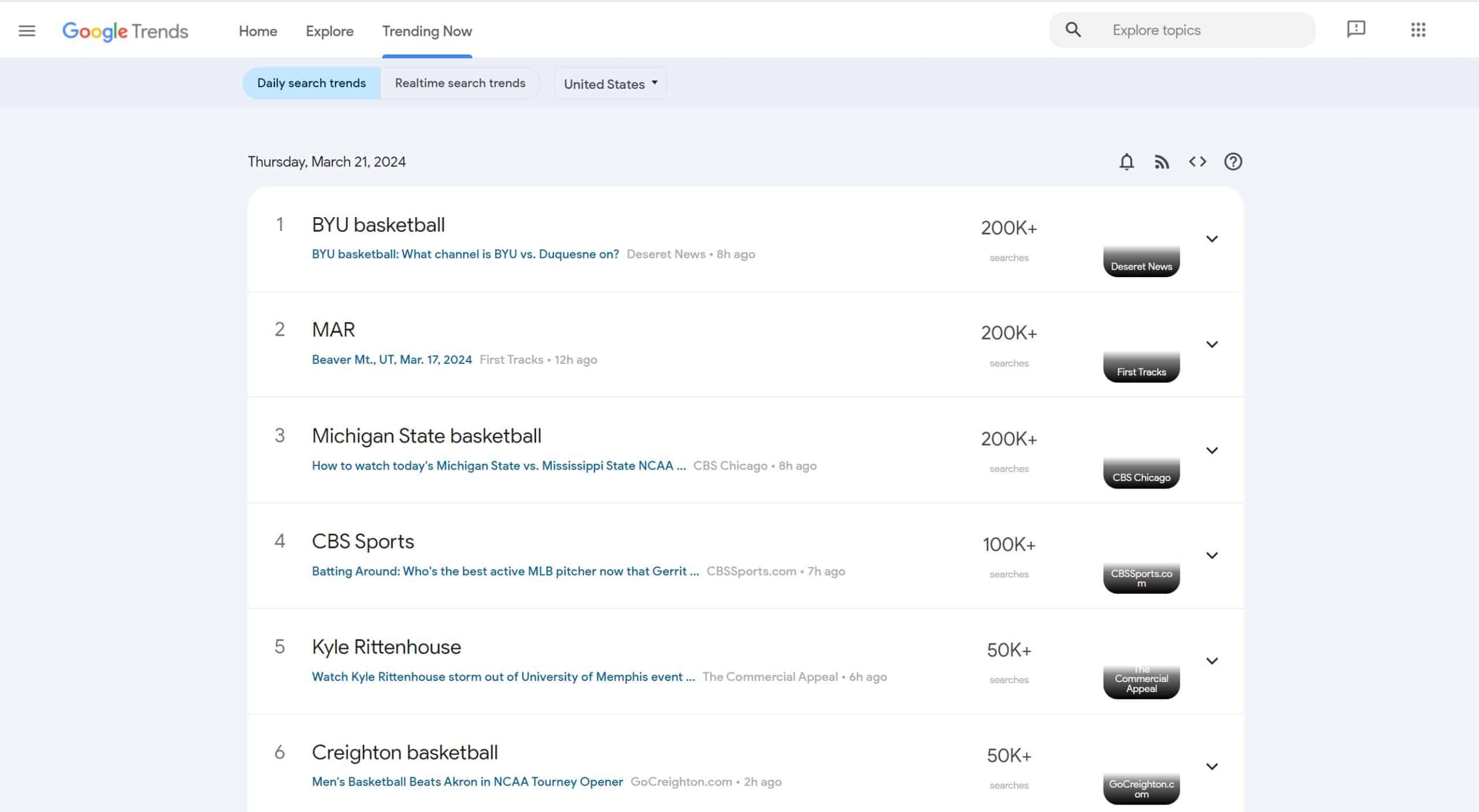
Crafting content around these areas not only positions you as a thought leader, but also aligns your message with your audience’s current interests.
The above car dealership example might want to look at trends to get some marketing ideas based on the automotive market’s performance.
In fact, at the time of writing this, many of the trending topics in “Autos and Vehicles” for the past week pertain to stock and recalls, which could indicate the direction the dealership might want to go in with their content topics, such as blog posts discussing vehicle recalls and how vehicle owners can address them:

Below each individual keyword’s “Interest by subregion” window, you’ll find “Related queries.” This area can show rising and top Google keyword trends, including percentages indicating changes in popularity.
So, how often is a word searched in Google related to “workout clothes,” for instance?
Let’s check out the top queries for that 12-month period:

Example: Workout Clothes Search Trends
An ecommerce brand selling workout clothes might use these trends to inform the specific apparel they want to market in their store, including clothing that’s non-toxic or made with cotton materials.
Keep in mind these queries won’t always be relevant for your brand, but I challenge you to get creative. Maybe sometimes there won’t be a trend worth writing a blog about, but maybe it’s worth a video or social media post.
Key Takeaways:
- Look for trending topics in your industry
- Choose a specific period to see current and past trends
- Remember that even seemingly irrelevant topics can inspire valuable content ideas
#3: Seasonal Navigation Trends
Every season has its rhythm and patterns that shape user behavior online.
Google Trends helps you understand these seasonal shifts by highlighting search patterns that align with times of the year.
For example, take a term like “cold remedies.” No surprise here: peak search season for cold remedies in the US is consistently October to February.
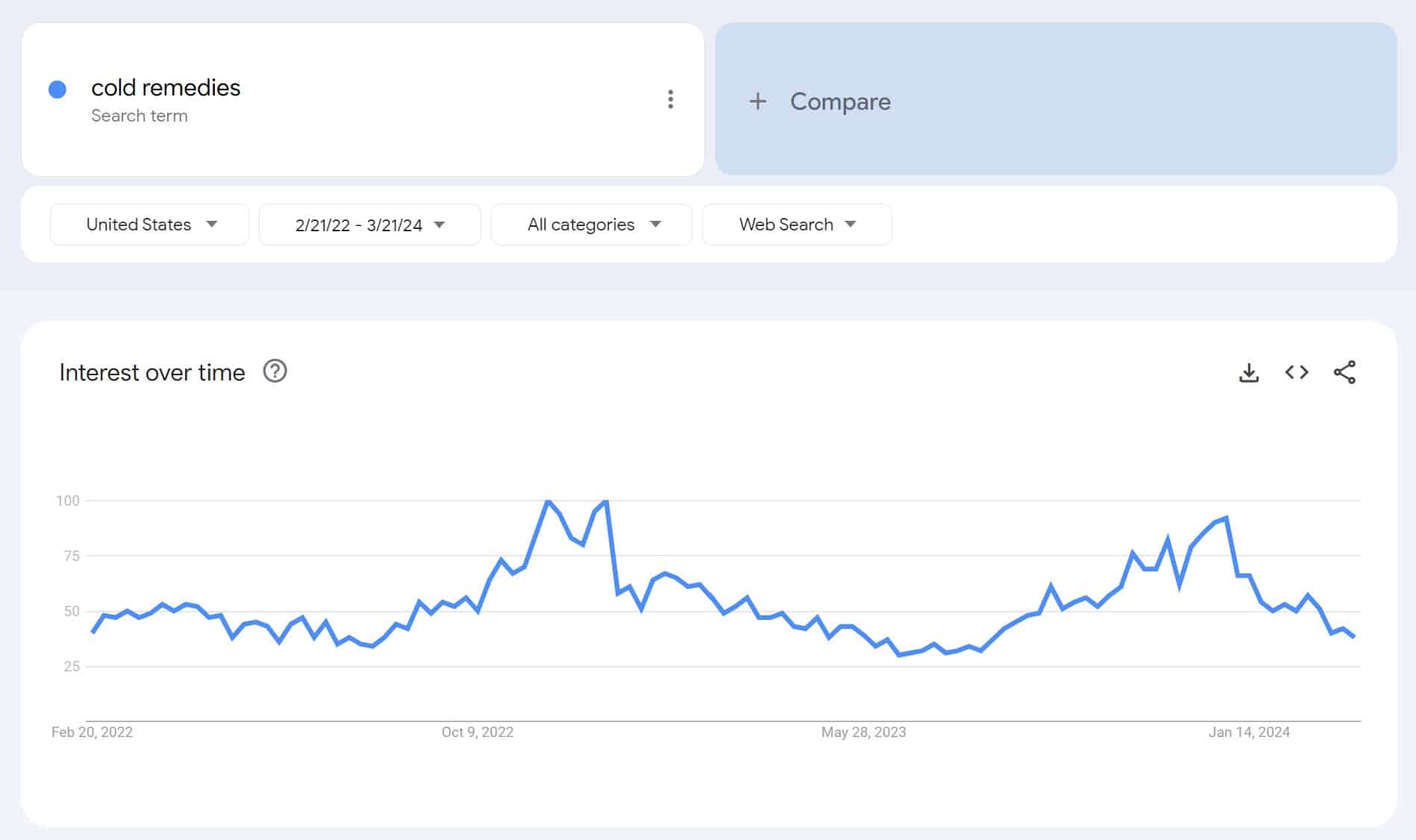
Plan your content and marketing campaigns to coincide with these trends, and make sure your business stays ahead of the seasonal curve.
For example, if I owned a healthcare blog, I would want my content on cold remedies to be done and written by the time it starts trending, and heavily promote during those peaks.
Another example might include an ecommerce brand that sells sunscreen and wants to find out when to market this product. To determine this, they might look at when “sunscreen” gets the most searches over the course of a year.

This data shows that most people express interest in sunscreen in the early summer months, from May to about mid-June.
Based on that info, it might be best to optimize sunscreen products and advertise for them right at the beginning of summer or even late spring.
Key Takeaways:
- Identify seasonal trends in your industry to align content and marketing efforts.
- Use Google Trends to analyze search patterns and predict peak times for specific topics.
- Plan and publish content ahead of seasonal spikes to maximize visibility and engagement.
- Businesses across industries can leverage seasonal insights, from healthcare blogs to ecommerce brands.
#4: Google Trends for Local SEO
Geography also affects search trends all year round. More than likely, there’s a higher demand for your product or service in a certain area.
For businesses looking to make a mark in their local community, Google Trends is essential. It shows you what’s of interest to people in your area, giving you localized insights that can shape your local SEO strategy.
For example, if you sell sports equipment and want to know where to find the best place to sell ski boots is, you could do so by plugging the keyword into Google Trends.
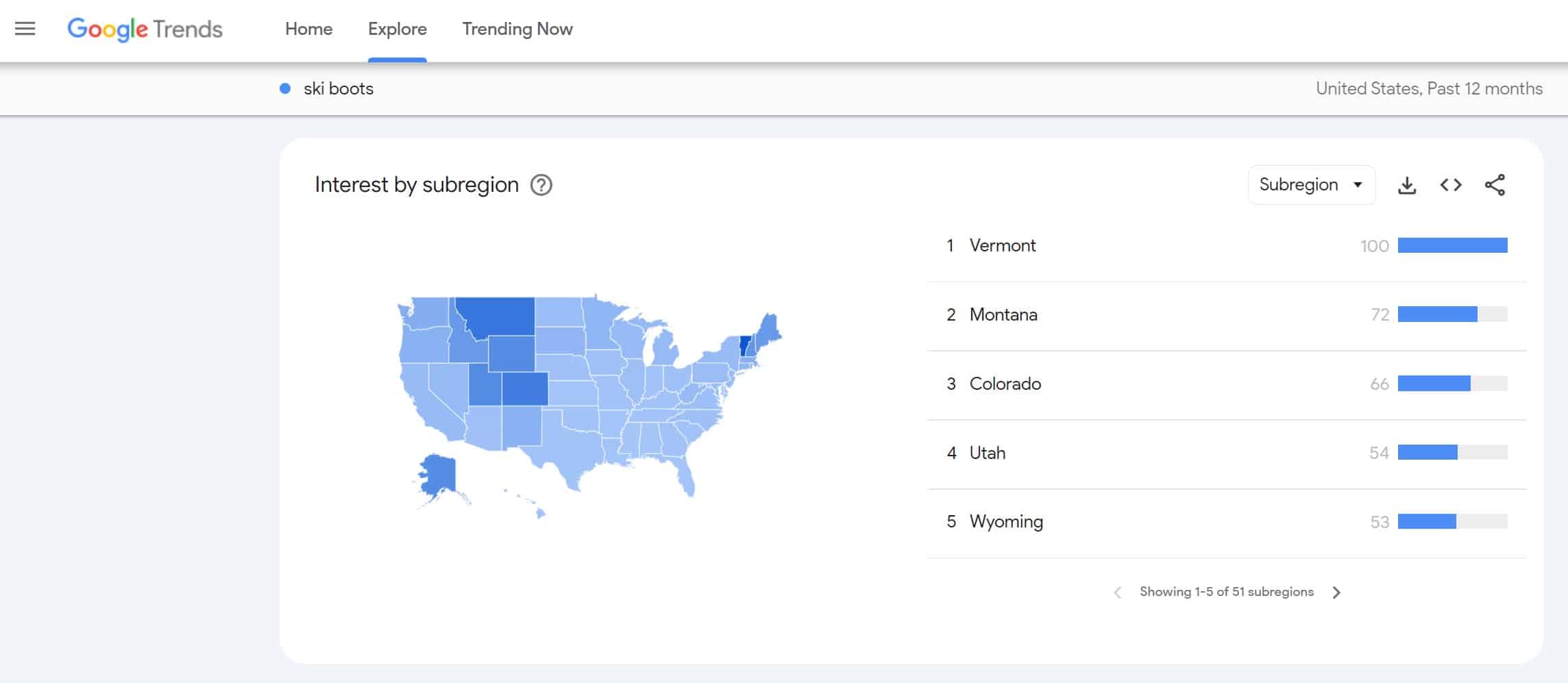
Here, you can again view data based on state, city, and metro to get as narrow an audience as possible.
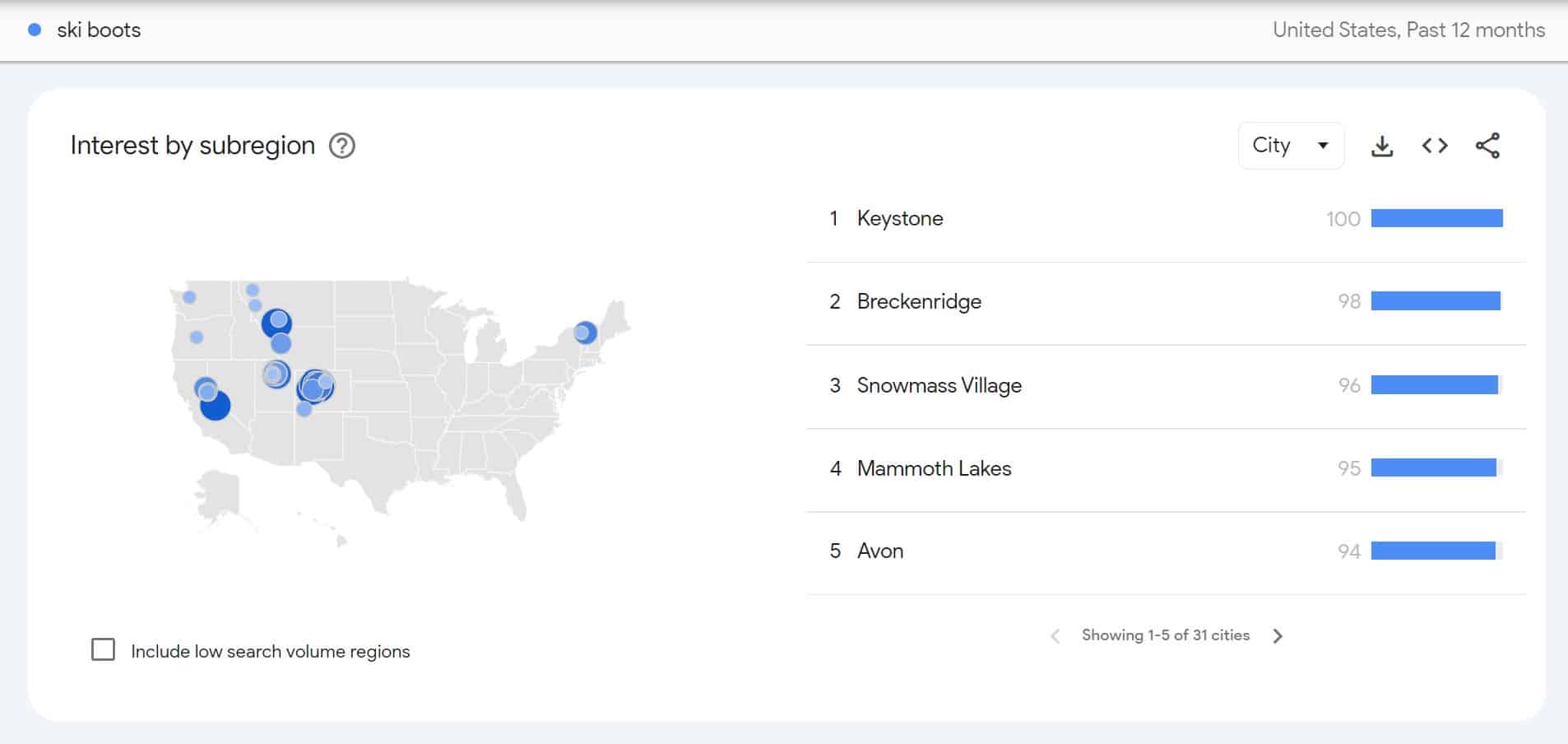
Then, when you’ve uncovered the areas where searches for that keyword or most popular, you can run local campaigns during peak popularity. You might even want to create local pages like “ski boots in keystone,” “ski boots in Breckenridge,” etc.
Google is primarily concerned with user experience and relevance. When you add location information to your content, you could improve its relevance for your target areas. So Google will potentially show your content to more people in those areas.
Key Takeaways:
- Use the “Interest by subregion” feature in Google Trends to see how trending keywords and topics perform in target regions
- Narrow down your searches by country, metropolitan area, or top cities.
- Use these trends to guide your local SEO strategy and other locally targeted marketing efforts
#5: Competitor Research
Curious about how you stack up against the competition?
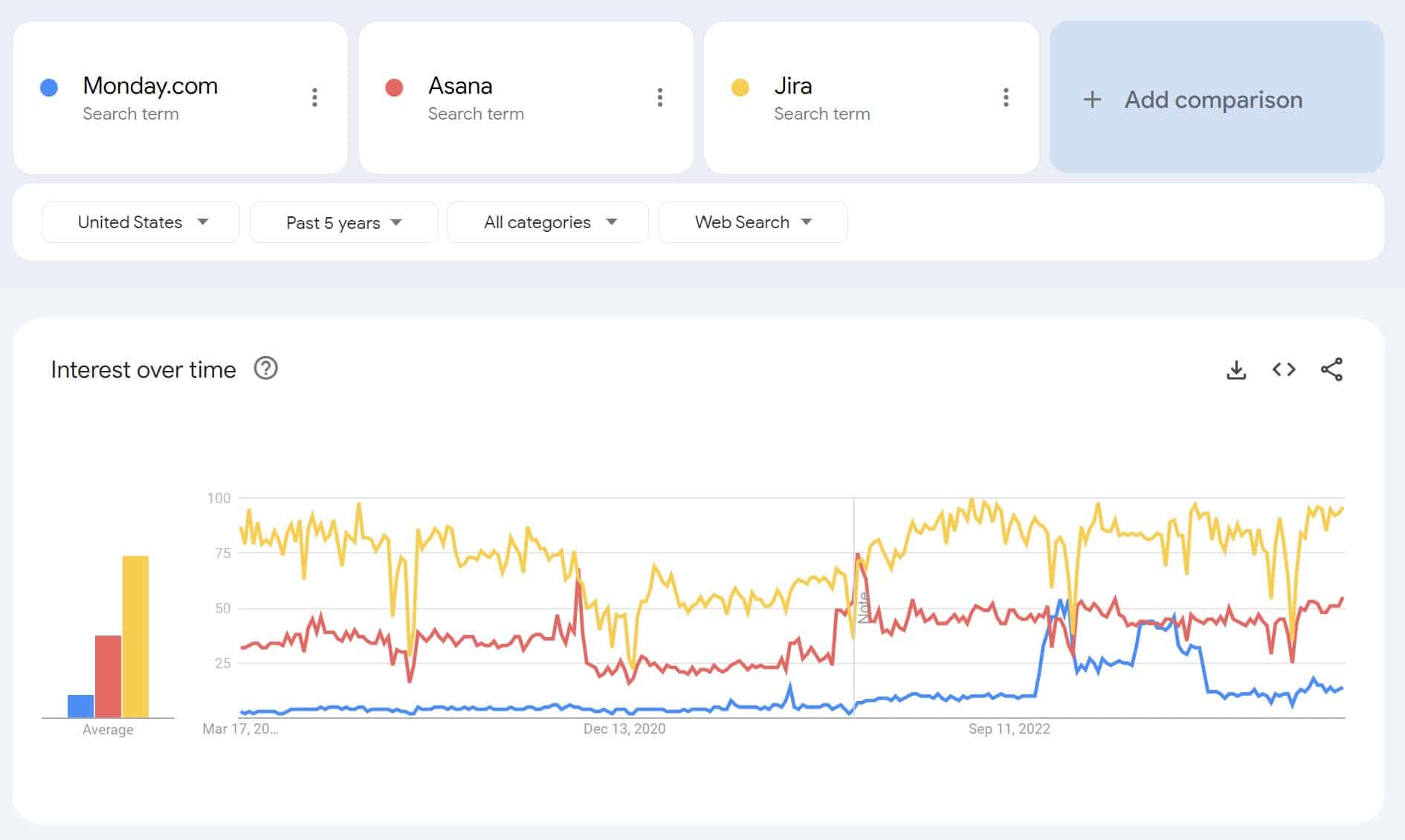
Google Trends can help you size up the landscape by comparing search interest in your brand versus your competitors.
You can see who’s leading the way in public interest and why, which can help you pinpoint areas of your strategy that need some work, likely primarily brand awareness.
In many cases, competitors will also appear in “Related topics.” For instance, take a look at the following rising topics for “men’s clothing:”

This data reveals how “Men’s Wearhouse” is a “breakout” topic, while some other highly popular brands are trending, including Uniqlo and J.Crew.
You can then see why certain brands are performing better to potentially get some ideas for your own.
For example, you look up Men’s Wearhouse in the news, and you can see that they’re advertising a massive sale:

Note how the bottom appeals to a “seasonal upgrade.”
A company selling suits might want to offer their own discount to compete during this period.
Key Takeaways:
- Search competitors’ brand names as keywords and topics to see how they perform over a specific period
- Compare multiple competitors to find the most critical competition in your industry
- Look in “Related topics” to see if competitors appear in top or rising topics
#6: Using Google Trends to Investigate Traffic Dips
Have you ever experienced a sudden traffic dip to an otherwise steady blog post?
In the window below the search field, you’ll see the “Interest over time” section, which displays a graph showing how many people search for a topic over a given period.
You may find that a search term that once experienced a super surge in volume simply isn’t popular anymore.
Case in point: a fidget spinner.
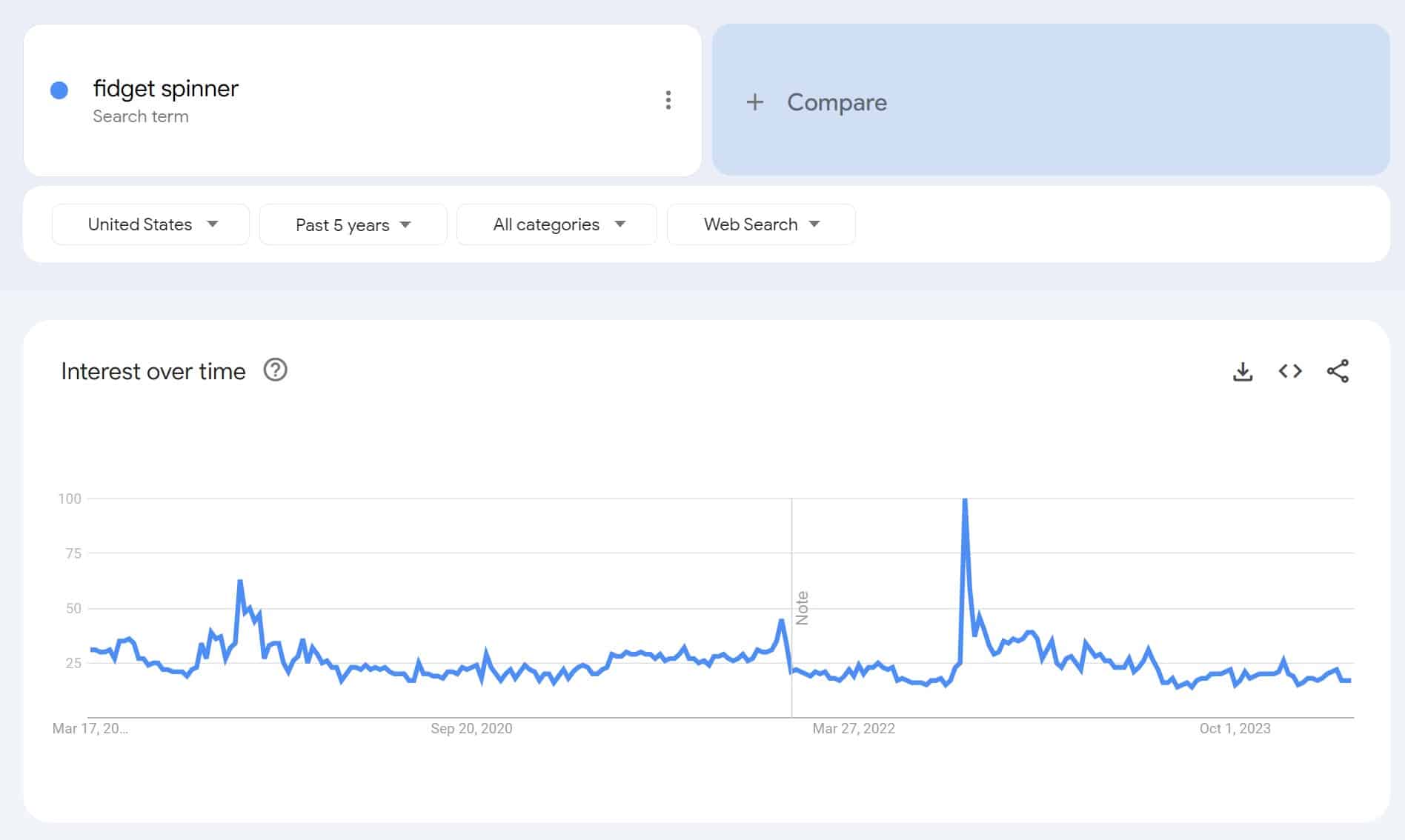
Notice a very clear drop-off point where the keyword seems to drop off entirely – with no recovery in sight.
In that case, it’s probably a post not worth wasting a refresh on. However, if you are using seasonal keywords or expect traffic to pick up again later, make sure you continue to monitor Trends. Think about using related keywords to give the post a boost during its off-season.
Here, we see how “workout clothes” tends to see considerably more searches than “athletic wear” in the past 12 months:

In the above example, we can see that while “athletic wear” doesn’t tend to perform much better or worse over time, Google Trends searches for “workout clothes” tend to be at their highest during the winter months.
Based on that detail alone, it might be best to market for “workout clothes” from around November through December.
Here is another example from Tubi, which was the brand behind one of the most popular commercials during the 2025 SuperBowl. Tubi’s marketing managers can see on Google Trends the impact the commercials had that day and the related topics people searched for.


Key Takeaways:
- Look for terms to find ones that see dips in traffic in a certain period
- Identify and avoid terms that have dropped off entirely
- Take into account how seasonal trends for some terms might impact traffic dips or spikes
#7: Creating SEO Topic Clusters
Google Trends allows you to see related topics and related queries to the keyword you searched. This could help inform what other subtopic pages you should create. Use the correct internal linking structure and voila, you have a topic cluster based on trending terms your audience is looking for.
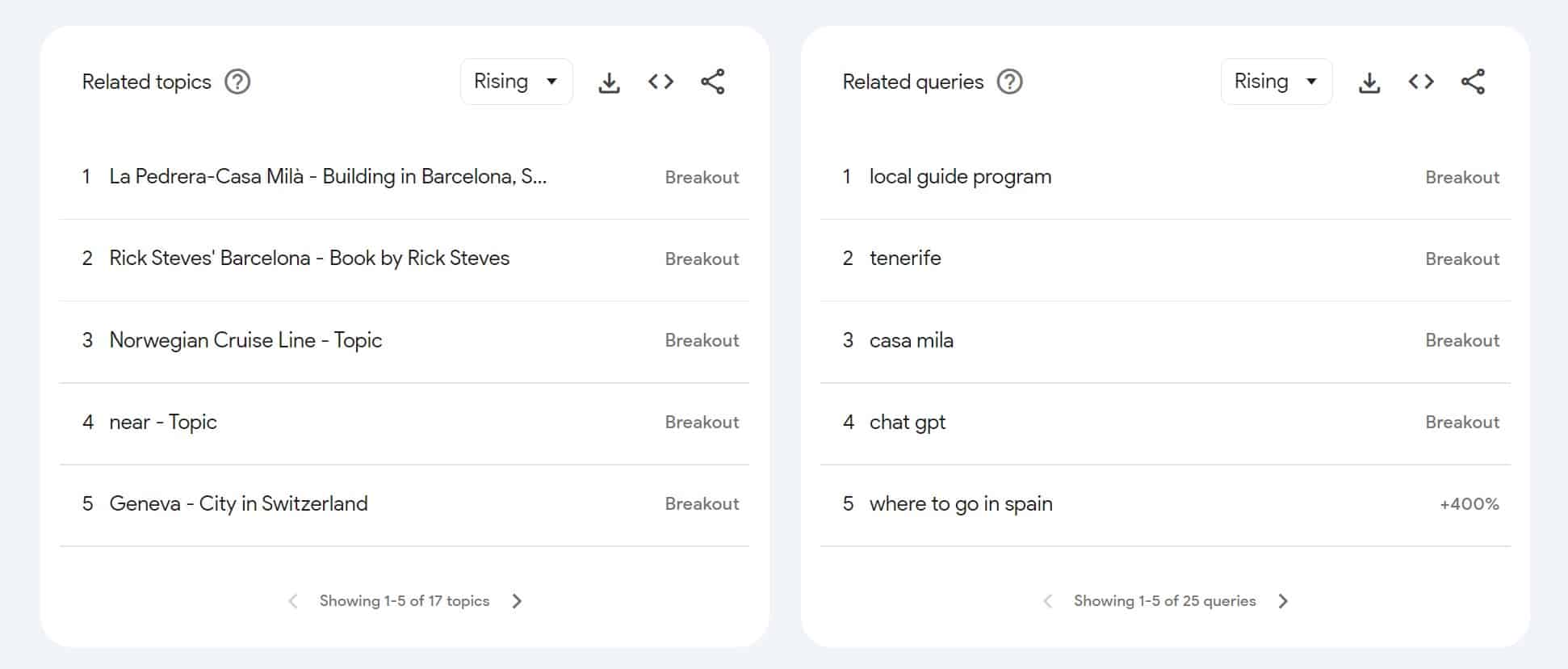
In this example for the query “barcelona itinerary,” if I owned a travel agency, these are related topics and queries I could also write content on and link it back to my parent page to create a cluster.
Another example may include a fitness company that wants to build content around “at home exercises,” which gives the following ideas covering specific goals behind those workouts:

Key Takeaways:
- Look at related queries and topics in Google website trends to get ideas for subtopics
- Enter short-tail keywords to see which long-tail terms come up based on what’s popular
How to Use Google Trends for Market Research
Let’s explore how to use Google Trends for market research in addition to product research.
As an example, let’s look at what kind of demographics there are for “electric vehicles.”
To start with, consider the interest in this type of vehicle over time in the U.S., which has remained relatively steady since early 2022.

Now, consider the top subregions within the U.S. where people are searching for these vehicle types. The District of Columbia seems to be where the biggest market is, followed by Vermont.

Looking at an even more local level, we can see that the top markets for electric vehicles are in the cities of Washington, D.C., Scottsdale, Arizona.

What are some other related queries that people are looking up? Let’s take a look:

This data suggests other popular searches among these audiences include “electric cars” and especially Tesla-brand vehicles.
To narrow things down even more, consider the related queries that have been rising in popularity for the last year.

It looks like customization is something that a growing number of people want with these vehicles.
Of course, Tesla tops the branded search above, so let’s look at related trending topics to find out what’s new in this market:

Tesla looks to be trending as one of the top brands, followed by the Hyundai Ioniq 5 and Rivian.
Based on all of this info, the top market for electric vehicles seems to be people in Washington, D.C. who are interested in Tesla and Ioniq vehicles. Many of these audiences are also in the market for customization.
FAQs
1. How often is Google Trends data updated?
According to Google, Google Trends data updates about every 10 minutes through the “Trending now” feature. This real-time updating keeps all data consistently current to help you stay up to date with the latest market trends.
2. Can Google Trends be used for free?
Yes, Google Trends is a free tool among many other Google tools, making it a potentially integral part of a cost-effective marketing strategy.
3. What’s the difference between Google Trends and other keyword tools?
Although other keyword tools can give you insights into metrics like average monthly search volume and competition levels, Google Trends can provide details about current trends and markets for keywords, along with effectively visualized comparisons for different keywords.
Get the Most from Google Trends With Ignite Visibility
To fully harness the power of Google Trends for your brand, it’s always best to work with experts who can handle every aspect of your marketing campaigns. At Ignite Visibility, we can implement Google Trends and a wide range of other helpful tools to fully optimize your efforts.
Hundreds of businesses use Ignite Visibility to help navigate the latest digital marketing trends, and use this to inform a strategic digital marketing roadmap. Whether you’re a local business owner or an international corporation, we’re here to support your business goals.
Ignite can help your brand:
- Find Great Keywords: Dive into the world of data-driven keyword research to uncover what your audience is searching for, allowing you to craft content that’s both relevant and timely.
- Create Buzzworthy Content: Use the insights from Google Trends and other digital marketing tools to anticipate and capitalize on shifts in consumer behavior, so your content stays fresh and, more importantly, sought after.
- Catch Seasonal Waves: Discern the predictable patterns through the year and align your marketing efforts with when interest in your products or services naturally peaks.
- Boost Local SEO: Reveal location-specific keyword trends, empowering you to capture the local market with regionally optimized content.
- Keep an Eye on the Competition: Position your brand ahead of the competition by analyzing search trends, giving you the foresight to pivot your strategies effectively.
Ready to connect more authentically with your audience? Get started today with a free proposal!

