Local businesses with inaccurate or incomplete Google Business Profiles can lose customers before they ever reach their website, as these assets put brands at the forefront in local Google searches.
According to BrightLocal’s Consumer Search Behavior Report, 46% of search queries have local intent behind them, and 75% of consumers decide which business to go with in under 30 minutes, making the Google Business Profile a critical element that gets a brand in front of these users when they’re most likely to take action.
To successfully set up and manage your Business Profile, you need to establish eligibility, optimize key information, improve customer actions, and measure the results.
In this blog, Associate Director of SEO, Eric Solomon, will explain how to set up your profile and optimize it to generate more organic traffic for your business.
What You’ll Learn:
- Benefits of Having a Google Business Profile
- Set Up Your Google Business Profile
- Optimize Your Google Business Profile
- Growing and Managing Your Google Business Profile Audience
- How to Manage GBP Profiles for Franchise and Multi-Location Businesses
- Managing Access and Permissions
- Real-World Examples and Case Studies
- Monitoring and Analytics for Google Business Profile
- Common Mistakes to Avoid With Google Business Profile Management
- FAQs About Google Business Profile
Understanding Google Business Profile vs. Google My Business
You may wonder: Is Google My Business the same as Google Business Profile? Simply put, yes. Google Business Profile was formerly known as Google My Business until 2022, when Google decided to rebrand this tool and refine it and other local SEO solutions.
Generally, it still serves the same function, with Google business listings allowing businesses to maximize their visibility on Google Search as well as Maps while connecting with customers in a highly convenient way that supplements other SEO and PPC efforts.
Also, unlike your Google My Business profile, this newer business profile allows you to directly manage your profile on both Google Search and Maps without the use of a separate dashboard. In turn, you can get more control over how people see your profile on these platforms.
With a well-optimized Google Business Profile, you can more effectively map the customer journey and engage people toward the top of the funnel as people look for your offerings or brand using Google services.
My Expert Opinion on Google Business Profiles
Google Business Profile is an exceptional tool every business and brand should use. Not only is it crucial for enhancing search visibility, but it also helps form a connection between the business and its audience.
I’ve seen firsthand how it can significantly improve a brand’s online presence, increase its awareness, and drive organic traffic their way.
One of our franchise clients was able to get a 44% year-over-year increase in website sessions and a 50% boost in phone calls through a well-optimized Google Business Profile, while another client with 1,500 locations achieved 25% more traffic from this asset along with other local SEO optimizations.
Action Item: Review your Google Business Profile and note where you can optimize it to improve your brand awareness and drive organic traffic in your direction.
Benefits of Having a Google Business Profile
There are several great advantages of creating a Google Business Profile, including:
- Increased Local Visibility: Businesses can ensure local audiences in their service areas can find them with locally targeted GBPs.
- Access to Valuable Audience Insights: You can also gain more insight into your target audiences with reviews, questions, and direct messages.
- Manage Customer Interactions and Grow Your Audience: Respond to customer reviews and messages to build your business’s reputation and showcase your responsiveness while you also grow your Google Business Profile audience.
Keep in mind that any type of business will benefit from a Google Business Profile, not just brick-and-mortar stores. Having a GBP will put your business on the digital map and help you connect with all audiences, regardless of your industry or business model.
To further prove the effectiveness of Google Business Profile for local SEO, consider the following key statistics:
- Businesses that complete their business profile descriptions comprise the top 75% of businesses appearing in the top three positions in search results.
- 87% of people searching for local businesses online conduct these searches on Google.
- SEO professionals agree that the Google Business Profile’s primary business category is the main local ranking factor for Google’s Map Pack.
There are many case studies showcasing the benefits of good Google Business Profile management.
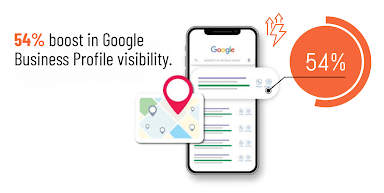
For example, one franchise with multiple locations and brands was able to boost their business profile’s visibility by 54% with the right approach to optimization.
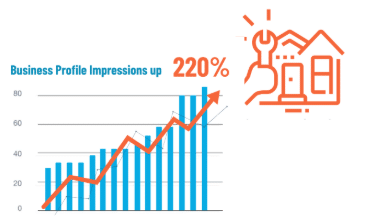
Meanwhile, a home services brand saw a 220% increase in organic traffic with the help of GBP optimization and Google Posts to regularly refresh its profile.
A cleaning brand was also able to increase local leads by a whopping 123% in part from optimizing its Google Business Profile for local SEO.
Set Up or Claim Your Google Business Profile
Wondering “How do I set up a Google Business page?” Here are some steps for businesses to develop highly optimized business profiles.
The first step to discovering how to increase Google Business Profile traffic is correctly setting it up. Here are four easy-to-follow steps on how to set up a Google Business page.
1. Create a Google Business Account
Creating or claiming your profile starts with setting up a Google Business account.
2. Claim or Create a Business Listing
You can create or claim your business listing through Google Maps once you set up your Google Business account.
Be sure to search for an existing listing before creating another, as Google may filter out or suspend a duplicate Business Profile when one already appears.
Also, to be eligible for a Google company profile, you need to have a physical location; online-only businesses typically don’t qualify, as you will need to verify your location, which we’ll cover in the next step.
When claiming a listing, you may need to request access from an existing owner. If you see the message “Someone else may manage this Business Profile,” choose Request Access, complete the form detailing your information and why you need access, and click Submit.
Once you request access, you will receive an email confirmation, and the current profile owner will also get an email and have three days to respond to it. Once approved, you’ll get an email to finalize the approval that makes you the new owner.

3. Verify Your Business and Secure Access
To protect businesses on Google Business Profile, you must verify your business.
You can verify your Google Business Profile using one of the following methods:
- Video Recording: Google allows you to record a video detailing your business, including your location, business operations, and proof of management.
- Phone Call or Text Authentication: You can also get verification through your business phone, whether via a call or text providing a code.
- Email: Google can email you with steps to verify your account.
- Live Video Call: Another option is getting on a live video call or text chat with a Google support rep to verify your account, which will follow much of the same steps as recording a video.
- Mail: Get a code delivered to your physical business location to verify the listed address.
Google ultimately determines which verification methods you can use based on the options you select during setup.
When verifying, keep primary ownership under business control, and invite managers individually with two-step authentication to maintain secure Google Business Profile management.
To learn how to contact Google about your Business profile, click here.
4. Enter Your Business Information
Once you have claimed your profile, it’s time to get to work! Add all your important business information, such as:
- Business name
- Address
- Phone number
- Website URL
- Business category
- Operating hours
- An in-depth description
- High-quality photos
- Products or services offered
- Special attributes
- A call-to-action (if applicable)

Entering the right category and description here is key to helping maximize visibility and grow your Google Business Profile audience.
Pro Tip: Make sure your NAP (name, address, phone number) is consistent across all of your digital marketing platforms, including your website, social media, and local business listings. This will help improve your SEO and make it easier for consumers to find you.
Choose the Right Location Settings
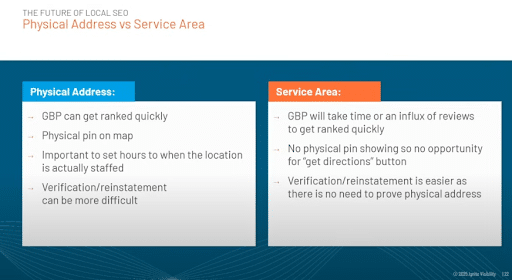
Now, when establishing business profiles, one of the main considerations is whether you want to target a physical address or a service area.
Specifically, you have the option of making your Google Business Profile a storefront, service-area, or hybrid business.
For example, a mobile plumber or auto repair company would go with a specific service area. Meanwhile, a restaurant might function as a hybrid, with both a physical location and online ordering services allowing people to get delivery within a certain service area.
You get a physical pin on Google Maps as a physical business, but you will need to establish the hours when staff are present at your location, and it can be more challenging to verify and reinstate your business.
How does the service area work in Google Business Profile? While this type of business might take longer to rank, that doesn’t mean that service-area businesses will always have a difficult time ranking.
Generally, if you have a physical address, it’s always best to include this over a service area when claiming or verifying your listing.
Also, if you’re opting for a service area, hide any addresses where you don’t serve, and keep in mind that adding service areas doesn’t guarantee visibility for people in these areas.
Troubleshooting: Common Setup Issues & More
With a better idea of how to create a Google Business listing, here are some common issues and potential fixes to get and keep your profile up and running:
- Lost Ownership: Whether you forget your GBP login or someone else claims ownership of your business, you can go through Google’s Business page and click on Manage Now. From there, you can follow the steps and prompts to add a location to your business and request access to your account.
- Negative Reviews: If you get a negative review from a customer, it’s best to respond with an honest, thoughtful, and respectful comment addressing any issues, which could help your reputation. However, if the review comes from a former employee or represents another conflict of interest as defined by Google, you may report the review.
- Suspended Account: There are many potential reasons why Google might suspend a Google Business Profile, but accidents can happen. For example, you might get suspended if you make too many alterations to your profile at once. In the event of a suspension, you can submit a reinstatement request, and Google will review your profile to determine whether it qualifies for reinstatement.
- Rejected Google Posts: In some cases, Google might reject a Google Post, usually if it contains language or images that qualify as “sensitive” topics. You might inadvertently use an “offensive” word, for instance. In these cases, it’s best to continue changing the language or images in your post and review Google’s sensitive categories to ensure your posts aren’t in violation of Google’s terms.
Optimize the Information That Supports Local Visibility
Once you’ve claimed your profile, it’s time to build it out so that more people can find and engage with your listing. Let’s look into what you can do to improve your Google Business Profile optimization.
So, what is Google Business Profile optimization, and what does it entail? Optimizing your profile involves adding clear photos and other elements to your profile to boost rankings and engagement.

You must also appeal to Google’s need for Google Business Profiles that appeal to:
- Relevance: Your business and offerings need to align with people’s search intent and the kind of solutions they want.
- Distance: Businesses must be close enough to prospective customers’ devices to show up in local search results.
- Prominence: Your business must also be trustworthy and reputable to customers both online and offline, which you can build and maintain with customer reviews and ratings, directories, links from other authoritative sites, local citations, and positive brand mentions.
The following is a checklist to help you in creating a Google Business Profile that truly connects with audiences:
1. Use Accurate Business Names, Descriptions, and Categories
You might be tempted to include keywords in your business name, but accuracy is most important. Your profile name should match its real-world brand counterpart, encouraging people to trust you when they come across you online and learn more about your business on your website or other channels.
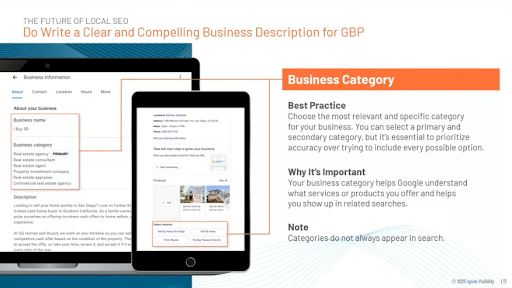
Another one of the most important steps in GBP optimization to help customers convert involves writing a detailed description for each profile explaining what products or services you offer, along with a list of categories to further define your business.
Choose the most specific accurate industry as your primary category, and all others that you fall under as your secondary ones. However, be judicious about secondary categories, as adding irrelevant ones will only hurt conversions as people find you don’t offer what you say you do.
Additionally, keep in mind that category changes may require reverification, so try to avoid changing categories too frequently.
Include all relevant information to help your potential customers understand what you’re all about before ever landing on your site, which can significantly increase Google Business Profile traffic to your website.

Naturally incorporating keywords in descriptions and categories can also help with SEO, as you’ll optimize for “near me” keywords and other relevant locally specific phrases.
2. Test Different Categories if You Fall Under Multiple
Some businesses might offer multiple types of products or services under various categories, which can make it difficult to pin down the right category for your Google Business Profile.
In these cases, it’s often best to try out multiple primary categories to see which one ranks the highest and drives the most engagement.
At the same time, you should choose as many relevant categories as you can for your profile, with the ability to select up to 10.
3. Add Service Areas in Addition to a Physical Address
If you serve customers within a specific region, you will want to include details about your service areas in addition to your company’s physical address.
As mentioned, it can be easier to rank for GBP if you include a physical address over service areas when establishing your profile, but it’s best to have both to fully optimize your profile.
People would then be able to find your business location on Google Maps while also being able to find out whether you serve their area through voice search or certain “near me” searches.
Including your service areas also ensures that the people in those areas know for certain that you’re the right business for them.
4. Complete Hours, Services, Attributes, and Descriptions
Update all regular business hours as needed, along with holiday hours, phone numbers, and website links, connecting each Google Business Profile to its corresponding webpage.
In your list of services, accurately describe ones you actually offer, as well as offers specific to each location.
As you discover how to set up a Google page for business, you can also integrate various attributes and special features that can further generate organic visits for a Google Business Profile.
First, let’s look at attributes, which customers can select to describe your business. Examples of these attributes on a Google Business Profile may include:
- Accessibility
- Activities
- Amenities
- Lodging Options
- Crowd
- Dining Options
- Highlights and Offerings
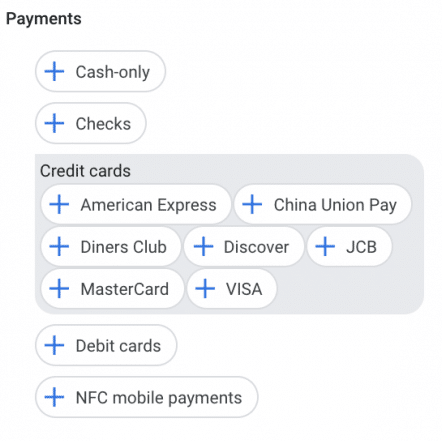
There are also plenty of special features that strengthen your Google business page.
Historically, the Q&A section allowed potential customers to ask and view answers to common questions directly on a business profile. However, Google has begun phasing out the traditional Q&A feature in favor of AI-generated answers that appear directly in Google Search and Maps. Instead of pulling from a static Q&A section, Google’s AI now generates responses using information from your Business Profile, website content, customer reviews, and other trusted sources.
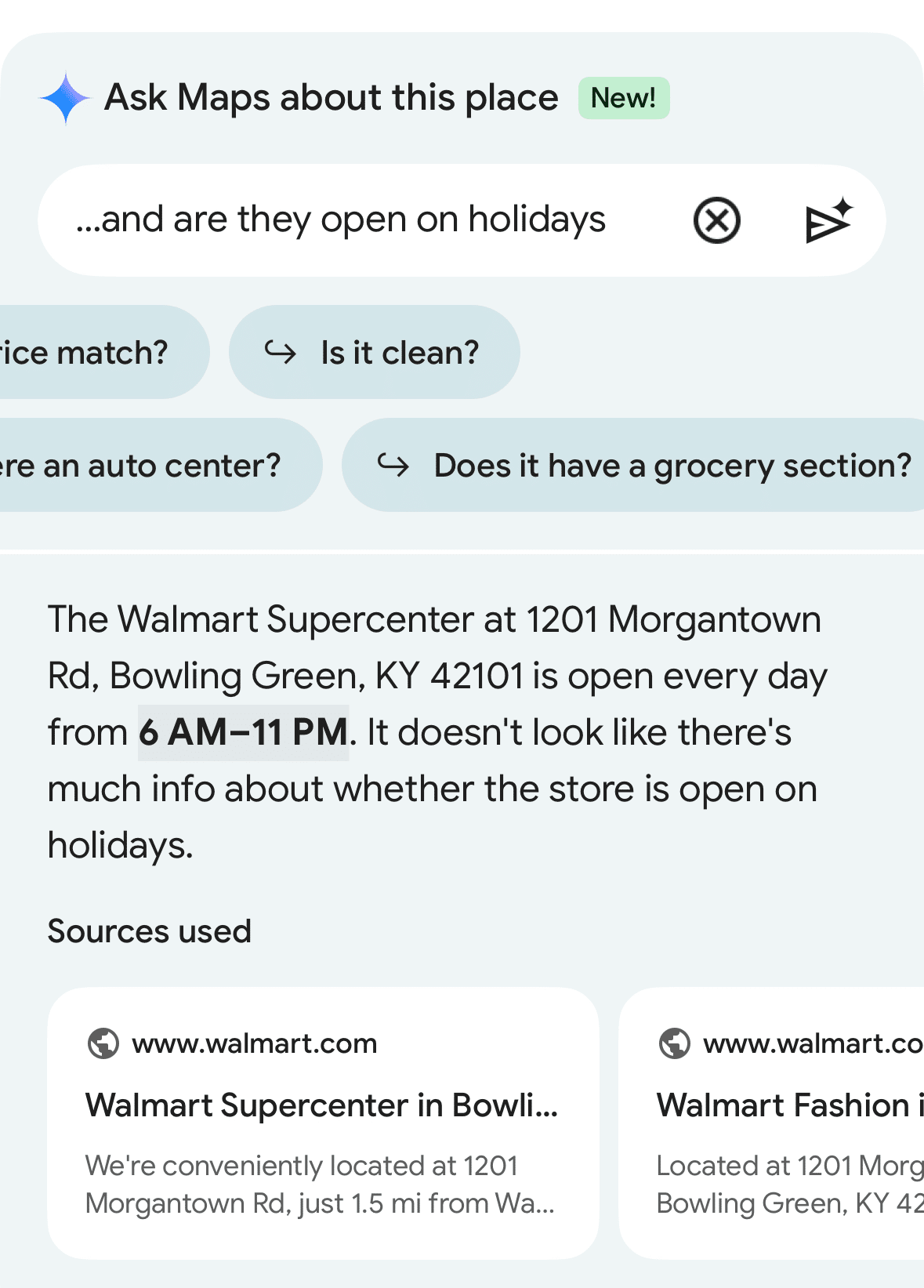
This shift makes it even more important for businesses to maintain accurate profile information and publish clear, well-structured content on their websites, particularly FAQ pages and service descriptions, so Google’s AI can surface the most relevant and accurate answers to searchers.
Apart from AI-powered answers, you can still optimize the following Google Business Profile features:
- Products
- Services
- Messaging
- Industry-specific features like class ratings and amenities for hotels, links to book reservations at a restaurant, and appointment booking buttons
Taking full advantage of these features helps businesses improve visibility, engagement, and performance as they effectively manage a Google Business Profile in an AI-driven search environment.
5. Leverage Relevant Keywords in Google Posts and Updates
Similarly to a social media platform, Google Posts allows you to share news, updates, and other information with your audience.

Use this space to post upcoming deals, events, and highlights. It will help improve your SEO and provide the perfect opportunity to invite your audience to interact with your business! As you post on your GBP, you should naturally incorporate relevant local keywords that help with GBP optimization efforts.
6. Use AI Content Creation for Descriptions and Posts
When used ethically, AI content can greatly impact SEO and streamline processes to help you more effectively optimize business profiles.
Specifically, you can use AI to help produce high-quality business descriptions and summaries for blog posts and other content in Google Posts, supplementing your other human-written content.
Just be sure to edit content and ensure it sounds natural, matching your brand voice when possible.
7. Set Up 2FA to Combat Spam and Unauthorized Changes
Be sure to protect your Google business page with the right anti-spam and anti-hacking measures. As you learn how to set up a Google page for business, you should enable two-factor authorization (2FA) that requires account managers to log in from two sources before they can access the profile.
Additionally, use a strong password and secure it when sharing Google Business Profile access with members of your team, ideally with a secure password management system.
Also, limit access to those you trust most to handle your Google Business Profile, and regularly review your profile to identify any unwanted changes.
To help you manage your Google Business Profile, you may also set up email alerts and notifications that can let you know if anyone is requesting access or making changes to your profile, ensuring nothing goes overlooked.
Growing and Managing Your Google Business Profile Audience
There are several ways to grow and manage a Google Business Profile audience and manage it.
How to Grow Your Business Profile Audience
First, it’s important to use reviews and ratings to build your business’s credibility. You can generate reviews by taking the following basic steps:
- Actively encouraging reviews in your messaging (e.g., “If you liked your experience, give us a Google review!”).
- Use multiple platforms to request reviews, including email, SMS texts, and in-person.
- Link to your GBP on your website.
You can also use social media links to drive more traffic to your GBP and other channels, including them when appropriate.
Additionally, regularly engage with customer questions and answers. The more responsive and helpful you are, the more reputable you’ll appear to existing and new audiences.
Proactively engaging your audiences by responding to reviews and optimizing your GBP messaging will help you stay on top of rankings while building trust among your target audiences.
For more tips on how to regularly optimize a large number of profiles for your multi-location business, take a look at our video on How to Optimize 100+ Google Business Profiles at Scale.
How to Increase Google Business Profile Traffic
Here are a few strategies to help you increase your Google Business Profile’s visibility:
- Encourage user-generated content, including images and videos that you can then repurpose for your own marketing efforts.
- Post on your profile regularly to signal to Google that your business is both relevant and active.
- Use service or product oriented keywords to help you reach the right audiences.
- Your Google Posts should also include calls-to-action that are clear and drive more traffic. Remember, the Google Business Profile post size is 1200 x 900 with an aspect ratio of 4:3.
Use exclusive offers and events to attract customers, such as limited deals that generate a sense of urgency and local community events that inspire more people to connect.

Turn Profile Views Into Customer Actions
Match your main action to the business, whether you want customers to:
- Call
- Book an appointment
- Order online
- Reserve
- Visit a location
To boost conversions and eliminate bottlenecks with Google Business Profile management, test the entire mobile journey from initial profile view to completed action, which could help identify where people are getting stuck.
In your Google Business Profile dashboard, update items like:
- Phone routing
- Booking availability
- Location selection
- Broken links
You must also make sure your other assets and teams are ready to convert, as unanswered calls and confusing or irrelevant landing pages will further waste visibility. Properly align landing page content with your Google Business Profile and maximize the availability of sales staff to answer calls as soon as they come in, which will move more people down the funnel.
Let’s look at an example involving Home Depot.
Looking for a local Home Depot, the Google Business Profile appears with a clear link to the website.
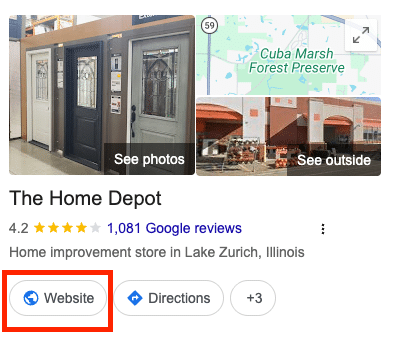
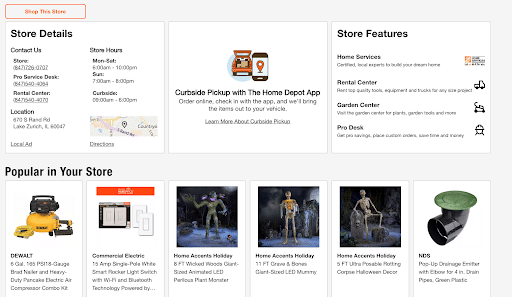
This link takes prospects to a localized landing page, complete with details that reinforce the Business Profile, including phone numbers and store hours, store features, and a link to “Shop This Store.”
It also includes details about downloading the app and using the Curbside Pickup service.
Use Current Contact and Booking Features
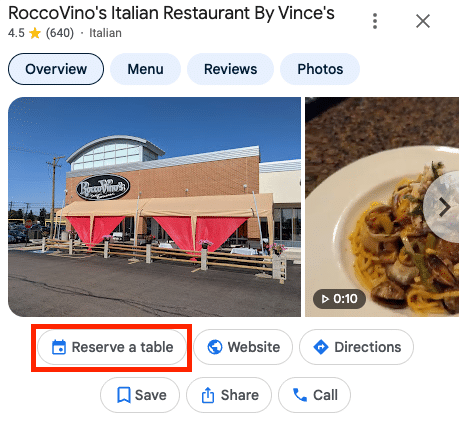
Booking options for businesses vary by category and provider, with some eligible to include a “Reserve with Google” button using a third-party provider or custom appointment URL that links to a booking page.
This feature allows people to reserve a table or book an appointment directly within Google.
Keep in mind that as of July 2024, legacy GBP chat and call history are no longer available.
In addition to traditional booking options, businesses can connect with customers via text messaging and WhatsApp.
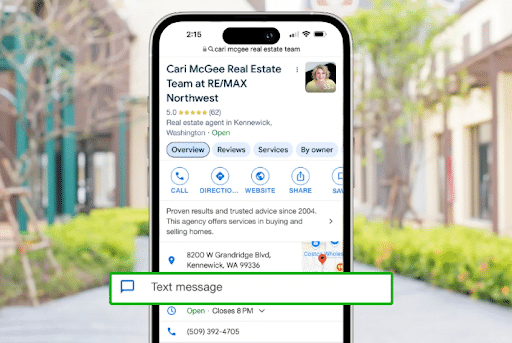
However, to get the most from this feature, assign someone to respond before enabling messaging, ensuring customers get a timely response whenever they reach out.
Add Useful Photos and Timely Posts
Include high-quality, well-optimized images that supplement the rest of your GBP content.
There are many types of images to include, but you should prioritize entrances and storefronts, parking areas, teams, products, and completed work.
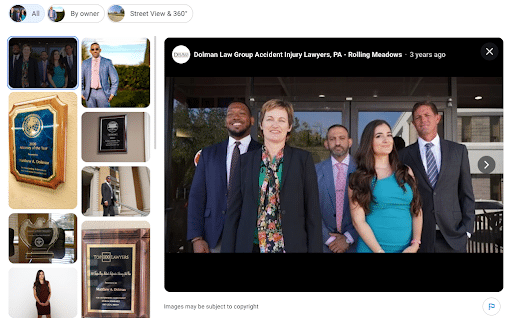
When you manage a Google Business Profile, also include regular Google Posts when warranted, which can include:
Update Posts
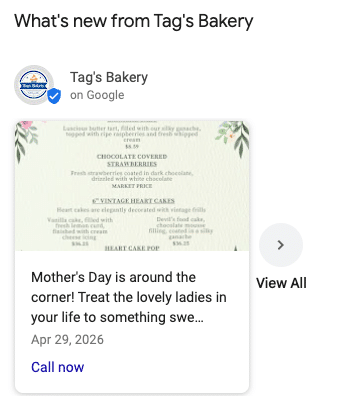
When you manage a Google Business Profile, one critical type of post to use is an “update,” which can share general news, daily updates, blog posts, or company announcements.
They can include a text description, photos or videos, and optional action buttons like “Call Now” or “Learn More” to drive action.
Event Posts
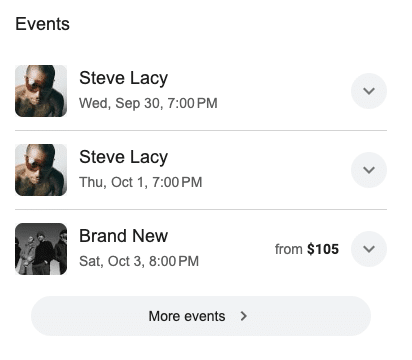
Using Google Business Profile Manager, you may also create event posts that promote a specific physical or virtual event connected to your business, including a title, date, time, and one or more links to buy tickets or RSVP.
Offer Posts
Promote any special promotions that could boost conversions with offer posts that detail a discount, sale, or another limited-time offer.
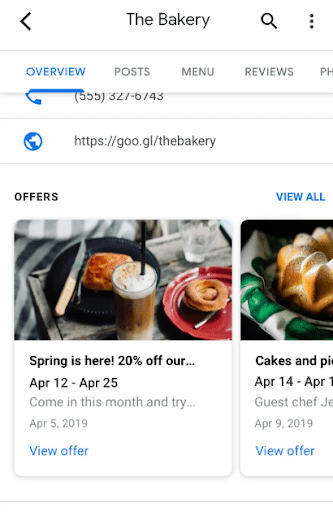
For each of these post types, double-check all local prices, dates, and availability before sharing across locations.
You also have the ability to implement native scheduling for more consistent posting, recurring posts for repeat offers or events, and multi-profile publishing across several locations.
Learn more about how to get the most from your posts with our Google Posts guide.
Build a Consistent Review Process
After customers interact with your brand and make a purchase, request honest reviews, as these are among the most important Google Business Profile features for business growth.
To attract new reviews, use direct review links or QR codes, which you can manage in the Google Business Profile dashboard.
When asking for reviews, you need to avoid providing incentives, as this goes against Google policies. Additionally, don’t gate your reviews or request any specific keyword inclusions, keeping reviews genuine and from actual customers sharing their honest opinions.
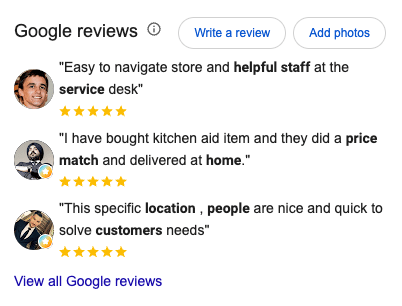
It’s equally important to respond to reviews on Google Business Profiles, which is why you should assign response ownership to someone on your team an escalate recurring complaints as needed. Even negative reviews can turn into positive ones with the right level of responsiveness.
BrightLocal’s 2026 Local Consumer Review Survey found that 41% of consumers always read reviews when browsing for businesses, up from 29% in 2025. This among other stats reveals just how crucial reviews are in influencing people’s buying decisions.
Prepare Your Profile for AI-Powered Local Search
Google Gemini is becoming increasingly integrated into the search experience, and local search is no exception.
In March 2026, Google introduced the Ask Maps feature, with an expansion in August that allows AI to complete multiple steps within Google Maps, including the ability for users to order food through participating partners.
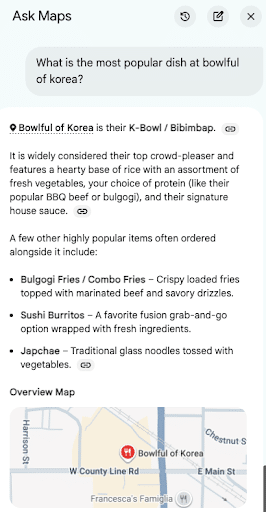
Ask Maps is different from AI Overviews and AI Mode in that it works directly in Maps, while Overviews appear in traditional search results and AI Mode acts as a separate dedicated AI chat feature.
To appeal to Ask Maps, maintain accurate menus, services, hours, and amenities that retrieve correct and detailed information from the AI agent. Also, naturally answer questions in your content with more conversational queries that might help people find answers when using voice search.
Optimizing your website content and Google company profile will increase your chances of appearing in these results.
Keep Answers Consistent Across Your Profile and Website
When optimizing for Ask Maps and other AI-powered searches, keep answers to questions consistent on all platforms, as Google recommends you keep current profile information for AI search.
For example, you might answer “Is this location accessible?” or “Do you offer same-day service?” on both your Google Business Profile and your website, in which case you need to align both answers to avoid providing contradictory information.
Resolve any conflicts you find on your profiles, location pages, and booking systems.
While Google has discontinued its Q&A API for profiles as of November 2025, this doesn’t mean that all public Q&A features have vanished from Google; optimizing for FAQs with dedicated page sections and FAQ schema structured data can still help with AI search context.
Monitor Suggested Edits Before Incorrect Information Goes Live
Google Business Profile Manager may include certain “suggested edits” from Google to update information. Business owners have four days after notification to accept or reject these edits before the profile goes live.
Even if the information is incorrect, Google may publish it if other publicly available information supports it.
Keep in mind that some policy-related edits can occur without any prior review, such as those that maintain compliance with Google’s policy around third-party data sources.
To catch any suggested edits as they come, perform daily notification checks and look at your Google Buiness Profile dashboard, with a designated reviewer and backup coverage. Weekly checks may not be sufficient, as Google might automatically apply edits before that window ends.
For example, you may need to verify a suggested hours change against actual opening hours and what appears on the location page. Confirm that the third-party information is correct before accepting the edit.
How to Manage GBP Profiles for Franchise and Multi-Location Businesses Without Losing Local Accuracy
For franchises or multi-location businesses, you need to maintain corporate brand standards while optimizing locally for each market.
Take the following steps to align corporate with local needs:
- Assign corporate responsibility for company-wide standards, access, and escalation.
- Assign local teams who are responsible for updating each location’s business hours, services, and photos, while responding to and resolving customer issues.
- Use business groups, location identifiers, and individual location pages to track the performance and compliance of each location.
Don’t worry about implementing a large number of profiles, either, as qualifying businesses with 10 or more profiles can verify them in bulk.
Also, if Google makes suggested edits for individual locations, create a dedicated queue that details notification dates, deadlines, and assigned owners to review and approve or reject these edits before Google applies them.
For help with verification, Ignite recommends using our Rallio platform, which can update all of your franchise business details with ease.


Rallio: Our All-In-One AI-Powered Solution to GBP Management
If your business is expanding or otherwise operates across multiple locations, it helps to have multiple Google Business Profiles.
However, it can become increasingly difficult to manage all of them with consistent business names, hours, and other information, especially if you need to make any changes.
These potential difficulties are why it helps to have GBP management software for multiple accounts that can handle all profiles and information.
Not all software is capable of meeting the needs of franchise and multi-location businesses, making it critical to find the right solution that has these capabilities.
Enter Rallio, which is Ignite Visibility’s proprietary GBP management software for multiple accounts, along with other social media channels.
Supercharged by AI, Rallio includes an easy-to-use and intuitive interface to help you easily manage your entire social media presence across platforms. Get help with content creation, scheduling, and in-depth analytics to continually optimize your profiles’ performance.
This tool also makes it easy to automate the solicitation of reviews, helping you generate as many as hundreds of reviews in a short amount of time for faster optimization.
Measure Qualified Leads and Location-Level Results
To measure the overall effectiveness of your Google Business Profile management, separate discovery, profile engagement, and completed business outcomes, looking at how visibility translates into revenue.
For instance, don’t count direction requests as in-store visits or call-button clicks as sales, as they don’t guarantee a customer conversion. In separating these instances, you also want to distinguish between marketing-qualified and sales-qualified leads, as they will be at different stages of the journey.
Another step to take here is to add consistent Urchin Tracking Module (UTM) tags to landing pages linked to each Business Profile, which will help track how many people come to your site from your GBPs.
In addition, collect measurable site visits and inquiries to both your Google Analytics 4 (GA4) data and CRM outcomes when possible, giving you a complete picture of the journey from profile view to conversion.
Be sure to compare similar periods and individual locations, accounting for seasonality if relevant to your business; you may find that people seek your services and products more in different locations based on seasonal trends, such as a retailer selling summer clothing seeing a spike in profile views and corresponding page visits during the spring and summer months.
To get a handle on the performance of all of your profiles, you can bulk-export multi-profile performance reports using the dashboard, performance API, or GA4’s local integration when profiles link to a GA4 property.
At the same time, keep in mind that metric availability might differ from platform to platform, as Google has eliminated legacy “Insights” metrics in its Performance API, with the API using deduping logic based on the number of unique users per day, e.g., if a user clicks on “Call” several times within 24 hours, the API will count it as one user, while other dashboards and exports might inflate those numbers.
Some features might also not be available on certain profiles, which can make metrics different for bookings, directions, and menus or products, for example.
Diagnose What Is Limiting Performance
There are several issues that might limit the performance of GBPs, such as:
- Low Visibility: If your profile suffers from poor traditional search and AI visibility, check verification, categories, competition, and proximity to diagnose the issue.
- Views But Few Inquiries: You may also see a rise in profile views but little to no actions taken, in which case you should review offering clarity, reviews, and contact options to identify issues like poor reviews or a lack of action buttons.
- Inquiries But Few Bookings: If people are reaching out but not booking or otherwise closing, check response times, availability, and qualification, as bottlenecks at the bottom of the funnel might be the culprit.
- One Weak Location: One of your profiles might be underperforming compared to others, warranting a comparison of its information and operations with those of similar locations.
Before attributing any gains or losses to optimization efforts, track any changes you make to profiles, landing pages, or other related content that might affect performance.
Resolve Suspensions, Duplicates, and Ownership Problems
You may also experience the following issues. Let’s break down each and go over some steps to resolve them:
GBP Suspensions
Google may decide to suspend your profile if it violates Google’s policies. To resolve this issue, do the following:
- Audit profile data, ensuring your business name, address, and category match your official information without any keyword stuffing.
- Hide addresses for service-area businesses if you travel to customers’ locations instead of having people visit a location.
- Once you’ve corrected any policy issues, collect evidence to support your appeal, including business licenses, lease agreements, utility bills, and a photo of your storefront signage.
- Use the Google Business Profile Appeals Tool to appeal the suspension, but remember that you have a 60-minute window to submit your appeal after opening the evidence form.
Note: Never create replacement profiles to bypass restrictions, as this could only hurt your attempts to resolve the problem.
Duplicate Profiles
If you have multiple profiles for a single location, resolve this issue by:
- Searching for any duplicate profiles via Google Search or Maps using the exact business name, phone number, and address you believe appear on auto-generated or unclaimed profiles.
- Not creating new listings, which will only serve to reset accumulated reviews and may lead to automated penalties.
- Requesting a merge or removal through Google Support, copying direct browser Maps URLs for the main and duplicate pages to maintain reviews.
Ownership Problems
If there is any conflict between a current owner and a prospective one, you can:
- Check for existing access to confirm whether previous owners, agencies, or employees control the profile.
- Request ownership through the GBP dashboard if you find that someone else is the owner.
- Provide verification documents to Google upon request when transferring ownership.
Managing Access and Permissions
For secure Google Business Profile management, you must determine who has what permissions on the account. Whether you want to create a Google Business Profile as an influencer or a business owner, it’s always important to restrict access and ownership to those you trust.
When sharing Google Business Profile access, you will specifically want to determine who is an owner or a manager.
Owners have the highest level of authorization, with the ability to add and remove other owners and members. Meanwhile, managers can remove themselves, but they are unable to add or remove other users.
Only primary owners have the ability to transfer primary ownership, but it is not possible to add Google groups as either owners or managers.
Steps for Sharing Google Business Profile Access
The following are the basic steps for adding owners or managers to your Google Business page:
- Go into your Google Business Profile.
- Choose More > Business Profile settings > People and access.
- Add a member by clicking the icon.
- Add the user’s email address (How much is Google Business email, exactly? You can reach out to Google for pricing information or try a free 14-day trial.)
- Select either “Owner” or “Manager” under the Access menu.
- Click Invite.
When determining who becomes an owner vs. a manager, consider who is at the highest level of the team. Who should have full control over the profile and be able to make instant changes as needed? These individuals should be owners.
Real-World Examples and Case Studies
Let’s look at some real-world Google Business Profile examples to give you some ideas of the direction you can go with these:
Dunkin’
One of the best brands to make full use of Google Business Profiles for multiple locations is Dunkin’. One item that stands out in these profiles in particular is the use of regular Google Posts.

These posts are frequent, with about two posts every week, with colorful and high-quality images that highlight the company’s tasty offerings.
Posts also include a CTA to begin an online order.
Ankin Law
Ankin Law is one of the largest personal injury law firms in the Chicagoland area, and it’s eager to showcase its reputation with reviews.

The profile includes a 5/5 FindLaw Lawyer Directory rating alongside Google reviews. The firm also regularly responds to all reviews on its profile, maintaining engagement with its audience.
Home Depot
Another Google Business Profile example worth mentioning is Home Depot’s, which takes advantage of the profile’s “See what’s in store section” to help customers find what they need at a designated location, without any need to visit the website first.

People can easily search for specific products in various categories. When clicking on one of the categories or entering a manual search, Google then takes the user to the corresponding Google Shopping page.

So, if you offer many products and want to supplement your ecommerce store, this strategy is a great way to boost sales.
Monitoring and Analytics for Google Business Profile
To improve your Google Business Profile’s performance over time, you need to regularly monitor and track various metrics.
Some of the many metrics that can help gauge performance include:
- Website clicks to measure traffic
- Calls and scheduled appointments
- Rankings
- Reviews
- Profile views
The specific metrics you track should correspond to your goals. For example, if you want to increase brand awareness, you might focus more on getting top rankings and profile views, while conversion goals might place emphasis on calls and appointments attributable to GBP views.
If you notice any issues that cause you to fall short of your goals, you should adjust your strategy accordingly.
For instance, if you are climbing in rankings but receiving less traffic, you might want to optimize your business description and disclose the services or products you offer to drive more conversions.
Common Mistakes to Avoid With Google Business Profile Management
The following are some of the most common Google Business Profile mistakes to avoid with your profile, along with some fixes:
- Inconsistent NAP: One of the biggest mistakes is having different names, addresses, or phone numbers across listings, which can be confusing for both users and search engines. Be sure that this information is accurate and up-to-date across all profiles using the right tools like Rallio.
- Outdated Hours: You might also fail to update your hours when they change, which could lead to lost customers if you advertise that you are open when you’re actually closed. As soon as you make changes to your hours of operation, make sure all listings reflect this change immediately.
- A Lack of Description: Neglecting to optimize your description could make it unclear to customers what your business offers, and it could make it harder for your business to rank, especially if it’s missing vital keywords that you could otherwise be targeting. Always update your listing with a detailed description of your business, industry, and offerings.
- Not Listing Service Areas: Even if you opt to prioritize a physical address when setting up your business location, it helps to include service areas if your offerings are limited to specific regions. Include service areas if you have them to indicate to Google and potential customers where you specifically serve your audiences.
- Absence of Products or Services: Indicate to both Google and potential customers what specific products or services you offer. Even if you don’t offer products, you can complete the Products section with details about services and links to respective service pages on your website.
- Neglecting Posts: Your profile could easily slip in rankings if you don’t regularly update it with Google Posts. Take some time to post in this section with everything from upcoming local events to industry- or company-related blog posts or news, with links to corresponding web pages.
- Not Responding to Reviews: People want to know that the brands they engage with value their input, especially when they leave reviews. Assign members of your team to respond to reviews, both positive and negative, which can boost engagement while showing that you care about what people have to say.
FAQs About Google Business Profile
1. How do I generate organic visits for my Google Business Profile?
The best way to generate organic traffic is to optimize your profile through posting consistent, quality, and relevant content. The more attention you give your profile, the better.
2. How can I grow my Google Business Profile audience?
Stay engaged! Post timely content like photos, events, and promotions. Soliciting and responding to FAQs and reviews will also help show your audience that you are engaged and committed to building a relationship with them which is key for customer retention.
3. How can I attract more visitors to my Google Business Profile?
Optimizing your profile with the correct keywords, as well as updated information and photos, will help attract more visitors.
For instance, you can use relevant local keywords in your profile to boost search rankings. You should also regularly update your NAP details, hours, and other information to keep it relevant and accurate.
Additionally, post regular updates via Google Posts to keep audiences coming to you, and clearly list and describe all of your offerings.
4. Are Google Workspace and Google Business Profile Manager the same?
No, these tools are not the same. While Google Business Profile can help you manage your business’s online presence on Google, Google Workspace consists of various tools that businesses can use to get work done online and manage their profiles, such as Gmail, Calendar, and Drive.
5. How can I fix issues with verification?
If you’re having trouble verifying your Google Business Profile, there are some steps you can take to troubleshoot, such as:
- Trying a different verification method
- Checking for specific issues in formatting or information, such as inaccurate address or unclear videos
- Review your business details again to ensure they’re correct
- Use Google’s Help Center
- Reach out to Google Support if needed
5. How does a multi-location agency help with Google Business Profile management?
Managing Google Business Profiles for brands with dozens or hundreds of locations requires hyper-localized strategy, listing synchronization, NAP consistency, and centralized review management. Working with a specialized multi-location marketing agency ensures each individual business profile ranks in its local Map Pack while maintaining overall brand standards and scaling organic growth nationwide.
7. Is Google Business Profile free, or do I need Google Workspace?
GBPs are entirely free to set up and don’t require a Google Workspace account for management. However, Google Workspace can be helpful for providing custom email addresses for businesses, along with extra cloud storage.
8. Can two businesses at one address have separate profiles?
Yes, two or more businesses at the same address can have separate GBPs, but they must be separate entities with independent branding, operations, and contact information. For example, several businesses might occupy an office building and use the same address for their profiles.
9. Does removing a profile from my account remove it from Maps?
No, removing a profile from a business account on Google won’t remove Maps listings. Doing so will only remove your ownership, management access, and any photos, Google Posts, or review responses you added.
If you want to remove your business from Maps, you’ll need to choose “Mark your business as permanently closed” on the GBP dashboard before removing management.
Google Business Profile Optimization With Ignite Visibility
Whether you need to increase Google Business Profile traffic for an existing profile or are starting from scratch, Ignite Visibility is here to help. We have worked with businesses across industries expand their reach, improve their online presence, and generate more organic traffic.
Our GBP optimization services can help with every aspect of Google Business Profile management and more with a holistic digital marketing solution, including solutions for national-to-local businesses.
We specialize in:
- Creating and optimizing Google Business Profile accounts
- Crafting local SEO strategies to reach customers in your target service area
- Developing high-quality content to share on your profile
- And more
Want help from our Google Business Profile management services? Check out our local SEO services to learn how we can optimize your profiles and integrate them into a complete strategy.