

When someone searches “near me,” your local business listing determines whether they call you or your competitor.
Local listings make a real difference in local SEO. A well-optimized presence across Google, Yelp, and other key directories drives real-world results: more calls, more foot traffic, and more customers who found you exactly when they needed you.
In this blog, Mark Hite, Director of Consumer Sales and Marketing, breaks down everything you need to know, including what makes a listing rank and the exact steps for building a presence that converts.
What You’ll Learn:
- What Are Local Business Listings?
- Why Local Business Listings Matter
- How Local SEO Works
- Types of Local Business Listings
- Organic vs. Free vs. Paid Listings
- How to Rank in Local Directory Listings
- Google Business Profile Optimization Checklist
- Best Local Directory Listings by Industry
- Common Mistakes in Business Local Listings & How to Fix Them
- FAQs About Local Business Listings
What Are Local Business Listings?
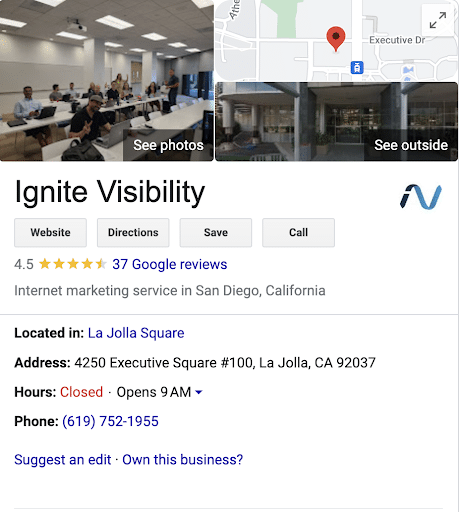
A local business listing is an online profile that displays your business’s name, address, and phone number (NAP) across platforms like Google, Yelp, and Facebook. These listings help customers find you in local and “near me” searches and directly impact your visibility in local SEO rankings.
Why Local Business Listings Matter
Local business listings are often the first things searchers see. Since most people don’t scroll long before they make a decision, you want to be in that top list.
When someone searches for a service in their area, Google shows local listings before organic results. This makes those listings prime real estate for capturing high-intent traffic right when someone is ready to act.
The impact goes beyond visibility. A complete, accurate listing builds immediate credibility. Customers can see your hours, read reviews, get directions, and call you directly without ever visiting your website. That frictionless experience translates directly into more calls, more visits, and more conversions from people who were already looking for exactly what you offer.
Consistency across platforms matters just as much. When your NAP information matches across Google, Yelp, Facebook, and other directories, search engines gain confidence in your business’s legitimacy. This strengthens your local rankings over time. Inconsistent or incomplete listings, on the other hand, can quietly suppress your visibility and send potential customers straight to a competitor.
Expert Insights on Local Business Listings
Local business listings aren’t just a “set it and forget it” box to check. They’re an active lever for local growth when treated with the same strategic attention as any other SEO asset. That means the right keywords, accurate and complete information, fresh photos, and a steady stream of reviews. But the real difference-maker is how well your listings reflect where you actually serve customers.
We recently worked with a premium home cleaning service in the Seattle metro area that was struggling to hold its rankings in a market flooded with low-cost competitors. By focusing on consistent Google Business Profile optimization and other local SEO tactics, we achieved a 123% increase in engaged sessions, a 117% jump in total sessions, a 61% increase in click-to-call actions, and a 52% lift in form submissions in just six months.
The takeaway is straightforward: local listings amplify everything else you’re doing in SEO. When your business information is consistent, your GBP is actively managed, and your content speaks to the specific places you serve, search engines reward you with the kind of visibility that drives real-world actions, like calls, visits, and conversions.

How Local SEO Works
When someone searches “coffee shop near me” or “plumber in [city],” the Google Map Pack pops up. This is a set of three local business listings displayed prominently at the top of the results page, often before any organic results.
Getting into that Map Pack is the goal of local SEO, and Google determines placement based on three core factors:
- Relevance: Does your listing match the search?
- Distance: How close is your business to the searcher?
- Prominence: How well-known and trusted is your business online?
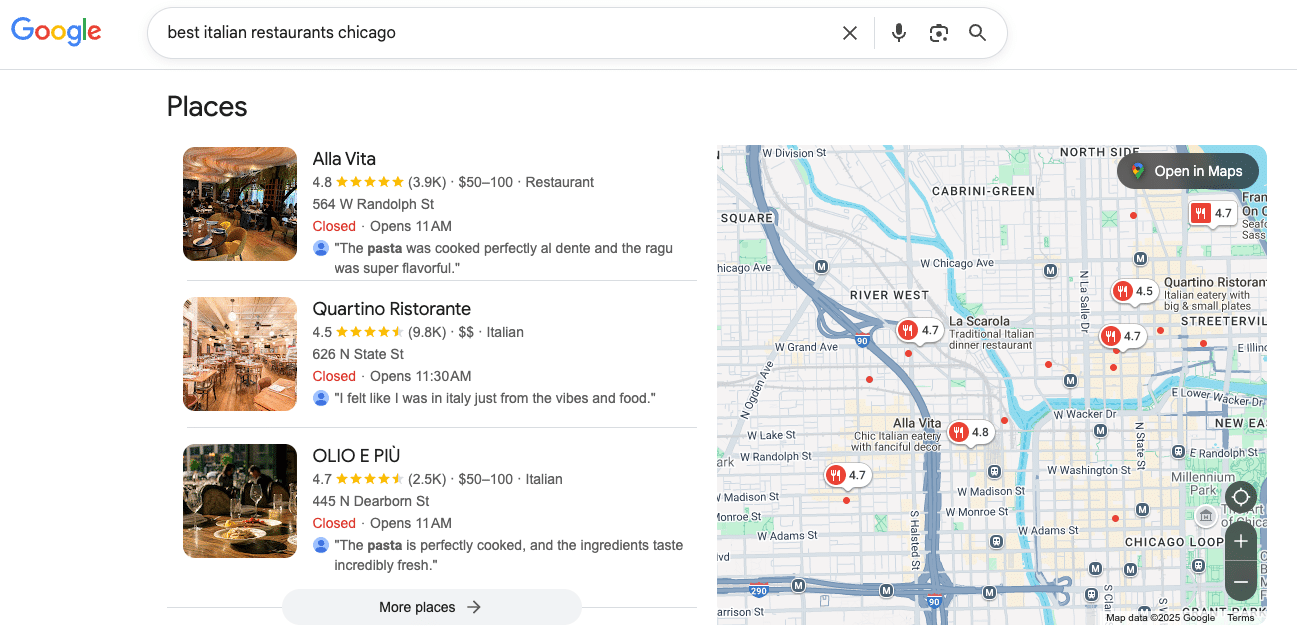
Your local business listings feed directly into all three. A complete, keyword-optimized Google Business Profile improves relevance. Consistent NAP data across directories reinforces prominence. An active listing with fresh reviews and updated information signals to Google that your business is worth showing at the top, where it counts.
Types of Local Business Listings
There’s no shortage of platforms where your business can have a presence. The key is understanding what each one does best, so you can prioritize which platforms are best for your business.
| Platform | Best For | Key Features | Cost |
| Google Business Profile | All businesses | Hours, photos, reviews, Q&As, Maps integration | Free (paid ads optional) |
| Yelp | Restaurants, retail, home services, hospitality | In-depth reviews, ads, messaging, customer insights | Free (paid options available) |
| Bing Places | Businesses wanting broader coverage | Mirrors GBP features, bulk upload for multiple locations | Free |
| Industry Specific Directories | Healthcare, home services, legal, and more | Highly-targeted audiences, like ZocDoc, Healthgrades, Angi, Thumbtack, or FindLaw | Varies by platform |
When it comes to local business listing management, Google Business Profile is your non-negotiable starting point. It’s the highest-impact listing for local SEO and should be fully optimized before anything else.
From there, layer in platforms based on where your audience actually spends time and which directories are most relevant to your industry.
Organic vs. Free vs. Paid Listings
Not all local business listings work the same way. Knowing the difference helps you make smarter decisions about where to invest your time and budget.
There are four main types of local business listings:
| Listing Type | How You Get It | Cost | Where it Appears |
| Organic Search Result | Earned through strong website SEO | Free | Standard search results |
| Google Business Profile (GBP) | Created and managed by the business | Free (ads optional) | Map Pack & Google Search |
| Paid Search Result | Purchased through Google Ads | Paid | Top of SERP, labeled “Sponsored” |
| Google Guaranteed | Application & Google verification process | Paid | Very top of SERP, above paid ads |
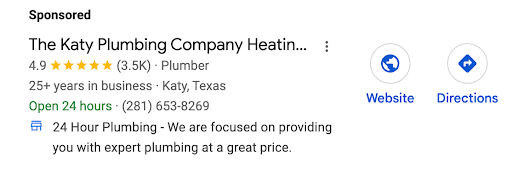
Each listing type serves a different purpose. Organic results and GBP listings are the foundation of any local SEO strategy and should be your first priority. Paid search and Google Guaranteed placements add to an already existing and optimized organic presence.
How to Rank in Local Directory Listings
Ranking in local search isn’t about one big move. It involves several steps to build the kind of local presence that compounds over time.
Here’s a checklist to help you understand how to increase local listings:
Step 1: Optimize Your Google Business Profile
- Claim and verify your GBP listing
- Fill out every field completely (name, address, phone, hours, website)
- Select the most accurate primary and secondary categories
- Write a keyword-rich business description
- Upload high-quality photos of your interior, exterior, and products/services
- Enable messaging and booking features where applicable
- Post regular updates, offers, and events to keep the profile active
Step 2: Ensure NAP Consistency
- Confirm your Name, Address, and Phone number are identical across every listing
- Standardize formatting (e.g., “St.” vs. “Street,” “Suite” vs. “Ste.”)
- Audit existing listings for outdated or conflicting information
- Update your website footer and contact page to match your listings exactly
Step 3: Build Local Citations
- Submit your business to top-tier directories (Yelp, Bing Places, Apple Business Connect, Facebook)
- Identify and target industry-specific directories relevant to your niche
- Use a citation management tool (e.g., BrightLocal) to track and maintain listings
- Remove or correct any duplicate listings
Step 4: Get Reviews
- Ask satisfied customers to leave a Google review
- Respond to every review, positive or negative, in a timely manner
- Develop a repeatable process for generating reviews (email follow-up, QR codes, etc.)
- Monitor reviews across all platforms, not just Google
Step 5: Optimize Your Website for Local SEO
- Include your NAP on your website (footer and contact page)
- Add local keywords naturally throughout your homepage and service pages
- Implement Local Business schema markup in your site’s backend
- Ensure your site is mobile-friendly and loads quickly
- Create location-specific landing pages if you serve multiple areas
Step 6: Build Local Authority
- Earn backlinks from local organizations, news outlets, and industry associations
- Sponsor or participate in local events to generate press and links
- Develop hyperlocal content that addresses your community’s specific needs
- Connect with other local businesses for co-marketing or cross-linking opportunities
Google Business Profile Optimization Checklist
Your Google Business Profile is the most impactful of the local lists, and most businesses are leaving rankings on the table by leaving it half-finished. Here’s exactly what a fully optimized GBP looks like.
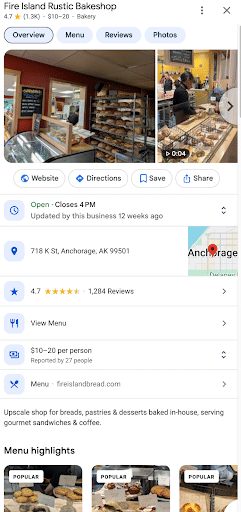
Basic Information
Make sure the entire profile is filled out. Your business name should match your branding, and your NAP must be complete and consistent.
Add your website URL, your social media links, and your business hours. Set your business category to the most specific and relevant one, adding secondary categories where applicable.
Business Description
Integrate keywords throughout your description naturally. It should clearly communicate what you do, who you serve, and what sets you apart. Stay well within the 750-character limit, putting the most important information in the first 250 characters.
Photos & Media
Upload your logo and add a clear, on-brand cover photo. All businesses should also include photos of the interior and exterior locations, product or service photos, and staff photos. Make sure that your photos are updated regularly. This is a sign to Google that you are open and active.
Customer Reviews
Reviews are a huge way to win attention. Set up an easy process to consistently generate new reviews, whether it’s a social media post or adding language to the bottom of your receipt.
Always respond to every single review, positive or negative, in a timely, professional, and personalized manner.
Posts and Updates
The businesses that post regularly to their Google Business Profile see more traffic and attention. Include posts that have relevant keywords, a clear message, and a call-to-action. Add offers, events, and new services to generate excitement.
Additional Features
There are also sections of each local business directory listing for FAQs, Q&As, and product and service descriptions. Take advantage of the messaging, booking, and contact links to make it easier to engage with your audience.
Best Local Directory Listings by Industry
Not every directory is worth your time, and spreading yourself too thin does more harm than good. The smartest approach is to start with the universal platforms every business should be on, then layer in industry-specific directories where your actual customers are already searching.
When evaluating any directory, prioritize two things: domain authority (the local listing scores closer to 100 are the best) and organic monthly traffic.
All Businesses
Here are some local lists that work, regardless of your industry:
- Google Business Profile
- Facebook Pages
- Apple Business Connect
- Yelp
- Bing Places
- Foursquare
- Better Business Bureau
- LinkedIn Pages
Restaurant and Hospitality
Here are some great directories for the restaurant and hospitality industry:
- TripAdvisor
- OpenTable
- Zomato
- HappyCow
Healthcare and Wellness
These directories are important for those in the healthcare and wellness space:
- Healthgrades
- WebMD
- ZocDoc
- Psychology Today
Legal
Here are some important legal business listing directories:
- Lawyers.com
- Avvo
- FindLaw
- Justia
Home Services
Home services businesses should focus on these:
- Angi (Formerly Angie’s List)
- HomeAdvisor
- Thumbtack
- Houzz
Real Estate
Real estate experts love:
- Zillow
- Realtor.com
- Trulia
Financial Services
Those in the financial services industry should focus on:
- NerdWallet
- WiserAdvisor
- NAPFA
Not sure where to find niche directories in your industry? A quick Google search using (your niche) + directory, (your niche) + business listings, or (your niche) + business directory will surface the most relevant options fast.
Once your universal listings are locked in and optimized, industry-specific directories become a powerful way to reach higher-intent audiences. The people who find you through these directories aren’t just browsing, but actively looking for exactly what you offer.
Common Mistakes in Business Local Listings & How to Fix Them
Even businesses that have put real effort into their local listings can unknowingly sabotage their own rankings. The good news is that most of these mistakes are fixable. You just need to know what to look for. Here are the most common issues and how to address them.
Duplicate Listings
The problem: Duplicate listings confuse both customers and search engines. If Google finds two GBP profiles for the same business, it doesn’t know which one to surface, and your rankings take the hit.
The fix: Audit your listings regularly using a tool like BrightLocal or Moz Local. When you find duplicates, claim them and request removal through the platform. Don’t just ignore them. An unclaimed duplicate can be edited by anyone, and this could create trouble for you.
Inconsistent NAP Information
The problem: If your business is listed as “123 Main Street” on Google but “123 Main St., Suite B” on Yelp, search engines register those as two different businesses. Even small inconsistencies quietly erode your local authority over time.
The fix: Audit every listing and standardize your NAP formatting across all platforms. Pick one format and stick to it everywhere.
Incomplete Profiles
The problem: A listing with missing photos, no business description, or blank fields signals to Google that your profile isn’t authoritative. Incomplete profiles also give customers less reason to choose you over a competitor with a polished, complete listing.
The fix: Treat every listing like a mini landing page. Fill out every available field, add high-quality photos, and write a description that actually tells your story.
Wrong or Outdated Information
The problem: Old phone numbers, outdated hours, or a former address still floating around on directories can send customers to the wrong place, tanking your reputation in the process.
The fix: Set a recurring calendar reminder to audit your top listings for accuracy. Any time your business details change, update your listings that same day.
Ignoring Reviews
The problem: Not responding to reviews signals disengagement and can deter potential customers. Google also factors review activity into local rankings.
The fix: Make review monitoring a weekly habit. Respond to every review with something personalized. For negative reviews, acknowledge the issue professionally and take the conversation offline when needed.
Keyword Stuffing in Your Business Name
The problem: Adding keywords to your business name field (e.g., “Joe’s Plumbing — Best Plumber in Chicago”) is a direct violation of Google’s guidelines and can result in your listing being suspended.
The fix: When listing local businesses, use your real, legal business name. Keyword optimization belongs in your business description and on your website, not in your name field.
Not Choosing the Right Categories
The problem: Selecting a category that’s wrong or too broad means Google won’t match your listing to the most relevant searches. This can cost you visibility with high-intent customers.
The fix: Research your primary category carefully and choose the most specific option available. Add secondary categories to capture additional relevant searches without overreaching.
FAQs About Local Business Listings
1. What is a local business listing?
A local business listing is an online profile that displays your business’s key information, such as name, address, phone number, and hours, on platforms like Google, Yelp, and Facebook. These listings help customers find you in local searches and play a significant role in your local SEO performance.
2. How do I create a local business listing?
Start by claiming your free Google Business Profile. Fill out every field completely, verify your listing, and then replicate your information across other key directories, such as Yelp, Bing Places, Apple Business Connect, and any industry-specific platforms relevant to your business.
3. How do I rank higher in Google local listings?
Focus on the fundamentals: fully optimize your Google Business Profile, ensure NAP consistency across all directories, build local citations, generate and respond to reviews, add local keywords to your website, and implement Local Business schema markup. Consistency and completeness across all of these factors compound over time.
4. What is NAP consistency?
NAP stands for Name, Address, and Phone number. NAP consistency means your business information is formatted identically across all online listings and directories. Even small discrepancies like “St.” vs. “Street” can confuse search engines and negatively impact your local search rankings.
5. What are local citations?
Local citations are any online mention of your business’s NAP information, whether on a directory, a local news site, or an industry platform. Citations help search engines verify that your business is legitimate and accurately located, which directly supports your local SEO rankings and Map Pack visibility.
6. How important are reviews for local SEO?
Extremely important. Reviews are a direct ranking factor in Google’s local algorithm and influence whether your business appears in the Map Pack. A steady stream of genuine, positive reviews combined with timely responses signals trustworthiness to both Google and potential customers actively comparing their options.
7. What is the Google local pack?
The Google local pack (also called the Map Pack) is the block of three local business listings that appears near the top of Google search results for location-based queries. It includes a map and key business details. Appearing in the local pack significantly increases your visibility, clicks, and customer actions.
8. Why is my business not showing on Google Maps?
The most common reasons include an unverified Google Business Profile, inconsistent or incomplete listing information, a new listing that hasn’t been indexed yet, or a suspended profile due to guideline violations. Start by logging into your GBP dashboard to check your verification status and resolve any flagged issues.
Optimize Your Local Business Listings With Ignite Visibility
Bottom line: local business listings continue to be an important part of local SEO. There’s a direct link between the quality, consistency, and reach of your citations and your search engine rankings–which in turn drives more foot traffic, sales, and if you play your cards right, reviews.
Want to get the best results with your local listings? The experts at Ignite Visibility can help. We can assist with everything from local search marketing to international SEO to help you reach any audience with your local business.
Based on your needs, we’ll make it easy for you to:
- Build and publish local business profiles
- Put together citations and links
- Optimize your Google Business Profile listing
- Create HTML pages for your website
- Build high-quality backlinks
- Develop hyperlocal content
Does this sound like a good strategy to you? Explore all of our local SEO services for help deciding which one is right for you!

