Tired of watching nearby jobs go to competitors down the street? Google Local Services Ads put your business at the very top of local Search and Maps results, letting nearby homeowners call or message you the moment they need help.
Google Local Services Ads are going through some of their biggest changes in years. The phased move into Google Ads is now underway, Google has expanded its service categories and direct-booking options, and certain missed calls will become billable on October 1, 2026. Add the Google Verified badge and the full shift of LSA reviews to Google Business Profile, and businesses have more to manage than a bid and a budget. Profile accuracy, call handling, booking quality, and lead follow-up now have a direct impact on performance and profitability.
In this blog, our VP of Paid Media, Ryan Cox, breaks down everything you need to know about Local Service Ads to get more leads and grow your business.
What You’ll Learn:
- Introducing Google Local Services Ads
- The Latest LSA Updates
- How the October 1 Missed-Call Policy Works
- LSA vs. Google Ads, PMax, and GBP: When to Use What
- How Does Google Rank Local Services Ads?
- How to Set Up LSA
- Google Local Services Ads: FAQs
TL;DR
Google Local Services Ads remain a high-intent, pay-per-lead channel, but the way advertisers qualify, manage leads, and control costs is changing.
- The phased migration into Google Ads began in August 2026.
- Google has added more specific restaurant, automotive, and beauty categories, plus a pre-badge path for some advertisers still completing verification.
- Eligible booking links already connected to a Google Business Profile can now appear automatically in LSAs through more than 500 Reserve with Google partners. These bookings are paid leads.
- Starting October 1, 2026, some missed calls during business hours can become billable if the caller stays on the line for more than 20 seconds.
- Back up historical reports, keep your Business Profile accurate, audit call routing, and track lead-to-revenue quality, not just lead volume.
What Are Local Service Ads?
To begin with, what is Google LSA? Google’s Local Service Ads, or LSA, is a pay-per-lead advertising platform designed to connect local businesses with potential customers searching for services on Google.
In short, Google LSA ads help service-based businesses advertise various local services within a specific area.
It’s important to understand how Google Local Service Ads management works to get the most from them: These ads work on a pay-per-lead (PPL) model that charges businesses only when prospects contact the business via the Local Service Ads.
These ads also enjoy premium placement in search results compared to other search results, now appearing in Google Maps alongside organic and other paid results.
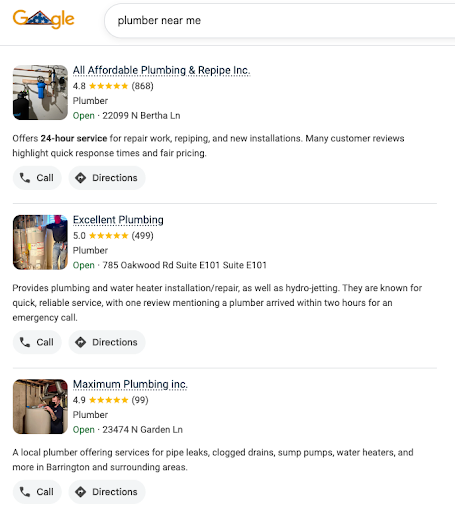
In order to run these ads, you must have a verified and public Google Business Profile. This recent change was made to enhance the reliability of the ads Google is running and prevent fraud. Besides, having a well-maintained Google Business Profile will only help your business in the long run anyway!
In addition to your Google Business Profile improving your business’s visibility, Local Service Ads are designed to help businesses generate leads by showcasing their services and providing relevant information to customers.
Think of Google LSA as a digital billboard specifically for local service providers, but with a much more refined targeting system.
When potential customers search for local services, whether it’s plumbers, electricians, or locksmiths, your business appears at the top of Google search results with features like customer reviews, ratings, and a click-to-call button.
With the recent integration of Local Services Ads (LSAs) into Google Maps, businesses can now reach more high-intent customers actively searching for services in their area. Google automatically generates and displays these ads on Maps using your existing LSA data, expanding visibility to users looking for local services.
If you’ve been managing Local Services Ads through Google’s standalone LSA dashboard, the transition is now underway. Google began moving select U.S. accounts in August 2026, with additional U.S. advertisers scheduled for late 2026 and non-U.S. accounts and remaining categories following in 2027. Each account keeps using its current interface until its assigned migration date.
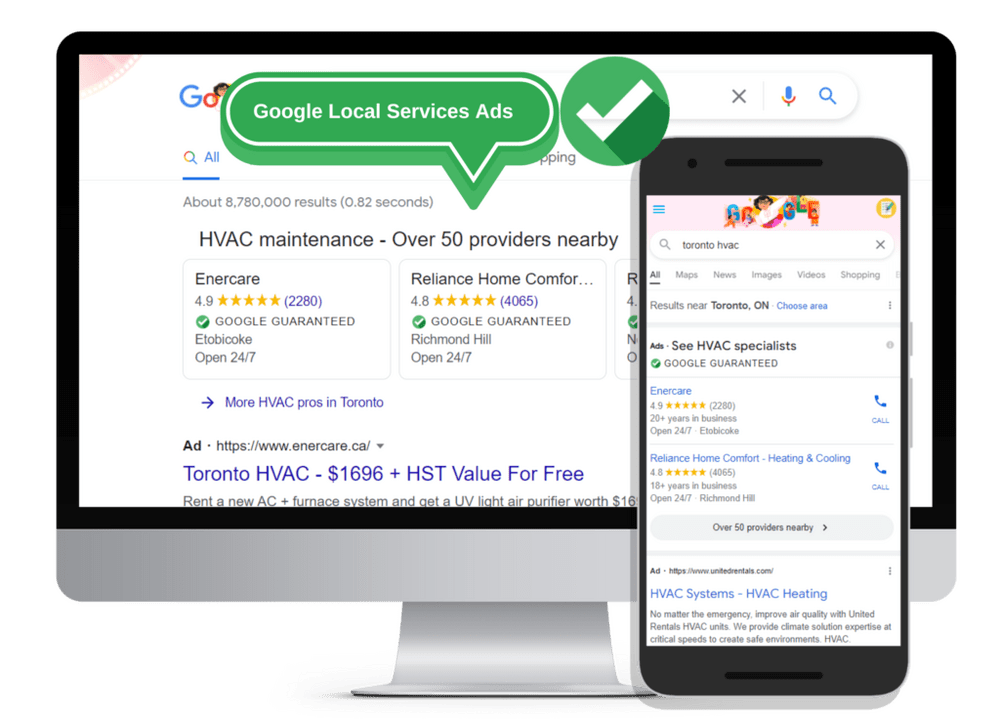
For more assistance with setting up Local Services Ads lead generation for local customers, consult Google’s Local Services Help.
My Expert Insight on Local Service Ads
Google Local Services Ads cut through the clutter and directly connect your business with ready-to-act customers. The landscape is also shifting fast: Google began moving selected accounts into the main Google Ads platform as specialized Performance Max campaigns in August 2026. Once an account migrates, the days of managing its local leads in a siloed dashboard are over.
I’ve witnessed just how Local Service Ads can elevate PPC campaigns for local businesses. With the help of Ignite Visibility, one multi-brand franchise in the home services industry combined paid search, paid social, local SEO, and Google Business Profile optimization, to yield a 1,009% return on ad spend (ROAS) and a 42% decrease in cost per lead (CPL). For accounts that have migrated, LSAs now live inside Google Ads. That creates a more unified management experience, but advertisers still need to adapt to new automated bidding, reporting, and lead-management workflows.
The key to winning in this new era is embracing Google’s AI. Because manual bidding will no longer be available after an account migrates, success will increasingly depend on accurate campaign settings, strong Google Business Profile data, fast lead handling, and realistic campaign-level Target CPA goals.
Action Items:
- Back up your historical data: The standalone LSA dashboard is being retired, and historical performance reports will not migrate. Google says a dedicated download page is coming; if you need the records now, take screenshots before your migration date.
- Prepare for daily budgets and automated bidding: Re-evaluate your budget. Weekly budgets are converting to a daily average, and manual maximum cost-per-lead bidding is being replaced by automated Target CPA.
- Consolidate your multi-trade targets: If you previously had different bidding targets for different services (e.g., plumbing vs. HVAC) in the same campaign, prepare to calculate a single, unified target across both as you migrate to the Google Ads interface.
Big Update in 2026: Local Service Ads Are Moving into Google Ads
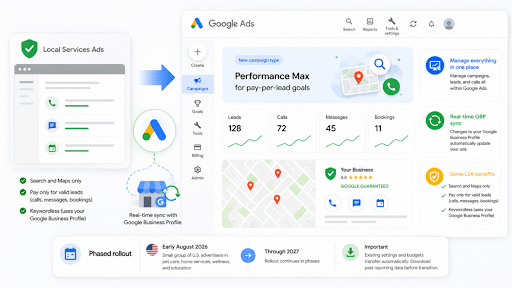
Google is moving Local Services Ads into the main Google Ads platform and retiring the standalone LSA dashboard. After an account migrates, its Local Services Ads will be managed as specialized Performance Max (PMax) campaigns built around a pay-per-lead goal.
Why This Is Not a Standard Performance Max Campaign
Standard Performance Max campaigns can serve ads across Google’s inventory, including YouTube, Display, Gmail, Discover, Search, and Maps. However, Google is placing strict guardrails around the new LSA-focused Performance Max campaigns so they continue to behave like traditional Local Services Ads.
Here’s what will remain the same:
- Placements: LSA-focused Performance Max campaigns will continue serving exclusively in their existing Google Search and Google Maps placements. They will not expand to YouTube, Gmail, Display, or Discover.
- Pay-per-lead billing: Advertisers will continue paying for valid leads, such as calls, messages, and bookings, rather than clicks.
- Keywordless targeting: Campaign targeting will continue to rely on selected service categories, service areas, and other campaign settings instead of manual keyword lists.
- Google Verified status: Eligible advertisers’ Google Verified status and completed verification checks will carry over. The former Google Guaranteed and Google Screened badges will not return; Google replaced them with Google Verified in October 2025.
What Is Changing
Watch this 7-minute recap of all the changes coming to Google LSA’s:
- The standalone dashboard is disappearing: Once an account migrates, advertisers will manage campaigns and respond to leads in Google Ads. Attempts to access the former LSA dashboard after the migration date will redirect users to Google Ads.
- Weekly budgets are becoming daily budgets: Google will divide the existing average weekly budget by seven to calculate the new average daily budget.
- Manual bidding is being deprecated: Advertisers will no longer be able to set a manual maximum cost-per-lead cap after migration.
- Vertical-level Target CPAs are being consolidated: Accounts using different Target CPAs for multiple service categories in one campaign will move to a single campaign-level Target CPA. Businesses that need different targets for services such as plumbing and HVAC may need separate campaigns.
- Google Business Profile data will sync one way: Business names, physical addresses, and standard business hours will sync from Google Business Profile into Google Ads. Photos and service areas may be prepopulated but can still be customized independently.
- Historical reports will not migrate: Lead and message history will carry over, but historical performance reports from the standalone dashboard will not. Advertisers should export any reports needed for year-over-year analysis before their migration date.
- BBB callouts are no longer supported: Google recommends using at least six alternative callouts, such as business hours, specialties, or accepted payment methods.
LSA Migration Timeline
- August 2026: Phase 1: Google began migrating select U.S.-based home and storefront service advertisers, including plumbing, HVAC, electrical, appliance repair, house cleaning, roofing, lawn care, pest control, and moving services.
- Late 2026: Phase 2: The rollout will expand to service-area businesses without physical storefronts and accounts using custom bidding or booking configurations.
- 2027: Phase 3: Google will migrate non-U.S. accounts and any remaining business categories.
Account administrators will receive an email 14 days before their scheduled migration, followed by a seven-day reminder and a confirmation after the transition is complete. Because each account has its own migration date, advertisers should follow the instructions in their Google notification rather than assuming the general rollout date applies to them.
Google says some campaigns may begin serving right away, but advertisers should allow up to two weeks for migration and performance to stabilize. At the time of this update, new pay-per-lead campaigns still cannot be created directly inside Google Ads; advertisers should continue using g.co/localservices until Google changes that workflow.
To prepare you for these changes, here’s how to optimize Google Local Service Ads after the big move:
- Download all historical reports you’ll need for year-over-year comparisons before you get that final confirmation email from Google.
- If you run several Google Local Services in a single profile, determine whether it’s best to go with a single target CPA or to split your services into separate campaigns.
- Following the migration, verify all data, including your daily budget, campaign-level target CPA, service areas and categories, ad scheduling, photos, lead-routing phone numbers, and callouts.
Google Added More Specific Business Categories
Google has expanded its U.S. eligibility list with much more specific categories across dining, automotive, and beauty. A restaurant can now identify itself as a pizza restaurant, sushi restaurant, steak house, or another specific cuisine. Automotive businesses can select options such as brake shop, tire shop, oil change service, or transmission shop instead of relying only on a broad auto repair category.
This gives Google a clearer picture of what the business actually offers. It also gives advertisers a reason to audit both their LSA service selections and Google Business Profile categories. Availability still varies by location and vertical, so use Google’s eligibility checker before changing your setup.
Google has also documented pre-badge ads for some advertisers. Eligible businesses that pass preliminary checks may begin receiving leads while they finish the remaining steps required for the Google Verified badge. Pre-badge listings appear below fully verified providers, and the option is not available for garage door services, health care, or locksmiths. The Google Verified badge itself is currently unavailable for auto, beauty, and dining categories.
Direct Booking Now Supports More Than 500 Partners
Google expanded LSA direct booking from roughly 20 Reserve with Google partners to more than 500. If an eligible partner booking link is already active on a linked Google Business Profile, Google can automatically show that booking option in the business’s LSA.
Direct bookings reduce the steps between discovery and conversion, but they are not free interactions. A booking request through an LSA can be treated as a paid lead and appears in lead reporting. The feature is currently limited to the United States and is not available for health care or tax-specialist verticals.
What to do: Confirm that the correct booking link is connected to the correct Business Profile, check that your scheduling provider is supported, and measure booked jobs and revenue, not just the number of booking leads.
Some Missed Calls Become Billable October 1
Starting October 1, 2026, a missed LSA call placed during business hours can become a paid lead if the caller stays connected for more than 20 seconds. If your phone system requires callers to press a key before being routed, the timer begins only after the caller presses that key. Google says it is also adding safeguards intended to limit robot calls and spam abuse, although it has not published details about how those protections work.
If the initial interaction is not charged, a later call that meets Google’s valid-lead criteria can be billed. Google Ads Liaison Ginny Marvin clarified that an advertiser is charged only once for qualifying follow-up interactions within 15 days of the initial interaction. A qualifying interaction after that window can create a new paid lead.
What to do: Audit business hours, IVR routing, hold times, and after-hours coverage before October 1. Then review call recordings and lead status regularly so you can catch routing failures, spam patterns, and wasted spend.
The Death of “Google Guaranteed” and “Google Screened”
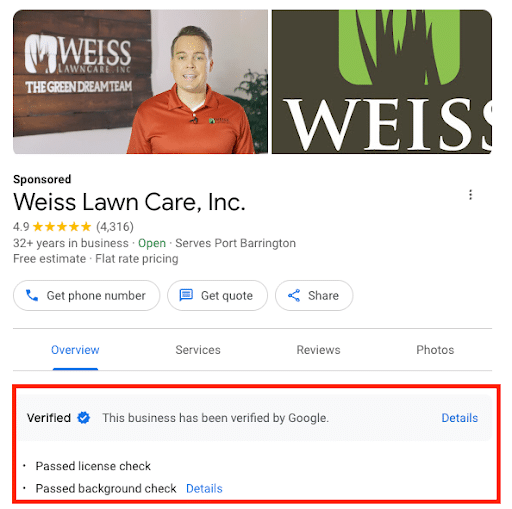
Local Service Ads used to come with either “Google Guaranteed” or “Google Screened” badges to build brand trust among audiences, but as of October 20, 2025, Google consolidated both into a single “Google Verified” badge with a blue checkmark. Google also retired its financial money-back guarantee program.
The blue checkmark tells customers that the business has completed Google’s required screening for that category. However, it is not available in every vertical. Google currently excludes auto, beauty, and dining categories from the badge.
Google also says the 2025 badge change did not affect LSA rankings. The checks a business has completed can contribute to overall profile quality, but advertisers should not present the badge itself as a guaranteed ranking boost.
Is LSA Right for Your Business?
Whether Local Service Ads are right for your business will depend largely on your industry, along with your business size and advertising budget.
The industries that thrive most with Google Local Service Ads include:
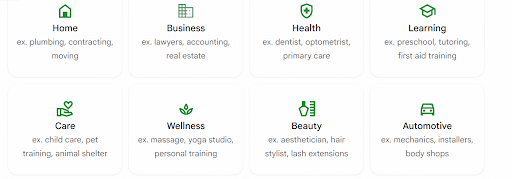
- Home Services: Electricians, plumbers, locksmiths, landscapers, garage door repair companies, and other often urgent home services will likely benefit from implementing Google LSA.
- Healthcare: Health and wellness services also frequently experience the advantages of Google local service ads by attracting patients near their facilities, whether dentists, doctors, veterinarians, or other professionals that might have multiple locations.
- Legal Services: Law firms and attorneys in family, IP, real estate, and other practice areas often succeed with Google local ads as prospective clients seek immediate legal solutions.
- Real Estate: Another industry that can get real results from Google Local Services Ads is real estate, with realtors and others benefitting from the “Google Verified” badge to build credibility while generating more leads.
Other considerations revolve around your business size and budget, as mentioned. Small businesses, solopreneurs, and many large companies with several local service areas can advertise locally on Google with these ads.
To make it worth the effort and maximize ROI, it’s also best to implement these Google local ads if your business has a consistent lead flow.
Benefits of Running Google Local Service Ads
Here’s what makes Local Service Ads a winning strategy for local businesses:
Direct Connection:
Customers can reach you instantly with a single click to call or message (available in the US). No more waiting for website form submissions or missed connections.
Qualified Leads:
Google uses your service areas, categories, job types, and other signals to match your ad with relevant searches. That can produce high-intent leads, but it does not guarantee that every contact will be qualified. Review lead quality and downstream revenue consistently.
Pay-Per-Lead Advantage:
You only pay when a potential customer reaches out through your ad, making it a budget-friendly way to target high-intent leads. Plus, you can track your return on ad spend (ROAS) more accurately.
Increased Visibility:
Google Local Services Ads appear at the very top of search results, above Google Ads and Google Business Profile listings.
Reach Targeted Customers:
Targeted advertising ensures that your ads are shown to relevant and potential customers, increasing the likelihood of conversions.
Sign of Trust and Credibility:
Eligible Local Services Ads can display a Google Verified badge after the business completes the required screening. The specific checks vary by category and location, and auto, beauty, and dining advertisers are not currently eligible for the badge. rank higher in local search results.
Simplified Lead Management:
The Local Services Ads platform provides tools to track, respond to, and manage all of your leads.
Access Google’s Support:
As a user of Google Local Services Ads, you have access to dedicated support.
Automated Bidding and Lead Optimization:
As Local Services Ads accounts migrate into Google Ads, bidding will shift from manual controls toward automated campaign-level Target CPA strategies. This change applies after migration; accounts that have not yet moved will continue using the controls available in their existing LSA dashboard.
Expanded Services:
While Local Service Ads have previously worked for a range of industries, they now work for an even broader array of verticals, including solar panel installers, tutoring services, pet care, wellness services, dental, and telehealth care providers.
Paying for Leads, Not Clicks
Unlike traditional PPC (pay-per-click) advertising, Local Service Ads operate on a pay-per-lead model. This means you only get charged when a qualified lead reaches out through your ad, either by phone call, text message (US only), or voicemail.
This also allows for more precise budgeting and a clearer picture of your ROI. The cost per lead varies by industry, location, lead type, and bidding mode. Google evaluates lead quality and may withhold or return charges for some low-quality leads, but advertisers should still review lead quality and close rates themselves.
What Information Should Your Local Service Ads Include?
Google wants to make sure potential customers have all the info they need to choose the perfect pro for the job. That’s why they recommend packing your Local Service Ads with details that showcase your talent. The more you tell them, the more confident they’ll feel about clicking that “call now” button!
Here’s some key information you’ll need to set up Google Local Service Ads:
Services Offered:
Clearly list the services you offer, including descriptions, pricing, and any special promotions or discounts. Let potential customers know exactly what problems you solve and how you can help them!
Service Area:
Be specific about your service area and where you’re based. If you have multiple locations, make sure to include all of them to help ensure you’re connecting with customers who you can realistically serve.
Contact Information:
Provide a reliable phone number, email, or website where customers can easily reach you for inquiries or to schedule services. Make it easy for interested customers to get in touch and book your services.
Reviews and Ratings:
Highlight positive customer reviews and ratings on your profile to build trust and establish credibility with potential customers. Social proof goes a long way! Showcase the positive experiences other customers have had to build trust.
Qualifications and Certifications:
Share any relevant qualifications, certifications, or licenses that show your expertise and professionalism in your field. Let customers know you’re the real deal by mentioning any relevant qualifications or certifications you hold.
Business Hours:
Be clear about your business hours so that customers can know when they can expect to contact or receive services from you. Knowing your availability helps set expectations and ensures a smooth experience for both you and your customers.
Photos or Videos:
Use visually appealing photos or videos to showcase your work, your team, or your premises. A picture is worth a thousand words! High-quality visuals can make a big difference in capturing attention and building trust.

Google Local Service Ads – Home Services
Who Can Use Local Service Ads?
Google Local Service Ads are available in the US, Canada, most of Europe (including Austria, Belgium, France, Germany, Ireland, Italy, Netherlands, Spain, and Switzerland), and the UK.
In the United States, Google currently groups eligible businesses into broad verticals that include:
- Auto care
- Beauty
- Food and beverage
- Health care
- Home services
- Learning
- People care
- Pet care
- Professional services
- Wellness
- Miscellaneous services
Eligibility is determined at the specific service and location level. Some categories are limited to certain states or pilot cities, so always check the live eligibility tool instead of relying on a static industry list.

More information on the specifics of each industry is available on the Google website.
Google may send account and migration notices by email, but never rely on an unsolicited caller or message alone. Confirm any requested action inside your Local Services Ads or Google Ads account, and use official Google support if you are unsure. As the 2026 migration progresses, Local Services Ads management is becoming part of Google Ads, while key business details continue to come from your linked Google Business Profile.
Key Google LSA Ranking Signals and How They Work
Google ranks Local Services Ads through an auction that considers your bid and overall profile quality. According to Google, key factors include:
- Responsiveness: Frequently missing calls or failing to answer messages can hurt your ad ranking.
- Search context and relevance: Google considers the requested service, time, location, your selected services, and your business bio.
- Contact options: Enabling message and booking leads gives customers more ways to reach you, especially when you cannot answer the phone.
- Profile quality: Your rating, number of reviews, average response time, high-quality images, completed verification checks, and other business details can affect ranking and lead costs.
- Bid and budget: Your bid remains part of the auction. Before migration, Google recommends Maximize Leads; after migration, bidding moves to the campaign-level automated setup described above.
Google does not list BBB complaint history, citation consistency, or click-through rate as LSA ranking factors. Keep those considerations separate from the factors Google documents for the LSA auction.
Google provides plenty of guidance on how to optimize Google Local Services Ads with the right approach.
The Complete Integration of GBP Reviews
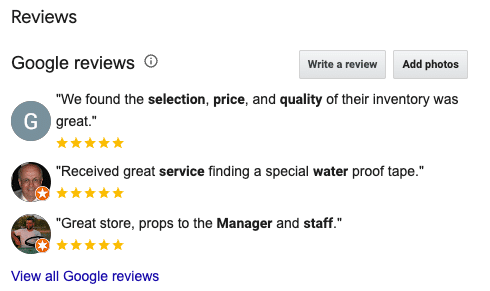
When getting reviews from your customers, they should all go to your Google Business Profile. Google eliminated its separate LSA review system in 2025, which means LSA-specific review links no longer work and all reviews used for Local Service Ads now come directly from your GBP.
This shift has made your Google Business Profile more important than ever. Google already requires a linked and verified GBP to run LSAs, and if your profile is suspended, your ads can stop running as well.
Reviews have always mattered. Google specifically lists a provider’s star rating and number of reviews as ranking inputs. As migrated accounts lose manual bidding controls, strong Business Profile data and lead handling become even more important, but Google does not publish a single “most important” ranking factor.
The takeaway is simple: make GBP reviews a priority. Not only will they help improve your Local Service Ads visibility, but they’ll also strengthen your local organic search presence at the same time.
Recent Policy and Product Updates
In recent years, there have been multiple changes to these ads, including updates to Google Local Service Ads management tools:
- Nov. 21, 2024: Google made Google Business Profile verification mandatory for Local Services advertisers.
- Jan. 6, 2025: Google retired the dedicated LSA mobile app. Advertisers continued managing accounts through the web dashboard; this was separate from the 2026 migration into Google Ads.
- Oct. 20, 2025: Google consolidated Google Guaranteed, Google Screened, and License Verified by Google into the Google Verified badge. The associated money-back guarantee was discontinued.
- Aug. 2026 (phased): Google began migrating select U.S. LSA accounts into Google Ads as specialized Performance Max campaigns with pay-per-lead goals.
- Aug. 24, 2026: Google’s updated eligibility documentation showed more granular restaurant, automotive, and beauty categories, plus pre-badge ads for some advertisers.
- Aug. 25, 2026: Google expanded eligible direct booking across more than 500 Reserve with Google partners.
- Oct. 1, 2026: Google’s updated call policy takes effect, making some missed calls and qualifying follow-up calls billable.

Eligibility and Regions
Verification is not one-size-fits-all. Google says requirements vary by the exact category and location and may include a verified Google Business Profile, identity or background checks, business registration, insurance, licenses, and minimum review requirements.
| Industry | Verification Requirements | Typical Lead Value | Example Keywords | Important 2026 Note |
| Home Services | Business license, background checks for customer-facing employees, and liability insurance | $15-$100 | “plumber near me” “hvac repair services,” “emergency locksmith” | Many are in the first U.S. migration phase; verification varies by service and location. |
| Legal Services | Professional licenses (bar admission), background checks for professionals and owners, E&O insurance | $30-100+ | “personal injury lawyer,” “immigration lawyer consultation,” “family law attorney near me” | Professional licensing and screening requirements vary by category. |
| Financial Services | Professional certifications, background checks, insurance | Variable but often high | “accountant near me,” “financial advisor in [city],” “local tax preparation service” | |
| Health & Wellness | Professional licenses, background checks, insurance | Moderate but variable | “chiropractor consultation,” “family doctor near me,” “dentist in [city]” | Booking leads and automated lead credits have category-specific restrictions. |
| Real Estate Services | Real estate licenses, background checks, E&O insurance | Variable | “home inspector near me,” “[city] real estate agent” | |
| Automotive Services | Business registration, background checks, insurance | Variable with most on the lower end | “car wash and detailing nearby,” “mechanic in [city],” “auto repair shop near me” | Categories are more specific; Google Verified is not currently available. |
Do not use a generic “typical lead value” as an eligibility benchmark. Lead prices vary by location, job type, lead type, and bidding mode. Check Google’s live screening and verification requirements for your exact category.
Google Local Service Ads work in many locations now, as well, with availability across North America, along with European countries, including Austria, Belgium, France, Ireland, Germany, the Netherlands, Italy, Spain, Switzerland, and the UK.
However, keep in mind that local differences may impact your campaigns, as different regions will have variable cost per lead, market competitiveness, number of permissible ads, service area radii, and ad rotation and ranking.
If you don’t qualify for these ads, you have other alternatives available, including Google Performance Max (PMax) and Local Ads.
How Automated LSA Lead Credits Work
Google uses machine-learning models to assess leads when the customer first makes contact. Leads classified as invalid or low quality may not be charged. Google also reassesses charged leads and may apply an automatic credit later, usually within 30 days.
The Rate this lead survey is feedback, not a guaranteed manual dispute. Google says feedback helps improve future matching and may occasionally result in a bonus credit. Credits are no longer available for “job type not serviced” or “geo not serviced” leads, and automated lead credits are not available for health care, tax specialists, or advertisers in EMEA.
This makes account setup more important. If you keep getting poor-fit leads, review your service areas, job types, and categories instead of relying on credits to fix the problem after the fact.
How to Set Up an LSA
Set Up Your LSA Profile
The setup path depends on your migration status. At the time of this update, advertisers still start new Local Services campaigns through g.co/localservices. Migrated campaigns are then managed inside Google Ads.
Here is a playbook on how to advertise locally on Google:
1. Check Eligibility
Check eligibility based on Google’s requirements, which you can do here. In doing so, you can identify your specific Local Service Ads categories.
2. Claim or Create Your Google Business Profile
If you don’t already have a verified GBP, start or claim one, and make sure all information is accurate and detailed to align with your LSA, including your description and business name.
In writing your descriptions, be sure to incorporate a copy template that you can then modify for each location. Do this for your LSA optimization as well, which will help keep things simpler.
3. Sign Up for the Platform and Create Your Local Service Ads Login
Click “Get Started” to create your LSA account and Local Services Ads login.
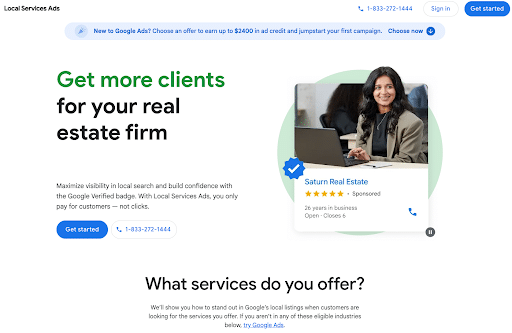
Get your Google Verified badge when you sign up for Local Services Ads. Fill in your business info: name, address, phone number, and email.

4. Complete Your Background Check (Variable)
To certify businesses, Google conducts a screening and verification process. The exact requirements vary by category and location, but the process may involve the following steps:
- Business Information: Provide accurate and up-to-date information about your business, including your name, address, and contact details.
- Background Checks: Undergo background checks, both for the business owner and the service professionals working for the business.
- Verification: Verify that your business meets the necessary requirements for advertising with Local Services Ads, such as licenses, certifications, or other qualifications relevant to your industry.
For example, if you are applying as an HVAC tech, you’ll need to upload your contractor license, plus any additional credentials relevant to your business.
From there, Google reviews your documents to determine whether they’ll allow you to advertise. If you don’t pass, you won’t be able to advertise.
If a business receives a final background-check disqualification, it must wait 30 days before reapplying. After a second denial, Google says the wait for later applications is 180 days, not one year.
Eligible businesses that complete all required checks may receive the Google Verified badge. Some businesses may qualify for pre-badge ads while finishing the remaining onboarding steps.
5. Add Local Service Ads Categories and Job Types
Once you’re in your Local Services setup (or Google Ads after migration) choose the categories and job types that match the services you actually offer.
At the same time, make sure to be as specific as possible and avoid including low-margin or generic jobs.
LSAs are keywordless, so negative-keyword management is not part of the setup. Control relevance through your service categories, job types, service areas, business bio, and ad schedule.
6. Write Service Descriptions and Business Bio
Next, craft your ad text and your business’s about section, including various trust factors, credentials, and quick and concise calls to action.
Again, in your service descriptions, use templated copy to streamline the process of optimizing text for each location and corresponding ad campaign.
7. Set Your Budget and Bid Strategy
Before migration, use the weekly budget and bidding controls available in the LSA dashboard. Google recommends Maximize Leads for legacy accounts that still have that option.
After migration, Google converts the weekly budget into a daily average by dividing it by seven. Manual maximum-cost-per-lead bidding and vertical-level Target CPAs are no longer supported. Review the new campaign-level Target CPA and separate high-value services into different campaigns only when the economics and lead volume support it.
8. Add Photos and Review Requests
Add professional and personalized photos to your ads, avoiding generic stock photos and AI imagery that could hurt your reputation among audiences.
Also, encourage your customers to leave reviews for your business on Google and other platforms, as this will directly impact your LSA rankings.
9. Target the Right People
First, you need to target the folks who need their pipes rescued. Through Google Local Services Ads, you can choose specific service areas, so you can target your local neighborhood or expand to nearby areas.
Because Local Service Ads are triggered when people search for services in a specific location, keywords work a bit differently than they do with your typical PPC campaign. Keywords relevant to LSAs categories will trigger the ads, but those keywords are things like “Denver cleaning services” or “plumber near me.”
The good news? You don’t need to manage or bid on keywords anymore. The ads are triggered based on thousands of relevant search terms, which Google has deemed relevant based on industry and location.
The slightly less good news? That means that unfortunately, you don’t get to review which keywords are sending over the most leads. Though these don’t operate on keywords, they are matched based on the service types you indicate.
10. Test and Monitor Your Leads
Go live with your campaign and test lead flow. You may want to review lead quality daily to begin with, followed by spreading it out over time.
Additionally, monitor call recordings, lead types, charge status, booking quality, and lead feedback. For migrated accounts, use Goals > Conversions > Leads in Google Ads.
11. Optimize and Maintain Your Trust Badge
Maintain your Google Verified status by completing any requested re-verification and keeping licenses, insurance, registration, and Business Profile information current.
Respond quickly because responsiveness can affect ad ranking and conversion rate, not because Google publishes a 15-minute threshold for keeping the badge. Use your own service-level target based on the urgency of the service.
Budgeting and Pricing: How LSA Pay-Per-Lead Works
Remember, Local Service Ads use a pay-per-lead model instead of pay-per-click (PPC).
Unlike PPC, which charges advertisers for each click on their ads, PPL charges only for qualified leads. What makes a “qualified lead” is whether that lead completes a desired action, be it a Google-verified phone call, booking, or message.
Google recently eliminated automatic credits for leads that don’t apply to your geographical area or job type, classifying these leads as “geo not serviced” and “job type not serviced,” respectively.
Instead, Local Services Ads use machine-learning models to assess leads at initial contact and reassess charged leads over time. Some poor-quality leads may be processed within the first 24 hours, while credits are applied within 30 days in most cases. Google does not promise an automatic refund for every spam or robocall.
There are also several key factors that influence cost-per-lead, such as:
- Industry and service type
- Urgency and intent
- Region
- Seasonality
- Response rate and reviews
- Service radius
Now, let’s look at some of the CPL ranges for each key industry using these ads. All data comes from BrightLocal and WordStream. Keep in mind that these numbers are dynamic estimates and prone to change:
| Industry | Estimated CPL |
| Plumbing | $25-$90 |
| HVAC | $35-$100 |
| Locksmith | $20-$60 |
| Electrician | $35-$85 |
| Roofing | $60-$150 |
| Legal | $80-$300+ |
| Pest Control | $20-$70 |
| Cleaning Services | $15-$50 |
| Real Estate Agents | $30-$100 |
Legacy LSA accounts use an average weekly budget and a monthly maximum. After migration, Google Ads uses an average daily budget and caps monthly spend at the daily average multiplied by 30.4. Daily spend can fluctuate with demand.
You can pause a campaign when you cannot accept new leads. However, do not promise that every in-progress interaction will be free; review the lead and billing record for any contact that began before the pause.
Lead Handling and Operations Playbook
Handling leads the right way is crucial with every LSA campaign.
Keep in mind that with the migration to Google Ads, the Google Local Services inbox will move into Google Ads with the following path: Goals > Conversions > Leads. Despite this change in Google Local Service Ads management, the following guidance on lead-handling, SLA, and disputes still applies.
Behind the Scenes of Validating Leads
Here’s a breakdown of how Google classifies a valid lead, straight from the source:
- Valid leads are related to your business or to the services
- You offer and can occur when customers find your Local Services ad on Google.
- Valid leads can be generated when:
- You receive a text message or email from the customer (United States and Canada only)
- You receive a voicemail from the customer
- You answer a phone call and speak with the customer
- You receive a missed call (without a voicemail) and you return the customer’s message with a text message, email, or call where you either speak with the customer or leave a voicemail
- You receive a booking request from a customer (United States and Canada only)
This means that promptly responding to inquiries is crucial, not just for converting those leads into customers, but also for boosting your ad ranking in future searches.
How to Track Leads with Local Ads
Before migration, you can access and manage leads in the Local Services Ads inbox. After migration, go to Goals > Conversions > Leads in Google Ads. The new Leads page includes charged status, lead type, the feedback form, and lead downloads for CRM import.
Here, you can see things like:
- The number of qualified leads you received
- The total cost of those leads
- How many leads turned into bookings (your booking rate)
- All your leads in one list
One way to make sure your sales team complies with Google’s requirements and to boost your reputation is to establish strong service-level agreements (SLAs). For instance, your SLAs should require your teams to respond to warm or hot leads within 15 minutes.
Here is a lead triage matrix to help you determine how and when to handle leads based on their level:
| Triage Level | Lead Type | Response Target |
| Hot / High Intent | Callers might request immediate service, send a message with same-day need, or leave a voicemail with an urgent service request | < 5 min. |
| Warm / Standard Service Required | Requests a quote or next-day appointment, could ask about availability or pricing | < 15-30 min. |
| Low / Potential Opportunity | Requests estimate for a later date, seeks comparison quote, or provides no timeline | Within 24 hours |
| Spam / Wrong Number / Duplicate | Silent calls, spam requests, accidental repeat inquiries | Ignore and filter out |
Develop Reply Scripts
To help you handle your leads, you must also ensure LSA integrates with your business’s CRM.
To continue to streamline lead management, put together reply scripts for phone calls, text messages, and emails.
For example, you might use something like the following for a phone call:
“Hi, this is [Your Name] from [Business Name]. I saw you reached out through Google about [requested service]. Can you tell me more about what you need so we can provide immediate assistance?”
Meanwhile, a text example might be shorter and look something like: “Hi [Prospect Name]. This is [Your Name] from [Business Name]. We received your request about [service]. Do you still need help with that today?”
Establish Escalation Flow
You should also create an escalation flow to move leads along the sales funnel.
At level one, your sales team might handle leads, while at level two, leads might be unable to be reached or have unclear intent, moving them down to the team lead. Ops Managers might then review leads at level three, where they are likely invalid.
Prepare for the 20-Second Missed-Call Rule
Starting October 1, 2026, a missed call during business hours can be charged if the caller remains connected for more than 20 seconds. For an IVR that requires a key press, the timer starts only after the caller presses the key and is routed.
Do not train staff to rush legitimate callers off the line. Instead, fix the operation behind the ad: make sure published hours match staffed hours, shorten hold times, test routing, add overflow or answering coverage, and review lead feedback and call recordings regularly.
Review Generation and Reputation Management
A big part of Google LSA campaigns involves collecting customer reviews and improving your reputation.
- You can do so with the following key steps:
- Ask every eligible customer (not only happy customers) for an honest review.
- Share the review link from your Google Business Profile by email or SMS after the job.
- Keep the request neutral. Do not ask for a specific rating or wording.
- Build the request and follow-up timing into your post-job process.
Do not offer payment, discounts, free goods, or services in exchange for a review. Google also prohibits discouraging negative reviews or selectively asking only satisfied customers.
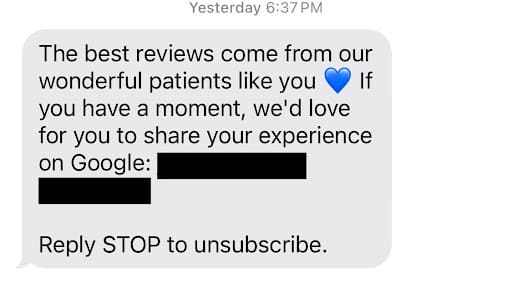
Effective rebuttal of negative reviews will help resolve any customer complaints and maintain your reputation. You could do so by:
- Acknowledging the review (“We’re sorry to hear your experience didn’t match expectations.”)
- Clarifying or contextualizing (“It sounds like there may have been some confusion on our end, which is unusual for our team.”)
- Offering resolution paths (“We want nothing more than to make this right, so please call our office today so we can resolve this issue.”)
- Reinforcing quality (“We take pride in providing responsive and consistently reliable service, and will work to mitigate this issue going forward.”)
Be sure to use A/B testing to try out different responses, which could help you determine which gets the best reaction from your customers.
To gauge the overall quality of reviews, measure metrics like:
- Review volume
- Review velocity
- Average star rating
- Keyword relevance
- Response behavior
Never underestimate the importance of reviews, as they can make or break your business. BrightLocal’s 2026 Local Consumer Review Survey found that 49% of consumers trust online reviews as much as personal recommendations.
Integrations: CRM, Call Tracking, and Reporting
To capture and convert more high-quality leads, you need to integrate the most effective tech stack around your LSA campaigns.
The primary tools to use include:
- CallRail: Your call tracking system could incorporate CallRail to help with local services ads lead generation for local customers once initially acquired. This tool integrates with HubSpot and Zapier.
- HubSpot: For your CRM, consider implementing HubSpot, which makes it easy to track leads all the way through the funnel for conversion.
- Google Ads: For more conversions and in-depth reporting, implement Google Ads to help track conversions and relevant metrics.
Based on your goals, you may want to track the following main metrics:
- Leads
- Lead-to-job conversion
- Avg cost-per-lead
- Customer lifetime value (CLTV)
LSA vs. Google Ads, PMax, and GBP: When to Use What
Here is a comparison of Google Local Service Ads with other ad platforms and GBP.
Note: As of the migration of Local Service Ads to Google Ads in 2026, LSA ads are actually becoming Performance Max campaign types targeting pay-per-lead goals. The following comparison shows how these campaigns work today as the migration progresses. This key distinction will stay relevant: LSA/pay-per-lead bills per valid lead only on Google Search and Maps, whereas standard PMax campaigns bill per click or conversion across Google’s full channel mix.

Google Local Services Ads (LSA) and Google Ads are both advertising platforms provided by Google, but there are several key differences between the two. For starters, LSAs appear right at the top of search results, complete with your ratings and reviews, and even a handy click-to-call button.
1. Ad Format:
Google Ads allows businesses to create text-based search ads, display ads, video ads, and more. On the other hand, Google LSAs are specifically designed for local service providers and appear as a featured listing at the top of the search results, showcasing the business’s name, phone number, review rating, and hours of operation.
2. Pricing Model:
Google Ads operates on a pay-per-click (PPC) model charging you each time someone clicks your ad, whereas Google LSA uses a pay-per-lead model, where advertisers only pay when a lead contacts them through the ad.
For accounts that have not migrated, Google still recommends Maximize Leads over manual Max Per Lead bidding. After migration, manual bidding is no longer available and Google applies a campaign-level Target CPA. Legacy accounts use average weekly budgets; migrated accounts use average daily budgets with a monthly cap.
Use lead-to-job conversion rate, average job value, gross margin, and customer lifetime value to set a Target CPA that supports profitability.
3. Verification Process:
With Google Ads, businesses can create ads without going through a verification process. However, in order to run Google Local Services Ads, businesses must go through a screening process to verify their licenses, insurance, and background checks. This is to ensure that only trusted and reliable service providers are featured.
4. Placement and Visibility:
Google Ads can appear in various locations on the search results page, but Google Local Services Ads appear prominently at the top of the search results, above the traditional Google Ads.
5. Overall Ease of Use:
Another advantage of Local Service Ads is their ease of use compared to Google Ads. While Google Ads come with more customizable options, this level of customizability makes them more complicated to use, whereas Google Local Service Ads come with templates for simplified development.
6. “Google Verified” Badges:
Eligible Local Services advertisers can display a Google Verified badge after completing the required screening. The badge is not currently available for auto, beauty, or dining verticals, and Google does not guarantee that it will increase rankings or conversions.
7. Services vs. Products:
Another key difference to consider is the kind of offering that benefits from each. Google Ads are great for companies trying to sell products and goods, while Google Local Ads are better suited for local businesses selling services to clientele.
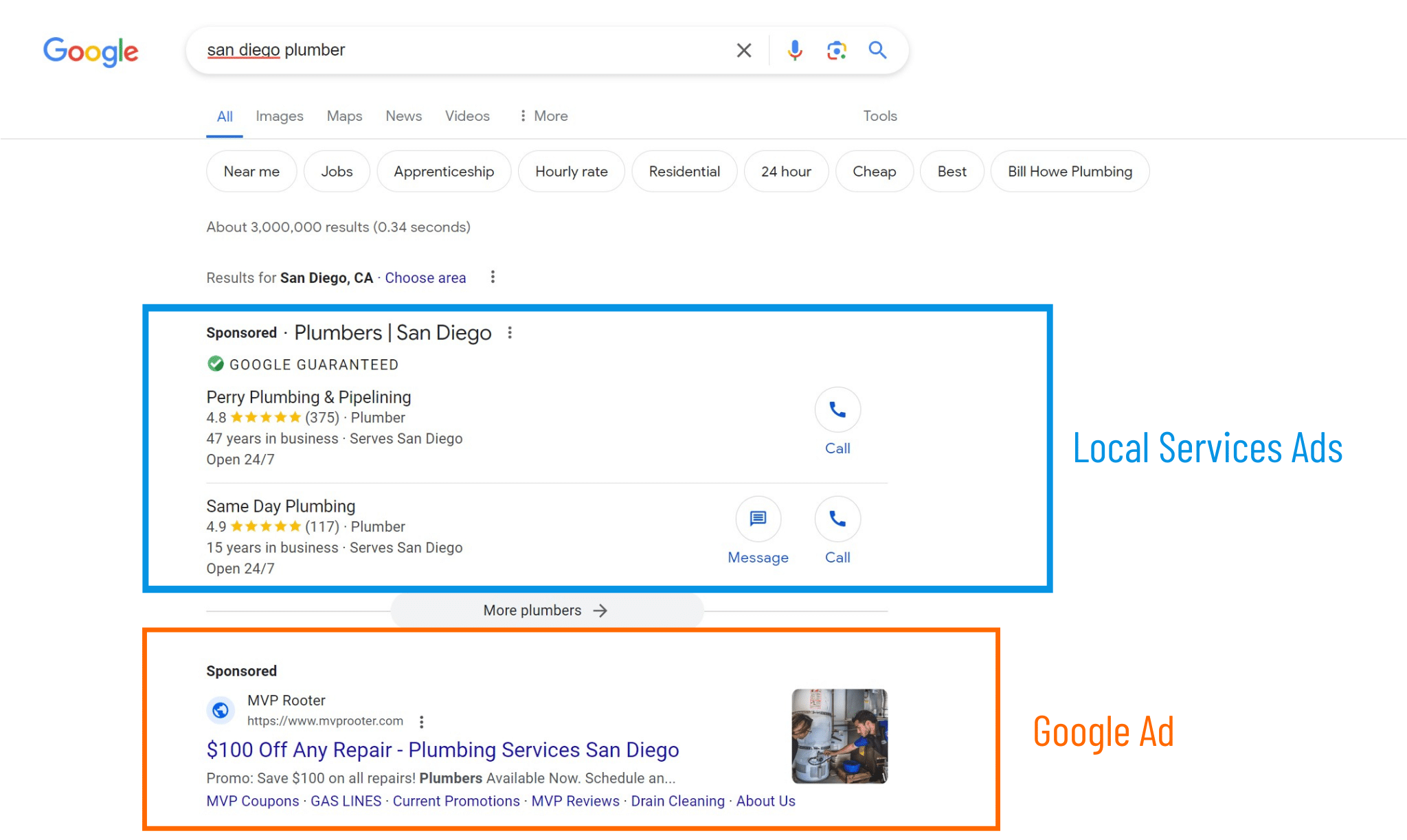
Not sure when to use or prioritize LSA over Google Ads and PMax? Here’s a little guide to help you make the right decision:
| Factor | Local Service Ads (LSAs) | Google Search Ads | Performance Max (PMax) |
| Goal | Acquiring pay-per-lead customers via calls and messages | Keyword-driven traffic and form fills | Multi-channel lead generation through Google platforms |
| Billing Model | Pay-per-lead (PPL) for qualified contacts | Pay-per-click (PPC) | Pay-per-click or conversion |
| Ranking Inputs | Service area, proximity, reviews, response time | Quality Score, bids, ad rank | Data signals like conversion feedback and ad creative |
| Ease of Setup | Simple with background checks and verification | Moderate through keyword and ad group setup | Complex using conversion tracking and assets |
| Geo Targeting | City and ZIP | Radius, ZIP, and custom map areas | Smart signals based on location intent |
| Lead Quality | Often high with calls and messages from verified users | Medium in many cases | Variable based on AI optimization and feed quality |
| Review / SEO Reputation Impact | Direct impact on rankings and visibility through GBP connection | Indirect via trust signals and extensions | Indirect through conversions and performance |
| Control Over Queries | Limited as Google matches user intent to service list | Full keyword control, including match types | Asset-based control using text, images, video, and feed |
| Limitations | Limited categories and lead types | Click fraud, unqualified traffic | Not the most transparent reporting, with a bit off a learning curve |
| When to Pause | Low lead volumes or repeated spam | High cost-per-click or low click-through rates | Weak data or no conversions |
Often, it’s best to use hybrid strategies that work together to optimize performance at every level.
For example, at the top of the funnel, when building brand awareness, you may implement Google Ads and PMax campaigns that get your brand out there.
Then, toward the bottom of the funnel, you may want to drive more conversions with your LSAs, where you can attract qualified and high-quality leads.
As you expand your business to multiple locations, here are some tips to follow to maximize scalability:
- Use one LSA profile per each location’s GBP
- Create one campaign per city or cluster in Google Ads
- Tie all review request links to the corresponding location’s GBP
If several locations serve the same geographic area, Google says it will show only the highest-ranking LSA for that query. Avoid overlapping profiles created only to crowd the results; each profile should map to a legitimate, eligible location and its correct Business Profile.
Troubleshooting: Suspensions, Badges, and Common Issues
There is always the risk of suspensions with LSAs, but you can both avoid and contest them with the right steps.
Google says Local Services accounts can be suspended for violations of its Local Services policies, provider terms, or Google Ads policies. Verification failures, expired documents, mismatched business information, or deceptive account structures can also stop an ad from serving. Poor lead quality by itself is not a documented suspension reason.
For effective remediation:
- Open Policy Manager to confirm whether the issue is an account suspension or a vertical-level ad disapproval.
- Read the cited policy and correct the underlying issue.
- Use Contact us to fix this when that option appears, or submit an appeal through Policy Manager.
- Keep supporting licenses, insurance, registration, and Business Profile records ready.
- Monitor Policy Manager for the review result and next steps.
To prevent future suspensions, account for all the items on this checklist:
- Licensing and insurance information
- A valid physical address
- Consistent information across platforms, including name, address, and phone number (NAP)
- High responsiveness to valid lead inquiries
- Legitimate customer reviews
- Matching GBP and LSA information
For additional help, consult Google’s verification guidelines to ensure compliance.
Frequently Asked Questions About Local Service Ads
1. What are Google Local Service Ads (LSAs)?
These are locally targeted Google ads that allow local service-based businesses to connect with local customers within their service areas.
2. Who is eligible to run LSAs?
Eligibility depends on your exact category and location. Google’s U.S. list includes home services, professional services, health care, auto care, beauty, food and beverage, learning, people care, pet care, wellness, and other select services. Use Google’s live eligibility checker because some categories are limited to certain states or pilot cities.
3. Will LSAs replace Google Ads?
No, LSAs do not replace Google Ads. Instead, they can complement existing Google Ads to reach local customers in need of service, while other ads could promote your business and build more brand awareness.
4. How does Google rank Local Service Ads?
Google looks at a number of factors to determine which businesses can rank for LSAs, including the searcher’s proximity to the business and service area, review quality, responsiveness to leads, and booking and scheduling.
5. How do LSAs affect my local SEO / GBP?
Running LSAs does not directly improve your organic local rankings. However, LSAs use data and reviews from your linked Google Business Profile. Improving profile accuracy and earning legitimate customer reviews can support both LSA performance and your broader local SEO strategy.
6. Are Local Service Ads going away?
No, Google Local Service Ads will remain with the migration in 2026. They’re simply moving into Google Ads, where they’ll function as PMax pay-per-lead campaign types. These ads will still only advertise locally on Google Search and Maps, with the same pay-per-lead model and keywordless setup, only with Google Ads management.
7. When will my account migrate to Google Ads?
Google is using a phased rollout. Select U.S. home and storefront service advertisers began migrating in August 2026. Service-area businesses without storefronts and accounts with custom bidding or booking configurations will follow later in 2026. Non-U.S. accounts and remaining categories will migrate in 2027. Account administrators receive a 14-day email notice, a reminder seven days later, and a final confirmation when migration is complete.
8. Will I lose my Local Service Ads data in the migration?
Google will transfer past customer leads, contact details, message history, and older call recordings into the Google Ads Leads page. Historical campaign performance reports will not migrate. Save the reports you need before your transition; Google says a download page is coming, and recommends screenshots if you need the data immediately.
9. Does “Performance Max” mean my LSA will show on YouTube, Display, and Gmail?
No. Standard Performance Max campaigns can serve across YouTube, Display, Gmail, Discover, Search, and Maps. The specialized LSA-focused Performance Max campaigns will remain limited to Google Search and Google Maps, use keywordless service-category targeting, and charge advertisers for valid leads rather than clicks.
10. Will Google charge me for a missed LSA call?
Starting October 1, 2026, Google can charge for a missed call placed during business hours if the caller stays connected for more than 20 seconds. If your IVR requires a key press before routing, the timer starts after the caller presses the key. Google says it is adding spam protections, but advertisers should still review call handling and lead quality.
11. Are direct bookings through Local Services Ads paid leads?
Yes. A booking request generated through an LSA is treated as a paid lead and appears in lead reporting. Direct booking is currently available only in the United States and is not available for health care or tax-specialist verticals.
12. Will my Google Business Profile booking link appear in my LSA automatically?
It can. If your business is verified for LSAs, the correct Business Profile is linked, and that profile has an eligible partner booking link, Google can automatically show it in the LSA. Review the booking setup and lead quality even when no extra linking step is required.
13. What are pre-badge Local Services Ads?
Pre-badge ads let some eligible businesses receive leads after completing preliminary checks while they finish the remaining Google Verified requirements. These listings appear below fully verified providers. They are not available for garage door services, health care, or locksmiths.
14. How are follow-up LSA calls charged?
If the first call is not charged, a later interaction that meets Google’s valid-lead criteria can be billed. Google Ads Liaison Ginny Marvin clarified that an advertiser is charged only once for qualifying follow-up interactions within 15 days of the initial interaction. A qualifying interaction after 15 days can create a new paid lead.
Ready to Ignite the Power of Google Local Services Ads?
Google Local Services comes with a wide range of benefits, starting with prime placement. Our paid media experts are ready to guide you through the process of integrating these valuable ads into your digital marketing strategy.
With pay-per-lead billing, direct booking, and lead management moving into Google Ads, LSAs can be a strong acquisition channel for eligible businesses. The real opportunity comes from connecting ad spend to answered calls, qualified bookings, completed jobs, and revenue.
To get the best results from your Local Service Ads campaign, it’s in your best interest to have reliable Google Local Service Ads management from the professionals at Ignite Visibility.
Our Google Local Service Ads Agency can:
- Create your Local Services Ads profile
- Qualify for the Google Verified Badge
- Build a strategy that incorporates Local Services Ads
- And more!
Ready to get started?
Learn about our pay-per-click management services and how we can help you advertise locally on Google with Google Local Service Ads management, along with a fully integrated marketing strategy.