


Business blogs offer a unique space for in-depth content and authentic connections. Want to start your own?
In this blog, John Lincoln, an SEO expert, shares how to start a blog that drives traffic, leads and email captures. You’ll uncover other reasons why a business might use a blog and how to leverage blogging to build authority, trust, and strong customer relationships.
What You’ll Learn:
- So, Does Your Business Need a Blog?
- How Might Your Business Use a Blog
- How To Start A Blog in 11 Steps
My Expert Insights on How to Start a Blog for Your Business
Business blogging is about forging connections that go far deeper than likes and shares. Deliver insights that resonate with your target audience, and you’ll establish yourself as a thought leader with a loyal following.
Blogging is a chance to share what goes on behind the scenes, like what your business offers and the people who make it all happen.
Action Item: Know your audience before you write. Before crafting your strategy, take a deep dive into your ideal customer’s world. What are their challenges? What are their long-term goals? Tailor your content to empower them, not just inform them. Ditch the hard sell. Offer solutions and educate your audience on industry trends and best practices.
Regularly publishing high-quality content is at the core of a thriving business blog. A well-defined content calendar keeps things flowing smoothly, ensuring a steady stream of informative and insightful pieces.
So, Does Your Business Need a Blog?
Before you ask, “how to start a blog” you should consider if your business needs a blog.
In 2024, ranking high in Google searches is great, but it’s not the only thing that matters anymore.
The competition is fierce, with millions of web pages vying for attention. But here’s the secret: it’s not about just one platform. Think of your blog as a seed you need to plant strategically across the web.
Blogging in 2024 is about content distribution, not just creation. Promote your posts across social media, reaching tens of thousands instead of a couple of thousand.
It takes effort, but the rewards are real. Studies show 61% of US consumers buy based on blog posts, and domains with blogs have 434% more indexed pages on Google! So, the answer is clear: your business absolutely needs a blog, but with a modern distribution strategy in mind.
So in short, yes your business needs a blog.
How Might Your Business Use a Blog
Before you jump into creating a blog, let’s cover a few ways you might leverage a business blog.
Forget dry press releases or impersonal social media feeds. A business blog is your chance to have a real conversation with your audience. It’s a space to showcase your experience, expertise, authority, and build trust.
Here are some compelling ways a blog can supercharge your brand:
- Educate and become a go-to resource: Share valuable, informative content that solves your audience’s problems. Offer practical tips, industry insights, and educational resources that position you as a thought leader they can rely on.
- Turn raving fans into brand advocates: People trust other people. Feature customer success stories and testimonials on your blog. Seeing how your solutions have transformed businesses like theirs builds trust and positions you as the go-to partner.
- Generate leads like a magnet: Blogs are lead-generation machines. Offer downloadable resources, white papers, or webinars in exchange for email addresses. This allows you to nurture leads and convert them into loyal customers.
- Attract the right people: Be intentional with the keywords you use. By targeting search intent, you will drive organic traffic to your website, attracting potential customers who are already interested in what you offer.
- Establish yourself as an industry leader: Share your unique perspective on industry trends and challenges. Participate in discussions and offer solutions in your blog posts. This positions you as a thought leader, attracting clients and partners who value your expertise.
- Keep your audience in the loop: Announce new products, upcoming events, or exciting company updates. Your blog keeps your audience engaged and informed about everything happening in your business world.
- Recruit top talent: Showcase your company culture, work environment, and career opportunities. Engaging blog posts attract potential candidates who resonate with your values and are excited to join your team.
- Boost your SEO and gain authority: Regularly publishing high-quality content with relevant keywords improves your search engine ranking. This drives more organic traffic to your website and increases your domain authority, a fancy way of saying your website is trusted and valuable.
How To Start A Blog in 11 Steps
Kicking off the blogging process is exciting and doesn’t have to be complicated! Here are some simple steps to guide you toward building a thriving blog that achieves your business goals:
1. Know Your Why and Who: Define Your Goals and Target Audience
Every blog needs a mission. What do you want to achieve with your content? Do you aim to generate leads, establish thought leadership, or boost brand awareness? Once you have a clear understanding of your goals, you can tailor your content strategy accordingly.
Identify your ideal reader. Understanding their demographics, interests, and pain points is vital. When you know your audience, you can create content that truly resonates with them, building trust and establishing yourself as a valuable resource.
2. Brainstorm Like a Boss: Generate Captivating Topics
Now comes the fun part: brainstorming blog topics. Think outside the box and tap into your team’s collective knowledge. Here are some ideas to get you started:
- Industry trends and insights: Share your unique perspective on hot topics in your field.
- Customer challenges: Address common pain points your audience faces and offer solutions.
- Behind-the-scenes glimpses: Give readers a peek into your company culture and values.
- Product or service deep dives: Educate your audience on how your offerings can benefit them.
- Industry influencer interviews: Collaborate with thought leaders to offer fresh perspectives.
3. How to Start a Blog: Build Your Blog on WordPress
One of the easiest ways to do content marketing is with the aid of a content management system (CMS). The best choice for a CMS is WordPress.
Why? Because it commands a whopping 62% of the market share. That’s more than the rest of the CMS options combined.
You’ll find it much easier to get online support for WordPress. Just Google the question that you have and you’ll likely find the answer from multiple sources.
Also, there’s a few reasons why WordPress is the most popular:
- In terms of user-friendliness and extensibility, it simply can’t be beat.
- You’ll find it much easier to get online support for WordPress.
- WYSIWYG (What You See Is What You Get) editor.
Freshy offers custom WordPress services to make your blogging experience seamless. For a well-organized and aesthetically pleasing site, teaming up with experts can significantly optimize how your while ensuring smooth functionality.
4. Install Yoast to Optimize Your Blog for SEO
As we’ve just noted, WordPress is extensible. That means you can add new features by installing plugins. One of the plugins that you should install is Yoast.
That’s because Yoast will help you with search engine optimization (SEO). Yoast is a critical component of how to start a blog. The plugin offers the following features:
- Suggestions for content improvement
- Page analysis for keyword relevance
- Sitemaps
- RSS optimization
The plugin also has a rare 5-star rating. And even better, Basic Yoast is free. However, you can also get a premium version that offers 24/7 support in addition to a few other features.
5. Add a Sitemap to Your Blog
You should also add a sitemap to your website.
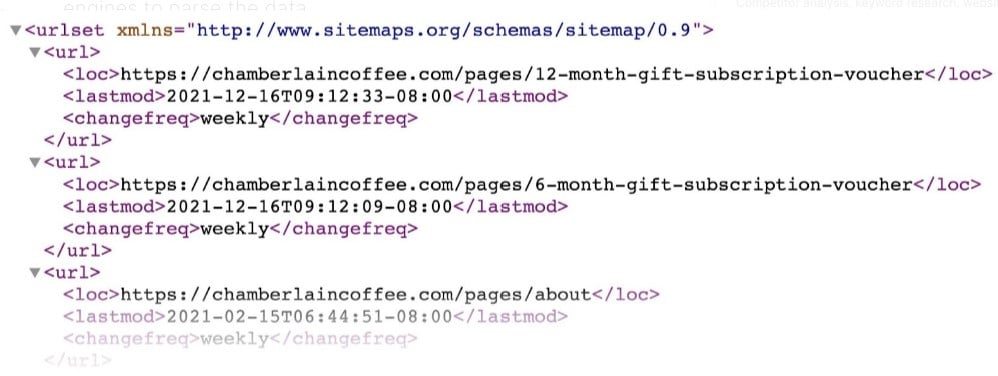
If you’re not familiar with sitemaps, they’re XML pages that search bots crawl to get a hierarchical view of what’s on your site. They help with SEO.
The good news is that if you’ve installed Yoast, you’ve already got a sitemap. Yoast creates that for you.
However, you should still link to your sitemap in the footer. That way the search bots will find the sitemap when they crawl your site.
6. Submit Your Sitemap to Google and Bing
Once your sitemap is created, it’s important to formally submit it to both Google and Bing.
Start by visiting the Google Search Console. Follow the process of adding your site if you haven’t already done so.
Once your site is added, visit the dashboard for that site and click on Crawl on the left-hand sidebar. Select Sitemaps from the dropdown menu that appears.
Click on the Add/Test Sitemap button on the upper, right-hand side of the main screen. Enter your sitemap URL and click on Submit.
If everything worked right, you should see a note that says your sitemap was submitted. Click the Refresh link and keep refreshing the page to ensure that Google can read your sitemap. You shouldn’t see any warnings on the table.
Next, submit your sitemap to Bing Webmaster Tools. Start by adding your site in the Add a Site field at the very top of the dashboard. Once you click Add, Bing will ask for a sitemap URL. Just enter it in and submit it.
7. Add a Sidebar to Promote Your Business
It’s also a good idea to promote your business right alongside the articles on your blog. You can do that with a sidebar.
The good news is that almost every reputable WordPress theme on the market makes it easy for you to add a sidebar. Check your theme’s documentation for details on how to do that.
Once you’ve got your sidebar set up, it’s important to include the right kind of info in it:
- Who You Are: Give details about the benefits of your products or services. Be sure not to hold back on bragging rights.
- Include Top Guides: Position yourself as an expert in your domain by linking to the top guide content you’ve created.
- Email List Promotion: It’s usually a great idea to include the field to capture a visitor’s email address in the sidebar itself. You could also just add a link to a form that captures the email address.
- List of Top Categories: Give curious visitors an easy way to find other great content that you’ve produced.
8. How to Start a Blog: Install Share Buttons
If you want your articles to have a wide reach, make it easy for people to share them with buttons.
When you click one of those button icons, you’ll see a popup that allows you to quickly share the article with friends and followers.
There are plenty of free plugins that you can use, but if you want a comprehensive, premium solution, take a look at Sumo..
9. Conduct Keyword Research to Satisfy Search Intent
Think of keywords as search engine road signs. You increase your chances of people finding your blog by strategically incorporating relevant keywords into your content.
Use keyword research tools to identify relevant terms your target audience is searching for. Don’t forget – it’s not about stuffing keywords; it’s about weaving them naturally into your writing for a smooth reading experience.
- Develop better content then your competitor
- Mention people and companies and email them
- Create social media profiles and share your blog posts there
- Advertise your blog posts on social media
10. Write Content that Converts: Create Compelling, Action-Driven Posts
This is where your expertise shines! Craft high-quality, informative content that engages your audience and compels them to take action. Here are some tips:
- Focus on value: Provide actionable takeaways that solve problems or educate your readers.
- Try long-form content: Google loves long-form content and you’ll be rewarded with backlinks, as long your content is quality.
- Write in a clear, conversational style: Break down complex topics into easily digestible pieces of content.
- Incorporate visuals: Images, infographics, and videos enhance user engagement.
- Optimize for readability: Use bullet points, subheadings, and short paragraphs for easy skimming.
- End with a call to action: Tell your readers what you want them to do next, whether it’s subscribing to your email list, downloading a resource, or contacting you for a consultation.
11. Promote Your Blog for Maximum Impact
A fantastic blog deserves an audience. Don’t be shy about promoting your content across various channels.
Share Posts Via Email: Build an email list and use it to promote your blogs! If you send out emails once a day or once a week, be sure to include in your email a link to your best and most recent articles. Add a summary that tempts people to click the link so they can learn more.
Share Posts Across Social Media: If you want to generate buzz about your blog, you need to go social. Once you’ve established your social media accounts, make sure that you use each platform to post links to your articles.
Guest Post on Other Poeple’s Blogs: Establish your authority across the web to build your personal brand and contribute to your own site’s EEAT.
How to Start a Blog for Your Business With Ignite Visibility
Ready to take your business blog to the next level? Ignite Visibility goes beyond just creating content – we craft strategic blog campaigns that achieve your specific goals.
Here’s how Ignite Visibility can help you:
- Attract new customers: Our SEO expertise ensures your blog ranks high in search results, driving organic traffic to your website.
- Build trust and authority: Establish yourself as a thought leader through informative and engaging content.
- Convert readers into leads: Implement targeted calls to action to capture valuable leads and grow your sales pipeline.
- Boost brand awareness: Ignite Visibility helps you leverage social media and other marketing channels to promote your blog, amplifying your brand message.
Contact Ignite Visibility today for a free consultation and discover how a strategic blog can transform your business!

