


Like other marketing components, a website isn’t a simple “set it and forget it” kind of asset. Once you’ve launched your website, you need effective management to maintain and continually optimize it for maximum ROI.
However, many businesses tend to neglect their sites until something breaks, it falls victim to hacking, or drops in Google rankings. Through proactive website management, you can mitigate these and other issues before they compromise your site.
In this article, Cooper Anderson, VP of Web Development, will explore how the right website management services and tools can provide your business with an online hub that gets real, long-term results.
TL;DR
Here, you’ll learn more about the following key topics:
- What is website management?
- The main elements of online website management
- Why you need effective website management
- When to get website management services
- What to look for in a website manager
My Expert Insight into Website Management
Effective online website management is integral to any business’s digital marketing strategy, as it’s where all of your traffic goes, ideally, to convert. At the same time, there’s a lot to it that can require continual monitoring and optimization, which can be overwhelming, especially as your site scales over time.
Without reliable and consistent management, your site is likely to struggle connecting with audiences and driving conversions. Just consider that 88.5% of people leave a website simply because it doesn’t load quickly enough, and standing out is becoming increasingly difficult with webmasters creating 252,000 new sites every week.
I’ve witnessed firsthand how the right website management tools and services help brands dominate competitors. One example is an ecommerce client of ours who worked with more than 700,000 pages with several XML sitemaps, which we broke up into smaller files that prioritized the most valuable pages for precise indexing. The end results were a significant increase in indexed pages (99K to 225K, a 130% increase over a four-month period), leading to considerably higher traffic.
Another client in telecommunications struggled with a combination of high traffic and low conversions, which our website managers were able to fix with the help of a quick navigation menu for mobile users, resulting in a 14.81% boost in phone clicks through effective conversion rate optimization.
So, let’s get into how website management works and how you can implement the right solution for your business.

What Exactly Is Website Management?
In short, website management refers to the ongoing process of maintaining, securing, and optimizing a website for optimum performance.
Keep in mind that managing a website is different from building one. Developing a site is one step, but running the site day to day requires persistence to ensure it really performs.
Also, website management isn’t exclusive to specific industries. Every type of business, from small to corporate, whether it’s a local retail shop or an enterprise SaaS company, needs some level of effective management to thrive online.
The Core Components of Effective Website Management
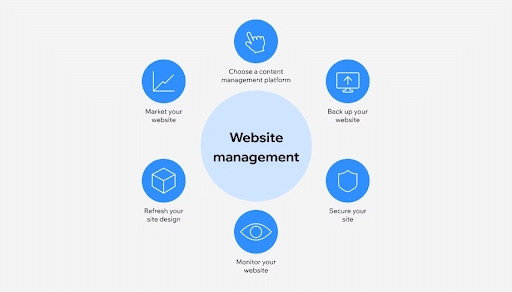
The key elements of online website management.There are several components that factor into effective website management, including:
Security and Monitoring
One critical consideration for online website management is reliable security and consistent monitoring, which will keep sensitive data safe from prying eyes and help maintain site-wide performance.
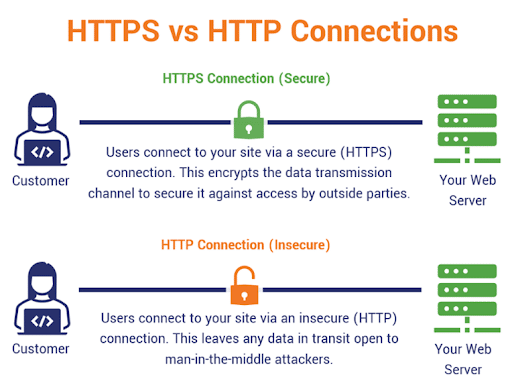
The first component here is an SSL certificate, which will secure your URL with HTTPS in place of unsecured HTTP, encrypting data to prevent hackers from accessing information like customers’ credit cards and other personal data.
Meanwhile, malware scanning will protect your site and its users from potential malware attacks that attempt to damage or steal data. You can also secure network traffic with firewall management that prevents unauthorized access through log analysis, regular audits, and policy optimization.
One last consideration is your site’s plugins and themes, which you should update as needed to mitigate the risk of vulnerabilities using outdated versions. Platforms like WordPress often automatically notify webmasters of new versions and update WordPress SEO plugins and others to keep them current.
Regular Backups
In the event of your website’s compromise or a disaster leading to lost data, you must also maintain full backups of your site.
To ensure you’re always working with the most recent version of your site, implement automated daily or weekly cloud-based backups that your system stores off-site.
Taking this initiative will prevent potentially costly downtime and the need to rebuild your site from scratch.
Performance and Speed Optimization
Another essential step is to optimize your site’s performance and load times, which will appeal to Google’s Core Web Vitals, metrics that serve as key signals for SEO.
For continual optimization, start by monitoring load times—the ideal load speed is no longer than 2.5 seconds.
Additionally, compress images to minimize their file size, which will further increase page load speed.
Consistent caching also helps improve load times by temporarily storing images and other website files in users’ browsers, ensuring that users are able to more instantly load pages when revisiting your site.
You can always test load times using Google’s PageSpeed Insights website management tool, and be sure to measure Core Web Vitals metrics to gauge performance.
Content Updates and Strategy
You must also regularly update your content and maintain an effective content strategy to build topical authority, improve SEO performance, and continually convert visitors.
There are multiple ways to go about this, including:
- Publishing New Blog Posts: Consistently publish new content on your blogs when appropriate, covering various industry topics that connect with audiences at the top of the sales funnel, which can help establish you as an industry authority while boosting SEO. One strategy that can help here is the pillar page approach, which involves creating a single, comprehensive post covering every aspect of a particular topic, followed by branching each subtopic into a dedicated post with its own designated long-tail keywords.
- Updating Team Pages: Your “About Us” and “Meet the Team” pages will also keep your site rich with content that gives your brand a personal touch, introducing visitors to the people behind your products or services. These pages can include bios and a behind-the-scenes look to demonstrate how your business operates, which can significantly build trust among new customers. You could also incorporate information about your company culture, beliefs, mission, and values into these pages.
- Adding New Products: As you introduce new offerings, incorporate them into category and product or service pages. For example, an ecommerce site could continually add new optimized product pages for each new product, while a service-based business can create dedicated service pages with clear CTAs that lead to more conversions.
- Maintaining Accurate Information: In addition, make sure all information on your site is accurate with the latest company and product info, and update off-site information as needed, including Google Business Profiles with accurate name, address, and phone number (NAP), business hours, and other relevant data, all of which can further build brand trust while supporting your SEO strategy.

Technical SEO Maintenance
Another item to include on your checklist is technical SEO, which enables search engines to crawl, index, and ultimately rank your pages.
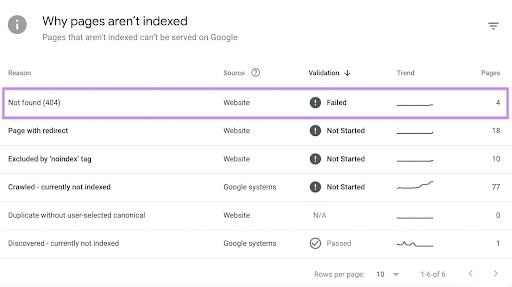
To maintain indexability, you first need to fix any broken links on your site that result in 404 errors. If you can’t replace broken pages directly, use 301 or 302 redirects that map each 404 to a relevant existing page.
In addition, monitor Google Search Console regularly to check for any indexing errors, which might indicate the need to edit robots.txt files or use more crawlable XML sitemaps that include all of the URLs you want to appear in Google.
Uptime Monitoring
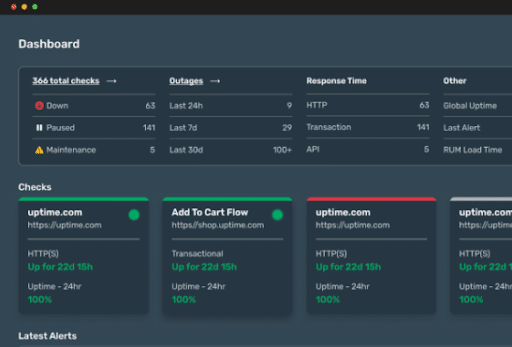
Website management also involves monitoring your site in real time to ensure it’s actually live and accessible at all times.
There are many website management tools you can use to monitor uptime, such as Uptime.com, which can help detect outages and performance issues 24/7 with advanced alerting logic that mitigates the risk of false alarms.
You can then determine the issue causing downtime and proactively resolve it.
Why Is Website Management So Important?
The following are some of the main benefits of good management:
First Impressions Matter
One of the main reasons you need to manage your website the right way is to establish a good first impression among your audiences.
Outdated or broken websites that are unappealing or difficult to navigate will quickly kill brand trust, keeping you from moving people down the sales funnel.
It Helps Achieve and Maintain Higher SEO Rankings
Keep in mind that Google often penalizes websites that are slow, inactive, or unsecured.
Through regular management, you’ll be able to keep your website in Google’s good graces with fast load times, consistent posting and user engagement, and reliable security using SSL and HTTPS protocols.
Fixing broken URLs and maintaining crawlability and indexability will also prevent Google from neglecting your site in search results.
You Create a Better User Experience (UX)
The right website management tools and strategies will work to maintain the ideal user experience across your site, enabling it to connect more easily to users.
Well-managed sites are generally easier to navigate for visitors, helping them find the content they need, which culminates in higher conversion rates and more high-value leads.
Save Money With a Website That Really Works
Another benefit is significant cost savings, as you’ll avoid potentially expensive downtime by proactively maintaining your site.
Otherwise, you could spend a lot of time and money on emergency disaster recovery, such as after hacks, denial-of-service (DoS) attacks, or other types of system compromise.
DIY vs. Hiring a Website Management Agency
Not sure whether you can handle management in-house or need a website manager to help? Here’s some guidance on when to do it yourself or hire an expert:
The DIY Route
Small businesses new to website development and management may try to handle everything on their own, especially if the website contains minimal content and a few pages to start.
Some of the pros of doing it yourself include:
- Reduced costs compared to hiring professionals
- Total control over your site, from design to content
- Fast setup for simple sites
On the other hand, there are some cons to keep in mind, such as:
- More time spent on management that you may not have, particularly as you scale
- The need for technical skills that your team might not possess
- Increased risks associated with hacks, data leaks, poor performance, and poor SEO
The In-House Hire
If you need some help managing your website, you might also opt to hire a dedicated in-house webmaster.
However, working with an in-house expert can come at a higher cost than working with a team. For example, you will need to spend more money on recruiting, hiring, and onboarding an experienced webmaster. You’ll also need to consider overhead costs like insurance and benefits.
Working with an in-house webmaster could also make it harder to scale your website as your business grows, preventing you from maintaining a competitive edge and maximizing performance.
Conversely, working with an entire team will help you save more in the long run with better ROI through proactive, scalable website management services.
Hiring an Agency
In many cases, it’s best to hire a team of experienced and highly skilled website managers.
Some of the benefits of working with an agency include:
- Peace of mind, as you know your site is in good hands
- Access to multiple experts who can handle every aspect of your site, including developers, SEOs, and security specialists
- Saved money with results-driven, bundled website management services that eliminate the costs of hiring an in-house expert
What to Look for in a Website Management Service
Considering hiring a website manager to handle your site? The following are some key considerations when searching for the right agency and services:
- Clear reporting and communication, with consistent responsiveness
- Fast turnaround times for support tickets to give you the assistance you need, when needed
- Proactive security measures instead of reactive fixes, identifying and addressing issues before they can blow up
- Optimal scalability to handle your website, or even multiple websites, as your business grows
Taking the time to find the ideal partner will save you a lot of time, money, and headache in the long run as you benefit from tailored services that meet your unique needs.
Work With the Experienced Website Managers at Ignite Visibility
If you want to get the best results from your website management efforts, it helps to work with a team of specialized and seasoned experts. Ignite Visibility can provide you with reliable solutions that meet your precise needs, helping you achieve those short-term wins and long-term goals.
With Ignite at the helm of website development and management, you can:
- Build a website that best represents your business online
- Continually manage SEO, security, and other aspects
- Regularly create and post well-optimized, high-value content
- Engage in real-time monitoring to gauge and optimize performance
- And more!
Want to get started with us? Find out how our website development services can give your site what it needs to dominate the competition.

