


Deciding where to host your company blog is a crucial decision. While you have a few options, Google reveals that your choice will impact your website’s overall SEO.
In this blog, Jason Carleton, Sr. Director of SEO, breaks down the differences between subdomains and subdirectories, providing insights into when to use each and how they can influence your overall SEO strategy.
What You’ll Learn:
- What’s the Difference Between a Subdomain and a Subdirectory?
- Subdomain SEO Impacts
- When Should You Use a Subdomain?
- When Should You Use a Subdirectory?
- FAQs About Subdomain SEO
My Expert Insight on Subdomain SEO
As search engines evolve, it’s critical to stay informed about how emerging trends, like AI-driven search, and Core Web Vitals, will impact your website’s performance, including subdomains.
As we move into 2026, you should remain focused on creating high-quality content, optimizing for user experience, and ensuring technical SEO best practices across both subdomains and subdirectories will become more important. While subdomains can still be useful for certain technical or organizational reasons, there are some things you should consider before choosing to use a subdomain.
Pro Tip: Focus on creating high-quality, relevant content for your subdomains. Optimize them for search engines and provide a seamless user experience. By aligning your SEO subdomain strategy with your broader SEO goals, you can boost your site’s visibility and performance.

What’s the Difference Between a Subdomain vs Subdirectory?
A subdomain is a separate section of your website that functions as an independent entity with its own DNS records, while a subdirectory is simply a folder within your main domain’s existing structure.
Subdomain URL Examples:
- blog.yoursite.com
- shop.yoursite.com
- support.yoursite.com
- locations.yoursite.com
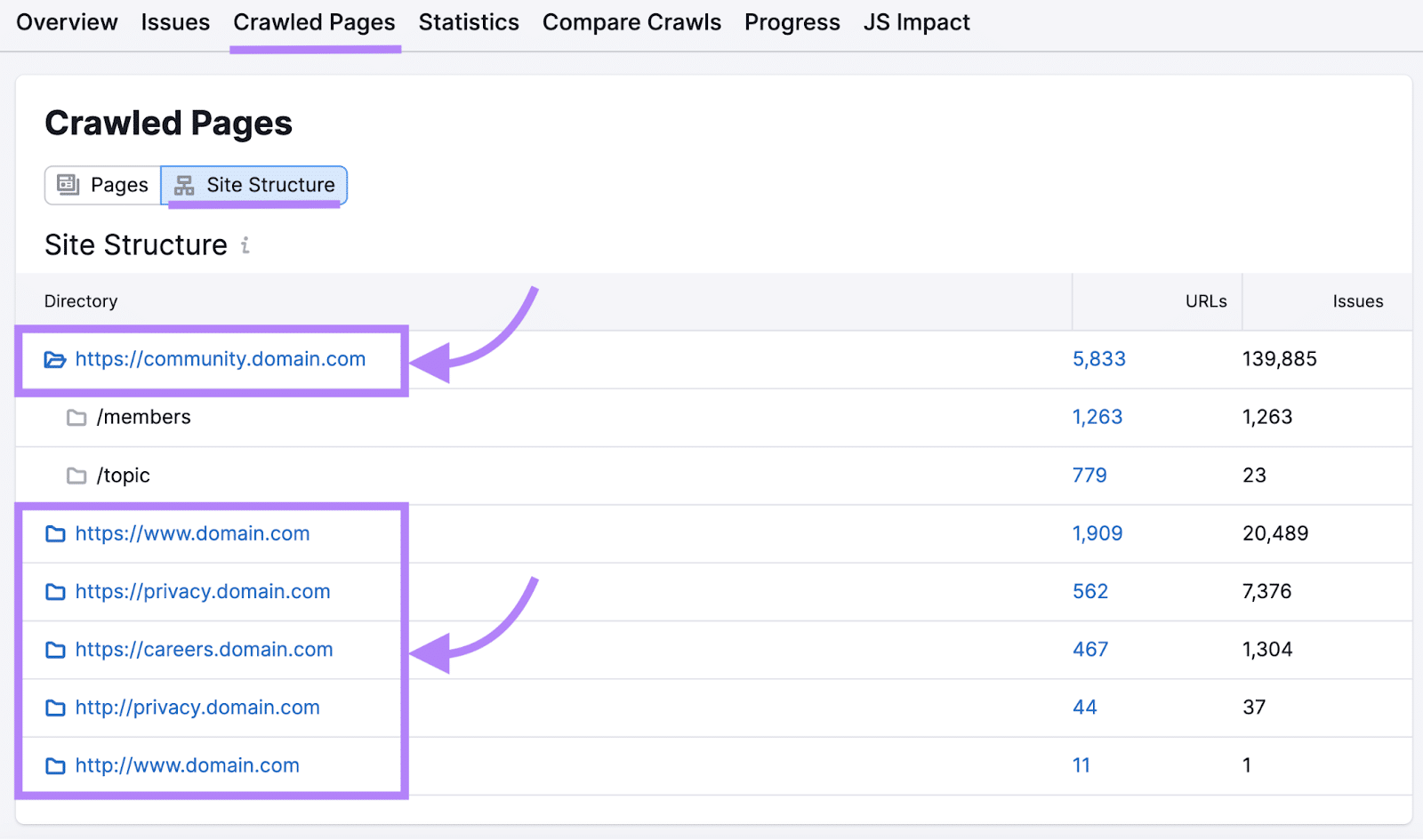
Example of a Subdomain, Source: SemrushSubdirectory URL Examples:
- yoursite.com/blog
- yoursite.com/shop
- yoursite.com/support
- yoursite.com/locations
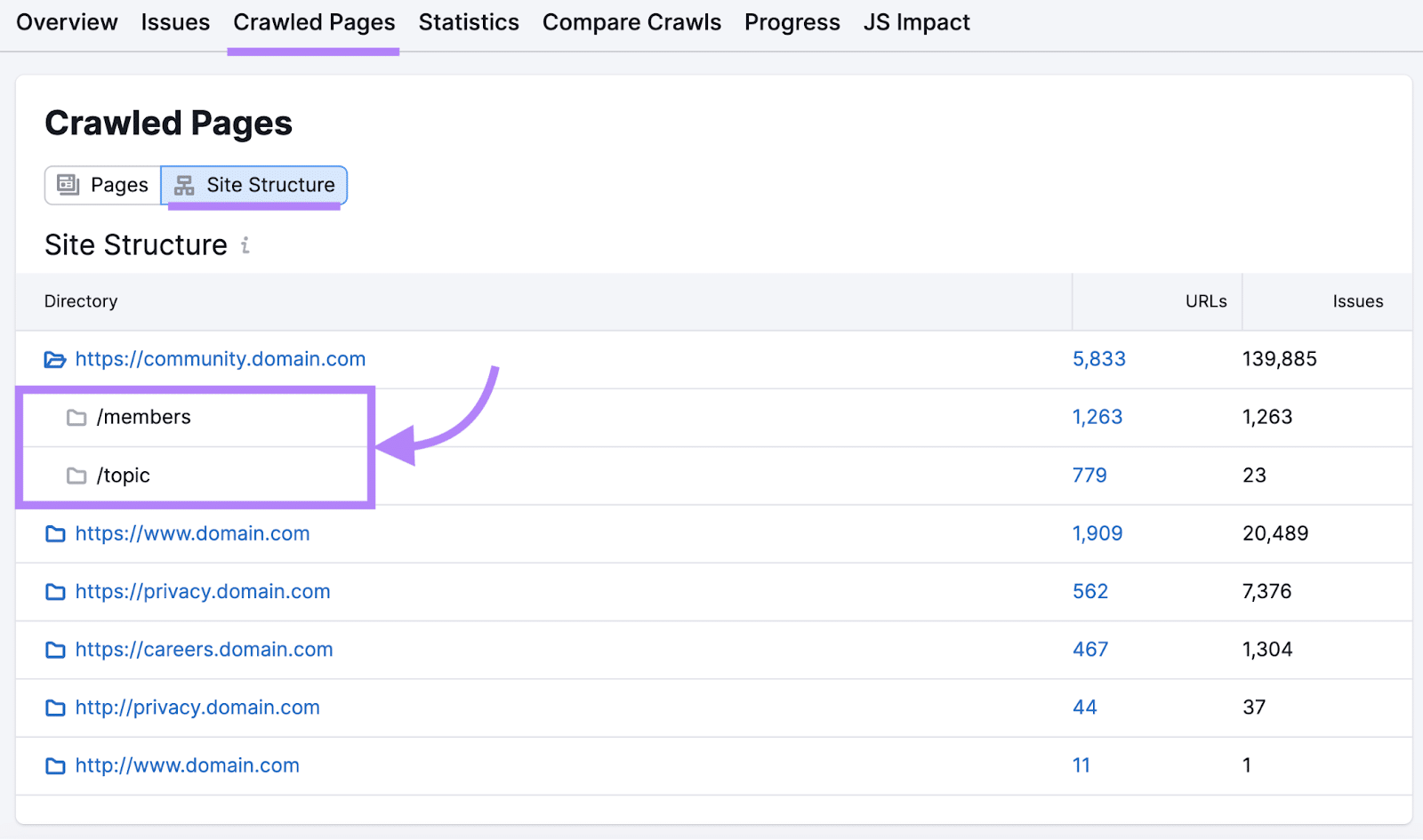
While Google treats subdomains and subdirectories equally in terms of indexing and ranking, real-world examples often show that subdirectories tend to perform better in search results.
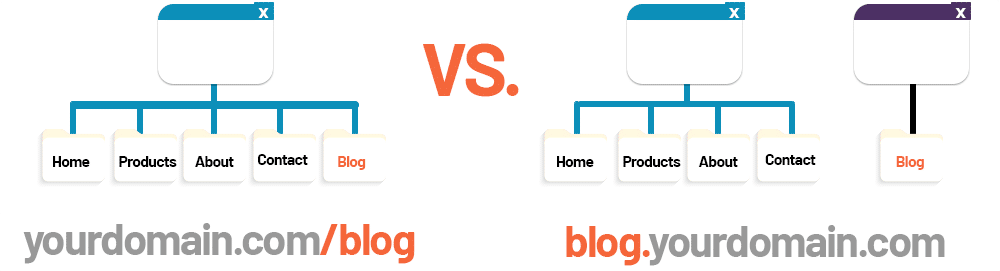
The technical differences between these two approaches run deeper than URL formatting. Subdomains require separate DNS configuration, where subdirectories inherit all DNS settings from the root domain. No additional DNS configuration is necessary because yoursite.com/blog is simply a path on the same server responding to the same host header.
Subdomains can also live on entirely different servers, hosting environments, or even content management systems. If you use a subdirectory, everything must exist in that one main domain’s server, using the same SSL certificate and hosting infrastructure.
When Should You Use a Subdomain?
Subdomains are a good choice if you need to host entirely different sections of your site that don’t require SEO authority from the root domain. Subdomains also work well when you need to implement separate CMS or back-end structures.
For example, you might use a subdomain for:
- Support portals
- Forums
- App
- Account login
However, keep in mind that subdomains do not automatically inherit SEO value from the root domain. You will need to work on each subdomain individually to rank well, which can require more effort.
When Should You Use a Subdirectory?
On the other hand, a subdirectory is perfect for when you want to expand your website with new content that’s closely related to your main site.
For example, if you’re launching a blog or an additional content hub, a subdirectory is generally the best approach, as it allows you to build authority more efficiently by pooling SEO value from across your domain.
- If you have a main category like “blog” and want to divide it into subcategories like “news,” “tips,” and “interviews,” you can use subdirectories like:
- example.com/blog/news
- example.com/blog/tips
- example.com/blog/interviews
Using a subdirectory also makes it easier to manage internal linking and canonical tags, ensuring that search engines understand the relationship between your content pieces, which can positively impact rankings.
How Google Views Subdomains and Subdirectories
Google’s official position, articulated repeatedly by Search Advocate John Mueller, states that the search engine can handle both subdomains and subdirectories equally well. In multiple Google Search Central hangouts, Mueller has emphasized that Google’s algorithms are sophisticated enough to understand the relationship between a subdomain and its parent domain, treating them appropriately regardless of structure choice.
However, the practical outcomes documented by industry experiments tell a more nuanced story. Backlinko’s analysis of over 11.8 million Google search results found that subdirectories consistently outperform subdomains in organic rankings, particularly for competitive keywords.
Ahrefs’ research reinforces this gap between theory and practice. Their analysis of subdomain-to-subdirectory migrations demonstrates that “[i]f you don’t treat [subdirectories] as part of the same site, Google may not either.”
The disconnect between Google’s official stance and measurable outcomes highlights the disparity between what the algorithm can do and what it consistently achieves at scale. While Google’s systems are theoretically capable of understanding subdomain relationships, the reality of crawl budgets, authority distribution, and link equity calculations creates systematic advantages for subdirectory implementations.
Subdomains and SEO Impacts: What You Need to Know
When it comes to hosting your blog, choosing between a subdomain and a subdirectory can significantly impact your site’s SEO performance.
Subdomains function as separate entities in Google’s eyes, meaning the authority you build on blog.yoursite.com doesn’t automatically strengthen yoursite.com’s rankings – a critical consideration that can cost you months of SEO momentum.
So, let’s talk about it: How do subdomains affect SEO?
Authority and Link Equity Distribution
Subdomain or subfolder: which is better for SEO? Subdirectories inherit the full authority of your main domain, consolidating every backlink, engagement signal, and trust metric into a single SEO asset. When a high-authority site links to yoursite.com/blog/article, that link equity flows directly to your root domain, strengthening rankings across your entire site.
Measurable Impact: Sites that migrate blog content from subdomains to subdirectories typically see an increase in organic traffic within 90 days, as consolidated authority improves rankings across the content library.
Mitigation for Subdomains: If operational constraints require subdomain use, implement aggressive cross-linking between your main domain and subdomain. Include prominent navigation that links back to the main site, embed related product/service links within blog content, and ensure that your subdomain’s brand mentions link to the root domain. Submit separate sitemaps for each property in Google Search Console and monitor both authority profiles independently.
User Experience and Navigation Coherence
Subdirectories provide seamless navigation continuity and an improved user experience. Users clicking from yoursite.com/products to yoursite.com/blog experience no visual disruption. This can reduce bounce rates when compared to subdomain transitions, where users often encounter different designs, navigation structures, or loading speeds that signal they’ve left the main site.
Measurable Impact: Subdirectory implementations maintain higher pages-per-session metrics compared to subdomain architectures. This directly correlates with improved engagement signals that influence rankings.
Mitigation for Subdomains: Invest heavily in visual and functional consistency across your main domain and subdomains SEO. Use identical headers, navigation menus, color schemes, and footer elements. Implement unified authentication so users logged into yoursite.com remain logged in on blog.yoursite.com. Create breadcrumb navigation that explicitly connects subdomain content back to the main site structure. Monitor cross-domain analytics carefully, tracking user flows between properties to identify and address friction points.
Content Management Complexity
Managing content on a subdirectory is a straightforward operation. It’s simply another section within your existing content management system (CMS).
Publishing to yoursite.com/blog uses the same WordPress, Shopify, or custom CMS instance that powers your main site. Updates to design, plugins, security patches, and functionality improvements apply universally across subdirectories, reducing maintenance overhead and ensuring consistency.
With subdomains, you’re essentially managing two websites: yoursite.com on one platform and blog.yoursite.com on another. This doubles your security monitoring responsibilities, plugin update schedules, and backup protocols.
Measurable Impact: Organizations operating content on subdomains report higher technical maintenance costs and more frequent technical issues (broken links, SSL certificate mismatches, plugin conflicts) compared to subdirectory implementations.
Mitigation for Subdomains: If subdomains are necessary, standardize your technology stack wherever possible. Use the same CMS platform, theme framework, and plugin ecosystem on both your main domain and subdomain to streamline updates. Implement automated monitoring that alerts you to SSL certificate expirations, security vulnerabilities, or performance degradation on both properties.
Analytics and Search Console Setup: A Practical How-To
Setting up analytics and Search Console correctly from the start prevents data fragmentation and tracking gaps that plague subdomain implementations.
GA4
In Google Analytics 4, create separate data streams for your main domain and subdomain within the same GA4 property to maintain unified reporting. Navigate to Admin > Data Streams > Add Stream, then configure each domain as a distinct web stream. This approach consolidates user journeys across both properties while allowing filtered views of each.
For cross-domain measurement, modify your GA4 configuration tag to include both domains in the measurement scope.
This linker configuration ensures that when users navigate between yoursite.com and blog.yoursite.com, GA4 maintains session continuity rather than treating the transition as a new user acquisition.
Google Search Console
In Google Search Console, add both properties separately, even if using a Domain property that aggregates all subdomains. The Domain property (verified via DNS TXT record) provides high-level performance data, while individual URL prefix properties (https://yoursite.com and https://blog.yoursite.com) enable granular indexing controls, targeted disavow files, and specific sitemap submissions. Submit separate XML sitemaps for each property to ensure complete crawl coverage.
Implement a UTM parameter strategy for any campaigns driving traffic between your main domain and subdomain. Tag links from yoursite.com to blog.yoursite.com with source/medium parameters like” utm_source=main-site&utm_medium=internal-link&utm_campaign=blog-promotion” to track cross-property referral performance and identify high-value navigation paths in your analytics reporting.
Migration Playbook: Subdomain to Subdirectory
Migrating from a subdomain to subdirectory structure requires methodical execution to preserve search equity and avoid traffic disruptions.
- Begin with comprehensive pre-migration backups: export your complete subdomain database, create full file system backups, document current DNS configurations, and capture baseline analytics for the 90 days preceding migration.
- Archive current Search Console data and download all historical performance reports. You’ll need these benchmarks to measure migration success.
- Create a detailed 301 redirect mapping table documenting every subdomain URL and its corresponding subdirectory destination. For example: blog.yoursite.com/category/article-title redirects to yoursite.com/blog/category/article-title.
- Test this mapping on a staging environment identical to your production setup, verifying that every redirect returns proper 301 status codes and lands users on the correct destination without chains.
- Update all canonical tags in migrated content to reference the new subdirectory URLs.
- Generate new XML sitemaps reflecting subdirectory URLs and submit them to Search Console while removing old subdomain sitemaps.
- If using a CDN, update cache configurations and purge all cached subdomain content to prevent visitors from seeing outdated cached pages.
- Systematically update internal links across your main site to point directly to new subdirectory URLs rather than relying on redirects.
- Maintain your redirect mapping table and server logs in an accessible archive for at least 12 months post-migration.
- Monitor Google Search Console error reports, crawl stats, and Index Coverage daily for the first two weeks, then weekly for 90 days. Track organic traffic, rankings for key terms, and crawl efficiency.
- Establish rollback criteria before migration: if organic traffic drops more than 15% for seven consecutive days, or if critical pages lose rankings beyond position 20, initiate rollback procedures using your pre-migration backups while investigating root causes.
Frequently Asked Questions About Subdomain SEO
1. Are subdomains bad for SEO?
Subdomains aren’t inherently bad for SEO, but they fragment your domain authority by treating content as a separate entity from your main site. For most businesses, subdirectories offer better SEO performance by consolidating all authority into a single domain.
Subdomains are most effective when you genuinely need separate properties, such as distinct geographic markets or completely different product lines, but for blogs, resource centers, and standard content, subdirectories are typically the best choice.
2. What is an example of a subdomain in SEO?
A common example of a subdomain in SEO is a blog hosted on a subdomain, such as blog.example.com. In this case, the blog is a separate section of the website, distinct from the main site’s content.
3. What are the disadvantages of subdomains in SEO?
One disadvantage of using subdomains for SEO is that they are treated as separate entities by search engines, which can dilute the overall authority of your main site. Additionally, managing content on subdomains can be more complex than on a subdirectory, as it requires separate hosting and maintenance.
4. Does Google index and rank subdomains?
Yes, Google indexes and ranks subdomains as independent websites. Each subdomain gets its own crawl budget, authority profile, and ranking potential separate from your main domain.
5. What is a root domain vs. a subdomain?
A root domain is the main domain name of a website, such as example.com. A subdomain, on the other hand, is a separate section of the website that is treated as a distinct entity by search engines, such as blog.example.com. Subdomains are used to create separate areas of a website, such as blogs, forums, or support sections.
6. What are the advantages of using subdirectories instead of subdomains?
Subdirectories consolidate all SEO equity into your main domain, allowing every piece of content to benefit from accumulated backlinks and authority. They provide seamless user navigation without domain transitions, reduce technical maintenance complexity by operating within a single CMS and hosting environment, and simplify analytics tracking with unified user journeys.
7. How does Core Web Vitals impact subdomains?
Core Web Vitals metrics apply equally to all parts of a website, whether they’re subdomains or subdirectories. The key is to optimize the user experience on every part of your site to ensure fast load times, good interactivity, and visual stability.
8. How do I track subdomains in Google Analytics 4 (GA4)?
In GA4, create separate data streams for your main domain and subdomain within the same property by navigating to Admin > Data Streams > Add Stream. Configure cross-domain measurement by adding both domains to your GA4 config tag’s linker settings: ‘linker’: {‘domains’: [‘yoursite.com’, ‘blog.yoursite.com’]}. This maintains session continuity when users navigate between properties. Also set ‘cookie_flags’: ‘SameSite=None;Secure’ to ensure cookies persist across domain boundaries. This unified property approach lets you track complete user journeys while still filtering reports by individual data stream when you need domain-specific insights.
9. Do subdomains affect my overall SEO performance?
Subdomains are treated as part of your broader SEO strategy, but they don’t inherit authority from the root domain as automatically as subdirectories. Proper implementation, such as internal linking and canonicalization, is essential to maintain the SEO integrity of your main site while using subdomains.
Elevate Your Subdomain SEO Strategy with Ignite Visibility
The decision between using a subdomain or subdirectory ultimately comes down to your site’s structure and long-term SEO goals.
If your content is an integral part of your main website and you want to consolidate SEO authority, a subdirectory is often the best route.
However, for content that needs to stand apart, such as separate services or unique technical requirements, a subdomain might be the better option.
Ignite Visibility can assist you in:
- Understanding the nuances of subdomain vs subdirectory SEO
- Implementing effective SEO strategies tailored to your business
- Maximizing your website’s potential for search engine rankings
- And much more!
Ready to take your SEO game to the next level? Contact us today!

