

With the increased advancement and integration of AI and other marketing technologies, email marketing now has plenty of automation capabilities. Automated email marketing can help with everything from automatically sending emails as needed to personalizing emails with dynamic, highly targeted content.
In this blog, Lifecycle & Email Marketing Strategist, Joel Staniszewski, will explore how email automations can revolutionize your strategies and the different types of email marketing software you can use to implement them.
What You’ll Learn:
- What is Email Marketing Automation?
- Benefits of Email Marketing Automation
- Essentials of Email Marketing Automation
- Common Pitfalls and How to Avoid Them
- Email Automation Software: Which is Right For You?
- Email Marketing Automation Process
- Email Marketing Automation Workflow Examples
- FAQs
My Expert Opinion on Automated Email Marketing
Email marketing is just as crucial as it’s ever been, especially if you want to maximize engagement with your audiences, converting new customers while retaining existing ones.
At the same time, there’s a lot that goes into email marketing, making it potentially challenging to give it the attention it needs, especially when you’re busy managing every other aspect of your marketing strategy and growing your business.
Ultimately, email automation can significantly improve the customer experience, simplify overall marketing workflows, and boost ROI in the long term.
What is Email Marketing Automation?
To begin, what is email automation, and what does it entail?
Like it sounds, email marketing automation is the process of sending emails to your customers and leads automatically. In doing so, automated email marketing can use AI-powered tools and other solutions that ease bottlenecks and continually optimize email campaign performance. In many ways, email automations can function much like virtual marketing assistants that handle all of the mundane processes without compromising quality.
Unlike one-off campaigns or newsletters you create and send in real-time, email automation lets you set up a workflow once and automatically send to a user based on an action or trigger you define.
And chances are, you’ve already seen them in action.
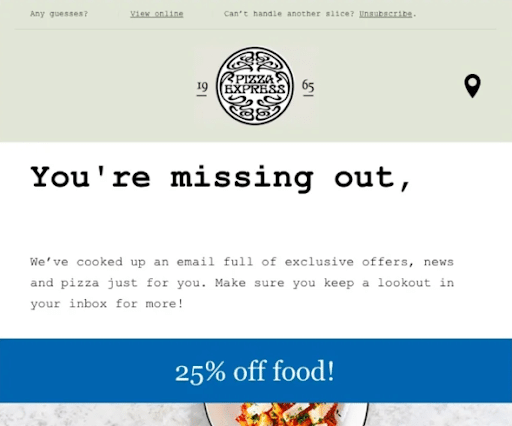
Ever received a welcome email after signing up for a newsletter or downloading a PDF? How about an email wishing you a happy birthday?
Both of those are part of automated workflows.
And they don’t stop there. Often, email automation workflows can include an entire series of emails as part of a drip campaign.
Think about it: entire drip campaigns set up once and ready to go when triggered and on schedule.
Clearly, automating your email marketing is a time saver.
But that’s not even the biggest benefit.
Automated emails are timely and highly personalized. They’re designed to deliver the right content at exactly the right time, and allow you to form deeper, more personalized relationships with your prospects because of it.
Not only that, but well-timed and relevant emails help you nurture a lead through the sales cycle.
Above all, automated emails simply produce better results from customers and prospects.
Automated emails get 119% higher click-through rates (CTRs) than other emails, and emails personalized through automation generate up to 6x higher revenue than non-personalized emails.
There are also plenty of email automation tools out there for you to try based on your needs, including Mailchimp, Klaviyo, Hubspot, Braze, and many others. Each has unique features that you can use to effectively build fully automated email campaigns that connect with your audiences.
Benefits of Email Marketing Automation
There are multiple advantages of automated email marketing, including:
- Personalization: One of the primary benefits of email automation is the ability to more consistently and effectively personalize emails to speak to audiences. Personalization in email is essential today, as personalized emails have a 29% higher open rate and a 41% higher click-through rate than their conventional, generic counterparts.
- Time Savings: You can also save more time with automated email campaigns. These solutions will keep your email correspondence responsive and move more people down the sales funnel without requiring your constant attention, freeing you and your teams up to focus on more urgent matters.
- Lead Nurturing Capabilities: Move leads more efficiently along the customer journey toward a sale with automated emails that connect with people at every step. As you move people down the funnel, they will engage with more personalized interactions and be more likely to convert.
- Increased ROI: While email is cost-effective already, automation can make it even more so with the right approach. According to Firework data, 80% of marketing automation users see more leads, with an average 12% decrease in marketing costs.
Essentials of Email Marketing Automation
If you’re wondering how to get started with email automations, the following are the fundamentals to give you some initial guidance:
AI-Powered Segmentation
Segmenting your target audience is an essential step to take to effectively target your emails. Thankfully, today’s email automation tools make it easy to use AI and machine learning to determine precisely what people want, breaking them up into segments with corresponding audience personas.
AI can gain insights into your audiences and split them into different groups based on demographics, purchase history, buying behaviors, and other characteristics, which will instruct your messaging and visuals to more effectively communicate with each segment.
Interactive Content
To boost engagement even more, you could incorporate interactive experiences into your emails.
Using HTML and CSS, you can develop something like mini-websites within your emails, with elements like polls, forms, quizzes, surveys, image carousels, and various links throughout.
For instance, you could include forms that people can complete to submit feedback or book appointments. Other emails might include surveys and polls, potentially even showing the results of a poll among other email recipients.
Mobile-First Emails
More and more people are using their phones to do everything from browsing the web to checking their inboxes. To make sure your emails connect with this growing number of mobile users, develop mobile-first email experiences that are seamless and user-friendly.
Use simple layouts in single columns, the right font sizes, and certain interactive components that connect with mobile users.
Consent and Compliance
Privacy and security are huge concerns today, and your emails are no exception. To earn your recipients’ trust and steer clear of noncompliance issues with privacy and security regulations, ensure your emails comply with the General Data Protection Regulation (GDPR), which applies to EU laws, and the California Consumer Privacy Act (CCPA), a California-based law enabling email users to access, delete, and opt out of selling their personal data. Additionally, always adhere to the CAN-SPAM Act, which sets the rules for commercial email, establishes requirements for commercial messages, gives recipients the right to have emails stopped from being sent to them, and spells out tough penalties for violations.
Common Pitfalls and How to Avoid Them
There are several mistakes that emailers often make that can compromise email automation efforts. Here’s what to avoid:
- Over-automation: Although automation can be invaluable in helping appeal to new and existing customers, don’t overdo it. Sending out too many automated emails or relying too much on automation could lead to people getting annoyed and losing trust. Try to regulate the frequency with which you send emails to recipients, and make sure the right emails are going to the right audience segments.
- Ignoring Personalization: You also want your emails to speak to each recipient for a personal touch. Failing to personalize emails could make your brand come off as detached and impersonal, and you may use the wrong messaging or offers to connect with recipients. Using personalized messaging, visuals, and offers, you will be able to establish a stronger connection and nurture real relationships with your audience.
- Lack of Testing: Another critical mistake that many make is neglecting to test email campaigns before launch. To confirm whether your email automations will really work, run A/B tests that change out one element between two versions of the same email, and see which performs best among test recipients.
- Poor Timing: Sending emails at the wrong time is an easy way to get lost in people’s inboxes, wasting your campaign’s potential. To avoid this, determine when your audience is most active and likely to check their email, and send emails consistently around this time.
Behavior-Based Triggers
Depending on the actions your email recipients take, automations will send the appropriate email to continue engagement.
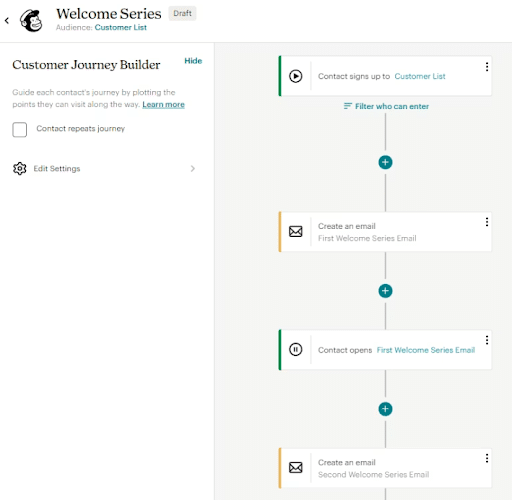
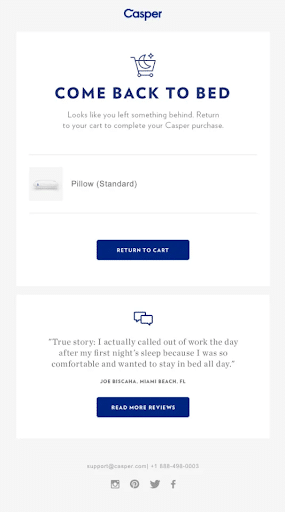
For example, someone may receive welcome emails when subscribing to a list, abandoned cart emails when not completing purchases on ecommerce sites, and review requests once a customer has made a purchase.
These triggers can significantly increase engagement with fully personalized experiences to keep people coming back to you.
Email Automation Software: Which is Right For You?
As you’ve probably guessed, automation doesn’t happen on its own.
It happens through email automation software. Different software will come with different capabilities, but generally speaking, they’ll accomplish the same goals.
Good news is if you’ve been doing any email marketing at all your current software can likely help you automate your campaigns.
Take MailChimp. It’s a huge player when it comes to email marketing (and one of my favorites for getting started).
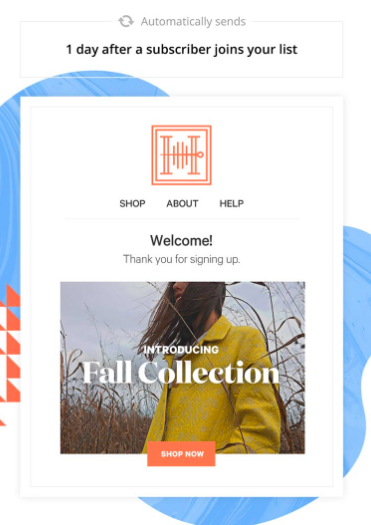
With MailChimp, you can set up drip emails that deploy when based on website activity, abandoned carts, periods of inactivity, etc.
You can connect it with a software like OptinMonster to drill down even further and send emails based on what kinds of topics a subscriber opted in for.
But MailChimp certainly isn’t the only player in the game. ActiveCampaign, Drip, SendLoop, Campaign Monitor, etc. all come with automation capabilities.
The problem? Almost any software you select will come with different tiers.
Many offer a free plan that can be tempting to go for, but as a general rule: the lower the price tag, the fewer the capabilities.
Here’s a rundown to help get you started. (Disclaimer: every software is different, so make sure you do some digging on your own before selecting any plans).
- Freemium models:
- Best for very small or local businesses
- Best if your email lists have fewer than 500 subscribers
- Mid-tier models:
- Best for small/medium sized businesses
- Best for businesses with an interest in expanding their email lists
- Enterprise level models:
- Best for large, established businesses
- Best for businesses with hundreds (even thousands) of audience segments
- Best for businesses looking for the highest customization capabilities
There are plenty of email automation tools to choose from based on your needs. Let’s look closer at a few of the most popular options out there.
Mailchimp
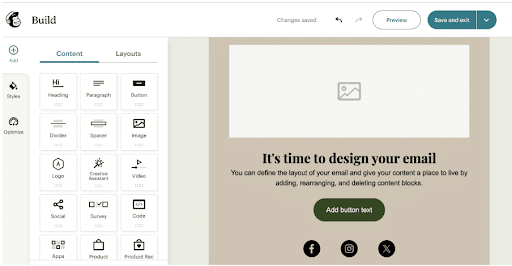
One of the best tools out there is Mailchimp, which is great for beginners and small businesses because of its ease of use and user-friendly nature. Some of the features you get with this email automation software include automated workflows, a drag-and-drop email builder, and segmentation and tagging.
Pros:
- Simple setup and navigation
- Pre-built templates and workflows
- Many integrations, including those for WordPress and Shopify
- Scalability to help businesses grow.
Cons:
- Limited features with the free plan
- Some users have reported deliverability issues, especially in high volumes
- Costs increase quickly for paid versions
Pricing:
A free plan is available, followed by a $20/month Standard Plan and a $350/month Premium Plan. Free trials and discounts are available for each paid plan.
HubSpot
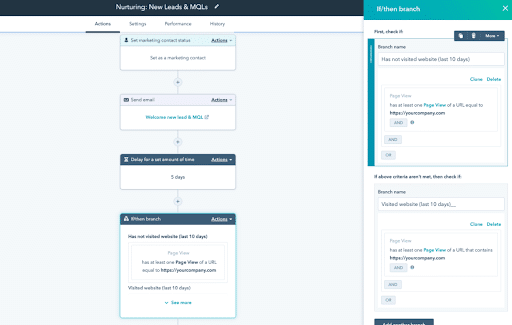
Another email automation software that many businesses enjoy is HubSpot, which covers email marketing and many other facets of digital marketing, from customer relationship management and social media to lead generation. Features include advanced segmentation and targeting, workflows for marketing automation, AI-powered optimization and personalization, and in-depth analytics.
Pros:
- All-in-one solution that can handle much more than email marketing
- AI-powered features and custom code actions
- Many integrations with various marketing and sales tools
- Advanced analytics and reporting to track the customer journey
Cons:
- Comes with more of a learning curve, making it best for more advanced users
- Limited customization options
- Annual contracts that are largely inflexible
Pricing:
Pricing varies greatly depending on what you need. You can start with a free plan for up to two users, with paid plans starting at $9/month for the Starter Plan, going up to $3,600+/month for the Enterprise Plan.
ActiveCampaign
ActiveCampaign is ideal email automation software if you need in-depth targeting and data insights for your campaigns. Features include advanced automation workflows, customer attribution and tracking, lead scoring, and detailed segmentation and targeting.
Pros:
- A built-in CRM system helps manage contacts and sales
- Complex automation workflows with split automations, conversion tracking, and goals
- Expansive integration capabilities
- Deep data tracking and analytics
Cons:
- No free plan available
- Like HubSpot, it comes with more of a learning curve
- Some users have reported issues with the platform’s email builder, incldunig certain bugs and a generally clunky experience
Pricing:
While a free plan isn’t available, you can try ActiveCampaign free for 14 days. The Starter Plan is available starting at $15/month, followed by a $49+/month Plus Plan, a $79+/month Pro Plan, and a $145+/month Enterprise Plan.
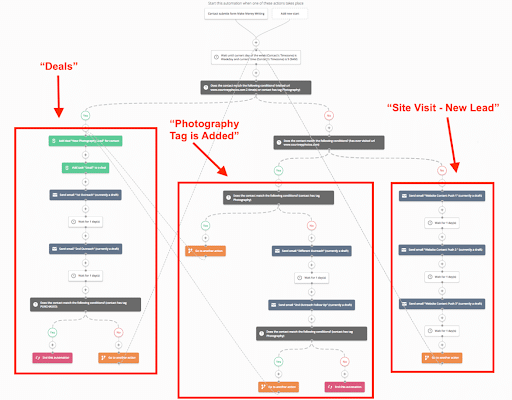
Here is a breakdown of the different types of email marketing automation software:
| Platform | Pros | Cons |
| Mailchimp |
|
|
| HubSpot |
|
|
| ActiveCampaign |
|
|
Email Marketing Automation:
Set Your Trigger
We know that automated emails are sent based on customer triggers.
It makes sense then that one of the first steps in setting up a campaign is defining what those triggers will be.
A lot of software will come with preset automations with built-in triggers, though those more advanced usually have the option to set custom triggers as well.
But for those new to the game, where do you start?
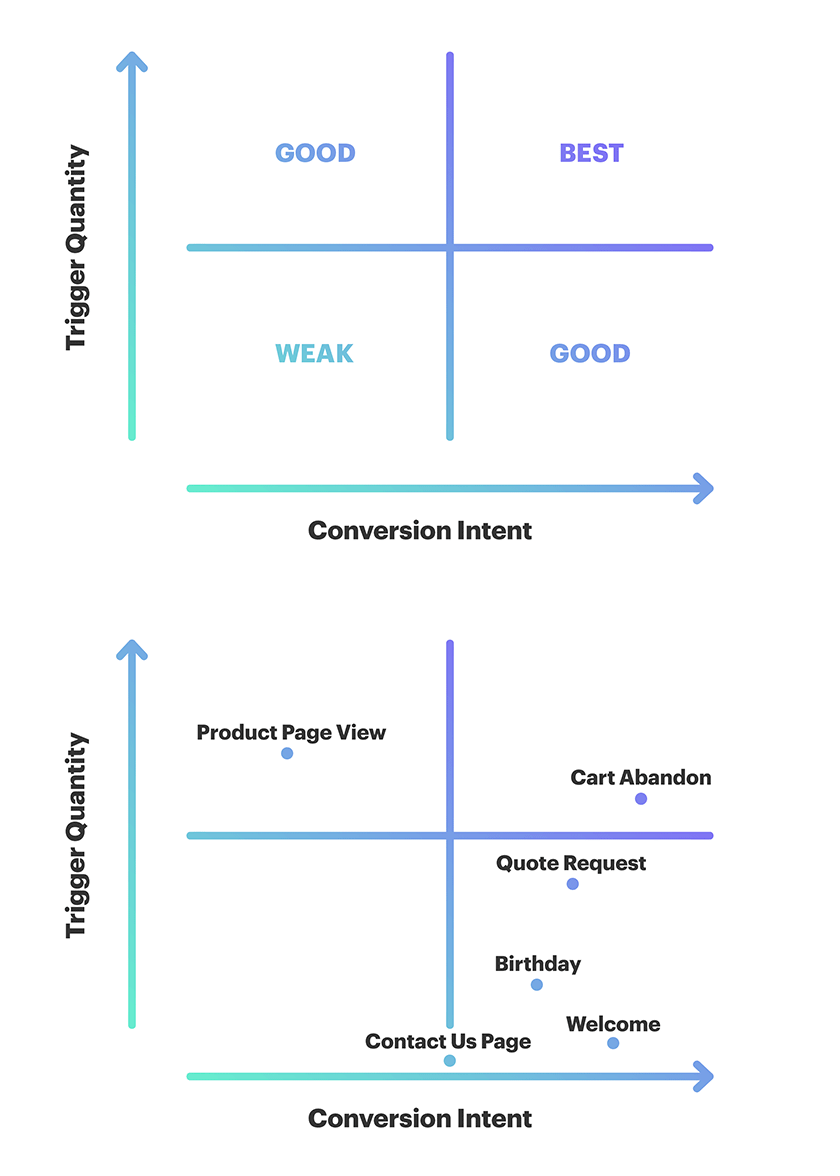
Your best bet is to choose your highest value triggers.
MailChimp explains that those generally come from frequent triggers to high motivated leas.
For example, a birthday email is sent only once a year and doesn’t prompt much action, so it would be considered a low-quality trigger.
On the other hand, abandoned carts happen quite frequently. Anyone who made it that far in the buying process more motivated to take action, making it a high-quality trigger.
Beyond that, the triggers you choose should match the goals your business is trying to accomplish.
So, if you run an e-commerce business and your goal is to increase sales, your triggers would be:
- Clicking away from check out – send abandoned cart emails
- Purchase and payment submitted – purchase confirmation email, shipping confirmation, tracking information, etc.
- Purchase received – follow-up emails with related products, surveys, etc.
Or, If your goal was to re-engage past customers or lapsed leads, triggers could be:
- 30 days without a purchase – send a “we miss you” email with a coupon
- 30 days without starting free trial – send another email on how to get started
Your goal may be to simply keep new or existing leads engaged:
- A day after sign up – send a welcome email
- After a third purchase – send an exclusive VIP email
- On a customer’s birthday – send a Happy Birthday email
When in doubt (and depending on your business), setting abandoned cart, welcome emails, and quote requests or form fills automations into action are good places to start.
Determine Your Drip or Workflow
Emails you schedule to send out in drip form can be a great way to stay engaged with customers and earn new leads.
These come as follow-ups to your initial triggered email, and almost every scenario can benefit from sending a series of emails, rather than a one-off (with the obvious exceptions of birthday or anniversary emails).
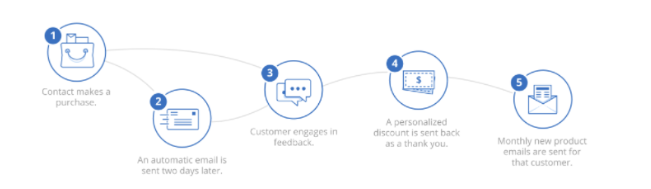
In fact, drip emails generate 3x the click-through rate of a typical marketing email.
Not only that, but drip open rates are about 80% higher than single sends, and companies that excel at drips generate 80% more emails 33% lower costs.
Drips, or workflows, are set up similarly to your trigger email and scheduled depending on the frequency you want to deploy them.
If you’re new to drip emails, I recommending starting your campaign with a series of three emails. From there, you can adjust the frequency based on the performance.
Here’s the thing to remember when setting up automated workflows: you need to account for all scenarios.
So, say you send an email with a free download. If the recipient clicks and downloads, you need a follow-up to their action.
But if they don’t click (or even open) your email, you’ll need another email ready to go to help re-engage the user.
Here’s an example scenario:
- You send them a whitepaper download after your welcome email
- They open the email – send them an ebook download or related articles from your website
- They don’t open the email – send a video to encourage more interaction
And of course, the drip would continue from there based on the recipient’s actions.
It can get complicated fast, which is why it’s important to have a game plan and focused strategy on how to engage your users.
Track Your Results
The last step in the process is continuously monitoring your results and adjusting accordingly.
Email marketing automation comes with a lot of moving objects – list segmentation, send frequency, timing – along with all the email testing staples like headline, creative, send names, etc.
For best results, use A/B tests to figure out which version of your emails returns the best results.
Most email software will give you access to data like opens, clicks, etc. You should pay special attention to:
- Delivery rate
- View rate
- Open rate
- Click-through rate
- Conversion rate
For more on which email metrics you should be measuring and how to get better results, read this full article here.
If your software allows it, you should also integrate with Google Analytics so you can keep tabs on customers and revenue growth, and how much is coming from your email marketing.
Keep an active eye on all of your workflows.
For example, if you find that a large percentage of customers are opening your first welcome email, but decreasing as you send more, you may need to cut down the number of emails in your series or take a hard look at the content you’re offering.
And as always, this is an ongoing process.
Check on your analytics often and continue to make tweaks to your workflows and content for the best results.
Email Marketing Automation Workflow Examples
While the workflows you ultimately choose will depend on your overall goals, let’s go over a few examples to help you started.
-
The Welcome Email Series
Trigger: Form Submission or Download on Site
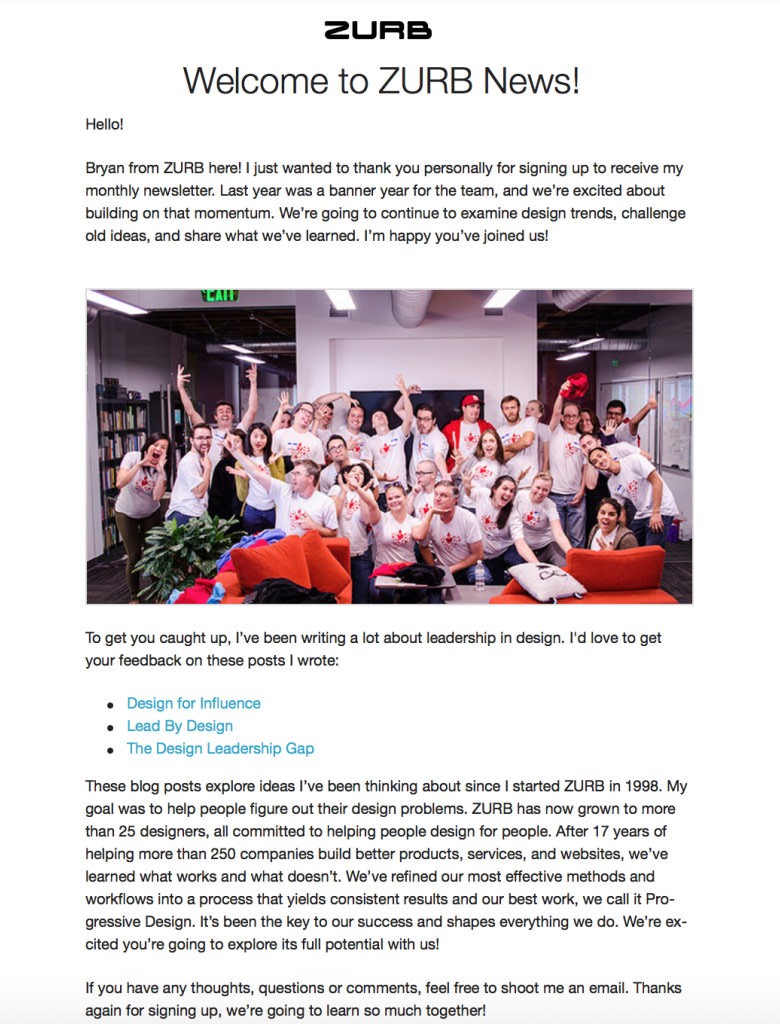
When a visitor to your site becomes a new customer or contact, give them a proper welcome with an automated email series.
These emails are designed to welcome the new member, provide any training needed, set expectations and keep customers engaged after they buy or convert.
Email 1: A straightforward welcome. Let them know you’re glad to have them on board and that they’ve made the right decision. Deliver on any promises you may have made pre-sign up (special offers, coupons, etc.)
Email 2: Provide some added value. Be proactive and address a pain point your target audience typically faces with a quick tip or strategy. Or, if they’ve signed up for a trial of your product, send some tips for getting started.
Email 3: Send useful resources. Point them to relevant articles on your website or downloads that might prove useful, based on what they’ve signed up for.
-
Engaged Users/Lead Nurturing Workflow
Trigger: Email or Website Clicks and Visits
This one plays off of your welcome email series.
It stands to reason that some of your recipients will interact more with your emails than others, and those that continually open your emails and click through to site or landing page.
Those that do have a good probability of becoming qualified leads – if nurtured correctly.
Email 1: Send a whitepaper download or intro to a long-form blog post. This should expand on the ways your company or service can help them.
Email 2: Send them pages you’ve identified as top-converting on your site. These could be case studies or past success stories (and highlight any similarities they may share with your current leads)
Email 3: Send them a free trial offer or product demonstration. Or, if you’re more on the service side, send a them a video from a thought leader in your company highlighting the value of your service.
-
Re-engagement Workflow
Trigger: Past Purchase, 30 Days Inactive
The road doesn’t end when a lead becomes a customer.
And if it does, it’s time to point them in a new direction.
After a purchase is made, put the effort into reaching out re-engaging that customer.
While it’s generally accepted knowledge that it’s cheaper to keep a customer than a acquire a new one, stats also say that 60-80% of customers who describe themselves as satisfied don’t go back for repeat purchases.
A lot of that is due to a loss of contact and engagement (and to be clear, a re-engagement or customer satisfaction are whole workflows unto themselves).
This one can is also effective for users who either signed up for a demo and never used it or visited a product or pricing page without purchasing.
Email 1: Go for the ask. Tell them you noticed they stopped by (or stopped coming by), and ask if they have any questions for you.
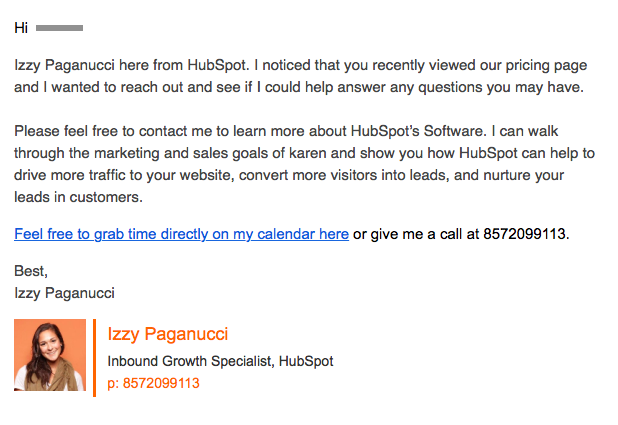
Email 2: The helpeful resource. If they made a purchase, ask how it’s going. If they’ve been unresponsive, try re-engaging with a new video highlighting a few awesome features.
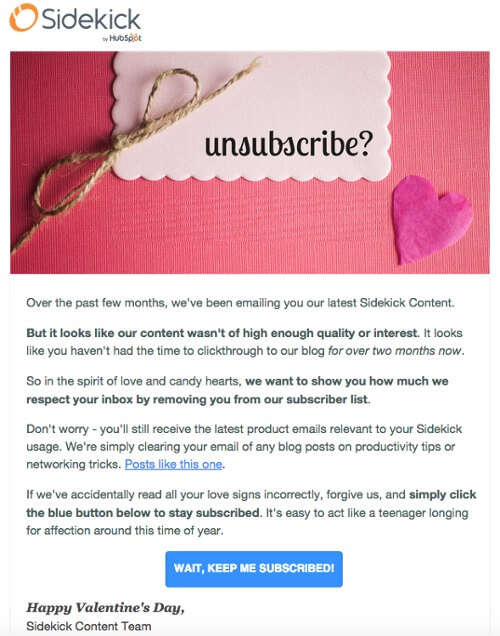
Email 3: Last chance. Ask if they’d like to unsubscribe from your emails, and tell them you hope they’ll be back. Three is usually the cut-off when it comes to re-engagement; too may emails and you’ll quickly become a nuisance.
FAQs
1. What is email automation?
Automated email marketing involves creating and sending emails that connect with the right people at the right time while streamlining workflows and minimizing human intervention. By effectively managing email automation tools, you can develop highly personalized and optimized campaigns.
2. How do I automate my email campaigns?
There are plenty of ways to automate email campaigns, from implementing the right email marketing automation software to building segmented email lists, building streamlined workflows, and continually monitoring and optimizing campaigns as they develop.
3. What are the best email automation tools?
There are plenty of solutions out there for you to try, with some of the most popular including Mailchimp, HubSpot, ActiveCampaign, ConvertKit, and Klaviyo. You can try each tool with a free version or trial and decide which is right for you.
Benefit From Automated Email Marketing With Ignite Visibility
Need help managing email automation tools and large-scale email campaigns? Ignite Visibility could give you the assistance you need with plenty of marketing expertise and access to some of the best solutions on the market.
We can help:
- Integrate AI-based automation solutions for email marketing
- Identify and segment your target audience
- Develop high-quality emails with personalization
- Send the right emails to the right people at the right time
- Integrate email marketing into a comprehensive digital marketing strategy
- And more!
If you like this idea, feel free to connect with us and discuss your email marketing needs.
