


Boosting your website’s organic visibility in searches comes with challenges and opportunities. Google is constantly adapting search engine results pages (SERPs). AI summaries are keeping more people on the results page, and the sitelinks search box has disappeared, impacting clicks. So, how do you shine a brighter light on your pages?
In this blog, Tanisha Mitchell, Sr. SEO Strategist, will review the latest updates on Google sitelinks, why you should use them, my expert take on changing sitelinks, tracking performance, and more!
What You’ll Learn:
- What Are Sitelinks?
- Who Should Use Sitelinks?
- Breaking Down The Different Types of Sitelinks
- Step-By-Step: How to Change Your Sitelinks
- Start Tracking Your Sitelink Performance
- Sitelink FAQs
What Are Sitelinks?
A site link describes the additional links Google displays below the main search result. Their job is to help users navigate to specific pages on a website. Examples include product pages, service offerings, contact information, lead gen pages, and anything else. What shows up depends on the query.
For example, if you search for “Vistaprint,” an online printing provider, you’ll see site links for products like “Business Cards” and one for “Account” to guide users to log into their profile.
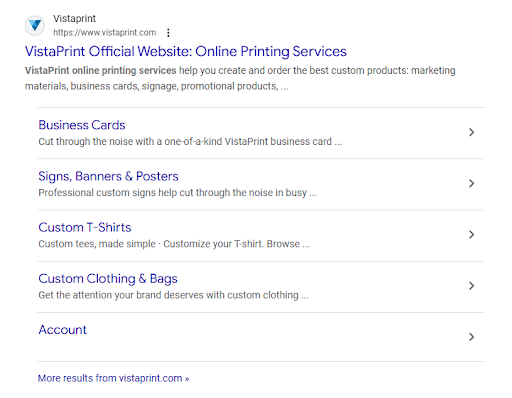
What’s unique about these organic sitelinks is that they are the result of branded searches. These queries occur when you look for a specific company or website. Google automatically displays them based on its algorithms when the structure of your website aligns with searcher intent and enhances the user experience.
What Google displays directly corresponds to your site structure and internal linking. The search engine only shows these when it thinks they will be helpful.
Site links have been part of Google results for navigational searches since 2006. There was previously a sitelinks search box, but Google sunset it in 2024.
Sitelinks are common and have been part of Google results for navigational queries since 2006. According to Ahrefs, they appear in 1.8% of the SERPs in their database. They evolved during that time and remain a valuable component for searchers.
My Expert Opinion on Sitelinks
Google Sitelinks can help you achieve higher visibility in search engine results pages (SERP) by providing quick access to searches, improving the user experience, and enhancing your company’s credibility.
If you have sitelinks, your website’s high-quality pages stand out to searchers, which could boost click-through rates (CTRs). Although there’s no way to choose which pages display since Google’s algorithm makes the selections, but, you can optimize your site to improve your chances.

Who Should Use Sitelinks?
Searchers aren’t the only group that can benefit from sitelinks. They provide your business with more visibility in search results. First, they occupy more space, so competitors get less of the screen.
It’s also a way for users to navigate your site before visiting it. The faster they get to the content that applies to their needs, the better user experience they have.
Keep in mind that the links are the product of search results from navigational queries. According to an analysis of over 332 million searches, one-third were navigational. That’s a considerable portion.
Based on our internal research on branded search, branded keywords have a high conversion rate. On average, they deliver a conversion rate double that of non-branded terms. They yield such results because:
- Searchers have a specific brand and destination in mind; they aren’t looking for information on a service or product.
- Those inquiring want to go to a specific page on the site.
- People who use branded search terms are typically further down the sales funnel.
- The competition is usually less on these terms versus generic ones.
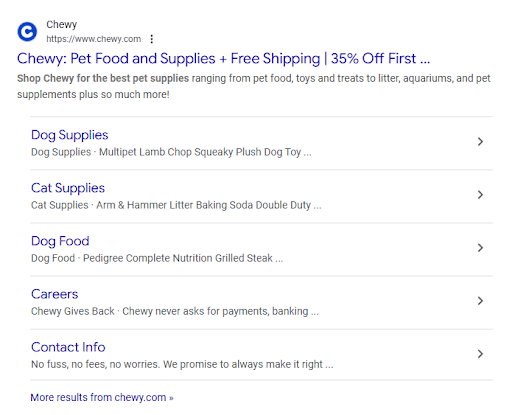

With this example, the company has sitelinks for its paid ad and organic listing. It makes it easier for consumers to click where they want to go.
In determining how to get sitelinks in Google search results, businesses can optimize their website to influence this. By doing so, you can maximize your CTR on search engine platforms, ultimately boosting your chance of conversions.
On the other hand, avoiding the sitelink extensions can cost you easy sales, which adds up over time. Focusing on Google sitelinks is smart, strategic, and easy marketing.
Organic sitelinks support these industries as well:
- Ecommerce: If someone is using a branded search, they may be looking for a specific product or service. Site links for these businesses are typically product or service pages, helping the searcher click directly to what they are looking for.
- Local businesses: SEO sitelinks are essential for these companies. Often, local searchers use a branded query to contact or visit, and sitelinks displayed usually include contact information and locations.
- SaaS: Another sitelink example vertical is software. Ideally, pages for pricing, demo requests, and features would appear.
Breaking It Down: Different Types of Sitelinks
Google displays various types of sitelinks depending on the query and your site’s architecture:
Organic Sitelinks
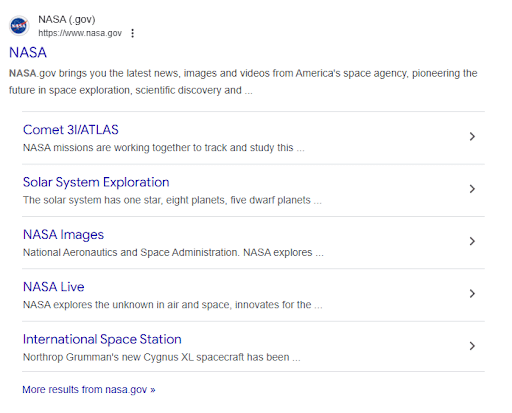
Organic variations include a 1-column, 1-line or a search bar.
Here’s some examples:

Optimization Tips for Organic Sitelinks
The first step is to allow your website into Google search. From there, use these strategies:
- Ensure you have a defined internal linking structure.
- Build a clear navigation hierarchy into your website.
- Use schema markup (get the guide for using schema for SEO here.)
For paid search, sitelinks can be valuable, as well. Sitelinks descriptions for Google Ads make the most sense when your campaign has multiple CTAs. These may also highlight special deals and incentives that persuade the searcher to click.
Mobile vs. Desktop Display Differences
Search results look different from mobile to desktop. Mobile has less room, so links tend to be single words rather than expanded.

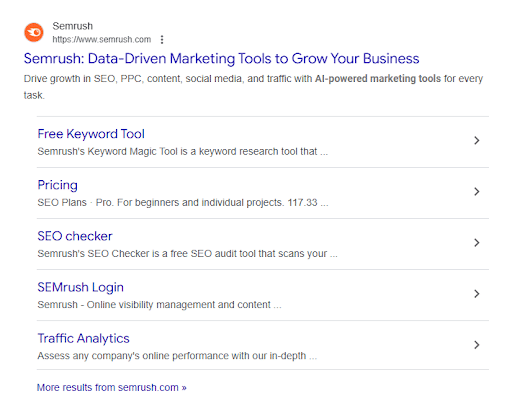
What Are Sitelink Extensions?
These are the additional links included in paid search ads. They are a type of Google ad extension, now called ad assets. They can promote products or services.
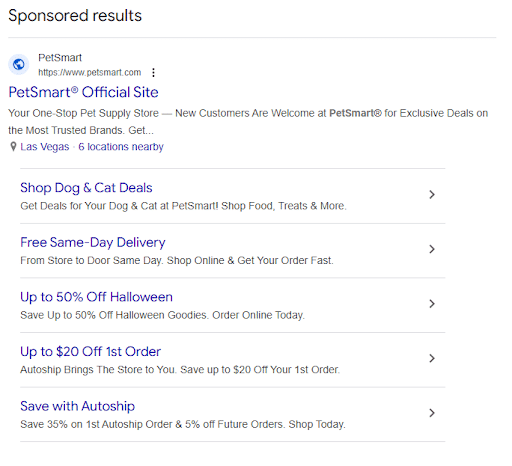
What’s the benefit of using the extension? Recent analysis revealed that when advertisers have specific product or service pages in their sitelinks, CTR can increase by 10-15%.
How to Change Sitelinks in Google Search
Although you cannot manually select which pages appear as sitelinks, you can optimize your website. Doing so makes it more likely that Google will choose the right links for your audience. Here’s how:
1. Use Branded Keywords in Title Tags
This is the most basic — yet probably the most important — piece of the sitelinks puzzle. Organic sitelinks stem from branded keywords.
Ensure that each page on your website has a unique, descriptive title tag. Google often pulls sitelinks from title tags. Clear and concise titles improve the likelihood that users will find the most relevant pages when your site appears in search results.
2. Submit a Sitemap to Google Search Console
An updated XML sitemap helps Google crawl and index your website efficiently. While a sitemap doesn’t directly affect sitelinks, it ensures that all important pages are discoverable and crawled.
3. Anchor Links for Long-Form Content
In long articles, use anchor links to create a table of contents or internal page navigation. This helps users quickly jump to relevant sections and signals to Google which sections are most valuable, improving the chance of those sections appearing as sitelinks.
4. Implement Structured Data
One of the most effective ways to influence sitelinks is through structured data, particularly using JSON-LD, which is Google’s preferred format.
By implementing structured data, you make it easier for Google to understand your site’s architecture and select the most relevant pages.
For instance, you can use the SiteNavigationElement schema to enhance the likelihood of sitelinks being displayed for navigational queries.
5. Build an Internal Linking Strategy
A well-thought-out internal linking strategy is crucial for influencing sitelinks. Google uses internal links to determine the relative importance of different pages on your site. Pages with more internal links pointing to them are more likely to appear as sitelinks. So, focus on linking to the most important pages consistently across your content.
6. Site Architecture & Navigation
Google’s algorithms favor websites that are well-organized and easy to navigate. To improve your chances of earning sitelinks, ensure your site follows a clear, siloed structure—a hierarchy where content is grouped by relevance and importance. For instance, make sure your homepage links clearly to key subpages like product categories or service pages.
Track Your Sitelink Performance
Tracking the performance of your sitelinks is crucial to optimizing them further. Here are two effective ways to monitor their performance:
- Google Analytics: Check the “Acquisition” tab in Google Analytics to monitor traffic driven by the links. You can identify which sitelinks generate the most visits and adjust your content strategy accordingly.
- Google Ads: If you’re running paid ads, sitelink performance can be tracked under the “Ad Assets” section. This helps you understand which sitelinks are contributing to higher click-through rates (CTR).
- Google Search Console: Use the Performance Report to view sitelink impressions and clicks for organic listings. To find this, take these steps for organic sitelinks: Navigate: Analytics → Acquisition → All Traffic → Source/Medium. Then filter for organic or branded traffic.
More ways to analyze sitelinks and mobile search:
- Look at core web vitals.
- Review mobile usability reports in Google Search Console.
- Ensure your site has a responsive layout, which affects how sitelinks display
Performance data can be valuable, and you should check it, looking for weekly and monthly trends. It helps you identify those that are underperforming so you can execute optimization strategies.
You should also compare results across device types. With this insight, you can make specific changes to impact desktop or mobile.
Sitelinks and Mobile Search
With Google’s mobile-first index, optimizing your mobile site is critical. Make sure the content and structure of your mobile site mirror that of your desktop version. Google may display different sitelinks for mobile users depending on the site’s mobile layout and navigation.
The links on the desktop homepage should be the same as your mobile homepage. If not, Google may not show the same sitelinks for mobile users.
FAQs: Google Sitelinks
1. Is there a difference between sitelinks for mobile and desktop searches?
Yes, desktop can show up to 6 of them and have descriptions. On mobile, there can also be up to 8, but there are no descriptions.
2. Can sitelinks appear in video or image searches, or voice search results?
Yes, they can also appear for video campaigns on platforms like YouTube and AdSense.
3. Do sitelinks affect voice search results?
While they aren’t currently used in voice search results, the rapid evolution of AI-driven search technologies may soon integrate them.
4. How can you find links to your website?
To see the links that search engines are using, Google your company name. Do so across browsers and devices to get a complete picture.
Meet Your Search Goals With Ignite Visibility’s Help
Sitelinks are a valuable tool that can significantly enhance your website’s visibility and user experience.
By staying updated on the latest SEO trends and continuously refining your approach, you can ensure your website captures more real estate on SERPs and delivers an optimal user experience.
Although you can’t directly control which sitelinks Google displays, implementing best practices will make an impact.
We can help you:
- Include structured data
- Build a strong internal linking structure
- Map out a clear site architecture
- And more!
For more information on sitelinks and structured data, and to see how we can help you build yours, get in touch with us today!

