

Google Dynamic Search Ads have been a great way for advertisers to stay on top of search results, but they’re undergoing a change as they are absorbed into Google’s AI Max for Search campaigns.
In this blog, Parker Hurley, Paid Media Strategist, will look at how Dynamic Search Ads work, what’s happening to them, and how to prepare for the new transition.
What We’ll Cover:
- Are Dynamic Search Ads Going Away? The Latest Google Ads Update
- Dynamic Search Ads vs. Responsive Search Ads, AI Max, and Performance Max
- When Website-Based Search Targeting Makes Sense, and When It Doesn’t
- Control Which Pages Can Generate Ads
- Audit Your Existing DSA Campaign Before Making Changes
TL;DR
- Prepare for the February 2027 transition: Google is moving Dynamic Search Ads (DSAs) into AI Max for Search campaigns.
- Audit your existing campaigns: Review targeting, budgets, bidding, exclusions, and conversion tracking before making changes.
- Clean up your website targeting: Exclude outdated offers, login pages, careers pages, and irrelevant URLs to prevent wasted spend.
- Keep page feeds current: Update URLs and labels as products, services, and locations change.
- Compare AI Max with keyword-based Search campaigns: Test which approach best fits your website, targeting needs, and business goals.
- Protect performance during the transition: Record your current results before making changes so you can measure the impact.
Are Dynamic Search Ads Going Away? The Latest Google Ads Update
Starting in February 2027, Google Ads Dynamic Search Ads (DSA) will be moving to AI Max for Search, which is an all-in-one AI feature layer built into traditional Google Search ad campaigns.
Google originally announced that the transition would occur in September 2026, but a June 11 update established the new 2027 timeline. So, keep in mind that older articles, including Google’s original announcement, will still claim the move was to take place in September.
This guide to Dynamic Search campaigns will detail how these ads work, the benefits of Dynamic Search Ads, how to manage existing DSA campaigns, and steps to prepare for the move to AI Max.
Specifically, we’ll go into:
- What are Dynamic Search Ads?
- How do DSAs work?
- Dynamic Search Ads vs. Responsive Search Ads, AI Max, and
- Performance Max
- When to use website-based search targeting
- How to choose which pages can generate ads
- Auditing your current DSA campaigns before transitioning
What Are Dynamic Search Ads, and How Do They Work?
Google Ads Dynamic Search Ads, or DSAs, use website content to match specific pages to relevant Google searches. Once matched, DSAs automatically generate relevant headlines for ads connected to selected landing pages, while advertisers supply descriptions and control ad targeting.
Let’s look at an example:
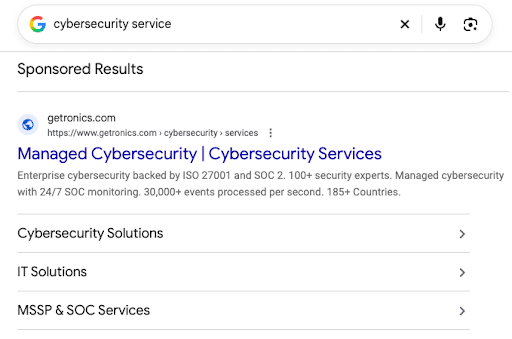
When searching for “cybersecurity services,” the first result is a DSA result linking to a particular services page, with links to other relevant landing pages under the main result.
You might also wonder: With Dynamic Search Ads what does the advertiser provide? Advertisers are responsible for providing the ad description and any exclusions, page feeds, or URL rules to influence targeting, while Google chooses the headline for each ad.
It’s important to distinguish DSAs from dynamic keyword insertion, responsive search ads, and dynamic remarketing, all of which are separate features in Google Ads. For instance, dynamic keyword insertion involves automatically updating ad text with specific keywords within ad groups, while dynamic remarketing displays personalized ads to users who have visited your website or app.
When setting up webpages for DSAs, two key elements include relevant page titles and readable content that is likely to feature natural keyword inclusions throughout. Remember that readability and helpfulness is crucial here, as good content should align with Google’s E-E-A-T guidelines and demonstrate “Experience, Expertise, Authority, and Trustworthiness.”
My Expert Insight Into Dynamic Search Ads
Today’s advertising is all about targeting audiences with relevant content that’s likely to connect, and Dynamic Search Ads have been one of the best tools to do so.
These ads are especially effective in that they look much like organic search results, and their relevance makes Google users more likely to click on them than their organic counterparts in some cases. They also match your ads to landing pages with the most relevant content, helping generate more leads instead of simply matching ads to users.
However, as Google continues to optimize its advertising platform and mechanics, Dynamic Search Ads are changing with the introduction of new Google AI Max campaigns that allow for even better targeting and optimization.
Ignite Visibility uses Google Ads, including Google Dynamic Search Ads, to help clients achieve real results; one home services franchise worked with us to optimize Performance Max, locally targeted paid search, and Local Services Ads for their ad strategy, boosting lead volume by 82% while reducing cost per lead by 32%.
So, what are Dynamic Search Ads, and what’s happening with them? Let’s get into it.
Dynamic Search Ads vs. Responsive Search Ads, AI Max, and Performance Max
To help you better understand the distinction between Dynamic Search and other aspects of Google Ads, let’s break down these concepts:
- Google Dynamic Search Ads: Uses dynamic targeting and ads within Google Search.
- Responsive Search Ads: A specific type of Google Search ad format that matches headlines and descriptions to users’ searches.
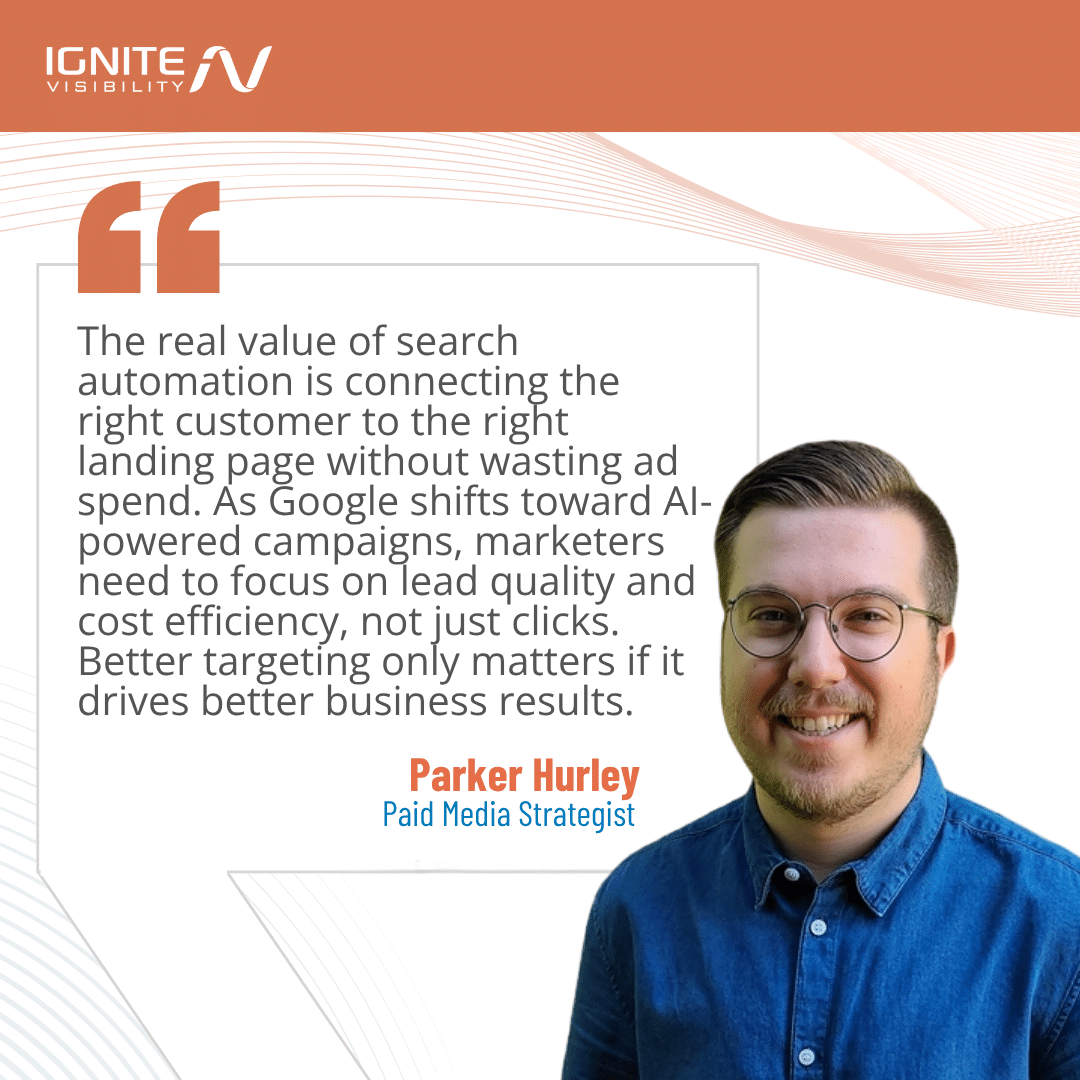
- AI Max: A suite of Search campaign features that include search term matching, text customization, and final URL expansion for more expanded Dynamic Search Ads settings.
- Performance Max (PMax): This campaign type spans Google inventory to place targeted ads on Search, Shopping, YouTube, the Google Display Network, Google Discover, Gmail, and Google Maps.
Here’s a closer look at how each of these works:
| Feature | Dynamic Search Ads | Responsive Search Ads | AI Max for Search | Performance Max (PMax) |
| Targeting | Website content, page titles, URLs, and page feeds | Keyword-based matching according to exact, broad, or phrase matching | Keywords, broad match, keywordless matching, and AI signals | Goal-based audience signals, automated targeting, and first-party data usage |
| Creative Inputs | Advertisers write descriptions and Google generates dynamic headlines | Up to 15 headlines and four manually selected descriptions | Existing keywords, website copy, and ads, with auto-generated text customizations | Extensive asset groups, including images, videos, headlines, descriptions, and logos |
| Landing Page Selection | Google chooses relevant pages from targeted website content | Fixed to the specific Final URL assigned to the ad or ad group | Final URL expansion allows for dynamic routing to the URL with the best fit | Automatically selects and expands landing pages on all relevant channels |
| Channel Coverage | Google Search Network | Google Search Network | Google Search Network | All available Google channels (Search, Display, YouTube, Discover, Gmail, and Maps) |
| Current Role | Gap-filler for large and thoroughly crawled sites, with an upcoming move into AI Max to improve their targeting capabilities | Primary standard text ad format for Google Search campaigns | Optimization layer and expansion suite in Search | Multi-channel and full-funnel automated campaigns for wide reach and conversions |
When Website-Based Search Targeting Makes Sense, and When It Doesn’t
If you’re not sure whether Google Ads Dynamic Search Ads are right for you, here is a checklist to help determine if it’s a good fit:
- You want to save time. With DSAs, you don’t need to map your keywords, ad text, or bids to each page, allowing you to reach new markets more quickly with your ads.
- You want to use relevant and dynamically generated headlines. Google Ads automatically generates a clear headline when people enter a search term that’s relevant to your website and content.
- You desire more control over your campaign. These ads appear based on your entire website or specific pages, and you can prevent ads from appearing for pages featuring products that are out of stock.
- You want to capture additional traffic. DSAs can help draw more traffic and sales by promoting businesses to more customers than they would be able to do with a keyword-targeted campaign alone.
- You would like to control your messaging. While Google auto-generates ad headlines, you can write your own description to maintain control over messaging.
- You have clear service and product pages. Pages clearly promoting a specific service or product have the chance to perform very well with DSAs.
- Your site features readable content. DSA campaigns perform best if your site has rich, helpful, and readable content that connects with users, not just search engines.
- You make accurate offers. Avoid misleading your audiences and search engines with offers that aren’t real or overpromise.
- Your site has meaningful conversion tracking in place. You should have Google Analytics 4, Google Search Console, and CRM integration ready to measure the results of your DSAs throughout the sales funnel.
Ultimately, a high-quality website in need of more control over efficient ad campaigns will be a good fit for these ads.
Conversely, you might not experience the benefits of Dynamic Search Ads if you:
- Have thin content. Sites with thin and unreadable content won’t be able to feed Google sufficient data to help match it to Search ads.
- Run a website with login-only content. Google and its users must be able to access the content you want to target when they land on the page.
- Have unclear service coverage. Products, services, and categories should have pages that feature ample content to establish what they are, how they work, and who they serve.
- Need tightly controlled wording at every level. Advertisers can choose the description for each ad, but remember that Google chooses headlines automatically.
If you’re starting from scratch, we recommend evaluating AI Max along with keyword-led Search before you invest too heavily in a legacy DSA campaign. You may find that one works better than the other based on your business, site structure, and needs.
Control Which Pages Can Generate Ads
If you believe you’re ready to use DSAs, here are the different targeting options you can use for these campaigns:
- Exact URLs: Direct ads to specific webpages to boost traffic and conversions for those pages.
- URL Rules: You can also set specific conditions in place to dynamically capture multiple pages with similar traits, e.g., “URL contains ‘hotel’” or “URL contains ‘Los Angeles’”. Advertisers often use these rules for exclusions to block non-commercial or low-value pages.
- Categories: You have the option of grouping certain topic groups together, with Google analyzing sites and group pages and giving them labels based on a broad category.
- Page Feeds: Another option is to upload a spreadsheet listing handpicked URLs with custom labels.
- All-Page Targeting: Finally, advertisers could give Google Ads access to all of a site’s content for DSAs, but this option may not be for everyone, and advertisers will likely want to set certain exclusions.
Let’s clarify exclusions: Page exclusions in Google Ads restrict specific destination URLs in campaigns, making them different from negative keywords, which restrict searches on Google.
You might have exclusions for different URL types, including:
- Career pages
- Support/login pages
- Expired offers
- Unavailable products
- Irrelevant markets
Bear in mind that category exclusions may not immediately catch newly discovered pages before Google has the chance to classify them, making it necessary to use explicit URL controls for critical exclusions.
Use Page Feeds to Organize Products, Services, and Locations
If you want to target specific pages, it’s often best to upload a page feed into Google Ads.
A page feed is a spreadsheet with one column for URLs and another for “custom labels.”
These labels can include:
- Service categories
- Locations
- Availability
- Approved promotions
Here is an example of what a page feed might look like:
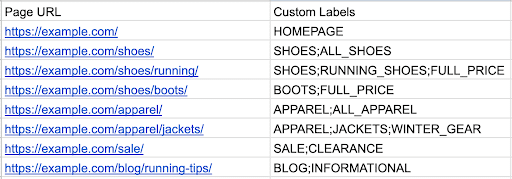
Just remember, labels only help organize targeting and don’t independently verify inventory or service availability.
Also, make sure you’re either targeting only feed URLs or using both the feed and Google’s website index in your campaign’s source settings.
Other steps to take when using page feeds include:
- Use final destination URLs only
- Avoid duplicate rows
- Keep tracking parameters out of feed URLs, managing tracking instead via the right tracking settings
Assign someone to update your page feeds when products disappear, branches close, or services change at any point, which will keep your campaigns current.
Audit Your Existing DSA Campaign Before Making Changes
If you’re running a DSA campaign and want to edit it in any way, conduct a review to audit performance before doing so.
Check for the following items in your review:
- Domain/language
- Dynamic ad groups
- Page targets
- Descriptions
- Exclusions
- Geography
- Budgets
- Bidding
- Conversion goals
If you are still able to develop a new DSA campaign, take the following basic steps according to Google’s guidance as of October 2026:
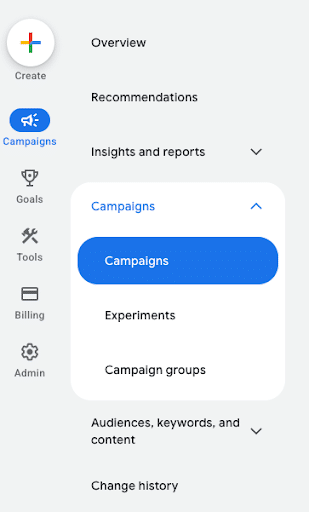
1. Log in to Google Ads and click on Campaigns.
2. Click on Campaigns within the Campaigns dropdown.
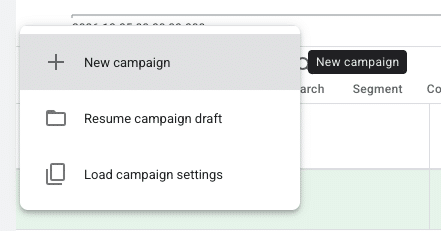
3. Click the blue plus button and choose New campaign.
4. Set one or multiple goals for your campaign, or don’t set any with the Create a campaign without a goal option.
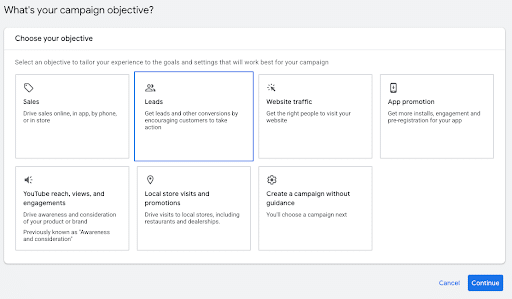
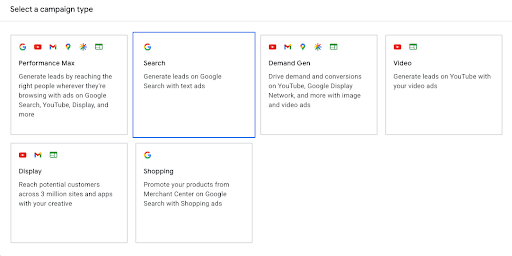
5. Make the campaign type Search.
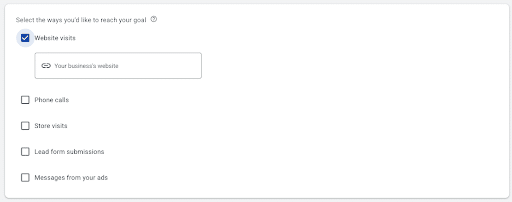
6. Specify the results you want to get from the campaign and click Continue.
7. Select an automated bidding strategy under Bidding if you’d like Google to handle bids.
8. Name the campaign and enter the locations you’d like to target, your budget, and languages to use.
9. Click Save and Continue.
10. Review all campaign settings and click Publish campaign.
You’re now ready to run your DSA campaign. You can use DSAs alongside standard ad groups, but you may want to run both separately when budgets or objectives change.
Turn to Ignite Visibility to Get the Most From Dynamic Search Ads
DSA campaigns can be great for your business, but it all comes down to when and how you use them.
Ignite Visibility can help you determine whether these ads are right for you and:
- Include page feeds and other data to help feed Google’s algorithm
- Optimize your website content for maximum readability and natural SEO
- Develop custom descriptions for all DSAs for more control
- Put together supplemental paid search or display campaigns
- Integrate ads into a holistic digital marketing solution
- And more!
Ready to work with us? Learn more about our pay-per-click management services and what they can do for your ad strategy.
