

Bounce rate remains a critical metric to reduce in marketing, but Google Analytics 4 (GA4) changed how bounce rate is defined.
In this blog, Keely McGroarty, Sr. SEO Manager, will review what website bounce rate is, how to interpret this metric, and how to improve bounce rate for your site.
What We’ll Cover:
- What is Bounce Rate?
- What is a Good Bounce Rate?
- Common Causes of High Bounce Rate
- How to Improve Your Bounce Rate
- Bounce Rate By The Numbers
- FAQs on Bounce Rate
What is Bounce Rate?
Essentially, it refers to the percentage of visitors who come to your site but leave without visiting any other pages.
For instance, if your bounce rate is 80%, that means 80% of the people who come to your site are only visiting the page they initially landed on, neglecting the other pages on your site entirely.
And here’s how you calculate it:
Bounce rate = total number of bounces on a page/total number of entrances on a page.
In Google Analytics 4 (GA4), you can find bounce rate meaning by looking at the percentage of sessions that were not engaged, making it the opposite of your engagement rate.
What counts as an engaged session in GA4 is a visitor who spends more than 10 seconds on a page, engages in a key event, or contributes to two or more page or screen views.
Why Do Visitors Bounce?
The answer could be one of two things:
- Your website wasn’t engaging enough
- Your website is attracting the wrong kind of visitor
- AI Overviews: Users are now less likely to click on a search result when an AI summary pops up, leading to higher bounce rates because users now find the information they need or answers to their questions right on the search page.
Why Do We Care About the Bounce Rate?
The reason you should care about bounce rate is that a high bounce rate means people aren’t finding your content helpful or interesting.
If people are immediately going back to search results after landing on your page, it’s simply not a good sign, and people won’t dig deeper.
Expert Opinion on Bounce Rate
While most of the metrics you track for SEO should be high, from website traffic to click-through rate and conversion rate, your website bounce rate is typically one that you want to see at the lowest percentage possible.
If you have a high bounce rate, this could indicate that people aren’t finding your content relevant or engaging after landing on a page from search results, making it important to figure out why your bounce rate might be high and determine how to improve bounce rate metrics.
However, what makes a bounce rate for SEO high will depend on certain factors, particularly your industry and the average bounce rate among your competitors.
So, what is a good bounce rate, and how can you optimize your website to get more people to stay on your site?
GA4 vs. Universal Analytics Bounce Rate
As of 2023, Universal Analytics (UA) became GA4, which changed the bounce rate meaning when measuring SEO metrics.
In UA, website bounce rate counted as a single-page session, i.e., a single request on a site. In GA4, that metric is now a “non-engaged session,” or one that people experience by spending less than 10 seconds on a page, spending less than two on a page or screen view, or neglecting to contribute a “key event” that counts as a conversion.
Why Your Bounce Rate Changed After GA4 Migration
With the transition to GA4 came more specific criteria for visits to count as “non-engaged sessions,” as UA counted any single-page visit as a bounce. GA4’s engagement-based measurement has the aim of being more accurate, as people may engage with a page longer than what originally contributed to your bounce rate.
As such, you’re likely to see a lower overall rate as people who spend more time on a page or engage in a conversion event no longer factor into it.
You can then more effectively see how users are engaging with your content for more meaningful insights than what UA offered. In turn, you can better determine how to reduce bounce rate based on the more nuanced engagement measurements you pick up in analytics.
Bounce Rate vs. Exit Rate (And When to Use Each)
The main difference between bounce rate and exit rate is the nature of people’s engagement with your site.
While the bounce rate is the percentage of people who left your site after only viewing one page, the exit rate refers to the percentage of views on a page that were the last someone saw while browsing your site.
When deciding whether to measure bounce rate for SEO or exit rate, consider the specific application: Website bounce rate can help you measure landing page quality based on engagement, while the exit rate is helpful for identifying drop-off pages along the sales funnel.
Does Bounce Rate Matter?
Keep in mind that this figure is a symptom metric, meaning that it indicates an underlying issue affecting how people engage with your content.
Because of the nature of website bounce rate, you should always interpret it alongside conversions, engagement, and search intent match. In other words, look at it as a gauge of your website’s user experience (UX), as it’s not a direct ranking factor.
If you notice that your site has a high percentage of bounces, it could be time to look into the quality or relevance of your pages’ content. If you want to figure out how to reduce bounce rate, you must figure out how to improve UX.
What Is a Good Bounce Rate?
What is a good bounce rate? The answer to this will depend on a few key factors, including page type, channel, and data trends.
Page Type
The first item to consider is the specific page type. The average website bounce rate will depend on whether the page is a:
- Blog Post or Content Page: These pages tend to have the highest bounce rates, ranging from around 65% to 90%. The reason for this is that people often visit these pages for a piece of information, and once they get it, they leave.
- Landing Page: You’re also likely to see a higher bounce rate for these pages (~60% to 90%), but that doesn’t necessarily mean that the page is of low value; people could very well be converting after skimming these pages, making conversions more important to look at than engagement. However, a particularly high bounce rate for these pages could indicate that the ad or search result doesn’t really match the page content.
- Product or Ecommerce Page: Conversely, the website bounce rate for these pages should be on the lower side, at around 20% to 45%. Here, people are more likely to spend some time browsing products, comparing them, and navigating the site, which should signal to GA4 more engagement.
Channel
You should also factor in the specific channel. Organic traffic will tend to have an average bounce rate of about 45%, along with paid results.
When it comes to organic traffic, you need to consider search intent and ensure the result matches people’s goals when entering a query. Meanwhile, well-targeted ads will likely lead to more engagement among your target audiences.
Social media will have more bounces in many cases (~54%), largely due to a lack of commercial intent in many cases, while email and referral traffic tends to yield the lowest rates (35.2% to 37.5%) due to more precise targeting.
Trend Over Time
Also, take a look at data trends over time. If you notice that your bounce rate for SEO or other campaigns is declining, this could indicate effective targeting and a good UX, while an increasing rate might signal problems with a lack of relevance, low-quality content, confusing navigation, poor mobile optimization, or other issues keeping people from engaging beyond that initial page.
When a High Bounce Rate Is OK (And Even Desirable)
While the average website bounce rate should be low in many cases, there are some circumstances when a lot of bounces isn’t necessarily a bad thing.
The following are some page types that are more likely to experience a higher website bounce rate:
- Single-Answer Blog Posts: If you have a blog post that answers a single question that people have, users will probably leave faster, especially if that answer is right at the top of the page in above-the-fold content.
- Phone-Click Landing Pages: If the main purpose of a page is to get people to initiate a phone call or click elsewhere, you’ll also tend to see more bounces.
- Directions or Contact Pages: People seeking directions or contact information won’t spend a lot of time on pages with these details in most cases, nor are they likely to visit other pages in this navigational stage.
- Event Registration Confirmation: People looking to confirm their attendance at an event will also normally avoid hanging out on these pages.
- Support Articles: Like single-answer blog posts, people might simply find an answer to their question or help with an issue in short order, leading to a bounce.
Remember, if you see a lot of conversions and lead events that move people along the customer journey, you can more easily forgive a high bounce rate.
How to Find Bounce Rate in GA4
With a better idea of “what is bounce rate,” you should know how to find it using your available reporting and analytics tools.
The following are some basic steps to take to view non-engagement metrics in GA4:
- Open GA4 and log in.
- View the bounce rate within your report dashboard alongside other metrics, including views and users.
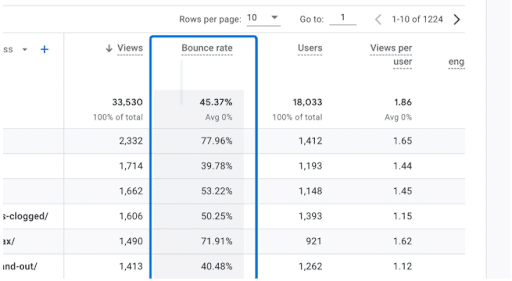
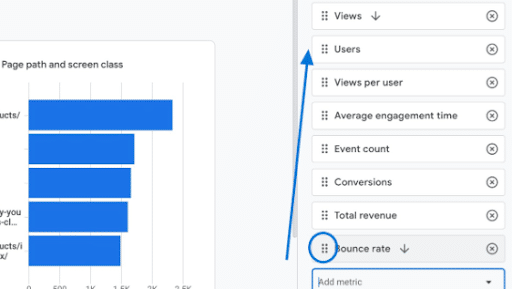
If it doesn’t appear within your existing report dashboard, you can add it with the following steps:
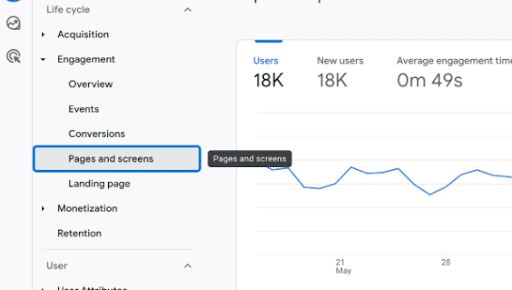
1. Navigate to engagement reports.
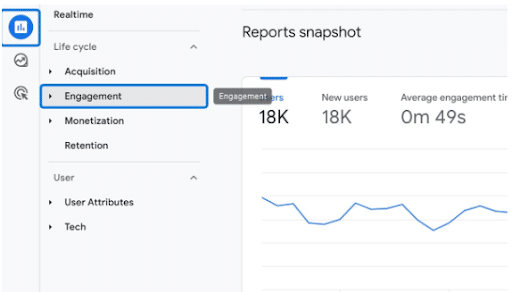
2. Go to Pages and screens.
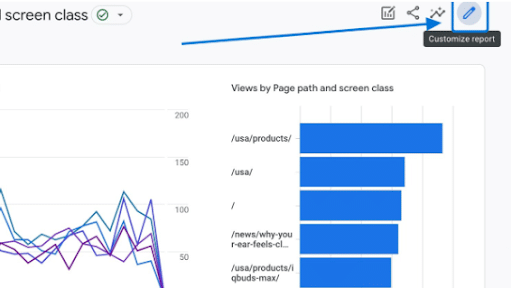
3. Select Customize report.
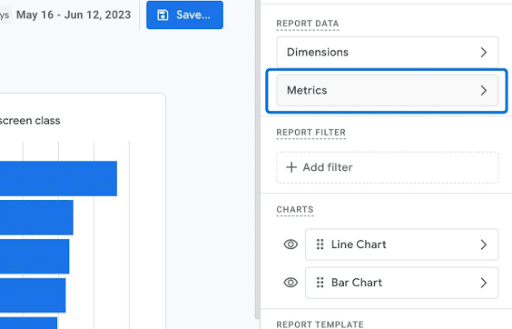
4. Click Metrics to add the metric.
5. Choose Add metric from the dropdown and then Bounce rate.
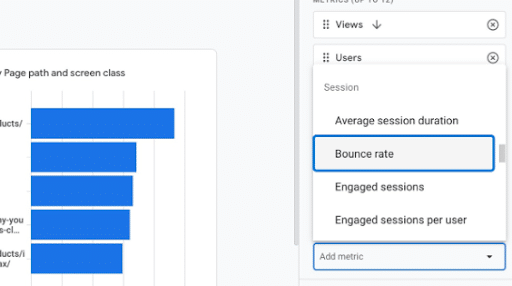
6. Move the metric, ideally near Average engagement time to allow you to see both side by side.
How to Figure Out Why You Have a High Bounce Rate
If you see that this metric is alarmingly high in GA4, the following are some steps to help you identify the reason behind it:
- Segment your content based on page, channel, and device, as various page types and channels could see more bounces than others.
- Check for intent mismatch, ensuring your page content matches the intent behind people’s searches when finding you on Google.
- Conduct an analysis of page speed and UX to determine whether people are struggling to explore your page or navigate your site.
- Look through your content to gauge scannability, making sure your content is readable and naturally flows to encourage more engagement.
- Check tracking and key events in Google Analytics, as issues could prevent proper tracking, or people might be converting despite a high website bounce rate.
- Compare your rate to that of similar pages, which might help you further determine how to improve bounce rate if a specific page is underperforming.
Common Causes of High Bounce Rates
There’s not a one-size-fits-all explanation here. High percentages can be caused by a myriad of issues – some broad, some technical, and some in between.
But some causes are more common than others, which I’ll outline below:
Acquisition Mismatch
Optimizing for the Wrong Keywords
One major mistake is targeting the wrong keywords in your content. Make sure each page pursues keywords that match the specific content topic, from your headers and body content to your title tags and meta descriptions.
Implementing the Wrong Ads
Another critical error entails developing ads that don’t match their corresponding landing pages or targeting the wrong audience with your ads. Always use ad messaging, headers, and visuals that align with landing pages, and connect with the right audience with the help of segmentation.
Content Mismatch
Impact of Inaccurate Tags and Descriptions
It may not seem like it, but your tags and descriptions are incredibly important.
They’re intended to accurately describe the content displayed on a page, and it’s also what will help your users decide if they want to visit that page or not.
But if your tags or descriptions are inaccurate, your visitors will feel misled and likely won’t stick around.
Luckily for you, it’s an easy enough fix. Simply examine any pages that have a particularly high percentage and look to make sure all your tags and descriptions reflect the most accurate, up-to-date information available.
Your Page Doesn’t Meet User Expectations or User Intent
When people land on your page from search results, they want what they’re looking for with that first click. If they don’t find the answers to their questions or the details they want about a particular topic, this is a quick way to get them to leave.
Make sure your pages are relevant to what people are searching for, and include information and designs that appeal to and engage users.
Your Page Just Isn’t Engaging
If you can’t blame a high percentage on a technical issue, it’s time to examine the page itself.
More often than not, you’ll find visitors aren’t sticking around simply because your page doesn’t speak to them. The content is irrelevant or outdated and doesn’t encourage them to learn more or take action.
This is when it’s time to call in your team of experts – web designers, content marketers, marketing masterminds, etc. – to examine how to reduce this metric and improve your user experience.
UX and Design
Poor UX
Your user experience (UX) needs to be great to reduce your bounce rate. Otherwise, people will likely click away from your website without moving further along.
Poor UX could result from confusing navigation that makes it difficult to explore the site. It could also involve a lack of information, inaccessibility for people with physical or cognitive disabilities, or mobile incompatibility that keeps mobile users from properly viewing your website.
It’s Not Mobile Friendly
A big one here. If your site’s not mobile-friendly, you can kiss a major percentage of your conversions goodbye.
In today’s landscape, smartphones dominate how people spend their media time. So, it’s important to keep mobile top-of-mind:
- As of October 2025, there are over 6.04 billion unique mobile internet users.
- As of September 2025, people using mobile devices contribute to 59.6% of all website traffic
Even Google’s in on the mobile search craze with its mobile-first indexing initiative.
If you haven’t taken the time to optimize your pages for mobile, there’s a very good chance that’s contributing largely to your high percentage for this metric.
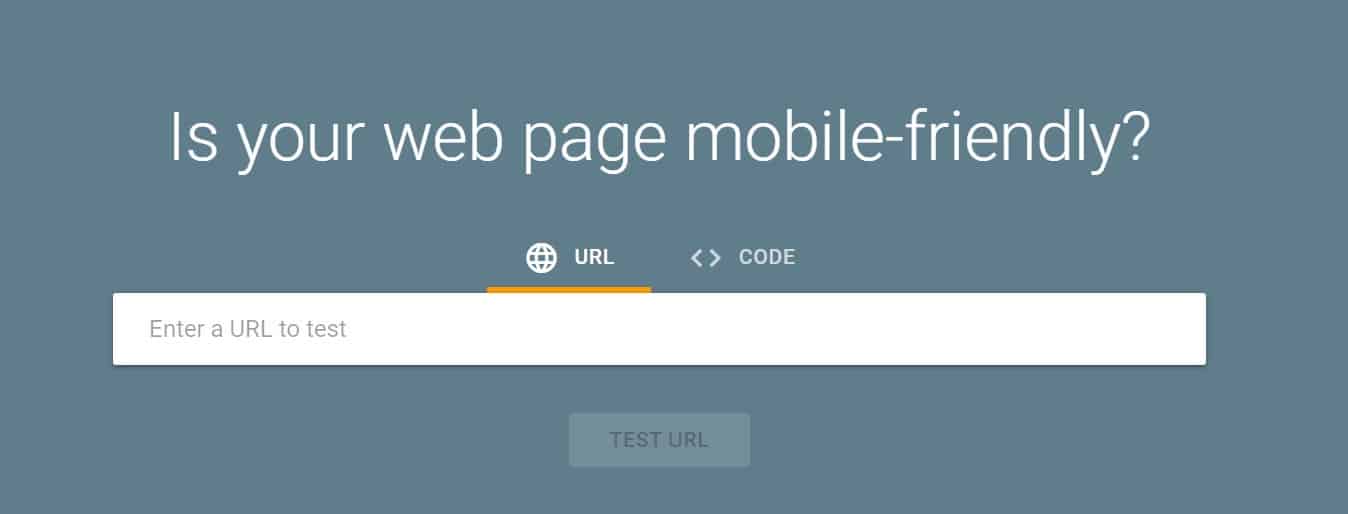
Use Google’s Mobile-Friendly Test now to see how well your site performs.
Your Design is Poor
Your website could also lead to a high bounce rate because of poor design. For instance, your content may be difficult to read, your images might be of low quality, or your design could be inconsistent down the page.
Consider conducting an audit of your site to determine if it suffers from poor design. You can then take steps to address this problem and optimize your site’s design.
Performance
Slow Page Load Speed
If there’s one thing we know, it’s that users simply don’t have the patience for slow load times.
Here are some stats that indicate how important fast load speeds are:
- Your bounce rate increases by a whopping 32% if your load time moves from one to three seconds.
- One in four visitors on a website will click away from a site if it takes over four seconds to load.
- 64% of shoppers who don’t like the user experience on a site will do their business elsewhere next time.
- Even a one-second delay reduces customer satisfaction by 16%.
- 46% of users won’t revisit a site that performs poorly.
Ouch.
These numbers are extremely unforgiving, and unfortunately, so are the users behind them.
Not only are users less likely to spend time on your site, but page load speed is a major ranking factor for Google. And low rank + high bounce rate = bad news.
Make sure you’re checking your page speed with Google’s PageSpeed Tools to ensure a fast experience – and lower this metric’s percentage – for your users.
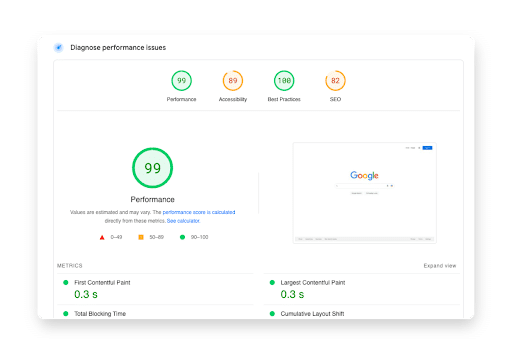
You can also see how your site performs by measuring Core Web Vitals, which measure the length of time it takes for core content to load on the page, users’ browsers to respond to clicks and other actions, and overall layout stability as the page loads.
Trust
Poor Credibility Signals
If your content comes across as less than trustworthy, this could also make people less likely to engage with your site.
Poor credibility signals could include:
- A lack of social proof like customer reviews and testimonials
- Insufficient transparency like undisclosed contact info
- The use of stock or AI imagery in lieu of authentic media
- The inability to verify information through external sources or certifications
Technical
Improper Google Analytics Set Up
This one is probably your best-case scenario. It basically means that users aren’t actually bouncing frequently from your site; rather, you’re just receiving inaccurate information.
Remember how a 20% or below percentage probably points to a tracking error? That’s what we’re talking about here.
Without the proper setup, you won’t get the proper results. Luckily, Google walks you through the process of checking and fixing your tracking here.
Broken Links and 404s
Another issue that can drive people away is the failure to fix any broken links on your pages. Conduct link audits to ensure that when people click on your pages, each link goes to a live page, potentially using 301 or 302 redirects when appropriate.
How to Improve Your Bounce Rate
And now, the section you’ve all been waiting for. There are a number of benefits to figuring out how to reduce this metric on a website.
Some of the above are easy fixes (see: load speed, Google Analytics setup, etc.).
Others…no so much.
But, just because they’re not easy doesn’t mean they’re impossible. Let’s take a look at a few ways you can work toward improving based on priority.
1. Match Intent and Message Consistency
Make sure your page lives up to its promise.
That means if you’re running a post on Facebook that links back to your blog, or creating an ad in Google Ads, make sure you deliver on whatever it says.
If people are clicking on your posts and ads and quickly bouncing, it means they haven’t found what they’re looking for.
To identify where the gaps in promise and deliverance are, keep an eye on your traffic sources. To track your channels, go back into Google Analytics.
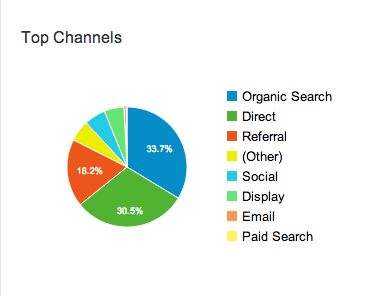
The Top Channels report will tell you the percentage for each channel grouping, and the All Traffic report will tell you the percentage for each source/medium pair.
If you find that a particular channel has a high percentage, you’ll know to further examine your strategy surrounding that channel.
Look at your content – does it really correlate to the content on your website? Is this really a channel your target audience is using?
2. Improve Above-the-Fold Clarity
Toward the top of your content, make sure you clarify the topic at hand and indicate what the page will discuss, which can give people a good idea of whether or not the page is relevant to them and entice them to keep reading.
Content at this stage should be straightforward, and if you see people leaving shortly after landing, even with high-quality above-the-fold content, this could be indicative of an issue with relevance.
3. Optimize Speed and Mobile Responsiveness
As mentioned, page load speed is crucial in keeping people on your site. Try your best to get your page to load within zero to two seconds, but don’t let it go past four seconds.
If your pages load fast enough, people won’t get frustrated and return to search results. In turn, you’ll keep those eyes glued to your pages and further reduce your bounce rate.
4. Incorporate Internal Linking Modules
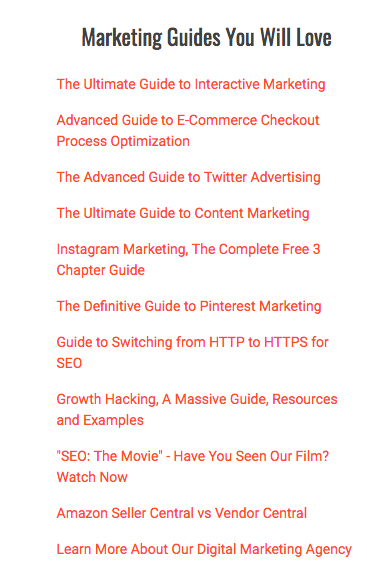
A well-placed link can make all the difference between a bounce and an extended visit. A relevant link in a blog post leading to more related content can guide users down a rabbit hole to quality pages across your website.
If you’re writing about SEO and happen to have a post about how to optimize images, absolutely include that link. It’s all about connecting your readers with more relevant content around your site.
It’s also a good idea to place links to popular posts and pages in your sidebar for quick navigation.
5. Include Well-Placed Calls-to-Action (CTAs)
Don’t let your users guess what they should do next because way too often, they’ll guess incorrectly.
So tell them. Want them to read more? Tell ‘em with a link. Want them to check out a similar product? Tell ‘em with a handy “you’ll also love…” link. Have an ebook you think they should definitely download? Lead them there with a well-placed pop-up.
CTA’s come in a variety of forms. That’s why you have to experiment with what works best for you and your readers.
Hint: Try buttons. They tend to be significantly more effective than links.
6. Optimize Multimedia and Formatting
Videos can be a great way to grab and hold people’s attention when they land on a web page. Consider embedding YouTube videos on pages where it makes sense to do so, such as a blog post about a certain topic.
You can even produce your own videos and embed them on corresponding blog posts, supplementing your blog.
Just make sure the video is relevant and supports whatever content you add it to on your site.
You should also optimize images, infographics, and other media to ensure page load speeds are consistently fast while helping optimize page flow.
7. Build Trust and Include Social Proof
You must also earn your visitors’ trust with credible content, reputable external sources for information, author bios, and other details that demonstrate industry leadership.
Ultimately, you want to adhere to Google’s E-E-A-T guidelines, which prioritize content showcasing Experience, Expertise, Authority, and Trustworthiness.
Another great way to build trust is to integrate social proof into your content when suitable, such as customer reviews and testimonials.
8. Complete Technical Cleanup
Effectively organize your pages and make sure all technical SEO elements and UX components work the way they should, which could help you reduce bounces.
Regular SEO and content audits can help with this effort as you identify any issues that might compromise your strategy.
Bounce Rate By The Numbers
Bounce Rate By Industry
As a rule of thumb, blogs have an average of 65% or higher. That’s because people who land on blogs from the search results typically just get the info they need and move on.
Also, the “Contact Us” pages have a very high percentage. People who visit those pages are only looking for a phone number, email address, or other way to contact the business.
Similarly, “Form Submission” pages often have a high percentage because people usually submit the form and bail immediately.
Here are some average ranges for different types of websites:
- Blogs: 80%
- Travel: 82.58%
- Ecommerce: 54.54%
- Real Estate: 40.78%
- Healthcare: 59.50%
Bounce Rate By Channel
A channel in SEO refers to the origins of your traffic. There are several different channels:
- Direct – visits from people who navigate directly to the URL
- Organic search – visits from people who clicked on a link in the search results
- Paid search – visits from people who clicked on a paid search ad
- Display – visits from people who clicked on a display ad (such as a banner ad)
- Referral – visits from people who clicked on a link on another website
- Social – visits from people who click on a link from a social media site such as Facebook or Twitter
- Email – visits from people who clicked on a link in an email
It’s important to differentiate this metric by the various channels so you know where to focus your attention.
For example, if your bounce rate is unusually high from organic search, then that probably means the content on your website isn’t appealing to visitors. Adapt your content marketing accordingly.
FAQs on Bounce Rate
1. What is bounce rate in GA4?
In GA4, what counts as a bounce rate is a lack of engagement activity on a page, whether a person spends less than 10 seconds on the page, contributes fewer than two page or screen views, or fails to convert through a key event.
2. What is a good bounce rate?
This metric will vary depending on content types, channels, devices, and trends, making a “good” rate subjective based on these factors. However, always look at the average bounce rate for similar page types, industries, and other factors to help you determine whether your metrics are where they should be.
3. Is bounce rate a Google ranking factor?
No, this metric is not a direct ranking factor, but it could indicate issues with other key metrics like engagement rates and click-throughs that could more directly impact your rankings.
4. When is a high bounce rate not bad?
Typically, you’ll naturally see more bounces with specific content types that encourage less overall engagement, such as blog posts answering a single question with a concise answer or contact pages where the goal is to drive conversions over engagement.
Ready to Reduce Your Bounce Rate?
You can’t optimize your bounce rates unless you have all the information you need at your disposal. Remember—as in most other aspects of digital marketing, it’s all in the data.
Our team of digital experts is ready to take all of the data into account and watch for patterns to emerge that will help solve the problem of high bounce rates where there shouldn’t be. We’re ready to help you build a solid strategy that
- Increases your page speed,
- Helps you create engaging content
- Increases conversions,
- Lowers your bounce rates.
Interested in learning more?
Contact us today to get started!

