

Whether for a personal or business brand, YouTube is one of the most important channels for marketing and reaching target audiences worldwide. With over 2.70 billion users, YouTube remains the second most popular search engine, just behind Google, and it’s one of the best channels for marketers, with the average user spending around 49 minutes on this site every day.
In this blog, Josh Rohr, Sr. Social Media Strategist, will go into how to create a YouTube channel that reaches audiences and builds a following, with a complete step-by-step guide to help you with every aspect of the process.
What We’ll Cover:
- Why Brands Should Create a YouTube Channel
- How to create a YouTube channel
- Advertising on YouTube
- Promoting your videos
- Frequently Asked Questions
How to Create a YouTube Channel in 6 Steps
Want to learn how to create a new YouTube channel? Here are the basic steps:
- Sign in to YouTube
- Create your personal or brand channel
- Choose a name and handle
- Add a profile photo and banner
- Write a detailed channel description
- Verify and customize your channel in YouTube Studio
Expert Opinion on How to Create a YouTube Channel
As a marketer, you might wonder how to have a successful YouTube channel that connects with your audiences and moves them along the customer journey.
YouTube remains one of the most powerful marketing tools out there, serving as the primary hub for video marketing efforts, whether you use it to host a dedicated channel or for video advertising.
With the right approach, you can easily learn how to create a new YouTube channel that covers many industry topics while promoting your business and offerings. The right strategy will have you regularly creating high-value, high-quality content that can supplement other marketing efforts, enabling you to take full advantage of video marketing.
To develop a channel that drives views, engagement, and followers, you need to find ways to stand apart from competitors through strong branding, consistently filling content gaps, and effective optimization.
Let’s dive into how to create a YouTube channel that resonates and helps you establish a strong connection with viewers.
Why Brands Should Create a YouTube Channel
There are multiple reasons to know how to create a business YouTube channel (or a personal one), as the right strategy can help you in ways that other marketing solutions alone cannot.
For example, you can increase your search visibility with good YouTube SEO. Targeting the right keywords naturally, both within your videos and in titles, descriptions, tags, and playlists, can supplement other organic search efforts. This is particularly the case when targeting high-value long-tail keywords.
Knowing how to create a successful YouTube channel will also provide you with reusable video assets that you can use in various YouTube videos and on other channels.
Additionally, more videos mean more discoverability as you build topical authority, and this authority will build more trust.
So take a seat in the director’s chair as we go through everything you need to know to create and build your own.
Before You Create Your Channel: Defining Audiences, Offers, and Content Pillars
Prior to getting started on how to create a public YouTube channel, here is a pre-setup checklist to make sure you’re fully equipped:
- Establish your target audience with market research, surveys, and other tactics.
- Set a clear business objective to guide your channel, whether you want to increase video views, attract more traffic to your site, or drive conversions and sales.
- Develop a list of video topics, which you can use to create a content pillar and subsequent subtopics to branch off from that pillar.
- Create a consistent posting cadence that keeps your channel updated regularly and your audiences engaged.
- Identify owners and stakeholders who can make decisions regarding your channel and content.
- Follow channel naming rules, with a consistent brand name and handle to use across your content and platforms.
Keep in mind that a channel needs to reflect a clear brand promise and not merely exist, following through on that promise through consistently top-quality content.
How do you create another YouTube channel in your industry that doesn’t simply disappear among competitors? In short, you need to stand out with valuable, helpful, and meaningful videos that position you as an industry leader.
How to Create a YouTube Channel
Thankfully, there’s no technical know-how needed here; YouTube makes it incredibly easy to set up your channel.
Step 1: Create a Personal or Business Channel
To begin, you’ll want to know how to create a business YouTube channel or a personal brand, each of which will come with different abilities and requirements.
A personal channel will likely position one or more people as personalities that people come to view as trusted, engaging influencers, while a business or brand name channel will try to position a particular brand as a professional industry leader, often by incorporating a whole team of personalities behind the brand.
When creating a business or brand channel, these setups allow creators to identify multiple owners and managers of an account.
So, “How do I create a YouTube channel,” you ask? Here are some basic steps to get you started on desktop devices:
1. Sign in or Create a New YouTube Account
Start by signing in to YouTube with your existing Google account, or create a new account.
2. Go to YouTube Studio
Once you have an account, go to your profile menu and select YouTube Studio from the dropdown, which is where you will be able to manage every aspect of your new channel.
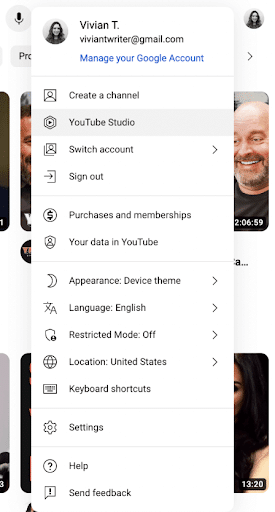
3. Choose “Create a Channel”
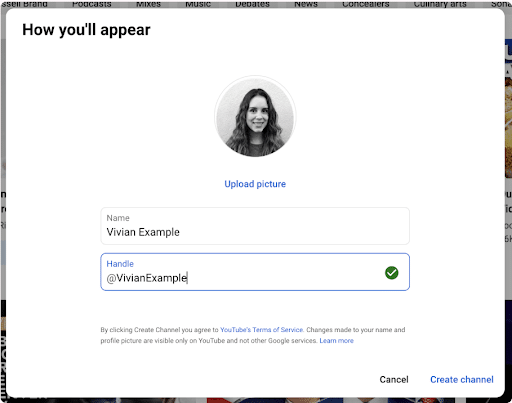
You can then create your channel, with the ability to select a profile picture, channel name, and handle.
The YouTube App also makes it easy to set up a new channel on a mobile device. Simply log in to the app, tap your profile icon, select Your Channel, enter the designated information, and tap Create Channel.
How do you make a YouTube channel public? You can easily choose between a private or public channel during creation, with the added ability to make each video public or private.
Step 2: Choose the Right Channel Name and Handle
The next key step in our guide on how to create a YouTube channel involves selecting an appropriate channel name and handle.
Your channel name should reflect your brand if not simply be your business name. Using your current business or brand name will keep things consistent across platforms and help you establish more brand authority on YouTube.
In addition to a channel name, create a unique handle, which will begin with “@” followed by a unique identifier. This handle could consist of multiple words combined into one, e.g., “Ignite Visibility” becomes “@IgniteVisibility.”
Here are some examples of how to create a business YouTube channel name and handle:
- Branded Channels: Examples here could include channels like HubSpot, TED, and Vox, which use the handles @HubSpot, @TED, and @Vox, respectively.
- Product/Service Channels: Popular product and service channels include Moz (Whiteboard Friday), Pro HR Tips, and The Sizzle Spot, which go by the handles @Moz, @ProHRTips, and @TheSizzleSpot.
- Thought-Leadership Channels: Smart Passive Income and Veritasium are two popular thought leaders on YouTube, using the handles @SmartPassiveIncome and @Veritasium.
Step 3: Add a Profile Picture, a Banner, and Brand Assets
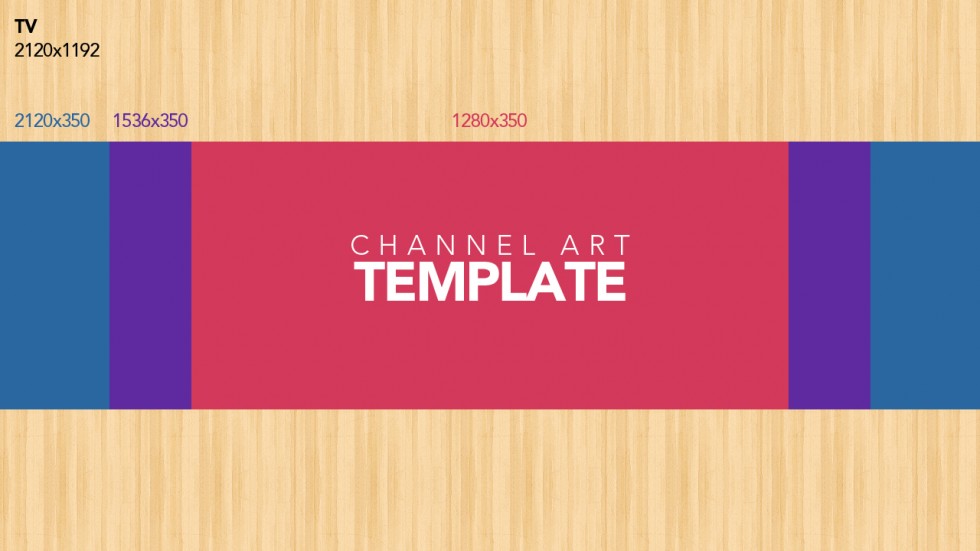
Next up is channel art, i.e. the giant banner that lives at the top of your channel homepage.
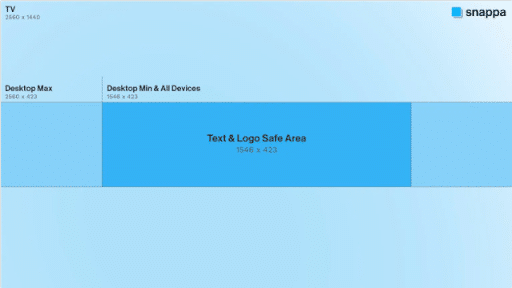
These come in all kinds and colors, but only one size. YouTube recommends your photo be 2560×1440 pixels with a max file size of 4MB.
The banner is generally the first thing people will see when they come to your channel, and it’s important that you choose a cover art that’s consistent with your brand.
You also need a high-quality profile picture that best represents your profile. The recommended resolution is 800 x 800 pixels, with a maximum file size of 2 MB to 4MB, and it should consist of your logo or another universally recognizable image attributable to your brand.
You may also use other brand assets, namely a logo, which you can include in your profile, banner, or other images. Place your logo in your banner within the safe “central area” of 1546 x 423 pixels.
How do you present yourself on your website or marketing materials? Simple and clean or funky and creative? Whatever your particular style is, stick with it. Effective brand consistency will help you build more trust and recognition as you differentiate yourself from competitors.
Here’s a little checklist to guide your creative design:
- Make sure your visuals and text are viewable on mobile devices
- Establish a clear value proposition backing your content
- Use consistent colors to reinforce branding
- Avoid clutter and make use of empty space to supplement visuals and text
Step 4: Write a Channel Description That Helps Users and Search
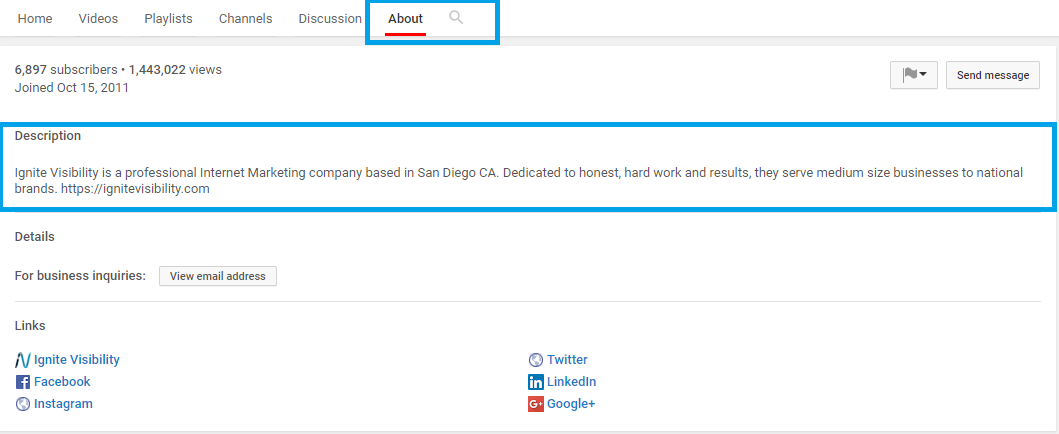
Now it’s time to enter your channel description. Like any other description or about page, you’ll want to describe your brand and what viewers can expect to see on your channel.
Think of it as your elevator pitch – you want to give viewers all the information upfront while still making it intriguing enough so they want more.
You also want to take the opportunity to employ a little YouTube SEO. Because YouTube is basically a search engine for videos, your videos should be treated and optimized like any other piece of content you create.
Start by selecting a few keywords and looking them up in the Google Keyword Planner. Once decided, try to incorporate the keywords into your channel description.
Use this formula to help you develop a strong description:
- Who you help with your content
- What content you publish on your channel
- Why trust you specifically
- When you publish
- A call to action.
For example, a marketing consultant might include a description like: “Expert marketing consultant with over 20 years of experience, publishing weekly tutorials on how to strengthen your strategy. Check out our videos below!”
Meanwhile, a fitness brand could write: “Daily workout tips from leading fitness experts to help you build an effective routine, whether at home or in the gym. Get started on your fitness journey with us today!”
Step 5: Customize Your Channel in YouTube Studio
If you want to know how to have a successful YouTube channel, there are plenty of ways to customize your channel through YouTube Studio:
Home Tab
When logged in on YouTube, go to YouTube Studio and the Customization option in the menu.
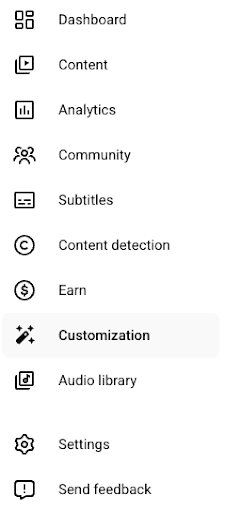
From there, you can optimize your main channel layout within the Home tab, with the ability to add custom sections, including For You, Videos, Short videos, and more.
Channel Trailer
Through YouTube Studio, you can also add a channel trailer that plays a video to introduce people to your channel.
This trailer can tell people what you and your channel are about, encouraging more people to watch your videos and subscribe.
Featured Video for Returning Subscribers
Be sure to designate featured videos for people who have already subscribed to your channel, getting them to continually engage with your content, new or old.
Featured Sections
The Home tab also allows you to list featured sections on your channel, which can lead viewers to videos sharing a certain theme.
Playlists
Similar to featured sections, you may include playlists on your home page that group multiple videos into a single continuous playlist, which can drive binge sessions and engagement.
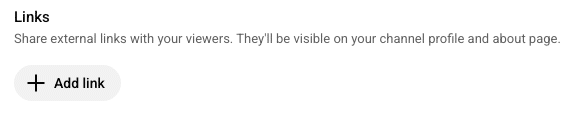
Site Links
Use YouTube Studio to add external links to your channel leading people back to your website.
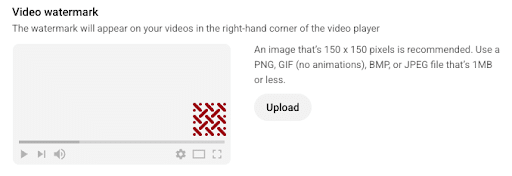
Watermark
Another feature you can add is a watermark featuring your logo in the corner of videos. YouTube recommends watermarks of 150 x 150 pixels and no more than 1 MB.
Step 6: Verify Your Channel and Unlock Features
The next step involves verifying your channel, which you can do using your phone via phone call or text message.
While you don’t need to verify your channel, there are some key benefits you get with verification, such as:
- Longer upload capabilities to promote long-form content
- Custom thumbnails to enrich your videos
- Live streaming to drive more engagement
- Content ID appeals involving copyright disputes
Also, keep in mind that advanced features may require an established channel history and ID or video verification.
Step 7: Upload Your First Video the Right Way
Good news! The hard part’s over – uploading couldn’t be easier.
You can upload either through your browser or the YouTube app.
For your browser, just log into your account and click the Upload button in the top right corner.

Click the button to upload your video and choose your privacy settings.
While your video uploads, you’ll be taken to the ‘Basic Info’ screen. Here, you’ll enter in your video title, description, and any tags.
This is where SEO comes back into play.
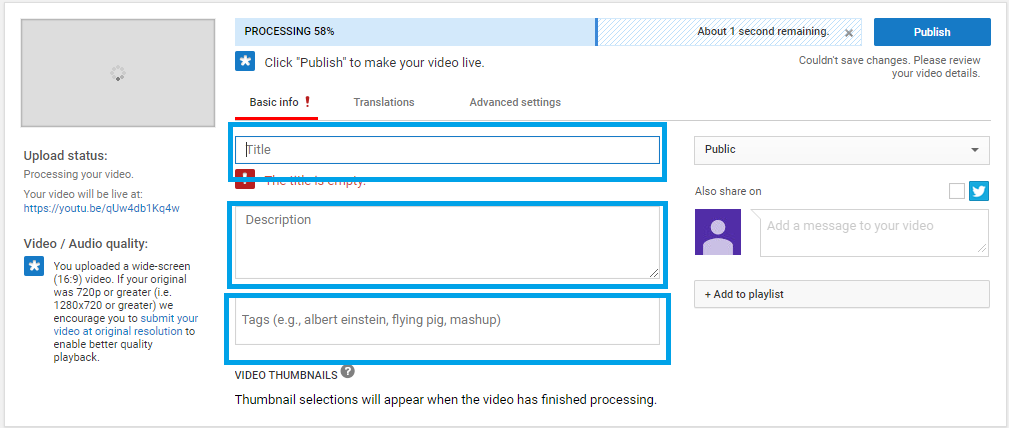
Just like with the channel description, you’ll want to choose 1-2 keywords that fit your video (and rank well), and incorporate them into your title and description.
Tags are another area to pay attention to. When applied correctly, they can lead to a higher rank in YouTube searches and more frequent appearances in Suggested Videos.
These will be a mix of default tags and video-specific tags.
Default tags include:
- Channel keywords – channel names, individual names, etc.
- Subject keywords – topics, categories, channel keywords, etc.
On the other hand, video-specific tags include:
- Specific topic
- Names included
- Video themes
Once your description and tags are in place, you’ll be taken to a ‘Languages’ screen where you can select any languages you would like your video translated into.
Next is the ‘Advanced Settings’ screen, where you’ll select your settings for things like comments, categories, etc.
Don’t forget to optimize your thumbnail, either. Include a balance of text, focus image, and color schemes to help establish what the video is about and make your videos stand apart.
You should also consider adding end screens or cards, which could highlight other videos in your channel of a similar theme to keep viewers hooked.
Press ‘Publish,’ and voila – you’ve created a YouTube video!
Oh, and don’t forget to select your audience in your channel settings. Creators have the option of indicating that their channel is “made for kids” if they comply with the Children’s Online Privacy Protection Act (COPPA) and other regulations.
Finally, add your videos to a playlist and promote them to maximize their visibility.
How to Advertise Your Videos
So you’ve created and published your video. Now it’s time to advertise.
Luckily, advertising on YouTube is highly effective.
43 percent of new customers buy something they saw in a YouTube ad, and Google has stated that YouTube ads “have the potential to increase the millennial audience your video ads reach by 42 percent, multiply engagement by 10X, and boost views of past videos by 500 percent.”
Pretty impressive numbers. And you can make them work for you.
Ad Breakdown
YouTube offers three types of ads: TrueView InStream ads, TrueView Discovery ads, and bumper ads. When considering how to make a YouTube channel, make sure you note how much you need to invest in YouTube ads.
TrueView In-Stream Ads
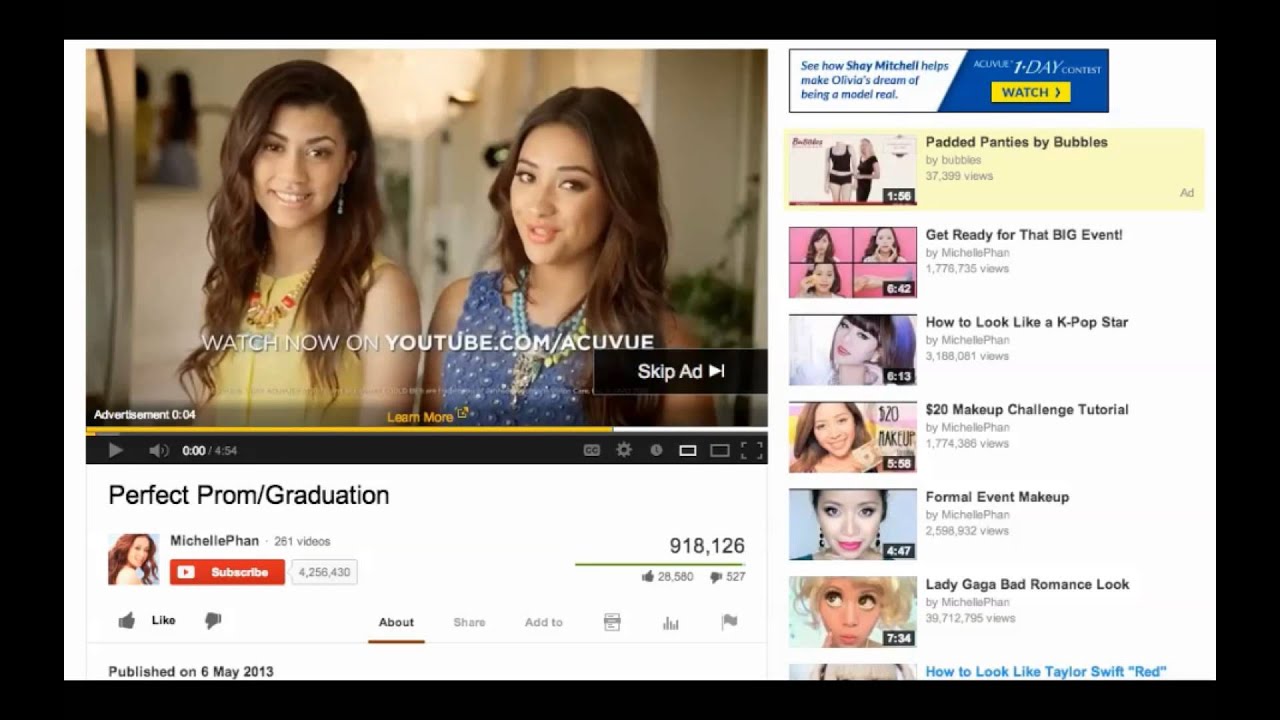
- Run before or during another video
- Viewers can choose to skip the ad after five seconds
- You only pay if a viewer watches for at least 30 seconds or clicks on your ad
- Best for: Maximum exposure
TrueView Discovery Ads
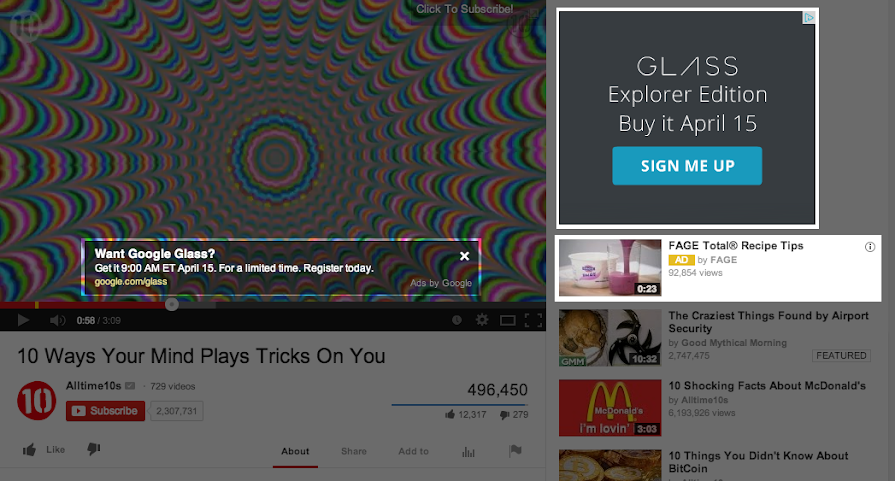
- Appear alongside other videos, in YouTube searches or on the Google Display Network
- You only pay when a viewer clicks on your video
- Best for: because they must be clicked on, you’ll attract an audience more likely to convert
Bumper Ads
- Appear before other videos and are six seconds or less
- Viewers cannot skip these ads
- You pay per impression
- Best for: Upper-funnel goals such as awareness
Ultimately the ad format you choose will depend on your individual business goals.
When in doubt, experiment with each of them.
For a more in-depth look at advertising on YouTube, take a look at my ultimate guide.
Optimize Titles and Thumbnails for Click-Through Rate
The following are some tips to help you develop strong titles and thumbnails:
- Match Search Intent: One of the most important steps to take here is to match your content to different viewers’ search intent; what kind of goals do they want to achieve, whether it’s to learn more about a particular industry topic or to decide on the best company within your industry.
- Make Value Obvious: Be very clear in your titles and thumbnails what kind of value each theme offers, be it to gain deeper knowledge about a particular topic, find ways to save more money, or other benefits to viewers.
- Avoid Clickbait: While leading people to a video with honest clickbait is okay, take care not to mislead audiences with titles and thumbnails that don’t actually reflect the video’s content. The latter tactic could lead to distrust, lost views, and unsubscribes more than anything.
- Design for Small Screens: With 69% of YouTube viewers using mobile devices to watch videos, it pays to optimize your content for small screens by using short titles and vertical video formats, along with more bite-sized content that’s easy to consume.
- Keep Text Minimal: Avoid saying too much in your titles or thumbnails and instead let your videos do the talking.
- Use Strong Contrast: In your thumbnails, use contrasting colors and shades to make your visuals pop.
Organize Playlists and Channel Sections for Discoverability
To group your videos into specific themes for channels and encourage more binging among viewers, be sure to develop playlists and dedicated sections when you have enough content to consolidate.
You can build playlists and featured sections around the following content types:
- Product education
- Tutorials
- Customer stories
- Webinars
- Shorts
- Case studies
Grouped sections can make it easier for people to navigate your channel and content while also encouraging people to binge your videos, as playlists automatically continue from video to video.
How to Promote Your New YouTube Channel
As with any marketing initiative, the promotion will make or break your channel.
The rule of thumb? Spend as much time promoting your content as you did creating it.
Here are a few tried and true methods to increase your YouTube traffic.
Social Media
If you’re using YouTube, it’s a safe bet to assume you’re active on other media channels as well.
So cross-promote like crazy. Share links to your video on your Facebook, Twitter, Instagram, etc.
Email Marketing

Email continues to be an effective way to reach customers, considering 72 percent of people prefer to receive promotional content through email marketing, compared to just 17 percent who prefer social media.
Use email marketing to include new videos in your newsletters or updates.
Ask readers to subscribe to your channel, and even include a link to your channel in your email signature.
Blog
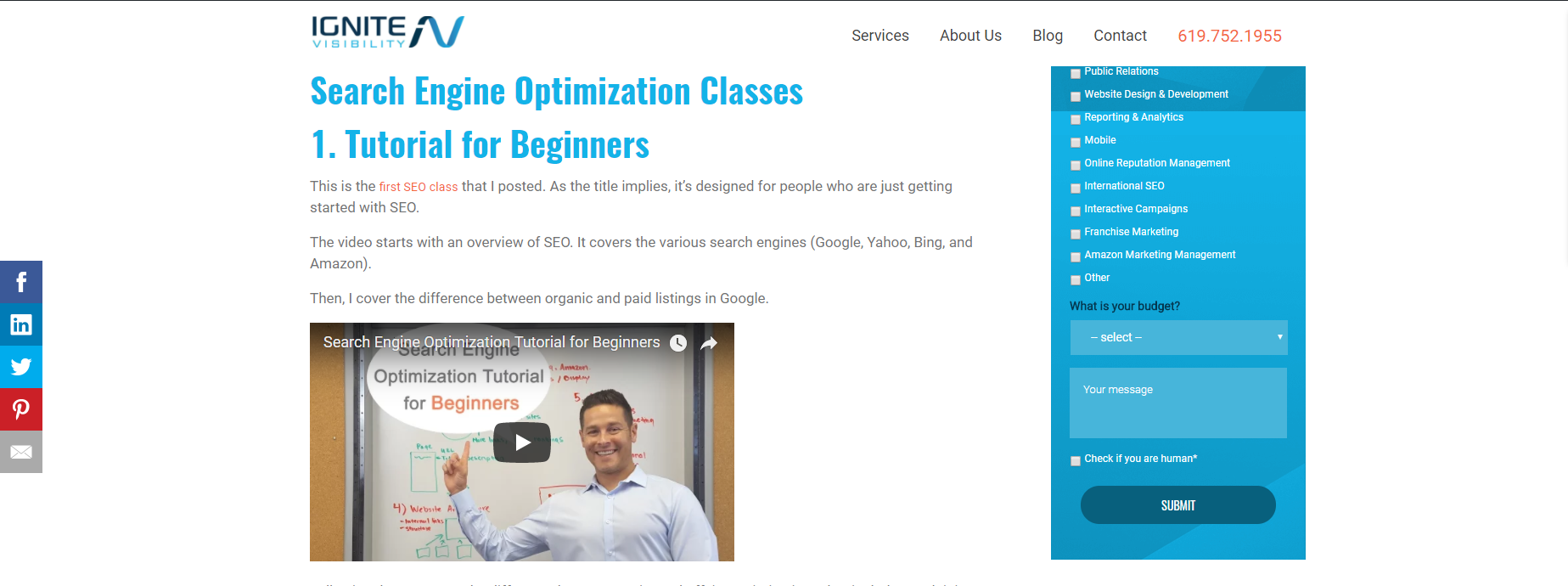
Create a blog post to go alongside your video, or simply put your video in its own post.
Either way, promoting through your blog is a powerful way to reach potential customers and represents another opportunity to rank through SEO.
Website Resource Hubs
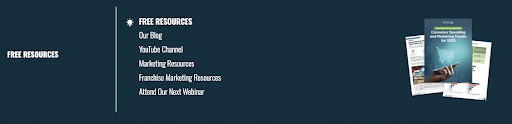
On your website, you can promote your videos through certain resource hubs, such as pillar pages and extending subpages, along with tutorial pages and other resources.
You can also link to your YouTube channel directly through a resources link in a dropdown menu.
Employee Advocacy
Members of your staff can post videos to their various social media channels, which they’ll likely be more incentivized to do if they’re involved in the video in some capacity, such as featuring in an employee highlight or expert video.
Repurposing Clips
Another method to try is repurposing existing videos.
For instance, you could chop a longer video into individual clips to use as YouTube Shorts, with links within those Shorts to the longer video. Shorts could feature a single fact or a condensed list, with the longer video exploring the topic in greater depth.
Interact with Other YouTube Channels
Want to be popular on YouTube? You have to put in some community work.
Actively engage with your audience in a personal, yet professional way. Reply to comments and answer questions. If they know they’ll get a response, users will be more likely to interact.
Don’t forget to reciprocate. Find other relevant channels to subscribe to and make an effort to leave your own comments.
Try Q&A Videos
A great way to involve your audience is to base a video on what they specifically want to know.
So ask them. Have your viewers send in questions, and dedicate a video to addressing those inquiries. Many YouTubers have an entire Q&A series on their channels since they receive questions so often.
Not only will give you content you know is valuable to your audience, but it will show your audience that you’re engaged with them as well.
Common Mistakes When Creating a YouTube Channel
When learning how to create a YouTube channel and make money, here are some critical mistakes to avoid:
- Inconsistent Naming: To supplement your profile pic and handle, keep your naming consistent across your channel and in your videos, which will prevent any confusion and make it easier to optimize for branded terms.
- Weak Branding: Your channel and videos should also reinforce your branding efforts with consistent and prominent brand names, logos, and recognizable thumbnail formats and color schemes that set you apart from other channels.
- No Trailer/Featured Video: Channels should include dedicated trailers and/or featured videos that introduce people to both your channel and content, giving them a taste of what you’re about.
- No Playlists: Putting together playlists on your channel can give audiences some content to binge while also helping with SEO by grouping your videos into specific themes.
- Generic Descriptions: Your channel and video descriptions should be detailed and include natural keyword instances that give audiences a better understanding of your brand and content while further helping with SEO.
- Low-Effort Thumbnails: Video thumbnails serve as the gateway to your content; use an effective thumbnail format that includes recognizable people, color layouts, logos, and relevant text to encourage people to click through and watch your content.
- Publishing Without a Content Plan: A content calendar will keep your channel organized and consistent, giving you a clear list of content ideas and regular scheduling.
- Prioritizing Ads Over Channel Basics: Before you promote your channel or brand with ads, focus on developing your channel. Otherwise, people clicking through those ads might not come to trust your brand, channel, or content to keep them moving along the customer journey.
How to Start a YouTube Channel FAQ
1. How do you create a YouTube channel for a business?
You can create a business YouTube channel by taking the following steps:
- Create a YouTube account and brand channel
- Enter your business or brand name
- Customize your channel in YouTube Studio
- Add a profile picture and banner image
- Write a description for your channel
- Verify your account
- Upload a channel trailer
2. What’s the difference between a YouTube channel name and a handle?
The channel name is the public name displayed on your channel, while a handle is a unique identifier that can appear in mentions and your URL, beginning with an “@” symbol.
3. How do you verify a YouTube channel?
You can verify your YouTube channel by having a 6-digit code sent to your phone via a call or text. Verified channels feature a gray checkmark next to your channel name to make it official.
4. How do you customize a YouTube channel in YouTube Studio?
In the Home tab, add a Featured Video and a Channel Trailer, along with featured sections or playlists. In the Profile tab, upload a custom profile picture, banner image, and video watermark. You can also add basic info, like your name and handle, a description, and links.
5. How many videos should you upload when starting a YouTube channel?
There isn’t a universal answer to this, but you can start by uploading one high-quality video to establish a strong launch, or you could upload around three to five to give new audiences a chance to binge your content from the start. From there, upload around one to three videos every week or so to keep your channel fresh.
6. How much does it cost to start a YouTube channel?
Starting a YouTube channel is technically free, but you may invest in professional video production and editing equipment, third-party editing software, video marketing services, and other costs to get the most from your channel and content.
Learn How to Create a YouTube Channel and Make Money With Ignite Visibility
With a better idea of how to create a successful YouTube channel, you may still need some help to get the most from it. Ignite Visibility has plenty of experience with video marketing, including managing YouTube channels across many industries.
When you work with Ignite, you’ll be able to:
Create a high-quality, well-optimized YouTube channel
Produce a wide range of equally high-quality videos
Promote your channel and videos across platforms
Integrate video marketing into a comprehensive digital strategy
And much more!
Contact us today to request a free proposal and get started with our experts for your next strategy.

