

It’s important not to underestimate the importance of the YouTube thumbnail for every video on this streaming platform. At the same time, you might not be sure how to perfect your thumbnails and generate the right response with them.
An effective YouTube thumbnail can encourage more users to click on your videos, leading to more views. What makes for effective YouTube thumbnails is a combination of clarity, curiosity, and branding, along with testing with the help of a title and thumbnail tester.
Josh Rohr, Sr. Social Media Strategist, will cover the need for effective YouTube thumbnails and how you can split test these elements to determine which works best for your videos.
What’s Covered:
- Why YouTube Thumbnails Matter
- YouTube Thumbnail Requirements
- YouTube Thumbnail Best Practices
- Mobile-First Thumbnail Design
- How to A/B Test YouTube Thumbnails
- YouTube Thumbnail FAQs
Why YouTube Thumbnails Matter
The YouTube thumbnail is one of the most crucial elements of any YouTube video. It serves as the visual summary of your video’s content and is more eye-catching than the title. Even with a clickbait title that tempts viewers, the thumbnail is what can ultimately drive people to either click play or click away.
Ultimately, a strong YouTube thumbnail can greatly improve your click-through rate (CTR) and ensure your videos stand apart. When paired with an accurate promise, you’ll see far less drop-off early on and maximize views, culminating in more traffic to your site from YouTube.
For marketers, YouTube thumbnails can impact distribution efficiency and cost per acquisition (CPA) in paid and social media cross-promotion.
Even if you understand the necessity of a good YouTube thumbnail in video marketing, you might not know exactly how to create the ideal thumbnail for each video. Thankfully, YouTube has made it easier to test your thumbnails before deciding on the right one.
Specifically, you can split test YouTube thumbnail options to test two to three different versions and see which performs best.
Expert Opinion on YouTube Thumbnails
While you might spend a lot of time and attention on your actual video content, the YouTube thumbnail is one of the main elements to consider before publishing. Much like email subject lines, YouTube thumbnails are essential in getting people to engage with the underlying content.
According to YouTube, 90% of videos that do the best have custom thumbnails, making it crucial to know how to create a YouTube Thumbnail that really connects with audiences.

YouTube Thumbnail Requirements
The first step to crafting the ideal YouTube thumbnail is to use the right thumbnail size for YouTube.
According to YouTube guidelines, the following are the proper YouTube thumbnail dimensions to use when uploading YouTube thumbnails:
- The ideal thumbnail size for YouTube videos is a minimum of 640 pixels or a 1280 x 720 resolution.
- File sizes under 2MB for videos and 10MB for podcasts
- A 16:9 aspect ratio for normal thumbnails
- Auto-generated 4:5 YouTube thumbnails for vertical videos
- An aspect ratio of 1:1 for podcast playlists
- File formats including JPG, PNG, and GIF
YouTube Thumbnail Best Practices
Want to successfully split test YouTube thumbnails using highly engaging visuals? The following are some best practices to implement:
Consider the Rule of Thirds
The “rule of thirds” is a rule in photography that also applies to YouTube thumbnails.
The rule dictates that the image’s subject should take up the left or right third of an image while the other two-thirds of the image remain open, forming a well-composed image.
Add Clear Images
Images shouldn’t be blurry or too cluttered to the point where people can’t make out the subject. Make sure your images are clear and easy to comprehend, which will help summarize the contents of the video.
Write a Captivating Title
Use a title that gets people’s attention and works with the YouTube thumbnail. However, you should avoid any clickbait-y titles that mislead viewers or flat-out lie to them about the video content. Think short and catchy.
Follow Community Guidelines
Your video thumbnail must also follow YouTube’s community guidelines. These guidelines apply to all images and video content on the platform, including banners, Community posts, and avatars.
Implement Good Contrast and Color
In learning how to create a YouTube thumbnail, you should incorporate contrasting colors and images to help your thumbnails stand out. Also, colors should supplement branding, as a unique color scheme could make your videos instantly recognizable to returning viewers.
Use Faces and Evoke Emotion
When appropriate, use faces and emotion in your YouTube thumbnail to drive a stronger connection with audiences. For example, if your video features a person speaking, use their face along with basic text summarizing the content of the video, with an expression that matches the theme.
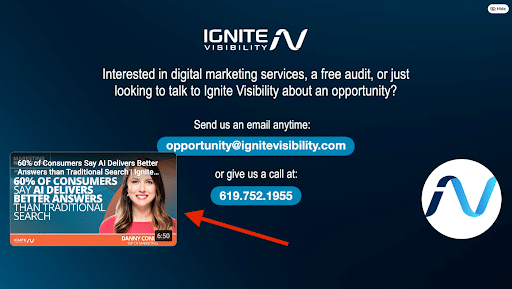
Don’t forget to put thumbnails on YouTube for the ending of videos, either. These can keep people engaging with your channel by viewing videos on related topics.
Use Minimal Text
Don’t go too heavily on the text in your YouTube thumbnails, as this can overwhelm viewers. Let the title do more of the talking and briefly supplement it with a few words to accompany your image.
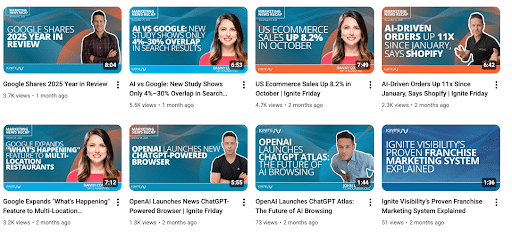
Keep Your Style Consistent
The style of your videos should also remain relatively the same across your entire channel. The same color scheme and image template can go a long way in establishing a unique brand for your channel.
Avoid Clutter
It’s also important to avoid general clutter in your thumbnails. Having too many images or an overabundance of text will, again, overwhelm viewers and potentially turn them away.
Don’t Be Deceptive
Your thumbnail, title, and description should accurately convey what the video is about. While some forms of clickbait are okay, you don’t want to deceive audiences and come across as misleading, as this could hurt your reputation in the long run, as well as your metrics and rankings.
Example Layout Templates to Get You Started
Here are some examples of how to edit thumbnails on YouTube with specific layouts:
Face & Two-Word Hook
Consider using this format for a more emotional approach to make a strong connection with audiences. It would feature the face of a person in the video with an appropriate expression alongside a two-word phrase that summarizes the information within, e.g., “Not Again!”, “Get Results”, or “Easy Guide.”
This strategy works best if your video features a personality and you want to evoke a specific emotional response.
Product Close-Up & Contrast
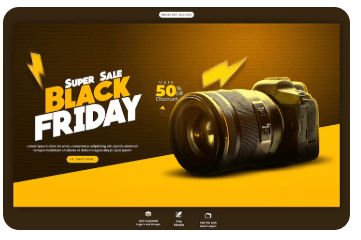
If your video features a particular product or multiple products, you could also include a close-up of a specific product with high contrast to help it “pop.”
Before/After Split
Another option is the before/after split, which is great for showcasing projects like home renovations or DIY activities. The thumbnail would feature a “before” image and highlight the results with an “after” image.

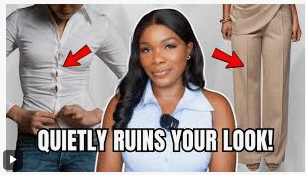
Big Object & Arrow/Circle
To focus on a specific object within a video, you could include an arrow or circle. For example, a video might feature a series of style mistakes that people make, with a thumbnail featuring an image pointing out a particular gaffe with an arrow.
Mobile-First Thumbnail Design
You should also know how to edit a thumbnail on YouTube for mobile audiences.
Here are some basic steps to teach you how to change a thumbnail on YouTube Shorts and other videos for mobile:
- Design your image at full size for conventional desktop videos.
- Zoom out to “phone size” to see how it would appear on mobile screens.
- If you can’t read it in one second, consider redesigning until it reads okay.
- Use “safe placement” that accounts for timestamp overlays, avoiding the bottom-right when doable to incorporate the entire image.
How to A/B Test YouTube Thumbnails
If you want to split test YouTube thumbnails, YouTube makes it easy to do so using tools on the platform.
One of the latest video marketing trends that are making this possible is YouTube’s “Test & Compare” feature, also known as “A/B Testing.” Content creators can use this feature to upload up to three different YouTube thumbnails for each video. You can then test these thumbnails and determine which generates the most clicks.
As of June 2023, YouTube made an official announcement through its Creator Insider channel stating that the feature would only be available to a few hundred creators at the start. However, this feature will eventually open up to others, enabling all creators to split test YouTube thumbnail options with ease.
The following are some brief steps to follow if you want to use this feature to your advantage:
- Open the Test & Compare feature, which you’ll find under Video Details when uploading a new video.
- Choose two or three different YouTube thumbnail options to run when uploading the video.
- Look at the data in Your test report to see which thumbnail performed best based on the Watch time percentage.
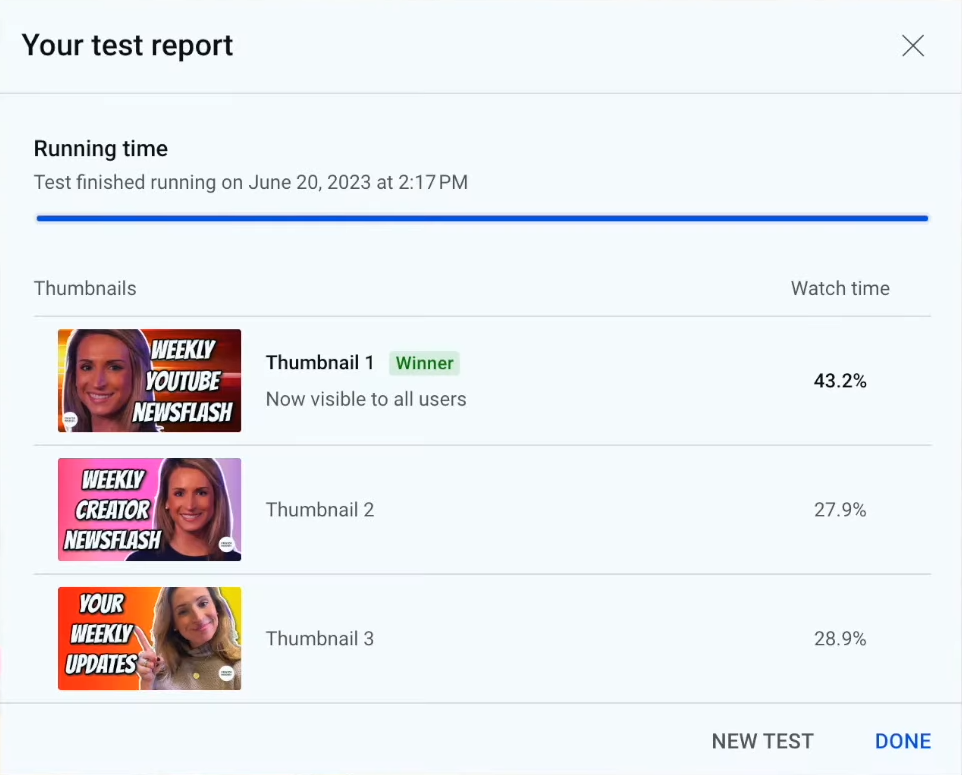
You can also learn how to change a thumbnail on YouTube Shorts with the title and thumbnail tester.
Be sure to run your A/B test for at least a few days, but many YouTubers will run these tests for up to around two weeks. However, YouTube’s tool will ultimately dictate the timing and end it early if a clear winner emerges, the “winner” usually being the thumbnail with the highest watch time share.
Remember, YouTube also allows you to run title and thumbnail combos with its testing tool, so you can try out different variations to see which is the winning blend.
FAQs
1. Can you split test YouTube thumbnails?
Yes, with YouTube’s “Test & Compare” feature, all content creators on the platform will soon be able to split test YouTube thumbnail options and see which gets the best results.
2. What are the YouTube rules for thumbnails
YouTube details the specifications and policy for its thumbnails. For instance, files must be the right size and not contain any controversial violent, sexual, or any type of graphic or misleading material.
3. Do thumbnails get copyrighted?
Yes, it’s possible to copyright YouTube thumbnails. This possibility is why you must either use your own images or copyright-free thumbnails, regardless of the image size.
Testing your video thumbnails can help you get the best results from your video marketing efforts.
4. What is the size of a YouTube thumbnail?
The ideal YouTube thumbnail dimensions are 120×720 pixels, but they must have a minimum width of 640. They also by default feature a 16:9 aspect ratio, but vertical videos will be 4:5.
5. What makes a YouTube thumbnail clickable?
There are several factors that can encourage people to click through your thumbnails, including:
- Faces and emotions
- Consistent branding that builds recognition and trust
- High contrast
- Highlighted objects
- Clear and minimal text
- No misleading clickbait
6. How do you A/B test YouTube thumbnails?
Within YouTube, you can try out different combinations of titles and thumbnails to see which performs the best. Based on which version has the highest watch time share, YouTube will automatically select a winner.
7. How much text should be on a YouTube thumbnail?
Ideally, you should only include a phrase of about two to three words in your video, something that makes the video content clear without adding clutter to your image.
Want to Get the Most Out of Your YouTube Marketing?
Ignite Visibility has a team of social media experts who are ready to take your YouTube channel to the next level. We leverage the power of the latest YouTube updates to help businesses grow their subscriber count. Our expert strategists work closely with clients to get the most from YouTube thumbnails with split testing, a common CRO practice.
Put your best foot forward by today with optimized thumbnails for your video marketing.

