

Microsoft advertising has moved far beyond being a “Google alternative”. It is now a sophisticated, AI-first ecosystem. If you are looking to scale in 2026, you aren’t just buying search terms; you’re tapping into a network of 109 million PC users who conduct 6.4 billion searches every month.
In this blog, SVP of Paid Media, Meghan Parsons, breaks down the modern Microsoft Ads landscape, from Generative AI and Performance Max to the unique B2B advantages that only Microsoft can offer.
What’s Covered:
- Step-by-Step: How to Launch a Microsoft Ad Campaign
- Ads that Win in Microsoft Search
- Microsoft Audience Ads Best Practices – Using the Microsoft Audience Network (MSAN)
- How (& Why) to Use Microsoft Advertising LinkedIn Profile Targeting
- Remarketing & Dynamic Remarketing
- Microsoft Ads vs. Google Ads: When to Use Both
- Key Microsoft Ads Features and Tools for Campaign Success
- Advanced Tactics: Integrating Microsoft Ads With SEO and PPC Strategies
- FAQs About Microsoft Ads Management
My Expert Opinion on Microsoft Ads
To get the best results from advertising on Microsoft, you need to understand impression share and obtain Microsoft Advertising Certification. In doing so, you’ll be able to fully optimize ad performance and develop expertise.
Used in a fully integrated marketing strategy, along with other pay-per-click (PPC) and search engine optimization (SEO) strategies, Microsoft Ads can help you get the most from advertising in a multi-channel approach.
Knowing more about how Microsoft Advertising works and the many ways you can use it will ensure you properly integrate it into your complete digital marketing strategy.
How Do Microsoft Ads Work?
Microsoft Advertising is a PPC ad platform that provides advertisers access to the Microsoft Audience Network, including the Bing search engine, LinkedIn, and other platforms where Microsoft Ads is available.
Microsoft used to have a honed-in partnership with Yahoo, but they changed up their model in 2015 to begin servicing other advertisers as well. Basically, their network and marketplace share have grown exponentially.
Just take a peek at some metrics. Back in 2015, they held 31% of the US search share. As of 2024, they have 38.1%. Microsoft has also raised their search share in the UK, Australia, France, and Germany.

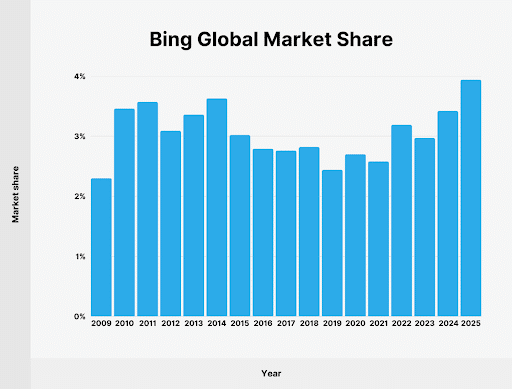
When you look at the overall global market share, Bing has continued to rise significantly. In 2009, they only had 2%. In 2025, they’ve doubled to 4%. Those numbers may seem small, but it’s still millions of people who could be your ideal client.
Besides, the network is more than just Bing.com. Microsoft also owns and operates:
- Bing
- Microsoft Edge
- Windows
- Skype
- MSN
- Outlook
- Cortana
Additionally, Microsoft has formed partnerships with a wide range of companies and organizations, including Yahoo, AOL, Meta, Expedia, and others.
Where Are Microsoft Ads Placed?
Microsoft Bing Ads are placed in two primary places: Bing Search and the Microsoft Audience Network.
Bing Search puts your ads directly in front of users searching on Bing and its partner search engines. They’re considered intent-driven placements, meaning that they are shown to people specifically looking for your product or service.
These placements use audience targeting and AI to serve ads to users based on their behavior, interests, and demographics, even when they aren’t actively searching.
Types of Microsoft Campaign Types
Microsoft Advertising also supports several campaign types to match different marketing goals:
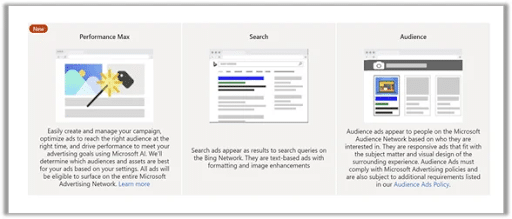
Search campaigns place text ads in Microsoft Bing Ads, similar to Google Search ads.
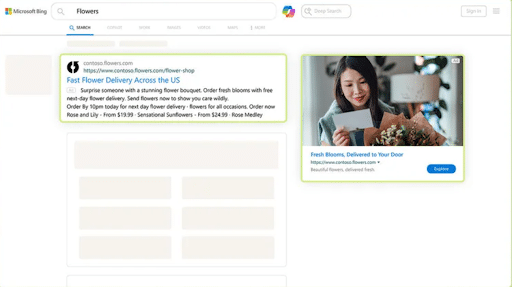
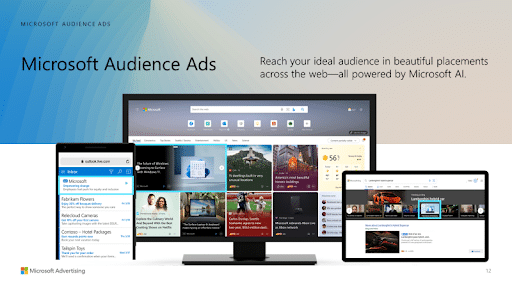
Audience campaigns run native ads across the Microsoft Audience Network for brand awareness and prospecting.
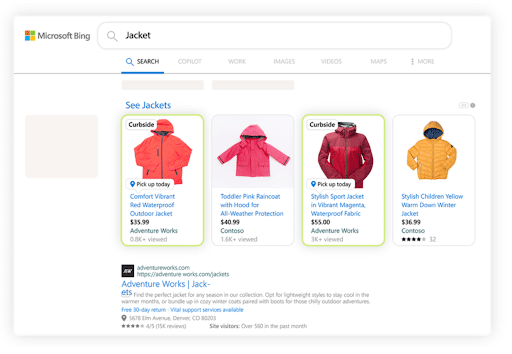
Shopping campaigns showcase product listings with images and pricing for ecommerce brands.
Performance Max campaigns use automation to serve ads across all Microsoft placements, optimizing delivery based on your conversion goals.
For verticals with higher PC paid click shares, Microsoft over-indexes, creating an even larger audience for searches that are already performing well.
It’s also important to understand how impression share works. Microsoft defines impression share as the number of times an ad appears divided by the total number of eligible impressions.
In other words, it measures the reach of your ads in the designated auction marketplace, giving you insight into how much of your target audience actually sees them. The higher your impression share, the more visibility your brand captures within that space.
Step-by-Step: How to Launch a Microsoft Ad Campaign
Getting a Microsoft Ads campaign off the ground doesn’t have to be complicated. Here are step-by-step instructions on how to set up your first campaign.
1. Set Up Your Account
Start by creating your Microsoft Advertising account at ads.microsoft.com. Once you’ve filled out your Microsoft Advertising login, fill in your business details, billing information, and time zone.
If you’re already running Google Ads, you can import those campaigns directly, but you should always review everything manually before going live. This will ensure that your settings are optimized for Microsoft’s platform.
2. Install Conversion Tracking
Before you spend a single dollar, set up your UET (Universal Event Tracking) tag. This is Microsoft’s tracking pixel, and it needs to be placed on your website to measure actions like form submissions, purchases, and sign-ups.
Without this step, you’re flying blind. Verify that the tag is firing correctly using the UET Tag Helper browser extension.
3. Choose Your Campaign Goal and Type
Select a campaign objective that aligns with your marketing goal, whether that’s driving website visits, generating leads, or increasing sales.
Then choose the campaign type that best fits:
- Search
- Audience
- Shopping
- Performance Max
Your goal determines how Microsoft optimizes your ad delivery, so be intentional here.
4. Define Your Targeting
Set your targeting parameters based on your audience. This includes:
- Geographic location
- Language
- Device type
- Demographics
For Search campaigns, build out your keyword lists with a mix of match types. For Audience and PMax campaigns, layer in audience segments like in-market audiences, remarketing lists, and LinkedIn profile targeting for B2B.
5. Build Your Ads and Assets
Create your ad copy and creative assets within the Microsoft Ads Editor.
For Search campaigns, write compelling headlines and descriptions that speak to user intent and include a clear call to action.
For Audience and PMax campaigns, upload a variety of images, logos, videos, and text variations so the system can test and optimize combinations.
The more asset variety you provide, the more room Microsoft’s AI has to find what works.
6. Add Ad Extensions
Extensions give your ads more real estate and more reasons to click. At a minimum, add sitelink extensions, callout extensions, and structured snippet extensions. If you’re a local business, include location extensions. For lead generation, add call extensions. These don’t cost extra and consistently improve click-through rates.
7. QA Everything Before Launch
Review every detail before flipping the switch. Double-check your targeting settings, budgets, bid strategy, ad copy, landing page URLs, and tracking. Make sure your UET tag is verified and working.
Run through the campaign as if you were the customer clicking on your ad and ask yourself: does the experience make sense from search to landing page?
8. Launch Your Campaign
Once everything checks out, set your campaign live. Start with a reasonable daily budget that provides Microsoft with sufficient data to optimize without overspending as the system learns. Avoid making major changes in the first 24 to 48 hours so the algorithm has time to calibrate.
9. First-Week Optimization Cadence
The first week is all about monitoring and making smart adjustments:
- Check performance daily, focusing on impressions, click-through rate, cost per click, and conversion data.
- Look for underperforming keywords or audiences and pause anything that’s wasting budget.
- Adjust bids based on early signals, test new ad variations if click-through rates are low, and confirm that conversions are tracking accurately.
After the first week, shift to a regular optimization schedule (typically two to three times per week) to keep the campaign improving over time.
Ads that Win in Microsoft Search
Responsive Search Ads (RSAs) are the standard ad format in Microsoft Search campaigns, and writing them well is the difference between wasted spend and consistent wins.
The key is providing Microsoft’s algorithm with high-quality material so it can assemble the highest-performing combinations for each search.
Here are some best practices to keep in mind when creating your Microsoft ads.
Write 8 to 10 Distinct Headlines
Don’t write ten versions of the same idea. Each headline should bring something different to the table.
Include a mix of headlines that highlight your core value proposition, specific product or service benefits, social proof like stats or awards, a clear call to action, and keyword-rich phrases that match search intent. Variety gives the system more to test, and more testing leads to better results faster.
For example, if you’re advertising a project management tool, your headlines might range from “Plan Projects in Half the Time” to “Trusted by 10,000+ Teams” to “Start Your Free Trial Today.” Each one serves a different purpose and appeals to a different moment in the buyer’s decision process.
Write 2 to 4 Strong Descriptions
Descriptions carry the weight of your pitch. Write two to four distinct descriptions that expand on your headlines with more detail.
Focus on what makes your offer unique, the problem you solve, and what the user should do next. Keep each description tight and action-oriented.
Pro Tip: Avoid repeating what your headlines already say. Use this space to add context and push the click.
To Pin or Not to Pin
Pinning locks a specific headline or description into a set position. While this gives you more control over what shows, it also limits Microsoft’s ability to test combinations, which can hurt performance.
The best practice is to avoid pinning unless you have a compliance or legal requirement, or a specific message that must always appear. If you do pin, pin two to three headlines to the same position so the system still has room to rotate and optimize.
Asset Testing Cadence
Don’t set your RSAs and forget them. Review asset performance every two to three weeks.
Microsoft grades each headline and description with a performance label: Low, Good, or Best. Use these ratings to guide your decisions.
Replace any headline or description stuck in the Low category with a fresh variation. Keep the ones rated Good or Best running, and always have new options in the queue to test.
Stay On Top of Errors
As you’re testing, make sure you check regularly for errors. Even the best marketer can sometimes run into MS advertising issues.
If you see something like “the search location doesn’t match this campaign’s location targeting settings” or “device not managed,” be sure to troubleshoot with Microsoft Ads Management to ensure you fix the issue and don’t lose out on valuable advertising time.
How to Review Asset Performance
Inside your Microsoft Ads dashboard, navigate to the ad level and open the asset details view. Here you’ll see individual performance ratings for every headline and description.
Look beyond labels and focus on which combinations drive the highest click-through rates and conversions. If a particular headline consistently appears in top-performing combinations, that’s a signal your audience responds to that message. Use those insights to inform your next round of ad copy and even your landing page messaging.
The bottom line is that RSAs reward marketers who put in the work upfront and stay engaged over time. Write with variety, test with discipline, and let the data tell you what’s working.
Microsoft Audience Ads Best Practices – Using the Microsoft Audience Network (MSAN)
Microsoft Audience Ads run across the Microsoft Audience Network (MSAN), placing native ads on properties like MSN, Outlook, Microsoft Edge, and thousands of partner sites.
These ads blend into the content experience, which means they need to look and feel like something worth clicking, not just another banner. Getting the creative details right is what separates high-performing Audience campaigns from wasted impressions.
Checklist of Best Practices
When inside of the Microsoft Ads Editor and creating your content, focus on these few things:
- Image ratios and specifications: Images should always be 1.91:1 (landscape), 1:1 (square), or 4:5 (portrait)
- Asset quality: Upload between 8-12 images across the supported ratios so that Microsoft has a variety to choose from
- Vary your headlines: Write at least 8-10 headlines with different hooks, calls-to-action, and social proof.
- CTA selections: Match your CTA to the actual action you want your audience to take, not just something simple like “Learn More.”
- Develop a creative testing plan: Build your testing cadence around four-week cycles to keep your creative from going stale.
To make the most of your MSAN experience, follow these steps:
- Layer your targeting thoughtfully. Combine in-market audiences with remarketing lists to reach users who are both interested in your category and already familiar with your brand. This creates a warm audience that converts at a much higher rate than cold prospecting alone.
- Use audience exclusions to protect your budget. Exclude existing customers or recent converters so you’re not paying to reach people who have already taken action. This keeps your spend focused on new opportunities.
- Don’t treat MSAN as a set-it-and-forget-it channel. Review placement performance regularly and exclude any partner sites that are driving high impressions but low engagement. Not every placement will deliver equal value, and trimming the low performers concentrates your budget where it actually works.
- Align your landing pages with the native ad experience. Users clicking from an Audience Ad are in a browsing mindset, not a searching one. Your landing page should ease them into the next step with clear information and a low-friction conversion path rather than hitting them with an aggressive sales page. Meeting users where they are mentally is what turns Audience Ad clicks into real results.
How (& Why) to Use Microsoft Advertising LinkedIn Profile Targeting
Microsoft announced its LinkedIn acquisition on June 13, 2016. Since then, they’ve developed a holistic approach to the Microsoft Advertising LinkedIn partnership.
Microsoft’s LinkedIn integration allows targeting based on LinkedIn profiles. It does this through a tool appropriately called LinkedIn Profile Targeting, which just so happens to be the only integration of its kind. This kind of exclusive opportunity to incorporate LinkedIn attributes into ad campaigns is particularly ideal for B2B industries targeting professionals, but it can also be great for targeting general audiences based on interests, income, and other demographic data.
Key Metrics for Microsoft Ads Using LinkedIn
This feature was in pilot for a while, but it came out of beta mode in the fall season of 2020.
During the trial, the tool had no trouble proving its effectiveness.
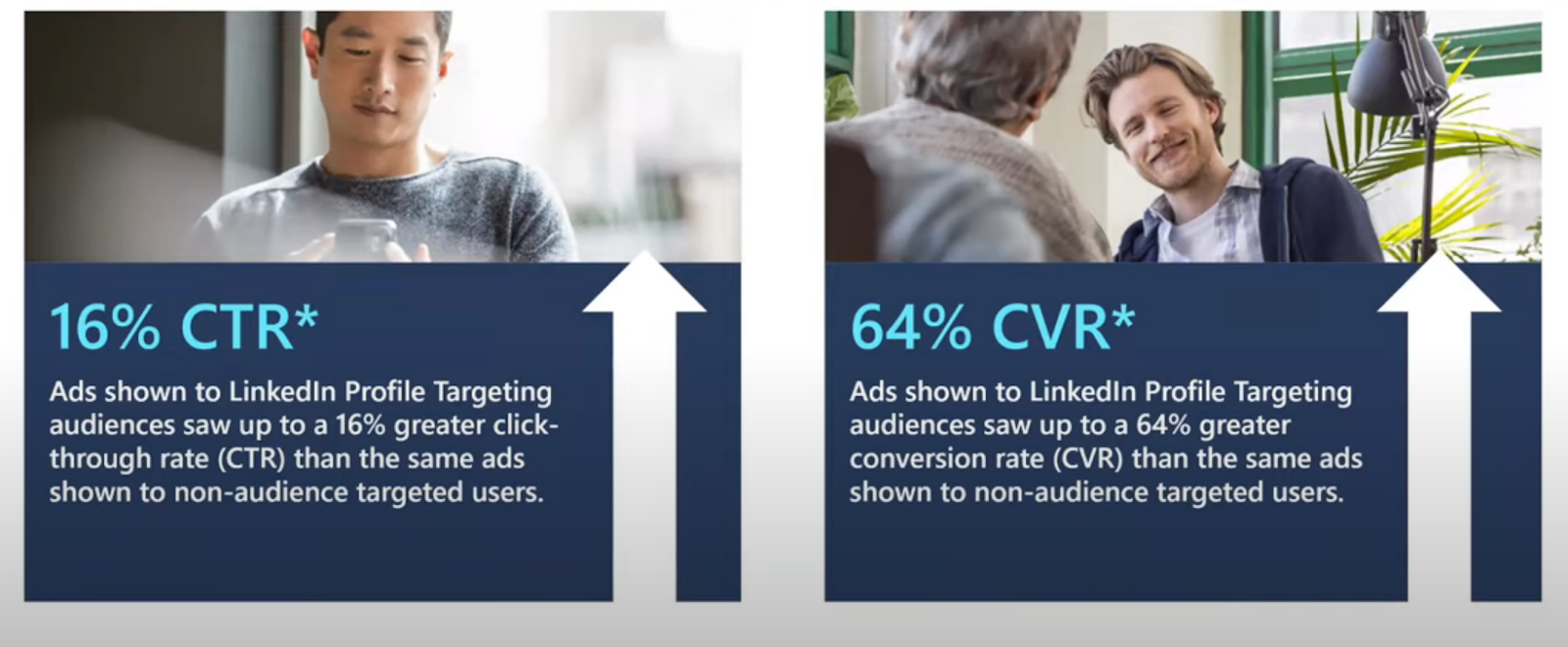
In fact, ads shown to audiences using Microsoft Advertising LinkedIn Profile Targeting saw their click-through rates jump 16%. Meanwhile, conversion rates increased by 64%.
Simply visit your Microsoft Ads search campaigns and bid boost (AKA modify your bids) on audiences you may be targeting.
What’s a Bid Modifier?
Bid modifiers enable advertisers to make adjustments to their bids for a particular element of their ads without altering targeting. For instance, you might want to increase or decrease your bid for ad impressions on mobile devices without altering audience demographics or other metrics.
If you want to target people who work at Microsoft based on their LinkedIn profile, you may be willing to pay 20% more than your bid for that particular customer.
You can go into your campaigns and modify the bid with a 20% increase. Bid modifying just means adding on a percentage level by whatever you think it’s worth to help you score a particular audience.
Targeting Options for Microsoft LinkedIn Advertising
A lot of B2B advertisers are really taking advantage of Microsoft Advertising LinkedIn Profile Targeting. As a business, you’re able to target in three key ways:
- Targeting based on companies
- Targeting based on industries
- Targeting based on job functions
Layer these audiences in and boost your bid for the most targeted options.
Take Advantage of Seasonal Targeting
Plus, as holidays roll around, Microsoft opens up the opportunity for businesses to target audiences related to Black Friday, Cyber Monday, and more.
Say someone searches online for an office chair during a Black Friday sale. Advertisers can go in and increase their bid by, say, 20% for certain audiences who they think are most likely to convert. Specifically, you might increase your bids on days with high demand (in the months or weeks before the holiday) and decrease them during quieter periods (such as a few days immediately preceding the target holiday).
The cool thing is you have a lot of different options when it comes to LinkedIn Profile Targeting. These include:
- 80,000 companies
- 148 industries (like law practice, retail, and financial services, to name a few)
- 26 job functions (such as marketing, accounting, and healthcare)
Remarketing & Dynamic Remarketing
Reaching someone once is rarely enough to earn a conversion. Remarketing lets you stay in front of users who have already interacted with your brand, keeping your business top of mind as they continue browsing.
Microsoft Ads offers several remarketing approaches, each with a different level of sophistication:
Remarketing Basics
Standard remarketing is the simplest form. It works by showing ads to users who have previously visited your website, based on the audiences you build from your UET tag data. You can create remarketing lists based on specific pages visited, time spent on site, or actions taken, like adding a product to a cart without completing the purchase.
Dynamic Remarketing
Dynamic remarketing takes things a step further. Instead of showing a generic ad to past visitors, it automatically generates ads featuring the exact products or services a user viewed on your site. If someone browses a pair of running shoes but doesn’t buy, dynamic remarketing serves them an ad showing that same pair of shoes with the current price and a direct link back to the product page.
This is especially powerful for ecommerce brands with large product catalogs. Instead of manually creating ads for every product, you connect your product feed to Microsoft Ads and let the system build personalized ads at scale. The result is highly relevant content that meets users exactly where they left off in the buying journey.
Dynamic remarketing consistently delivers some of the highest return on ad spend of any campaign type because it targets users with proven purchase intent and shows them exactly what they already wanted.
Audience Expansion
Audience expansion is Microsoft’s way of helping you reach new users who behave similarly to your existing remarketing audiences. When enabled, the system analyzes the characteristics of your remarketing lists and finds additional users across the Microsoft network who share similar browsing patterns, interests, and demographics.
Think of it as a lookalike layer on top of your remarketing strategy. It’s useful when your remarketing lists are performing well and you want to scale beyond your existing site visitors.
However, be careful using it Audience expansion broadens your targeting, which can dilute performance if left unchecked. Start with it enabled on a small budget, monitor cost per conversion closely, and scale only if the expanded audience delivers results that meet your benchmarks.
Minimum Audience Size Requirements
Before your remarketing campaigns can start delivering, your audience lists need to meet Microsoft’s minimum size or you’ll run into MS advertising issues.
- For Search remarketing, your list must have at least 300 users.
- For Audience campaigns, the minimum is 300 as well.
If your lists fall below these numbers, your campaigns won’t serve ads.
This is an important planning consideration, especially for smaller businesses or newer websites. If your traffic volume is low, it may take time to build lists large enough to activate remarketing. Focus on driving qualified traffic through Search and Audience campaigns first, and let your remarketing lists build organically. You can also extend your membership duration (the window of time a user stays on your list) to capture a larger pool. Microsoft allows membership durations up to 180 days, which is helpful for businesses with longer sales cycles.
Exclusions Strategy
Just as important as who you target is who you exclude. A smart exclusions strategy prevents you from wasting budget on users who have already converted or who aren’t a fit for your current campaign goal.
Start by creating an exclusion list of recent converters. If someone already purchased or submitted a lead form, there’s no reason to keep spending remarketing dollars on them, at least not immediately.
Exclude them for a window that makes sense for your business. For a one-time purchase, that might be 30 to 60 days. For a subscription product, you might permanently exclude them.
You should also exclude low-quality visitors. Users who bounced within a few seconds or visited only a single page likely aren’t worth remarketing to. Build a separate list for these visitors and exclude them from your campaigns to keep your budget focused on users who have shown genuine interest.
Finally, layer exclusions between campaign types. If you’re running both standard and dynamic remarketing, exclude dynamic remarketing audiences from your standard campaigns to avoid overlap and keep your reporting clean. A disciplined exclusions strategy is what separates efficient remarketing from simply chasing everyone who ever landed on your site.
Microsoft Ads vs. Google Ads: When to Use Both
Most marketers treat Microsoft Ads and Google Ads as an either-or decision, but the smartest strategy uses both. The key is understanding what each platform does best and where they complement each other.
Here are some examples of when you should use both together:
- Incremental Reach: Google dominates search volume, but Microsoft captures an audience that Google doesn’t fully reach. Those 109 million PC users on Bing include professionals, older demographics, and higher-income households who may never see your Google ads. Running on both platforms means you’re covering more ground without competing against yourself.
- CPC and Competition Differences: Microsoft Ads typically delivers lower cost-per-click than Google because fewer advertisers compete for the same keywords. This means you can often capture qualified clicks at a fraction of the cost, stretching your overall budget further.
- Importing Campaigns: Microsoft makes it easy to import Google Ads campaigns directly, but don’t copy everything one-to-one. Audiences behave differently on each platform. Search intent, device usage, and demographics all vary, which means your bids, budgets, and targeting need adjusting. A keyword that performs well on Google might underperform on Microsoft, or outperform at a lower cost.
Pro Tip: Use Google for primary volume and Microsoft for incremental, cost-efficient reach. Together, they create a more complete paid search strategy.
Key Microsoft Ads Features and Tools for Campaign Success
So, where do advertisers start with MSAN?
Lance points out that business would typically have their search campaign already up and running. MSAN is a different approach to get you on native ads, so it’s usually an expansion from search tactics. After all, audience-specific campaigns aren’t driven by keywords, but rather lists.
On MSAN, there are numerous targeting options. You can choose one or more profile, user, and intent targeting tools to reach your ideal customer:
- Dynamic remarketing
- In-market audiences
- Custom audiences
- Product audiences (dynamic remarketing only for retailers with feeds)
- Similar audiences
- Customer match
- Custom combinations
- Location targeting
- Device targeting
- Linkedin Profile Targeting
- Age and gender targeting
There’s one cool feature, in particular, you ought to know about, and it has to do with image ads.
Within the user interface, you can review your images in ad previews. That image needs to be a particular size (1200 wide x 628 high, to be specific). Microsoft crops your image for you and repurposes it for other placements.
If there are issues in your ad preview, you can re-crop your image, upload a new image, or select a different image for an individual aspect ratio. You can add just one image, but Microsoft recommends using four images and changing them frequently for best results.
Because of the data unique to MSAN, Microsoft is seeing better performance on partner sites. This includes a doubled CTR on MSN, 1.2x greater CTR on Outlook, and 3.5x greater CTR on publisher partners.
Take Advantage of Budget Flexibility for Microsoft Ads
Here’s one more feature that proves Microsoft Audience Network goes above and beyond:
Within your Microsoft Advertising search campaigns, the LinkedIn Profile Targeting feature is only a bid modifier. You can gather the data, layer on the audiences, and bid up or down based on the relevancy of that particular target. However, you can’t exclusively target people through search.
However, you can exclusively target those audiences through your MSAN campaigns.
With adequate budget flexibility using the Microsoft Audience Network, you can ensure you get the most from your budget when advertising on Microsoft platforms. As needed, you can redirect your budget to the ad campaigns that more urgently need it, helping continually optimize performance.
Advanced Tactics: Integrating Microsoft Ads With SEO and PPC Strategies
When advertising on Microsoft platforms, there are some critical tactics that can fully optimize these campaigns for better results, such as:
Align With SEO
To complement your Microsoft advertising strategy, you should use SEO tactics that help you dominate search results. Search ads can rank for terms in Sponsored results on Bing, while SEO efforts targeting those same or similar terms can catch people below in organic results.
SEO could also help you target more competitive terms that you might not be able to bid for as easily with PPC, giving you a more cost-effective alternative.
Use Multi-Platform Advertising
Don’t limit your ad campaigns to Microsoft Advertising. Instead, use a blend of PPC tools, including Google Ads and various assisting tools like Semrush, to create a fully optimized campaign across all platforms.
While the content of your ads might differ between Google and Bing or other platforms, try to keep them aligned in terms of branding. Using similar imagery and messaging will make your brand more recognizable and add more credibility as you maximize visibility.
Leverage Data for Cross-Platform Insights
Use the data collected through Microsoft Advertising analytics and reports to inform the rest of your PPC campaigns. For example, you might discover that a certain set of ads resonates with a particular audience, which could influence your Google Ads campaigns or vice versa.
Conversely, if ads aren’t doing so well with your Microsoft Ads audiences, you might find that you’ll get better results with Google Ads as you target different audiences on each or use different types of ad content.
Looking to the Future with Microsoft Advertising
Microsoft Advertising continues to evolve, making it an increasingly valuable channel for digital marketers planning for 2026 and beyond. The platform is backed by seriously impressive data, and the numbers tell a compelling growth story.
Global digital ad spending reached $709.65 billion in 2025 and is projected to grow to $781.17 billion in 2026, reflecting a compound annual growth rate of 10.1%.
That momentum is expected to continue, with spending forecast to hit $1.088 trillion by 2030 at an 8.6% CAGR, driven largely by AI-powered ad targeting, growth in video and immersive advertising, and the expansion of connected TV and streaming platforms. tbrc
Microsoft is leaning heavily into this growth. In January 2026, the platform rolled out a ton of new updates, including:
- New Performance Max Campaign customer acquisition goals that let advertisers either increase bids for new buyers or focus exclusively on acquiring them
- Doubling the search theme limit in PMax campaigns to 50, giving advertisers richer signals to work with
- Introducing share-of-voice metrics, including impression share, click share, and impression share lost to budget and rank
- Adding Content Targeting that allows ads to align with specific content categories
- Autogenerated assets in Responsive Search Ads
Search volume on the Microsoft network continues to climb, and with hybrid and remote work now firmly established as the norm, desktop usage remains strong.
Meanwhile, AI-driven search is reshaping how users discover products and services, and Microsoft is at the center of that shift with Copilot and Bing’s AI integrations.
Whatever direction you take your campaigns, one principle remains essential: know your audience and target them with intentionality.
If you’re not being deliberate with your audience strategy and you’re not leveraging the Microsoft Audience Network, you’re leaving revenue on the table. The platform is adding more value with every update, and the marketers who lean in now will be best positioned to capture it.
FAQs About Microsoft Ads Management
1. What is Microsoft Advertising (Microsoft Ads) and how does it work?
Microsoft Advertising is a pay-per-click ad platform that places your ads across the Microsoft network, including Bing search, Microsoft Edge, MSN, Outlook, and thousands of partner sites. Advertisers bid on keywords and audience segments to show ads to users searching for or interested in their products and services. You only pay when someone clicks your ad, making it a cost-effective way to reach over 109 million PC users monthly.
2. How is Microsoft Advertising different from Google Ads?
While both platforms are PPC-based, Microsoft Advertising reaches a distinct audience that skews older, more affluent, and desktop-heavy. Competition is typically lower on Microsoft, which means lower cost-per-click for many industries. Microsoft also offers unique targeting through LinkedIn profile data, giving B2B advertisers an edge. Google delivers higher search volume overall, but Microsoft captures incremental reach among audiences that may never see your Google campaigns.
Experience Microsoft Advertising Success With the Help of Ignite Visibility
As your business develops, it can be difficult to balance your PPC and other marketing efforts, with Microsoft Advertising and Google Ads requiring ample attention and focus.
For some added help with advertising, turn to Ignite Visibility. Our experts can assist with:
- Developing strong ads for Bing ads and other Microsoft Advertising platforms
- Using MSAN and LinkedIn data to help identify the perfect target audiences
- Measuring campaign data to determine how to optimize campaigns further
- Optimizing targeting and budgets to drive more impressions and conversions
- Providing you with top-tier Microsoft advertising support
- And more!
If you’re ready to get results with your Microsoft Ads campaigns and other aspects of digital marketing, get in touch with our team today.
