

Over the course of the last few decades, there’s no denying that the proliferation of social media has revolutionized the way we communicate.
But, perhaps best of all, Instagram Stories offer a low-pressure alternative to the platform’s high-pressure photo feed. No need to endlessly contemplate images, captions, and filters to curate the perfect posts.
Sharing is easier, more spontaneous, and more authentic than ever, and adding links to your Instagram story is an easy branding strategy.

What You’ll Learn:
-
The Power Behind Instagram
-
What Makes Instagram Stories So Effective
-
Why You Should Be Adding Links to Your Instagram Stories
-
How to Add Links Via The Swipe-Up Feature
-
Add a Link to Your Instagram Stories Without 10k Followers
The Instagram Powerhouse
If you’re old enough to remember the oh-so-slow dial-up days of the nineties, the fact that we live in an age where you can now share photos online instantaneously is unfathomable.
Enter Instagram. The photo-sharing app has more than a billion users — and 500 million of them are active daily. What started as a simple way to share photos with friends and family, is now a powerful force behind the shaping of eCommerce businesses.
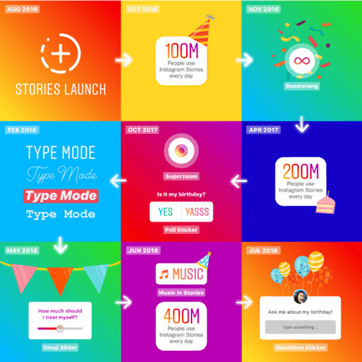
Nothing helped cement its hold on eCommerce businesses quite like the addition of Instagram Stories. Stories are a quick and easy way to introduce your products to your audience while also keeping track of who is seeing them and making it a highlight on your profile so consumers can go back and view them again later.
Depending on how many followers you have, you can also add links to your stories. Doing this will send your consumers right to your website so they can easily buy what you’re showing them as soon as they see it.
Keep reading to find out how to add a link to your Instagram story.
What Makes Instagram Stories so Effective?
Traditionally, Facebook has been the platform of choice for businesses looking to expand their presence on social media, but Instagram is slowly revealing better engagement figures. According to studies commissioned by Facebook IQ, 83 percent of users discover new products and services on Instagram.
Of those surveyed, 87 percent said seeing product information on Instagram inspired them to take action, such as following a brand, visiting a website, or making a purchase.
And it’s no surprise that Instagram Stories have boasted incredible engagement numbers too. With 80 percent of users following at least one business on Instagram, 56 percent of them browsed the brand’s website for more information after viewing their Instagram Story.
Plus, one in five Instagram Stories shared by a brand receives a direct reply. This alone can provide invaluable insights into how your current and potential customers view your products and services.
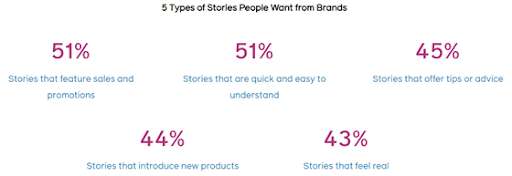
Need more evidence? Instagram yields an impressive 4.7 percent engagement rate per post. That may sound low until you discover that Facebook has a 0.12% rate. That means that Instagram is 3,000 percent more effective than Facebook in motivating your potential customers to act!
Why Should I Add Links to My Instagram Story?
Unlike its predecessors, Instagram Stories enable brands to express themselves creatively and give followers a behind-the-scenes look at how their favorite products are made or how their employees spend their days.
But, from a marketing standpoint, the main difference between Instagram and other popular social media channels is that it wasn’t originally seen as a direct selling tool.
In part, this is because Instagram only permitted users to add a link to their profile bio, as opposed to under each post like on Facebook, Twitter, and LinkedIn. For years, that was the only way to get users out of the app and onto a web page.
But much to marketers’ delight, Instagram Stories are now able to embed a link directly into an image or video, making it easier for brands to promote their businesses.
This link is typically one that redirects to the users’ website, blog, or YouTube video to boost views or any external site that you’re looking to drive traffic to.
When users link within their Stories, it facilitates a smoother customer experience by taking them directly to the site mentioned, instead of navigating to the bio before clicking the URL. Since this development, there have been numerous questions surrounding how to add a link to Instagram Story and make the most out of this feature.
How Do I Use Instagram Links to My Advantage?
Links can be used in a variety of ways — all of which can grow your brand awareness and your bottom line.
The number one way to use links is to promote your product. For example, if you want people to buy a certain shirt, make a Story of yourself wearing the shirt and then use the link to direct your viewers to the exact page on your website where they can purchase it. This is a quick and easy way for them to buy exactly what is in front of them. They see it. They want it. They purchase it immediately. Keep in mind though, that you want to maintain the integrity of your account, so don’t use this tactic in every single Story.
You can also attach links to Instagram Stories to drive traffic back to your YouTube channel or blog. If you’re talking about something in detail, maybe a tutorial or a story you’re telling, and you’ve already written a blog post or recorded a YouTube video on this topic, tell your viewers to “swipe up” to read or view more. In your blog or on your channel, you can include more links to drive targeted traffic to different locations. This also allows your consumer the opportunity to explore more of your site or channel.
Another way that you can benefit from using links in stories is to use it to unveil new and exclusive content. Use your Stories to quickly tease your audience. Once you have them hooked on your content, tell them to swipe up to learn more.
If you are a course creator, you can also use stories as a way to get your viewers to register for your course. Start by talking a little bit about your course and then use the link feature to guide them directly to the landing page where they can sign up. Taking out those small, extra steps of having to go back to your bio to click the link makes it much easier for you to grab their information and get them registered quickly. This tactic also works for anyone trying to grow their email list. It’s a great way to capture information you can use to contact your views in the future.
How Do I Add a Link to Instagram Stories Using the Swipe Up Feature?
In this step-by-step guide, you’ll receive a comprehensive understanding of how exactly you can best leverage this functionality for your business.
We’re going to break down the process in three simple steps so that you won’t need to Google “how to add a link to Instagram stories” ever again!
Ready? Let’s dive right in:
There are two ways to do this, the first of which is the easiest—Instagram’s swipe up feature, which is reserved for verified accounts (certifying the authenticity of the brand or public figure it’s representing) and accounts with more than 10,000 followers.
1. Click on the Instagram Stories icon displayed on your Instagram home page
Look for the camera icon located on the top left-hand corner of your screen. Underneath will be a circle icon with a plus sign with Your Story written below it. Click on it.
You’ll see several options laid out towards the bottom that will allow you to take different types of videos, ranging from Boomerang to Superzoom. Depending on your brand, you can experiment a bit and then select the one that will best convey your brand’s story. Remember—these Stories disappear after 24 hours. They don’t need to be as polished and second-guessed as the photos and videos on your grid.
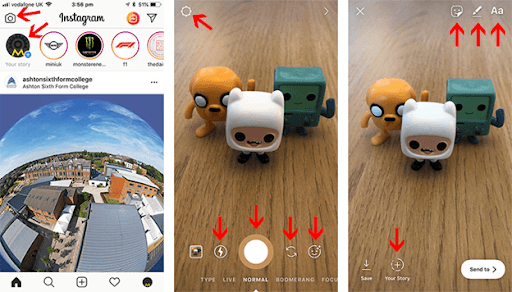
You can also access your library of previously captured content and upload a photo or video directly from your camera roll. To do this, simply click on the camera icon, then tap the icon that’s on the bottom far left of your screen. You can also swipe up if that’s easier.
2. Add filters, icons, GIFS or text to your Story
Once your video has been successfully added, it’s time to customize! Click on the text, filter, or sticker icons at the top of your screen and run through some different options.
- Filters: Swipe right or left to apply filters to the entire image.
- Stickers: Tap on the stickers icon to access a collection of stickers, ranging from location, time, temperature, and emojis.
- Draw: With the drawing icon, you can draw directly on your photo. Choose from a pen, highlighter, neon, and chalk.
- Text: Text is offered in various fonts including strong, classic, modern, neon, and typewriter. Certain fonts are even available in different background colors.
3. Add a link to your Story
You’re almost there! Now that your story is all set up, look for the link icon at the top of your screen (resembles a clip or chain link).

Click on it and you will be directed to a page where you can add in your link. Don’t worry—you’ll get a chance to preview how your link will appear to users before publishing.
In a separate web browser, open the website that you want to link to your Story and copy the link. Then paste your link into the Instagram Story link box.
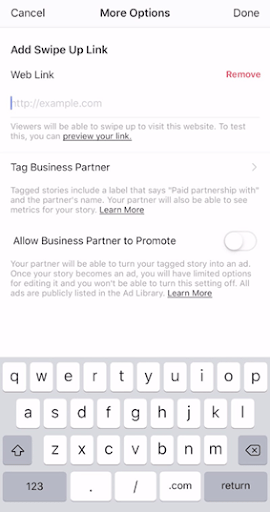
Tap Done in the upper right-hand corner to finalize. Then, click Your Story to publish.
Once your link has been added, the link icon should have a white circle around it. Users will see a See More button towards the bottom of their screen when they see your story in which they can either tap on the button or swipe up to be taken to the specified URL.
It’s a good idea to do your due diligence and double-check to make sure the link works by opening your story and clicking through. Since Instagram Stories are temporary, these types of links work best for seasonal and time-sensitive promotions.
Who Can Link on Instagram Stories?
Unfortunately, not everyone can attach links to Instagram Stories. This feature is not available to every account, which adds to its mystique. Only verified accounts or business accounts with 10,000+ followers can add a link to Instagram Stories.
Still growing your account and don’t have the coveted “blue check” yet? Don’t worry!
You can also access this valuable feature through your Ad Manager or by “promoting” your story. This is a paid option, so it will cost you, but it also gives you the option of seeing how well your Story is performing so you can decide if it was money well spent.
What if I Don’t Have 10,000 Followers?
Not every business account is in a position where they can garner such a following. Some are newer brands that are just kicking off their Instagram and others simply don’t have enough time to devote to growing their social media presence. So, what’s the alternative? Can you still add clickable links to your Instagram stories anyway?
It will cost you a bit, but you most certainly can!
There are two ways you can go about it.
When you post an Instagram Story, the platform gives you the option to promote it using the app.
Or, you can promote your Story using the Ad Manager. How?
- Open your Instagram’s Ads Manager.
- Create a campaign objective.
- Select your audience or make a customized one.
- Choose a budget.
- Pick “Instagram Stories” as the location of where you want the ads to appear.
- Edit your Instagram Story as needed and add a relevant call-to-action.
Once it’s published, you’ll be able to track your post and see how well it’s performing through the Ads Manager feature.
Final Thoughts
There you have it—now you officially know how to add a link to Instagram Story!
While the world of social media is constantly in a state of flux, as a marketer, it pays to have an understanding of these new developments in order to better contextualize your Instagram strategy.
With creative freedom, a variety of content, and the opportunity to forge stronger connections with your customers in real-time, Instagram stories provide a unique marketing channel that should not be overlooked!
