

Think a Google Business Profile is just for brick-and-mortar businesses? Think again! Businesses across industries are expanding their reach and increasing organic traffic by optimizing their Google Business Profile (GBP).
In this blog, Sr. SEO Digital Strategist. Eric Solomon will explain how to set up your profile and optimize it to generate more organic traffic for your business.
What You’ll Learn:
- Benefits of Having a Google Business Profile
- Set Up Your Google Business Profile
- Optimize Your Google Business Profile
- Growing and Managing Your Google Business Profile Audience
- How to Manage GBP Profiles for Franchise and Multi-Location Businesses
- Managing Access and Permissions
- Real-World Examples and Case Studies
- Monitoring and Analytics for Google Business Profile
- Common Mistakes to Avoid With Google Business Profile Management
- FAQs About Google Business Profile
Understanding Google Business Profile vs. Google My Business
You may wonder: Is Google My Business the same as Google Business Profile? Simply put, yes. Google Business Profile was formerly known as Google My Business until 2022, when Google decided to rebrand this tool and refine it and other local SEO solutions.
Generally, it still serves the same function, with Google business listings allowing businesses to maximize their visibility on Google Search as well as Maps while connecting with customers in a highly convenient way that supplements other SEO and PPC efforts.
Also, unlike your Google My Business profile, this newer business profile allows you to directly manage your profile on both Google Search and Maps without the use of a separate dashboard. In turn, you can get more control over how people see your profile on these platforms.
With a well-optimized Google Business Profile, you can more effectively map the customer journey and engage people toward the top of the funnel as people look for your offerings or brand using Google services.
My Expert Opinion on Google Business Profiles
Google Business Profile is an exceptional tool every business and brand should use. Not only is it crucial for enhancing search visibility, but it also helps form a connection between the business and its audience.
I’ve seen firsthand how it can significantly improve a brand’s online presence, increase its awareness, and drive organic traffic their way.
Action Item: Review your Google Business Profile and note where you can optimize it to improve your brand awareness and drive organic traffic in your direction.
Benefits of Having a Google Business Profile
There are several great advantages of creating a Google Business Profile, including:
- Increased Local Visibility: Businesses can ensure local audiences in their service areas can find them with locally targeted GBPs.
- Access to Valuable Audience Insights: You can also gain more insight into your target audiences with reviews, questions, and direct messages.
- Manage Customer Interactions and Grow Your Audience: Respond to customer reviews and messages to build your business’s reputation and showcase your responsiveness while you also grow your Google Business Profile audience.
Keep in mind that any type of business will benefit from a Google Business Profile, not just brick-and-mortar stores. Having a GBP will put your business on the digital map and help you connect with all audiences, regardless of your industry or business model.
To further prove the effectiveness of Google Business Profile for local SEO, consider the following key statistics:
- Businesses that complete their business profile descriptions comprise the top 75% of businesses appearing in the top three positions in search results.
- 87% of people searching for local businesses online conduct these searches on Google.
- SEO professionals agree that the Google Business Profile’s primary business category is the main local ranking factor for Google’s Map Pack.
There are many case studies showcasing the benefits of good Google Business Profile management.
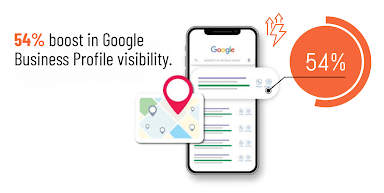
For example, one franchise with multiple locations and brands was able to boost their business profile’s visibility by 54% with the right approach to optimization.
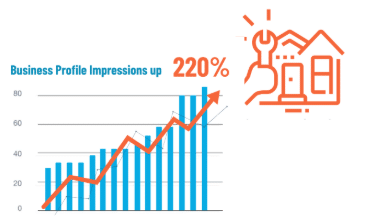
Meanwhile, a home services brand saw a 220% increase in organic traffic with the help of GPB optimization and Google Posts to regularly refresh its profile.
A cleaning brand was also able to increase local leads by a whopping 123% in part from optimizing its Google Business Profile for local SEO.
Set Up Your Google Business Profile
Wondering “How do I set up a Google Business page?” Here are some steps for businesses to develop highly optimized business profiles.
The first step to discovering how to increase Google Business Profile traffic is correctly setting it up. Here are four easy-to-follow steps on how to set up a Google Business page.
1. Create a Google Business Account
Creating or claiming your profile starts with setting up a Google Business account.
2. Claim or Create a Business Listing
You can create or claim your business listing through Google Maps once you set up your Google Business account.

3. Verify Your Business
To protect businesses on Google Business Profile, you must verify your business.
You can verify your Google Business Profile using one of the following methods:
- Video Recording: Google allows you to record a video detailing your business, including your location, evidence that the business exists, and proof of management.
- Phone Call or Text Authentication: You can also get verification through your business phone, whether via a call or text providing a code.
- Email: Google can email you with steps to verify your account.
- Live Video Call: Another option is getting on a live video call or text chat with a Google support rep to verify your account, which will follow much of the same steps as recording a video.
- Mail: Get a code delivered to your physical business location to verify the listed address.
To learn how to contact Google about your Business profile, click here.
4. Enter Your Business Information
Once you have claimed your profile, it’s time to get to work! Add all your important business information, such as:
- Business name
- Address
- Phone number
- Website URL
- Business category
- Operating hours
- An in-depth description
- High-quality photos
- Products or services offered
- Special attributes
- A call-to-action (if applicable)

Entering the right category and description here is key to helping maximize visibility and grow your Google Business Profile audience.
Pro Tip: Make sure your NAP (name, address, phone number) is consistent across all of your digital marketing platforms, including your website, social media, and local business listings. This will help improve your SEO and make it easier for consumers to find you.
Physical Address vs. Service Area
Now, when establishing business profiles, one of the main considerations is whether you want to target a physical address or a service area.
While this may come down to whether you provide deliverable products or services within a particular area, the option you choose could also come down to which will get the best results.
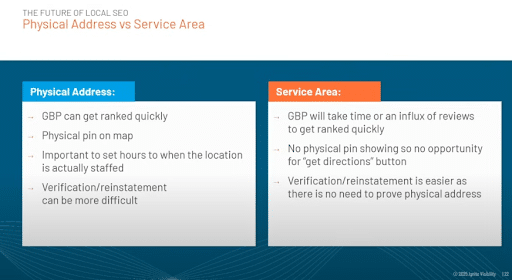
A physical address Google Business Profile will get ranked faster than a service area-based profile, more often than not.
Additionally, you get a physical pin on Google Maps, but you will need to establish the hours when staff are present at your location, and it can be more challenging to verify and reinstate your business.
How does the service area work in Google Business Profile? While this type of business might take longer to rank, that doesn’t mean that service-area businesses will always have a difficult time ranking.
Generally, if you have a physical address, it’s always best to include this over a service area when claiming or verifying your listing.
Troubleshooting: Common Setup Issues & More
With a better idea of how to create a Google Business listing, here are some common issues and potential fixes to get and keep your profile up and running:
- Lost Ownership: Whether you forget your GBP login or someone else claims ownership of your business, you can go through Google’s Business page and click on Manage Now. From there, you can follow the steps and prompts to add a location to your business and request access to your account.
- Negative Reviews: If you get a negative review from a customer, it’s best to respond with an honest, thoughtful, and respectful comment addressing any issues, which could help your reputation. However, if the review comes from a former employee or represents another conflict of interest as defined by Google, you may report the review.
- Suspended Account: There are many potential reasons why Google might suspend a Google Business Profile, but accidents can happen. For example, you might get suspended if you make too many alterations to your profile at once. In the event of a suspension, you can submit a reinstatement request, and Google will review your profile to determine whether it qualifies for reinstatement.
- Rejected Google Posts: In some cases, Google might reject a Google Post, usually if it contains language or images that qualify as “sensitive” topics. You might inadvertently use an “offensive” word, for instance. In these cases, it’s best to continue changing the language or images in your post and review Google’s sensitive categories to ensure your posts aren’t in violation of Google’s terms.
Optimize Your Google Business Profile
Once you’ve claimed your profile, it’s time to build it out so that more people can find and engage with your listing. Let’s look into what you can do to improve your Google Business Profile optimization.
So, what is Google Business Profile optimization, and what does it entail? Optimizing your profile involves adding clear photos and other elements to your profile to boost rankings and engagement.

The following is a checklist to help you in creating a Google Business Profile that truly connects with audiences:
1. Optimize Your Business Name With Keywords if Possible
If it makes sense to do so in your industry, optimize your business name with relevant keywords.
For example, many law firms might include “lawyers” or “attorneys” and specific practice areas in their business names on GBP, such as “_____ Personal Injury Lawyers” or something similar.
Of course, even if your business name doesn’t include a keyword in it naturally, you could file a Doing Business As (DBA) petition to allow you to include a primary keyword in your GBP’s business name.
2. Optimize Your Business Description and Categories
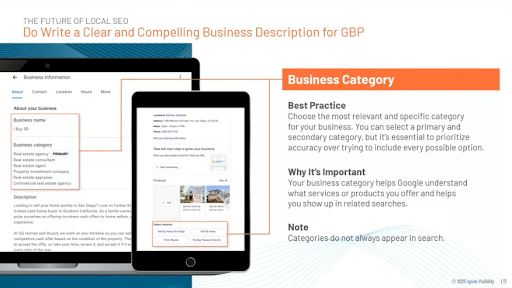
One of the most important steps in GBP optimization involves writing a detailed description for each profile explaining what products or services you offer, along with a list of categories to further define your business.
Include all relevant information to help your potential customers understand what you’re all about before ever landing on your site, which can significantly increase Google Business Profile traffic to your website.

3. Test Different Categories if You Fall Under Multiple
Some businesses might offer multiple types of products or services under various categories, which can make it difficult to pin down the right category for your Google Business Profile.
In these cases, it’s often best to try out multiple primary categories to see which one ranks the highest and drives the most engagement.
At the same time, you should choose as many relevant categories as you can for your profile, with the ability to select up to 10.
4. Add Service Areas in Addition to a Physical Address
If you serve customers within a specific region, you will want to include details about your service areas in addition to your company’s physical address.
As mentioned, it can be easier to rank for GBP if you include a physical address over service areas when establishing your profile, but it’s best to have both to fully optimize your profile.
People would then be able to find your business location on Google Maps while also being able to find out whether you serve their area through voice search or certain “near me” searches.
Including your service areas also ensures that the people in those areas know for certain that you’re the right business for them.
5. Leverage Keywords in Google Posts and Updates
Similarly to a social media platform, Google Posts allows you to share news, updates, and other information with your audience.

Use this space to post upcoming deals, events, and highlights. It will help improve your SEO and provide the perfect opportunity to invite your audience to interact with your business! As you post on your GBP, you should naturally incorporate relevant local keywords that help with GBP optimization efforts.
6. Use AI Content Creation for Descriptions and Posts
When used ethically, AI content can greatly impact SEO and streamline processes to help you more effectively optimize business profiles.
Specifically, you can use AI to help produce high-quality business descriptions and summaries for blog posts and other content in Google Posts, supplementing your other human-written content.
Just be sure to edit content and ensure it sounds natural, matching your brand voice when possible.
7. Optimize for Voice Search
With more people using platforms like Amazon Alexa, Siri, Hey Google, and other virtual assistants, optimizing for voice search is more important than ever.
Including all of your information and keeping it accurate could lead more virtual assistant users to come across your business profiles over competitors’, especially if competitors aren’t as diligent about completing all information.
Also, in your descriptions and Google Posts, try to incorporate more conversational keyword phrases that people might enter into voice search queries.
8. High-Quality Photos and Videos: A Visual Boost
A great thing about Google Business Profile is that it allows you to add photos to your listing, along with video content. This is the perfect way to showcase your work so that your audience knows what to expect when reaching out to secure your services.
The Google Business Profile Post size for images is 1200 x 900 pixels and a 4:3 aspect ratio, and you should include high-quality images that complement your post.
If you are a restaurant, post pictures of your delicious menu items and relaxing atmosphere. If you are an electrician, post pictures of your work, equipment, or team members. At the very least, you should include your logo and location so people can publicly identify your business.

Another example is an electrical company showcasing the company’s team, with the secondary photo highlighting a deal to draw even more attention.

Some locations will also want to post images of their storefront, in which case the picture should be clear, with nothing blocking the building.

Be sure to adhere to Google’s guidelines for GBP photos, such as the dimensions of a Google Business page profile and banner pic, which include:
- Format: JPG or PNG
- Size: 10 KB to 5 MB
- Recommended Resolution: 720 px H by 720 px W
- Minimum Resolution: 250 px H by 250 px W
- Quality: Well-lit and in-focus image quality without excessive filters or other alterations.
In addition to photos, you can generate organic visits for Google Business Profiles using engaging videos that can showcase different aspects of your business. For example, you might include videos featuring employee introductions, product highlights, virtual tours, and behind-the-scenes footage. These videos should be short-form and last around 30 seconds.
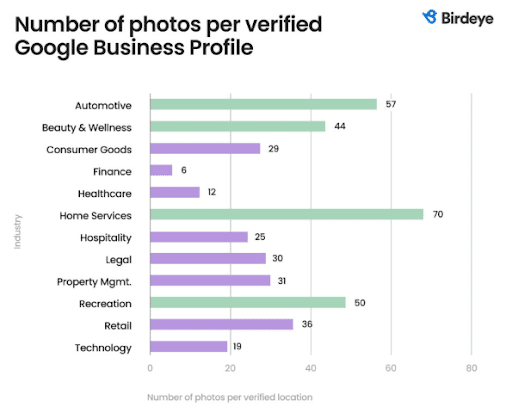
Not sure how many photos to include in your profile? Here are some figures per industry to give you some ideas:
9. Encourage and Manage Customer Reviews
Another way to grow a Google Business Profile audience is to solicit and manage your business’s reviews.

This will give you excellent insight into how to improve your business and provide potential customers with the social proof they need to decide to move forward.
As you manage Google Business Profile reviews, respond to even the most negative ones with a kind and understanding reply. You might be able to explain the situation more in-depth or show how you value critical feedback and will implement it in the future, which can help you win over new customers.
10. Utilize Attributes and Special Features
As you discover how to set up a Google page for business, you can also integrate various attributes and special features that can further generate organic visits for a Google Business Profile.
First, let’s look at attributes, which customers can select to describe your business. Examples of these attributes on a Google Business Profile may include:
- Accessibility
- Activities
- Amenities
- Lodging Options
- Crowd
- Dining Options
- Highlights and Offerings
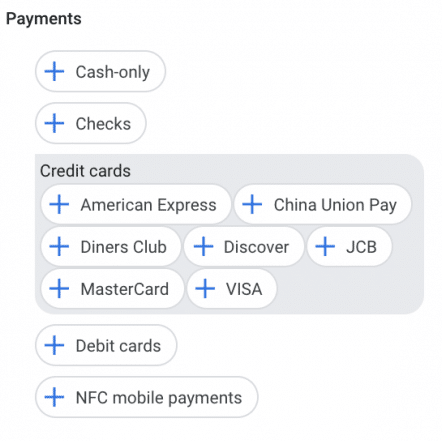
There are also plenty of special features that strengthen your Google business page.
Historically, the Q&A section allowed potential customers to ask and view answers to common questions directly on a business profile. However, Google has begun phasing out the traditional Q&A feature in favor of AI-generated answers that appear directly in Google Search and Maps. Instead of pulling from a static Q&A section, Google’s AI now generates responses using information from your Business Profile, website content, customer reviews, and other trusted sources.
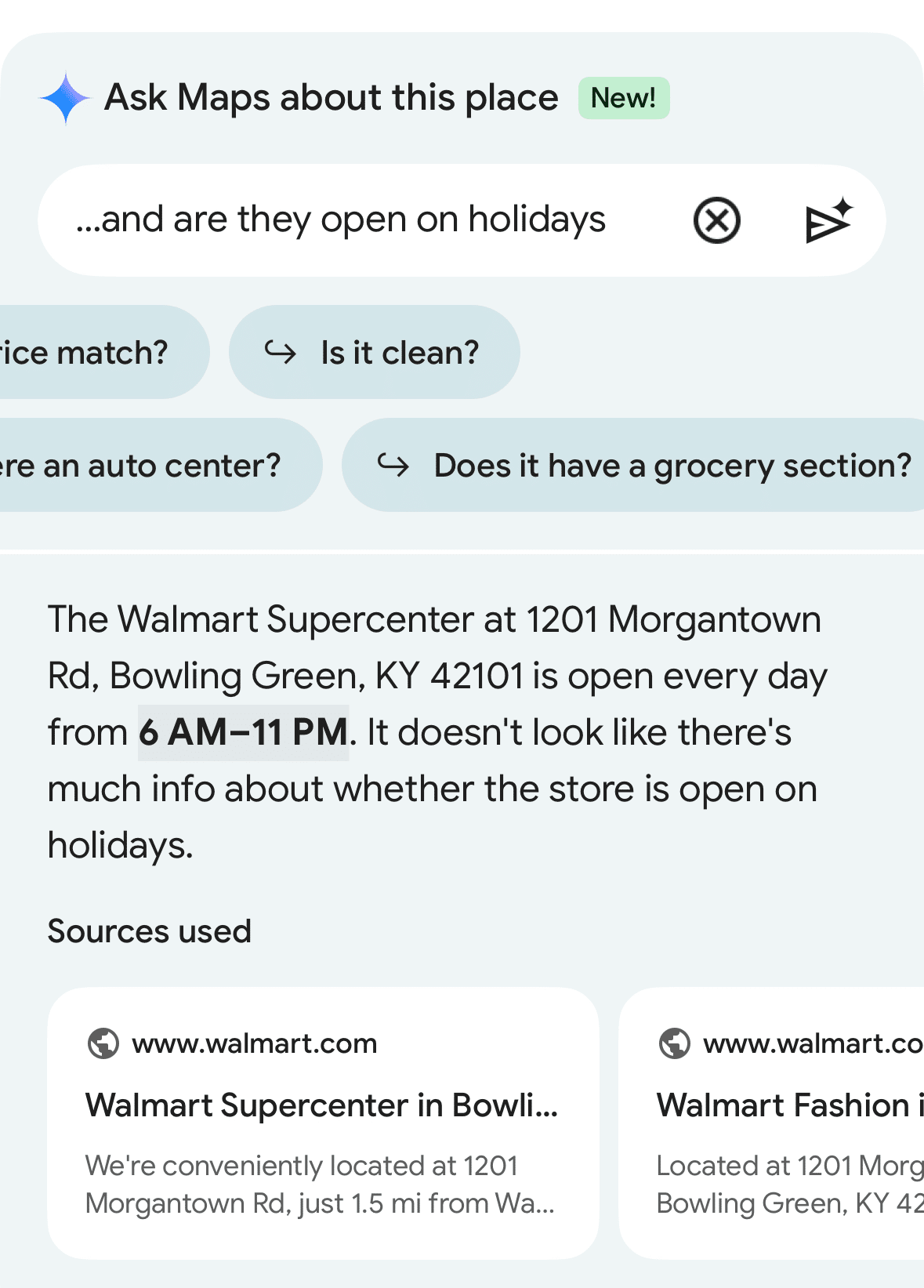
This shift makes it even more important for businesses to maintain accurate profile information and publish clear, well-structured content on their websites, particularly FAQ pages and service descriptions, so Google’s AI can surface the most relevant and accurate answers to searchers.
Apart from AI-powered answers, you can still optimize the following Google Business Profile features:
- Products
- Services
- Messaging
- Industry-specific features like class ratings and amenities for hotels, links to book reservations at a restaurant, and appointment booking buttons
Taking full advantage of these features helps businesses improve visibility, engagement, and performance as they effectively manage a Google Business Profile in an AI-driven search environment.
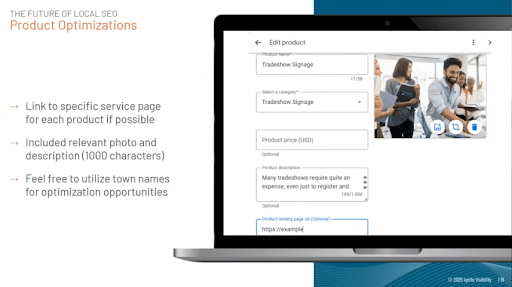
11. Include Services as Products to Link to Your Site
In the Products section of your profile, even if you are a service-based business that doesn’t offer products, you advertise your services and include corresponding links to service pages on your website.
Simply use this section to list all of your company’s service offerings and add a link to a service page when possible.
Also, try to describe your services in depth, as you have 1,000 characters to do so, and be sure to include a photo if available.
12. Get and Manage Extensions to Help With Appointment Booking
You can also get extensions to help you manage appointment bookings.
For instance, you can use Google Calendar to manage your appointments, along with Appointlet, a Chrome extension that allows you to grab booking links, generate bookings to copy to your clipboard, and paste a link to a booking in a live chat or email message.
13. Set Up 2FA to Combat Spam and Unauthorized Changes
Be sure to protect your Google business page with the right anti-spam and anti-hacking measures. As you learn how to set up a Google page for business, you should enable two-factor authorization (2FA) that requires account managers to log in from two sources before they can access the profile.
Additionally, use a strong password and secure it when sharing Google Business Profile access with members of your team, ideally with a secure password management system.
Also, limit access to those you trust most to handle your Google Business Profile, and regularly review your profile to identify any unwanted changes.
To help you manage your Google Business Profile, you may also set up email alerts and notifications that can let you know if anyone is requesting access or making changes to your profile, ensuring nothing goes overlooked.
Growing and Managing Your Google Business Profile Audience
There are several ways to grow and manage a Google Business Profile audience and manage it.
How to Grow Your Business Profile Audience
First, it’s important to use reviews and ratings to build your business’s credibility. You can generate reviews by taking the following basic steps:
- Actively encouraging reviews in your messaging (e.g., “If you liked your experience, give us a Google review!”).
- Use multiple platforms to request reviews, including email, SMS texts, and in-person.
- Link to your GBP on your website.
You can also use social media links to drive more traffic to your GBP and other channels, including them when appropriate.
Additionally, regularly engage with customer questions and answers. The more responsive and helpful you are, the more reputable you’ll appear to existing and new audiences.
Proactively engaging your audiences by responding to reviews and optimizing your GBP messaging will help you stay on top of rankings while building trust among your target audiences.
For more tips on how to regularly optimize a large number of profiles for your multi-location business, take a look at our video on How to Optimize 100+ Google Business Profiles at Scale.
How to Increase Google Business Profile Traffic
Here are a few strategies to help you increase your Google Business Profile’s visibility:
- Encourage user-generated content, including images and videos that you can then repurpose for your own marketing efforts.
- Post on your profile regularly to signal to Google that your business is both relevant and active.
- Use service or product oriented keywords to help you reach the right audiences.
- Your Google Posts should also include calls-to-action that are clear and drive more traffic. Remember, the Google Business Profile post size is 1200 x 900 with an aspect ratio of 4:3.
Use exclusive offers and events to attract customers, such as limited deals that generate a sense of urgency and local community events that inspire more people to connect.

How to Manage GBP Profiles for Franchise and Multi-Location Businesses
Here are some tips for managing multiple locations effectively:
- Keep all information consistent across all of your listings for uniform data.
- Create separate corresponding location pages on your website to link to within each profile.
- Optimize each listing with high-quality visuals, brand-specific hashtags, content, graphics, and logos as needed, to keep each location’s page unique.
- Monitor and respond to reviews for all locations, potentially assigning the management at each property to do so.
- Use features and tools like GBP’s location groups and Rallio, powered by Ignite Visibility, to streamline your efforts. With Rallio, you can manage business listings, reputation, and social media content across multiple locations in one dashboard, ensuring NAP consistency and stronger local visibility. Pair this with analytics tools like Semrush’s Listing Management to track performance and uncover new opportunities.
- Be sure to update any profiles as soon as business information changes.


Rallio: Our All-In-One AI-Powered Solution to GBP Management
If your business is expanding or otherwise operates across multiple locations, it helps to have multiple Google Business Profiles.
However, it can become increasingly difficult to manage all of them with consistent business names, hours, and other information, especially if you need to make any changes.
These potential difficulties are why it helps to have GBP management software for multiple accounts that can handle all profiles and information.
Not all software is capable of meeting the needs of franchise and multi-location businesses, making it critical to find the right solution that has these capabilities.
Enter Rallio, which is Ignite Visibility’s proprietary GBP management software for multiple accounts, along with other social media channels.
Supercharged by AI, Rallio includes an easy-to-use and intuitive interface to help you easily manage your entire social media presence across platforms. Get help with content creation, scheduling, and in-depth analytics to continually optimize your profiles’ performance.
This tool also makes it easy to automate the solicitation of reviews, helping you generate as many as hundreds of reviews in a short amount of time for faster optimization.
Managing Access and Permissions
For secure Google Business Profile management, you must determine who has what permissions on the account. Whether you want to create a Google Business Profile as an influencer or a business owner, it’s always important to restrict access and ownership to those you trust.
When sharing Google Business Profile access, you will specifically want to determine who is an owner or a manager.
Owners have the highest level of authorization, with the ability to add and remove other owners and members. Meanwhile, managers can remove themselves, but they are unable to add or remove other users.
Only primary owners have the ability to transfer primary ownership, but it is not possible to add Google groups as either owners or managers.
Steps for Sharing Google Business Profile Access
The following are the basic steps for adding owners or managers to your Google Business page:
- Go into your Google Business Profile.
- Choose More > Business Profile settings > People and access.
- Add a member by clicking the icon.
- Add the user’s email address (How much is Google Business email, exactly? You can reach out to Google for pricing information or try a free 14-day trial.)
- Select either “Owner” or “Manager” under the Access menu.
- Click Invite.
When determining who becomes an owner vs. a manager, consider who is at the highest level of the team. Who should have full control over the profile and be able to make instant changes as needed? These individuals should be owners.
Real-World Examples and Case Studies
Let’s look at some real-world Google Business Profile examples to give you some ideas of the direction you can go with these:
Dunkin’
One of the best brands to make full use of Google Business Profiles for multiple locations is Dunkin’. One item that stands out in these profiles in particular is the use of regular Google Posts.

These posts are frequent, with about two posts every week, with colorful and high-quality images that highlight the company’s tasty offerings.
Posts also include a CTA to begin an online order.
Ankin Law
Ankin Law is one of the largest personal injury law firms in the Chicagoland area, and it’s eager to showcase its reputation with reviews.

The profile includes a 5/5 FindLaw Lawyer Directory rating alongside Google reviews. The firm also regularly responds to all reviews on its profile, maintaining engagement with its audience.
Home Depot
Another Google Business Profile example worth mentioning is Home Depot’s, which takes advantage of the profile’s “See what’s in store section” to help customers find what they need at a designated location, without any need to visit the website first.

People can easily search for specific products in various categories. When clicking on one of the categories or entering a manual search, Google then takes the user to the corresponding Google Shopping page.

So, if you offer many products and want to supplement your ecommerce store, this strategy is a great way to boost sales.
Monitoring and Analytics for Google Business Profile
To improve your Google Business Profile’s performance over time, you need to regularly monitor and track various metrics.
Some of the many metrics that can help gauge performance include:
- Website clicks to measure traffic
- Calls and scheduled appointments
- Rankings
- Reviews
- Profile views
The specific metrics you track should correspond to your goals. For example, if you want to increase brand awareness, you might focus more on getting top rankings and profile views, while conversion goals might place emphasis on calls and appointments attributable to GBP views.
If you notice any issues that cause you to fall short of your goals, you should adjust your strategy accordingly.
For instance, if you are climbing in rankings but receiving less traffic, you might want to optimize your business description and disclose the services or products you offer to drive more conversions.
Common Mistakes to Avoid With Google Business Profile Management
The following are some of the most common Google Business Profile mistakes to avoid with your profile, along with some fixes:
- Inconsistent NAP: One of the biggest mistakes is having different names, addresses, or phone numbers across listings, which can be confusing for both users and search engines. Be sure that this information is accurate and up-to-date across all profiles using the right tools like Rallio.
- Outdated Hours: You might also fail to update your hours when they change, which could lead to lost customers if you advertise that you are open when you’re actually closed. As soon as you make changes to your hours of operation, make sure all listings reflect this change immediately.
- A Lack of Description: Neglecting to optimize your description could make it unclear to customers what your business offers, and it could make it harder for your business to rank, especially if it’s missing vital keywords that you could otherwise be targeting. Always update your listing with a detailed description of your business, industry, and offerings.
- Not Listing Service Areas: Even if you opt to prioritize a physical address when setting up your business location, it helps to include service areas if your offerings are limited to specific regions. Include service areas if you have them to indicate to Google and potential customers where you specifically serve your audiences.
- Absence of Products or Services: Indicate to both Google and potential customers what specific products or services you offer. Even if you don’t offer products, you can complete the Products section with details about services and links to respective service pages on your website.
- Neglecting Posts: Your profile could easily slip in rankings if you don’t regularly update it with Google Posts. Take some time to post in this section with everything from upcoming local events to industry- or company-related blog posts or news, with links to corresponding web pages.
- Not Responding to Reviews: People want to know that the brands they engage with value their input, especially when they leave reviews. Assign members of your team to respond to reviews, both positive and negative, which can boost engagement while showing that you care about what people have to say.
FAQs About Google Business Profile
1. How do I generate organic visits for my Google Business Profile?
The best way to generate organic traffic is to optimize your profile through posting consistent, quality, and relevant content. The more attention you give your profile, the better.
2. How can I grow my Google Business Profile audience?
Stay engaged! Post timely content like photos, events, and promotions. Soliciting and responding to FAQs and reviews will also help show your audience that you are engaged and committed to building a relationship with them which is key for customer retention.
3. How can I attract more visitors to my Google Business Profile?
Optimizing your profile with the correct keywords, as well as updated information and photos, will help attract more visitors.
For instance, you can use relevant local keywords in your profile to boost search rankings. You should also regularly update your NAP details, hours, and other information to keep it relevant and accurate.
Additionally, post regular updates via Google Posts to keep audiences coming to you, and clearly list and describe all of your offerings.
4. Are Google Workspace and Google Business Profile Manager the same?
No, these tools are not the same. While Google Business Profile can help you manage your business’s online presence on Google, Google Workspace consists of various tools that businesses can use to get work done online and manage their profiles, such as Gmail, Calendar, and Drive.
5. How can I fix issues with verification?
If you’re having trouble verifying your Google Business Profile, there are some steps you can take to troubleshoot, such as:
- Trying a different verification method
- Checking for specific issues in formatting or information, such as inaccurate address or unclear videos
- Review your business details again to ensure they’re correct
- Use Google’s Help Center
- Reach out to Google Support if needed
Google Business Profile Optimization With Ignite Visibility
Whether you need to increase Google Business Profile traffic for an existing profile or are starting from scratch, Ignite Visibility is here to help. We have worked with businesses across industries expand their reach, improve their online presence, and generate more organic traffic.
Our GBP optimization services can help with every aspect of Google Business Profile management and more with a holistic digital marketing solution, including solutions for national-to-local businesses.
We specialize in:
- Creating and optimizing Google Business Profile accounts
- Crafting local SEO strategies to reach customers in your target service area
- Developing high-quality content to share on your profile
- And more
Ready to improve your local SEO with an optimized Google Business Profile? Reach out to us today!

