

Not all search engines and bots visiting your website know what to do with Javascript.
Here’s everything you need to about Google dynamic rendering and why you should implement it.
What We’ll Cover
- What is Google dynamic rendering?
- What Javascripts dynamic rendering?
- How does this help marketers?
- How to get started
- Mobile and speed considerations
- Testing it out
- Troubleshooting
Dynamic rendering is important because web developers frequently turn to Javascript frameworks like AngularJS to serve content.
The problem is search engine bots often don’t “see” content the way browsers see it when visiting script-driven websites. That leads to indexing issues.
Fortunately, Google has a solution: dynamic rendering.
And now Google also has some documentation to explain that concept.
What Is Dynamic Rendering?
Sometimes, developers create complex, single-page web apps. They typically rely on Javascript frameworks to handle the user interface.
That’s a great solution for human beings visiting the site with a browser. But not so great for search engine bots trying to parse content.
Why? Because bots are using a “headless” browser.
A headless browser is a browser that crawls around cyberspace with no graphical user interface. It doesn’t see a web page in the traditional sense.
Instead, it evaluates static HTML elements.
Websites run by Javascript produce much of their content on the fly. It’s not served as static HTML.
So the search engine bots don’t see anything but a bunch of Javascript code. They can’t index that.
There is a solution, however. It’s called dynamic rendering.
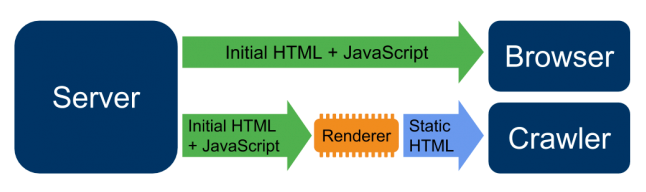
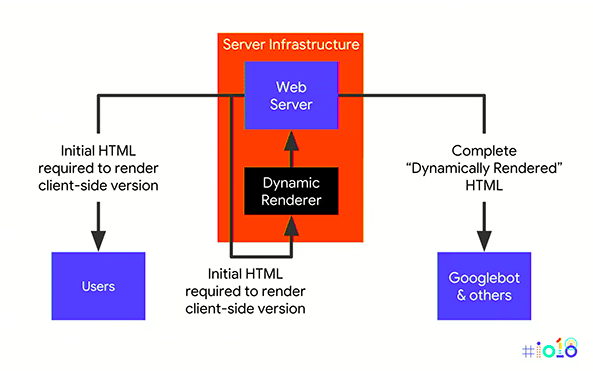
Here’s how it works: web developers create a series of static pages that they serve only to bots. That way, search bots can see the content and index it.
Then, they include logic on the website that checks every request. If the request is coming from a bot, the site serves up the static content. If the request is coming from a “normal” web browser, the site serves the Javascript content.
Sadly, it’s not an easy solution. It calls on extra work for developers.
Maybe someday Google and Bing will develop bots that can properly parse script-generated elements. For now, though, that’s not the case.
Who Needs to Use Dynamic Rendering?
You need to use dynamic rendering if you’re running a site that serves content from Javascript.
Here are a few of the Javascript frameworks that developers often use to create web content:
- AngularJS
- React
- Vue.js
- jQuery
Keep in mind: jQuery is used for a variety of reasons. Just because your website runs jQuery doesn’t mean you need to add a dynamic renderer. Consult with your development team.
Companies like Dish, Twitch, Wix, Comcast, and even Domino’s Pizza all rely on a dynamic rendering framework to optimize their sites for search.
How Dynamic Rendering Helps Marketers
When it comes to online marketing, the name of the game is visibility. You want people to find your content online.
One of the ways to make that happen is with search engine optimization (SEO). You configure your site so search engines can easily index it and rank it near the top for keywords related to your niche.
As we’ve seen, that’s challenging if you have a Javascript-driven website. Search bots can’t parse your content.
Dynamic Rendering enables you to maximize your reach by effectively translating your pages into a way that bots can find and parse them.
Dynamic Rendering: Getting Started
If you want to add dynamic rendering to your website, you’ll probably need to enlist the aid of yet another framework.
I know. That’s not what you wanted to hear.
Unfortunately, it’s probably going to be necessary. Here are a few frameworks you should consider:
- Puppeteer – This is Google’s own renderer so it’s a good starting point. Using Puppeteer, you can generate screenshots and PDFs of web pages, create pre-rendered content, and even automate form submission if you’re in a testing frame of mind. Best of all: it’s free.
- Rendertron – You’re going to have to put your propeller hat on and grab this one, in raw code form, from Github. Still, it’s designed to render web pages that the Googlebot can’t preview. You can view a demo of it here.
- Prerender.io – This solution will cost you some money if you plan on rendering more than 250 pages. The code for the framework is also available on Github.
Once you’ve got your dynamic renderer set up and running, it’s time to choose the agents you want to receive static HTML content.
If you’re interested in indexing, you’ll obviously want “googlebot” and “bingbot” in that list. However, there are other agents (like “linkedinbot”) that you might want to receive static content as well.
Serving Speedily
Once you’ve integrated the dynamic rendering framework and picked your bots, you still might need to tweak some things.
For example, if you find that the renderer is slowing down your server, you’ll need to make adjustments. Otherwise, your site won’t rank well.
You can fix that by adding a cache to serve static content. Also, you might need to validate that bot requests are from legitimate crawlers.
For example, here’s how to validate that a bot request is really from Google:
- Get the IP address of the bot (example: 22.33.44.155)
- Run a reverse DNS lookup to get the server name of that IP address (for example: xyz.googlebot.com)
- If the name of the server ends with either googlebot.com or google.com then you know it’s a legitimate request from Google
Dynamic Rendering: Mobile Considerations
It’s a mobile world. If your site isn’t fine-tuned to serve content that looks great on a mobile platform you’re almost certainly going to fail.
That’s why you need to make sure that your dynamic renderer serves HTML content that’s user-friendly for the smallest smartphone screens. You’ll probably need to use dynamic serving to make that happen.
Here’s how the whole process works:
- First, determine if a bot or a real user is accessing your website
- Next, determine if the agent is a mobile or desktop agent
- If the request is coming from a real user, serve the script-driven content
- If the request is coming from a bot, serve the mobile static content if it’s a mobile bot or serve the desktop static content if it’s a desktop bot
This is an important concept because Google is moving to a mobile-first index. That is, it’s crawling pages with a mobile agent and “seeing” them the way a mobile user would see them.
So if you’re interested in getting your pages indexed and earning a high rank, you’ll need your dynamic renderer to serve mobile-friendly HTML content.
Testing It Out
Once you’ve got everything set up, it’s time to run a few tests.
Start by visiting the Mobile-Friendly Test hosted by Google. Just plug in the URL of your site and let it rip.

After a few seconds, Google will show you what your site looks like from the perspective of its agent. If that content doesn’t match what you want the agent to see, reach out to your development team and explain to them how you want it to look.
The Mobile-Friendly Test will also alert you if there are any mobile-specific issues associated with your site.
Next, use Fetch as Google to test the effectiveness of your dynamic renderer. Just make sure that you click on the “FETCH AND RENDER” button or you won’t see anything.
Again, check out the rendered version of your site and, if it doesn’t look right, make the necessary tweaks.
If you’re using structured data on your site (and you probably should be if you aren’t), head over to the Structured Data Testing Tool. Plug in your URL and make sure that Google is finding all your markup.
Of course, the ultimate test is to wait a while and check the search results. Is your content appearing? If so, then the dynamic renderer is doing its job.
Troubleshooting Dynamic Rendering
Remember, when it comes to software development, Murphy’s Law is strictly enforced. Something is likely to go wrong the first time you implement a dynamic renderer.
For starters, if your website content isn’t appearing the way it should, make sure you’ve configured the framework properly. Go through all the settings again.
You also might be using a framework that simply isn’t compatible with your web app. In that case, move to another framework.
If your site isn’t getting indexed, that could be due to slow load times. Look into the caching solution mentioned above.
Finally, if you’re not seeing structured data, check the code for JSON-LD script tags. If they’re missing, Google won’t parse the markup.
Google Dynamic Rendering Frequently Asked Questions
Does Google crawl dynamic pages?
Yes, it does. However, it is important to know that some search engines that aren’t Google, may not have spiders that crawl dynamic pages. Google also now indexes pages with “&id=” parameters in URLs, as well as having their own dynamic pages.
What is rendering in SEO?
Rendering is known as the process where Google takes your webpages, runs the page code, and assesses your content so that it can understand the layout or structure of your site. This information is used to rank the quality and authority of your website content, in comparison to other sites that appear when people Google search.
Is Javascript bad for SEO?
Yes. Javascript ultimately makes Google have to work harder to parse through your website content.
What is server-side rendering?
Server-side rendering (SSR) is when content on your webpage is rendered on the server in which you use, and not on your browser using Javascript.
Wrapping Up Dynamic Rendering
Javascript frameworks make it easy to create outstanding, user-friendly web content. That content isn’t bot-friendly, though.
That’s why you should implement dynamic rendering if you’re running a site that relies on Javascript-generated content.
Dynamic rendering will enable search engine bots to find your content and index it so that your website has greater exposure in the search results.
It’s not an easy solution, though. Be sure to enlist the aid of a qualified development team.
