


You may have reporting set up to track your conversion data, but the numbers you’re getting may not be the full picture. Have you checked how your conversion tracking is working lately? If not, it’s time to investigate.
In this blog, James Semczuk, Analytics Strategist, will show you how regular conversion tests can help make your digital marketing tracking more accurate.
What We’ll Cover:
- Why Conversion Testing is Important
- How to Conduct a Conversion Test
- Common Conversion Tracking Problems
- FAQs
What Is Conversion Testing in Digital Marketing?
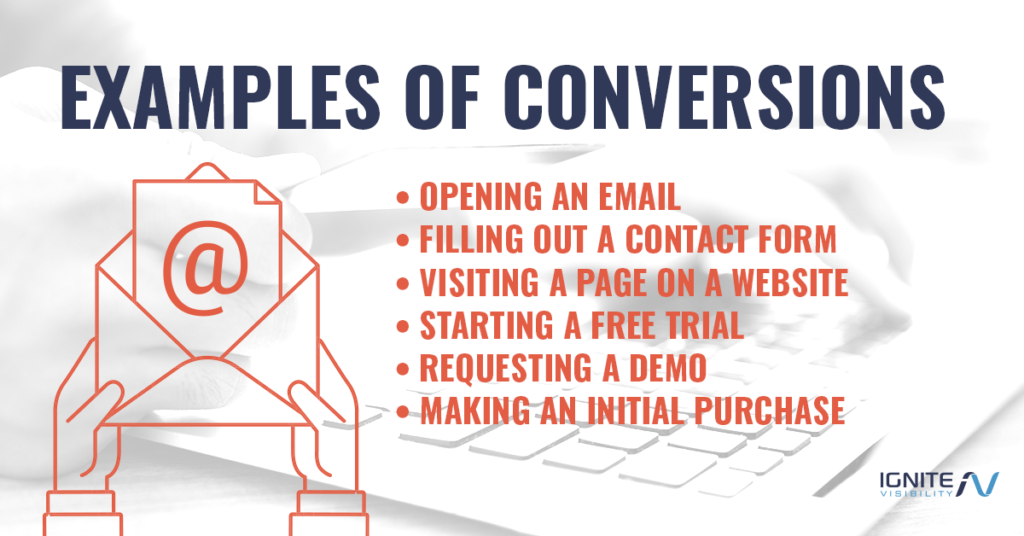
According to Study.com, a conversion could be anything like:
- Opening an email
- Opening a link within the email
- Examining the content of a webpage
- Purchasing a provided good or service (typically the ultimate goal of marketing departments)
Conversions can refer to leads or sales. They can also refer to micro conversions, such as email opens and clicks that move people incrementally toward a sale, or macro conversions that result in real ROI, e.g., purchases and acquired leads, both of which types you can track with various conversion tracking tools.
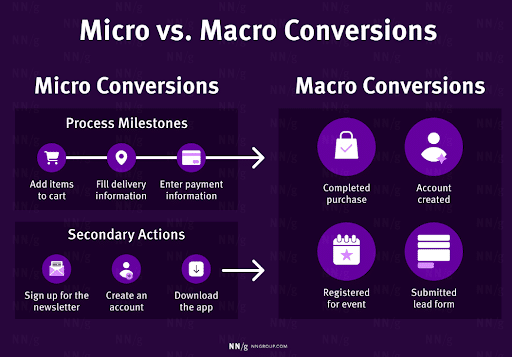
For example, when engaging in marketing campaign tracking, an ecommerce brand might track macro conversions such as completing a purchase and joining a loyalty program, with micro conversions involving adding products to a shopping cart or creating an account on the platform before checkout. Meanwhile, a software-as-a-service (SaaS) brand might focus on macro conversions like subscribing to a paid plan or upgrading to another tier, while micro conversions might look like signing up for free trials or attending a webinar to move them closer toward a sale.
So, what is conversion tracking and conversion testing, and what does it look like?
In order to achieve the intended action from a potential customer, websites must optimize various conversion paths.
Your digital marketing strategy depends on these conversion paths. Even if these conversion paths are functioning correctly, the data that tracks it may not be.
Conversion testing refers to checking that conversions are operating correctly on the front end and that conversion tracking is functioning as intended on the back end.
With these two pieces of the puzzle linked, companies can get a better idea of where they stand in the digital landscape.
What Conversion Testing Is Not
Sometimes, people use conversion testing to mean testing how different types of conversions compare to one another. For example, digital marketing teams may perform A/B testing (aka split testing) to see which copy or conversion path wins.
However, this isn’t the full picture. Conversion testing is really making sure the tracking is set up in a way that provides accurate, holistic data.
Many times, companies will be tracking so many key performance indicators (KPIs) that they don’t even know what they’re tracking. Or they’ve updated their website and haven’t tested the conversion tracking code since.
Regular tests fight this complacency and the skewed information that stems from it.

Why Conversion Testing Is Important
One wise writer on SmartInsights wrote, “Even if things are going well, it’s still important to carry some form of preparation. Otherwise, how will you know when you’ve hit your targets?”
This rings true for conversion paths and tracking.
Recently, the Ignite Visibility team had a client tell us, “You know, we’ve made so many updates to the site lately that I’m honestly not sure if all of our conversions are even working properly. Would you be able to audit them for us?”
We were stoked for our client—this is the perfect attitude to have in regards to your conversion tracking. In fact, it’s amazing how much people overlook this.
Testing is usually an afterthought. But when you stop to think about it, it’s really one of the most important things you should be paying attention to on your website.
If your conversions aren’t working properly, it directly impacts your bottom line. Marketing strategies of the modern-day are extremely complex. Often, the operations within them can get seriously expensive if there isn’t regular monitoring. Setting goals and targets as you go and performing regular testing, ensures you’re in control of your expenses and your success.
Plus, failing to test means problems can linger, which can throw off the accuracy of your digital marketing efforts. This means a conversion test is a form of conversion rate optimization (CRO), though an undoubtedly underused one.
Paid campaigns work especially well when they can calibrate themselves to accurate conversions. After all, you are spending money on the campaigns, so why not make sure the conversions are operating as intended?
Just look at what recent studies have found regarding poor conversion tracking and testing: Marketers waste around 21% of their marketing budgets on poor measurement and attribution by using ineffective channels and marketing campaigns.
Additionally, Gartner estimated that poor data quality costs organizations about $12.9 million each year on average.
If you need help with tracking marketing campaigns and data conversion testing, you may benefit greatly from the help of Ignite Visibility. To find out where your campaign currently stands and to identify opportunities to improve conversion testing and tracking, book an audit with us today!

How Often Should You Perform Conversion Tests?
The regularity of a conversion test really depends on your conversion timeline (aka how long you expect customers to take getting through your conversion path). Still, there are some standards you can stick to that will help guide the way.
Any time you make a change to code on a page with conversion tracking, you should test the conversion tracking on that page. It’s possible that the code changes you made had unintended consequences and are affecting additional pages.
That’s why it’s vitally important that someone in your organization has a thorough understanding of how your conversion tracking works. That person is likely to know what code changes may be causing issues.
In addition to testing whenever you make a change, you should also have a general testing schedule. A good bare minimum would probably be to audit everything once per quarter.
This is a good rule of thumb if you don’t make a lot of changes to your site. The more changes you make, the more often you should schedule your regular tests.
Through consistent audits, you can ensure you aren’t among the 45% of marketers who don’t trust their attribution data and those wasting $80 billion annually on misattributed conversions.
Here’s what Adalysis says about auditing conversion tracking for pay-per-click (PPC) accounts:
“A PPC account audit is the first step a PPC manager should take when working on a new Google Ads account. The audit results in a clear action plan for how to boost the results as fast as possible. It is recommended to audit PPC accounts regularly, at least once every 3-6 months, depending on account size, to make sure nothing has slipped the manager’s attention.”
You Should Test Even If You Can See Conversion Data In Your Reports?
Frankly, it’s possible that the tracking data in your automatically generated reports could be picking up just a portion of the conversions, or even too many. While you’re still seeing data, it might not be accurate.
For example, we’ve seen situations where clients had tons of different conversions in their account that had built up over many years. They lost track of the details of which ones were which. When we audited them they were tracking the same thing multiple times but under different names, essentially inflating their conversion numbers.
In another situation, we saw different prices being sent to different platforms. One price was being sent to Google Analytics and another was being sent to Google Ads for the same conversion, throwing off the accuracy of the data.
These anecdotes are clear examples of why it’s important to dig below the surface. Numbers don’t lie, but teams can set up metrics to report in a way that doesn’t tell the real story.
To get the most from your data conversion testing efforts, you’ll want to perform frequent audits, with the cadence varying depending on the size of your site. Here are some guidelines based on size:
- Small Sites: Monthly
- Medium-sized Sites: Monthly or quarterly
- Enterprise: Continuous monitoring with weekly alerts and quarterly full audits
To help automate marketing campaign tracking efforts, you can also perform daily health checks that consistently monitor performance, making any necessary tweaks to your strategy.
How to Conduct a Conversion Test
To help with your conversion testing strategy, here are some specific steps to take, including conversion tracking tools for each:
1. Plan and Map Events (1-2 Days)
As the foundation for your conversion tracking strategy, you’ll want to start with planning and event mapping, which will help with mapping the customer journey.
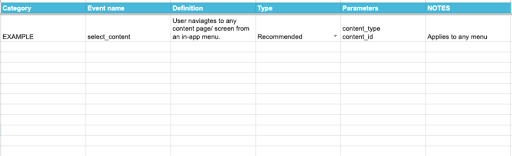
Here, you will want to establish your business objectives, create an event map with specific page URLs and user interactions, and establish naming conventions, e.g., “product_added_to_cart” for an object action.
Also, be sure to assign ownership to specific team members, including developers and analysts, with consistent documentation.
When determining which is the best software for tracking marketing attribution at this stage, there are numerous tools you can use, including:
- Spreadsheets for event mapping
- Diagramming software like Lucidchart and Miro
Also, in digital marketing, single vs. multiple property tracking should factor into planning and mapping.
2. Instrumentation (2-5 Days)
At this stage, you would add your tracking code to your site using various conversion tracking tools like Google Tag Manager (GTM), the server environment for server-side tracking, and mobile app SDKs for iOS or Android devices.
GTM serves as a centralized way to manage and deploy tracking across your marketing stack. While it’s commonly used for Google Analytics conversion tracking based on the events and parameters defined in the previous step, it also supports tags for paid media, social platforms, and other advertising and measurement tools, making it easier to maintain consistent tracking across channels.
3. Front-End Validation (1 Day)
Prior to publishing any changes, validate events on the front end via your website or app’s user interface.
To achieve this, you can use tools like GTM Preview Mode, the DataLayer Checker extension for Google Chrome, and tag inspection extensions like Omnibug.
Omnibug is especially useful for validating a wide range of marketing and analytics tags across platforms, making it easier to confirm that events and parameters are firing correctly beyond just the data layer.

4. Backend Validation (1 Day)
After completing front-end validation, you can confirm that the data leaving your server is correct and aligns with the front-end data.
To complete this step, you might use server logs, APIs, and internal database logs.
For example, you can review your server’s access logs or logging platform to determine whether the outbound network requests occur as expected.
Meanwhile, conversion tracking tools like the Google Analytics Measurement Protocol Validation Server can send test hits to then receive feedback in the same format.
5. Cross-Platform Arrival Checks (1 Day)
Confirm that the data you collect arrives in the final Google Analytics conversion tracking platform for accurate reporting and optimization.
Within Google Analytics 4, you can go to “DebugView” within the “Admin” section of the dashboard, where you can see events arrive in real time.
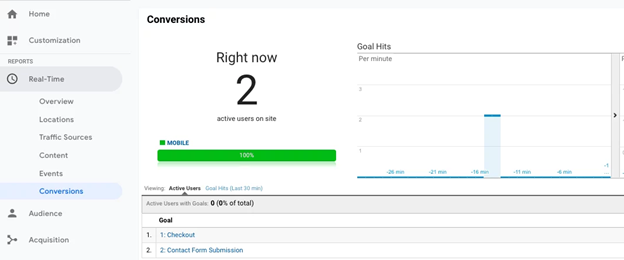
Meanwhile, in Google Ads, you can view the “Conversions” summary page and see conversion actions to check their “Status” and make sure the system is recording them.
Additionally, you can check the Facebook Conversions API using the “Test Events” feature to see whether events are arriving correctly and match browser events.
6. Documenting and Scheduling Regression Tests (1 Day)
One last critical conversion testing step involves documenting implementation and planning for future tests. This includes establishing regression tests, which are repeatable checks designed to ensure that existing conversions and tracking continue to function correctly after site updates, tag changes, or platform releases.
By maintaining clear documentation and regularly running regression tests, teams can quickly identify when a change has unintentionally impacted conversion tracking and address issues before they affect reporting or optimization efforts.
When determining which is the best software for tracking marketing attribution at this stage, you might implement Confluence or other documentation platforms, along with Asana and other project management tools.
First, update your documentation with any changes made to conversion tracking during implementation and validation. Next, you can develop simple and repeatable test scripts to maintain correct critical event firing following updates to your website or code.
Be sure to schedule regression tests as recurring tasks within your marketing campaign tracker to ensure data remains intact.
Common Conversion Tracking Problems to Know About
There are plenty of things that can go wrong with your conversion tracking. This is especially true if you have updated your website recently or forget to test your conversions on a regular basis.
If you went through the conversion test steps above one by one but are still having issues, you may need to work with a developer or platform to help you fix the issue. Here are some of the most common problems you may run into:
- Incorrect code
- Code on wrong pages
- Extra code added during implementation
- Multiple analytics code on the same page
- Inclusion of the remarketing code instead of the Analytics code
- Having Analytics code hardcoded on the site as well as in Google Tag Manager
- Tracking code not set up properly for cross-domain tracking
- JavaScript errors that prevent tags from firing correctly
- Caching issues that delay or block updated tracking code from loading
- Google Tag routing or trigger configuration issues
You may have this issue or another, but the above list is a good place to start.
Enterprises may also experience additional challenges that can compromise their conversion testing efforts.
Because enterprise organizations are typically larger and more complex, there are often more systems, data sources, and touchpoints to test and validate. Common issues include:
- Cross-domain cookie restrictions that prevent third-party data collection
- Inconsistent revenue currency
- Test vs. production environment issues
- Duplicate event counting, e.g., client and server-side events
- Delayed ingestion
- Complexities around offline conversion implementation
- HIPAA compliance requirements and/or more advanced privacy and consent frameworks
FAQs
1. What is conversion tracking, and why is it important in digital marketing?
Marketing campaign tracking for conversions helps keep track of user interactions after completing specific actions, such as clicking on an ad or visiting a specific landing page. Proper tracking can help gauge campaign effectiveness and determine how effective your site or app is at converting audiences into paying customers.
2. What are the best tools for conversion tracking?
When deciding which is the best software for tracking marketing attribution, there are many tools you can use, including Google Analytics and other analytics software, Facebook API and other social media trackers, Google Tag Manager, and project management platforms, among others.
3. How do you set up conversion tracking correctly?
Define your conversion goals to start, followed by generating tracking code for Google Ads and other channels and implementing this code for conversion testing. You can then verify and test conversion data and configure an attribution model to assign credit to each touchpoint.
4. What are the most common conversion tracking mistakes to avoid?
There are multiple mistakes that marketers can make when tracking marketing campaigns, such as not setting up tracking at all, incorrectly installing code, neglecting to assign conversion values, not using UTM parameters, and using the wrong count settings.
5. How can I improve my conversion tracking accuracy and insights?
You can optimize tracking accuracy and gain more actionable insights by taking steps such as conducting regular audits, using server-side tracking, implementing micro conversions, and using data-driven attribution.
Bottom Line: Don’t Leave Money on the Table
Making sure your conversions are tracking properly has a direct impact on your bottom line.
A lack of testing can lead to inaccurate data, which can cost business owners money.
Perhaps you have inaccurate lead information, which means you’re losing information on potential customers. Or maybe you have inaccurate paid campaign information causing you to spend money on the wrong campaigns. Whatever it may be, a kink in the system could cause you to think you’re doing much better or worse than you actually are.
Ignite Visibility’s Analytics team can help bring certainty to your conversion tracking. We can help you audit, document and test to make sure that everything is working as it should. Our ultimate goal is to make sure our clients’ digital marketing efforts are getting them the biggest ROI they can get.

