Get Started
MENUMENU
  • Who We Serve
    • Who We Serve

      • Business Types
      • Multi-Location Businesses
      • B2B Marketing
      • Ecommerce
      • Lead Generation
      • Franchise Businesses
      • Franchise Marketing
      • Franchise Development
      • National to Local
      • Franchise SEO
      • Franchise Paid Media
      • Franchise Social Media
      • Franchise Email Marketing
      • Franchise Web Dev
      • Industries
      • Automotive Services
      • Dental Practices
      • Financial Services
      • Home Services
      • Healthcare Practices
      • View More Industries
  • Services
    • Services

      • Owned Media
      • Content Marketing
      • Conversion Rate Optimization
      • Creative & Branding
      • Website Development
      • WordPress Development
      • Reporting & Data Analytics
      • Email & SMS Marketing
      • Lifecycle Marketing
      • Earned Media
      • SEO
      • Local SEO
      • AI SEO
      • Digital PR
      • Social Media Managment
      • Paid Media
      • PPC
      • Paid Social Advertising
      • Display Advertising
      • Influencer Marketing
  • About Us
    • About Us

      • About Ignite
      • Our Story
      • Our Values
      • Our Team
      • Clients
      • Diversity & Inclusion
      • Hire Us
      • Contact Us - Get Started
      • Our Awards
      • Our Clients
      • Case Studies
      • Request Free Audit
      • Join Our Team
      • Become a Referral Partner
      • Career Opportunities
      • Hiring Notice
  • Free Resources
    • Free Resources

      • Free Resources
      • Our Blog
      • YouTube Channel
      • Marketing Resources
      • Franchise Marketing Resources
      • Attend Our Next Webinar
    • Ignite Free Resources
  • 619.752.1955
  • Get Started
Home / How-To Tutorials / How to Embed A Google Map in A Website Landing Page

How to Embed A Google Map in A Website Landing Page

June 16, 2021 By John Lincoln

How to Embed A Google Map in A Website Landing Page

Looking to embed a map on your website landing page? You’ll find that it’s easier than you think, thanks to the magic of Google Maps.

In this guide, I’ll show you how to embed Google Maps on a website.

Why Should I Embed a Google Map Into My Site?

Before I get into the “how,” let me explain the “why.” There are a few reasons I would recommend embedding a Google Map into your web page.

  1. Small Business: For starters, it’s especially useful if you’re running a local mom-and-pop shop and you want people to find it. Sure, you can provide an address and let folks do the GPS thing. But it’s much more user-friendly to display an online map.
  2. Multi-Location Businesses: What if you run a business that has multiple locations? Embedding different Google Maps into your landing pages will help guide customers to the correct location, eliminating the need to navigate away from your site.
  3. Contact Information: When you embed a Google Map there is data that comes along with it. This data can provide your business address, phone number, website, reviews and more.
  4. It’s Free: It’s free to embed a Google Map on a webpage, so why not? Simply follow the directions below to get started!

RELATED:  Local SEO Tips: How to Optimize for a Multi-Location Business

How to Embed a Google Map

Step 1: Locate Your Map

First, visit maps.google.com in your browser.

Then, navigate to your place of business or the place you want to highlight in the embedded map.

Fortunately, it’s easy to move around on Google Maps. You can just left-click and drag the mouse around to move.

By the way: you can use the plus sign to zoom in. That’s useful if you want to embed a map with significantly more detail than what the default view gives you.

Pro-Tip: Include landmarks and distinguishable street names in your map. Eliminate extra customer pain points by helping them easily get to your business to increase the likelihood of conversions.

Step 2: Locate the Code to Embed

Once you’re satisfied with the map, click on the menu bar. That’s the three dashes in the upper, left-hand corner.
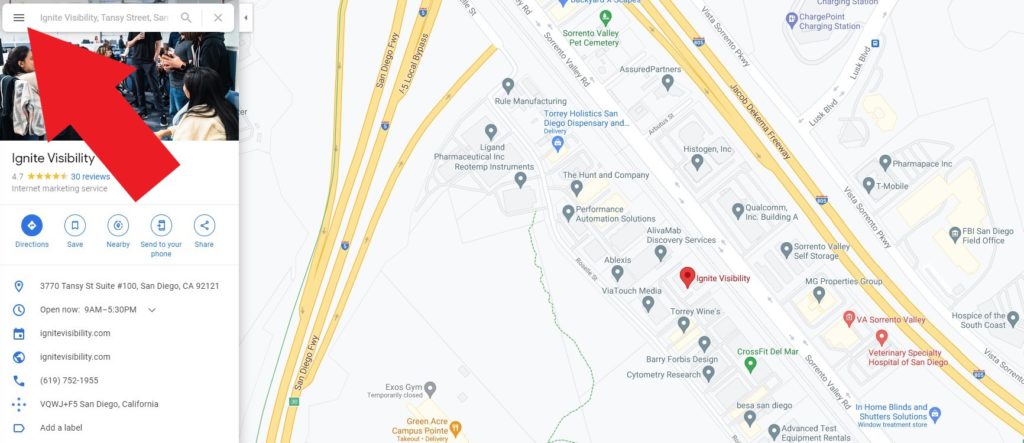
Menu Bar on Google Maps

Take a look towards the bottom of the menu. You’ll see a “share or embed map” option.
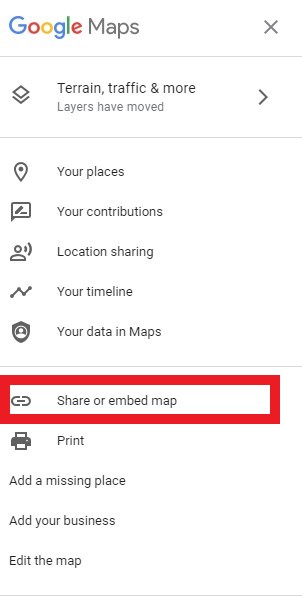
Share or Embed A Google Map

Click on that and a pop-up will appear. The default option on the pop-up is to share a link to the map you’re looking at.

Instead, you’ll want to click the “embed a map” tab. You’ll see a smaller version of the map that’s still displaying in the background.

At this point, you get to decide the size of the map you want to embed on your web page. The default is “Medium.”

You can click the down-arrow next to the word “Medium” to select either “Small” or “Large” options.

Additionally, you can create a custom-sized map.

Once you’re satisfied with the map size, click the “Copy HTML” link. That will put the embed code in your copy buffer.
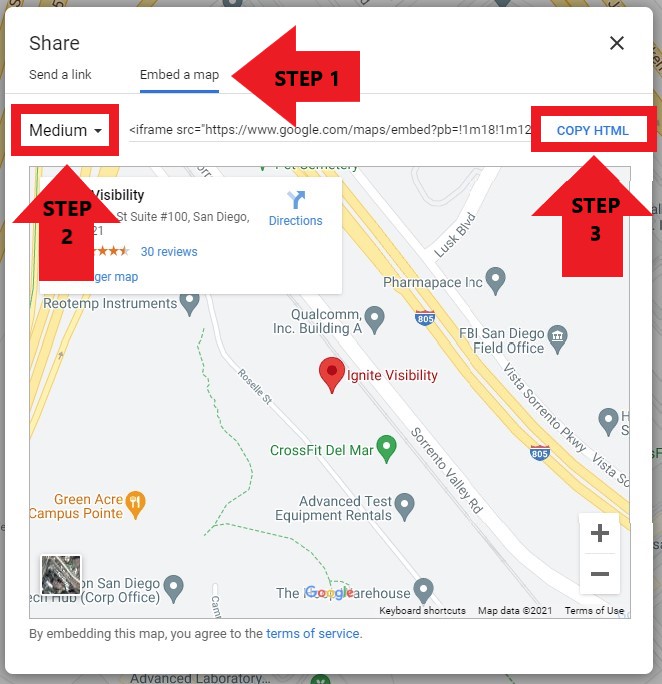
How to Embed a Google Map

Step 3: Embed Your Google Map

At this point, all you need to do is paste the embed code into your web page.

But that’s not as easy as it sounds. If you don’t know anything about HTML (HyperText Markup Language) then you should probably get in touch with a professional web developer.

If you know a little about HTML, then you probably can handle it on your own. Just make sure you paste the code into the right part of the markup so it appears where you want it on the page.

Finally, check it out. Load your web page and make sure the map displays as you expected.

If you like what you see, stick with it. Otherwise, head back to the drawing board. Create a map more suitable to your target audience and paste that in.

Other Helpful Tips:

Did you know you can make your Google Map responsive? A responsive Google Map will automatically resize itself based on the screen size. This is essential if your web traffic comes from both mobile and desktop.

Make your Googe Map responsive simply by navigating to the embedded code and adding in the following embed response:

<style>iframe {width:100%;height:100%;}</style>

Looking to format your web page?

You can center your embedded map on your site as well by using the “align center” on your WordPress website.

Wrapping It Up

There you go. Now you know how to embed Google Maps on your landing page.

It might seem a little awkward at first, but once you’ve beaten the learning curve you can put a map on any page you like.

Related Posts

  • What Google’s New Map Location Ranking Test Means for Businesses

    I am not sure if this is a new Google test or not, but I…

  • Google + Embedded Posts, How to Embed Google + Posts

    Facebook launched embedded post and now Google + has added this functionality. Similar to a…

  • Google Offers Free One Page SEO Guide

    Although at times it does seem Google is against very advanced SEO companies, when it…

About John Lincoln

John Lincoln (MBA) is the Co-Founder & Executive Chairman of Ignite Visibility, a top performance marketing agency backed by Mountaingate Capital. A digital marketing strategist and keynote speaker, Lincoln has managed over 1,000 marketing programs for brands like DoorDash, HBO, Tony Robbins, and Experian. Under his leadership, Ignite Visibility has been named a leading digital marketing agency in the U.S. and made the Inc. 5,000 list six times. Lincoln also spearheaded the development of CertaintyTech, a cutting-edge media mix modelling and forecasting platform. An award-winning marketer, Lincoln has authored three books, including Advolution (2022), and produced films such as SEO: The Movie. Recognized as a Top Business Leader, he has been featured in Forbes and The New York Times and spoken at global events like Web Summit and SMX. Lincoln's mission is to empower businesses through innovative digital strategies while reinvesting in clients, employees, and the community.

About Ignite

Ignite Visibility is a premier full-service digital marketing agency. We were founded in San Diego, CA but are now a 100% remote-first company with Igniters and clients around the globe.

Ignite Visibility is one of the highest awarded digital marketing agencies in the industry, works with some of the biggest brands in the world and is a 6x Inc. 5000 company.

noun-trading

Our Services

Ignite Visibility offers Award-Winning Services including comprehensive full-funnel digital marketing strategies. Learn more about our most popular service offerings below:

  • SEO Search Engine Optimization
  • PPC Pay Per Click
  • Email Marketing
  • Social Media
  • Creative
  • View All Services

Contact Us. Let’s Chat!

  • This field is hidden when viewing the form

Marketing Guides

SEO In 2020: How To Prepare For Major Disruption

"SEO: The Movie" - Have You Seen Our Film? Watch Now

"Social Media Marketing: The Movie" - Have You Seen Our Film? Watch Now

Amazon Seller Central vs Vendor Central

Listen To The Podcast Featuring The Best Minds In Marketing

John Lincoln Interviews Global Director of Digital Marketing & Strategy at Qualcomm, Jessica Jensen

Check Out 227 Free Online Marketing Classes

The 2020 Guide To Dominating SEO With Advanced Schema

Learn More About Our Digital Marketing Agency

Learn More About Our SEO Services

Learn More About Our Paid Media Services

SELECT CATEGORY

Become A Contributor

Interested in writing for Ignite Visibility?

APPLY NOW

noun-chat

Let's Chat

Ready to grow your online visibility and sales?

Request Your Free Proposal

Work With Us

NEWSLETTER // SIGN UP NOW


noun-strategy

Free Marketing Resources

  • Digital Marketing Resources
  • Marketing Strategy Videos
  • Weekly Marketing News Recaps
noun-strategy

Most Popular Blogs

  • How Long Does SEO Take?
  • Multi-Location SEO: Top Strategies
  • Google AI Overviews: Everything You Need to Know
  • Technical SEO 101
  • 18 Google Ad Extensions You Should Use
  • Complete Guide to Google Responsive Display Ads
  • Capitalizing on Local Service Ads
  • How SEO and PPC Work Together
  • Community Management Best Practices
  • B2B Social Media Marketing Guide
  • VIEW ALL BLOGS
noun-letter

Join Our Newsletter

CONNECT WITH US

  • facebook
  • twitter
  • instagram
  • youtube
  • linkedin

Services

  • SEO
  • Local SEO
  • AI SEO
  • Paid Media
  • Social Media Marketing
  • Email Marketing
  • Conversion Rate Optimization
  • Website Design & Development
  • Digital PR
  • Analytics & Attribution

Industries

  • Consumer Franchise Marketing
  • Franchise Development
  • Multi Location
  • ECommerce
  • B2B
  • Healthcare & Medical
  • Home Services
  • Financial Services
  • View More Industries

Resources

  • About Us
  • Our Team
  • Awards
  • Clients
  • Case Studies
  • Blog
  • Marketing Resources
  • Franchise Marketing Resources
  • Contact Us

Ignite Logo

REQUEST A FREE PROPOSAL

JOIN THE NEWSLETTER

Locations

San Diego

4370 La Jolla Village Drive Suite 320,
San Diego, California 92122

Irvine

7700 Irvine Center Drive Suite 430,
Irvine, CA 92618

Orlando

100 East Pine St,
Orlando, FL 32801

New York

14 Wall Street
20th Floor New York, NY 10005

(619) 752-1955

©2026 Ignite Visibility. All Rights Reserved.
Privacy Policy and Terms of Service