

Instagram is a powerful tool for businesses, but you must know how to promote a business on Instagram the right way to get the most out of the platform.
Ignite Visibility’s Senior Social Media Strategist, Josh Rohr, shares 19 proven strategies to help you effectively promote your business on Instagram.
What We’ll Cover:
- Why You Need to Advertise on Instagram
- How to Use Instagram for Business: 19 Ways to Promote Your Brand
- Content Creation: Making Engaging IG Posts for Small Businesses
- Case Studies of Successful Instagram Campaigns
- FAQs: How to Promote on Instagram
Expert Insights on How to Use Instagram for Business
Instagram remains one of the most popular social media platforms, especially for more visually oriented users. Businesses of all types can benefit from an Instagram boost strategy to connect with potential customers while standing out from the competition.
If you have highly visual content and a target audience that’s likely to respond to that content, I definitely recommend Instagram for your marketing efforts. It’s particularly great for publishing short-form video content that captures users’ attention with brief videos, complementing longer-form YouTube videos and other content.
By optimizing your profile, images, and videos to perform their best on the platform, you can quickly discover how to promote your business on Instagram with an effective strategy. Consistency is key here, as you’ll want to post regularly to engage both viewers and the algorithm and maximize visibility.
Why You Need to Advertise on Instagram
With 2 billion monthly active users, Instagram is more than just any other social media platform. It’s a critical marketing channel that drives business results. Here’s why it deserves a place in your overall strategy:
- Engaged Users: 90% of users follow at least one brand, and 87% take action after seeing a product on Instagram , making Instagram a powerful conversion tool.
- Proven Returns: Marketers consistently rank Instagram as delivering the highest ROI across all digital channels.
- Strategic Targeting: Advanced audience segmentation ensures your message reaches your ideal customers at the right time.
- Seamless Sales Integration: Built-in shopping features reduce friction in the buyer’s journey, enabling direct purchases without leaving the app.
Best Ways to Promote Your Business: Instagram Platform Features that Support Your Marketing Goals
Let’s take a look at how you can align Instagram’s tools with your broader marketing objectives:
- Reels: If you want to boost brand awareness and help people discover your brand to connect with new customers, use Instagram Reels, which are short-form videos that can easily capture new audiences. Reels are an excellent way to drive top-of-funnel awareness and audience discovery through short-form video content.
- Carousels: Create a single post with several videos or images in a carousel, allowing you to build narrative-driven campaigns with multi-image posts perfect for product education and storytelling.
- Instagram Live: This feature allows businesses to host or participate in live Q&As and interviews or show how things work behind the scenes, lending more transparency and authenticity to your Instagram boost strategy.
- Interactive Stickers: Use quizzes, questions, and polls to engage audiences and show that you value their input, which can drive conversions and improve your overall marketing strategy.
How Do You Use Instagram for Business: 19 of the Best Ways to Promote Your Business
1. Create a Business Profile
Create an account on Instagram if you don’t have one, either by logging into the app or the Instagram website, and follow the prompts to create your account.
On the website, click on Profile on the bottom left menu and choose Edit Profile on the next page, or tap the  icon in the app and select Edit Profile on the next screen there.

Tap on Switch to professional account at the bottom of the next page.

Tap Next and choose your business category, and confirm the selection by tapping Switch to professional account.

Choose Business and tap Next. Add your business’s contact details or skip this step.
Finish setting up your account by following the next prompts, and connect your account to your business’s Facebook page if you have one.
2. Start Optimizing Your Business Profile
Understanding how to advertise your business on Instagram requires you to understand that your profile is prime digital real estate. You need to make every element count.
- Start with a recognizable profile photo, typically your logo, sized at 320×320 pixels for clarity.
- Write a keyword-rich bio of 150 characters or fewer. It should clearly communicate what you do and who you serve, incorporating relevant search terms potential customers might use.
- Add strategic contact buttons (for example: email, phone, or directions) to streamline your customer journey. Include a compelling call-to-action and insert the appropriate links, whether to your website, a landing page, or a link-in-bio tool.
- Select the most relevant business category to improve discoverability in Instagram search.
- Enable professional dashboard features to access analytics that inform your marketing strategy.
- Create Highlights to showcase evergreen content like testimonials, services, FAQs, and behind-the-scenes glimpses.
- Include alt-text descriptions for your photos to boost your position in search results.
- Post consistently to keep followers engaged and look at the data relating to what people like the most to inform future content creation.
- Leverage Stories and Reels for various content, as these post types often have the best engagement rates.
Check out this optimized profile from Letterfolk’s page, which includes a brief description with relevant keywords, a link to the parent company’s Instagram profile, and a link to other sites and profiles, along with Highlights, Reels, and Tagged posts to connect with audiences.

3. Focus on Your Branding
Consider two key visual elements: Your profile picture and a defined brand identity.
Choose a profile picture that includes your logo and include consistent brand messaging in your profile. Your posts could also use a consistent color scheme and include a logo to further establish a clear brand identity.

To make sure your profile picture looks good on all devices, see how it looks on both desktop and mobile screens.
A good profile pic will work with the 110×110 px resolution on mobile and the 180×180 px resolution on desktop screens.
4. Use Clickable Links and Link-in-Bio Tools
If your goal is to drive traffic to your website, you need to make it easy for your viewers. Instagram now lets you add up to 5 external links to your bio. You can either link to your main website, blogs, social media channels, or even specific items like free ebook downloads and other content.
If you want to consolidate your links into one clean link, you can use a tool like LinkedTree to put everything in one place.

Some alternatives to Linktree you can try include:
- Beacons.ai: A creator-focused platform offering a free plan with unlimited links, integrated email marketing, and a media kit builder. Premium features include custom domains, advanced analytics, and built-in monetization tools like tip jars and product sales. This tool is great for content creators and small businesses wanting an all-in-one solution.
- Stan Store: Specifically designed to sell digital products, courses, and other services, this tool goes beyond simple link management, offering a complete storefront with payment processing, calendar booking, and email collection. This tool is perfect for service-based businesses focused on driving conversions through Instagram.
- Koji: This alternative link-in-bio page builder includes interactive features like tipping, lead forms, and social feeds. The platform emphasizes engagement through mini-apps you can add to your page. It provides robust analytics and works well for businesses that want to create a more interactive experience than a standard link list.
5. Include High-Quality Visuals
Instagram is a highly visual platform. That means that the quality of your images or videos can make or break your success.
For instance, all photographs should be clear and encourage people not only to click on the post but to share it with their own audiences. Meanwhile, infographics, charts, and other images should include familiar colors and branding that is distinct to your brand.
If you can, include your logo in the corner of image posts to further establish them as yours. With consistent quality and visual cues, your followers and new target audiences will come to recognize your brand and associate it with great content.

Want to learn how to make engaging IG posts for small business pages? Here are some tools that can help:
- Canva: One popular and easy-to-use design tool is Canva, which allows you to optimize existing images or create new ones with social media templates for Instagram Posts, Reels, and Stories, along with other platforms.
- Snappa: You can also try Snappa, which also makes it easy to create all types of graphics for social media and other content. Using this tool, you can optimize images using presets based on Instagram’s dimensions.
- VistaCreate: This free design tool has thousands of templates to use, including ones to help create visuals for Instagram. Additionally, it gives you access to a massive library of design elements and assets.
6. Create a Variety of Content
No one wants to see the same post types over and over. Create various types of content, including Reels, static images, carousels, and infographics.
Revolve your content topics around your target audience and what they want to see. You should also look at your analytics to determine what resonates with them regarding format and subjects.
Not sure which content to use when determining how to advertise your company on Instagram? Here is a brief breakdown of each main content type:
- Posts: These are traditional Instagram posts that comprise either images or videos. They’re ideal for posting on a regular basis if you want to create a permanent library that grows with your presence.

- Stories: A more temporary option, Stories can connect more urgently and directly with audiences. They’re perfect for adding more authenticity in the moment with a bit of spontaneity over conventional curated posts.
- Reels: These are videos that can be up to 60 minutes, that may include stickers, audio, and effects. Reels can appear both on Instagram and Facebook to extend your reach to both platforms.
- Carousels: If you want to post up to 20 images at a time, carousels allow you to do so. For example, you could use a carousel post to show off a collection of related products.
To get some ideas for how to make engaging IG posts for small businesses or even specific business models, try looking at some competitors and see what content drives the most engagement.
Don’t be afraid to play with Stories and Reels. With Instagram users spending a total of over 17.6 million hours watching them daily, Reels is not a type of content that you should ignore.
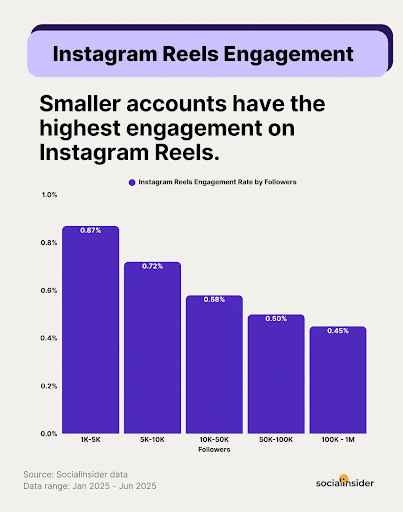
Reels don’t just get attention for large Instagram accounts. In fact, smaller accounts typically get a higher engagement rate on their Reels than larger accounts.
7. Focus on Longer-Form Video Content
While Reels and other short-form content are instrumental in showing you how to promote a business on Instagram with concise videos, you can also use long-form content to build a connection with audiences on this platform.
Specifically, you can post long-form content up to 60 minutes long using Instagram Video, which now incorporates what used to be Instagram TV (IGTV). This feature is useful for developing all kinds of content that short-form videos won’t cover, such as:
- Webinars
- Extensive how-to guides
- Testimonials
- Q&A sessions
- Brand stories
- Behind-the-scenes looks at your company
- Interviews
- Product or service introductions and explainers
Pro Tip: To make the most of your content, repurpose Q&As and webinars or other long-form content into shorter clips. You can then share these clips via Instagram Reels or Stories along with other platforms like YouTube Shorts and Facebook.
8. Write Engaging Captions
To establish a strong connection with your audience, your captions should use language that appeals to your target market, incorporate popular relevant hashtags, and be short and succinct to get your point across quickly.
You can also include a CTA at the end of your caption to encourage viewers to take direct action after engaging with your content.
Don’t forget emojis when appropriate to use, as they can add a visual element to your captions that makes them even more impactful. However, you should only use them sparingly to add some “spice” to your posts and keep them fun and relatable.

9. Leverage Hashtag Campaigns (But Don’t Overuse Them)
Although not as popular and powerful as they once were, hashtags are still a helpful tool for categorizing content and increasing engagement among smaller niches.
You can also add those that are trending and have relevance to your brand. Another hashtag strategy would be to participate in national days or holidays.
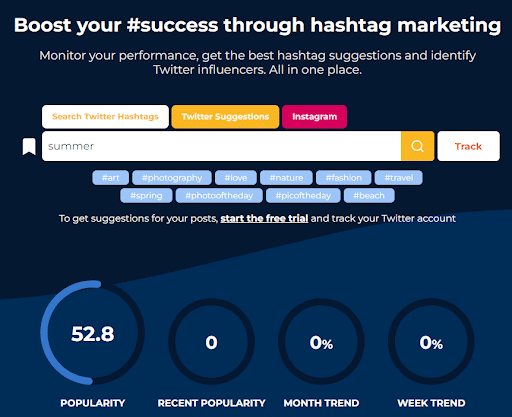
Use Hashtagify to uncover what’s popular. Here are a few more tips:
- Look at competitor posts for ideas
- Limit them to three words
- Use between 3 and 5 per post
Just don’t overdo it with hashtags—too many could over-optimize and overwhelm your audiences, potentially coming off as spammy.
10. Engage in Advanced Optimization
There are many components you can use to fully optimize your content. Specifically, one effective method is to add music to capture attention and stop people from scrolling.
Some easy wins to optimize your posts include tagging locations and adding alt text to images. Every post can enable you to tag its target location to optimize it locally, while alt text can provide more context for images to help people find them in searches.
Other elements to incorporate include user tags and keywords in titles, captions, and other text content.
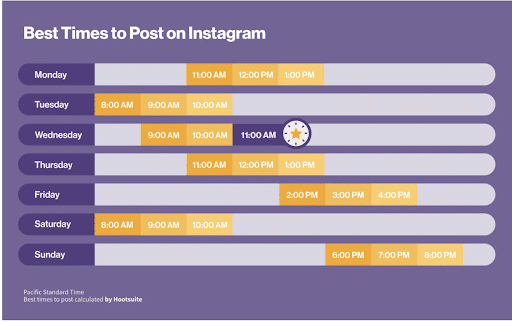
11. Post at the Most Optimal Times
Try experimenting to identify the best times to post on Instagram. Look at engagement metrics and see when audiences are viewing, liking, commenting, and sharing most frequently.
Keep in mind that the weekends are often best for some audiences, depending on the kinds of followers you have. Some people may spend more time scrolling when they have time off from work on Saturdays and Sundays.
12. Cross-Promote on Different Platforms
Spread your content around by cross-promoting on different platforms. To be efficient, you can use social media scheduling tools.
Tweak captions for each platform to adapt to its style. For instance, while you might be lighthearted and humorous on Instagram, with emojis that appeal to that playfulness, a more formal tone could work better on your Facebook page, or the language could change based on the age of each platform’s respective audiences.
If you want to know how to use Instagram for small business promotion across platforms, here are some scheduling tools you can use:
- Rallio: Supercharged by AI, this tool brings it all together by using advanced AI to connect brands, content creators, business owners, and their employees. It was designed with franchises and multi-location businesses in mind, helping eliminate some of the bottlenecks that occur when working across locations.
- Hootsuite: This social media management tool can help you schedule posts on multiple platforms along with many other aspects of social media marketing. Use it to post, measure engagement, and optimize your Instagram boost strategy and overarching social media campaign.
- Buffer: In addition to using this tool for scheduling posts on your social media platforms, you can use Buffer’s various social media marketing tools to optimize campaigns and see organic audience growth.
- Sprout Social: This all-in-one social media management solution can help you glean valuable insights into your audience, publish posts, and develop influencer marketing strategies.
13. Follow Accounts Relevant to Your Industry
Since Instagram has such a diverse user base, your target audience is there. You just need to find them. One way to do this is by following reputable and esteemed accounts in your industry.
Those you follow should have an established presence on Instagram. For example, if you’re in the healthcare technology industry, you’d want to follow an associate like HIMSS (Healthcare Information and Management Systems). It’s a respected and credible association.
But don’t just follow them—engage. Share their posts, like them, and even comment when the content has synergies with your brand. Doing so could support how you promote on Instagram in two ways. First, the profile could follow you back, which amplifies your presence. Second, their followers could find your comment interesting and head to your profile to follow.
14. Form Meaningful Influencer Partnerships
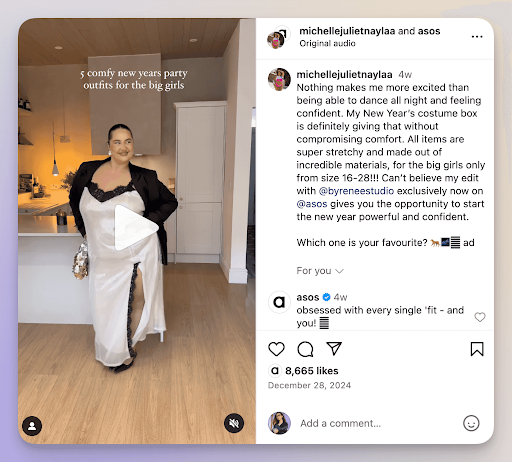
To start with, it’s important to find the right influencer partner based on your niche and budget. Ideally, you would find an influencer with a loyal following and whose values align with your brand’s.
While you might want to target the big influencers with 100,000 or more followers, consider going with micro-influencers in your niche who are more cost-effective and can reach a potentially even more loyal following.
You can benefit from these partnerships by:
- Soliciting product placements
- Setting up paid partnerships
- Host joint livestreams
Always be sure to establish clear collaboration terms, including gifted products, affiliate commissions, or flat fees, before starting your work together.
You should also give the influencers creative freedom while ensuring brand guidelines are met. Track performance through unique discount codes, affiliate links, or dedicated hashtags to measure campaign effectiveness and inform future partnerships.
Take a look at ASOS’s collaboration with micro influencers for inspiration. By partnering with smaller influencers, the popular brand builds a consistent bank of authentic content that its audience can relate to.
15. UGC (User-Generated Content) Campaigns and Community Building
Speaking of authentic content, user-generated content is another way to expand your reach while providing authentic social proof that resonates more than traditional advertising.
UGC campaigns encourage followers to share their experiences with your products or services, creating a library of relatable content that builds trust with prospective customers. You can take advantage of UGC campaigns by:
- Launching branded hashtag campaigns
- Running contests requiring photo submissions
- Featuring customer testimonials and reviews in your content mix
- Reposting UGC (with permission)
Using real customers’ content helps to strengthen community bonds and makes customers feel valued, increasing loyalty and repeat purchases.
16. Hosting a Contest or Giveaway
Instagram also makes it easy to host contests and giveaways using hashtags and other features. For instance, you can get your followers to enter a contest by subscribing, liking, or otherwise engaging with your content, which could help you maximize your reach while giving audiences something in return.
Giveaways can also encourage people to connect with you more frequently if they can expect to get something of value out of regular interaction.
17. Run Paid Promotions on Instagram
Running paid promotions on Instagram is more than just boosting Instagram posts. There’s also Instagram Ads, which run like more typical PPC ads on other platforms. Both of these types of promotions can help expand your reach and connect with your target audience.
Let’s look at the difference between the two:
- Boosts: Quickly convert existing posts into ads to reach a broader audience. Boosts are ideal for engagement-focused campaigns but offer limited customization compared to ads.
- Instagram Ads: Created through Meta Ads Manager, these ads provide advanced targeting and creative options, allowing for tailored campaigns that align with specific goals like website traffic, lead generation, or sales.
One of the big benefits of Instagram Ads is the platform’s precise audience targeting, which includes:
Instagram offers precise audience targeting through:
- Demographics: Age, gender, and location.
- Interests: Based on user activity.
- Custom Audiences: Retarget previous website visitors or app users.
- Lookalike Audiences: Target people similar to your best customers.
- Language: Tailor ads to specific languages.
You’ll also have access to a variety of Instagram Ad forms, including:
- In-feed ads: Appear in users’ main feed.
- Reels ads: Engage viewers with short-form, full-screen videos.
- Stories ads: Immersive, full-screen ads displayed between Stories.
- Carousel ads: Multiple images or videos users can swipe through.
- Shopping ads: Showcase products and drive purchases.
- Explore ads: Reach users browsing Instagram’s Explore tab.
18. Instagram Shops and Ecommerce Integration
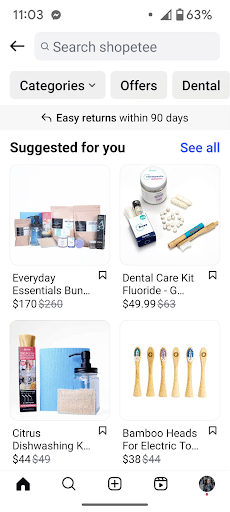
Instagram Shops and storefronts make it easy to create a fully shoppable catalog directly within the app. This eliminates barriers and shortens the time between discovery and purchase significantly.
Customers can:
- Discover tagged products in posts, Stories, and Reels
- Browse details
- Compare options
- Check out without leaving the platform.
Make it even easier by:
- Enable product stickers in Stories
- Create dedicated Shop tabs on your profile
- Utilize shopping ads to reach new audiences
With Instagram’s native analytics, track which products generate the most engagement and sales, informing both your social strategy and broader inventory decisions.
19. Using Analytics and Insights to Guide Content Strategy
Understanding how to promote business on Instagram is directly tied to understanding Instagram’s native analytics. They will provide critical insights into:
- Audience demographics
- Peak engagement times
- Content performance
- Follower growth patterns
- Reach
- Impressions
- Saves
- Shares
- Profile visits
By analyzing this data, you can see what type of content your audience enjoys the most, whether it’s Reels, carousels, static posts, or Stories.
Use this intelligence to build a content calendar based on when your audience is most active and what topics generate conversation. A/B test posting times, captions, and hashtag strategies while measuring results.
These insights inform not just your Instagram tactics, but your broader content marketing strategy across all channels.
Content Creation: Making Engaging IG Posts for Small Businesses
Knowing how to promote your business starts with creating great content. Strategic content creation drives measurable business results, including increasing brand awareness and generating more conversions.
Here’s how to craft Instagram content that engages audiences and supports growth:
Keep a Content Calendar
Consistency builds audience trust and keeps you top-of-mind. Use planning tools like Rallio or Meta Business Suite to schedule posts in advance and maintain a regular posting rhythm. Aim to post 3-5 times a week to increase your visibility without overwhelming followers.
Why it matters: Instagram’s algorithm favors accounts that post consistently. Regular content keeps you appearing in followers’ feeds and increases your chances of reaching new audiences through the Explore page.
Best timing: Analyze your Instagram Insights to identify when your specific audience is most active. General benchmarks show peak engagement occurs Tuesday through Friday between 9-11 AM and 7-9 PM, but your audience may differ.
Engage Directly With Audiences
Social media is a two-way conversation. Respond to comments within the first hour of posting, reply to DMs promptly, and proactively engage with followers’ content. Give shoutouts to loyal customers, answer questions in Stories, and acknowledge user feedback.
Why it matters: Direct engagement signals to Instagram’s algorithm that your content is valuable, boosting its reach. More importantly, personal connections build customer loyalty. Engaged followers convert at higher rates and become brand advocates.
Share Behind-the-Scenes Footage
Humanize your brand by showcasing your team, workspace, production process, or day-to-day operations. Instagram Stories and Reels are perfect for this authentic, unpolished content that builds emotional connections.
Why it matters: Transparency builds trust. Consumers increasingly want to know who the people are and what the values are behind the brands they support. Behind-the-scenes content differentiates you from competitors and creates relatability that polished product shots can’t achieve.
Showcase Products
Create visually compelling product content that highlights features, benefits, and real-world applications. Use carousels to show multiple angles or use cases, Reels to demonstrate products in action, and static posts for lifestyle imagery.
Why it matters: Educational product content moves followers through the buyer’s journey. Showcasing benefits (not just features) addresses customer pain points and reduces purchase hesitation. Posts with clear product value propositions convert 3x higher than generic brand posts.
Tip: Create “mini collections” featuring complementary products or seasonal offerings to increase average order value through cross-selling.
Post User-Generated Content
Launch branded hashtag campaigns encouraging customers to share their experiences with your products. Repost this content (with permission and proper credit) to your feed and Stories. Current UGC trends include “unboxing” videos, transformation content, and creative product styling.
Why it matters: UGC serves as authentic social proof – and audiences love it! In fact, 93% of marketers say user-generated content performs significantly better than traditional content. It also provides a steady content stream while making customers feel valued, strengthening community bonds.
Utilize Interactive Features in Stories and Reels
Leverage Instagram’s interactive stickers, including polls, quizzes, question boxes, countdowns, and the newer “Add Yours” sticker that encourages chain participation. These features boost engagement while providing valuable audience insights.
Why it matters: Interactive content increases time spent with your brand and signals high engagement to Instagram’s algorithm, improving overall account reach. It also provides first-party data that informs product development and content strategy.
Examples:
- Use polls to let followers vote on new product colors or flavors
- Deploy quiz stickers to educate about industry topics while showcasing expertise
- Ask questions to gather testimonials or content ideas directly from your audience
- Recent trend: The “Add Yours” sticker creates viral chain reactions where followers contribute to themed content, exponentially expanding your reach.
Focus on Visually Appealing Posts
Quality matters. Invest in good lighting (natural or affordable ring lights), maintain consistent brand aesthetics, and ensure images are sharp and well-composed. Tools like Canva, Adobe Express, or VSCO help maintain visual consistency even without professional photography skills.
Why it matters: Users scroll Instagram rapidly. You have less than 2 seconds to stop the scroll. High-quality visuals immediately signal professionalism and value. Posts with strong visual appeal receive 94% more views than low-quality content.
Pro tip: Establish a cohesive visual identity using consistent filters, color palettes, and composition styles. Your feed should feel intentional when viewed as a whole, reinforcing brand recognition.
Write Captions That Tell a Story
Construct a compelling narrative with your post captions, appealing to your audience’s emotions while conveying a clear message. You should also end with an enticing call to action.
Why it matters: While Instagram is visual-first, captions drive action. Story-driven captions increase saves and shares, which are key metrics Instagram uses to determine content quality.
Formula that works:
- Hook (first 5-7 words grab attention)
- Story or value (educate, entertain, or inspire)
- Call-to-action (what should they do next?)
Example: Instead of “New candles available,” try: “The smell of fresh coffee at 6 AM—that’s what inspired our newest candle collection. We spent six months perfecting the blend of espresso bean, warm vanilla, and just a hint of cinnamon. Which morning ritual scent should we create next? 👇 Comment below!”
Case Studies of Successful Instagram Campaigns
There are plenty of brands out there demonstrating how to use Instagram for business. Let’s look at some great examples of how to promote your business on Instagram.
Salesforce
When we think of brands that know how to use Instagram to promote your business, Salesforce comes to mind. One of the top customer relationship management (CRM) solutions, Salesforce has cultivated an engaged audience through a wide range of posts.
They post:
- Footage of events and the staff behind them
- Entertaining explainer videos
- Ads featuring influencers and even celebrities
Even though their content varies, they have maintained a recognizable brand across all of it.

From Reels to image posts promoting its various products and solutions, Salesforce has taken full advantage of the platform to maximize reach and build meaningful connections with potential customers.
Today, the Salesforce profile has over 286,000 followers and continues to grow.

You don’t have to be a major brand to replicate this type of strategy. Everyone from huge brands like Salesforce to small mom-and-pop coffee stops can benefit from showing behind-the-scenes content, informative how-to Reels, and product promotion posts.
Just be sure to focus on your data to see what your audience is enjoying. Once you know more about who you’re trying to reach, you can tweak your strategy to match their needs.
Takeaway: The days of super buttoned-up professional marketing are gone. Don’t be afraid to have fun with your content, even if you are a software company.
Duolingo
A good example of a brand that knows how to poke fun at itself and use humor to its advantage is the language-learning app Duolingo.
Duolingo and its easily recognizable bird, Duo, have taken the internet by storm with its playful appearances in the company’s many video and image posts.
For instance, Duolingo partnered with Chipotle to show how Duo is “just like us,” as he stops into a Chipotle to buy a meal.

Other content features Duolingo taking part in themed trends like a choreographed Squid Game dance ahead of the release of the show’s second season, along with image posts highlighting top languages.

Other content features Duo dancing with a KPop band, giving language lessons, and taking part in trends.
The Duolingo social media team has done such a good job at branding themselves that their content is easily recognizable on other social media platforms, too, including TikTok and Threads. By making their content recognizable, they can extend their reach by cross-posting across multiple channels.
Key Takeaway: Something like a notable bright-green bird mascot or using a recognizable color palette will help your brand stand out. When you stand out, audiences can instantly recognize your content across all marketing channels.
FAQs: How to Promote Your Business on Instagram
1. Is there a cost for Instagram for business?
No, there is no cost to have a business profile. You’ll only pay if you want to advertise on the site. Also, if you use Instagram Shopping and their native checkout, you may have selling fees.
2. Is Instagram good for small businesses?
Yes, small businesses can succeed on Instagram by cultivating a community and sharing quality content. It’s worth the time investment with all the features available and its high ROI. Knowing how to promote a small business on Instagram is essential, as is knowing how to make engaging IG posts for a small business to help it stand apart.
3. What are the most important features of Instagram for business?
Professional accounts offer Instagram Insights, Instagram Shopping, and Instagram Direct. These are crucial for understanding demographics, selling directly on the site, and having a direct way to communicate with customers.
4. What is the best way to improve your Instagram business profile?
You may think, “I wonder how to tune up my Instagram business page.” Well, there are many ways to do so. Including effective branding and visuals, adding links to your bio, and figuring out how to add your business location on Instagram in different places could help you get the most from your profile.
Learn How to Promote a Business on Instagram With Ignite Visibility
Promoting and advertising your business on Instagram has great value. It can yield brand awareness, loyal fans, and revenue. To do it well requires expertise and consistency, and we can help. No matter what industry you’re in, we know the best ways to promote your business.
Our social media experts can support any of your social media marketing goals by:
- Developing a plan to get the attention of your target audience
- Optimizing ads for the maximum number of clicks
- Identifying the right influencers for your business
- And more
Ready to start using Instagram for business the right way? Reach out today to get started.

