

Heard the buzz about browser push notifications?
In this article, we’ll go over what you need to know about push notifications so you can determine if they’re right for your business model.
What We’ll Cover:
- What browser push notifications are
- Mobile push notifications
- Why a secure site matters for browser push notifications
- How to add a push notification to your site
- How to use browser push notifications
- Best practices for using push notifications
- Browser push notification types
- Push notification FAQ
So now you’re probably asking, what’s a push notification?
You’ve probably visited a website lately and saw a not-so-attractive pop-up asking if you wanted to receive “push notifications.”
As a digital marketer, you may have thought about whether or not you should add browser push notifications to your site.
Well, there are some pros and cons to this.
Right now, savvy digital marketers are all over it. I’ll explain…
What, Exactly, Are Browser Push Notifications?
If you find yourself asking what’s a push notification, it is really just like it sounds.
Push notifications are browser-based notifications that websites send to people who’ve chosen to receive them. On a desktop or laptop browser, they usually appear in the lower, right-hand corner and have a call-to-action included.
If you click the “Allow” button on a pop-up that asks if you want to receive push notifications, you can expect to see a little message from that site magically appears on your browser window at some point in the future.
That will happen even if you’re visiting a different website.
Browser Push Notifications: A Classic Case of Interruption Marketing
Pop-ups “interrupt” the user at the present moment. That’s why they’re considered an example of interruption marketing.
Now, you’re probably wondering what’s a push message. Here’s a quick explanation.
Consider this scenario: a user who opted to receive a push notification from xyz.com is using Quickbooks Online at 10AM. That person is doing some accounting work.
Then, all of a sudden, a little pop-up appears in the bottom corner of the screen. It’s a message from xyz.com notifying the user that a new blog post has been published.

That notification interrupted the user.
Before you decide that browser push notifications are right for your business, ask yourself if people in your target market will respond positively to interruption marketing.
What About Mobile Support for Push Notifications?
Push notifications are also supported on mobile devices, but there’s a catch.
They’re generally supported on Android platforms. It’s a different story with iOS, though.
Some push notification solutions support iOS. Others don’t.
That’s because Apple has some fairly stringent requirements for people who want to send push notifications to a Safari browser. They have to obtain a developer’s license and then register to send push notifications.
So, depending on your push notification software, you might or might not be able to send notifications to iOS users. That’s something to think about as you decide whether or not push notifications are right for your business.
Go Secure for Browser Push Notifications
If you do opt for browser push notifications, it’s best to equip your site with the HTTPS protocol.
Why? Because you’ll probably make it easier for visitors to opt in to receive push notifications.
Some push notification software will allow a one-click opt-in solution if the site is using HTTPS. On the other hand, if the site is using HTTP, then the software will insist on a two-click opt-in solution.
You could lose some subscribers between that first and second click. That’s why it’s a great idea to go with HTTPS instead of HTTP on your site if you’re using browser notifications.
You’ll also get a few SEO benefits if you go with HTTPS over HTTP.
Adding Push Notifications to Your Site
As you can imagine, the technology behind browser push notifications is advanced. That’s why you might need to get some help from a professional developer if you want push notifications on your site.
If you think you can handle it on your own, there are a few ways to learn about how to send push notifications to a browser.
You can easily enlist the help of push notification software.
One great option is Pushnami.
Pushnami is supported by all major desktop and mobile browsers. It also offers an API so you can integrate it with one or more of your applications.
According to the company website, Pushnami clients are seeing:
- An 18% increase in subscription rates
- A 30% boost in conversion rates
- A 24% increase in traffic
That’s what this particular tool can do for your site.
Another way to learn how to send push notifications to a browser is to use a plugin for WordPress.
Push Notifications for WordPress by PushAssist is one option. You’ll have to fork over some cash if you want to enjoy the full benefits of the product, but it does support iOS.
OneSignal is another plugin solution. You can’t beat the price: it’s free.
How to Use Push Notifications
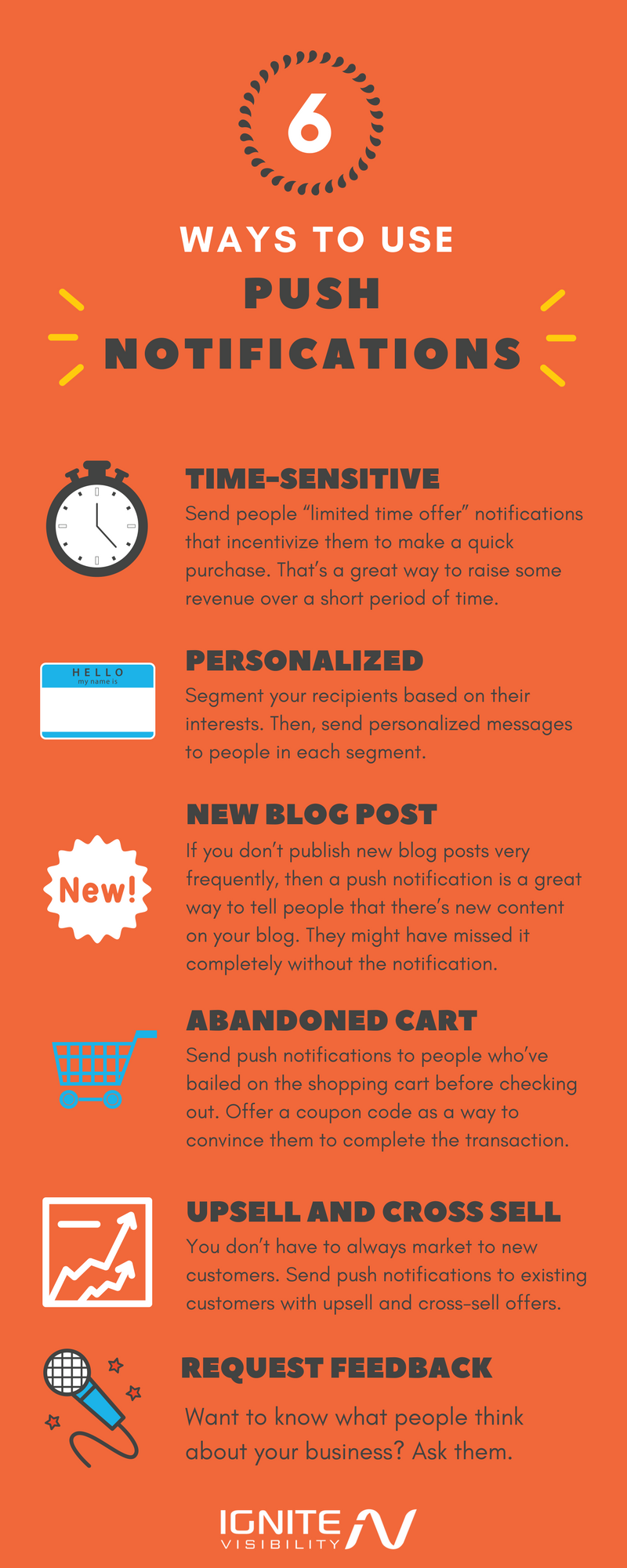
How should you use browser push notifications in your digital marketing efforts? There are several ways to go about it, including the following:
- Time-sensitive notifications – Send people “limited time offer” browser notifications that incentivize them to make a quick purchase. That’s a great way to raise some revenue over a short period of time.
- Personalized notifications – Segment your recipients based on their interests. Then, send personalized messages to people in each segment.
- New blog post notifications – If you don’t publish new blog posts very frequently, then a browser push notification is a great way to tell people that there’s new content on your blog. They might have missed it completely without the notification to alert them.
- Abandoned shopping cart notifications – Send browser push notifications to people who’ve bailed on the shopping cart before checking out. Offer a coupon code as a way to convince them to complete the transaction.
- Upsell and cross-sell notifications – You don’t have to always market to new customers. Send push notifications to existing customers with upsell and cross-sell offers.
- Request for feedback notifications – Want to know what people think about your business? Ask them.
Best-Practices for Browser Push Notifications
Although the infographic above offers great advice on how to use browser push notifications, there are also some best practices that you should follow to ensure that you are using them correctly.
First, make sure you emphasize value. Remember to answer the WIIFM (“What’s In It For Me?”) question.
Put yourself in the shoes of your customer. Why would that person want to receive interruptions throughout the day about content on your blog or the products you’re selling?
You had better be able to answer that question. Also, the answer to that question should provide something of value to your customers.
Next, make it visual. If you’re not getting the results you expect with a plain text browser push notification, maybe you should add an image to it.
As a rule of thumb, an image is more appealing than plain text. A well-crafted picture could give you a boost in your conversion rate.
Next, wait for the right time to display the push notification. It’s tempting to show the popup as soon as somebody visits your site. But is that really the best time?
Probably not. Let your visitors browse around for a while and gain an understanding of what you offer.
Give them time to learn about the value that you business provides. Then hit them with the popup.
They’ll likely be more receptive.
You should also segment your popup notifications along with your market. Chances are pretty good that you’ve already segmented your market. Why not segment your notifications as well?
You can do that by displaying relevant popups based on where visitors “hang out” on your website.
Let’s say you’re selling digital cameras and parts. Display a popup for visitors who tend to browse in the lens categories. Visitors who accept the push notification invite will only receive messages that are relevant to lenses.
You can do the same with other sections on your site.
Next, consider your customers’ time zones. It’s not good customer service to wake up a customer at 4AM just to promote a new sale on camera lenses.
Remember: when you send a browser push notification at 9AM in the Eastern time zone, you’re sending at 6AM in the Pacific time zone. Some folks on the west coast might not take too kindly to getting a message that early in the morning.
Also, send notifications at optimal times. This dovetails nicely with the previous point. Find out when people are most engaged with your app or website and send out notifications during those times.
According to a study by Leanplum, push notifications sent out when users are likely to engage with the app have open rates about three times higher than notifications scheduled by time zone.
So pay attention to time zone, but don’t make it the only criteria when sending out notifications.
Browser Push Notification Types
When thinking about what push messages are, you should be aware that there are many types with many different purposes.
What kinds of browser push notifications should you send out? Let’s go over the options:
- Welcome notification – It’s just like a welcome email in your email marketing. It lets the user know that you appreciate the trust.
- Waterfall notifications — A series of automated messages that pour in after the user opt-in to receive push notifications. These include newsletters, videos, courses, social media, etc.
- One-off notifications — Similar to an email newsletter but in the form of a push notification. These include product promos, services, content marketing, news, updates, etc.
- Autoresponder notifications — Set up your website blog’s RSS feed to send push notifications automatically. These can be once a day, weekly, or even monthly.
- Preference notification – When people put an item on the wish list while it’s out of stock, be sure to send them a notification when it comes back in stock.
- Cart abandonment notification – Who says you should only use emails to remind people that they abandoned the shopping cart? Use push notifications as well.
- Delivery update notification – “Your item has shipped!” is a delightful thing to read in a browser push notification.
Promotional notification – Got a sale going on? Let people know with a push notification. The additional business could help offset the hit on your margins.
Browser Push Notification FAQs
1. What are some examples of valuable push notifications?
While many people may find browser push notifications to be intrusive and annoying, there are some cases beyond trying to make a sale that folks will find useful.
- Flight information – Check-in time, changes, delays, connections, etc.
- Utility information – Traffic updates, weather reports, etc.
- Sports updates – Game day scores, breaking news, etc.
2. I have a good size following on social media. How can I use push notifications in a way that’s beneficial to my customer base?
If you have done the research and determined that your target audience will enjoy receiving browser push notifications, then there are several ways you can incorporate these popup messages.
- Promotions – Sales, coupon codes, new products, etc.
- Receipts – Provide digital receipts via push notifications.
- Shipping – Notify your customer when their package was shipped and enable tracking.
- Feedback – Streamline your user experience by asking your customers what they want.
3. When did push notifications get started?
While the history of browser push notifications is short, some of the facts may surprise you.
The very first push notification service was launched by Apple in June of 2009 and was called Apple Push Notification Service. This might come as a bit of a shock since Apple is the one that makes it difficult for companies to use browser push notifications on the iOS platform.
Google rolled out its own version of push notifications (Google Cloud to Device Messaging) the following year, and the rest is history.
4. Do people actually like getting push notifications?
Yes and no.
Some reports have shown that up to 50% of folks find browser push notifications to be annoying. But don’t let that sway you from conducting your own research to see what your target audience thinks.
- Approximately 26% of users like receiving updates about their favorite brands or products.
- About 20% of users say that push notifications improve their productivity.
- Meanwhile, 46% will opt-out of receiving browser push notifications.
- The average open-rate for push notifications is between 30% to 50%.
- The average CTR for push notification is between 5% and 10%.
5. What should I do with non-active users?
Delete them.
This may seem harsh, but if you have a list full of people who are not responding to your browser push notifications, you need to remove them.
You can easily clean up your list and only keep active, engaged users.
Wrapping Up Browser Push Notifications
Browser push notifications can be a great way to promote your brand online. Just make sure you do some up-front research to determine if they’re right for your business.
Then, be sure you don’t overuse them. While they can be a great way to get your message across, there’s a fine line between effective and obtrusive.
