


Sometimes, there are things on the internet that shouldn’t be. When this happens, you can file a Google removal request to have it taken down.
In this blog, we will explain what a Google Removal is and share everything you need to know.
What You’ll Learn:
- Notice of Removal Overview
- Types of Google Removal Notices
- Court Orders and Legal Removal Requests
- SEO Impact and Measurement
- Preventative Opportunities for Marketing Teams
- FAQs about Google DMCA Notices
Notice of Removal Overview
A removal notice is a formal request to Google to take down certain types of content from search results. Google offers several pathways for requesting content removal based on different criteria.
Here are the four main types of removal requests:
- Personal Information (PII) Removal – For sensitive personal data such as contact details, financial information, and government IDs that could facilitate identity theft.
- Right to Be Forgotten (RTBF) – For EU/UK residents to request the removal of outdated or irrelevant personal information.
- DMCA Copyright Removal – For copyright holders to remove content that infringes on their intellectual property rights.
- Legal/Court Orders – For removing content that has been declared unlawful by a court ruling or violates local laws
Understanding these removal options helps individuals and organizations protect their privacy and legal rights online while working within Google’s established processes.
Sometimes, you’ll be on the other side of a notice of removal. Instead of the one filing for removal, you’re the site receiving the notice.
If this is the case, you might have received a notification that looks like this:

Or, you may receive the bad news by way of the Google Search Console.
Here’s a copy of the notice one of our clients received:
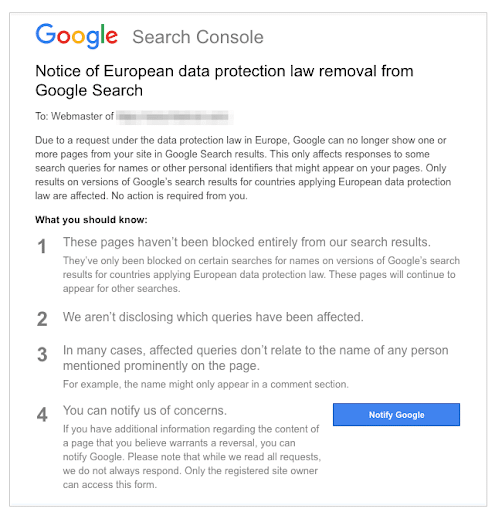
Essentially, receiving a notice of removal means that someone has submitted a Personal Information Removal Request form through Google and your page is affected.
Types of Google Removal Notices
The first step to understanding notices of removal is identifying which type of notice applies to your situation. Knowing the correct removal pathway will improve your processing and success rates.
Instead of frantically searching the internet to find out what type of Google removal notice do I have?, you can refer to this quick breakdown to help you better understand the types of Google removal requests:
| Removal Type | When to Use | Request Form |
| Personal Information (PII) | To remove sensitive information like SSNs, bank accounts, ID documents, and login credentials | Results About You |
| Right to be Forgotten | For EU/UK residents requesting removal of outdated/irrelevant personal info | EU Privacy Form |
| DMCA Copyright | For copyright holders whose content is being used without permission | Copyright Removal Form |
| Legal/Court Orders | For content declared illegal by courts or violating local laws | Legal Removal Request |
PII/Doxing Removals
Seeing your personal information on the web can be jarring, but the Google Results About You tool provides a streamlined process to request that it be removed from search results.
Before submitting your request, make sure that the content you’re requesting to be removed falls under the guidelines for removal. This can include:
- Government ID numbers
- Bank account details
- Credit card information
- Personal signatures
- Confidential medical records
- Login credentials
If you need to remove personal information, follow these steps:
1. Log in to the Results About You dashboard to find the Google Form: Search Removal Request.

2. You’ll then be led to the form to start your request. Input as much information as you can.

3. Next, you’ll describe the problem. As you select different options, it’ll request more information, such as the type of information you want to remove, whether or not there is malicious or threatening intent, and more. You also have the option to add specific URLs and screenshots.

4. The final screen will ask for your content information. You’ll then confirm your claims and submit your removal request.
After you submit your request, you can monitor its status through the same dashboard. There are typically four statuses:
- Pending Review: Initial submission stage
- In Progress: Under active evaluation
- Completed: Final decision made
- Additional Info Needed: More documentation required
It’s important to note that, even if you’re successful, this won’t delete the source of the results. It’ll simply hide it from search results, making it harder to find via Google.
RTBF (Right to Be Forgotten)
In 2014, the Court of Justice of the European Union ruled that individuals have the right to request that Google remove URLs containing personal information from search results.
In response, Google has given users the option to submit a request with the information in question – also known as the Right to Be Forgotten, or RTBF.
This option allows EU and UK residents to request removal of certain search results about themselves. This privacy right stems from the EU’s General Data Protection Regulation (GDPR), which was born from the 2014 ruling and applies specifically to name-based searches. All removal requests must comply with the Google Maps EU removal regulations to be approved.
What is most important to remember about RTBF removal requests is that they only affect search results in the EU or UK versions of Google. Even if the removal request is approved, the content may still appear when users search from non-EU locations, use VPNs configured to non-EU countries, or access non-EU versions of Google.
An additional update made in 2025 streamlined the RTBF process with two significant changes: Publishers will no longer receive notifications about content removal. Removal decisions must also be processed within 30-45 days.
Submitting an RTBF Request
To submit a valid RBTF request, you must meet the following criteria:
- Be a resident of the EU/UK
- Provide proof of identity
- List specific URLs for removal
- Explain why the content is irrelevant, excessive, or outdated
If your request qualifies, you can start the process using Google’s Personal Data Removal Request Form.

If your request is denied, you can submit an appeal as long as you provide additional context about privacy impact, demonstrate clear irrelevance to public interest, show significant passage of time since the information was published, or document personal harm or professional impact.
DMCA Copyright Removals
In 1998, the United States Congress passed the Digital Millennium Copyright Act, or DMCA. Its goal was to address different concerns regarding copyright abuse in the digital age.
The DMCA provides a framework for copyright holders to request the removal of content that infringes their copyrights. If a copyright holder finds unauthorized use of their content, they can file a Copyright Removal Request with Google.
To file a Google DMCA notice, the requester must be able to provide proof of ownership, specific URLs of infringing content, a good-faith belief of infringement, and a penalty of perjury.
All of that information can be submitted using the DMCA notice form on Google’s website.
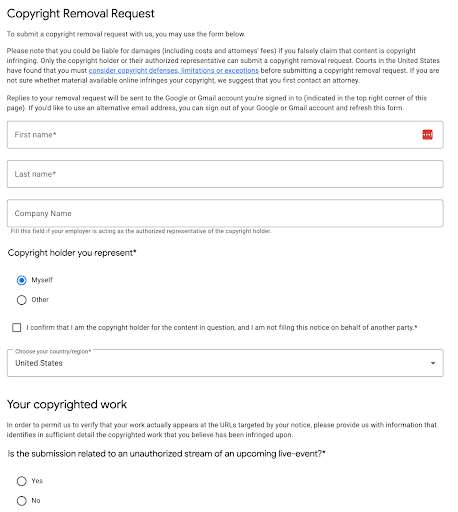
While this is an excellent option for actual copyright infringement, submitting fraudulent requests can result in legal action, including criminal penalties for perjury or a potential lawsuit from the original complainant.
If you receive a DMCA takedown notice and believe it to be false, you can file a DMCA counter-notice with Google to restore the content.
Typically, a DMCA takedown notice template would look something like this:
DMCA Counter Notice
To: Google Legal Support
Re: [Removed URL]
I hereby state that:
I have a good faith belief that my content was removed due to a mistake or misidentification.
My contact information: [Your content details here]
I consent to the jurisdiction of the federal district court where Google is located.
I accept service of process from the complainant.
Under penalty of perjury, I swear the above is true and accurate.
[Your signature]
[Date]
Before you submit a DMCA counter notice, you should consider hiring legal counsel, documenting fair use claims, gathering ownership evidence, and evaluating potential litigation costs to determine whether it is financially beneficial to proceed.
If you decide to move forward with your complaint, the DMCA process has to follow a strict timeline that includes:
- Initial removal within 1-3 business days of a valid request
- DMCA counter-notice will trigger a 10-14 day waiting period
- Unless legal action is filed, content is reinstated after waiting period expires
- Copyright holder must provide court order to prevent reinstatement
Court Orders and Legal Removal Requests
When it comes to content removal requests, legal removal requests are the most complex. They typically require court intervention and jurisdiction-specific considerations.
Court-ordered removals require valid legal grounds to address things like defamation and libel, counterfeit products, trademark violations, privacy violations, and criminal records expungement.
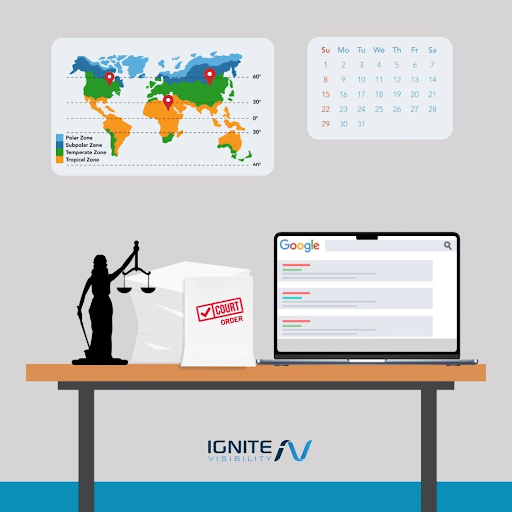
Before filing a legal removal request, consider these important geographical jurisdiction limitations:
- Court orders must be valid in the requesting jurisdiction
- Removals typically only apply to specific country domains
- International enforcement requires multiple jurisdictional court orders
- EU court orders may have broader regional applications
Since this type of removal request is more complicated, it is typically advised to seek professional legal representation. You should consult outside counsel if you want to file repeated DMCA violations or counter-notices, cross-border content disputes, or defamation claims. Cases involving public interest or complex trademark issues are also a good reason to hire legal counsel.
If you decide to move forward with your request, you’ll need to file the following information using Google’s Legal Removal Request Form:
- Complete court order
- Specific URLs you want removed
- Jurisdiction documentation
- Proof of identity
- Contact information for legal counsel
Legal removal requests also follow a strict timeline that follows this process:
- Initial review: 5-7 business days
- Additional documentation requests: 3-5 days
- Removal upon approval: 2-3 days
- Appeals process: 30 days
Legal Disclaimer: This information is for general guidance only and does not constitute legal advice. Always consult qualified legal counsel for specific situations, especially involving court orders or international jurisdictions.
SEO Impact and Measurement
While it’s certainly possible for DCMA notices to harm SEO, it’s worth noting that requesting removal isn’t a very effective negative SEO tactic. Again, this “removal” only applies to super-specific pages and as a result, likely won’t inflict the level of damage that a bad actor was hoping for.
Additionally, as you can see in the screenshots I posted above, this form asks for a lot of very specific information, making it difficult to falsify these requests at scale.
Do note that Google provides a reinstatement request form that allows users to request a reversal. Now, they also mention that they “can’t guarantee a response to that form,” which means this isn’t a fool-proof method.
To be cautious, you should always monitor your SEO performance, especially across different search parameters and geographic locations. It can be pretty simple to monitor these changes because Google removal requests most often affect direct URL searches, specific keyword combinations, name-based searches, related image searches, and featured snippet appearances.
Not sure what to monitor? Here is a checklist that will help you track removal effectiveness and monitor your SEO impact:
- Google Search Console
- Review Removals tool data
- Monitor indexed pages count
- Check coverage reports
- Track manual actions
- Search Result Verification
- Use geo-proxied searches
- Check different device types
- Monitor various Google domains
- Test incognito mode results
- Analytics Assessment
- Compare pre/post removal traffic
- Analyze query position changes
- Track click-through rates
- Monitor organic visibility
As you monitor your removals, it’s important to remember that certain pages may remain in Google’s index even when hidden for specific search queries. This means that the content could still appear for different search terms or in other geographical locations.
Preventative Opportunities for Marketing Teams
The GDPR may be European law, but the reality is that compliance matters a TON for businesses all over the world, because it applies to any company that does business with European customers.
Whether you have an e-commerce shop, a media outlet, or a SaaS product, if you’re getting traffic and doing business in European countries, you are required to comply with the GDPR regulations.
GDPR “Rules”
While there’s a lot more to GDPR compliance, here’s a basic outline of what companies are expected to do to ensure proper data management.

Companies must:
- Be transparent about how you use consumer data
- Grant users access to their personal data
- Allow users to ask you to update outdated or inaccurate information
- Provide the option for users to have personal information deleted
- Give users the ability to suppress or restrict information
- Allow users to transfer their data to another company
- Offer users the option to object to their data being used for certain uses like email marketing or ad personalization
- Grant users the ability to opt out of automated decision-making or profiling
Make Compliance a Continuous Effort
According to cybersecurity expert, Zoe Rose, no regulation represents a complete solution.
She says GDPR compliance serves as a starting point and that organizations need to make customer security a priority–noting that many organizations are leaning too hard on the “we’re working on it” excuse.
Instead, the focus needs to shift toward identifying the root problem and making meaningful, long-term changes.
Security considerations include a wide range of access points and applications. Here’s a quick rundown of what you’ll need to think about as you put together a compliance plan to ensure you cover all bases.
- Software updates
- Website security
- Regular backups
- Database protection
- Plug-ins
- Access security
- Form data
FAQs about Google DMCA Notices and Removal Requests
1. Does a notice of removal mean the page is gone from Google everywhere?
No. Certain requests can only be removed from certain places. For example, RTBF only affects EU/UK results, court orders typically apply to specific jurisdictions, and PII removals work globally but only for specific queries. Even if it is removed, the content may still appear for different search terms or in other regions.
2. If I remove content from my site, how do I speed up reindexing?
You can speed up reindexing by using Google Search Console’s URL Removal tool. You can also submit an updated sitemap and use the Remove Outdated Content tool. Usually, this combination will deindex your page within 24-48 hours.
3. Is removing from Google the same as deleting from the web?
No. Google removal only affects search visibility. Unless the site owner deletes it, the original content will remain on the hosting website. The content may also still be accessible through other search engines or direct URL access.
Get Help with Google Removal Requests from Ignite Visibility
Compliance is an ongoing effort that applies to your entire digital footprint. While these changes may seem daunting, failing to comply with regulations could land you in some pretty serious trouble.
If new privacy laws and compliance with existing ones are confusing, let Ignite Visibility guide you! We can help you:
- Respond to notices of removal
- File requests for removal
- Monitor your traffic for SEO impacts
- And more!
Intrigued? Request more information today!

