

While traditional content management systems (CMS) have worked for many years, as content delivery trends and platforms change, the frontend element of these systems just isn’t as versatile as it once was. Enter headless CMS systems, tools that can increase flexibility, speed, and omnichannel content deliverability, making them appealing solutions in today’s environment.
Headless CMS platforms are particularly important today as multi-channel marketing demand grows, with these campaigns leading to as much as a 287% increase in purchase rates.
In this blog, Emilio Bogantes, Solutions Architect III, will look at the differences between headless CMS vs. traditional CMS systems, the various headless CMS features for different platforms, and how to integrate headless CMS platforms into your current setup.
What You’ll Learn:
- What is a Headless CMS?
- Why Marketers Should Care
- Content Modeling Mastery
- Personalization and Dynamic Content
- Analytics Integration
- Developer-Marketer Collaboration
- Frontend Integration Tips
- FAQs
What is a Headless CMS?
So, what is a headless CMS? A headless CMS is a backend-exclusive CMS system that works independently of the frontend, headless CMS meaning that it’s without that normally combined “head,” keeping content creation and management separate from delivery.
Headless CMS architecture allows for a bit more wiggle room for content delivery compared to the structure of traditional CMS tools, usually integrating into different frontend tools through APIs, e.g., the Contentful headless CMS platform.
For example, while WordPress and other conventional CMS platforms include an integrated frontend for content distribution on desktop and mobile browsers, using API integrations to connect with a separate frontend for headless CMS solutions can make your content compatible with mobile apps, social media platforms, and many other types of media and devices.

My Expert Opinion on Headless CMS Solutions
Fifteen years ago, I was building a custom CMS from scratch at a boutique digital agency where I started my career. It made sense at the time. The existing platforms were either too rigid or too complex to hand off to a client, and we needed something we could shape around the business.
What we got instead was a system that was harder to maintain than anything it replaced, impossible to train non-technical users on, and expensive to customize every time a requirement changed. That experience taught me something early: the hardest problem in content management has never been technology. It has always been the person sitting in front of it.
That lesson followed me through Joomla, Drupal, WordPress, Adobe Experience Manager, and eventually into Strapi, Contentstack, and Contentful. And looking back across all of it, I can say with confidence that headless CMS did not emerge from a trend. It emerged from accumulated pain.
The authoring problem is still the hardest one
Non-technical teams need to create, update, and publish content without calling a developer. That was true in 2008 and it is still true today. What changed is that early headless implementations actually made this worse before they made it better. Exposing raw JSON to a content editor is not a solution. The platforms that are winning right now, Contentful, Contentstack, Sanity, are winning largely because they invested seriously in the editorial experience, not just the API layer. The gap between architectural elegance and editorial simplicity is where the real competition is happening.
The infrastructure problem is real and I have seen it fail
Traditional CMS platforms like WordPress and Joomla run both the frontend rendering and backend logic through the same PHP process. When everything is working, you do not notice. When a loop runs out of control, or traffic spikes beyond what the server was sized for, everything fails at the same time. I have watched production sites go down mid-campaign for exactly these reasons. Headless architecture separates those concerns at a structural level. A content surge does not take down your backend. A backend issue does not blank your site. That separation is not a feature. It is a fundamental shift in how responsibility is distributed across the system.
Separating the data layer also changes how teams work. Your development team and your content team can operate in parallel without blocking each other. That alone has a compounding effect on delivery speed that is difficult to appreciate until you have worked both ways.
What headless does not solve, and nobody talks about this enough
Speed of development. Going headless raises the technical floor significantly. You need experienced engineers, a clear SDLC and DevSecOps practice, proper content modeling before a single line of frontend code is written, and API contract design that accounts for how content will actually be consumed across channels. A WordPress site can be live in days. A well-architected headless setup needs weeks of foundation work at minimum, and that is before you factor in the editorial workflow, preview environments, and deployment pipeline.
Headless is the right architecture for the right team and the right scale. It is not a shortcut and it is not for everyone. But when the foundation is solid, the ceiling is genuinely higher than anything a monolithic CMS can offer.
I’ve found omnichannel marketing solutions to be particularly effective among our clients. For example, one consumer electronics franchise benefited from a solution using a combination of SEO platforms, organic social media channels for content distribution, and content marketing to target investors, leading to a 60% increase in organic traffic and an 89% boost in organic social traffic. Additionally, 90% of new franchise awards were multi-unit, which led to a considerable deal size increase.
Campaigns like this one are far easier to execute with a headless CMS architecture that enables versatile content distribution across channels.
Ultimately, if you want to ensure your content reaches your target audiences at all crucial touchpoints with your CMS, headless might be the way to go.
Headless CMS vs. Traditional CMS
To better demonstrate the difference between CMS and headless CMS, here’s a clear comparison of the two models:
| CMS Model | Flexibility | Cost | Complexity | Use Cases |
| Traditional | Relegated to specific platform templates | Lower cost | Low complexity for more user-friendliness |
|
| Headless | A decoupled backend allows for more flexibility in content delivery on the frontend | Higher cost due to custom dev needs | Higher, requiring the help of specialized engineers |
|
Why Marketers Should Care
If you’re not sure why you might need a headless content management system for your content marketing strategy, there are a few key benefits of implementing headless CMS platforms for marketers:
Faster Time to Market
Using headless CMS options, content creation and development teams can work in tandem, keeping both processes efficient to decrease the amount of time it takes to develop and launch new content. For instance, you can benefit from increased agility as you develop content for multi-platform holiday marketing, developing and delivering content for your website, apps, and social media channels well in time to promote early to last-minute sales.
In turn, you can get your content out there as soon as it needs to go out to increase revenue and ROI, making a headless CMS worth the investment due to more timely marketing efforts.
Omnichannel Publishing Capabilities
Headless CMS tools enable you to develop and manage all content within a single, centralized solution before distributing it across everything from websites and mobile apps to voice assistants, smart watches, and Internet of Things (IoT) devices, among other emerging platforms to connect with target audiences wherever they are.
Whether for multichannel or omnichannel campaigns, headless CMS development is essential for maintaining the compatibility of content with all target platforms, allowing for more seamless content delivery that gets your creative out there faster.
More SEO Control
Headless CMS architecture also helps with search engine optimization (SEO), as it can more effectively optimize content delivery through content delivery networks (CDNs) for faster loading times and generally improved Core Web Vitals due to better overall performance, which can directly impact search engine rankings. You also get more control over key technical SEO elements like URL structure, meta tags, and structured data.
Ultimately, headless CMS SEO will help you more effectively optimize content to drive high-intent search traffic to your site, leading to more conversions and subsequently more sales.
Increased Personalization
Pull data from various platforms’ APIs to deliver highly personalized content, taking into account user behavior to develop a tailored experience. You can also integrate headless CMS systems into customer relationship management (CRM) tools and customer data platforms (CDPs) to collect and analyze critical customer data to inform personalization efforts.
As a result, you’ll be able to use a headless CMS to continually optimize your marketing efforts for better performance, leading to higher overall ROI.
These advantages illustrate how headless CMS development could be the key to more effective marketing efforts.
Pros and Cons of Headless CMS
If you’re still not sure whether to implement a headless CMS architecture, consider the specific benefits vs. disadvantages.
While the upfront cost of a headless CMS tends to be somewhat higher than that of a traditional CMS, which can be difficult to afford on a tight budget, the flexibility of these platforms can help you realize a higher ROI in the long term as you’re better able to distribute content across all relevant channels.
And although the complexity of headless CMS development may need some specialization to manage effectively, you can get the most from these solutions with expert WordPress development and dev services for other platforms, which will help you get the most from these solutions.
A headless, serverless CMS can work for many applications, such as an ecommerce website that needs to scale hundreds or thousands of products requiring dynamic descriptions, along with marketing content for the base store and mobile apps.
Meanwhile, a software-as-a-service (SaaS) company might benefit from a headless CMS solution that enables marketing teams to easily build SEO-optimized websites and landing pages while maintaining product documentation and support portals.
Plenty of other businesses across a range of industries can also take advantage of headless CMS development, such as financial institutions that need to centralize interest rates and disclosures for ease of updating across platforms, as well as healthcare practices that need to separate secure patient-facing materials from general content to maintain HIPAA compliance.
The 8 Best Headless CMS Platforms to Use
Here is a breakdown of the top headless CMS solutions available based on model:
SaaS Headless CMS
If you want a headless, serverless CMS that keeps content management at its simplest, here are some SaaS options to try:
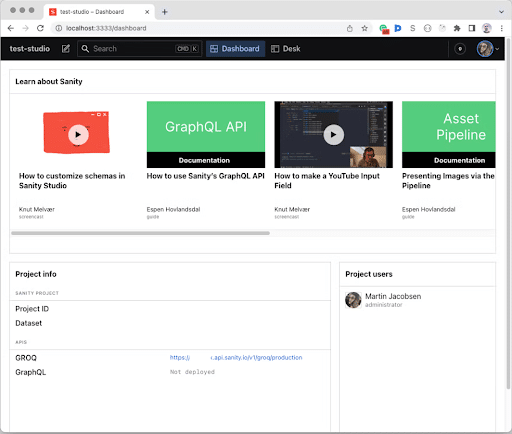
- Sanity: A solid structured content platform complete with a collaborative studio, with schema-driven modeling, a fully customizable editorial interface, and support for GraphQL and GROQ.
- Prismic: This solution uses slice-based modeling that works with frontend elements, with a good fit for Next.js ecosystems and compatibility with modern tech stacks.
- Hygraph: Another SaaS option is Hygraph, which features a native
GraphQL API and reliable relational modeling. It’s ideal for API-focused architectures.
Open-Source Headless CMS
Want more control over your CMS? Here are a few open-source platforms:
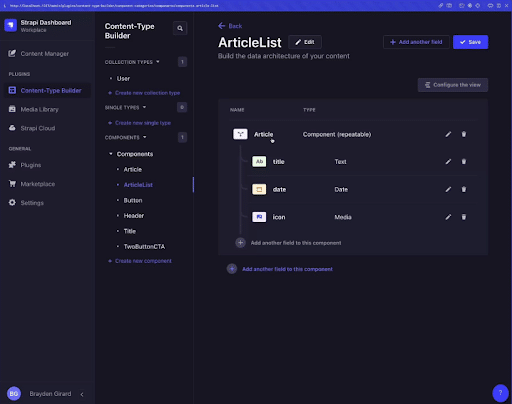
- Strapi: This is arguably the most popular open-source solution, offering self-hosting capabilities to keep your data consistently secure, which is particularly helpful in maintaining GDPR and HIPAA compliance.
- Directus: Another open-source platform, Directus, works with existing SQL databases and provides a helpful visual overlay over data without requiring a migration to a dedicated platform.
- Payload CMS: This option is self-hosted by default and uses TypeScript to install directly into application folders; ideal if you need a more advanced solution.
Enterprise Headless CMS
If you’re looking for enterprise-grade platforms, consider these solutions:
- Contentful: Many large enterprises use this platform because of its superior scalability and in-depth integrations, but keep in mind that pricing will also scale considerably based on usage.
- Contentstack: You may also opt for this solution if you need advanced workflow management and localization, along with enterprise-level security and role-based access control (RBAC).
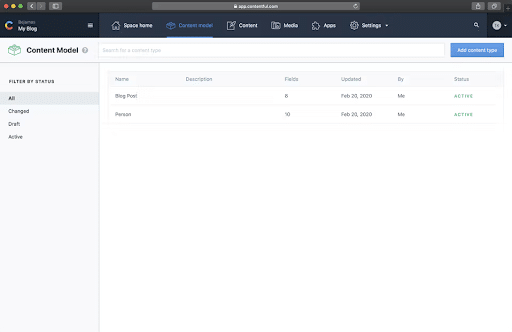
Now, let’s compare each of these options in more depth:
| CMS | Primary Strength | Best for | Deployment | API Support |
| Sanity | Real-time collaboration and extensive customization | Content-heavy apps requiring custom workflows | Cloud | GraphQL and GROQ |
| Prismic | Visual page building and slice-based modeling | Landing pages and marketing-centric sites | Cloud SaaS | GraphQL and REST |
| Hygraph | GraphQL-native content federation | Management of complex data across multiple sources | Cloud SaaS | GraphQL-centric |
| Strapi | Highly reliable open-source ecosystem | Developers who want total control over infrastructure | Self-hosted or Managed Cloud | GraphQL and REST |
| Directus | Data-first approach that wraps around your database | Teams with existing SQL databases | Self-hosted or Managed Cloud | GraphQL and REST |
| Payload CMS | Code-first and TypeScript-native integration and type safety | Tech-savvy engineering teams that need optimal flexibility | Self-hosted or Managed Cloud | GraphQL and REST |
| Contentful | Enterprise maturity and ecosystem | Large-scale omnichannel content distribution | Cloud SaaS | GraphQL and REST |
| Contentstack | Enterprise agility and reliability | Mid-to-large global enterprise workflow management | Cloud SaaS | GraphQL and REST |
How to Choose the Right Headless CMS Solutions
With so many options out there, you need to make the right choice for your business.
The following are some key considerations to help you find the ideal platform:
Saas, Open-Source, or Enterprise Solutions
One main factor to consider is whether you want a SaaS, open-source, or enterprise solution.
SaaS platforms are easy to integrate into your workflows and can leave a lot of management to the service, while open-source solutions offer more extensive control, albeit with the need for more advanced engineering.
Meanwhile, enterprise-grade platforms give larger businesses the chance to scale their operations as needed, but these solutions also tend to come with enterprise-level costs as they scale.
Editorial and Content Flow
You should also consider editorial experiences and content flow when choosing a platform.
For example, headless CMS SEO should be easy to incorporate with an intuitive interface and efficient content management, allowing you to easily draft, review, schedule, and publish content.
Security and Compliance
Your CMS should also comply with GDPR, SOC 2, and/or HIPAA (if applicable) when working with sensitive data.
Additionally, consider the need for RBAC to assign roles to your team, determining who can create, edit, and publish content.
Other security features to look for include single sign-on (SSO) and API token management.
Also, think about whether you need complete control through self-hosting or if vendor-managed security via SaaS solutions is sufficient.
Scalability
Depending on the scope of your business and operations, decide whether you need a solution that offers reliable scalability.
For instance, if you own an ecommerce business that currently sells or is expected to sell a large number of products, you may need a solution that offers enterprise-level scalability for ease of content management across all product pages and other content.
Just remember, it’s best to go with a non-headless CMS unless your site meets the criteria for a headless platform, including the following needs:
- Omnichannel or multichannel delivery
- Frontend flexibility
- High performance and security
- Scalability
- Technical resources
Content Modeling Mastery
To get the most from your headless CMS, it’s important to know how to optimize your content model based on your needs.
Here is some basic guidance on how to implement some critical components in your content:
Canonical Tags
Canonical tags are HTML elements that indicate which iteration of a web page is the ideal version, preventing duplicate content from causing potential issues.
Take the following steps to implement canonical tags using headless CMS tools:
- Store canonical URLs within the headless content management system, ideally within a field for each page that includes the canonical tag.
- Retrieve the canonical URL through an API on the frontend, applying it to the “<head>” section of each page. The end tag would look something like “<link rel=”canonical” href=”…”>.”
- Include the canonical tag for filtered product pages and other types of duplicate or near-duplicate content, further indicating which is the preferred page version you want search engines to index.
Open Graph Meta Tags
To prepare content for social media, you can use Open Graph meta tags that control how content appears in social media posts.
Here are some steps to make full use of these with headless CMS development:
- Create custom fields within your headless CMS platform content model for every Open Graph property you would like to manage for social media channels, including “og:title,” “og:description,” and other relevant tags.
- Fill each custom field with relevant content that applies to each page.
- Use an integrated API to retrieve the meta tags and incorporate them into the page’s “<head>” HTML.
XML Sitemaps
An XML sitemap can be a great way to boost SEO, helping search engine bots more efficiently crawl websites to accelerate indexing and ranking.
Take these steps to develop an XML sitemap using a headless CMS:
- Use your headless CMS tool to compile a list of all URLs with deliverable content.
- Structure the XML sitemap using the standard format, e.g., “” and “” elements for all URLs.
- Implement webhooks or cron jobs to automatically update your sitemap as your website changes.
JSON-LD Schema
When optimizing content for SEO, structured data is essential, with JavaScript Object Notation for Linked Data (JSON-LD) Schema being one of the most popular formats for implementation.
It’s easily embedded in HTML content, usually within the “<head>” of web pages in the form of a “<script>.”
SSG and ISR
Next.js is a popular framework that handles the heavy lifting of web development. Two of its best features for SEO are Static Site Generation (SSG) and Incremental Static Regeneration (ISR).
Static Site Generation (SSG)
SSG creates your website’s pages as ready-to-go HTML files before anyone even visits the site.
- Instant Indexing: Because the pages are already built, search engine bots can read your content and metadata the second they arrive.
- Faster Loading: These pre-built pages load incredibly fast. This helps your Core Web Vitals scores, which Google uses to rank your site higher.
Incremental Static Regeneration (ISR)
In the past, updating a “static” site meant rebuilding the entire thing from scratch. ISR changes that.
ISR lets your pages be built once and then quietly updated in the background as people visit them. You get the speed of a static site without needing a full technical rebuild every time you fix a typo.
If you update an article in your CMS, ISR ensures those changes show up for your readers automatically, keeping your site fresh for both users and search engines.
Clearing up the “Tech Speak”
You might also hear terms like JAMstack, SSR, or Serverless. While they all work together, they aren’t the same thing:
- JAMstack is the overall philosophy of using pre-built pages and APIs to make sites faster.
- SSR (Server-Side Rendering) builds the page at the exact moment a user clicks a link. It’s flexible but often slower than SSG.
- Serverless refers to the invisible cloud technology that runs these processes without you needing to manage a physical server.
Speed, Performance, and Delivery
The right headless CMS features can optimize these elements when managing content.
The combination of CDNs, asset optimization, and lazy loading can all work to create the perfect content delivery system through headless CMS architecture.
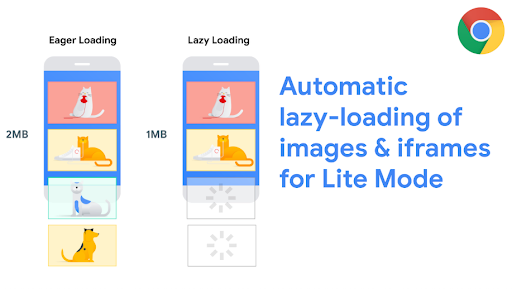
While CDNs cache and distribute content via APIs and reduce loads on origin servers for better performance, asset optimization on the backend eases the burden on the frontend for headless CMS integrations. Lazy loading, meanwhile, allows content to load on each page only as the user scrolls down, which can shorten load speeds for a better UX and further appeal to Core Web Vitals.
Personalization and Dynamic Content
Using tools like Sanity and Contentful headless CMS systems, you can personalize content and make it dynamic to more directly connect with your target audiences across platforms.
More specifically, you can develop unique audience personas to segment your audience and deliver personalized content experiences to each segment and individual user.
APIs allow you to more easily personalize with dynamic content.
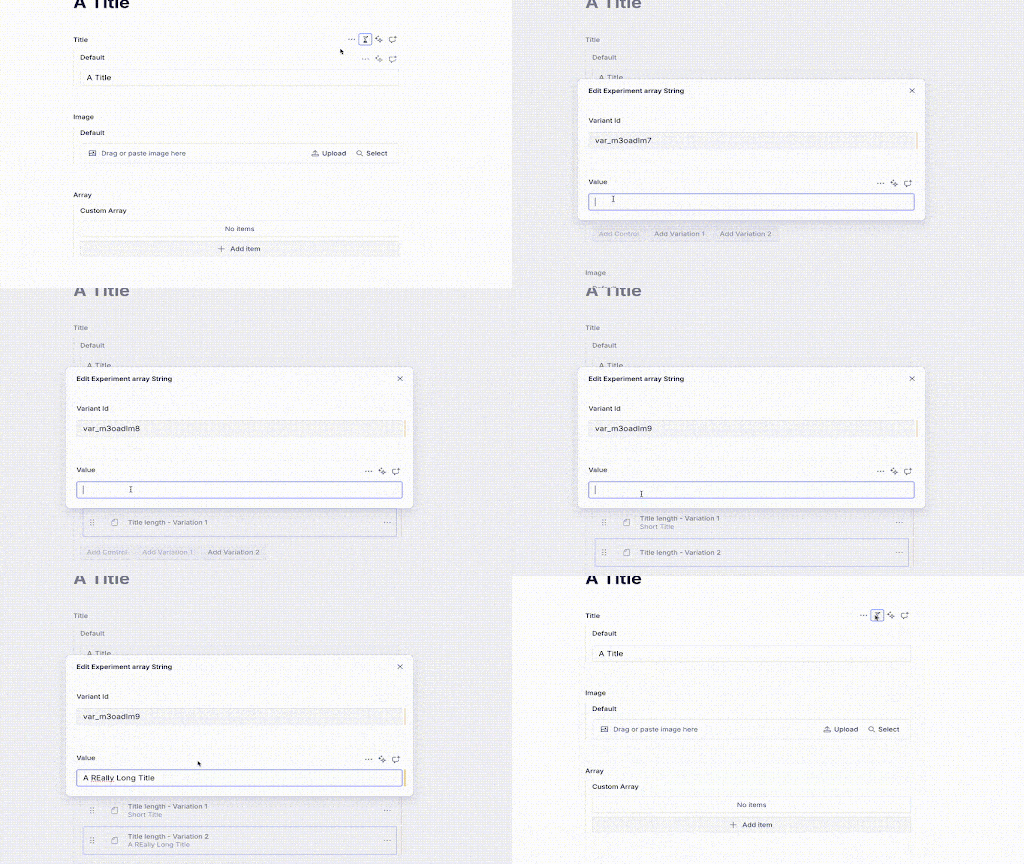
For example, Sanity includes a personalization tool that can use conditional logic to deliver personalized content. As you determine which content works best, Sanity also includes an A/B testing tool with its personalization feature to run two versions of the same content, which can help you determine which is best for your strategy.
Analytics Integration
Another benefit of using a headless CMS is the ability to easily integrate with certain analytics tools, such as Google Analytics 4 (GA4), HubSpot, and Mixpanel.
You can easily integrate your CMS with GA4 by including a Google Tag for your GA4 property in your frontend application and using Google Tag Manager (GTM) for more advanced tracking.
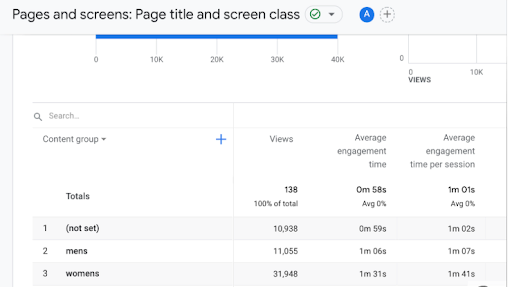
Using tools like GA4, you can also track performance by content type. Within GA4, for example, you can categorize content into different types, including blog posts, landing pages, case studies, and videos. GTM can then help you track pages and events according to content type.
You can also use GA4 to create content groups to track the performance of different kinds of content, such as pages for women’s clothing and men’s clothing for a clothing store.
Developer-Marketer Collaboration
To ensure developers and marketers are on the same page when it comes to content management, there are ways to make the experience of working with a headless CMS for SEO and other marketing efforts easier for marketers.
For example, you can use preview environments to visualize how content will look for designers and content teams before publishing. When conducting a headless CMS comparison between various tools, you can see how previews might look.
You can also maintain version control for content to ensure you are using the right content format for each platform, as marketing needs change, and visual editors can allow for better comprehension when developing a site than raw JSON-LD schema.
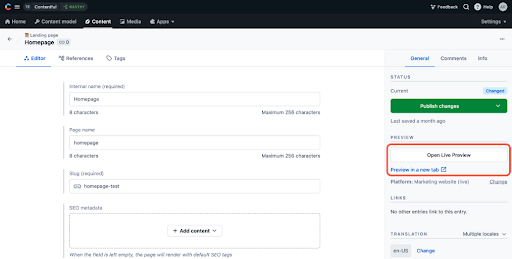
Meanwhile, feature flags can help control the visibility and usage of certain headless CMS features without making changes to any source code. At the same time, different teams can work with multiple content branches, modifying independent copies of original content within your CMS without impacting the primary repository.
Frontend Integration Tips
Here are a few tips to help integrate a frontend for headless CMS systems:
1. Choose the Right Frontend
Depending on your situation, you may choose between different frontend frameworks, including Next.js, Gatsby, and Vue.
Next.js is one of the most commonly used, a React framework that allows for server-rendered application building. It can use either Static Site Generation (SSG) or Server-Side Rendering (SSR) to load pages faster while making pages immediately available to search engine crawlers.
Gatsby, on the other hand, can help build high-performance sites with dynamic content, also pre-rendering pages at build time to further accelerate load speeds.
Vue is another option, a JavaScript framework that offers ease of learning and simplicity.
2. Handle Routing the Right Way
In most cases, frontend frameworks like Gatsby and Vue will handle routing when using a headless CMS.
Consider using dynamic routing that can retrieve content from the CMS based on the specific URL and platform.
3. Preview Content on Each Platform
Set up a preview environment when possible, which many systems allow, which can help content editors determine how any changes will appear on different platforms.
Live preview SDKs can simplify this process.
4. Efficiently Deploy Content
SSG or SSR frameworks can pre-render or server-render pages to optimize SEO and general performance.
Set up automated deployment workflows using tools like Vercel or Netlify that can trigger deployments or builds when updating content in the CMS.
Then, using GA4 or other analytics tools, you can gauge content’s performance and determine what’s working and what needs improvement to optimize marketing efforts.
FAQs
1. What is a headless CMS in simple terms?
What is headless CMS, exactly? The big difference between a headless CMS and traditional CMS is that a headless platform separates content management from presentation and design, allowing users to easily distribute centrally located content to websites, mobile apps, and other platforms.
2. What are the benefits of a headless CMS?
There are numerous advantages of using a headless CMS architecture, such as:
- Omnichannel content delivery on many platforms
- Developer flexibility
- Enhanced speed and performance
- Increased security
- Future-proofing and scalability
- Faster dev cycles
3. Is a headless CMS better for SEO?
Headless CMS SEO is often easier because it offers faster page loads and overall better Core Web Vitals metrics, more flexibility and customization to optimize schema markup and other elements, and convenient publishing of content on all relevant channels to improve consistency while avoiding duplicate content.
4. What are the best headless CMS platforms?
The answer depends on your specific needs, with some of the top SaaS solutions including Sanity, Prismic, and Hygraph, while open-source options include Strapi, Directus, and Payload CMS. Enterprises can also benefit from Contentful and Contentstack.
5. When should you use a headless CMS?
You should use one of these platforms if you need:
- Content delivery across channels
- Superior scalability
- Frontend flexibility
- Reliable security
6. What is the difference between headless CMS and traditional CMS?
A traditional CMS is monolithic and blends both the front and backend for unified content management and distribution, while a headless solution keeps content management separate from the frontend to decouple the two, allowing for more flexibility of content delivery.
7. How much does a headless CMS cost?
The cost of a headless platform can vary greatly, depending on the solution and scalability requirements. For instance, there are free versions that can handle smaller projects, while enterprises might pay a premium for a highly scalable and feature-rich service based on usage.
Work With Ignite Visibility to Get the Most From a Headless CMS
Want to successfully implement a headless content management system? Our experts could assist you with our extensive, tailored marketing services. We have ample experience in website design and development to provide you with a solution that really works.
You’ll enjoy benefits such as:
- A complete content strategy that guides CMS integration
- Management of your CMS to effectively build and manage content
- A high-quality website to serve as your business’s hub
- An omnichannel strategy that reaches your target audience on all relevant platforms
- And more!
Learn more about our website development services to discover how we can fuel your site’s long-term growth.

