


While traditional content management systems (CMS) have worked for many years, as content delivery trends and platforms change, the frontend element of these systems just isn’t as versatile as it once was. Enter headless CMS systems, tools that can increase flexibility, speed, and omnichannel content deliverability, making them appealing solutions in today’s environment.
In this blog, Lucas Dantas, Head of Engineering, will look at the differences between headless CMS vs. traditional CMS systems, the various headless CMS features for different platforms, and how to integrate headless CMS platforms into your current setup.
What You’ll Learn:
- What is a Headless CMS?
- Why Marketers Should Care
- Content Modeling Mastery
- Personalization and Dynamic Content
- Analytics Integration
- Developer-Marketer Collaboration
- Frontend Integration Tips
- FAQs
What is a Headless CMS?
So, what is a headless CMS? Old-fashioned CMSs have a monolithic architecture that combines content creation and management in the backend with presentation in an integrated frontend, with headless CMS meaning that the frontend (i.e., the “head”) is separate, leaving just the backend.
Headless CMS architecture allows for a bit more wiggle room for content delivery compared to the structure of traditional CMS tools, usually integrating into different frontend tools through APIs, e.g., the Contentful headless CMS platform.
For example, while WordPress and other conventional CMS platforms include an integrated frontend for content distribution on desktop and mobile browsers, using API integrations to connect with a separate frontend for headless CMS solutions can make your content compatible with mobile apps, social media platforms, and many other types of media and devices.

My Expert Opinion on Headless CMS Solutions
In the world of CMSs, traditional models have been extremely convenient, combining the frontend and backend into a single solution that made it easy to design, manage, and implement content seamlessly.
However, today’s omnichannel marketing strategies make traditional CMSs more rigid and restrictive, as platforms like WordPress work mainly for basic desktop and mobile browsers on the frontend, with limited versatility when it comes to displaying content across platforms.
Ultimately, if you want to ensure your content reaches your target audiences at all crucial touchpoints with your CMS, headless might be the way to go.

Why Marketers Should Care
If you’re not sure why you might need a headless content management system for your content marketing strategy, there are a few key benefits of implementing headless CMS platforms for marketers:
- Faster Time to Market: Using headless CMS options, content creation and development teams can work in tandem, keeping both processes efficient to decrease the amount of time it takes to develop and launch new content. For instance, you can benefit from increased agility as you develop content for multi-platform holiday marketing, developing and delivering content for your website, apps, and social media channels well in time to promote early to last-minute sales.
- Omnichannel Publishing Capabilities: Headless CMS tools enable you to develop and manage all content within a single, centralized solution before distributing it across everything from websites and mobile apps to voice assistants, smart watches, and Internet of Things (IoT) devices, among other emerging platforms to connect with target audiences wherever they are.
- More SEO Control: Headless CMS architecture also helps with search engine optimization (SEO), as it can more effectively optimize content delivery through content delivery networks (CDNs) for faster loading times and generally improved Core Web Vitals due to better overall performance, which can directly impact search engine rankings. You also get more control over key technical SEO elements like URL structure, meta tags, and structured data.
- Increased Personalization: Pull data from various platforms’ APIs to deliver highly personalized content, taking into account user behavior to develop a tailored experience. You can also integrate headless CMS systems into customer relationship management (CRM) tools and customer data platforms (CDPs) to collect and analyze critical customer data to inform personalization efforts.
These advantages illustrate how headless CMS development could be the key to more effective marketing efforts.
Content Modeling Mastery
To get the most from your headless CMS, it’s important to know how to optimize your content model based on your needs.
Here is some basic guidance on how to implement some critical components in your content:
Canonical Tags
Canonical tags are HTML elements that indicate which iteration of a web page is the ideal version, preventing duplicate content from causing potential issues.
Take the following steps to implement canonical tags using headless CMS tools:
- Store canonical URLs within the headless content management system, ideally within a field for each page that includes the canonical tag.
- Retrieve the canonical URL through an API on the frontend, applying it to the “<head>” section of each page. The end tag would look something like “<link rel=”canonical” href=”…”>.”
- Include the canonical tag for filtered product pages and other types of duplicate or near-duplicate content, further indicating which is the preferred page version you want search engines to index.
Open Graph Meta Tags
To prepare content for social media, you can use Open Graph meta tags that control how content appears in social media posts.
Here are some steps to make full use of these with headless CMS development:
- Create custom fields within your headless CMS platform content model for every Open Graph property you would like to manage for social media channels, including “og:title,” “og:description,” and other relevant tags.
- Fill each custom field with relevant content that applies to each page.
- Use an integrated API to retrieve the meta tags and incorporate them into the page’s “<head>” HTML.
XML Sitemaps
An XML sitemap can be a great way to boost SEO, helping search engine bots more efficiently crawl websites to accelerate indexing and ranking.
Take these steps to develop an XML sitemap using a headless CMS:
- Use your headless CMS tool to compile a list of all URLs with deliverable content.
- Structure the XML sitemap using the standard format, e.g., “” and “” elements for all URLs.
- Implement webhooks or cron jobs to automatically update your sitemap as your website changes.
JSON-LD Schema
When optimizing content for SEO, structured data is essential, with JavaScript Object Notation for Linked Data (JSON-LD) Schema being one of the most popular formats for implementation.
It’s easily embedded in HTML content, usually within the “<head>” of web pages in the form of a “<script>.”
SSG and ISR
Next.js, an open-source web development framework, makes building web applications easier than ever, automating simple development tasks.
Two components within Next.js, Static Site Generation (SSG) and Incremental Static Regeneration (ISR), can support your SEO efforts.
SSG can do so by pre-rendering HTML files, making all content and metadata available to search engine bots as soon as they land on your website. Pre-built pages also allow for faster loading times, which can appeal to Core Web Vitals for even better SEO performance, and a smoother user experience means more engagement, indirectly boosting SEO.
Speed, Performance, and Delivery
The right headless CMS features can optimize these elements when managing content.
The combination of CDNs, asset optimization, and lazy loading can all work to create the perfect content delivery system through headless CMS architecture.
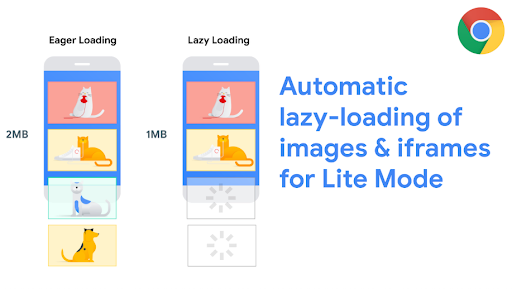
While CDNs cache and distribute content via APIs and reduce loads on origin servers for better performance, asset optimization on the backend eases the burden on the frontend for headless CMS integrations. Lazy loading, meanwhile, allows content to load on each page only as the user scrolls down, which can shorten load speeds for a better UX and further appeal to Core Web Vitals.
JAMstack, Pre-rendering, and SSR Benefits
Three crucial components in optimizing content delivery include:
- JavaScript, APIs, and Markup (JAMstack): This headless CMS development architecture uses serverless functions to deliver pre-rendered and static content to shorten load speeds and improve headless CMS SEO, while also improving security and indexing.
- Pre-rendering: This technique involves generating static HTML files and serving them directly to visitors for even faster load times while making page content immediately crawlable for search engines for easy indexing.
- SSR: This technique involves servers generating HTML content and sending it to each user’s browser, which can make dynamic content particularly easy for crawlers to index while shortening load times.
Personalization and Dynamic Content
Using tools like Sanity and Contentful headless CMS systems, you can personalize content and make it dynamic to more directly connect with your target audiences across platforms.
More specifically, you can develop unique audience personas to segment your audience and deliver personalized content experiences to each segment and individual user.
APIs allow you to more easily personalize with dynamic content.
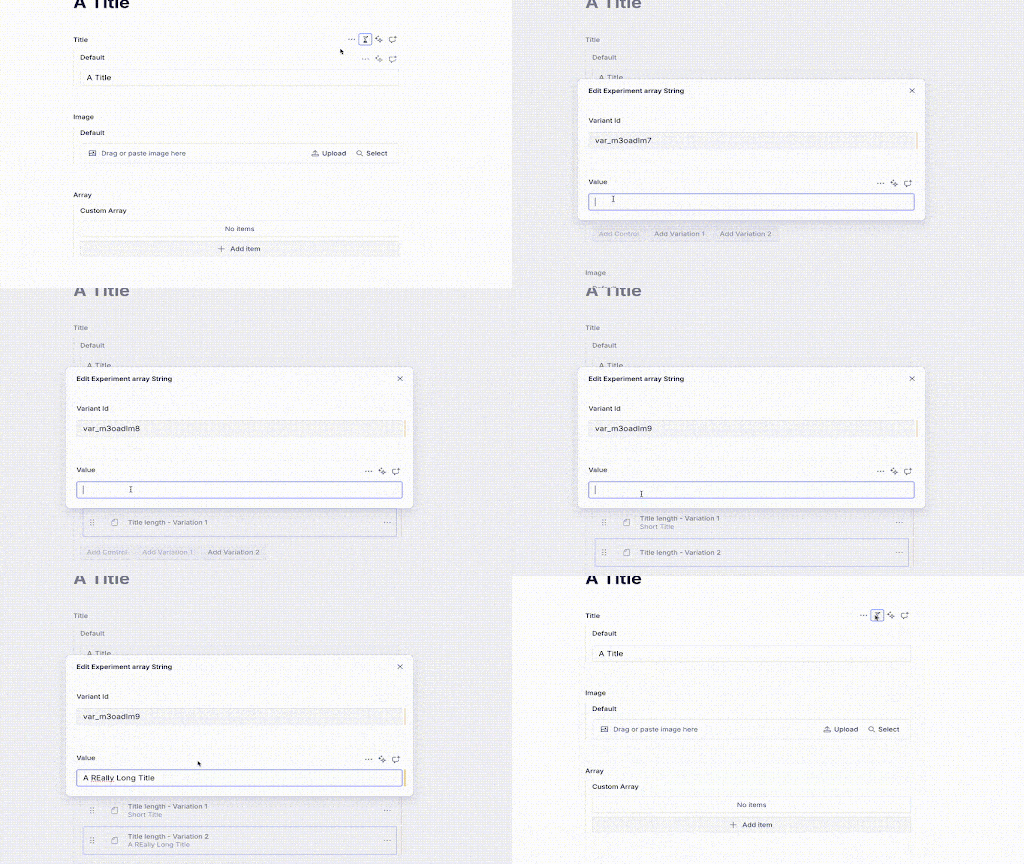
For example, Sanity includes a personalization tool that can use conditional logic to deliver personalized content. As you determine which content works best, Sanity also includes an A/B testing tool with its personalization feature to run two versions of the same content, which can help you determine which is best for your strategy.
Analytics Integration
Another benefit of using a headless CMS is the ability to easily integrate with certain analytics tools, such as Google Analytics 4 (GA4), HubSpot, and Mixpanel.
You can easily integrate your CMS with GA4 by including a Google Tag for your GA4 property in your frontend application and using Google Tag Manager (GTM) for more advanced tracking.
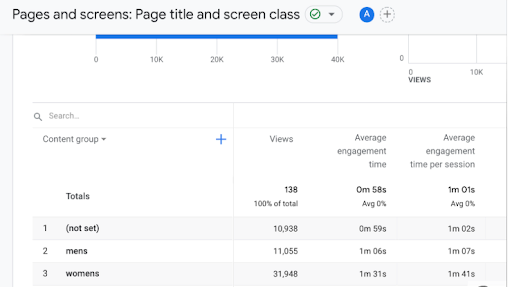
Using tools like GA4, you can also track performance by content type. Within GA4, for example, you can categorize content into different types, including blog posts, landing pages, case studies, and videos. GTM can then help you track pages and events according to content type.
You can also use GA4 to create content groups to track the performance of different kinds of content, such as pages for women’s clothing and men’s clothing for a clothing store.
Developer-Marketer Collaboration
To ensure developers and marketers are on the same page when it comes to content management, there are ways to make the experience of working with a headless CMS for SEO and other marketing efforts easier for marketers.
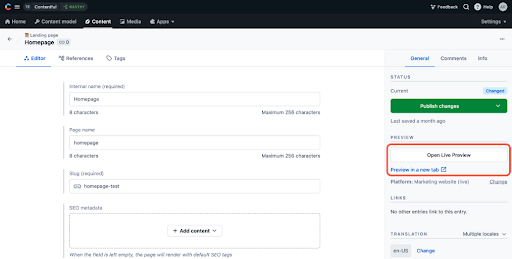
For example, you can use preview environments to visualize how content will look for designers and content teams before publishing. When conducting a headless CMS comparison between various tools, you can see how previews might look.
You can also maintain version control for content to ensure you are using the right content format for each platform, as marketing needs change, and visual editors can allow for better comprehension when developing a site than raw JSON-LD schema.
Meanwhile, feature flags can help control the visibility and usage of certain headless CMS features without making changes to any source code. At the same time, different teams can work with multiple content branches, modifying independent copies of original content within your CMS without impacting the primary repository.
Frontend Integration Tips
Here are a few tips to help integrate a frontend for headless CMS systems:
1. Choose the Right Frontend
Depending on your situation, you may choose between different frontend frameworks, including Next.js, Gatsby, and Vue.
Next.js is one of the most commonly used, a React framework that allows for server-rendered application building. It can use either Static Site Generation (SSG) or Server-Side Rendering (SSR) to load pages faster while making pages immediately available to search engine crawlers.
Gatsby, on the other hand, can help build high-performance sites with dynamic content, also pre-rendering pages at build time to further accelerate load speeds.
Vue is another option, a JavaScript framework that offers ease of learning and simplicity.
2. Handle Routing the Right Way
In most cases, frontend frameworks like Gatsby and Vue will handle routing when using a headless CMS.
Consider using dynamic routing that can retrieve content from the CMS based on the specific URL and platform.
3. Preview Content on Each Platform
Set up a preview environment when possible, which many systems allow, which can help content editors determine how any changes will appear on different platforms.
Live preview SDKs can simplify this process.
4. Efficiently Deploy Content
SSG or SSR frameworks can pre-render or server-render pages to optimize SEO and general performance.
Set up automated deployment workflows using tools like Vercel or Netlify that can trigger deployments or builds when updating content in the CMS.
Then, using GA4 or other analytics tools, you can gauge content’s performance and determine what’s working and what needs improvement to optimize marketing efforts.
FAQs
1. What are the main benefits of using a headless CMS?
There are many headless CMS examples out there that demonstrate a variety of benefits, including omnichannel content delivery capabilities, improved scalability, more flexibility of content development and delivery, faster content development, optimized SEO and performance, enhanced security, and the freedom for engineering teams to select any frontend framework for the presentation layer.
2. Is a headless CMS good for SEO?
Yes, these platforms are often great for SEO, as they can allow for the integration of structured data to help with technical SEO, while SSR and SSG in frontend frameworks can immediately provide page data to search engine crawlers to accelerate indexing. This approach can also shorten page load times.
3. Can marketers use a headless CMS without coding?
With visualizations and visual editing tools, content editors can more easily build and make changes to content without the need for any coding skills.
4. How is a headless CMS different from a traditional CMS like WordPress?
While traditional CMS systems include both a frontend and a backend in a monolithic architecture, headless platforms decouple the backend from the frontend, functioning as an integratable backend with APIs. This structure generally allows for more flexibility, as you can deliver content to many types of platforms.
Work With Ignite Visibility to Get the Most From a Headless CMS
Want to successfully implement a headless content management system? Our experts could assist you with our extensive, tailored marketing services. We have ample experience in website design and development to provide you with a solution that really works.
You’ll enjoy benefits such as:
- A complete content strategy that guides CMS integration
- Management of your CMS to effectively build and manage content
- A high-quality website to serve as your business’s hub
- An omnichannel strategy that reaches your target audience on all relevant platforms
- And more!
Request a free proposal from us to find out how we can take your marketing to the next level.

