

Pay-per-click is demanding. It takes extensive research, regular testing, and constant adjustments to make a consistent profit on campaigns.
But you’re struggling to juggle PPC optimization with everything else. And with PPC becoming more competitive, making the most of your ad spend is more important than ever.
Luckily, there’s a solution: automation tools. So in this article, you’ll learn what PPC automation tools are, how they work, and how to use them effectively.
What is PPC Automation?
In its purest form, PPC automation is using software to optimize pay-per-click campaigns. It lets you outsource repetitive tasks to high-performance software, saving massive time and effort.
How Does It Work?
PPC tools connect directly to your ad platform to read and modify data. While it’s not totally hands-free (you’ll need to make some adjustments), they aim to remove as much effort as possible according to their stated goal.
For example, Optmyzr uses years of historical data to optimize Google, Facebook, and Amazon accounts. It’s already done the research—you’ll only need to decide which suggestions to take.
So while automation tools still need human oversight, they’ve done most of the work.
Why It is Necessary
Effective marketing depends on maximizing your available resources. When your team spends too much time on repetitive tasks, they can’t focus on advancing your larger marketing strategy.
PPC software automates all the boring stuff, multiplying its users’ productivity.
Say your team spends ten hours a week optimizing bidding by hand. If they automate that task, they have ten more hours to write better copy, run consumer surveys, or do anything else.
Types of PPC Automation Tools
PPC automation software varies widely in its roles. With the right software, you can automate almost any part of your ad campaigns.
So next, we’ll break down the different kinds of automation tools and suggest the best tools for each job.
Software
By handling routine tasks, PPC automation software lets teams work more efficiently. But not all software serves the same purpose.
Reporting and Integrations
Gathering data, connecting sources, and building charts all make reporting painful for PPC managers.
Reporting tools streamline this process by automating most of these tasks. They integrate with ad platforms like Google Ads and Amazon to instantly extract data and build reports.
So when choosing a reporting tool, ensure it includes all your ad platforms. Here are the tools with the most integrations:
Swydo – PPC Automation Reporting
Swydo’s hundreds of templates make it easy to create comprehensive reports. They designed their platform for PCC managers and make it easy to manage countless integrations for multiple clients.
Swydo’s integrations include:
- TikTok Ads
- Pinterest Ads
- Mailchimp
- Salesforces
- And many others
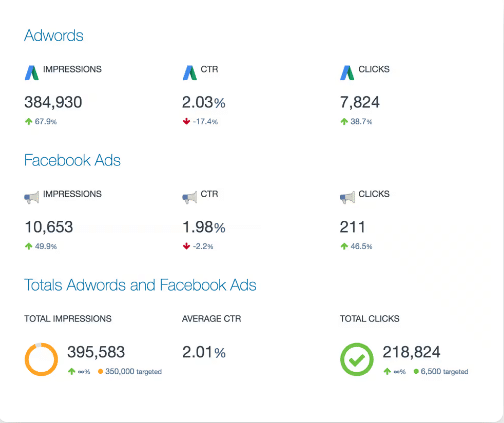
Their reports include detailed KPI tracking based on the ad platform. They’re easy to understand for all skill levels, making them ideal for exporting to clients.
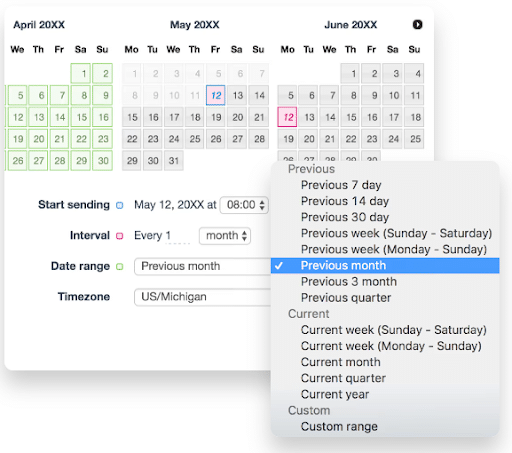
Swydo even lets you schedule reports for delivery to clients, so you don’t have to create and send them every month.
DashThis – PPC Automation Analytics
With robust features, over 34 integrations, and bargain pricing, DashThis is one of the best reporting tools on the market.
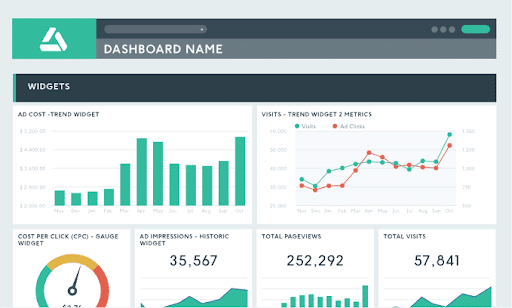
Users can combine data from multiple integrations on its all-inclusive dashboard. And with unlimited data sources, this dashboard becomes a powerhouse of PPC analysis.
Comprehensive Software
Comprehensive software goes beyond reporting tools to automate every aspect of PPC marketing.
These tools create reports, optimize budgeting, manage bids, and more. Essentially, they offer everything needed to create and manage PPC campaigns without leaving the platform.
The most feature-rich comprehensive software tools are:
Optmyzr – PPC Management Software
Optmyzr integrates with five major ad platforms:
- Google Ads (and Google Analytics)
- Microsoft Ads
- Amazon Ads
- Facebook Ads
- Yahoo Ads
Using data from these platforms, Optmyzr creates advanced reports in several formats. These reports are hugely customizable—featuring white labeling, custom date ranges, dynamic tables, and more.
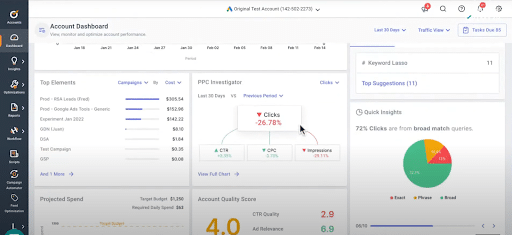
Optmyzr also uses your data proactively with advanced features like:
- Account health warnings. Optmyzr assigns green, yellow, and red health codes for each PPC account based on your KPIs.
- Anomaly detector. Get notifications whenever KPIs diverge from expected levels.
- Page checker. Optmyzr automatically pauses ads for broken landing pages or out-of-stock products.
Opteo
Like Optmyzr, Opteo designed its platform for PPC ad managers. The result is a full-featured tool for automating and optimizing paid click campaigns.
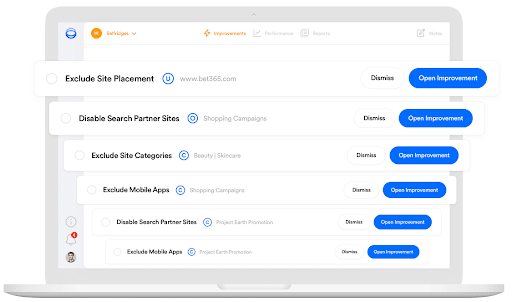
Opteo’s most distinctive feature is its automated exclusion of low-quality traffic sources. For example, Opteo may reject placements on mobile apps, parked domains, adult content, and partner sites.
Custom Tools
Sometimes, you need functionality beyond what PPC software allows. Custom tools allow you to program advanced functions into your ad platforms without any coding skills.
Scripts
In PPC, “scripts” refers to snippets of Javascript performing certain tasks based on your input.
PPC experts usually discuss scripts in relation to Google Ads. Still, they have applications for other ad platforms, like Microsoft Ads.
When people see the word “Javascript,” they often assume they’re out of their depth. But that’s a mistake—anyone can run scripts by using existing libraries.
For instance, you could use this script to disable ads for out-of-stock items:
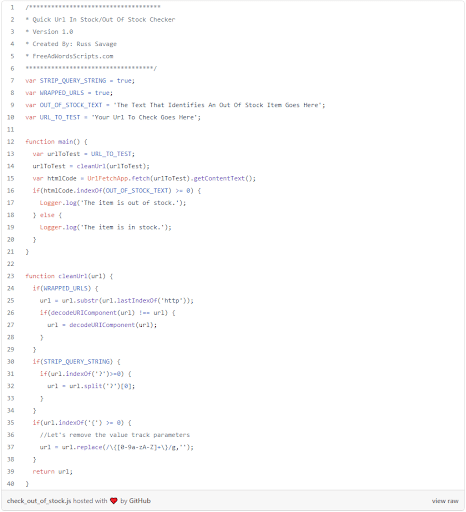
Scripts let you do more than streamlined PPC automation tools allow. With the right coding skills—or the right repository—you can automate anything.
Custom Columns
Custom Columns lets you view customized metrics calculated from Google Ads data. For instance, you could display desktop and mobile CPC instead of general CPC in one column.
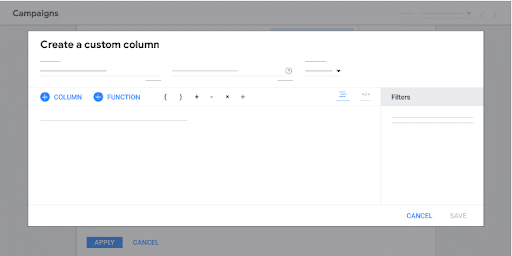
Custom Columns also lets you create metrics not found within Google Ads. It may seem technical, but you only need basic math skills.
Imagine you wanted to create a metric called “Desktop share of impressions,” which is desktop impressions divided by total impressions. This is how you’d do it:
- First, name the column “Desktop impression percentage” and add a description explaining the metric to other users.
- Next, choose the “Impressions” metric and add the “Desktop” filter
- Then, select “÷” and add the “Impressions” metric again.
- Lastly, select “Percent” as the “Data Format.” This makes the column display as a percentage.
This process is simple yet crucial for understanding ad data beyond what even advanced tools display.
PPC Automation: Step-by-Step
Here’s how to automate your PPC campaigns each step of the way:
1. Set Clear Goals
Creating goals before automating might seem obvious, but it’s crucial to maximize its effectiveness. Many marketers apply automation randomly, hoping all the adjustments will magically churn out gold.
Cut out the guesswork by setting SMART goals—targets that are specific, measurable, achievable, relevant, and time-bound.
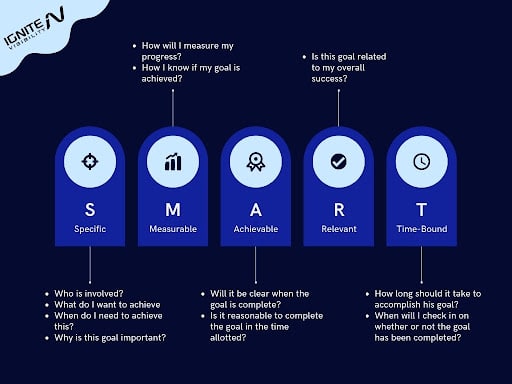
Examples of SMART automation goals include:
- Double sign-ups within two months
- Increase inbound leads by 50% before next year
- Reduce cost-per-acquisition by 20% in 60 days
- Reduce ad spend while increasing inbound leads within 30 days
2. Choose PPC Automation Software
Next, you’ll need to select a PPC tool to manage your automation.
First, identify all the automation features you need according to your goal. For example, you’ll need software that optimizes bids and filters bad traffic to reduce ad spending.
Second, your tool needs integrations for all your ad platforms.
Imagine you ran ads on TikTok, but your chosen tool didn’t have that platform. A new tool would be your only option.
3. Connect Integrations
All PPC software relies on integrations to source and edit data.
So before doing anything else, you’ll need to connect your PPC software with all your ad platforms. Thankfully, most tools make this a one-minute process for each tool.
4. Analyze Initial Reports
When first loading integrations onto your PPC tool, you may see performance metrics you haven’t seen before. This information may give you a new perspective on your campaign’s performance.
You may find serious issues, like slow landing pages, bad copy, and missing keywords. These core issues lead to weak metrics, like low CTRs and high acquisition costs.
If that’s the case, stop pursuing your initial goal of tackling these problems. Since basic issues affect the entire campaign, fixing them helps you achieve your goals.
5. Begin Automation
Once you’ve addressed the initial issues, you can begin implementing automation tools. Start with basic functions—like bid management—and work your way up to advanced features like enhanced scripts.
6. Review Results and Refine
While the results of your automation will be immediate, they will take a few weeks to manifest themselves fully. As they roll in, pay attention to your KPIs, seeing how they react to the adjustments.
More importantly, relate these results to the goal you set at the beginning.
Did you reach your goal? If not, where did you fall short? Will more time with your new adjustments eventually lead to success, or do you need to make a drastic change?
Pros and Cons of PPC Automation
You can reap enormous benefits from PPC automation, but it’s not without its drawbacks. Here are both sides of the story:
Pros
Increased Scale: With automation, you can run more campaigns without spending more time. It’s like adding five more people to your team.
Effortless Bid Management: Adjusting bids based on ever-changing data is stressful and time-consuming. PPC automation tools use advanced algorithms to handle this task efficiently and effectively.
Optimized Ad Copy: Automation tools use vast amounts of data to optimize copy beyond human ability. They analyze each word according to your industry, projecting performance for each variant.
Easy & Comprehensive Reports: Reporting becomes effortless and more accurate with automation tools. They organize all ad platform data into customizable reports on demand—you can even schedule them to create and send reports by themselves.
Higher ROAS: Automation tools’ enhanced functions drive better overall results for ad campaigns, provided they’re used correctly.
Cons
Cost: Automation tools can be expensive. But considering their huge ROI, the cost is generally manageable.
Success Not Guaranteed: People often approach automation tools thinking they’re just a few clicks away from the Fortune 500. But automation won’t solve fundamental problems with your business—or improper use of the software.
Start Automating Your Campaigns Now
As PPC grows, so will its automation tools. It won’t be long before software replaces most PPC work altogether.
You have the most to gain by taking action now. Start comparing tools, integrating your channels, and optimizing your campaigns.
Years down the line, their impact on your business will be enormous.
