

The Meta Conversions API, also historically known as the Facebook Conversions API, is essential for optimizing ad performance by connecting your ads to your website, apps, and other platforms to track specific events. Meta reports that advertisers using a web event-based conversion API setup saw an average 17.8% decrease in cost per result compared with advertisers without this component.
In this blog, Javier Rodriguez, Senior Director of Paid Media, will provide a Meta Conversions API overview and detail how you can use it for Facebook Ads conversion tracking and optimization.
What’s Covered:
- What Is Facebook Conversions API and What Does It Actually Do?
- Meta Pixel vs. Conversions API: Why Advertisers Often Use Both
- Key Benefits: Why Use CAPI?
- How to Set Up Facebook Conversions API
- Test CAPI and Troubleshoot the Most Common Problems
- Facebook Conversions API FAQs
TL;DR
- Meta Conversions API (CAPI) sends website, CRM, app, and offline conversion data to Meta to improve ad tracking and optimization.
- Combine CAPI with Meta Pixel to improve measurement and reduce tracking gaps.
- Track meaningful events, such as qualified leads, purchases, and completed sales.
- Prevent duplicate conversions by matching event names and IDs across both systems.
- Protect customer privacy by respecting consent requirements and sharing only permitted data.
- Measure success through qualified leads, sales, and acquisition costs, not just reported conversions.
What is Facebook Conversions API and What Does It Actually Do?
Meta Conversions API (CAPI), previously called Facebook Conversions API, is a component that connects marketing events from a server, website platform, app, or CRM to Meta and, in turn, Meta Ads for performance measurement and ad optimization.
The acronym API stands for application program interface, and, simply put, is a kind of software conduit that allows two different platforms to communicate with each other.
However, you might be unfamiliar with this solution and how to use it.
Meta has chosen a few select agencies to partner with to provide the simplest way to use CAPI, and Ignite Visibility is one of them.
In other words, we’re ready to help you set up the Conversions API to establish a direct connection between the marketing data you collect and Meta, with the ability to track each online and offline conversion on Facebook.
The goal of using Facebook CAPI is to help advertisers make use of first-party data, overcoming the challenges of doing so in recent years. In turn, you can optimize ad targeting, reduce cost per action, and put together a much fuller picture of your results without violating users’ privacy.
While privacy is an understandable priority for Apple, Google, and many other digital companies, it has severely limited the use of third-party data for advertisers.
CAPI can help maintain compliance with privacy measures like iOS updates using first-party data while still respecting users’ privacy.
The Facebook conversion API can ultimately help improve measurement and optimization signals, giving you the ability to continually optimize your ads over time.
My Expert Opinion on Facebook Ads Conversion Tracking
Social media advertising is one of the most important tools for brands to reach and convert audiences, and Meta—formerly Facebook—is no exception.
With the right approach to Meta Ads, you can reach the right audiences at the right time with precise targeting and the right timing, which is where the Meta Conversions API comes into play. While Meta Pixel can help with ad optimization with client-side tracking, the Facebook conversion API takes advantage of server-side tracking for additional benefits.
We at Ignite Visibility have helped clients across a range of industries get the most from their Meta Ads campaigns with the help of the Facebook Conversions API, with one painting franchise client seeing a 44% decrease in cost per lead and a 29% boost in leads within five months of launching Meta Ads. Another client was able to get an average of 33 leads per month and get franchise deals at $3,500 per location with a Meta Ads paid social engine.
If you want to see figures like these or other comparable results to your industry’s top performers, it helps to know how to properly use this tool to track every conversion on Facebook.
Meta Pixel vs. Conversions API: Why Advertisers Often Use Both
Before CAPI came along, advertisers could rely solely on Facebook Pixel to collect data from users and track campaign performance.
However, with the iOS14 update from Apple boosting privacy for users, advertisers suddenly needed more than Pixel to help with campaigns.
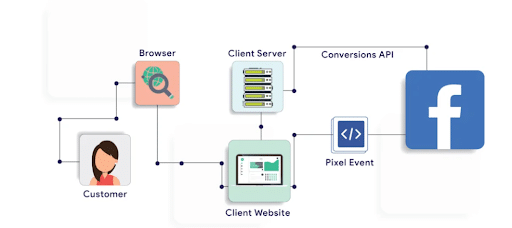
Enter Facebook conversion API, which can work with Facebook Pixel, now called Meta Pixel, to help you get the most from your data. While Pixel helps track the customer journey and interactions, the Conversions API will show you the end results of your efforts.
The Conversions API ultimately helps by measuring customer actions gained from Pixel, which increases the transparency of the buyer’s journey. You can also use CAPI to decide which data to share with Facebook Ads Manager and when you want to share it.
Here’s a little comparison of the two to clear up how they work both separately and together
| Attribute | Meta Pixel | Meta Conversions API |
| Where Events Originate | Client-side; runs as a JavaScript snippet in users’ web browsers | Server-side; sent directly from a web server, CRM, POS system, app, or commerce platform to Meta |
| What It Can Report | On-site browser interactions, clicks, page views, scroll behavior, browser cookie or click IDs, and standard web events | Online browser conversions, offline purchases, CRM data, lead generation updates, subscription renewals, phone calls, and other conversion events from backend systems that your server can access |
| Implementation Requirements | Simple setup that only entails pasting a JavaScript code snippet into a website’s header or through a tag container | Moderate to high technical effort, with the need for backend development, a direct CRM/commerce integration, cloud/server infrastructure, or a partner gateway |
| Common Limitations | Suffers from potential ad blocker usage and browser privacy restrictions that can lead to a significant decrease in reported events | Needs ongoing technical maintenance and server management; when running with Meta Pixel, it also needs the right “event_id” deduplication to mitigate the reporting of duplicate events |
Ultimately, using Facebook CAPI and Pixel together will help you fully understand and optimize your campaign performance.
Using both the Meta Pixel and conversion API together could look something like this path:
- A customer makes an online purchase after clicking through a Meta Ad.
- The browser reports checkout completion with the Pixel.
- The server reports the same purchase via the Meta Conversions API.
- Deduplication keeps the system from counting the event twice.
One thing to remember is that while server delivery can reduce dependence on browser data, effective data collection and matching may still need browser data for context, along with permitted identifiers.
Key Benefits: Why Use CAPI?
Facebook conversion API offers multiple advantages that make it worth implementing for your ad campaigns.
Here are some of the more specific benefits of using Facebook CAPI:
Harness the Power of First-Party Data
With the release of iOS14 and other privacy measures, Apple and other companies worked to phase out third-party data and boost user privacy.
What CAPI does is help you connect customer interactions to Facebook Ads Manager more directly, helping you use valuable user data that can help you optimize your ad campaigns.
When people interact with you via your website or another interaction, such as a lead ad or CRM, you can use this data to your benefit.
Protects Users’ Privacy
Facebook CAPI allows you to collect vital user data to help you improve your ad targeting and personalization capabilities.
At the same time, you’ll maintain users’ privacy.
Instead of relying on third-party data, you’ll collect first-party data through direct interactions, eliminating the need for Facebook Pixel alone.
Boosts Overall Ad Performance
Deeper insights into customer actions and the customer journey will help you fully optimize your ads.
By integrating Facebook Conversion API, you can enhance Meta Pixel and gain full transparency into how people are interacting with your brand.
If you want to future-proof your marketing strategy, CAPI integration will go a long way in doing so.
Why Marketers Should Really Care
Marketers want to make full use of CAPI to ensure their campaigns can succeed with the lowest cost per acquisition (CPA) and other expenses.
Facebook Conversions API allows for this by giving marketers more control over data sharing and collection. These capabilities enable marketers to paint a complete picture of the customer journey.
Also, marketers can target the right people by giving Meta all the correct signals it needs for running ad campaigns. As a result, you can avoid any false positives or negatives that might otherwise hurt your efforts.
Perhaps most importantly, marketers will need CAPI once third-party cookies are officially gone. Using the Conversions API, you can use first-party data to effectively compensate for the loss of third-party data.
Choose the Right CAPI Setup for Your Business
When determining how to set up Facebook Ads conversion tracking with Meta Conversions API, consider the following elements and how they work:
| Attribute | Partner Integrations (e.g., Shopify, WooCommerce, and Salesforce) | Conversions API Gateway | Server-Side Tag Management | Direct API Implementation |
| Supported Events | Standard web events and standard commerce/messaging/CRM events | Standard web events that existing Meta Pixels trigger, but does not natively support offline events, mobile apps, or non-Meta platforms | Multi-platform web, app, and custom data streams, with the ability to forward events to Meta CAPI, GA4, and other platforms at once | Comprehensive coverage across web, native mobile app, offline and POS in-store, CRM, and messaging events |
| Technical Ownership | Shared/Managed, with partner platforms handling integration logic | You would own the cloud infrastructure within your Google Cloud or AWS account, with self-serve setup available within Meta’s Events Manager | In-house or agency, with owners managing server containers, data enrichment/cleansing rules, and tagging logic | Fully in-house and requires software development and backend infrastructure |
| Maintenance | Low, via platform updates and partner-managed connectors | Low to moderate, with owners responsible for cloud server uptime, gateway updates, and AWS or Google Cloud Partner bills | Moderate to high, requiring Google Tag Manager tagging knowledge, container updates, tracking QA, and server-side request load monitoring | High, as engineering teams need to manually maintain the API payload structure, manage server reliability, handle deduplication, and integrate Meta Graph API version changes |
| Cost | Varies from partner to partner, often in subscription bundles | Free software and setup from Meta, though owners must pay standard cloud hosting fees | Variable, ranging from free open-source Google Tag Manager software to fees for cloud hosting for server containers | High initial development cost, with developers often taking weeks with a direct integration |
Look at Meta’s documentation for a Meta Conversions API gateway overview.
Before choosing your setup, evaluate your existing platform’s supported integration. You may find that custom implementation is best if a setup can’t cover required events or business systems.
There’s also a newer Meta-enabled Conversions API opt-in option available in Meta’s official tag template. To determine whether you can use this feature, check availability and supported scope in your Meta Ads account.
Plan Your Conversion Events Before Connecting Tools
Next in this Meta Conversions API overview, let’s look at how you can plan different types of conversion events using three examples of business actions:
| Business Action | Trigger | Source System | Event Name | Event ID | Value/Currency | Responsible Owner |
| An ecommerce customer completes a checkout online | The payment gateway captures funds and the order management system produces a success receipt | Ecommerce backend order management system or payment processor | Purchase | Order_[order_number] and Purchase | Required, e.g., value: 124.50, currency: USD | Backend software engineers or ecommerce data analysts |
| A home service inquiry becomes a qualified opportunity | A sales rep moves the lead pipeline stage to Sales-Qualified Lead (SQL) in your database | Corporate CRM platform like Salesforce or HubSpot | Lead or a Custom Event like “QualifiedOpportunity” | “crm_opp_[opportunity_id]” or “lead_[crm_contact_id]” | Highly recommended using a baseline value or average deal value | CRM administrators or marketing operations specialists |
| A customer makes an in-store transaction | The cashier or self-checkout terminal closes out the ticket | POS systems like Square or a legacy ERP system | Purchase | pos_tx_[receipt_number]_[store_id] | Required | IT systems integration engineer or retail operations manager |
In any of these or other cases, define success before sending data, as form submissions, qualified leads, bookings, and completed sales are all different outcomes.
Also, prioritize meaningful events that occur consistently, and avoid labeling every sales funnel step as a purchase or assuming all custom events qualify for ad optimization.
For direct implementations, you’ll also need to consider key fields like:
- Event_name: The name of the standard or custom conversion event in Facebook Conversions API.
- Event_time: When the event occurred.
- Action_source: Where the customer transaction occurred.
Other fields could include customer information from first-party data signals, including emails, phone numbers, first and last names, and date of birth.
For more details about the specific schema structured data, take a look at Meta’s API implementation guide.
How to Set Up Facebook Conversions API
To set up CAPI for data sharing, take the following basic steps:
- Audit existing tracking.
- Confirm business and data source permissions.
- Select the correct dataset or Pixel.
- Choose an integration.
- Map events.
- Test.
- Monitor.
Here’s a breakdown of each:
Step 1: Set Up Your Meta Business Suite Account or Audit Existing Tracking
The first thing you’ll need to do is set up a Meta Business Suite account. Setting up a Business account will allow access to both Facebook Pixel and Ads Manager. Together, both of these tools will help you measure and track customer actions.

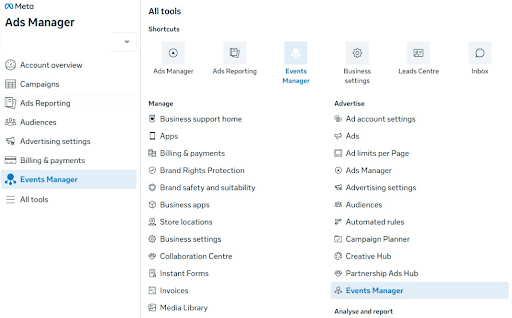
If you have a Meta Business Account and Meta Ads, audit your existing tracking setup, including current pixel data in Meta Events Manager. You can then identify any down-funnel gaps, like missing CRM lead updates or server-side purchases, along with your Event Match Quality (EMQ) score.
Step 2: Confirm Business and Data Source Permissions
Verify Business Manager access, ensuring you have Admin access to Meta Business Manager, the Ad Account, and the specific dataset/Pixel.
Check user roles to confirm you have permission to produce access tokens or configure partner integrations.
In Events Manager, select the Data sources or Data sets tab on the left, and connect sources, including Meta Pixel and Conversions API.
Know that Events Manager differs from Ad Manager’s campaign reporting, which only shows attributed events connected to people who were shown or clicked your Meta ads and measures ad metrics like basic ad performance, return on ad spend (ROAS), and cost per acquisition (CPA).
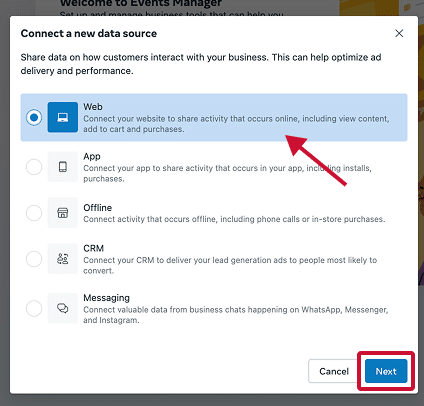
Step 3: Create a Meta Pixel or Reuse an Existing One
If needed, create a Meta Pixel. A pixel places a line of code on your website that allows you to share interaction data with Meta Ads Manager.
Otherwise, reuse an existing data source instead of automatically creating a new Pixel. Additionally, be sure to inventory all plugins, tags, and gateways to avoid overlapping implementations.
Certain partner integrations may also handle credentials and mapping, while direct implementations need secure server-side credentials and a designated technical owner.
Step 4: Choose an Integration Method
Based on the different methods we disclosed above, you can choose between one-click Meta-enabled CAPI in Events Manager, partner integrations, server-side GTM/CAPI gateway, or direct API/manual setup.
Step 5: Install a Meta Pixel on Shopify and/or WooCommerce
If you have a Shopify or WooCommerce store, or both, you’ll want to install the pixel on these platforms.
To set up a Pixel in Shopify, go to Sales channels in the Shopify dashboard, select Facebook & Instagram, go to Settings, and choose Data sharing settings, where you can add your new Pixel.
As of 2026, Shopify documents Facebook Conversions API purchase event sharing for Enhanced and Maximum settings. Keep in mind that both of these settings share customers’ personal information, including their names, email addresses, locations, and browsing behavior in online stores.
To set up the pixel on WooCommerce, you’ll need to go through the following process:
- Look for and install the WordPress “Meta for WooCommerce” plugin, and be sure to activate it once installed. This extension includes CAPI after setup, requiring no additional settings.
- Through the plugin settings, you can connect the plugin to your Meta Business account, which will connect it to your Meta Pixel and other features.
- Choose the settings through the plugin that match your preferences, and include the pixel ID you created in the plugin’s “Facebook Pixel ID” box.
- Access the “Conversion API” section of the plugin settings, enabling it and allowing you to make any additional changes to settings.
When setting up Pixels on either platform, look for old manually installed Pixels as well as overlapping plugins, and test actual purchases and deduplication, even if the integration performs these tasks automatically.
Step 6: Map Events
Match all standard events, e.g., “PageView” or “Purchase.” Also, enable deduplication by passing an identical “event_id” and timestamp across your browser Pixel and CAPI events to prevent the system from counting events twice.
Step 7: Test the Pixel
With the Meta Pixel installed on your Shopify or WooCommerce store, you can make sure it’s working right. The Meta Pixel Helper tool will allow you to test your unique pixel.
Step 8: Set Up Facebook Conversion API
You can now set up your Facebook Conversions API. This process involves accessing your Facebook Business account and going into the Ads Manager section. Here, you can click on Conversions API, where you can select the right configuration for your site.
Step 9: Set Up Events in CAPI
One last step involves setting up events through the Conversions API, which you can do in the following steps:
- Create a specific event to track within the Conversions API, which could be a signup, purchase, and app installs, among others.
- Use your Meta Pixel ID when setting up the event.
- Use Facebook Events Manager to finish setting up the event. Choose the appropriate pixel and include the specific details about your event.
- Add the event code to a designated website or mobile app. When someone completes the event, the data will go from that site or app straight to Ads Manager.
- Test the event for yourself by completing the event and determining if any data goes to Facebook Ads Manager.
- Begin tracking your event to measure the data and determine what steps to take to optimize performance.
Step 10: Monitor Performance
After setup, ensure your API is capturing a sufficient server-to-browser event coverage ratio, with a high EMQ score. Meta recommends an event coverage of 75% or higher.
When monitoring, watch Events Manager for any missing deduplication keys, payload errors, or unhashed user data and resolve these issues to optimize performance.
Connect Your CRM and Offline Outcomes to Meta
Make sure you account for all offline conversion events by connecting your CRM to Meta.
In 2025, Meta officially retired the legacy Offline Conversions API, with current implementations using Facebook CAPI and datasets.
For example, a home services brand might follow this offline journey:
- A home renovation company acquires a Meta lead from a Meta Ad.
- The lead appears in the CRM record.
- The lead undergoes qualification to ensure it’s a good fit for renovation services.
- Booking occurs.
- The system logs the job as completed once done.
Your integration should be able to track all of these as specific outcomes.
In Meta, populate the “action_source” field based on where the action actually occurred, and preserve the actual event time to accurately track when the interaction occurred.
For multi-location ad campaigns, it’s particularly important to maintain location IDs, lead ownership, consistent qualification rules, and the right data source permissions; one dataset may not work for every location.
Finally, remember that successful data transmission does not guarantee attribution to ads or qualification for optimization.
Prevent Duplicate Conversions With Consistent Event IDs
In facilitating deduplication, both browser and server copies of the same action require the same event names and event IDs that go to the same Pixel or data source in Meta.
Browsers and servers use different naming conventions, e.g., “eventID” for browser events and “event_id” for server-side events.
For instance, a purchase would have a unique business event ID between both copies, while a separate purchase gets its own ID. In this case, retrying delivery should maintain the original event ID.
Meta currently has a 48-hour deduplication window for matching browser and server events, but try to send as promptly as possible and avoid looking at that 48-hour period as a target.
When monitoring, flag any failures you find, including these common ones:
- Independently generated IDs
- Mismatched event names
- Repeated IDs across purchases
- Multiple integrations sending an identical event
Improve Event Match Quality Without Oversharing Customer Data
While you want to aim for a high EMQ score, this metric is merely a diagnostic showing how effective your customer information is for event matching. Don’t treat it as a direct measure of lead quality, incremental revenue, or implementation completeness.
When working to boost your score, review all permitted identifiers, formatting, field-specific hashing requirements, and how your integration handles all of these.
In addition to your EMQ score, evaluate other key elements like event coverage, deduplication, data freshness, and accurate values.
And instead of sending as much customer information as you can, only send accurate, permitted information required for measurement.
Apply Privacy Choices to Browser and Server Events
Another factor to consider is privacy, as server-side delivery could help with privacy compliance, but it does not bypass user preferences or guarantee compliance.
To more effectively keep data collection and usage compliant, both the Pixel and server integration must account for privacy notices, applicable consent or opt-out requirements, and permitted data controls.
Check all URLs, event names, custom fields, and CRM mappings for any sensitive customer information. This is particularly important for industries like healthcare, wherein practices should prevent raw intake details from channeling into advertising events to maintain HIPAA and other regulatory compliance requirements.
Look at hashing strictly as a matching and security measure; it does not give you permission to share otherwise prohibited information at any point.
When performing a publication review, consult Meta’s Business Tools Terms, and, if you’re using a Shopify integration, review Shopify’s data sharing guidance to help further avoid noncompliance issues.
Test CAPI and Troubleshoot the Most Common Problems
When testing Facebook Conversions API, confirm the following before launch:
- Events send to the intended data source.
- Deduplication of browser and server copies occurs.
- Timestamps and values are correct.
- Consent controls work properly.
- The responsible owner has reviewed diagnostics.
Don’t rely on the Meta Pixel Helper alone, as this tool simply checks browser tracking without independently validating server delivery. Instead, use Events Manager testing and integration or server logs when evaluating Facebook CAPI.
Here are some common symptoms and where to check for root causes during testing and troubleshooting:
| Symptom | Cause to Check |
| No server events | Credentials and connection |
| Inflated purchases | Duplicate integrations or IDs |
| Weak matching | Permitted identifiers and formatting |
| Missing offline outcomes | CRM triggers and mappings |
Test both failed and repeated submissions instead of focusing on the “happy path.” In doing so, ensure failed payments don’t translate into successful purchase events in the system.
Assign ongoing ownership throughout and always retest after making any changes to checkout processes, CRMs, plugins, consent tools, or websites.
Measure Whether CAPI Improves Business Results
Here’s something to consider when measuring results: Better reporting doesn’t necessarily mean better actual performance, as additional attributed conversions in your system may indicate recovered measurement instead of increased sales.
It’s also crucial to establish a documented baseline against which you can compare tracking health, cost per qualified lead, completed purchases, revenue, and acquisition costs.
If you see that the data looks different in Meta, Google Analytics 4 (GA4), and CRMs, it could be the result of factors like:
- Attribution rules
- Reporting windows
- Time zones
- Matching
- Processing delays
Conduct controlled testing where it makes sense to do so, and avoid crediting Facebook CAPI for simultaneous changes to your creative, offer, or budget.
Facebook Conversions API FAQs
Have additional questions extending beyond “What is the Conversions API?” Here are some frequently asked questions and corresponding answers to help out.
1. Why should I use the Conversions API and Meta pixel together?
Using the Facebook Conversion API with Meta Pixel, you can get even better results from your ad targeting. You’ll also be able to more effectively measure and optimize your campaigns.
Even if you already have a Meta Pixel set up, you can seamlessly integrate the Conversions API.
2. Does the Conversions API negatively affect tracking or websites?
No, integrating Facebook CAPI with your website or app won’t have any negative effect on your data or setup. The only way it could hurt your campaigns is if you remove your Meta Pixel.
3. What types of events can you track with the Conversions API?
There are three main types of events you can measure and track with your Conversions API setup: Website events, app events, and offline conversions.
For instance, when people download your app or sign up on your website, this data will go directly to your Facebook Ads Manager for tracking. These events would be the same as the ones you already track through a Meta Pixel.
4. How can I optimize my CAPI setup?
There are multiple ways you can improve your Conversions API setup, including:
- Sharing as many relevant parameters as possible to optimize event match quality
- Sharing the same events with a website-plus-server connection
- Avoiding duplicate events
- Sharing events in real-time or near-real-time
5. What are the best parameters to share with the Facebook Conversion API?
You’ll be able to match events with accounts more effectively if you share more events with more customer information parameters.
Parameters to share could include client IP addresses along with hashed emails or phone numbers. It really comes down to the specific audiences you want to track when prioritizing parameters.
6. What is event match quality?
One key metric to consider is event match quality, which gauges how well the parameters you share for each event can match the event with accounts.
The higher the event match quality, the more you’ll be able to reach the right people at the right time with your ads. You’ll also improve attribution for your events to determine which ads are getting the best results.
7. Is Facebook Conversions API free?
Yes, the Facebook conversion API is entirely free to use for Meta Ads campaigns. However, while the API itself is free, depending on your setup and integrations, you will have to consider other costs like partner fees, hosting, implementation, and maintenance.
8. Can I use CAPI without a website?
Yes, it’s possible to use Meta CAPI for Facebook Ads conversion tracking without a website, with multiple offline and CRM use cases, such as physical retail sales, call center and phone orders, and CRM lead funnel stage evaluation. The reason for this is that CAPI could pull from other sources outside of website Pixels.
9. How long does implementation take?
The amount of time it takes to implement Meta CAPI will depend on several factors, including partner support, custom events, CRM mapping, permissions, testing, and privacy review, potentially taking anywhere from minutes to weeks.
Get the Most from CAPI with Ignite Visibility
Now that you know more about how to set things up with this Meta Conversions API overview, some next steps to take include auditing your existing Pixel and CAPI setup, verifying the events that represent real business value, and resolving measurement errors before scaling spend.
Want to use CAPI to your advantage?
Lucky for you, Meta has chosen a few select agencies, including Ignite Visibility, to provide a simple solution to setting up this new version of CAPI.
When you turn to us for help with the Conversions API, you’ll enjoy the most user-friendly and simplest way to use the platform. You’ll get other benefits such as:
- Faster CAPI integration that shortens the process from weeks to minutes
- No additional cost when our team manages Meta advertising, with some exceptions depending on volume
- Technical simplicity; simply create your Ignite Visibility subdomain and we’ll handle the rest
- Free maintenance in the form of automatic gateway updates with new features
Ready to get started? Get help with your Meta campaign strategy and measurement with Ignite Visibility’s paid social services, and find out whether Meta is receiving the signals that matter to your business.
