


Your email campaign is live. It’s got a solid copy, compelling offer, and great design. There’s just one problem: it’s landing in spam, and your revenue, engagement, and campaign reporting are all paying the price.
Email deliverability is one of the most underestimated levers in email marketing. Modern inbox providers now evaluate your sender identity, domain reputation, engagement signals, and content quality all at once. Miss the mark on any one of them, and your emails never see the inside of an inbox.
In this blog, Joel Staniszewski, Senior Lifecycle & Email Marketing Strategist, email marketing expert, will discuss ways to improve email deliverability, including various email deliverability tools and best practices that can help you land in people’s inboxes more consistently.
Email Deliverability Checklist: Quick Fixes Before You Troubleshoot
Before we get into the nitty-gritty, let’s run through a quick foundational checklist. These are the email deliverability best practices to have in place before you hit send. Oftentimes, when you land in spam, you can find the culprit on this list.
- Authenticate your domain with SPF, DKIM, and DMARC
- Verify your DNS records are correctly configured
- Clean your email list and remove invalid or inactive addresses
- Check your spam complaint rate (aim for under 0.1%)
- Make sure your unsubscribe button is a visible, one-click process
- Run an email deliverability test to check inbox placement across providers
- Monitor Google Postmaster Tools for domain and IP reputation signals
- Segment out unengaged subscribers before your next send
- Review your email content for spam trigger words and poor text/HTML ratios
My Expert Opinion on Email Deliverability
Many businesses still have to deal with various email deliverability issues that hold them back. Today, around 64.6% of businesses state that poor email deliverability has hurt their revenue and customer retention, while a mere 23.6% of companies actually verify their email lists prior to launching a campaign.
Getting your deliverability right could be hurting you more than you think. Without it, your emails don’t land, and the campaign you’ve worked hard on won’t be seen. And that’s the point, right? In a recent client experience, Ignite helped a SaaS investment management software provider improve their email marketing strategy and deliverability. Our campaign led to a 78.77% increase in click rates, a 39.54% increase in unique open rates, and a 28.11% increase in click-to-open rates. Without establishing strong email deliverability, they would have never seen success like that.
If you’re not developing an effective email marketing strategy, you’re going to have a hard time avoiding spam folders and ensuring people see your emails with every campaign.

What is Email Deliverability?
Email deliverability refers to the ability of your emails to reach recipients after being sent. It sounds simple, but there’s an important distinction between deliverability and delivery that a lot of marketers gloss over and it matters more than you might think.
Email Delivery vs. Email Deliverability
| Email Delivery | Email Deliverability | |
| What it Measures | Whether your email was accepted by the receiving server | Whether your email landed in the inbox vs. spam or promotions |
| What it Tells You | That your email wasn’t bounced or blocked outright | How your sender reputation, content, and engagement are performing |
| Success Looks Like | Low bounce rate | High inbox placement rate |
| Tools to Monitor | ESP delivery reports | Google Postmaster Tools, MXToolbox, Mail-Tester |
Think of it this way: Delivery is the floor. Deliverability is the goal. You can have a near-perfect delivery rate and still a massive chunk of your list will never see your emails because they’re being routed to spam.
If you want to know how to improve email deliverability, the key is identifying the specific causes of email deliverability issues. From there, you can determine the best practices and solutions to help optimize it.
Symptoms of Spam Issues
Before you can improve email deliverability, you need to know if your emails are going into people’s spam folders.
The signs that you might be having spam issues aren’t always obvious, and relying on open rates alone will leave you flying blind. Here’s the full picture of what to watch for:
- Drop in Open Rates: Still the most visible signal, but don’t treat it as the only one. A consistent decline usually points to an inbox placement problem, especially if it’s provider-specific.
- Rising Bounce Rate: A spike in hard or soft bounces is a sign your list health is deteriorating and your sender reputation is at risk. Left unchecked, high bounce rates will accelerate deliverability problems fast.
- Falling Click-Through Rate: If opens are holding steady but clicks are tanking, your emails may be getting filtered into tabs or secondary folders where engagement naturally drops off.
- Provider-Specific Drops: If your metrics are tanking for Gmail users but fine everywhere else or vice versa, that’s a strong indicator of a provider-level reputation issue worth investigating separately.
- Spam Complaint Spikes: A surge in junk or spam reports is a direct signal to inbox providers that something is off. Keep your complaint rate under 0.1% — consistently.
- High Unsubscribe Rates: A sudden unsubscribe spike can indicate your emails are reaching unengaged or misaligned audiences, which compounds deliverability issues over time.
- Google Postmaster Tools Warnings: Alerts around domain reputation, IP reputation, spam rates, or delivery errors in Postmaster are your early warning system. Check it regularly, not just when something goes wrong.
- Seed Test Failures: If you’re running inbox placement tests and your emails are landing in spam or missing entirely across seed accounts, that’s about as definitive a confirmation as you can get. Time to dig in.
Root Cause Framework to Identify Email Deliverability Issues
In learning how to improve email deliverability, here is a framework comprising five main buckets to determine precisely what’s going wrong with your campaigns:
- Authentication and Infrastructure
- Mailbox Provider Rules and Monitoring
- Reputation and Sending Behavior
- List Hygiene and Consent
- Content and Design
And as inbox providers continue to evolve, there’s a sixth factor quietly becoming harder to ignore: identity changes at the mailbox level are emerging as an additional hidden driver of deliverability breakdown. And this one doesn’t always show up cleanly in your standard metrics.
Let’s get into the 5 main buckets:
1. Authentication and Infrastructure
Two of the first items to consider when discussing email deliverability best practices are authentication and your email system’s infrastructure. Here are some instances that could indicate an issue with these aspects:
You’re Not Using a Business Domain
Sending from a free or ESP-branded domain is a fast track to the spam folder. Inbox providers treat custom business domains as a baseline credibility signal, and if you’re not using one, their algorithms notice immediately.
But it’s not just which domain you use. You also have to configure it correctly. A properly authenticated custom domain is non-negotiable for email deliverability. Here’s what that full authentication stack looks like:
- SPF (Sender Policy Framework): Specifies which IP addresses are authorized to send on behalf of your domain.
What good looks like: A single, clean SPF record with a hard fail (-all) at the end. No duplicates. - DKIM (DomainKeys Identified Mail): A cryptographic signature that verifies your message wasn’t altered in transit.
What good looks like: A 2048-bit key, properly published in DNS and passing verification in your ESP. - DMARC: Tells receiving servers what to do when SPF or DKIM checks fail — p=none (monitor), p=quarantine (send to spam), or p=reject (block entirely).
What good looks like: Starting at p=none to collect reporting data, then progressively tightening to p=reject once you’ve confirmed clean mail is passing. - DMARC Alignment: Your From domain must align with both your SPF domain and DKIM signature. Misalignment is a common, easily missed failure point.
- TLS (Transport Layer Security): Encrypts email in transit. Most ESPs handle this automatically. Confirm you’re on TLS 1.2 or higher.
- PTR/Reverse DNS: Maps your sending IP back to your domain. What good looks like: A PTR record that resolves cleanly to a hostname matching your sending domain.
- Branded Sending Domain: Your tracking links and sending domain should reflect your brand, not your ESP’s. Configure custom tracking domains in your ESP settings.
- Dedicated vs. Shared IP: Shared IPs tie your reputation to other senders. Dedicated IPs give you full control, but require a proper warm-up period before sending at volume.
Once you have your domain set up, map the domain to an IP address using a DNS record. For instance, www.example.com might connect to 192.0.2.1, which is a compatible IPv4 address. CNAME records could also connect one domain to another, e.g., blog.example.com to www.example.com.
How to fix it:
- Change to a custom domain using your business name.
- Use platforms like Mailchimp and GlockApps to check authentication.
- Use SPF, DKIM, and DMARC records for your website’s domain.
- Work with a reputable ESP.
- Validate your IP with commands like DNS Lookup or online tools such as ZeroBounce and Hunter.
You’re Not Getting Through Your Receiver’s Inbound Filter
As an email marketer wondering why are my emails going to spam?, you’ll want to make sure you don’t have an inbound spam filter issue. These filters score each incoming email based on sender reputation, content signals, authentication results, and historical behavior. Score too high, and you’re in spam or blocked entirely.
The three main filter types to know:
- Gateway filters: block at the network edge
- Hosted filters: enterprise solutions like Proofpoint or Mimecast, often stricter and less transparent
- Desktop filters: user-configured and highly unpredictable
How to fix it:
- Set up appropriate email authentication protocols.
- Ensure your domain doesn’t appear on a blocklist.
- Maintain a consistent sending schedule and gradually warm up your IP.
- Run regular email deliverability tests using Mail-Tester or GlockApps to see how your emails score across filter types.
2. Mailbox Provider Rules and Monitoring
Authentication gets you in the door, but every major inbox provider has its own rulebook. If you don’t meet their bulk sender requirements, you’ll quickly get flagged as spam. Before you troubleshoot anything else, make sure you’re compliant across the board.
Bulk Sender Requirements by Provider
The bar has been raised across Gmail, Yahoo, and Microsoft. Here’s what each provider currently requires:
| Requirement | Gmail | Yahoo | Microsoft/Outlook |
| Volume threshold | 5,000+ emails/day triggers stricter enforcement | Not publicly specified | Not publicly specified |
| SPF | Required | Required | Required |
| DKIM | Required (1024-bit minimum, 2048-bit recommended) | Required | Required |
| DMARC | Required (p=none minimum) | Required | Strongly recommended |
| From domain alignment | Required | Required | Required |
| One-click unsubscribe | Required for bulk senders | Required | Recommended |
| Visible unsubscribe link | Required | Required | Required |
| TLS encryption | Required | Required | Required |
| Valid forward/reverse DNS | Required | Required | Required |
| Spam complaint rate | Under 0.10% (hard limit at 0.30%) | Under 0.30% | Not publicly specified |
Non-compliance with any of these, especially for Gmail and Yahoo, can result in emails being routed to spam or rejected outright. Treat them as hard requirements, not simply a guideline.
Monitoring Tools by Provider
Once you’re compliant, ongoing monitoring is what keeps you that way. Each major provider offers its own visibility tools:
- Google Postmaster Tools: Tracks domain reputation, IP reputation, spam rate, delivery errors, and authentication pass rates for Gmail. If you’re not already set up, here’s how to get started.
- Microsoft SNDS (Smart Network Data Services): Provides data on how Outlook and Microsoft email services view your sending IPs, including spam trap hits and complaint rates. Setup guide here.
- Feedback Loop (FBL) Services: FBLs notify you when recipients mark your emails as spam. Gmail, Yahoo, and Microsoft all support FBL setup. If you’re not using them, you’re missing direct complaint signals that could save your sender reputation before it’s too late.
Using Spam Trigger Words
Even a well-authenticated, fully compliant email can be filtered if the content itself raises red flags. Inbox providers scan for spam trigger words as part of their content scoring process — and some of the most common offenders are phrases marketers use all the time without thinking twice.
Common trigger word categories include financial promises (“financial freedom,” “earn extra cash,” “no credit check”), urgency tactics (“supplies are limited,” “act now”), and promotional language (“sign up free today,” “risk free,” “free installation”).
How to fix it:
- Use tools like EmailCopyChecker or Mail-Tester to score your email content before sending.
- Provide your copywriting team with an updated list of trigger words to avoid. Prevention is easier than fixing a deliverability problem after the fact.
- Read your emails out loud before sending. If it sounds like a late-night infomercial, it’ll probably read like one to a spam filter, too.
3. Reputation and Sending Behavior
You must also consider email deliverability best practices for reputation and sending behavior, which could factor in issues such as:
Your IP Address Hasn’t Solidified Its Reputation
A new or previously misused IP address is a red flag for inbox providers. But here’s something a lot of marketers miss: domain reputation often carries more weight than IP reputation, especially for senders using shared IP pools through major ESPs. Your domain’s age, consistency, DKIM and DMARC compliance, and engagement history all factor into how providers assess your trustworthiness.
That said, both matter, and they work together:
- IP reputation is based on sending behavior: volume consistency, authentication pass rates, bounce rates, and complaint rates associated with that IP address.
- Domain reputation is tied to your sending domain’s track record: its age, authority, and how consistently it passes authentication checks over time.
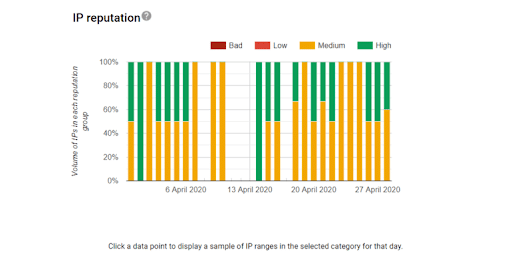
Reputation is mailbox-provider-specific. A strong Gmail reputation doesn’t automatically translate to a strong Yahoo or Outlook reputation. Monitor each separately using provider tools like Google Postmaster Tools and Microsoft SNDS.
IP Warm-Up: Guidance by Send Volume Stage
If you’re starting with a new IP or recovering a damaged one, don’t rush it. Sudden volume spikes are one of the fastest ways to tank a new IP’s reputation before it’s had a chance to establish itself. Always prioritize your most engaged subscribers first. They generate the positive engagement signals that build reputation fastest.
| Stage | Timeframe | Daily Send Volume |
| Stage 1 | Week 1–2 | 50–200/day |
| Stage 2 | Week 3–4 | 500–1,000/day |
| Stage 3 | Week 5–6 | 2,000–5,000/day |
| Stage 4 | Week 7–8 | 10,000+/day |
Throughout every stage, monitor open rates, click rates, bounce rates, and spam complaint rates closely. If any metric trends in the wrong direction, pull back volume and stabilize before pushing forward again. Never spike volume suddenly. Gradual and consistent is the entire point.
How to fix it:
- Determine if you’re using a dedicated (private) or shared IP address.
- Eliminate senders on your IP that have sent any spam or engaged in fraudulent sending activity.
- If you have a new IP address, start with smaller amounts of emails before building up into a large-scale campaign.
You Have a High Spam Complaint Rate
If a lot of people are reporting your emails as spam, ESPs are going to algorithmically assume that’s where you belong. There are a lot of ways to avoid this — many of which we discuss throughout this blog — but we’ll give you a rundown here.
The ideal spam complaint rate is less than 0.1%, which indicates that your emails come across as valid and authentic.
How to fix it:
- Make sure your subject line and copy are accurate and intriguing.
- Send emails consistently, but keep the frequency on an even keel.
- Make sure you include an unsubscribe button and always get permission via opt-ins before sending someone an email.
- Regularly tidy up your subscriber list.
Your Sending Frequency Is Off
Email cadence is a dance. Too little emails and your audience will forget you even exist. Too many emails and you’ll annoy them (in fact, 78% of people unsubscribe because a brand sends them too many emails). Too inconsistent with your timing and you’re more likely to annoy people or catch them at a bad time.
How to fix it: Set a firm frequency and stick to it. Also, make sure you’re providing actual value within each message, otherwise your subscribers won’t be subscribers for much longer.
Your IP Is Appearing in Blocklists
If you haven’t built a good IP reputation and you get flagged for spam too often, you could appear in blocklists that keep you from sending emails entirely. This could be detrimental to your efforts and prevent you from reaching audiences.
You can use tools like MXToolbox and Spamhaus to see if your IP appears on any blocklists and on which databases.
How to fix it:
- Identify the appearance on blocklists and the root cause.
- Secure your systems and clean your email list.
- Request removal from the blocklist by contacting your provider after fixing the underlying issue.
4. List Hygiene and Consent
Your sender reputation is only as strong as the quality of the list you’re sending to. A bloated list full of unengaged, invalid, or unsolicited contacts hurts your metrics and signals to inbox providers that your emails aren’t wanted.
Here’s what to watch for and how to stay on top of it.
You Have a Low Open Rate
Without adequate open rates, the recipient’s provider will view your content as unreliable and therefore spam.
There are two parts to an open rate. The first is that the receiver clicks the email itself to open it. The second is that the reader opts to allow any images within the email to open, ultimately viewing the full email. If you’re not getting one or both of these, your open rates may be struggling and you could wind up in spam.
As of 2025, the average email open rate across all industries was around 42.35%.
How to fix it:
- Establish a cadence for cleaning your subscriber list, whether it’s every 30, 60, or 90 days of re-engagement.
- Detect spam traps by looking for signs like dropped open rates, unengaged subscribers, and surges in bounce rates.
- Segment your email lists to more effectively target the right people at the right time.
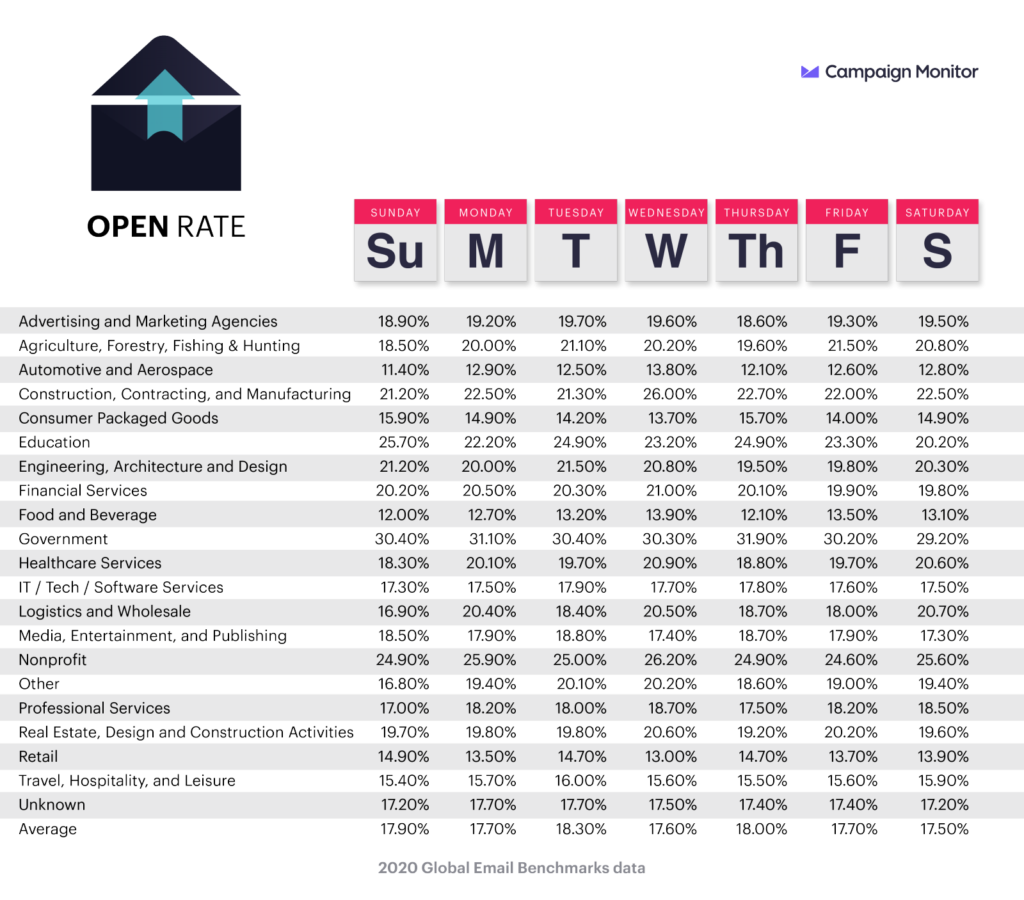
- Adjust campaigns to ensure you send during the right days and times for optimal engagement.
- Use double opt-in email marketing for deliverability, which involves a two-step subscription process to confirm interest.
This chart shows the days with the highest email open rates per industry.
You Didn’t Get Permission Before Sending Someone an Email
There’s nothing more annoying than landing on a subscriber list you didn’t choose to join. And quite frankly, you can’t blame people for hitting that unsubscribe or spam button with brute force when that happens. Adding people to your email list without their permission is tacky, and everyone knows it. It only makes sense this action would be a spam folder trigger.
If you’re purchasing email lists, this will hurt more than help your email campaigns. Not only will you be connecting with unengaged recipients who are more likely to drop you in their spam folder, but you also risk certain issues with GDPR, CAN-SPAM, and other regulations in place to mitigate the risk of spam.
How to fix it:
Always use opt-ins for your email subscription list. Better yet, use double opt-ins to ensure the folks on your list aren’t spamming you themselves, and to confirm they’re definitely interested.
You Haven’t Updated Your Subscriber List
If you’re still asking why are my emails going to spam after addressing authentication and reputation, your list is often where the answer lives. Stale lists accumulate hard bounces, spam traps, and chronically unengaged subscribers. All of these things drag down your sender reputation with every send.
Here’s a practical cadence to keep your list clean and your metrics meaningful:
- Hard bounces: Suppress immediately and automatically. There is no reason to attempt a second send to a hard bounce.
- Soft bounces: Monitor over 2–3 sends. If the issue persists, suppress the address.
- Inactive subscribers (no open or click in 90+ days): Flag for a re-engagement campaign before suppressing. Give them one clear chance to opt back in. If they don’t engage, let them go. A smaller, engaged list will always outperform a large, disengaged one.
- Re-engagement campaigns: Run these before suppression, not instead of it. A simple “still want to hear from us?” email with a clear CTA is enough. If they don’t respond, suppress them.
- Never buy lists: Ever. Not even “verified” or “permission-based” lists from third-party vendors. The risk to your deliverability and legal standing isn’t worth it.
- Segment by engagement: Divide your list into high, medium, and low engagement tiers and treat them differently. Your most engaged subscribers should be your primary audience for new campaigns and IP warm-up sends.
5. Content and Design
You should also keep in mind the content of your email, its layout, and visuals. The way your emails look will impact everything from whether people open your emails to engagement and conversion.
Here are some symptoms of low-quality content and poor design:
You Have a Low Engagement Rate
Getting your receivers to open your email is one thing, but what about engagement? ESPs use engagement rates as a strong indicator on whether or not your emails should go to spam.
Yes, this includes your open rate, but there’s more involved. Engagement includes the time your recipients spend reading your content and whether they click through any links within the email.
Also, make sure your text-to-HTML ratio is good, makes optimal use of content, and avoids excessive punctuation or commercial terms that might turn people away.
How to fix it:
- Increasing email engagement is a multifaceted task. First, focus on your copy — because if everything from your subject line to your closing CTA isn’t up to par, people won’t respond.
- Try split testing (AKA A/B testing) to confirm your copy is the best it can be.
- Conduct pre-send spam testing to further determine whether the email comes across as spammy.
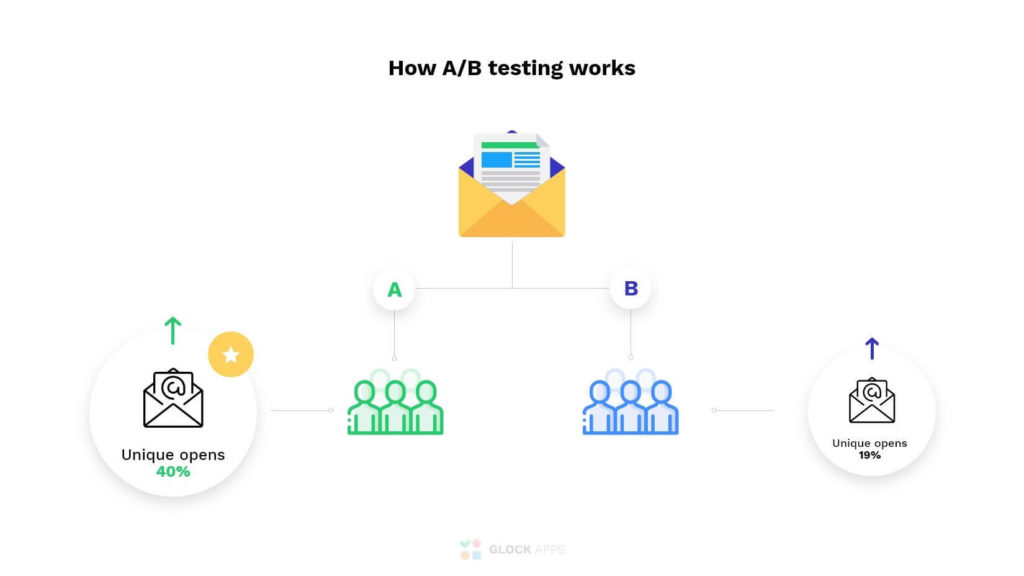
Next, analyze when you’re sending your emails; the right day and time can make all the difference. You’ll also want to whittle down your subscribers based on which recipients no longer serve your metrics (it may seem counterintuitive, but it’s helpful to have the right audience, not just a large audience).
Two final action items to improve engagement and click-through rates:
- Include a strong call-to-action above the fold, if the email warrants it.
- Add captivating images with strong calls-to-action.
Your Unsubscribe Button Is Missing or Hard to Find
If you take anything from this list, make it this: You legally need to include an unsubscribe button in your marketing emails. It’s also good practice to make the unsubscribe button easy to find (this helps avoid frustrating your readers).
Even if it weren’t against the law, leaving out an unsubscribe button or making it hard to find is an ineffective email marketing tactic. You’re more likely to see high spam reports as a result, because if someone doesn’t want to be on your list, they’re going to get you out of their inbox one way or another.
How to fix it:
- Make sure you include an obviously placed unsubscribe button (most marketers include it near their business’ physical address at the bottom).
- Provide an opportunity for people to opt back in on a new window (you know, just in case).
If you want to reduce your unsubscribe rates, consider which days offer the lowest unsubscribe rates per industry.
Advanced Pro Tip: Consider using a different sender domain or ESP for transactional emails vs. marketing emails to avoid unsubscribe actions on your marketing email list affecting your transactional email delivery.
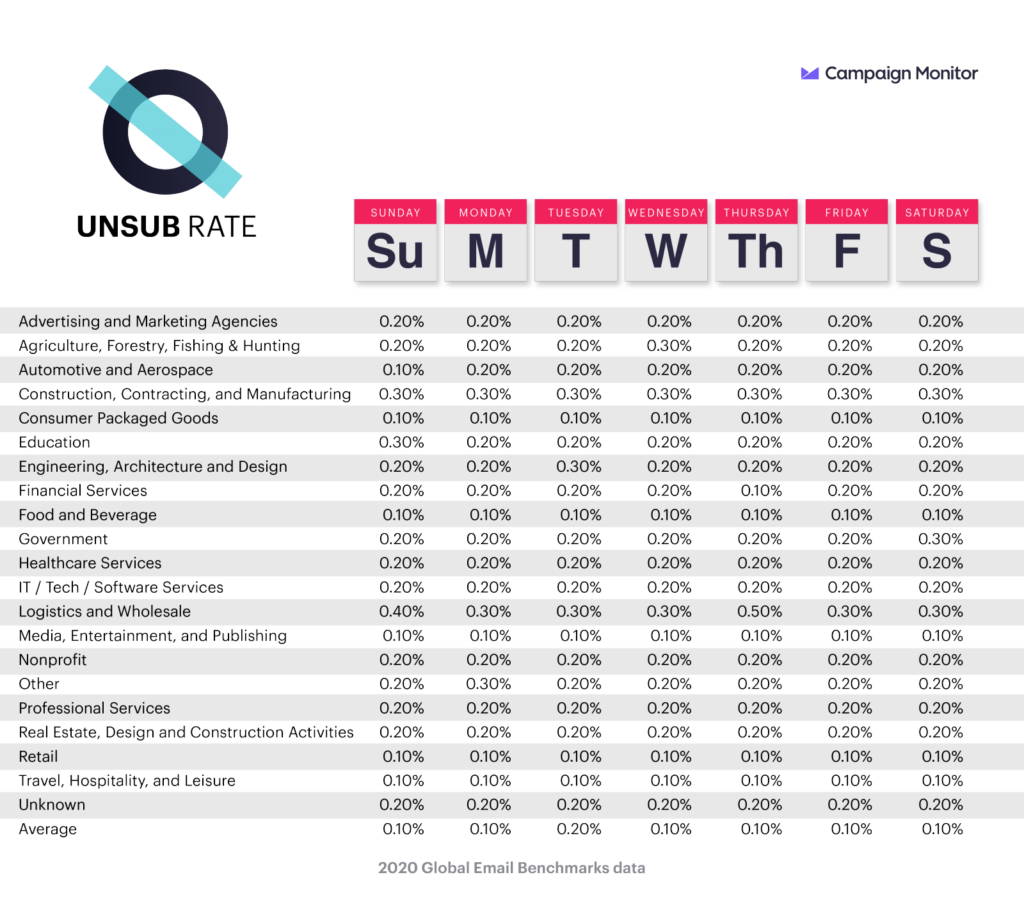
Unsubscribe rates by day and industry
Your Physical Address Is Missing
If you’re sending a marketing email as a business, it’s imperative to include a physical address. In fact, it’s the law (you can find more info in the CAN-SPAM Act from the FTC).
Brands typically do this all the way at the bottom, near the unsubscribe button. The address must be valid, whether it’s an office address or P.O. box. The reason for this is to make marketers traceable for the average consumer.
How to fix it:
- If you haven’t done it yet, implement a physical address into your template for all future email campaigns.
- If you’re a part of a small business or work out of your home, you should definitely get a P.O. box to keep your home address secure.
Your Subject Line Is False or Misleading (It’s Illegal!)
Here’s a quick — and completely avoidable — way to land in the spam folder. And even without spam reports and filtration, it’s an unethical marketing tactic that you should totally avoid.
In 2003, the US government made it illegal to intentionally mislead your email recipients through the subject line. The law is called the CAN-SPAM Act.
This can come to life in a few ways: Using a conversational subject line that makes it seem like you know the recipient personally (“want to get coffee soon?”), adding the word “urgent” when the email is anything but, and faking a purchase confirmation to get someone to open your email.
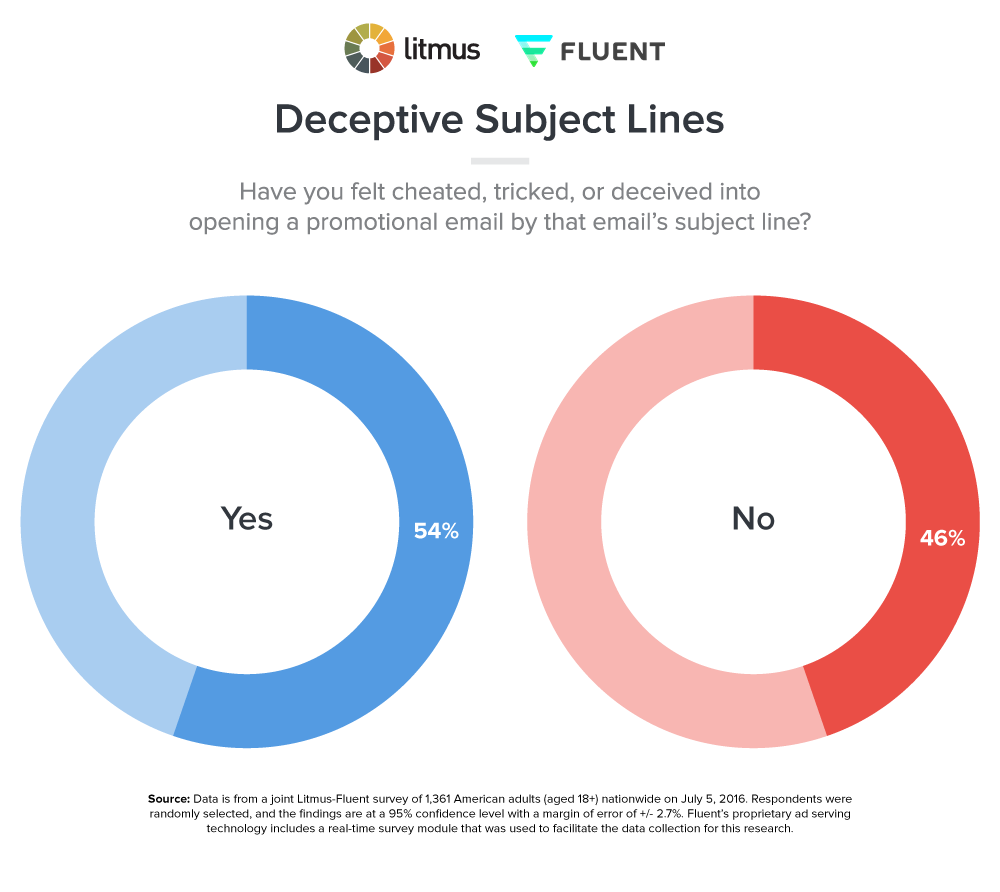
In 2019, Litmus and Fluent conducted a study asking people if they’ve ever felt deceived by promotional email subject lines. More than half of people, 54% to be exact, said yes.
How to fix it:
- Avoid misleading subject lines that use deceptive tactics like including an “Re:” in front or “Limited time” when an offer isn’t actually time-sensitive.
- Instead, opt for safe subject lines that clearly state the purpose of the email and its content, ensuring it’s relevant, e.g., “Update: New Features in Our App” and “Hi, [Name], Get the Perfect Tote Today!”
- Get creative with your subject lines without misleading audiences, possibly asking questions to invite people to learn more within the email itself.
Sorry, But You’re Forgettable
Even with a clean list, solid authentication, and legitimate content, you can still end up in spam for one painfully simple reason: your subscribers don’t remember signing up for your emails. When that happens, they don’t unsubscribe. They hit “report spam,” and your sender reputation takes the hit.
Recognition is a deliverability signal. When subscribers consistently open your emails, it tells inbox providers you’re a trusted sender. When they don’t, or worse, when they flag you, it tells providers the opposite.
How to fix it:
- Maintain a consistent From name and email address. Switching sender names or domains mid-campaign confuses subscribers and erodes the familiarity you’ve worked to build.
- Keep your visual identity consistent. Your logo, color scheme, typeface, and layout should be recognizable at a glance, before anyone reads a single word.
- Stick to a predictable sending cadence. Showing up in someone’s inbox at irregular intervals is a fast way to become a stranger.
- Use your CRM data to reinforce identity consistency across touchpoints. If a subscriber knows your brand from SMS, social, or previous purchases, make sure your email presence reflects the same voice, name, and look they already recognize. Fragmented brand identity across channels quietly undermines email recognition, and recognition drives engagement.
When Learning How to Prevent Emails Going to Spam, Is There a Difference Between Providers?
Every inbox provider has a unique spam filter. To avoid having marketers try to swindle the list, they don’t advertise their individual processes. It’s more of a trial and error thing. Use your email marketing software to analyze spam rates for different platforms. Consider segmenting your subscriber list based on the platform they use for their inbox so you can maximize your content’s chances of getting through the filter, no questions asked.
The “Why Are My Emails Going to Spam?” Question, Resolved
If you’re sending out emails to lift your brand, your content is probably going to hit the spam folder at some point. But by knowing how to prevent emails from going to spam, you can keep your levels to a minimum. This improves your standing with inbox providers and, most importantly, your subscriber list. And it keeps you in close proximity to your current or future consumers: Their primary inbox.
Advanced Troubleshooting
For more details about how to improve email deliverability, take the following key steps:
Contact Mailbox Providers
If you conduct any of the above fixes for specific identified issues and find that it doesn’t work, you could contact your mailbox provider for more assistance and guidance to fix deliverability problems. Zoho Mail, Gmail, Outlook, and other major providers typically offer support for business customers.
Run Speed Tests
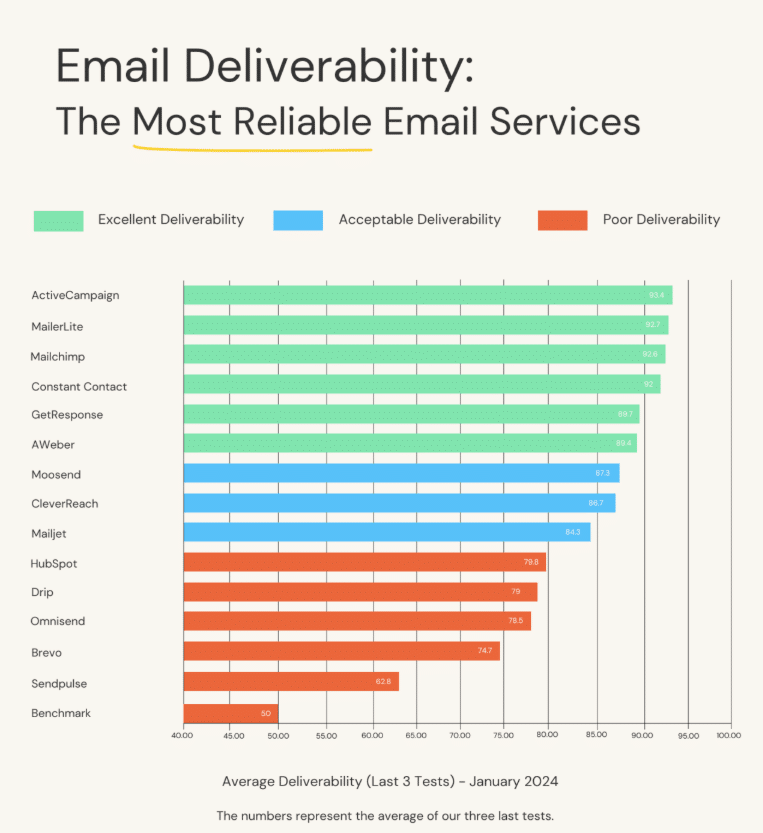
Using solutions like Abstract API and Mail-Tester, you can conduct speed tests to determine deliverability rates. You might find that certain platforms are slower than others or that certain factors negatively impact your deliverability speed.
Measure Progress
Always measure the progress of your campaigns against your goals. Your goals will determine the marketing KPIs you set, whether you’re looking to maximize open rates, get more clicks, or drive conversions. Platforms like HubSpot and Mailchimp make it easy to track campaigns with rich analytics and reports.
Tools and Resources
There are multiple email deliverability tools you could use to help you maximize your emails’ visibility and reach, such as:
- Google Postmaster: In terms of email deliverability tests, Google Postmaster Tools is one of the best solutions available, providing a rating for domain reputation, email marketing spam rate, authentication reports, and delivery error warnings.
- MXToolbox: As another of the best email deliverability services, MXToolbox can help determine whether your domain is blacklisted, conduct a detailed analysis of DKIM, SPF, and DMARC configurations, and review email content for certain types of spam triggers.
- Mail-Tester: A free-to-use email deliverability test tool, Mail-Tester can check the quality of individual emails before sending them to recipients, providing a spam score, technical and content review, and a blacklist check with valuable insight and feedback.
- GlockApps: For a more comprehensive email deliverability tool, you might turn to GlockApps, which provides a real-time deliverability report based on test emails sent to seed lists, along with HTML and content analysis, authentication monitoring, and actionable insights.
- Litmus: In addition to email design and preview capabilities, Litmus includes email analytics and spam testing features to help proactively address any issues before sending campaigns.
- Folderly: This AI-driven tool can diagnose and resolve email deliverability issues through content analysis to identify spam triggers, with the added ability to monitor email placement and complete email warm-up to boost your reputation.
- SendGrid: Twilio’s SendGrid is an email deliverability service that works specifically for marketing and transactional emails, with in-depth analytics, a powerful API, and various monitoring and optimization tools to improve deliverability.
FAQs
1. Why are my marketing emails going to spam instead of inbox?
There are several reasons why your email deliverability might suffer from spam-related issues, including spammy headlines that lead to reports of “junk” or “spam,” sending emails too frequently, non-compliance with the CAN-SPAM Act and other regulations, and generally poor design.
2. How do I test if SPF, DKIM, and DMARC are set up correctly?
You can conduct an email deliverability test by checking to see if SPF, DKIM, and DMARC are correctly set up using online checkers such as DMARCLY or EasyDMARC, along with sending test emails to MXToolbox or other email deliverability services.
3. What is domain warm-up and how long does it take?
This process, also known as IP warm-up, entails slowly and steadily increasing the volume of emails a domain sends to build the domain’s reputation over time. The process can take several weeks to develop a reputable domain that avoids winding up in spam folders.
4. What spam complaint rate should I aim for?
Generally, it is best to make your spam complaint rate as low as possible to avoid penalizing your domain, with the industry average usually falling around 0.1% or lower, which is approximately one complaint per 1,000 emails.
5. Can a Gmail address change affect email deliverability?
Yes. When a Gmail user changes their primary address, emails sent to the old address may still be delivered for a period, but engagement data tied to that address becomes unreliable. If your list isn’t updated, you’ll be sending to an effectively dead contact, which increases bounce rates and drags down engagement metrics over time.
6. How should marketers adapt to Gmail email address changes?
Monitor for sudden drops in engagement from previously active contacts. That’s often the first sign of an address change rather than genuine disengagement. Use re-engagement campaigns to prompt subscribers to update their contact preferences, and make it easy for them to do so. Keeping your preference center and CRM data current is your best defense against list decay from address changes.
7. What happens to emails sent to a Gmail address after it’s changed?
Gmail does not automatically forward emails to a new address when a user changes their primary account address. Emails sent to the old address may bounce, go unread, or land in an inactive inbox. None of these will generate the engagement signals your sender reputation depends on. Over time, sending to changed or abandoned addresses contributes to list decay and deliverability degradation.
8. Does Gmail’s alias system create deliverability blind spots?
It can. Gmail allows users to create address aliases, or variations of their primary address using dots or plus signs (e.g., john.doe@gmail.com and johndoe@gmail.com resolve to the same inbox). While this doesn’t typically cause delivery failures, it can create duplicate records in your CRM, inflate your list size, and skew engagement data. Regularly auditing for duplicate or alias-based entries helps keep your list clean and your metrics accurate.
Learn How to Improve Email Deliverability With Ignite Visibility
To develop consistent, high-quality email campaigns that get real results, turn to Ignite Visibility for email deliverability services tailored to your needs. Our team of professionals has plenty of experience putting together high-performance campaigns that maximize visibility, open rates, engagement, and conversions.
Consider the following benefits of working with us:
- Fully developed email campaigns that avoid spam
- Well-constructed subject lines and content that engage recipients
- Compelling CTAs that drive action all the way to a sale
- Integration into a comprehensive digital marketing strategy
- And more!
Get started with your custom email marketing strategy from Ignite Visiblity today!

