

Wondering how to start a podcast?
In this article, we are going to teach you how. By the end, you will be a podcast launch expert!
Chances are pretty good that at least some the people you’re trying to reach are into podcasts.
According to Edison Research, 40% of Americans ages 12 and older have listened to a podcast. Almost a quarter (24%) say they listened to one within the last month.
Also, six in ten Americans are familiar with the word “podcasting.” That’s a 22% increase over the previous two years.
So podcasting is gaining in popularity. That’s a sign that it’s a great marketing medium.
In this article, we’ll explain how to start a podcast and promote it online. We’ll also help you determine whether podcasting is right for your brand.
How to Start a Podcast – Is a Podcast Right for Your Business?
Should you even start a podcast? Maybe.
For starters, it’s a bad idea to start a podcast just because everybody else is doing it. That’s usually not a good reason to do anything in business.
What’s right for other businesses might not be right for your business.
Also, do some market research. Find out if your likely customers are listening to podcasts regularly. If not, then you might be better off using your resources on other marketing initiatives.
Podcasting requires time and attention. If you’re not 100% committed to it, you shouldn’t even start it.
The Stats Are In On How To Start a Podcast
There are, however, plenty of reasons why you should use podcasting to promote your business.
That’s especially true if you’re trying to reach millennials. According to AdWeek, younger Americans are turning away from blogs in favor of podcasts.
Also, Edison Research claims that podcasts take up a whopping 30% of the time Americans spend listening to audio sources. That’s even higher than AM/FM radio (21%) and owned music (23%).

Further, Midroll reports that 61% of podcast listeners say bought something after hearing about it on a podcast ad. In other words, podcast listeners are engaged.
The Best Benefit Of Starting A Podcast
The best benefit of podcasting is that you can use it to reach potential customers while they’re otherwise occupied.
Think about it: people can’t read a blog while they’re driving, but they can listen to a podcast.
Also, folks might have trouble watching a video while they’re working out, but it’s usually pretty easy to listen to a podcast with ear buds.
In other words, you can use a podcast to connect with folks in your target market at a time when you couldn’t otherwise reach them.
Podcasting gives you the opportunity to market to those who are multitasking.
Here are a few stats that Midroll collected about podcast listeners:
- 32% listen while working out
- 52% listen while in the car
- 40% listen while walking, running, or biking
- 37% listen while on public transportation
- 46% listen while traveling
How to Start a Podcast – Other Benefits
There are plenty of other reasons to start a podcast as well. Here are a few of them:
- To position yourself as an authority – You probably already know about the importance of content marketing to position yourself as an authority in your niche. Podcasting can do much the same thing with a different medium.
- To connect with your target market – Simply put, you can connect with the people in your market using audio in a way that you can’t do with text-based blogging. Remember: 38% of communication is through vocal elements. You can’t express those vocal elements in a blog post, but you can in a podcast.
- To expand your reach – As we’ve seen, podcasts are growing in popularity. If you want to increase your market share, a new podcast can help you do that.
Before You Learn How To Start A Podcast
If you’re sold on the idea that you should launch a podcast, then you’re probably wondering how to get the ball rolling. Start by laying the groundwork.
First, come up with a topic. What are you going to talk about on your podcast?
Before you answer that question, though, you need to dig a little deeper.
Ask yourself which topics will resonate with people in your target market. Pick a few and write them down.
Then, ask how you can use those topics to promote your brand.
Remember, the whole idea behind using a podcast is shameless self-promotion. If you’re not going to boost your business with the podcast, then what’s the point?
Pick a Name
Next, you need a name for your podcast. Don’t take a shortcut here.
Think about how long you spent coming up with just the right name for your business. You should do that with your podcast as well.
Why? Because it could make all the difference.
Clever names make people want to listen. Boring names turn people off.
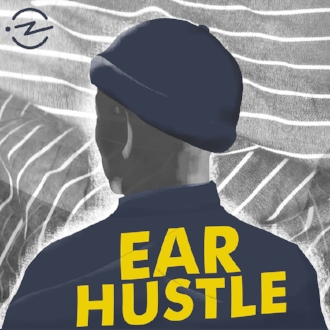
For example, “Ear Hustle” is the catchy name of a podcast that’s co-hosted by two inmates in San Quentin State Prison. “Terrible, Thanks for Asking” is the darkly funny name of a podcast that deals with trauma and loss.
Come up with a memorable name for your podcast and you’ll more likely succeed.
Artwork
Your podcast will also need artwork.
Yes, visual artwork. Even though the podcast itself is an audio event, you’ll promote it with an icon.
That icon will be a square. Usually, it’s 1400×1400 pixels, up to a maximum of 2048×2048 pixels.
Get it done professionally. That icon is the “face” of your podcast.
Put as much effort into your podcast artwork that you did into your company logo. It’s that important.
How Often Should You Podcast?
Next, ask how often you want to podcast.
The important thing here isn’t so much the frequency of your podcast, but the consistency.
In other words, if you commit to doing a podcast once a week, then do it once a week. Don’t do it twice in one week, then skip it completely for the next two weeks, then do another one the following week, and skip the next week.
Pick a frequency and stick with it.
The last thing you want to do is get into podfading. That’s when you do a podcast less and less frequently over time until eventually your podcast disappears completely.
That could hurt your brand more than help it.
How to Start a Podcast Length of Time
Next, determine how long you want each podcast to last.
There’s no rule that says all podcasts have to run the same length of time. That’s usually a good policy, though.
As an overworked entrepreneur, you’re probably too busy to conduct an hour-long podcast every week. You’ve got other priorities.
However, you might be able to handle 10-15 minutes per week. All you have to do is come up with a few things to talk about and record the podcast.
To Co-Host or Not to Co-Host
The next question you need to answer is: should you have a co-host?
Again: maybe.
If you’re one of those people who’s not very good at speaking extemporaneously, then it might be good to bring a co-host on board. That way, you can promote your brand in a back-and-forth conversation.
On the other hand, if you’re a smooth talker, it might be best to fly solo.
You could also go hybrid: have a guest on your podcast sometimes while speaking by yourself on other occasions.
As usual, though, think about what your audience wants and respond accordingly.
How to Start a Podcast and Pick a Category
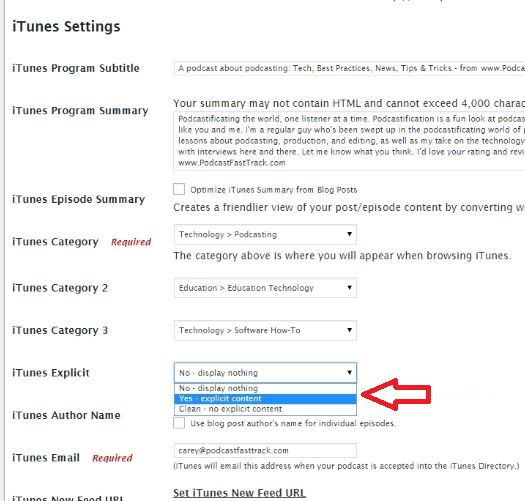
There are plenty of categories you can choose from on iTunes, including History, Sports & Recreation, and Personal Journals.
You’ll have to go through them to find the one that’s best. Make you sure you select an option that will make it easy for people in your target market to find your podcast.
Remember: some people search for podcasts by category.
Write Your Description
You’ll also have to write a description about your podcast. That’s a brief blurb that tells people what your podcast is all about.
Optimize it. Make sure it’s filled with keywords related to your niche.
Also, write it like ad copy. Make people want to listen to your podcast with your description.
For example, here’s part of the description of “The Lifetime Cash Flow Through Real Estate Investing” podcast:
The Lifetime Cash Flow Through Real Estate Investing Podcast grants you access to expert real estate investors, syndicators, lenders, property managers, and advisors. These experts share their stories, tips, and advice on how they successfully built their businesses, and their fortunes, through multi-family real estate investing.
Novice real estate investors will want to listen to a podcast with that description.
Podcast Rating
It may be the case that people in your target market will respond positively to provocative, adult language. If that’s the case, then be sure to rate your podcast accordingly.
Otherwise, though, use family-friendly language and give it a clean rating.
Get a Microphone
Now that we’ve covered the basics of podcasting from a marketing standpoint, let’s take a look at the logistics of podcast production. We’ll start with the microphone.
Yes, you could use the microphone that’s built in to your laptop. But you shouldn’t.
Why? Because it will produce an audio quality that’s an absolute abomination.
Go pro or go home.
The Blue Snowball iCE Condenser Microphone has more than 3,000 reviews on Amazon with a 4.4 / 5 rating. It’s only $49 and eligible for Amazon Prime (meaning you can get it in a couple of days).
If you’ve got some more green to spend, consider splurging on the Blue Yeti USB Microphone. That’s going to set you back $119, but the extra money might be worth it considering that it has more than 6,200 reviews and a 4.4 / 5 rating.
You also want to invest in a pop filter for your mike. That will help reduce popping sounds caused by your mouth movements.
There are plenty of inexpensive pop filter options available on Amazon.
Audio Recording Software
Next, you’re going to need software to record your awesome podcast. That software solution will also save your podcast in an audio (MP3) format.
You’ll also use audio software to edit your podcast. That way, you can take out verbal mistakes and trim down the time to something more manageable.
If you’re using a MacBook, you’re in luck. The cleverly named GarageBand app is already on your hard drive and you can use it to record and edit your podcast.

Even if you’re not on a MacBook, you’re still in luck. That’s because Audacity is an excellent podcasting solution for PCs and it’s free.
If you’re on the Adobe Creative Cloud and you have access to all apps, then you can use Adobe Audition. That’s professional grade software.
Unfortunately, Adobe Audition requires a monthly subscription. If you want to avoid that fee, go with GarageBand or Audacity. They’ll work just fine.
How To Start A Podcast With Skype Recording Software
Sometimes, you might want to interview someone over Skype. If that’s the case, then you’ll need Skype recording software.
Here are two great options:
- Ecamm Call Recorder – a Mac-based solution for $39.95
- Pamela – a PC-based solution for $16.67
Both products offer free trials.
The Recording Process
Once you’ve got the software and hardware installed, how do you record a podcast?
It’s this simple: plug your microphone into your computer, launch your recording software, click the “Record” button, and start talking!
Really, it’s no more complicated than that.
Of course, the exact process will vary depending on which recording software you’re using. Consult the docs and do a quick “Testing 1, 2, 3…” moment before you start your actual podcast.
As we’ve seen, you’ll want to save the file in MP3 format. That’s because almost any digital device with audio playback capabilities supports MP3. It will also give you a low file footprint.
Usually, you’ll also want to use a fixed bitrate when saving your MP3 file. As a rule of thumb, go with 128kpbs.
For sample rate, choose 44.1MHz. That’s CD quality.
Setting up an Intro
You’ll also want an “intro.” That’s a brief bit of music or an announcement that includes the name of your podcast.
If you’re on a budget, you can probably get away with some royalty-free music that won’t cost you anything. Make sure you check the license, though. Sometimes, the original artist will want credit.
If you’ve got some money to spend, take a look at some of the audio logos offered by Shutterstock. Yes, there is such a thing as “stock music.”
As far as an announcement, you can just head over to Fiverr and find somebody with a radio-quality voice that can give you an intro. That’s probably all you need.
Putting It All Together
Once you’ve got your intro and recorded your first podcast, it’s time to put everything together. Fort that, you’ll use your software.
If you’ve never done any sound editing before, there’s going to be a learning curve. Most sound editing apps, quite frankly, take time to master.
However, there’s usually plenty of documentation online to help you along. Also, feel free to consult some visual tutorials in YouTube. That’s usually the easiest way to learn.
You’ll need to splice your intro onto your actual podcast. Then, you’ll need to edit out anything from your podcast that you don’t want there.
Finally, if you’re using an “outro,” you’ll need to add that on as well.
Once that’s all done, you’ll save your newly edited podcast. At that point it’s ready for upload.
How to Start a Podcast – Should You Upload?
Yes, you need to save your file somewhere in cyberspace.
You could upload the file to your own website. But if you stream it from there, you’ll likely hit some bandwidth problems. Your hosting provider probably doesn’t allow for that level of outbound traffic.
What you’re looking for is YouTube for audio. Fortunately, there are options.
- Libsyn – One of the oldest podcast hosts. Solutions start at $5 per month.
- Blubrry – “The largest podcast directory in the world.” Prices start at $12 per month.
- Anchor – A 100% free all-in-one podcast solution.
- Pippa – A podcast hosting startup. Your first 5 episodes are free, then prices start at $12 per month.
Syndicate Your Podcast

You might be thinking that once you upload your podcast to the Internet, you’re done. Nope.
Next, you need to syndicate it.
When you syndicate your podcast, you’re making it available to people so they can listen to it. Otherwise, your MP3 file will just sit in cyberspace and nobody will know it’s there.
So how do you syndicate your podcast? Start by generating an RSS feed.
The media host that you chose (see above) will have instructions as to how you generate an RSS feed. It’s different for each platform.
The good news is that it’s usually pretty easy.
Once you have your RSS feed, you’ll submit it to a podcast directory.
A Podcast Directory?
A podcast directory is how people will discover your podcast. If you have a “Podcasts” icon on your smartphone, you can tap it now to see several different podcasts that are pulled from the directory.
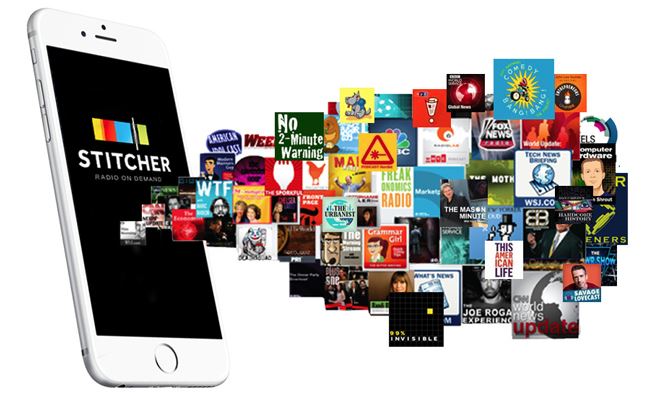
Here are a few podcast directories to choose from:
- iTunes – This is a no-brainer. If you have any intention of getting serious with podcasting, you need to make your podcasts available via iTunes.
- Google Play – Google’s answer to iTunes.
- Stitcher – The second-largest podcast directory in existence.
- SoundCloud – An old favorite for podcasters.
- Spotify – Only supported by some podcast platforms at this time. Follow the instructions at the link.
Promote Your Podcast
Even if you upload your podcast to a popular directory, there’s no guarantee that people will discover it. In fact, they probably won’t.
You have to promote it.
One of the best ways to promote your podcast is to use your established marketing channels (social media, email, and your blog) to generate buzz before you upload it.
Why? Because if you can get a lot of listens right off the bat, you might get even more publicity.
When you click on the “Podcasts” icon on your mobile device, you probably see something called “New and Noteworthy” at the top. Wouldn’t it be great if your podcast could be featured in that spot?
You’ll give your podcast a better chance of appearing in the “New and Noteworthy” section if people start listening to it right away.
Here are a few other ways to promote your podcast:

- Share teasers – Post images, soundbites, and even video clips of your podcasts to “whet the appetites” of people in your target market.
- Release at least 3 episodes to start – When you’re ready to finally launch a podcast, don’t just launch one. Launch three. That way, you’ll get more listening time up front and increase your chances of getting noticed.
- Convert the audio to a YouTube video – Although YouTube is a video platform, you can upload your podcast audio to YouTube. That way, people can find about your podcast when they search for keywords within YouTube. Also, post a link to your podcast in the description of the video so people will know how to find it.
- Hold a contest – Ask people to leave a review of your podcast. Then, pick a winner from the reviewers. Send that winner a free T-Shirt, discount, or something even more valuable.
Wrapping Up How To Start A Podcast
Now you know how to start a podcast and promote it. Your next step is to take some time to think about the kind of podcast that will appeal to people in your market. Then, follow the steps outlined above to launch it.
