

Fake Facebook accounts and profiles affect consumers, content creators, brands, and Marketplace users in various ways, from impersonations and driving fake engagement to scam and phishing attempts. It’s an ever-present problem, with the platform taking action on 698 million fake accounts toward the end of 2025.
As such, knowing how to tell if a Facebook account is fake is essential in ending potential threats and indicating when to report one.
In this blog, Glenette Broma, Social Media Specialist will tell you how to tell if a Facebook profile is fake and what you can do about it if you discover one.
What You’ll Learn
- Fake Facebook Accounts: Everything You Need to Know
- The Most Common Warning Signs of a Fake Account
- Spotting Fake Facebook Marketplace Accounts
- What Should You Do If You Find a Fake Facebook Account?
- FAQs About Fake Facebook Accounts
TL;DR
If you want to know how to tell if a Facebook account is fake, there are some key indicators to look for that can help you spot one almost immediately, such as:
- A brand-new profile with little to no engagement, followers, friends, or posts
- Inconsistent photos showing a different person or style
- Spammy direct messages (DMs)
- Suspicious links that might lead to phishing sites or other malicious content
- Copied profile details from another existing account
- A lack of interaction history
- An odd sense of urgency and/or money requests
What Counts as a Fake Facebook Profile?
In learning how to tell if a Facebook account is fake, you should also know what constitutes a fake profile or account.
There are several forms of fake accounts you might encounter, including:
- Impersonation: One of the main ways someone might create a fake Facebook account is to develop an account mimicking another real one, stealing that profile’s images and details, often in an attempt to scam that account’s friends or followers by first building their trust before asking for money or sensitive details.
- Hacked Accounts: In other cases, a fake account could be a real one that’s been compromised by a malicious party, typically through a phishing attempt that led the account owner to inadvertently give that party access to their account. Hackers could then use the profile to attempt to scam that profile’s friends or followers, send links to phishing sites, or engage in other activity.
- Bot/Spam Accounts: These are accounts running on semi-automated or fully automated programs to spread disinformation, send malicious links, or promote products or brands.
- Fake Marketplace Profiles: Sometimes, fake profiles might appear in the Facebook Marketplace, either posing as buyers to propose payments and ultimately claim they “overpaid” and request the seller to send money back in an overpayment scam, or listing non-existent products to receive payments from unsuspecting buyers.
- Coordinated Fake Engagement: Fake or real accounts could also coordinate to produce fake engagement, which could involve making fake comments to steer public opinion or submitting a massive amount of likes or reacts to boost a post’s visibility.
My Expert Opinion on Fake Facebook Accounts
Someone always has to ruin a good thing, right? While there are a ton of great attributes about Facebook and its impact on digital marketing, there are some downsides. One of the biggest? Facebook scammers.
Learning how to detect scammers on Facebook is important not only for your brand but also for you personally. When it comes to digital marketing specifically, you have to be on the lookout for Facebook scammers pretending to be a representative of your business or a former unhappy customer.
Today, around 5% of all Facebook profiles are fake, and malicious parties are always creating new ones. Identifying and reporting these profiles can help protect your reputation while also protecting others on the platform from potential scams, manipulation, or other actions that might otherwise compromise users.
Pro Tip: If your business is going to be active on Facebook, you have to be aware of potential scams and fake profiles. If you come across one, learning how to report it is paramount to keep it from interfering with your digital marketing strategy.
Fake Facebook Accounts: Everything You Need to Know
What is the point of a fake Facebook account? Well, some accounts may attempt to scam you through some form of action, such as sending money to them or visiting a phishing website. Meanwhile, others may contribute to ad campaigns to sway public opinion or otherwise engage with other users.
This has never been more apparent than in the 2016 Presidential Election. To date, it is estimated that $100,000 was spent on approximately 3000 ads connected to about 470 fake Facebook profiles leading up to the election.
Beyond the highly publicized election “fakers,” Facebook has an inordinate amount of fake accounts that defy its terms of use on a daily basis. However, Facebook isn’t just letting them be. In Q4 of 2023 alone, Facebook removed 691 million fake accounts from the platform.
What Are They Used For?
People use these accounts for fake likes, fake comments, and fake reviews. But what is really interesting, is that the issue perpetuates itself.
Someone who creates a fake account to like pages or leave comments actually has to like a variety of items, leave a variety of comments and interact with a range of people. Otherwise, the account will be deleted by Facebook.
Why Is This An Issue For Marketers?
These fake accounts also cause an issue for marketers. First, you don’t want to be in a position of guilt by association. Secondly, you don’t want to tarnish your company’s good name by having unsavory or ill-intentioned ads run on your content.
How Are Fake Facebook Accounts Maintained?
With the recent light shone on these fake accounts and the spread of disinformation, Facebook has started to take a hard-line stance against those who use the platform for nefarious reasons.
But while Facebook works on doing its part to eliminate the problem, you need to do your own due diligence to spot the fakes.
The Most Common Warning Signs of a Fake Account

If you want to know how to tell if a Facebook account is fake, the following are some of the main indicators:
Profile Photo Issues
How do you know if a Facebook account is fake? One key way is to look at the account’s profile photo.
Many fake accounts tend to use photos from other real profiles, while others may use generic or stock photos, with many using images of famous or semi-famous influencers or celebrities.
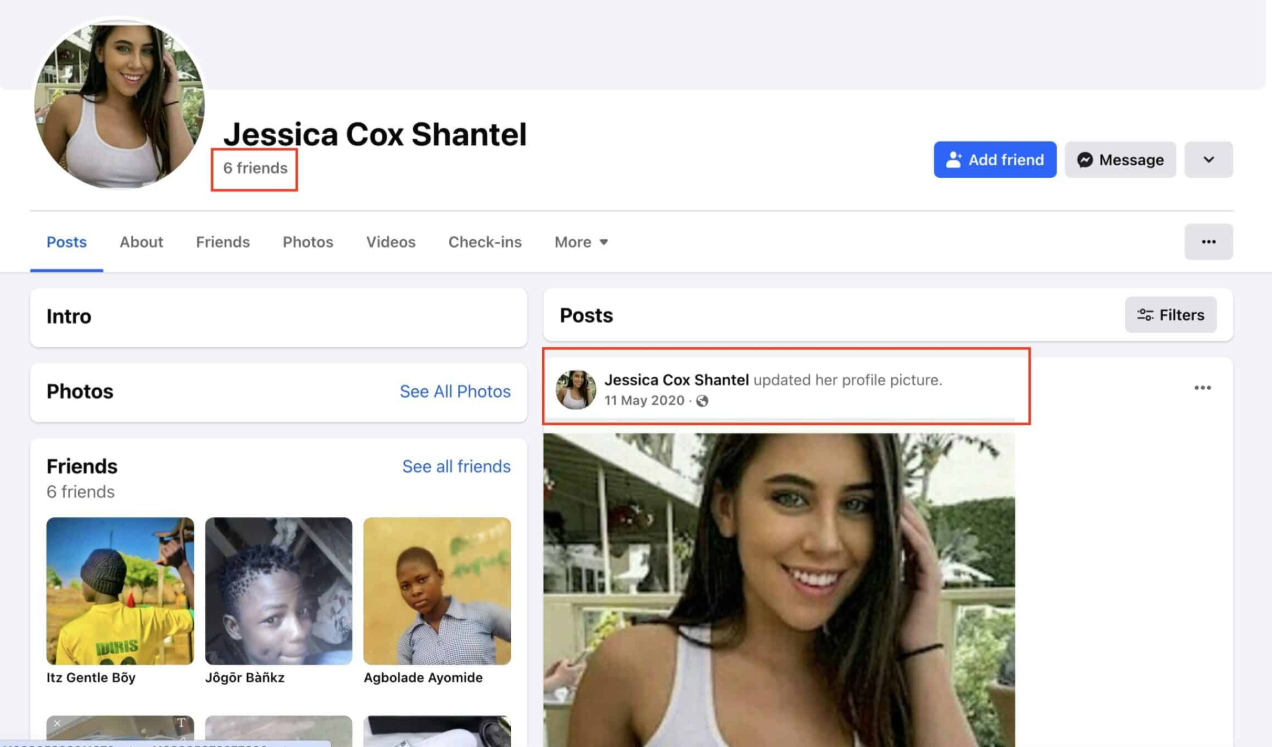
Also, it’s a big red flag if the profile only has one profile picture, particularly if the profile has apparently been around for some time.
Sparse or Inconsistent History
You can also learn how to know if a Facebook profile is fake based on the profile’s history.
For one, you might see that a profile has very few posts with little to no engagement.
Conversely, a profile could have a large number of posts, but it might be clear that posting habits and content are inconsistent. For instance, one post could use a certain type of language in the caption, while another uses very different language, suggesting that those captions (and possibly images or other content within) are stolen from various profiles.
Suspicious Friend Patterns
How many of your real Facebook friends have thousands of friends on Facebook?
Chances are, not too many.
On the flip side, if the account only has a few friends or zero, that is also a sign.
If you see a Facebook account with friends that number into thousands (or less than 10), the account could be fake. While some people may really have that many friends, use your best judgment.
You might also wonder how to tell if a Facebook profile is fake even if the profile has many friends. In some cases, you might see a profile with hundreds of friends, but if the account is relatively new, this could merely indicate many fake friends like fellow scammers or bots or people who recently accepted the friend request. The age of the account is still a big factor here when deciding whether the account is fake.
Strange Bios
When you click on somebody’s Facebook link, you can see a brief biography about the user on the left-hand side of the page. If the information there seems fishy, it’s a sign that the account is fake.
For example, if somebody claims to have been born in Cape Cod, Massachusetts, but went to school in Mumbai, India, and now works for a car repair shop in Tulsa, Oklahoma, then you have a good reason to suspect that account.
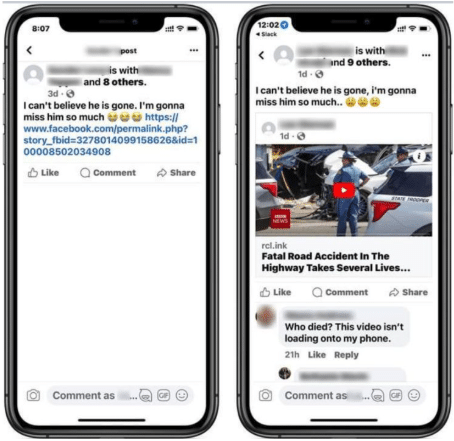
Link-Heavy Posts
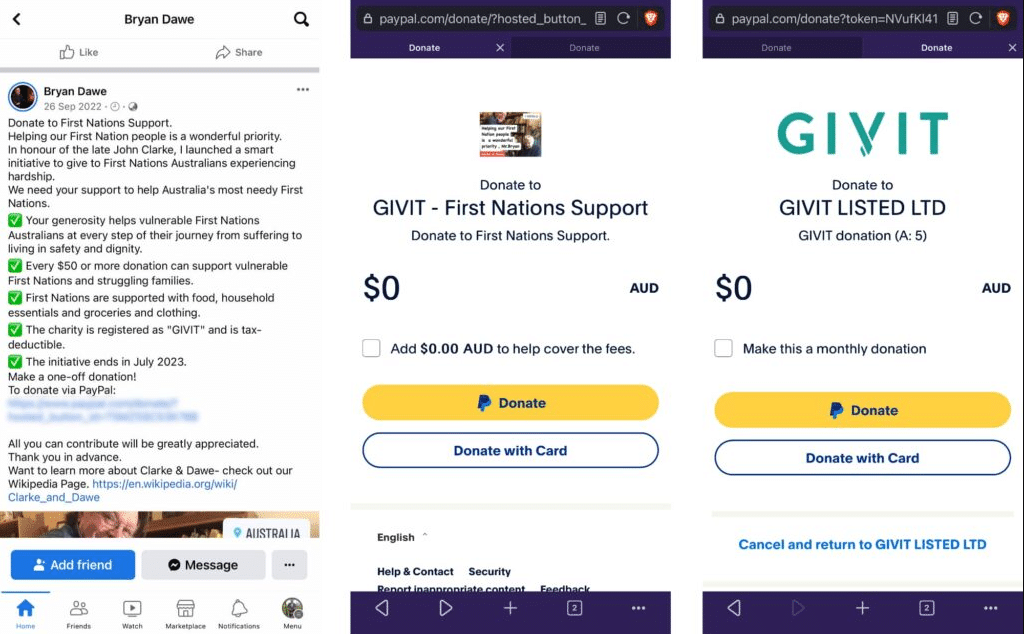
You might also find that a profile has a lot of fake Facebook posts with suspicious links.
Profiles might use different types of malicious links to scam users, such as:
- Fake links to news articles that take users to phishing sites
- Links that appear to belong to PayPal, Facebook, or banks to steal sensitive data
- URL shorteners using tinyurl, bit.ly, or other programs to disguise the link destination
- Fake coupons or prizes that require users to complete forms with critical information
- Fraudulent phishing links in lost pet or missing person posts
- Installable malware or other malicious software disguised as video or photo links
Repetitive Comments
In some cases, you could also encounter profiles that make the same or similar comments across posts, groups, or pages.
If you see this kind of activity, it’s a good indicator that the profile is a bot that might be attempting to drive profile or post engagement, disseminate disinformation, or scam users with a suspicious link.
Odd Language Patterns
It’s also important to know how to spot a fake Facebook profile based on the language it uses in posts and comments.
As you may have noticed, a growing number of posts are using generic, AI-written content to tell stories of all kinds or promote brands or offerings. These posts could appear formulaic and have certain tells, like the overuse of phrases like “it’s not [blank], it’s [blank],” or an overabundance of m-dashes (—).
Posts could also simply put things awkwardly in a way that sounds inhuman, such as a structure that’s overly formal or uses odd English.
Urgent Requests
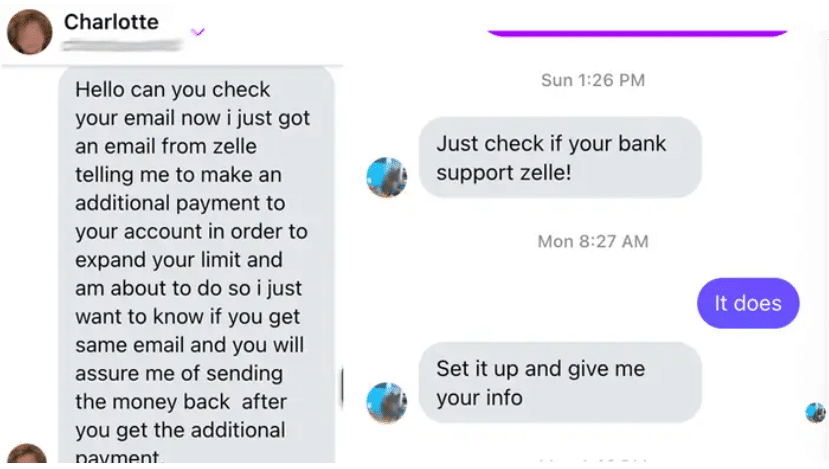
Scammers often attempt to get people to pay them money or complete another action, either through comments or DMs.
If you receive one of these requests, there’s a good chance there’s a scam involved. For instance, you might receive a message from a fake friend profile asking you to send them money ASAP, or they may claim they want to send you money if you provide them with your bank details.
How to Verify Before You Assume
While a profile might look questionable, there are some instances when it might be genuine—it could just be new or simply doesn’t see much activity. Remember, suspicious does not always mean fake.
Here are some ways to confirm whether a profile is real or fake:
Reverse Image Search Profile Photos
One of the easiest ways to determine that a Facebook account is fake is by examining the photo.
It’s often the case that fake accounts use a profile photo that they’ve downloaded from somewhere else online.
Here is one that liked a post I wrote. Looks a little suspect, don’t you think?

How can you tell if the photo was “borrowed”?
Simple: just fire up Google Image Search, then download the profile photo from the Facebook page that you suspect is fake.
Drag and drop that photo into the Google Image Search bar and click the Search button.
If the photo is from a fake Facebook account, you should see loads of matches all across cyberspace.
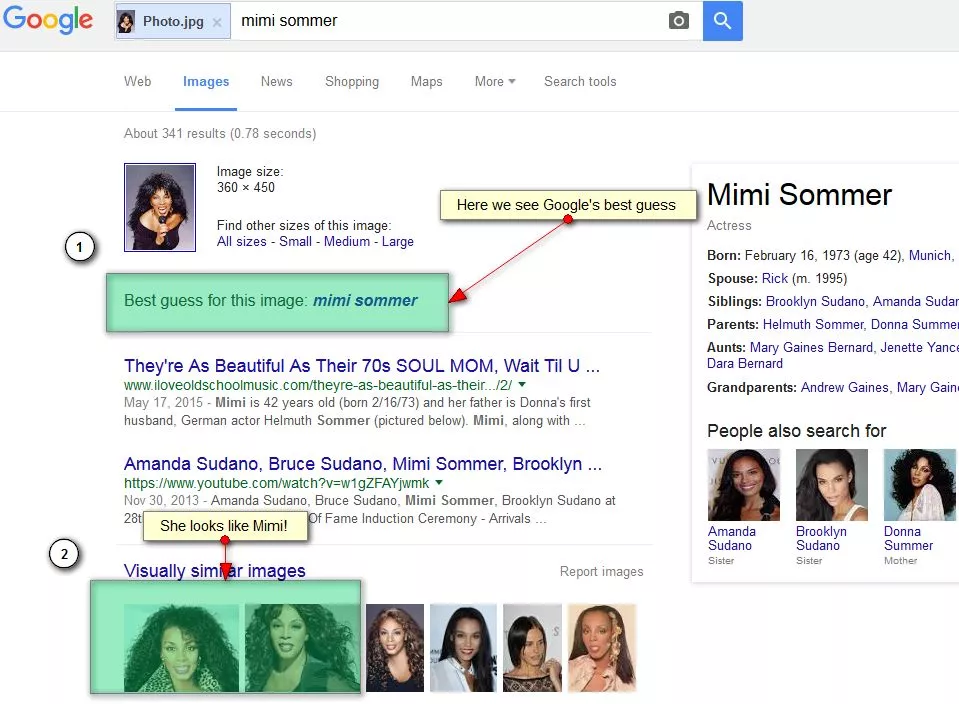
Not sure how to tell if a Facebook profile is fake when the image doesn’t pop up in Google? Even if you can’t find a photo of an existing person through a reverse image search, the photo could belong to another person whose identity the scammer is using, such as another Facebook member.
Check Profile Age and History
Many people who are on Facebook share a common trait: They use Facebook fairly regularly.
If you suspect a fake Facebook profile, check the recent activity on the user’s wall.
If the user is performing various activities from time to time, such as posting updates, adding photos and getting tagged by friends, then it’s probably a real account.
On the other hand, if the timeline is strangely absent of any type of activity, you’re probably looking at a fake Facebook account.
Also, it can be a signal of a fake account if you see conversations that people would never have, like this.
- Hi
- Great photo
- Thank you
- You are great
- Good day!
Review Tagged Photos Carefully
Not only should you look at and do a reverse image search of the page’s profile photo, but you also need to look at any other photos on the profile, including those with tags.
Photos could feature a lack of tags of friends or family in group images, for instance, or they might feature certain irrelevant tags and hashtags that don’t match the image content.
In images with tagged people within a photo, another way to spot a fake profile is by the lack of comments from those tagged individuals.
Compare Public Details Across Platforms
If a profile looks suspicious on Facebook, check out other profiles to determine whether the profile is actually fake.
Look up the user’s name on platforms like Instagram, LinkedIn, and elsewhere. If other people show up for that name or there’s a distinct lack of activity anywhere else, it’s likely that the profile isn’t real.
Inspect Comment Behavior
Look for weird language or repetitive comments on posts. If the profile appears to only provide limited responses, the same response, or no response at all, it’s probably a fake.
Fake Facebook Accounts vs. Hacked Real Accounts
If you suspect an account is fake, keep in mind that some fake profiles are actually real ones that hackers have hijacked, potentially through phishing scams.
In these cases, a real profile might suddenly make a complete rebrand and/or start posting scammy content or suspicious links.
You can report a compromised account to Facebook if this is the case, about which we’ll go into more detail below.
Marketplace-Specific Red Flags
Facebook Marketplace is a great place to promote your business or sell used household items, but it can also be a scammers’ paradise.
Just like regular fake Facebook accounts, doing a little due diligence ahead of time will help you spot a fake Marketplace account or listing.
So, how do you know if a Facebook profile is fake in the marketplace? Here are some clear signs:
- The account has a new seller profile
- Buyers receive pressure to pay upfront
- The buyer or seller requests an off-platform transaction
- Sellers or buyers refuse to set up a safe meeting spot
- Pricing for items appears too good to be true
- Sellers provide inconsistent listing details
What to Do if You Find One
So, you’ve learned how to tell if a Facebook account is fake. Now what? You might wonder, “How can I report a fake Facebook account?” or “What is the best approach to deal with a fake profile?”
Here are some specific steps to take:
1. Don’t Engage
First, don’t reply to, message, or otherwise engage with the fake profile, including a fake Facebook post.
Engaging could get the profile to pursue more interaction with you and, depending on the account, attempt to scam you. Making a comment on or reacting to a post could also benefit that post or page by appealing to engagement signals.
2. Don’t Click on Anything
Also, don’t click on any links on a person’s profile or post. Often, these links take you to phishing sites, and even clicking on these links could put you at risk of compromising sensitive data.
3. Report the Profile, Page, or Listing
The next step is to report the fake profile, page, or Marketplace listing, depending on your interaction. Facebook gives you plenty of guidance to help you report fake accounts and profiles.
Again, we’ll get into the specific steps to report a profile in the next section below.
4. Block the Account
Additionally, block the account to prevent further interaction. Doing so will prevent any unwanted messages, scam attempts, or other forms of engagement.
5. Warn Affected Colleagues, Friends, or Family if Needed
If the account is connected to coworkers or others on Facebook, such as if a profile is imitating one of them, warn these people of the threat with a comment or DM.
6. Secure Your Own Account if You Interacted
If you engaged with the profile in any way, be sure to secure your Facebook account. You can do so by updating your password and other credentials, and enabling two-factor or multi-factor authentication (2FA/MFA).
Facebook offers some methods to help you secure your account as needed.
How to Report a Fake or Impersonating Account
Wondering “how can I report a fake Facebook account?” Here are some steps to take, depending on the type of fake profile.
Reporting a Fake Profile or Impostor
Take these steps to report a new fake account or one impersonating another:
1. Go to the fake profile
2. Click on the three dots on the right to pull up the action dropdown.
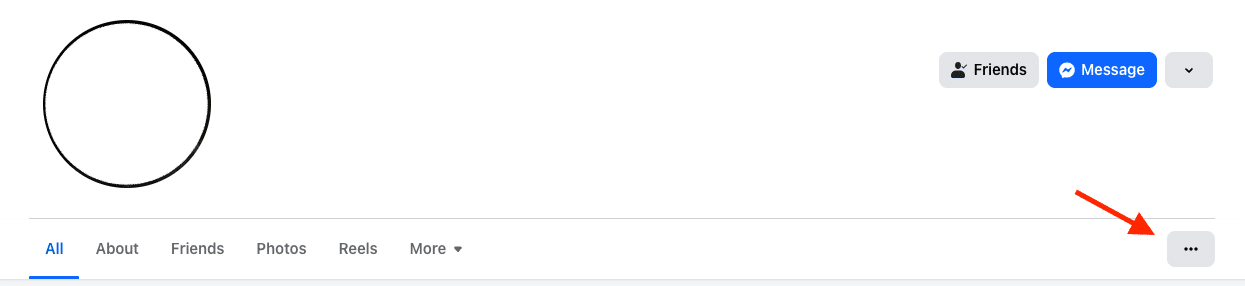
3. Click on Report profile.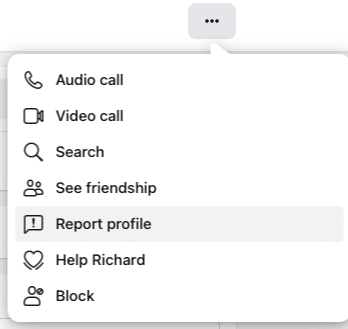
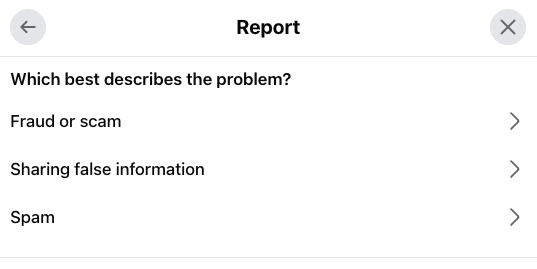
4. In the next menu, choose Scam, fraud or false information to report one of these issues.
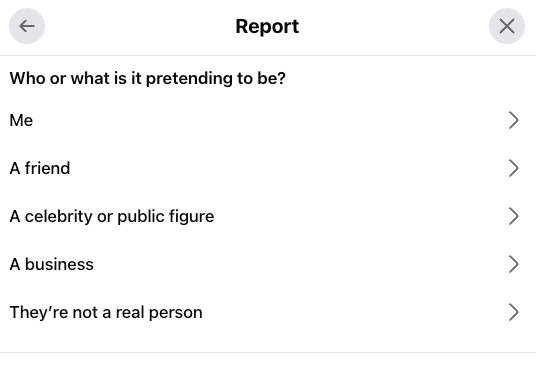
5. If the profile is clearly fake, choose Fake profile and indicate who the profile is impersonating.
6. Submit the report to Facebook, where staff will review the report and take action.
Reporting a Fake Marketplace Profile
If you encounter a fake profile in the Facebook Marketplace, take these easy steps to report it:
1. Click on the person’s profile name in the Marketplace interaction.
2. Go to the three dots to trigger the dropdown menu.
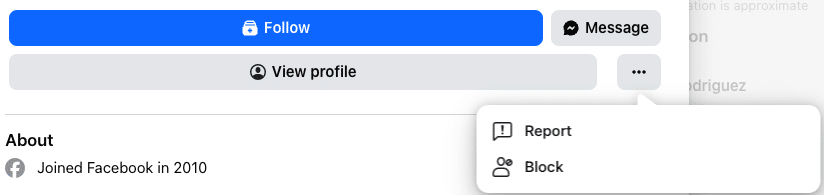
3. Click Report.
4. Indicate the specific reason for reporting the profile.
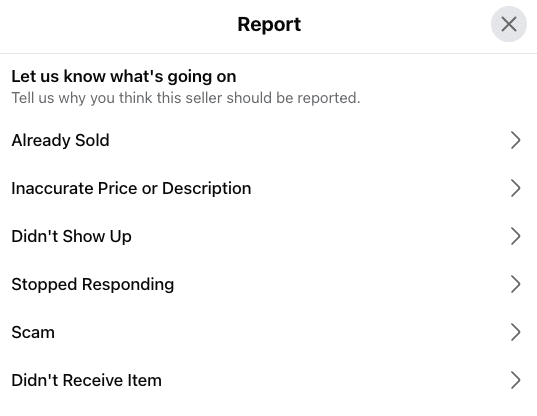
5. Submit the report to Facebook for review and await a response.
How Brands Can Protect Themselves
There are some ways brands can arm themselves against fake and impersonating accounts, including:
- Brand Monitoring: Through brand monitoring, you can track brand mentions, logo usage, keywords, and more to identify and eliminate impersonating accounts.
- Impersonation Watchlists: Develop a database of recognized lookalike handles and usernames, misspellings, and unauthorized domains. Regularly auditing will also help identify impostors that might pop up. In doing so, you can conduct a periodic Facebook user ID lookup to help spot any fakers.
- Pinned Statements About Official Profiles: On your profile, include a pinned statement about what your official profiles will look like, how they’ll engage with users, and the handles they use.
- Moderation Workflows: Create specific workflows to ensure that marketing, legal, and security teams know how to address fake profiles and impersonators, including the steps for reporting profiles to Facebook. You can even assign a designated Facebook checker to help spot a fake profile.
- Employee Education: Send emails or develop a resource to educate employees on how to identify and address phishing attempts, scams, and fake profiles.
- Social Listening: With the help of various social listening tools, you can see what people are saying about your brand and look for any claims of “being scammed” or other negative interactions that might indicate an impostor.
What Not to Do
Now that you have a good idea of what to do and how to tell if a Facebook profile account is fake, let’s go over some things you shouldn’t do.
One thing you should never do is message suspicious accounts, as this could encourage them to try to push phishing or scam attempts.
Also, never send money to a party you don’t trust. If a friend or family member requests funds, check with the person, either through their existing account or in person, to confirm whether it’s really them.
You shouldn’t trust caller IDs or screenshots, either. Always check sources before engaging with any profile.
Finally, don’t try amateur “tracing,” as trying to find a specific individual through a profile is potentially illegal without a subpoena.
Common Myths About Fake Accounts
Let’s bust some common myths about fake Facebook profiles.
Myth #1: Lots of Friends Means Real
Just because a profile has dozens, hundreds, or even thousands of friends doesn’t mean it’s legitimate.
In some cases, a lot of friends could indicate a large presence of fake accounts or bots, giving the illusion that the profile is real, established, and regularly active on the platform.
Myth #2: One Normal-Looking Photo Proves Legitimacy
A profile pic or post image that looks real might be an attempt at deception.
Always look for multiple consistent images and conduct reverse image searches as needed to identify fake Facebook posts and profiles.
Myth #3: Only Older Adults Get Targeted
Anybody can fall victim to a scam, not just older users.
Many bots and scammers try tactics that younger crowds might not be familiar with, and they can work to scam these users just as much.
Myth #4: All Fake Accounts Are Obvious Bots
While many fake profiles consist of bots, this isn’t always the case.
Just as many profiles involve real people who may attempt to manually manipulate users through comments, DMs, and posts.
FAQs About Fake Facebook Accounts
1. How Do You Know if a Facebook Account Is Fake?
There are numerous ways to tell whether a Facebook profile is fake, such as:
- Brand new profiles will minimal posts and engagement
- Inconsistent profile and post images
- Spammy DMs
- Suspicious links in profiles or posts
- Copied details
- Urgent messages and money requests
2. How Does Facebook Measure Fake Accounts?
At this time, Facebook measures fake accounts based on enforcement report metrics that pertain to content violations against their terms of service. According to Facebook, most activity on the platform is genuine and involves real users, but Meta is also looking for ways to improve the ability to report fake accounts.
3. What Can a Fake Facebook Account Do?
One way to know how to tell if a Facebook profile is fake is the type of conduct the “person” uses. They often randomly friend people on the platform to gain access to their personal information, either through chat or the person’s profile. The endgame is often to commit identity theft.
4. How Does Facebook Recognize Fake Accounts?
While you might know how to spot a fake Facebook account, you might wonder how Facebook detects them. Upon identifying a potentially fake account, Facebook uses technology to look at fanout, direct, and aggregated features to determine whether the account is truly fake.
5. Can a fake Facebook account be traced?
Occasionally, yes. If the account was used in serious illegal activities, law enforcement can request information from Facebook that will show them who created the account and where they were located.
6. Can you find out who created a fake Facebook account?
Sometimes! The most reliable way is to trace the IP address linked to the fake Facebook account. This information can tell you the name of the person who created the account, their location, device details, and other valuable information.
7. Can You See if Someone Checks Your Facebook Profile?
No, at this time, you cannot see who has viewed your profile on Facebook. However, you can see who viewed Facebook Stories while they are live, and you can see the total number of visitors to your page using Meta Business Suite.
Manage Your Facebook Account the Right Way With Ignite Visibility
If you want to avoid any issues with fake Facebook profiles, it helps to work with experienced experts who provide reliable Facebook marketing solutions.
With Ignite Visibility, you’ll be able to:
- Set up a high-quality official Facebook profile for your brand
- Regularly monitor for impersonation profiles and report them
- Develop a solid Facebook marketing strategy
Continually manage your brand reputation through digital PR
And more!
Does this sound good to you? Contact us today to request a free proposal!

