Your website traffic jumps 40% in a month. At first glance, that sounds like great news. Organic traffic is up. Direct sessions have climbed. Users are visiting more pages than ever.
Then you look closer. Conversions have barely moved. Engagement has fallen. A large percentage of the new traffic is coming from locations your business does not serve, and thousands of visitors appear to be landing on pages without taking any meaningful action.
Before celebrating the growth, there is another question worth asking: Are those visitors actually people?
Bad data can severely compromise your reporting and analytics, and one of the most common sources of bad data is bot traffic. While you might be initially happy about a sudden surge in traffic, there’s a chance it could come from fake users who never go beyond that first page visit.
In this blog, Chris Pahla, Ignite Visibility’s SEO Manager, will answer the question of “what is bot traffic?” and discuss not only how to detect bot traffic but also how to discern good from bad bots.
Jump To:
- What Is Bot Traffic?
- Does GA4 Automatically Filter Bot Traffic?
- How Can You Tell If Traffic in GA4 Might Be Bots?
- Can You Filter Bot Traffic Out of GA4?
- Should You Block AI Bots?
- How to Measure Bot Traffic Properly
- FAQs About Bot Traffic in GA4
TL;DR:
- Bot traffic can seriously distort your website analytics, leading to inaccurate reporting and poor marketing decisions.
- While GA4 automatically filters known bots, sophisticated or unidentified bots can still slip through and inflate traffic, skew engagement metrics, and mask true performance.
- Instead of blocking all bots, marketers should learn to identify suspicious traffic patterns, separate human visitors from automated activity, and preserve beneficial crawlers like Googlebot and AI search bots.
- The best approach combines GA4 analysis with server, CDN, or WAF data to protect data integrity while maintaining search and AI visibility.
What Is Bot Traffic?
Bot traffic is website activity generated by automated software rather than a person manually browsing a website.
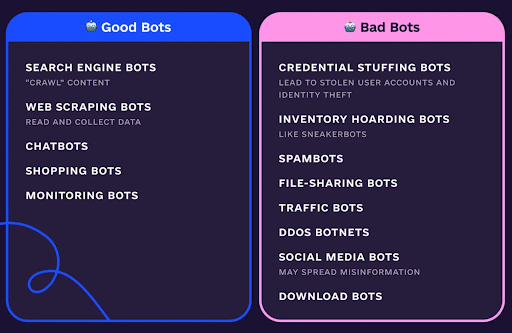
But not all bots are bad. Some of the most important visitors to your website are technically bots.
Googlebot crawls your pages so they can appear in Google Search. Bingbot performs a similar role for Bing.
Cloudflare, for example, now classifies automated activity according to what the bot is doing rather than treating all automated traffic as one category. Its classifications include search crawlers, AI assistants, AI training crawlers, monitoring tools, advertising bots, and other automated systems.
That distinction matters.
A search crawler discovering your content is very different from a bot generating thousands of fake pageviews or attempting credential stuffing.
For analytics purposes, the goal therefore should not simply be: Block all bots.
The better objective is: Keep unwanted automated activity from corrupting marketing measurement while preserving legitimate crawlers that help the business get discovered.
Expert Opinion on Bot Traffic
Bot traffic has always existed, but the problem is becoming more important for marketers as automated web activity grows in both volume and sophistication. In fact, throughout 2025, agentic AI bot traffic alone increased by 8,000%, with Cloudflare Radar showing that bots account for about 57% of all website traffic.
For marketers, the biggest risk is not necessarily that a bot visits a website. It is that automated activity gets mistaken for genuine customer behavior.
That can distort everything from SEO reporting and channel attribution to conversion rates and budget decisions.
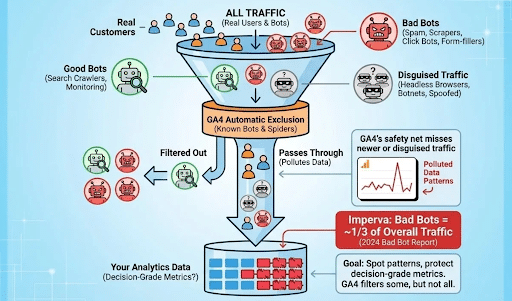
Google Analytics 4 (GA4) automatically removes traffic from bots and spiders it recognizes, using Google’s own research alongside the International Spiders and Bots List maintained by the IAB. However, Google also makes it clear that this system applies to known bot traffic. Marketers cannot see how much known bot traffic GA4 excluded, nor can they disable this automatic filtering.
That leaves an important question: What happens when the traffic is automated, but GA4 does not recognize it?
That is where marketers need a broader bot traffic detection strategy.

Does GA4 Automatically Filter Bot Traffic?
Yes, but only to a point.
GA4 automatically excludes known bots and spiders from reported data. Google uses its own research together with the IAB International Spiders and Bots List to determine which automated traffic falls into that category, filtering out any identifiable Google Analytics bot traffic.
Unlike Universal Analytics, there is no setting that marketers need to enable.
There is also no GA4 setting that lets you turn Google’s known-bot exclusion off.
This automatic protection is useful, but marketers should understand its limitation:
Known bot filtering does not mean all automated activity is guaranteed to disappear from GA4.
A newly created bot, sophisticated scraper, headless browser, spam network, or other automated system may not match the patterns Google’s detection systems recognize.
That means marketers can still encounter suspicious traffic inside GA4.
Ignite Visibility has previously covered fake traffic as one of the common issues marketers can encounter in GA4. The more important next step is understanding how to identify bot traffic in Google Analytics and decide whether the problem belongs in GA4, Google Tag Manager, your CDN, your web application firewall, or somewhere else entirely.
Why Bot Traffic Is More Than an Analytics Annoyance
The danger starts when automated traffic gets interpreted as customer behavior.
Imagine an SEO report showing:
- Organic users up 35%
- Sessions up 42%
- Engagement rate down 18%
- Leads unchanged
It would be tempting to conclude that SEO visibility improved, but the website has a conversion problem.
That might lead to a new conversion rate optimization project.
But what if a significant portion of the traffic increase was automated?
The diagnosis changes completely.
Bot traffic can potentially distort:
- Users
- Sessions
- Pageviews
- Engagement rates
- Landing-page performance
- Geographic reports
- Channel attribution
- Conversion rates
- SEO performance reporting
- Campaign analysis
- Audience behavior
- Year-over-year comparisons
This is why bot detection should be viewed as data integrity, not simply web security.
Bad traffic creates bad inputs.
Bad inputs produce bad conclusions.
And bad conclusions create bad marketing decisions.
How Can You Tell If Traffic in GA4 Might Be Bots?
There is rarely one metric that proves traffic is automated.
Instead, marketers should look for combinations of unusual behavior. In addition to detecting Google Analytics bot traffic, the following signs could show you how to identify bot traffic in Adobe Analytics and other web analytics platforms.
1. Sudden Traffic Spikes With No Business Explanation
Unexpected growth should always trigger investigation.
Suppose website sessions typically fluctuate between 80,000 and 100,000 per month.
They suddenly jump to 160,000.
Before reporting a 60% increase in traffic, ask:
- Did rankings improve?
- Did paid media spend increase?
- Was there a PR campaign?
- Did a piece of content go viral?
- Did seasonality explain the change?
- Did referral traffic increase?
- Did conversions increase proportionally?
If nothing changed that could reasonably explain the traffic increase, dig deeper.
Growth without a plausible acquisition source can be one of the first signs that something unusual is happening.
2. Geographic Traffic That Makes Little Business Sense
Geography can reveal anomalies quickly.
Imagine a regional US business suddenly receiving tens of thousands of sessions from a country where it does not operate, advertise, or serve customers.
That deserves investigation.
But avoid jumping directly from:
“Traffic from this country looks strange” to: “Block all visitors from this country.”
Real customers, employees, travelers, VPN users, and legitimate crawlers can all complicate geographic reporting.
Use geography as a clue, not proof.
3. High Traffic With Almost No Engagement
Another warning sign is large volumes of traffic that generate little meaningful activity.
Look for patterns such as:
- Extremely short engagement times
- Few meaningful events
- No form submissions
- No ecommerce activity
- Little scrolling
- No repeat behavior
- Thousands of sessions with almost identical behavior
Again, low engagement does not automatically mean bots.
A poorly targeted campaign can produce low engagement too.
What matters is the combination of abnormal volume and abnormal behavior.
4. Traffic and Conversion Trends Stop Making Sense Together
One of the most valuable checks is comparing traffic growth against business outcomes.
For example:
- Users: +75%
- Qualified leads: +1%
- Revenue: -3%
That does not prove bots are responsible.
But it tells you the traffic increase deserves investigation before anyone presents it as marketing success.
Marketers should increasingly validate traffic against meaningful downstream actions rather than treating users and sessions as standalone success metrics.
5. Strange Landing Page Patterns
Review which landing pages suspicious traffic enters through.
Bot activity may appear across hundreds or thousands of URLs in ways that would be unusual for a real audience.
You may also see excessive activity around pages that typically receive almost no demand.
Look at:
- Landing page
- Page path
- Hostname
- Query parameters
- Event activity
These dimensions often reveal patterns hidden in top-line traffic reports.
6. Suspicious Source and Medium Activity
Large increases in: (direct) / (none) often attract attention and could indicate Google Analytics bot traffic.
But direct traffic itself is not evidence of bots.
Direct traffic can include visitors typing URLs, using bookmarks, clicking untagged links, or arriving from sources where referral information was lost.
The question is whether the direct traffic also displays other unusual characteristics.
For example:
- One geography
- One landing page pattern
- No engagement
- No conversions
- Abnormally high volume
- A sudden start date
Together, those signals become much more meaningful.
A Practical GA4 Bot Traffic Investigation
When unusual traffic appears, do not begin by trying to exclude it.
Begin by understanding it. Once you know how to detect bot traffic, you can determine both whether and how to stop bot traffic.
A simple investigation can follow this sequence:
Step 1: Identify When the Anomaly Started
Find the first day or week where traffic changed materially.
Compare the suspicious period with:
- Previous period
- Previous year
- Normal baseline traffic
Knowing exactly when the anomaly began makes every subsequent analysis easier.
Step 2: Break the Traffic Down by Acquisition
Look at:
- Default channel group
- Source
- Medium
- Campaign
- Referral source
Determine whether the spike affects the entire website or primarily one acquisition channel.
Step 3: Compare Geography
Review:
- Country
- Region
- City
Look for geographic concentrations that did not exist before the anomaly.
Step 4: Examine Landing Pages
Identify where the suspicious sessions begin.
Are they concentrated around one page?
Are they hitting hundreds of pages?
Are unusual URLs receiving activity?
Step 5: Review Engagement
Compare:
- Engaged sessions
- Engagement rate
- Average engagement time
- Events per session
- Key events
- Conversions
If the traffic behaves dramatically differently from your normal users, that helps isolate the suspicious segment as AI bot traffic or other automated traffic.
Step 6: Look at Technical Characteristics
Where available and appropriate, examine dimensions such as:
- Device category
- Browser
- Operating system
- Screen resolution
- Hostname
Large clusters of technically identical traffic can provide additional clues.
Step 7: Create a Segment
Once the suspicious characteristics become clear, create an Exploration or reporting segment representing that traffic.
Then compare: All traffic versus Traffic excluding the suspicious segment
You may discover that what appeared to be a major website-wide performance change was almost entirely caused by one unusual traffic cluster.
Can You Filter Bot Traffic Out of GA4?
This is where marketers need to be careful with terminology when determining how to stop bot traffic.
GA4 automatically removes known bot traffic, but its configurable property-level data filters are not a universal bot filtering system.
Google currently provides data filters for specific categories including internal traffic, developer traffic, and web hostname traffic.
For example, you can identify internal users based on IP address and exclude those events from processing. Google recommends testing these filters before activating them because once an exclusion data filter is active, the affected events are permanently removed from processing and will not be available later in GA4 or BigQuery.
That is very different from creating a report filter or Exploration segment.
For suspicious traffic that has already been collected, marketers will often be better served by:
- Creating comparisons
- Building Explorations
- Filtering downstream dashboards
- Segmenting suspicious traffic
- Annotating reporting periods affected by anomalies
This preserves the original dataset while allowing analysts to report performance more accurately.
Filtering Bot Traffic vs. Blocking Bot Traffic
This is perhaps the most important distinction in the entire conversation.
Filtering affects measurement.
Blocking affects website access.
They solve different problems.
| Approach | Primary Purpose |
| GA4 automatic bot filtering | Removes recognized bots from analytics |
| GA4 report filters/segments | Removes suspicious traffic from analysis |
| GA4 data filters | Permanently excludes specific supported traffic categories |
| GTM/tagging controls | Determines whether analytics tags fire |
| CDN/WAF bot protection | Stops or challenges automated web requests |
| CAPTCHA/Turnstile | Protects forms and user interactions |
| Server/CDN logs | Measures requests reaching infrastructure |
| robots.txt | Communicates crawl preferences to compliant crawlers |
This distinction becomes especially important when AI crawlers enter the picture, as this particular type of AI bot traffic is essential for AI SEO.
Should You Block AI Bots?
Not automatically.
The phrase “AI bot” now describes several very different activities.
Cloudflare distinguishes among AI systems used for search, agents acting on behalf of users, and crawlers used for model training.
Those categories may deserve different policies.
For example, OpenAI identifies OAI-SearchBot as a crawler associated with ChatGPT search. OpenAI states that websites wanting their content to be discoverable, surfaced, and cited in ChatGPT search should avoid blocking OAI-SearchBot.
This creates an important consideration for SEO teams.
A blanket infrastructure rule that says “Block all bots” could potentially interfere with valuable search or AI discovery.
Instead, businesses should decide which automated activities they want to allow.
A sensible policy might look like this:
- Search Engine Crawlers: Generally allow verified crawlers such as Googlebot and Bingbot.
- AI Search Crawlers: Consider allowing crawlers that support AI discovery and citations if AI visibility matters to the business.
- AI Training Crawlers: Make a separate policy decision based on the organization’s preferences regarding model training.
- Monitoring and Business-Critical Bots: Allow systems the organization intentionally uses.
- Malicious or Abusive Automation: Challenge, rate-limit, or block when confidence is sufficiently high.
Modern bot management platforms increasingly support this type of granular approach. Cloudflare, for example, maintains verified-bot classifications and provides bot scoring that can help distinguish likely automated traffic from humans.
AI Crawler Traffic and AI Referral Traffic Are Not the Same Thing
This distinction is especially important for marketers.
Suppose ChatGPT accesses a webpage through a crawler.
That is automated activity.
Now imagine someone asks ChatGPT for a recommendation, sees your business cited, clicks the citation, and visits your website.
That second visit is a real user.
It should not be excluded simply because the referral originated from an AI platform.
OpenAI specifically notes that publishers allowing OAI-SearchBot can track referral traffic from ChatGPT through analytics platforms such as Google Analytics.
This creates two completely different measurement questions:
How often are AI systems accessing our content?
and
How much human traffic and business value are AI systems sending us?
GA4 is far better suited to answering the second question.
Infrastructure logs are usually more useful for the first.
Why GA4 Alone Cannot Tell You How Much Bot Traffic You Receive
A common client question is: “Can Google Analytics tell us what percentage of our traffic is bots?”
Not completely; it can help show you how to detect bot traffic, but only to an extent.
GA4 automatically excludes known bots, and Google does not provide a report showing marketers exactly how much traffic was removed by that process.
There is another limitation.
Many crawlers do not behave like normal website visitors.
They may request HTML directly from the server without executing the JavaScript required to trigger normal GA4 browser tracking.
In those cases:
The bot visited the website, but GA4 may never record a session.
That is why server, CDN, and WAF logs become important.
A more useful measurement architecture looks like this:
Website/CDN Logs
Measure:
- Total requests
- Verified search crawlers
- AI crawlers
- Suspicious automation
- Blocked requests
- Challenged requests
GA4
Measure:
- Human sessions
- Engagement
- Acquisition
- Conversions
- AI referral traffic
- Marketing performance
This gives marketers two different views of the same digital ecosystem.
Can Bot Traffic Affect SEO?
Bot traffic itself and SEO performance should not be confused.
A suspicious spike in GA4 does not automatically mean rankings are being harmed.
The more immediate problem is often measurement accuracy.
If automated activity gets mixed into your organic reporting, you may misinterpret:
- Organic traffic growth
- Landing-page performance
- Engagement
- Conversion rate
- Content performance
- SEO ROI
This can lead to situations where Google Search Console and GA4 appear to tell very different stories.
Search Console measures interactions with Google Search.
GA4 measures activity that occurs once analytics tracking fires.
The two systems already measure fundamentally different things. Suspicious automated traffic can widen that gap further.
When GA4 shows unexplained growth that Search Console, rankings, leads, and revenue do not support, investigate before drawing conclusions.
For broader technical SEO health, bot accessibility also deserves careful treatment. Search engines need to crawl content in order to index and rank it, making crawler management part of a larger technical SEO strategy rather than purely a security function.
How to Prevent Malicious Bot Traffic From Reaching Your Analytics
Following bot traffic detection, if the investigation confirms unwanted automation, the strongest solution usually happens before the traffic reaches GA4.
Depending on your technology stack, that could involve:
Web Application Firewall Rules
A WAF can identify and block suspicious request patterns before they reach your application.
CDN Bot Management
Platforms such as Cloudflare can distinguish verified bots from potentially harmful automation and apply different actions accordingly.
Cloudflare’s bot-management options include challenges, custom rules, bot scoring, and tools designed to stop malicious automation while preserving legitimate crawler access.
Rate Limiting
A legitimate human is unlikely to request thousands of pages within seconds.
Rate limits can help control aggressive automated behavior without necessarily blocking every automated visitor.
CAPTCHA or Turnstile
Forms, account logins, and other high-value interactions may benefit from automated abuse protection.
Tag Firing Controls
In certain situations, developers may prevent analytics tags from firing when traffic matches a validated unwanted pattern.
However, this should be implemented carefully.
Overly broad logic can accidentally remove legitimate visitors from reporting.
Be Careful With Permanent GA4 Exclusions
One of the biggest analytics mistakes is moving too quickly from:
“This looks suspicious.”
to:
“Let’s permanently exclude it.”
Google explicitly warns that active GA4 exclusion data filters permanently prevent matching data from being processed. Once excluded, those events cannot later be recovered in GA4 or BigQuery.
Use a staged process:
- Identify suspicious traffic.
- Validate the pattern.
- Build a reporting segment.
- Compare performance with and without it.
- Investigate server/CDN logs.
- Test technical controls.
- Only then consider permanent exclusion or blocking.
The same principle applies to infrastructure.
Do not block an entire country, browser, ISP, or category of crawler because one report looks unusual.
The cost of a false positive can be real customers, legitimate search crawlers, or AI discovery traffic disappearing with the bots.
How to Measure Bot Traffic Properly
If organizations genuinely want to understand how much automated traffic they receive, the best solution is to create a separate bot monitoring layer.
Instead of asking GA4 to do everything, combine analytics with infrastructure data.
A bot monitoring dashboard might report:
- Total website requests
- Estimated human requests
- Verified search crawler requests
- AI search crawler requests
- AI training crawler requests
- Monitoring bots
- Known malicious bots
- Challenged requests
- Blocked requests
- Unknown automated activity
You can then keep traditional marketing reporting focused on actual user behavior.
That produces a much cleaner distinction:
- Marketing Analytics: Who visited, engaged, and converted?
- Bot Monitoring: Which automated systems accessed the website, and what were they doing?
As AI search grows, the second question may become increasingly useful.
Bot traffic is no longer just noise.
Some of it represents search engines and AI systems discovering, retrieving, and evaluating your content.
The Future of Analytics Requires Knowing Who (or What) Visited
For years, marketers treated website traffic as a relatively simple concept.
- A session meant somebody visited.
- A pageview meant somebody viewed a page.
- A traffic increase usually meant more people discovered the website.
That assumption is becoming less reliable.
The web increasingly consists of humans, traditional search crawlers, AI search systems, autonomous agents, monitoring services, scrapers, and malicious automation all accessing the same digital properties.
That means marketers need to become more precise about what they are actually measuring.
The goal should not be to eliminate every automated request. The goal should be to separate meaningful human behavior from automation while maintaining access for the machines that genuinely contribute to visibility and business growth.
Before celebrating your next unexplained traffic spike, ask one additional question: Who (or what) generated that traffic?
The answer may completely change how you interpret your performance.
FAQs About Bot Traffic in GA4
1. Does GA4 Automatically Filter Bots?
Yes. GA4 automatically excludes traffic from bots and spiders it recognizes using Google research and the IAB International Spiders and Bots List. Marketers cannot disable this filtering or see exactly how much known bot traffic GA4 excluded.
2. Can Bot Traffic Still Appear in GA4?
Yes. Automatic bot filtering applies to known bots. Suspicious or previously unidentified automated activity can still require investigation, particularly when unusual traffic patterns appear.
3. Can I Create a GA4 Filter to Remove All Bots?
GA4 does not provide a customizable universal “exclude all bots” data filter. Its property-level data filters support specific categories such as internal traffic, developer traffic, and web hostname traffic. Suspicious traffic may instead need to be isolated using reporting segments, Explorations, tagging controls, or infrastructure-level protections.
4. How Do I Know If GA4 Traffic Is From Bots?
Look for combinations of anomalies such as unexpected traffic spikes, unusual geographic concentrations, near-zero engagement, no conversions, strange landing-page behavior, and acquisition patterns that cannot be explained by normal marketing activity.
No single metric should be treated as definitive proof.
5. Should I Block All Bot Traffic?
No. Some bots are essential for search visibility, monitoring, and other legitimate functions. Businesses should distinguish between beneficial crawlers and malicious or unwanted automation.
6. Can Blocking Bots Hurt SEO?
Blocking legitimate search crawlers can interfere with crawling and discovery. Bot controls should therefore preserve access for verified search engines while targeting malicious or unwanted automation.
7. Can Blocking AI Bots Affect AI Search Visibility?
Potentially. Different AI crawlers have different purposes. For example, OpenAI says websites should allow OAI-SearchBot if they want their content to be discoverable and cited in ChatGPT search. Organizations should create policies based on crawler purpose rather than blocking every AI bot indiscriminately.
8. Can GA4 Measure AI Traffic?
GA4 can measure visits from users who click through from AI platforms when those visits trigger normal analytics tracking.
That is different from measuring AI crawlers accessing website content. Server or CDN logs are generally better suited to crawler measurement.
9. What Is the Best Way to Measure Total Bot Traffic?
Use infrastructure-level data such as CDN, WAF, or server logs alongside GA4.
GA4 should primarily measure user behavior and marketing performance, while infrastructure data can help quantify automated requests that may never trigger analytics tracking.
Find Out How to Stop Bot Traffic With Ignite Visibility
Knowing how to identify bot traffic in Google Analytics and prevent the wrong types from messing up your marketing can help you mitigate the risk of bad data. Ignite Visibility knows what to look for and how to stop bot traffic when it presents an issue.
Our team will help you with:
- Setting up Google Analytics to track all traffic
- Continually monitoring metrics to watch for unusual trends
- Identifying traffic from good vs. bad bots
- Optimizing analytics to identify, filter, and block bad traffic
- And much more!
Learn more about our analytics and reporting services to find out how we can help you get the best results from your marketing efforts and avoid issues with low-quality data.