


We talk a lot about expanding reach and connecting with more consumers, but how will we connect with them if we don’t speak their language? Translating our content, especially our YouTube videos, is often overlooked, but it’s one of the most important ways to expand your reach and make your videos more accessible.
In this blog, Katya Shakarian, Social Media Manager, will explain why it’s important and how to translate YouTube videos.
My Expert Opinion on Translating YouTube Videos
One of the best ways to develop content strategies that form a connection and foster engagement between clients and their audiences is by meeting their audience where they are, and that includes speaking their language!
When you take the time to learn how to translate YouTube videos, it will not only increase your content’s accessibility but also boost your reach. It’s truly a win-win situation for everyone involved.
YouTube is a growing platform with so much potential. Translating your videos into different languages is one of the easiest ways to capitalize on that growth and connect with more people around the globe.

What We’ll Cover:
- Why Translate YouTube Videos?
- How to Manually Translate YouTube Videos
- Tools & Extensions for Translating YouTube Videos
- Tips for Translating YouTube Videos to English from Other Languages
- Common Challenges with YouTube Translations
- FAQs About Translating YouTube Videos
Why Translate YouTube Videos?
The better question is – why not?! There are so many reasons to invest in a quality YouTube video translator, and if you’ve ever toyed with the idea of international SEO, you’re likely already familiar with many of them.
- Global Reach—Translations open up your content to viewers worldwide, making it accessible and enjoyable for people speaking different languages.
- International Audience—Over two-thirds of viewers aren’t from your region, which means translating videos can significantly boost your audience and channel growth.
- Inclusivity—Subtitles aren’t just for language barriers – they benefit the hard-of-hearing and deaf viewers, enhancing accessibility.
- Noisy Environments—Subtitles help viewers in loud surroundings follow your content without missing out on important information.
- On-the-Go Watching—Many people watch videos silently on their smartphones during travel or work. Translated subtitles ensure they can be understood without sound.
- Effortless Subtitles—YouTube’s feature for automatic subtitles in your language expands your reach effortlessly.
Expanding Access to Content—Translating your videos helps more people enjoy and learn from your content. - Overcoming Language Barriers—When you translate your videos, viewers won’t need to rely on subtitles to understand and learn from them. This makes it much easier to listen to foreign YouTube videos.
Now, even with the reasons listed above, you may still find yourself wondering if translating your videos is worth it.
A good place to start is your YouTube Analytics. Under the “Build an Audience” tab, you’ll be able to see where your audience is watching from. If a considerable amount is coming from places outside your home country, it’s a good sign that translation could aid your video strategy considerably.
How to Manually Translate YouTube Videos
So, now that you know it’s important, how can you translate a YouTube video? Let’s talk about the different ways!
Using YouTube’s Subtitle and Caption Options
Subtitles and closed captions (CC) are written translations of a video. These are displayed in the language spoken on the screen. As a rule of thumb, it’s always a good idea to include captions in your videos as it can drastically increase your reach.
More and more people are catching on to the power of video descriptions and captions. In fact, a recent study found that 53% of the people surveyed are all about expecting their captioning needs to ramp up in the future. So, staying ahead of the curve is definitely a smart move.
You can choose to write and upload your own YouTube captions or use YouTube’s auto-generated captions (only available in certain countries).
You also have the option to add translated subtitles, which are translations of your captions in other languages. Again, you have the option here to translate your own, or you can use community contributions.
Enabling community contributions allows the YouTube community to contribute subtitles to your videos. If you go this route (which can save you a considerable amount of time), you will always have the option to review the captions they submit.
Keep in mind, that this isn’t always the best way to ensure your videos are translated as accurately as possible.
If you’d rather create or outsource your own captions and subtitles, you can upload them manually to YouTube. Make sure that the files have been created in one of the accepted formats.
To Upload Your File:
- Navigate to your Video Manager and locate the desired video for subtitling.
- Click on the Edit option associated with the video.
- Access the Subtitles/CC section.
- Opt for Add new subtitles or CC, pick your language, and decide whether to upload a ready-made file, transcribe the content yourself, or utilize the auto-translation feature.
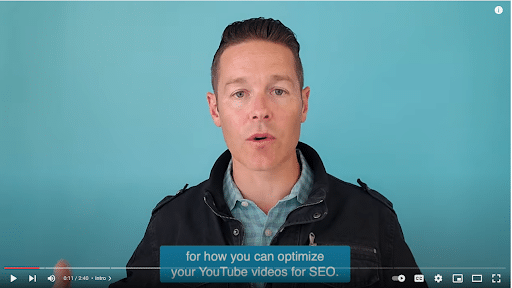
And that’s it! You’ve successfully added captions and subtitles to your videos.
When YouTube Auto-Translate Isn’t Working
Like any other piece of technology, sometimes YouTube auto-translation can be glitchy. Try some of these troubleshooting tips if YouTube auto translate is not working.
- Refresh the page – sometimes simply refreshing will clear the minor glitches in the system.
- Check your language preferences – Go into your YouTube account settings and make sure everything is as it should be.
- Disable and enable captions – The good old turn it off and turn it back on again trick! Sometimes, this will help kick the technology into gear.
- Update your browser – If your browser is out of date, it could cause some of the technical issues.
- Clear your cache and cookies – Clearing these out could re-set the translation technology.
- Report the issue to YouTube – Your issue might be affecting others! Let YouTube know so they can work on a fix.
- Manually add text captions – Manually adding captions, although tedious, is an immediate solution.
Translate Your YouTube Titles and Descriptions
You also have the option to translate your titles and descriptions.
By translating this kind of metadata, viewers who speak another language will be able to find your videos in the search results, which will, in turn, increase your video’s discoverability and boost your organic reach.
To add titles and descriptions in another language:
- Go to YouTube Studio
- Scroll down the right-hand menu and select Subtitles
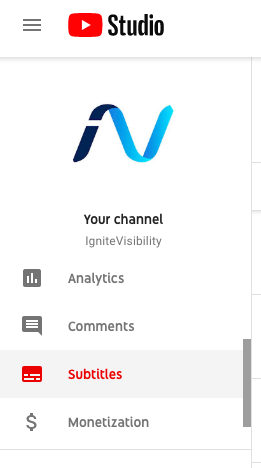
- Set the original language (if you haven’t already)
- Click the Add Language button and choose the language you’d like to translate to.
- Under Title & Description, select Add.
- Enter the translated title and description
- Click Publish
And you’re set!
Translate Your YouTube Comments
Ever had that moment when someone leaves a comment on your fresh YouTube video, but it’s in a language you can’t decipher? Luckily, YouTube has got your back with a nifty feature to bridge the language gap and keep the conversation moving.
Here’s how you can translate YouTube comments:
For Mobile App Users:
- Open your YouTube app and head to the comment section of the video with foreign-language comments.
- Look for the Translate to English line right beneath the foreign text.
- Tap on it, and let the magic happen. Google’s translation will appear in your device’s preferred language, which it figures out based on your settings and usage.
- To switch back to the original text, tap See Original.
For Desktop Users:
- If you’re browsing YouTube on your desktop using Google Chrome, there are a few options.
- You can grab the YouTube Comment Translate extension for Chrome, which can work wonders.
- Alternatively, just highlight the foreign-language text in the comment.
- Right-click on it, and select the Translate option.
- The translation, powered by Google Translate models, will make things crystal clear.
Translate Your Playlists
I always recommend creating playlists for your YouTube channel.
They give viewers an easy way to navigate your content and find what they want. Plus it creates helpful content categories so you can make sure you’re covering your major topics thoroughly.
But this is another area where you don’t want to leave any international viewers hanging. Luckily, YouTube allows you to translate your playlist titles and descriptions as well.
To do so, you’ll need to navigate back to the Classic Creator Studio in the left-hand menu of your YouTube Studio.
From there:
- Select Playlists from the Video Manager
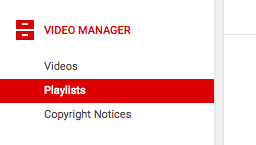
- Click Edit by the playlist you’d like to translate
- Click on the three dots on the right-hand side and select Translate Playlist Info
- Click the settings and select Translate Playlist
- Under Original Language, set the playlist’s primary language
- Then, under Translate Into, select or add your desired language
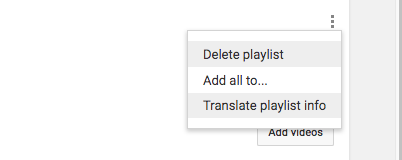 Enter the translated title and description and then click Save.
Tools & Extensions for Translating YouTube Videos
Looking to quickly translate YouTube videos without breaking the bank on expensive human translation services? We’ve got you covered with these fantastic options!
Most of the following transcripts services are paid. Although most offer a free version, it’s highly likely that you’ll need to upgrade your account at some point.
Remember that AI tools are much quicker than human translators but can sometimes be inaccurate. Be sure to choose one with incredible reviews and a high accuracy rate.
Pro Tip: You can use this paraphrase tool to turn transcription of a video into an engaging piece of content. It means that you can turn a YouTube video to an awesome article for free!
YouTube Language Translator Extensions
These tools can help enhance your YouTube viewing experience by providing subtitles for any video.
Subtitles for YouTube

This extension is available in the Chrome store and adds subtitles to any video. It works with over 40 languages, allows you to see both original and translated texts, and gives you translations in real-time.
Key Features:
- Translates up to 40 languages
- Can be added directly to your Chrome browser
- Works on any YouTube video
- Cost-effective
Mate Translate

Mate Translate translates across the web, including YouTube and Netflix. It helps translate subtitles into 103 different languages, also offering help to understand new words and phrases.
Key Features:
- Understands 103 languages
- Shows phonetic transcription to assist with pronunciation
- Synchronizes across all devices
- Allows you to create a custom words list
- Works with YouTube, webpages, PDFs, and Netflix
AI Tools for Real-Time Translation
When it comes to translating videos, AI comes in clutch! Here are some of the best ways to use AI to translate YouTube live videos.
VEED.io
When it comes to online video translation, VEED.io stands out as a star performer.
With VEED, you can directly translate YouTube videos without subtitles into a variety of languages like English, Spanish, Chinese, French, Japanese, and more. The beauty of this video translator app lies in its feature that lets you edit the translated subtitles and even download the video with the subtitles seamlessly embedded.
Key Features:
- Smooth video stabilization
- Stylish text overlay
- Supports HD resolution for crisp quality
- Merge and split videos with ease
- Control video speed to fit your needs
- Convenient media library access
Pricing:
- Free Plan: $0/month
- Lite Plan: $12/month
- Pro Plan: $29/month
- Enterprise options available

Kapwing
Kapwing is another popular translation service, trusted by names like Google, Dyson, and Facebook.
Key Features:
- Subtitles and dub audio in 70+ languages
- Offers an all-in-one video editor
- Works in seconds
- Offers access to translate voices
- Automatically resizes videos to fit any platform
- Enhances audio quality
Pricing:
- Free Plan: $0/month
- Pro Plan: $16/month/member
- Business Plan: $50/month/member
- Enterprise options available

Happy Scribe
With Happy Scribe, you have two options—automatic transcription, which boasts up to 85% accuracy through speech recognition software, and professional transcription, where a skilled team transcribes your files manually. Whether you’re looking to transcribe audio files or add subtitles to your videos, Happy Scribe is a solid choice.
Key Features:
- Automatic transcription
- Aiding proofreading assistant
- Highlight and comment to collaborate
- Share transcripts with convenient links
- Manage timecodes smoothly
- Embed interactive transcript player
- Customize and embed subtitles into videos
- Utilize machine translation (9 languages)
- Manage caption settings
- Seamlessly Integrate through API
Pricing:
- Free Plan: $0/month
- Basic Plan: $10/month
- Business Plan: $29/month
- Enterprise Plans Available

Translator for YouTube Videos Without English Subtitles
Sometimes, you’ll run into a video that does not have English subtitles. So, how do you translate them then?
Easy! There are third-party tools that can translate audio directly. Kapwing and Happy Scribe each offer this service or you can use YouTube’s Community Contributions.
Additionally, Amara is another helpful tool to translate YouTube video to English without cc.
Amara
Amara Editor is a cloud-based software solution that allows you to add subtitles to your videos via translated subtitles, professional captions, video transcriptions, or auto captions.
Key Features:
- Affordable, high-quality subtitles
- Multiple formats and delivery options
- 50+ languages with more available upon request
- A human team of 2,500+ translators to ensure your tone is captured correctly
Pricing:
- Free Plan: $0/month
- Plus Plan: $24/month for 2 users, $12/month for any additional users
- Enterprise Plans Available
- Integrated Plans Available

Tips for Translating YouTube Videos to English from Other Languages
Translating your videos into other languages is an incredible idea, but when your to-do list is already overwhelming, it can just seem like one more thing to check off. Here are some tips on how to make it less overwhelming so that you and your audience can benefit from translating your YouTube videos!
- Use subtitles as a base. These are the easiest ways to make your videos more accessible.
- Lean into AI tools to do the heavy lifting.
- Break down the video into time-stamped chunks to make translating it easier.
- Allow community feedback. Native speakers may have some valuable input for you!
- Research language trends to make sure you translate expressions correctly.
All of these tips can be applied to any situation where you’re translating from one language to another.
Common Challenges with YouTube Translations
Even with the best intentions, it’s normal to run into some common challenges, especially when you are learning how to translate YouTube videos.
Some of these challenges include accuracy and context issues. Sometimes, especially when using an AI translator, you’ll lose the impact of slangs, idioms, or specialized terms. If the videos you’re translating are heavy in any one of those things, be sure to review it carefully to make sure all of your content comes through correctly.
Additionally, sometimes technology malfunctions. Getting familiar with more than one YouTube video translator will help you avoid downtime when one tool isn’t working correctly.
Lastly, even though the AI tools support a number of languages, YouTube’s platform may not support all of them. In fact, the platform only supports about 29 major languages, which doesn’t account for all of the languages you may want to translate your videos into.
FAQs About Translating YouTube Videos
1. How can I translate a YouTube video without subtitles?
Easy! There are a ton of great tools out there that work as a translator for YouTube videos that don’t have English subtitles. Explore the list above to find the one that works best for you!
2. What’s the best extension to translate YouTube videos?
There are a few that work really well, including Subtitles for YouTube and Mate Translate.
3. Is there a way to translate live YouTube videos?
Yes! Download one of the extensions listed above to translate live YouTube videos.
4. Should you shoot new videos in the new language?
YouTube’s pretty advanced, but it can’t translate the actual video speaker for you. And unless you want to invest in some shoddy dubbing, it’s probably not a route you want to explore anyway.
So, should you invest, instead, in shooting a video in several languages?
The answer to this depends entirely on the ability of the people in the video to speak that language and the amount of time and resources you have, as well as how big your international audience is.
Let’s chalk that one up to a business decision.
5. What do translated videos look like?
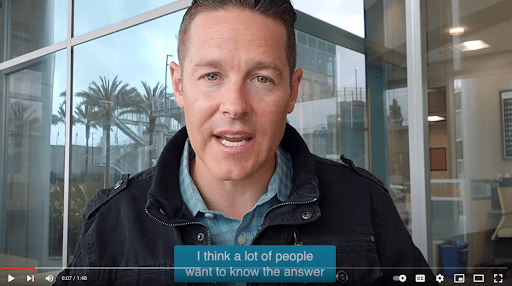
In case you’re wondering what your viewers will actually end up seeing after you’ve implemented the steps above, here’s a quick rundown.
The cool part is that the user doesn’t really have to do anything; videos will automatically play with the appropriate subtitles for a user’s given location.
YouTube is an advanced platform that uses certain triggers to match the video language to the viewer’s native tongue.
These triggers are based on the viewer’s chosen interface language, recently watched videos, and location. YouTube uses these signals to determine the language that is the best match for the current viewer.
If a viewer changes their chosen interface language on the site or through the app, they will not automatically be shown every video in their new chosen language. This takes time to reset.
If you just learned how to translate YouTube videos and you want to see what it looks like to you viewers, here are a few easy steps to follow:
- Using Chrome, Firefox, MS Edge, or Opera, open an incognito browser.
- Visit YouTube and scroll to the bottom of the homepage.
- You will see a drop-down menu labeled Language.
- Choose the language you want to check.
- Go to the desired video’s watch page.
- Run a search for it using the video ID or title.
Elevate Your YouTube Channel with Ignite Visibility
It’s crucial to have a solid YouTube strategy for your success. If you’re putting effort into your channel, why not go the extra mile to ensure all your viewers can enjoy your content?
Ignite Visibility can help you:
- Translate your YouTube videos
- Create a successful video content strategy
- Turn your videos into blogs, social media content, and email marketing tools
- And more!
Are you ready to elevate your content and reach new audiences by translating your YouTube videos?

