

To give your customers the best possible results as a business, it helps to know what those customers are thinking. Enter customer feedback systems, which can provide you with the frameworks and tools needed to collect and evaluate input from customers to find out what they want and whether they’re happy with your brand and offerings.
In this blog post, Josh Sheline, Sr. Strategist, Business Development, will explain how a customer feedback system works and some strategies for effective implementation of these invaluable tools.
My Expert on Customer Feedback Systems
Every business should gain insight into how its customers feel about its branding and offerings, which can inform future operations and marketing efforts.
The right solutions can help collect customer feedback and analyze it to determine what’s working and what needs improvement. The beauty is that there are many ways to integrate these systems and learn precisely what your customer base thinks.
An effective customer feedback system will consist of a combination of frameworks and customer feedback software to encourage people to share their opinions with data you can use to optimize your products or services.
Let’s get into how these systems work and not only how to collect customer feedback with them but also use that feedback to your advantage.

How a Customer Feedback System Works
First, what is a customer feedback system?
Customer feedback management systems are solutions that harness the power of various tools, like customer feedback software and customer relationship management (CRM) solutions, along with structured frameworks for gathering, organizing, and analyzing customer feedback. Based on the insights gleaned from this process, you can determine how to continually optimize the customer experience and improve your offerings.
In learning about how to collect customer feedback, the specific process is as follows:
- Collect: Here, you would collect customer feedback from various sources, like user surveys and social media comments.
- Analyze: Using analytics tools, you can then organize and analyze the data collected to identify any trends and sentiment among your audiences.
- Act: Based on your analysis, you’ll be able to determine which changes will make the most impact, complete with a roadmap that prioritizes these changes based on importance.
- Close the Loop: Inform your customers about the changes you make, showing that you value and actually implement their input.
- Learn: Keep monitoring feedback and refine your collection and analysis methods to gain even more meaningful insights.
Why Having a Customer Feedback System Matters
There are multiple reasons to collect customer feedback using a reliable system. Here are just a few of the benefits:
- Reduced Churn: By revealing the root cause of dissatisfaction among customers, you can reduce churn through immediate action, which can turn those unhappy customers into loyal ones with the right approach.
- Higher Net Promoter Score (NPS): Closed-loop programs can also get you measurable results in the form of an uptick in NPS, which helps gauge customer loyalty using a set scale, as you convert more “detractors” of your brand into enthusiastic “promoters.”
- Faster Product Learning Cycles: Having a formal customer feedback management system will help accelerate the process of product development and improvement as you collect meaningful data in real time, leaving nothing overlooked and underexplored.
Types of Feedback and Channels
There are three main types of customer feedback, each with multiple ways to collect customer feedback: direct, indirect, and inferred.
Let’s break down each:
| Feedback Type | Channel | Description |
| Direct (Proactive) | Post-Interaction Surveys | Surveys that customers fill out immediately after completing a purchase, resolving a help ticket, or another action |
| In-App Microsurveys | Short and highly targeted surveys that customers can complete via a mobile or web app to provide input about an experience, product, or feature | |
| Interviews | Live conversations between customer service reps and customers with more in-depth questions and answers | |
| Usability Tests | Observation of representative users when trying to complete particular tasks, inquiring about issues with usability | |
| Indirect (Passive) | Reviews | Customers leave reviews on various platforms like Google, Yelp, G2, the App Store, and many others |
| Social Listening | Using social media platforms to monitor brand reputation and discussions about your offerings on Facebook, X, or other platforms. | |
| Support Tickets | Tracking customer questions or complaints that they submit via help desk software | |
| Community/Forums | Participating in or monitoring forums and online communities, either your own or on third-party sites like Reddit or industry-dedicated forums | |
| Inferred (Behavioral) | Usage Analytics | Seeing how users interact with your product, such as through clicks or session duration on certain pages |
| Churn Reasons | Finding out why customers stop using a particular product, which you might be able to collect based on observation of behavioral patterns or exit surveys |
Best Practice Principles for Customer Feedback Systems
With more knowledge about the ways to collect customer feedback, it’s important to know how to collect customer feedback by taking the right approach.
The following are some best practices to implement with your customer feedback systems:
Set Goals and KPIs
To start with, you should set specific goals and choose key performance indicators (KPIs) that correspond with those goals. For example, you might track NPS along with customer satisfaction (CSAT) at various touchpoints and the customer effort score (CES) to measure ease of interaction.
Capture Data With an Omnichannel Strategy
Develop an effective omnichannel strategy to collect data wherever your customers are and interact with your brand. These channels can incorporate everything from surveys and support tickets to online reviews and communication with sales or customer service reps.
Use Representative Sampling and Timing
To get a complete picture of your customer base, choose a representative sample of your customers consisting of a small group that accurately reflects your audience’s broader demographics.
Also, time your surveys well to avoid potential fatigue, with too many surveys likely to lead to less thoughtful reviews and less honesty, along with lower response rates.
Optimize Your Survey Design
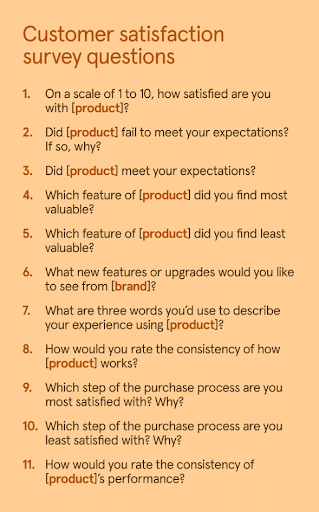
Clear and concise surveys that get to the point will be easier for people to complete. Also, avoid any potentially confusing language and biases that might compromise the integrity of the survey. Questions should be able to get you valuable insights that can truly help your operations and your customers.
Build Trust With Data Privacy and Anonymity
Communicate with customers how you will use their data and, when possible, offer anonymity to survey participants, which will likely lead to more honest feedback. In turn, you’ll be able to build more trust among your customers.
Set Up Your Closed-Loop Process
This element is essential to your customer feedback system. It entails responding to customers shortly after they interact with your brand and acknowledging their input with the goal of resolving their issue. A Service Level Agreement (SLA) can establish a specific response time, which is ideally less than 24 hours in most instances.
Centralize and Tag
Keep all of your feedback in a centralized system, with customer feedback software often capable of comprehensive tagging to categorize all responses. Effective tagging can make it even easier to organize all of that rich data you collect, enabling your team to identify specific themes and pain points.
Prioritize the Work
Implement a prioritization framework to determine which tasks your team needs to complete first. In the process, use methods like Reach, Impact, Confidence, Effort (RICE) and Impact, Confidence, Ease (ICE) to measure impact vs. effort, indicating whether the resources you’re using are getting the results you want in the end.
Measure the Impact
Finally, measure the overall impact of your work after making any changes. You can measure response rate, NPS lift, churn, and other metrics to gauge effectiveness and optimize from there.
Implementation Blueprint
Here is a guide to get you started on your customer feedback system:
Step 1: Conduct an Audit
Start with an audit of your current channels and identify any gaps you need to fill with your system. In addition to evaluating the value of your current feedback from various sources, be sure to take a look at the tools, metrics, and workflows in place.
Step 2: Establish Objectives and Governance
Next, develop clear objectives and effective data governance to bolster your feedback program. In doing so, define its purpose, whether you want to improve customer service, products, or overall satisfaction. You can then match those goals to specific KPIs for reporting and analytics.
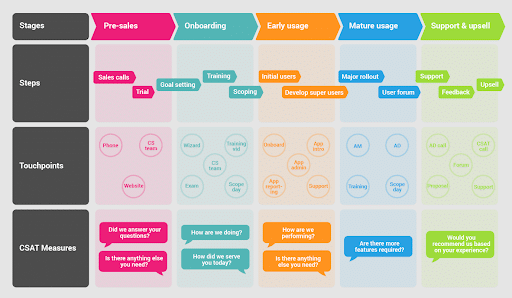
Step 3: Plan Channels and Map Surveys
Put together a strategic plan to guide your system, including details about precisely when and where to collect customer feedback. Ask for input at the right moments, which you can do with little CSAT surveys immediately after an interaction.
Step 4: Implement the Right Tooling and Integrations
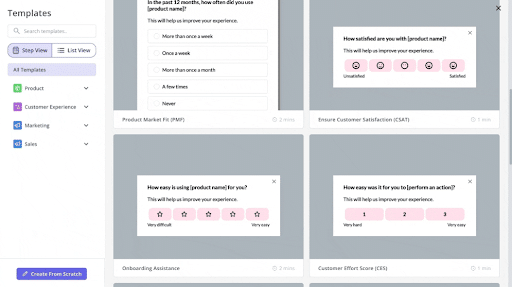
You also need the right software solutions to help you develop a strong online customer feedback system. Certain tools can help automate feedback collection and keep all of your collected data centralized in a single location. They could also integrate into CRMs and product analytics tools, among others.
Step 5: Set Up Taxonomy and Dashboards
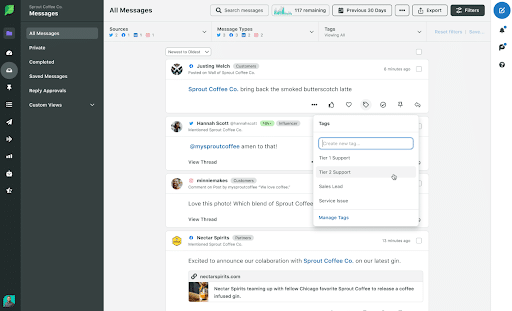
After centralizing your feedback, the next step would involve organizing your data for analysis. A tagging system with a consistent taxonomy could help you label and categorize all of your customer feedback based on certain attributes, such as topic and sentiment.
Step 6: Develop Close-the-Loop SLAs and Playbooks
You’ll now want to close the loop to formalize the process and build more trust among customers. This step will involve setting up SLAs that dictate how long your team has to respond to customers, while playbooks can help standardize the steps needed to acknowledge, prioritize, and resolve customer feedback for streamlined efforts.
Step 7: Run Pilots, Iterate, and Scale
Before launching the completed customer feedback management system, run a pilot with a small representative sample of your customers to test it out. You could even conduct A/B testing for certain types of survey questions or other interactions. Once you determine the system is working, run it at scale across your organization and continually monitor the results.
Tooling Landscape
There are plenty of tools out there you can use to put together your online customer feedback system, such as:
- Customer Experience (CX)/VoC Suites: This customer feedback software would manage the entire feedback process at every stage, and many of them use AI to help optimize efficiency. Ex.: Qualtrics, Medallia, Sprinklr, InMoment.
- Survey/Microsurvey Tools: Use these solutions to develop, distribute, and analyze customer surveys with metrics like NPS, CES, and CSAT. Ex.: SurveyMonkey, Hotjar, Typeform, Delighted.
- Form Builders: These tools can help you create different types of forms, including contact and feedback forms. Ex.: Google Forms, Jotform, HubSpot Form Builder.
Social Listening Tools: Using this customer feedback management software, see what people are saying about your brand or competitors to identify any issues to resolve or gaps to fill. Ex.: Sprout Social, Brandwatch, Talkwalker. - Review Management Platforms: Manage, monitor, and respond to all positive and negative customer reviews across platforms with these solutions. Ex.: Birdeye, Podium, Yotpo.
- Analytics/Extract, Transfer, Load (ETL) Tools: Using this customer feedback software, you’ll be able to transfer and structure data from various sources into a centralized platform. Ex.: AWS Glue, Fivetran, Airbyte, Talend.
In choosing the best customer feedback management software, consider the following criteria:
- Integrations with your existing tech stack
- Workflows and alerts capabilities
- Text analytics and AI optimization
- Governance and compliance, e.g. GDPR and SOC2 compliance for data privacy
- Scalability to help your business grow
- Cost based on your budget
Designing Surveys People Actually Answer
To encourage people to complete your surveys, design them to maximize engagement. There are numerous ways to do this.
For example, you can format questions with a simple structure of a rating plus one open text for feedback.
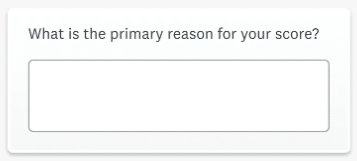
In your questions, like the above, use neutral wording to avoid biases or misinterpretations, and construct your questions in a logical order to create an efficient flow.
Additionally, determine the right timing for each question, such as post-event vs. customer lifecycle questions.
You may also give incentives such as a discount or entry into a contest, as long as they are without bias. Meanwhile, progressive profiling could help you paint a clearer picture of each customer as they go along their journey.
Also, emphasize a mobile-first experience to appeal to mobile users, and ensure your feedback channels are accessible to all users.
Analysis: From Comments to Decisions
As you analyze feedback, begin by detecting certain themes, such as specific pain points that people are experiencing with your offerings.
When identifying these themes, you can use coding and taxonomy creation to tag and organize them into categories, such as certain levels of sentiment.
AI-assisted clustering could help with this.

As you go along, you might spot confidence thresholds where, after certain interactions, churn decreases. It’s also possible to separate misunderstanding vs. actual defects that you need to address.
At the same time, triage queues can centralize lists of items or tasks based on their urgency to help with prioritization.
Closing the Loop
There are multiple steps to take to effectively close the loop.
Based on your NPS, you can first break down customers into three categories on a score of 0 to 10:
- Detractors (0-6): These are dissatisfied customers who may refuse to do business with your brand and potentially tarnish its reputation through bad word-of-mouth.
- Passives (7-8): Sitting right in the middle, “passives” are customers who are relatively neutral about your brand and offerings. It’s important to sway these in the direction of “promoter” when possible.
- Promoters (9-10): At this stage, your customers would be enthusiastic and loyal, serving as brand advocates who conduct repeat business while recommending you to others.
To standardize processes, develop SLAs that clearly state when reps should contact customers, specifically within 24 hours.
Use survey templates and track escalation with playbooks that guide the process along, and always issue “Thank you” and “You said/we did” messaging to really close that loop.
Metrics and ROI
You can track plenty of metrics to help you measure your efforts, such as:
Program Metrics
These measure the performance of your surveys and other feedback sources, and they can include:
- Response rate
- Completion time for surveys
- Coverage by segment
Outcome Metrics
Measure the impact of your efforts using the following:
- NPS/CSAT/CES trends
- Churn vs. retention
- Ticket deflection
- Conversion
Program Health
Also, track these to track overall program health:
- Time-to-close-loop for efficiency
- Percentage of feedback actioned to gauge responsiveness
Common Pitfalls and How to Avoid
Work to overcome the following challenges you might face along the way with your online customer feedback system:
- Over-Surveying: Avoid letting fatigue hurt the quality of surveys by carefully timing them.
- No Owner to Act: Assign people to respond to customers and hold them accountable, which will prevent customer feedback from going ignored.
- Siloed Data: Centralize all of your data within a convenient, accessible system.
- Vague Questions: Be specific and concise in your questions while remaining neutral, which will prevent misunderstanding and biases.
- Ignoring Indirect Signals: Always pay attention to indirect feedback sources like reviews, social media conversations, and support tickets.
- Skipping “You Said/We Did”: Include this messaging when closing the loop to indicate that you have heard your customers and made changes based on their feedback.
Get the Most From Your Customer Feedback System With Ignite Visibility
Want to build a customer feedback system that really works for you? Ignite Visibility can help you keep track of feedback and incorporate it into your digital marketing efforts. Whatever you require for your business to perform, we can work with you to help you maximize retention and delight your customers.
With our help, you’ll have the chance to:
- Implement the right tools to track customer feedback and other data
- Develop effective marketing strategies that adapt to feedback and customer sentiment
- Continually optimize campaigns to meet your customers’ needs
- And more!
Connect with us today to speak with our team and find out what we can do for your brand.

