


A good website design is everything when it comes to appealing to your target audiences as a business. According to VWO, you can expect to see a 200% increase in conversion rates with a great user interface (UI). For some brands this means committing to a complete website redesign to establish a strong online presence.
So, does your website need a redesign?
In some cases, a website redesign is the right move to breathe new life into a website. In others, you might benefit from a little website refresh that spruces things up.
In this guide, Oscar Lutteroth, Chief Creative Officer, will discuss what a website redesign is all about, the differences between a redesign and a refresh, so you can pick the right option for your site.
What You’ll Learn:
- Understanding Website Redesign and Website Refresh
- Which Should You Do: Redesign vs. Refresh
- Website Redesign Checklist: A Step-by-Step Process
- Common Mistakes to Avoid
- FAQs
Our Expert’s Opinion on Website Redesign
To determine whether your website needs a redesign or just a refresh, start by conducting a thorough audit of its current state and performance. Tools like Google’s PageSpeed Insights, Google Analytics, and Chrome DevTools can help you identify speed issues, user behavior patterns, and technical bottlenecks.
While sometimes all you need to boost online performance is a light website refresh, updating visuals, tweaking layouts, or refining content, other times, a more extensive redesign is necessary.
Consider that 94% of people’s first impressions of a web page are based on design. That means you need to capture visitors’ attention and trust the moment they land on your site, creating an experience that appeals to their needs as potential customers and users.
In general, you might need a full redesign if your site suffers from poor user experience, low SEO rankings, minimal conversions, or consistently underperforms against your goals. With a clear understanding of when and how to redesign, you can confidently begin the process of improving your site and delivering a more effective digital presence.

Understanding Website Redesign and Website Refresh
First, it’s important to know what constitutes a website redesign and a refresh.
What Is a Website Redesign?
A website redesign involves completely altering a website from the ground up, from its architecture and structure to its creative design and core functionality.
You’ll likely want to redesign your website if you need to make significant changes to every area. Don’t worry, at some point, it’s likely that every website will require a redesign to maintain relevance and keep up to date with the latest web design and digital marketing trends.
User expectations change over time, especially as people today tend to focus on personalization and the value that brands bring them on an individual level. New developments in design technology, such as AI, have made it important to continually innovate to stay ahead of competitors.
For instance, your website might not effectively attract traffic or drive conversions due to its outdated layout, drops in rankings, and low user engagement rates. In this case, you might consider a complete update to boost performance.
However, keep in mind that a redesign can take weeks or months to complete and is potentially very costly. So, if you’re considering a redesign, it’s important to prepare accordingly.
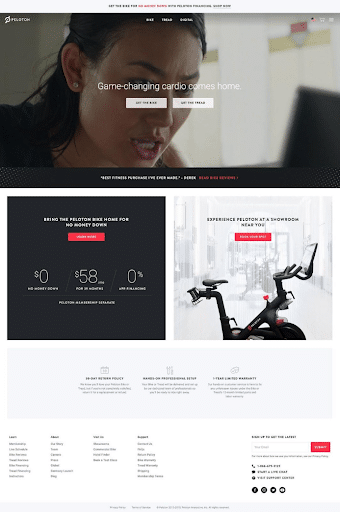
One website redesign case study that shows the value of an effective website revamp is Peloton, which found a way to more effectively emphasize its product selection. In an earlier version of the website, this is what the homepage looked like:
Following the website redesign process, Peloton created a website that effectively directed people to the right products based on their personal preferences, with a complete list of categories right below the header.
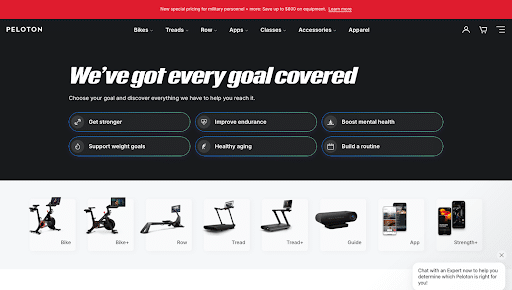
The website reflects the direction in which Peloton has decided to go as hardware sales decrease year over year. Instead, they’re shifting toward a subscription model that includes workout videos, interactive apps that measure progress toward users’ goals, and team challenges to add a level of competitiveness that keeps people subscribed.
In the end, a redesign could be the key to helping your business thrive online, especially seeing as your website is your business’s primary representation on the web.
What Is a Website Refresh?
While a redesign calls for a total overhaul, it’s sometimes best to merely refresh a website. Refreshes entail minor updates to a website’s visuals, content, and performance.
You might want to choose a new theme, make some changes to specific content like past blog posts, or alter calls to action. These minor changes won’t likely impact your site’s functionality but can freshen your user experience.
Some signs you may need to refresh your website could include:
- Outdated or unappealing design aesthetics
- Inconsistent branding
- Blog posts with outdated information
- Certain pages that need SEO updates
- A poor user experience
Which Should You Do: Redesign vs. Refresh

Not sure whether you need a website redesign or a refresh? The following signs could indicate when a redesign is worth the effort:
An Overall Outdated Design
If your site simply seems outdated and a website refresh isn’t sufficient to spruce it up, you could opt for a complete redesign. For example, you might have a site with old graphics that no longer reflect your business, such as images of products that are no longer available. In this case you’d want to pursue a website refresh and update images. In other cases, the general look of your site might not appeal to the latest design trends, causing the need for an entire website redesign.

Issues With Mobile Responsiveness
You need to redesign a website if it doesn’t work on all mobile devices. Ensure your site consistently provides a great user experience on smartphones and tablets. Otherwise, you risk losing a large portion of your target audience.
For example, Batteries Plus’s franchise website has a mobile-responsive design that makes it easy for mobile users to pick up and explore. It also includes a convenient, mobile-friendly CTA form right there on the homepage.

An Overall Poor User Experience
Another factor that could lead to a redesign is the user experience, which could be poor enough across the site to warrant a revamp. Users might struggle to find the pages you want to lead them to, or your site could be visually unappealing enough to cause people to drop off as soon as they land on your pages. Slow loading speeds and broken pages could also indicate it’s time for a redesign.
One example of a franchise website with a good but simple UX is McDonald’s. This website includes a user-friendly and generally effective layout for ease of navigation.

Minimal Conversions and Low User Engagement Rate
Little dips in conversions and lulls in user engagement rates could warrant a refresh. However, if your website is really struggling, a redesign might be in order.
You may find that many web pages aren’t moving people along the buyer’s journey due to multiple issues. There might also be other bottlenecks keeping people stuck.
Declining SEO Performance
You might find that your pages are dropping in rankings, either due to not consistently updating, a poor user experience, or simply because your competitors have better websites. By identifying the specific root of the problem through analytics and competitive analysis, you could decide whether a redesign might boost your search engine optimization efforts.
Incompatibility With New Technologies
Website redesigns are often necessary if a site doesn’t work with the latest web technologies, including critical plugins and third-party integrations. These and other technologies are essential for keeping your website fully functional and updated.
You’re Not Achieving Your Goals
Depending on the goals you have in place for your site, you might discover that attempts to refresh pages here and there aren’t helping you get any closer to achieving them. In these instances, you may want to redesign your site to help with driving more visitor traffic, moving people along the buyer’s journey toward a sale, scheduling appointments, or other objectives.
Website Redesign Checklist: A Step-by-Step Process
Once you’ve determined that a redesign is the next step, you’ll want to learn how to redesign a website.
To make your next redesign a success, follow this complete website redesign checklist:
1. Evaluate Your Current Website
The first step to take with a website redesign is to evaluate your existing website. Conduct an initial audit that assesses different aspects, including performance, content, and design.
Some of these tools include Google PageSpeed Insights, Google Search Console, WebPageTest, and Google Analytics.

In the process, you should also use Analytics and other tools to analyze user behavior. Heatmap tools like Hotjar can help you see where users scroll, click, and navigate on your web pages.
2. Set Clear Goals for Your Redesign
Also, to help determine how to redesign a website, decide on what you want to achieve with it. What are the specific goals you need to reach?
There are many potential goals you might have in mind, such as:
- An Improved User Experience: You could focus on aspects of UX like optimized navigation to move people through your website more efficiently, more engagement on individual pages or across the site, improved accessibility for impaired visitors, mobile responsiveness to appeal to mobile users, or more aesthetically pleasing design elements.
- Increased Website Traffic: Another goal might be to boost traffic to your site, especially organic traffic from search engine rankings with your target keywords. Getting higher rankings in search results could supplement other traffic-gathering efforts like paid media advertising.
- More Conversions: You may also want to move more people to the bottom of the funnel with better conversion rates and more sales. To achieve this goal, the website redesign process might involve optimizing contact forms, calls to action (CTA), and steps to sign up for a newsletter, purchase products, or reach out to your business directly.
- Better Website Performance: Other goals might apply to your website’s general performance, such as faster loading speeds, increased scalability, optimized security, and better content management systems.
- A Stronger Brand Identity: Additionally, redesigns might have the goal of improving your brand identity in various ways, such as implementing a more contemporary look and feel, optimizing brand consistency in your messaging and visuals, and making your website appear generally more authoritative.
These goals should ultimately align with your business objectives.
The goals you set will then guide your website redesign. They’ll also determine which metrics you track after launching your site to measure success.
3. Define Your Target Audience
Think about who you want to attract to your website. For example, if you run a franchise, you’ll want to consider the needs and preferences of potential franchisee candidates. In the process, track their online behavior and find out what appeals to them on a franchise website.
The more you understand your audience, the more effectively you can gauge how to do a website refresh or redesign that resonates. Through analytics tools, surveys, and other feedback, you can get a better feel for your ideal audience.
4. Create a Website Redesign Strategy
To ensure a successful redesign, create an effective strategy.
You can begin with a sitemap and wireframe that establishes a clear page hierarchy and layout.

The sitemap is like a roadmap, and the wireframe is like a skeleton for your website. Together, they give you a fuller picture of the overall layout and navigation. The most helpful content that drives conversions will be the most important and should be priority.
5. Focus on User Experience (UX) and User Interface (UI)
Your website could be functionally sound, but it won’t get anywhere if it has an atrocious UX or UI. As soon as people land on your website, it should encourage them to continue scrolling and clicking well beyond that first page.
Ultimately, it’s about focusing on the user with every aspect of design, ensuring that people have a pleasant experience and can easily get to where they need to go on your site.
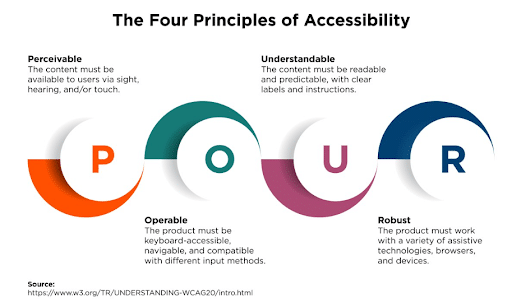
There are several elements to consider as you determine how to redesign a website’s UX and UI:
- Mobile responsiveness: Take a mobile-first approach to web design, as a big chunk of your audience will use mobile devices to access your site.
- Efficient navigation and CTAs: Your homepage and the rest of your site must have simple, intuitive navigation. Additionally, add highly visible and easy-to-complete CTAs. These items will help boost conversions.
- Page load speed: Your web pages must also load quickly to keep users engaged. Ideally, your pages should take no longer than two to three seconds to load. Reducing large files, compressing images, and using techniques like lazy loading can make load speed faster.
- Technical errors: Address broken images and links, layout issues, 404s, and other errors that might otherwise compromise your site’s integrity.

6. SEO Optimization During Redesign
When learning how to refresh a website or redesign it, search engine optimization, or SEO, is another key consideration.
You’ll want your site to rank well for targeted keywords in search engine results pages. To do so, you should:
- Optimize pages for specific target keywords, using unique ones for each page. This will prevent cannibalization. Tools like Google Keyword Planner and Semrush can assist with keyword research. They indicate metrics like search volume and competition to identify the best opportunities.
- Keep or improve existing rankings by using 301 redirects from old pages to their new counterparts. This step is particularly crucial when completing a website migration from one domain to another.
7. Update Content and Visuals
Content is king, and don’t forget it in your website redesign checklist.
Update your site’s content and visuals to effectively connect with your target audiences. You can do so in the following ways:
- Refresh outdated pages with new text and other content. Also, add new resources, including blog posts, information pages, ebooks, white papers, and more.
- Modernize brand visuals and messaging, using clean, crisp visuals and resonant messaging.
- Integrate FAQs, success stories, and dedicated blog sections into your content.
- Refresh all images, fonts, and color schemes to imbue a more contemporary look.

- Update your homepage hero sections which include the subheadings people see at the top of your pages. This section can also include a concise CTA to hook new visitors in from the start.
- Include compelling lead capture forms where appropriate, along with testimonials and videos. These resources will go a long way in convincing new prospects to convert as they come to trust your brand.

8. Test and Launch
Right before you launch your website, test it to confirm its functionality and usability.
For example, you should test your website’s overall performance, including page load speed and the integrity of all of your pages. One effective tool to help gauge SEO and overall performance is Screaming Frog, which can crawl your entire site and detect various issues.
Additionally, you’ll want to check your website’s accessibility, including the use of alt text, color contrast for visually impaired users, font size, captions, and more.
Finally, create a launch plan to minimize potential downtime. Assign members of your team to specific tasks and have a system in place to keep the launch consistently smooth.
In the end, you should benefit from a stable website redesign that gets real long-term results.

Common Mistakes to Avoid
There are some potential web design mistakes you might make. Here are some of the most common ones and how to avoid them:
- A Lack of Clear Goals: Always set specific and realistic goals to guide your redesign and increase your chances of success.
- Neglecting SEO: Maximizing visibility on Google and other search engines is crucial in attracting more organic traffic to your site, making on-page and off-page SEO critical components.
- Ignoring User Feedback: Another detrimental mistake is failing to heed user feedback. Conduct surveys and ask on social media what people’s experiences are like, addressing any issues they find.
- Inadequate Planning: Take the time to develop a clear plan for your redesign, giving it a direct roadmap to a successful launch.
FAQs
1. What is the difference between a website redesign and a website refresh?
A website redesign is a complete update to a website and its content, while a website refresh entails minor changes to more subtly update a site. Website redesigns require a lot more time, effort, and money than website refreshes, but they can be worth it to drive better performance.
2. How often should you redesign or refresh a franchise development website?
It’s typically in your best interest to redesign your website if it’s not getting the results you want, but in most cases, companies redesign their sites once every two or three years, with refreshes in between to make smaller updates.
3. What is included in a website redesign checklist?
Many items can contribute to your checklist, including:
- Evaluating your existing website
- Setting actionable goals for your redesign
- Defining your audience
- Creating a redesign strategy
- Optimizing your site’s UX and UI
- Improving SEO
- Updating content and visuals
- Testing and launching
4. How much does it cost to redesign a franchise development website?
The average cost for website redesign is around $100 to $3,000 on your own. Meanwhile, agencies can cost about $15,000 to $30,000 or more.
Many factors will impact the average cost for website redesign, such as the size and scope of your site, the resources needed to help complete the redesign, and the experience of the agency you hire.
In most cases, it’s often best to hire an experienced agency that can help you get the most from your redesign. Otherwise, lackluster DIY projects might hurt rather than help your franchise website.
5. How can I ensure my website redesign doesn’t hurt my SEO rankings?
Conduct an SEO audit of your website before initiating a redesign. Based on what’s working and what isn’t, you can decide which elements to change for the new website. If you can, migrate high-performing content and SEO elements to your new site fully intact.
Meanwhile, conduct keyword research and optimize technical and on-page SEO elements to improve low-performing pages.
Get Help With Your Next Website Redesign from Ignite Visibility
To get the best results with a website redesign, it’s best to work with an agency that understands the needs of franchise websites. Ignite Visibility has plenty of expertise and resources to help your next redesign succeed. In addition, we provide a wide range of franchise marketing services that fuel meaningful growth.
Not sure you need us? Here are just some of the ways you can benefit from our solutions:
- Determine whether your site needs a redesign or refresh
- Learn the ins and outs of your target audience to inform your strategies
- Optimize existing and new pages for SEO to dominate rankings
- Create high-quality and modern visuals and content for every page
- Maximize page speed and other aspects of performance to drive conversions
- Develop a new website from scratch if needed
- And more!
Get in touch with our experts today and get everything you need to drive franchise success.
