

Thinking about Bing Shopping Ads?
You should be!
This article will tell you everything you need to know to be a pro with Bing Shopping.
What We’ll Cover:
- What Bing shoppping ads are
- Bing shopping ads vs. Google shopping ads
- Benefits of Bing:
- Bing shopping ads flexibility
- Integrating Bing ads with Google ads
- Are Bing shopping ads right for your brand?
- How to create a Bing shopping ad
So, why the upswing in Bing Shopping Ads?
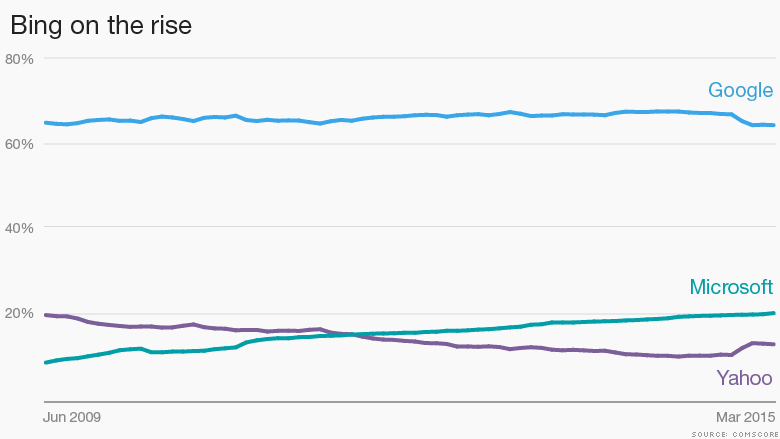
For starters, 1 in 5 people use Bing for online searches.
In fact, Bing’s average click-through-rate (CTR) is about 50% higher than what we see on Google Ads, and every industry had a higher average CTR than seen on Google.
Even better? The Bing Network audience spends 35% more online when shopping from their desktop computers than average internet searchers.
Do I have your attention? Good. Let’s dive in.
What are Bing Shopping Ads?
First things first.
Similar to Google Ads, Bing Shopping Ads are Bing’s platform for advertisers to display product ads on Bing’s Search Network.
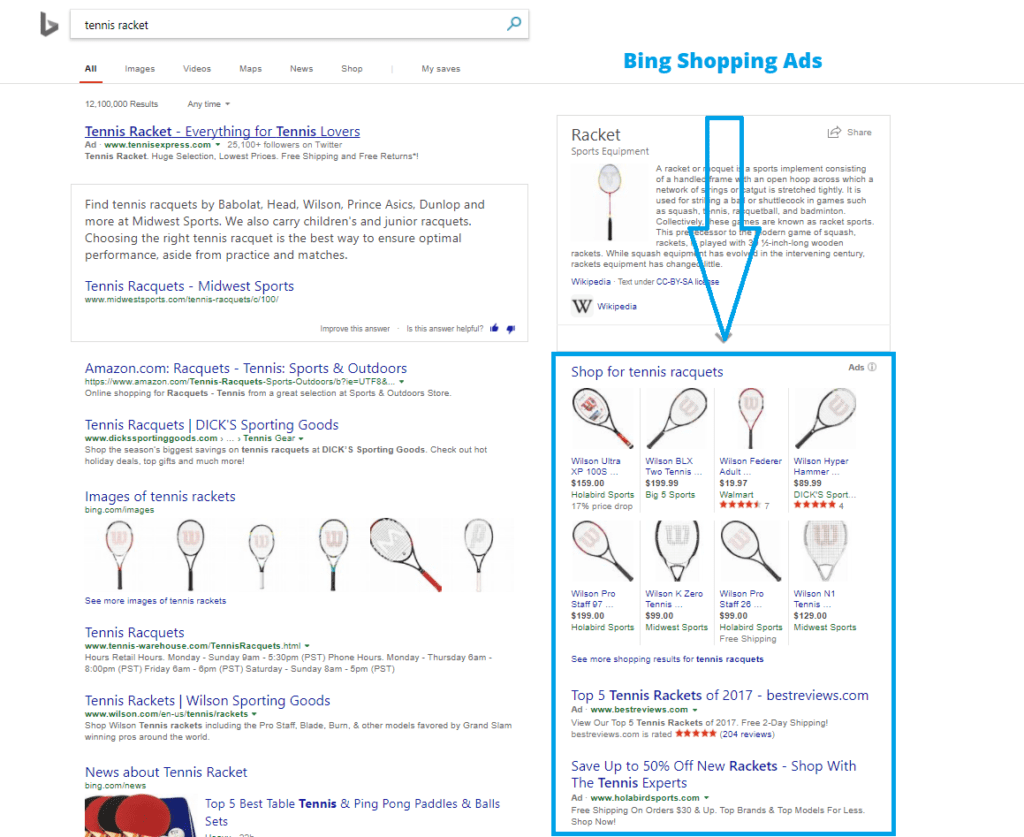
Shopping ads allow you to better display your product than traditional text ads by using higher-quality images. Bing lists the following advantages of their shopping campaigns:
- There’s no need for extensions – Shopping ads eliminate the need to create an extension; rather, your catalog is automatically linked during set-up
- Enhanced control over your campaign – By using the Campaign Priority setting, you can specify which campaigns should take priority over others
- Custom labels – Custom labels are fields associated with each product that you are free to use however you’d like. Bing Shopping ads examples include best seller, seasonal item, special offer, etc.
- Product groups – Groups are a highly targeted way to organize based on characteristics such as brand, condition, etc. Each ad group will be associated with a single product group.
- Common promotional text – all ads within a group will use the same promotional text
Bing Shopping Ads vs. Google Ads
If you compare Bing ads vs Google ads, there is one thing you need to keep in mind.
Google wins, hands down.
In a world of 6,586,013,574 daily searches, 4,464,000,000 belong to Google.
Bing controls 873,964,000.
Now, I know what you’re thinking. Why would you spend your money advertising on a search engine that doesn’t even control the most searches?
Less Competition with Bing Shopping Ads
When comparing Bing shopping vs Google shopping, you’ll quickly notice that there is much less competition on Bing than Google. This is a good thing for your company.
Think of it this way: Fewer people use Bing as their ad engine, which means that there are fewer competitors for you to go up against. This alone will save you loads of money in the long run.
And because Bing uses an auction system similar to that of the Google Ads auction, that also translates to you saving money.
More specifically, it means better ad positions and cheaper costs per click.
Let’s break down the dynamics of Bing shopping vs Google shopping.
Google Shopping results:
- Average CPC for Google Shopping Campaigns: $.48
- Average ROAS for Google Shopping Campaigns: 751%
- Average revenue per click for Google Shopping Campaigns: $3.58
Bing Shopping results:
- Average CPC for Bing Shopping Ads: $.33
- Average ROAS for Bing Shopping Ads: 1345%
- Average revenue per click for Bing Shopping Ad: $4.43
See what I mean about comparing Bing ads vs Google ads?
Not only do Bing ads cost you less per click, but they often generate an even higher return than similar Google ads.
Part of Bing’s high numbers in return on investment spending (ROAS) also likely have to do with ad placement. Because bids tend to be less expensive on Bing, advertisers have a better chance of landing in a top spot.
With Google, you’ll potentially pay more for a less desirable position.
So while it may not generate the number of searches that Google does, it still represents an opportunity for your ads to excel due to the lack of competition.
Bing Shopping Ads Offer More Flexibility in Key Areas
There are a few key differences between Bing Ads vs Google Ads that lean toward Bing’s favor.
First up, budget. Both platforms on a pay-per-click (PPC) basis. But with Google, you choose your budget on a strictly daily basis.
Bing, however, lets advertisers choose between daily and monthly budgets.
You also have more options when it comes to location targeting. In Google Ads, your location is set at the campaign level, whereas Bing allows you to set a location at the campaign level as well as well as at the group level.
Bing also allows you to assign different campaigns different in time zones.
Another big difference in targeting (which we’ll explore in-depth shortly) is how they target by demographic.
Google AdWords targets mainly by exclusion, meaning if you want to segment a certain age and gender group – say, women ages 20-35, you must add those to your campaign and then specify which groups to exclude.
Bing Shopping Ads allow you to choose specific age ranges and gender and adjust your bids accordingly.
Targeting With Bing Shopping Ads
Of course, ads are only effective if they reach your target audience. Luckily, Bing provides plenty of targeting options to help increase your exposure to the customer’s that matter most.
With Bing, you can set targeting options for both display and mobile ads at the campaign level or ad group level.
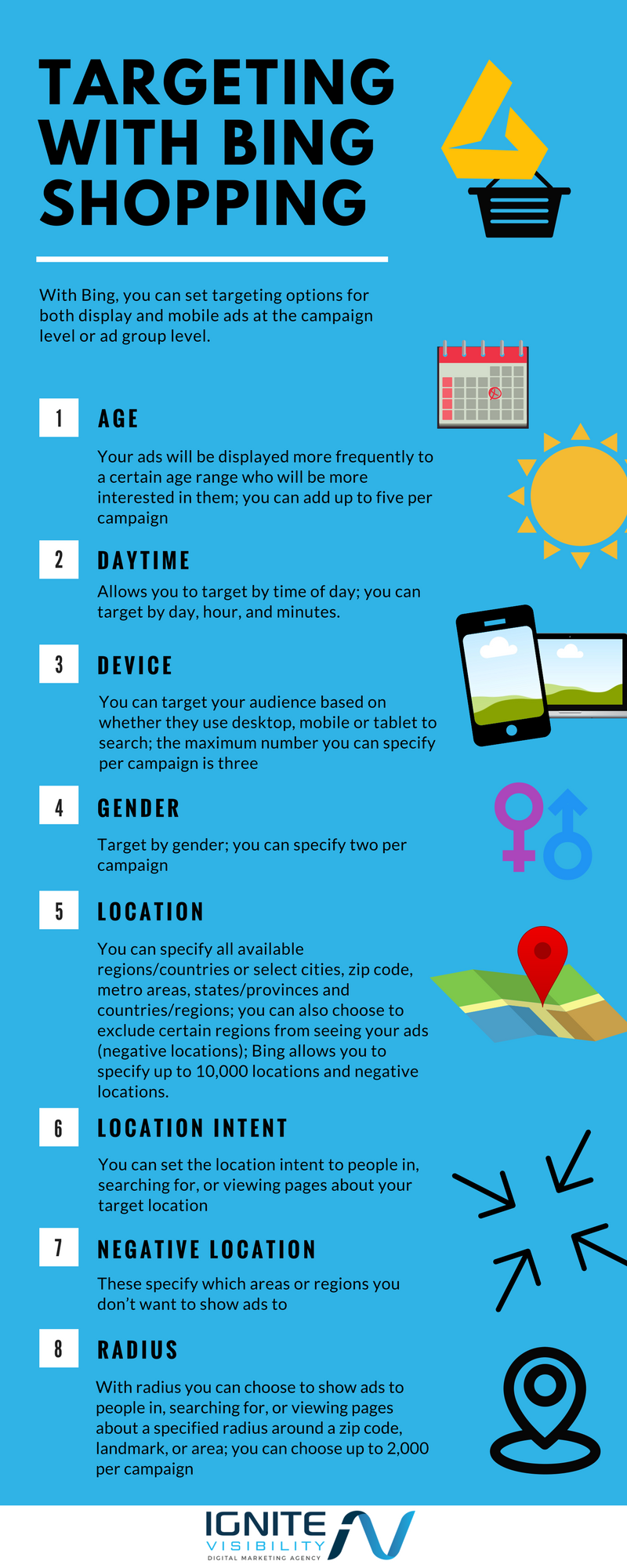
You can target ads by the following key factors:
- Age – Your ads will be displayed more frequently to a certain age range who will be more interested in them; you can add up to five per campaign.
- Daytime – Allows you to target by time of day; you can target by day, hour, and minutes.
- Device – You can target your audience based on whether they use desktop, mobile or tablet to search; the maximum number you can specify per campaign is three.
- Gender – Target by gender; you can specify two per campaign.
- Location – Can specify all available regions/countries or select cities, zip code, metro areas, states/provinces and countries/regions; you can also choose to exclude certain regions from seeing your ads (negative locations); Bing allows you to specify up to 10,000 locations and negative locations.
- Location Intent – You can set the location intent to people in, searching for, or viewing pages about your target location.
- Negative Location – These specify which areas or regions you don’t want to show ads to.
- Radius – With radius you can choose to show ads to people in, searching for, or viewing pages about a specified radius around a zip code, landmark, or area; you can choose up to 2,000 per campaign.
Once you’ve set your Bing Shopping Ads targets, you can increase your bid amounts to make sure your ads are displayed higher in search results – to the right audience.
As you choose each target criterion, you will have the option to increase your starting bid by a certain percentage.
For example, if you sell jewelry online and have a physical store location in Nashville, you can choose a base bid for the keyword “jewelry,” then you can create a location target for the campaign that raises the bid by 50% for users in the Nashville area.
The higher bid increases the chances that users in your target location, in this case Nashville, will see your Bing ad.
Keep in mind that you can specify your minimum target criteria at the campaign level, and then continue to narrow down at the ad group level. For example, choose a general location like “U.S.” or “California” for your campaign target location, then narrow your ad groups down further by zip code or city.
Google Ads Integration With Bing Shopping Ads
Already invested with Google Ads?
Not a problem. Bing Shopping Ads has a feature that allows you to import existing AdWords campaigns into Bing.
Simply log in to your Bing Shopping Ads account, click Import Campaigns, and then click Import from Google Ads.
From there, you’ll be prompted to log in to your Google account, choose what you would like to import, etc.
Do keep in mind that certain settings won’t be imported from the campaign, such as some language settings, etc.
Are Bing Shopping Ads Right for You?
Ultimately, it comes down to your audience.
- Are comprised of 116 million unique searchers on Bing Network
- Conduct 5.5 billion monthly searches
- Make up a 32.6% share of the U.S. desktop search market
- Is evenly split between males and females (50% male, 50% female)
- Almost half of Bing Network users (46%) are married or living with a partner
- ⅕ live in the U.S. South Atlantic
- Nearly 40% are between the ages of 35-54
- ⅓ has a household income of $100,000 or more
- Over ⅓ hold an associate degree, while 17% graduated from graduate school
The takeaway? Bing users cover both genders, are educated, and have spending power. If your target audience falls into any of the above parameters, you’ll want to give Bing Shopping Ads a go.
Another key indicator that you should be on Bing depends on the industry you’re trying to target.
Because shopping ads are focused more directly on retail – you’re in luck. Apparel and accessories have an average CTR of 3.33%, while Google’s similar e-commerce industry gets an average CTR of 1.66%.
How to Create an Ad with Bing Shopping Ads
In order to create a product advertisement with Bing Shopping Ads, there are four easy steps that you need to follow.
1. Claim your domain.
To claim your domain, you will need a Microsoft account that you will use for Bing Shopping Ads.
Go to Bing Webmaster Tools and verify your domain. Click on Profile and make sure that you fill out all of the sections completely. Under My Sites, enter your domain URL and select Add. Then fill out the info sections and hit Verify.
2. Create your store.
Once you see that your domain is verified, you can start to create your store.
Click on Tools > Bing Merchant Center > Create a Store, and enter your information.
3. Upload your products.
You can then upload your products through the Catalogue Management Tab.
Keep in mind that your files needs to be smaller than 4MB. You also need to update your feed regularly because your catalogue will expire after 30 days.
4. Create your shopping campaign.
When you are ready to create an advertisement with Bing Shopping Ads, go to the Campaign Page and select Create Campaign > Shopping Campaign.
From there you can add campaign targeting parameters and product extensions. You can also use product filters to focus on specific items, edit the time zone, and even select key locations to target with your ad.
Wrapping Up Bing Shopping Ads
When it comes down to it, if you’ve already mastered Google Ads, getting familiar with Bing Shopping Ads won’t be a big issue.
The two are similar in many crucial ways – including setup, keyword research, and bidding.
But with Bing, you have the potential to reach a somewhat untapped audience that will offer you a huge return on your investment.
So the real question is, why wouldn’t you give Bing a try?
