


When deciding between subdomain vs. subdirectory formats for your URL structure, Google states that both can work. However, the right choice will depend on your website architecture, governance, and long-term SEO goals.
In this blog, Jason Carleton, Sr. Director of SEO, breaks down the differences between subdomains and subdirectories, providing insights into when to use each and how they can influence your overall SEO strategy.
What You’ll Learn:
- What’s the Difference Between a Subdomain and a Subdirectory?
- Subdomain SEO Impacts
- When Should You Use a Subdomain?
- When Should You Use a Subdirectory?
- FAQs About Subdomain SEO
TL;DR
Not sure when to use subdomains vs. subdirectories? Let’s break down which to use and when real quick:
- Use subdirectories by default for content hubs and blogs
- Alternately, use subdomains when you need more distinct separation
- For SEO, subdomain and subdirectory formats can rank with proper implementation
What’s the Difference Between a Subdomain and a Subdirectory?
A subdomain is a site that’s actually separate from a main domain to establish different sections of a site with different functions, such as an ecommerce counterpart to a non-ecommerce site. Meanwhile, a subdirectory serves as a folder branching off from an existing URL, such as a blog within that same domain, requiring less separation or distinction.
Let’s look closer at the differences between each:
Subdirectory vs. Subdomain URL Examples
Subdomain URL Examples:
- blog.yoursite.com
- shop.yoursite.com
- support.yoursite.com
- locations.yoursite.com
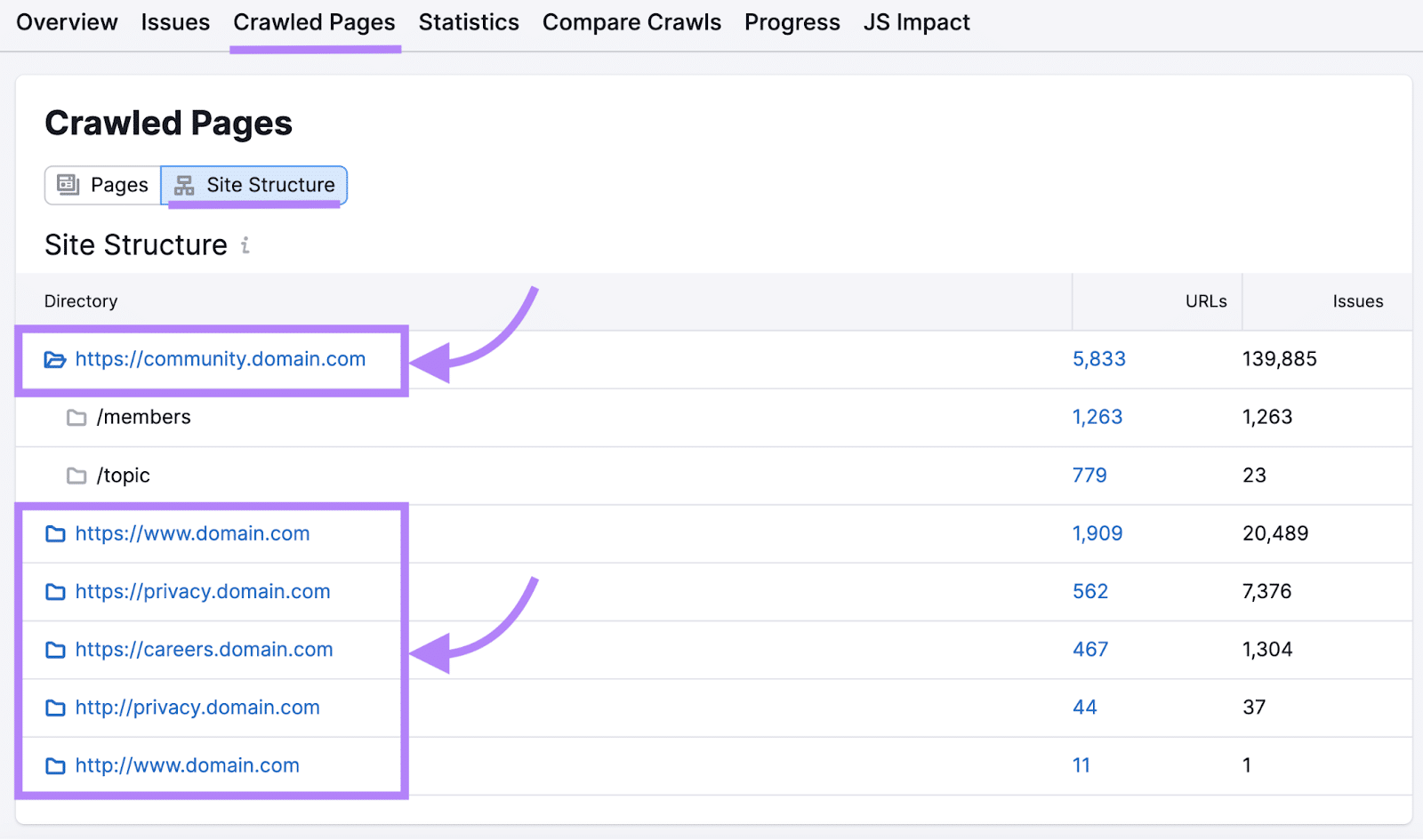
Example of a Subdomain, Source: SemrushSubdirectory URL Examples:
- yoursite.com/blog
- yoursite.com/shop
- yoursite.com/support
- yoursite.com/locations
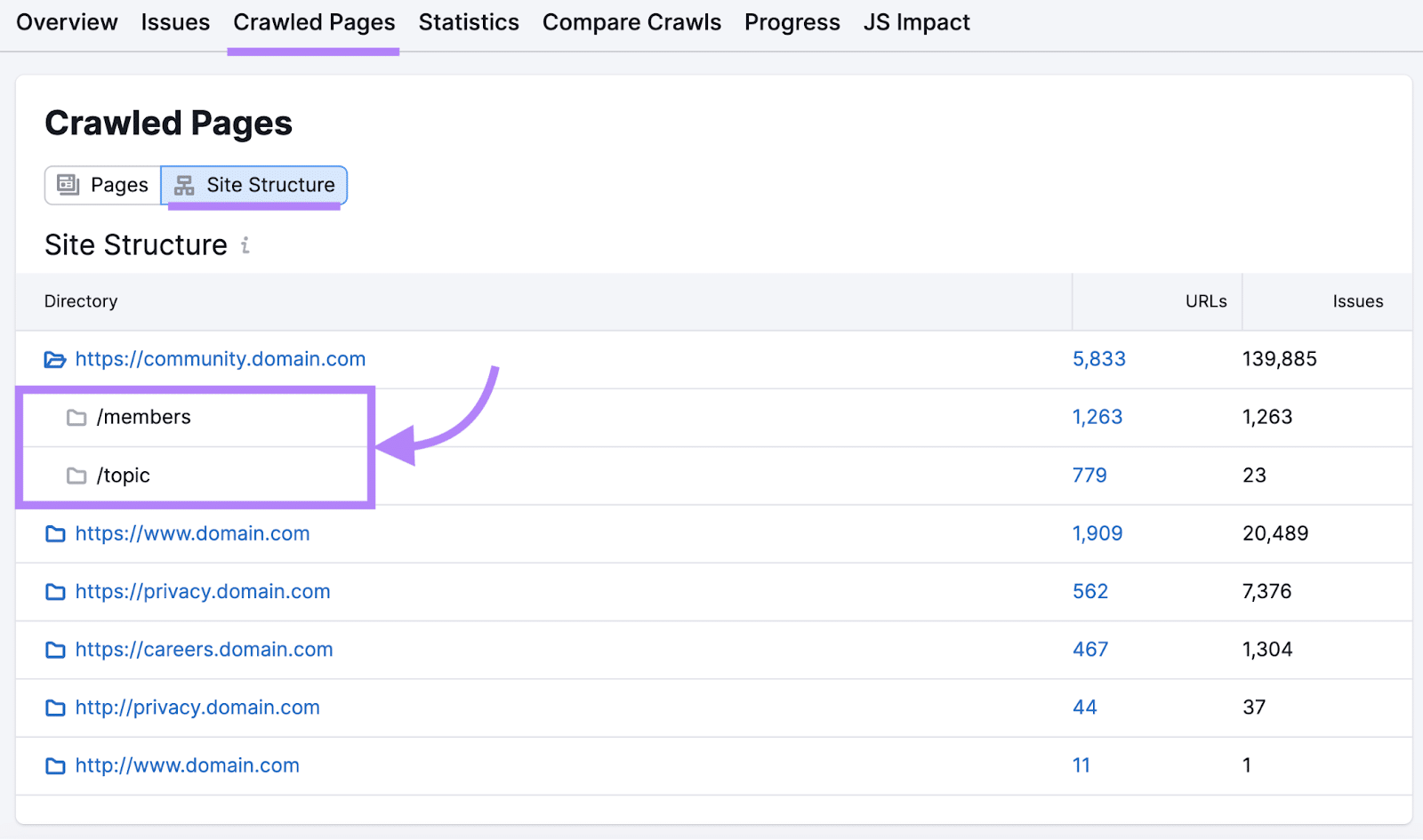
While Google treats subdomains and subdirectories equally in terms of indexing and ranking, real-world examples often show that subdirectories tend to perform better in search results.
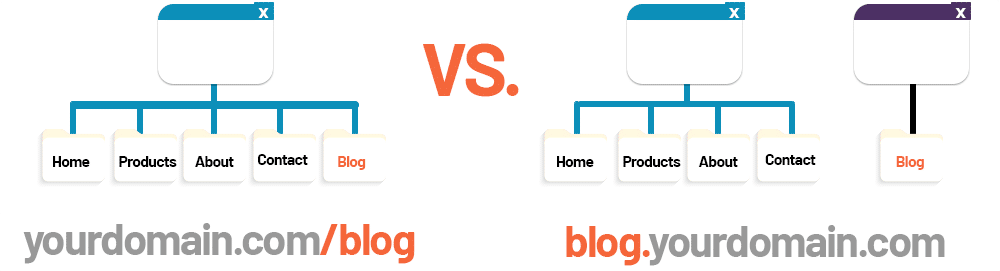
DNS Differences Between Subdomains vs. Subdirectories
The technical differences between these two approaches run deeper than URL formatting. Subdomains require separate DNS configuration, where subdirectories inherit all DNS settings from the root domain. No additional DNS configuration is necessary because yoursite.com/blog is simply a path on the same server responding to the same host header.
Subdomain vs. Subdirectory: CMS and Hosting Flexibility
Subdomains can also live on entirely different servers, hosting environments, or even content management systems.
If you use a subdirectory, everything must exist in that one main domain’s server, using the same SSL certificate and hosting infrastructure.
My Expert Insight on Subdomain SEO
As search engines evolve, it’s critical to stay informed about how emerging trends, like AI-driven search, and Core Web Vitals, will impact your website’s performance, including subdomains.
As we settle into 2026, you should remain focused on creating high-quality content, optimizing for user experience, and ensuring technical SEO best practices across both subdomains and subdirectories will become more important. While subdomains can still be useful for certain technical or organizational reasons, there are some things you should consider before choosing to use a subdomain.
In short, always default to subdirectories for content that belongs on your main website, unless there is a specific technical or organizational reason to separate content more officially with subdomains. For instance, if you want to develop a resource hub dedicated solely to support topics, a subdomain might be justified.
Pro Tip: Focus on creating high-quality, relevant content for your subdomains. Optimize them for search engines and provide a seamless user experience. By aligning your SEO subdomain strategy with your broader SEO goals, you can boost your site’s visibility and performance.

Subdomains vs. Subdirectories: Google’s Official View
To summarize: Google sees both subdomains and subdirectories as fine to use, with search engine bots capable of crawling and indexing both.
To elaborate here a bit, Google’s official position, articulated repeatedly by Search Advocate John Mueller, states that the search engine can handle both subdomains and subdirectories equally well. In multiple Google Search Central hangouts, Mueller has emphasized that Google’s algorithms are sophisticated enough to understand the relationship between a subdomain and its parent domain, treating them appropriately regardless of structure choice.
However, the practical outcomes documented by industry experiments tell a more nuanced story. Backlinko’s analysis of over 11.8 million Google search results found that subdirectories consistently outperform subdomains in organic rankings, particularly for competitive keywords.
Ahrefs’ research reinforces this gap between theory and practice. Their analysis of subdomain-to-subdirectory migrations demonstrates that “[i]f you don’t treat [subdirectories] as part of the same site, Google may not either.”
The disconnect between Google’s official stance and measurable outcomes highlights the disparity between what the algorithm can do and what it consistently achieves at scale. While Google’s systems are theoretically capable of understanding subdomain relationships, the reality of crawl budgets, authority distribution, and link equity calculations creates systematic advantages for subdirectory implementations.
Why Teams Still Often Prefer Subdirectories
While the subdomain structure has its benefits and use cases, marketers and development teams often like to use subdirectories because they often come with an operational and strategic advantage.
The following are some reasons why teams tend to use a subdirectory vs. subdomain format:
- Content Consolidation: Management of content and SEO for subdomains is generally easier, centralizing content when it supports the main domain and its function, e.g., blog posts strengthen the domain authority without requiring a dedicated hub.
- Simpler Internal Linking: Subdirectories count as a branch of the primary domain, allowing for more evenly distributed link equity across the site to supplement backlinks and other efforts that build domain authority.
- Easier Governance: Subdirectories also benefit from more centralized management using the same CMS, plugins, updates, and other elements to simplify maintenance.
- Fewer Reporting Silos: Using Google Analytics 4 and Google Search Console, you can get a more unified view of site performance with subdirectories, without the need for cross-domain tracking configurations.
- Stronger Brand and Site Cohesion: Subdirectories use the same design elements, user experience components, and branding, giving users a more consistent experience to build brand authority and trust.
So, when choosing between a subdomain vs. subdirectory structure, consider these elements. However, a subdomain structure may be necessary if you need more separation, and it won’t necessarily hurt SEO when implemented carefully and correctly.
When Should You Use a Subdirectory?
A subdirectory is perfect for when you want to expand your website with new content that’s closely related to your main site.
The following are some instances when you might want to use a subdirectory vs. subdomain structure:
- Blogs
- Resource centers
- SEO content hubs and pillar content
- How-tos and other guides
- Case studies
- Location-specific landing pages
- Topical expansions tied to the main brand, establishing topical authority
For example, if you’re launching a blog or an additional content hub, a subdirectory is generally the best approach, as it allows you to build authority more efficiently by pooling SEO value from across your domain.
If you have a main category like “blog” and want to divide it into subcategories like “news,” “tips,” and “interviews,” you can use subdirectories like:
- example.com/blog/news
- example.com/blog/tips
- example.com/blog/interviews
Using a subdirectory also makes it easier to manage internal linking and canonical tags, ensuring that search engines understand the relationship between your content pieces, which can positively impact rankings.
When Should You Use a Subdomain?
How do subdomains affect SEO? With proper practices, they can benefit rankings and overall performance.
There are some perfectly valid reasons to use a subdomain vs. subfolder structure. Specifically, they can help establish separate:
- Products
- Apps
- Support centers
- Account areas
- Country and language architectures
- In some cases, stacks or teams
However, keep in mind that subdomains do not automatically inherit SEO value from the root domain. You will need to work on each subdomain individually to rank well, which can require more effort.
SEO Impacts That Actually Matter
When it comes to hosting your blog, choosing between a subdomain and a subdirectory can significantly impact your site’s SEO performance.
Subdomains function as separate entities in Google’s eyes, meaning the authority you build on blog.yoursite.com doesn’t automatically strengthen yoursite.com’s rankings – a critical consideration that can cost you months of SEO momentum.
So, let’s talk about it: How do subdomains affect SEO?
Crawlability and Discovery
Google and other search engines locate, crawl, and index subdomains vs. subfolders separately from the core domain.
Although Google can usually find subdomains with ease, your subdomains could come with certain crawl budget issues and require more time to crawl and index than subdirectories.
Internal Linking
Links between subdomains and root domains still function as internal links, but they may not pass link equity quite as effectively as those within a subdirectory.
To avoid this issue, make sure all internal links are well-established and logical to help distribute equity.
Canonicals
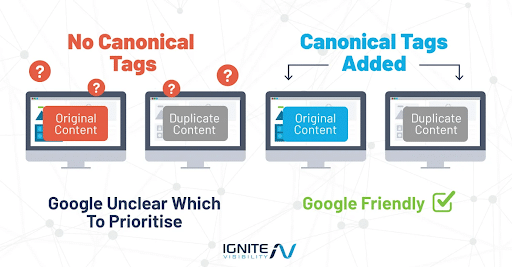
Seeing as subdomains appear as separate sites to Google, similar or the same content appearing on these and your root domain could lead Google to consider them duplicate content.
The proper use of canonical tags can help indicate which sites and pages serve as the main version you want to index and rank.
Duplication Risk
Again, duplication can be an issue if your subdomain contains content that’s similar or identical to the main site. Strategizing to incorporate canonical tags and creating more unique content across domains can prevent duplicate content from hurting SEO in subdomains.
Analytics and Reporting
You will need to set up separate Google Search Console configurations for subdomains to track SEO performance.
It’s also important to integrate your subdomains into the root domain within Google Analytics 4 to get a complete picture of performance across domains.
We’ll get into how to set up Google Search Console and Google Analytics 4 for proper domain tracking below.
UX Continuity
It’s equally crucial to create a cohesive user experience between subdomains to maintain continuity.
Make sure your sites implement consistent branding, header navigation, and site search functionality to create a less jarring experience for users and search engines alike.
Governance
Also, keep in mind that technical maintenance is a bit more meticulous for a subdomain vs. subdirectory structure.
Effectively consolidate all sitemaps, SSL certificates, robots.txt files, and other elements to simplify maintenance across domains.
Analytics and Search Console Setup: A Practical How-To
Setting up analytics and Search Console correctly from the start prevents data fragmentation and tracking gaps that plague subdomain implementations.
GA4
In Google Analytics 4, create separate data streams for your main domain and subdomain within the same GA4 property to maintain unified reporting. Navigate to Admin > Data Streams > Add Stream, then configure each domain as a distinct web stream. This approach consolidates user journeys across both properties while allowing filtered views of each.
For cross-domain measurement, modify your GA4 configuration tag to include both domains in the measurement scope.
This linker configuration ensures that when users navigate between yoursite.com and blog.yoursite.com, GA4 maintains session continuity rather than treating the transition as a new user acquisition.
Here are some basic steps to track your subdomains in GA4:
- Go to Data Streams in your Admin dashboard under Data collection and modification.
- Choose Web and click on the corresponding web data stream.
- Next, click Configure tag settings.
- Click Configure your domains within Settings.
- By default, GA4 will automatically detect the same Google tag across all domains in the Recommendations section, at which point you can click Add to accept recommendations.
- Manually add domains by clicking Add condition in Include domains that match the following conditions. From there, choose a match type and enter the identifier for that particular domain under Domain.
- Click Save to begin tracking.
Google Search Console
In Google Search Console, add both properties separately, even if using a Domain property that aggregates all subdomains. The Domain property (verified via DNS TXT record) provides high-level performance data, while individual URL prefix properties (https://yoursite.com and https://blog.yoursite.com) enable granular indexing controls, targeted disavow files, and specific sitemap submissions. Submit separate XML sitemaps for each property to ensure complete crawl coverage.
Implement a UTM parameter strategy for any campaigns driving traffic between your main domain and subdomain. Tag links from yoursite.com to blog.yoursite.com with source/medium parameters like” utm_source=main-site&utm_medium=internal-link&utm_campaign=blog-promotion” to track cross-property referral performance and identify high-value navigation paths in your analytics reporting.
The following are some steps for tracking subdomains in GSC:
- Within the GSC dashboard, click on the property selector dropdown at the top left and choose Add property.
- Choose Domain in the “Select property type” window.
- Enter the main domain name you wish to track, e.g., example.com
- Click Continue.
- You will then need to Verify ownership via DNS verification, adding a CNAME or TXT record to the DNS configuration.
- Track subdomains’ SEO performance under Performance and Index Coverage reports.
Migration Playbook: Moving From Subdomain to Subdirectory
Migrating from a subdomain to subdirectory structure requires methodical execution to preserve search equity and avoid traffic disruptions.
The following are the main steps to take when transitioning from a subdomain structure:
1. Map URLs
Before migrating from a subdirectory to a subdomain structure, map your URLs and determine where they should go on the new domain.
In the process, identify all active URLs, title tags and meta descriptions, and H1 header tags.
All of your old URLs should match a corresponding destination.
2. Implement 301 Redirects
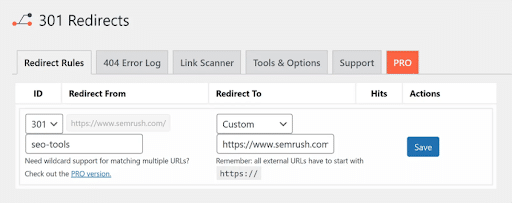
The next step is to incorporate 301 redirects from all old URLs to their new destination, but you should avoid using any meta refreshes or 302 soft redirects.
Taking this step will help ensure that people go to a new corresponding page when clicking on a link and don’t wind up on a 404, keeping them moving along the customer journey.
3. Establish Canonical Tags
To prevent conflicts between your old and new pages, use canonical tags that indicate to search engines which version of a page is the right one to rank.
For example, a page could feature the following canonical tag:
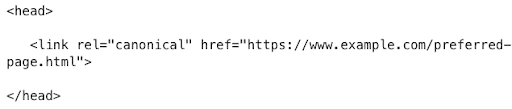
This rel=”canonical” tag would distinguish this page from any duplicates that might otherwise cause cannibalization.
4. Update Internal Links
You will also need to update internal links within your subdirectory to help spread link equity across pages and maintain their crawlability and indexability.
5. Set Up Post-Migration Monitoring
In Search Console and GA4, monitor for items like:
- Traffic
- Crawl errors
- Coverage
- Rankings
For the first two weeks, it’s best to conduct daily monitoring to catch any problems before they can worsen, and then switch to weekly monitoring.
6. Set Clear Benchmarks
Finally, set benchmarks based on your specific goals and industry or competitor standards.
In doing so, go beyond simple keyword ranking tracking, focusing on organic traffic by page, indexed URLs, backlinks and leading referrers, and AI Overview citations.
Common Mistakes to Avoid
Do subdomains hurt SEO? Normally, no, but the following mistakes when using either subdomains or subdirectories could do so, making it important to avoid them as much as possible:
- Moving Without Redirects: Neglecting to implement 301 redirects can result in 404 errors, ranking drops, and lost link equity, which is why you must always map old URLs to new ones based on the most relevant matches.
- Leaving Canonicals Wrong: If canonical tags point to the wrong version of a website, this could confuse search engines and keep Google from ranking the page you want to rank, negatively impacting subdomains’ SEO. Canonicals should accurately reflect the target page without leading to soft 404s.
- Split Analytics: Use subdomain or cross-domain tracking in Google Analytics to create a unified view of all data. Otherwise, SEO with subdomains could suffer from complex reporting and disconnected journey tracking.
- Inconsistent Navigation: Another factor that can hurt both branding SEO for subdomains and subdirectories is using a different type of footer, header, or overall UX from your main site. You should work toward creating a seamless experience for all users with your content.
- Duplicate Content: SEO in subdomains will also suffer if pages have similar or identical content. Canonical tags can help resolve this issue by indicating to Google which page to rank.
Failing to Update Internal Links: After moving your content, be sure to update your internal links, confirming with a post-migration site crawl that all internal links go directly to the new URL destination while mitigating the risk of redirect chains.
Frequently Asked Questions About Subdomain SEO
1. Are subdomains bad for SEO?
Subdomains aren’t inherently bad for SEO, but they fragment your domain authority by treating content as a separate entity from your main site. For most businesses, subdirectories offer better SEO performance by consolidating all authority into a single domain.
Subdomains are most effective when you genuinely need separate properties, such as distinct geographic markets or completely different product lines, but for blogs, resource centers, and standard content, subdirectories are typically the best choice.
2. What is an example of a subdomain in SEO?
A common example of a subdomain in SEO is a blog hosted on a subdomain, such as blog.example.com. In this case, the blog is a separate section of the website, distinct from the main site’s content.
3. What are the disadvantages of subdomains in SEO?
One disadvantage of using subdomains for SEO is that they are treated as separate entities by search engines, which can dilute the overall authority of your main site. Additionally, managing content on subdomains can be more complex than on a subdirectory, as it requires separate hosting and maintenance.
4. Does Google index and rank subdomains?
Yes, Google indexes and ranks subdomains as independent websites. Each subdomain gets its own crawl budget, authority profile, and ranking potential separate from your main domain.
5. What is a root domain vs. a subdomain?
A root domain is the main domain name of a website, such as example.com. A subdomain, on the other hand, is a separate section of the website that is treated as a distinct entity by search engines, such as blog.example.com. Subdomains are used to create separate areas of a website, such as blogs, forums, or support sections.
6. What are the advantages of using subdirectories instead of subdomains?
Subdirectories consolidate all SEO equity into your main domain, allowing every piece of content to benefit from accumulated backlinks and authority. They provide seamless user navigation without domain transitions, reduce technical maintenance complexity by operating within a single CMS and hosting environment, and simplify analytics tracking with unified user journeys.
7. How does Core Web Vitals impact subdomains?
Core Web Vitals metrics apply equally to all parts of a website, whether they’re subdomains or subdirectories. The key is to optimize the user experience on every part of your site to ensure fast load times, good interactivity, and visual stability.
8. How do I track subdomains in Google Analytics 4 (GA4)?
In GA4, create separate data streams for your main domain and subdomain within the same property by navigating to Admin > Data Streams > Add Stream. Configure cross-domain measurement by adding both domains to your GA4 config tag’s linker settings: ‘linker’: {‘domains’: [‘yoursite.com’, ‘blog.yoursite.com’]}. This maintains session continuity when users navigate between properties. Also set ‘cookie_flags’: ‘SameSite=None;Secure’ to ensure cookies persist across domain boundaries. This unified property approach lets you track complete user journeys while still filtering reports by individual data stream when you need domain-specific insights.
9. Do subdomains affect my overall SEO performance?
Subdomains are treated as part of your broader SEO strategy, but they don’t inherit authority from the root domain as automatically as subdirectories. Proper implementation, such as internal linking and canonicalization, is essential to maintain the SEO integrity of your main site while using subdomains.
Elevate Your Subdomain SEO Strategy with Ignite Visibility
The decision between using a subdomain or subdirectory ultimately comes down to your site’s structure and long-term SEO goals.
If your content is an integral part of your main website and you want to consolidate SEO authority, a subdirectory is often the best route.
However, for content that needs to stand apart, such as separate services or unique technical requirements, a subdomain might be the better option.
Ignite Visibility can assist you in:
- Understanding the nuances of subdomain vs subdirectory SEO
- Implementing effective SEO strategies tailored to your business
- Maximizing your website’s potential for search engine rankings
- And much more!
Ready to take your SEO game to the next level? Contact us today!

