

Ranking for search engine results page (SERP) features on Google is essential for maximizing your visibility in search. Today, Google results include a variety of SERP features, including visual elements like Maps, AI answers, products, videos, and ads. SEO can help you earn organic placements, while ads require a paid media strategy.
In this guide, Ashley Mushayabasa, Digital Marketing Coordinator, will cover the Google SERP features that matter the most, how to improve eligibility, and how to measure the results of your SERP feature strategy.
What You’ll Learn:
- What Are SERP Features?
- What’s New With Google SERP Features?
- Which SERP Features Should You Target?
- Major Google SERP Features and How to Optimize
- Other Google SERP Features to Know
- How to Track SERP Features and Measure Results
- Common SERP Feature Mistakes
- FAQs
TL;DR: What Marketers Need to Know
- Target the Google SERP features that match your customers’ searches and your business goals.
- Know how to track SERP features by keyword, location, and device, and check whether your brand actually appears within them.
- Avoid key mistakes such as focusing too much on schema and going after irrelevant features
- Use Search Console to measure search visibility and GA4 or your CRM to measure leads and revenue.
What Are SERP Features?
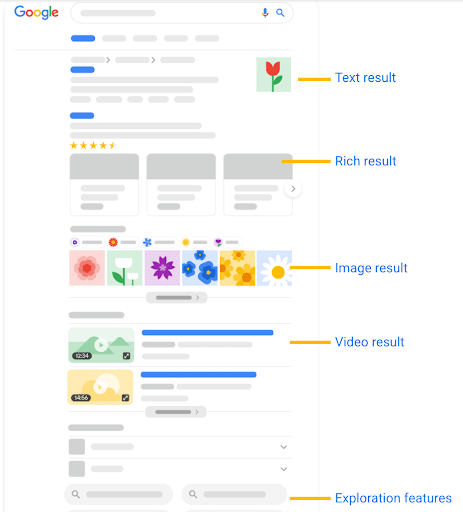
First, let’s look at what SERP features are. SERP features are elements on search engine results pages that stand apart from traditional blue-link listings. They are often visual and can provide users with the information they need without leaving the SERP.
Rich results are one type of SERP feature. They enhance a listing with extra details, such as product prices, review stars, or recipe information, typically using supported structured data. Other features, such as Knowledge Panels, AI Overviews, and People Also Ask, appear as separate sections on the results page.
What’s New With Google SERP Features?
- AI search has dedicated reporting. Google’s generative AI performance reports rolled out worldwide on August 31, 2026. They show impressions from AI Overviews and AI Mode, with breakdowns by page, country, device, and date.
- AI inclusion has its own control. In Search Console, the Search generative AI setting lets you include or exclude your site’s links and content from these experiences. Inclusion is the default, but check your property’s setting.
- FAQ rich results have been retired. Google stopped showing them on May 7, 2026. Useful FAQ content still belongs on your site, but FAQ markup is no longer a way to earn that search enhancement.
- Review and video guidance has changed. Google clarified its rules against fake and undisclosed incentivized reviews and added creator information to its VideoObject documentation. Check these requirements when updating product reviews or video pages.
My Expert Opinion on SERP Features
In addition to traditional search results, websites must target relevant SERP features in SEO strategies. These features can greatly increase your visibility in search results, building trust among users.
Ranking for these elements is particularly important as more and more users have zero-click experiences on Google, with 68% of searches today ending without a click. The more ubiquitous your brand is across results, the more you can attract users who will eventually visit your website and convert, even if they don’t initially do so with that first search.
The experts at Ignite Visibility have worked to help clients across industries dominate SERPs, with a big focus on boosting rankings for AI results. One client landed 72% more first-page rankings with a strong SEO strategy optimizing for Featured Snippets and AI Overviews, while another experienced a 729% increase in AI visibility and 32% more leads.
Knowing how to optimize for each relevant SERP feature can give your brand the lift it needs to get in front of your target audiences.
Which SERP Features Should You Target?
The specific features you want to target will depend on your business type. Here are some of the different features to target based on your industry:
| Business Type | Target SERP Features |
| Local Businesses | Maps and Google Business Profiles for each location |
| Retailers | Product listings, images, and Shopping ads for a seamless ecommerce experience |
| Publishers and B2B Brands | Relevant AI answers, news, and video opportunities |
Start with the keywords your customers use, then check the results in the locations and on the devices that matter to your business. A feature is worth pursuing when it appears for relevant searches and gives customers a useful next step, such as reading a guide, calling a location, or buying a product.
These examples show how search intent can guide your strategy. They are starting points to investigate, not a promise that each feature will appear for every search.
| Example Keyword | SERP Features to Check | Content or Profile to Improve |
| emergency plumber near me | Local Pack and paid ads | The local Business Profile, service page, and relevant ad campaign |
| how to fix a leaking faucet | Featured Snippets, People Also Ask, AI Overviews, and video results | A clear tutorial with useful steps and a demonstration |
| buy waterproof hiking boots | Product results, Shopping ads, and images | Product pages, Merchant Center data, and product photography |
Now, we’ll get into these and other features in more depth with the below list of Google SERP features.
Major Google SERP Features and How to Optimize
Here is a practical list of Google SERP features to consider and how to optimize for them in your SERP feature strategy. Google’s layouts and available features vary by query, location, and device, so focus on the results your customers actually see.
1. AI Overviews and AI Mode
One of the more recent additions to the list of Google SERP features is AI results, including AI Overviews and AI Mode.
AI Overviews are summaries that appear at the top of SERPs for many informational queries, with citations or mentions of specific sources.
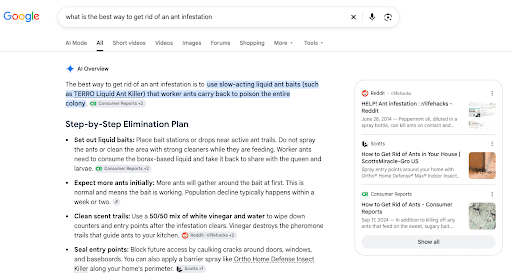
Google also allows people to engage in more conversational searches with AI Mode, which can expand on information summaries and allow users to go even deeper with their questions. AI Mode is a separate search experience, while AI Overviews appear within the main results page.
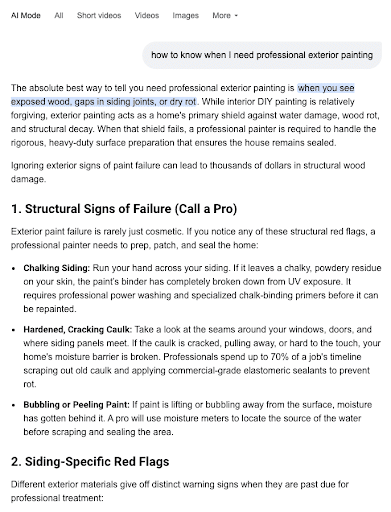
AI search results are great for various business types, including educational platforms, content publishers, and B2B companies focusing on top-of-funnel, informative or research-heavy topics.
To be eligible for AI results, your page must be indexed and eligible to appear in Google Search with a snippet. Your site also needs to be included in Search generative AI features through Search Console. Helpful, original content and a sound technical SEO foundation matter; Google does not require special AI schema or an llms.txt file.
Practical Steps for Optimization:
- Open key sections with concise and conversational summaries of around one to two sentences that directly answer queries.
- Map internal subheadings (H2s, H3s, etc.) to establish a hierarchy and incorporate natural phrasing.
- Build out blogs, pillar pages, and other resource pages that answer relevant follow-up questions. Add first-hand examples, original research, or expert explanations instead of creating a separate page for every question variation.
2. Featured Snippets and People Also Ask
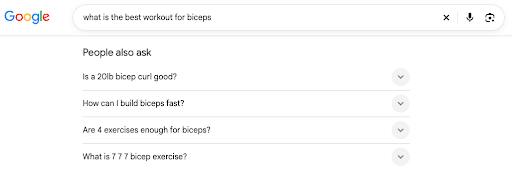
You may also target Featured Snippets, which are blocks of text, lists, or tables that Google pulls directly from a webpage. Like AI results, they can appear toward the top of search results with a link to the source.
Additionally, you might want to rank for People Also Ask (PAA) sections, which include a list of questions with expandable answers beneath. Clear answers to relevant questions can make your content useful for these results. PAA is different from the retired FAQ rich-result feature.
You should pursue these features if your business runs a healthcare platform, is a legal firm, or publishes DIY or tutorial content that may benefit from these formats.
Google selects these answers automatically. A first-page ranking is not a published eligibility requirement, and you cannot mark a page as a Featured Snippet. Focus on answering the question clearly and making the content accessible to Google.
Practical Steps for Optimization:
- Answer the question directly beneath its heading, using a concise paragraph, list, or table that suits the question. Google does not specify a fixed minimum snippet length.
- Organize lists with clean HTML formatting, e.g., “<ul>” tags for unordered lists, “<ol>” for ordered lists, and “<table>” for tables.
- Look at existing PAA sections for target queries to indicate which questions to include in an FAQ section.
3. Local Pack and Business Profiles
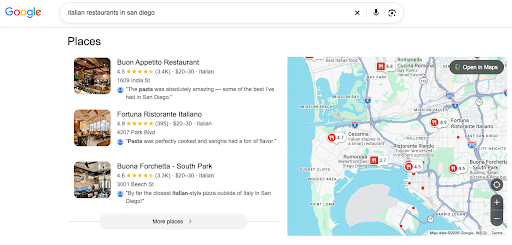
Next in our list of Google SERP features is the Local Pack, along with Google Business Profiles.
The Local Pack typically displays three local business listings with a map. Google says local results are mainly based on relevance, distance, and prominence. The Google Business Profile (GBP), meanwhile, is a kind of hub for all of the information about a particular business location, including its name, address, and phone number (NAP), as well as business hours, a description, and offerings. Google Business Profile Help.
Generally, the Local Pack and GBP are crucial for any brick-and-mortar business or service-based brand, such as retailers, restaurants, medical clinics, hotels, and home service providers like plumbers or electricians.
To manage a GBP, your business must meet Google’s eligibility guidelines, such as serving customers at a physical location or traveling to them. Verify and maintain the profile, but remember that choosing a service area does not guarantee rankings across that area. Service-area businesses should hide an address where customers are not served.
Practical Steps for Optimization:
- Maintain accurate business details for each location across its dedicated website page, local directories, citation profiles, and GBP. Keep hours and primary categories current.
- Ask customers for genuine reviews and provide helpful responses. Google says review volume and positive ratings can help local rankings; it does not identify response speed or review velocity as guaranteed ranking factors.
- Include high-quality photos of any storefronts, business interiors, products, or services in your GBPs.
For setup and ongoing management, follow our Google Business Profile guide.
4. Knowledge Panels
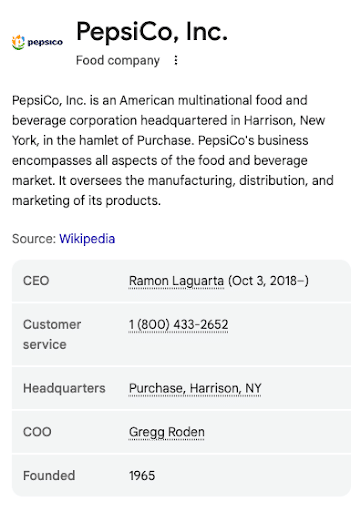
Another Google SERP feature to consider is the Knowledge Panel. This feature highlights information about certain entities like places, people, or brands. Knowledge Panels often appear on the right side of desktop results, with a different layout on mobile.
Public corporations, enterprise brands, public figures, and high-profile agencies benefit most from this feature, as it establishes authority and builds trust.
Google creates Knowledge Panels automatically using information available across the web. You cannot directly add your brand to the Knowledge Graph or guarantee a panel by adding schema. If a panel already exists for your entity, an authorized representative can claim it and suggest corrections.
Practical Steps for Optimization:
- Implement accurate Organization markup on your homepage to help Google understand your business. Connect it to official brand profiles and keep key details consistent.
- Get high-authority brand mentions and press features on trusted third-party publications.
5. Sitelinks
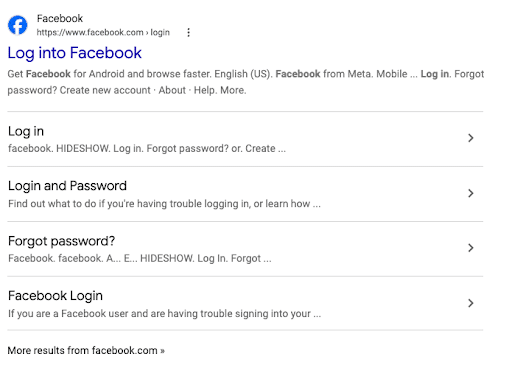
Sitelinks are clusters of sub-navigation hyperlinks that can take users to specific pages on a website. They tend to show up for navigational searches, such as when people want to find a login or contact page for a particular brand.
If you run a website where people frequently need to navigate to a login, contact, pricing, or support page, you’ll want to target these features. For example, corporations with large websites, ecommerce stores, membership platforms, and SaaS portals could all have audiences looking for particular pages.
Google generates sitelinks automatically when they are useful for a search. It does not publish a requirement that your brand must rank first, and you cannot manually choose the organic sitelinks it shows.
Practical Steps for Optimization:
- Use a clear internal site hierarchy with naturally placed pages for easy navigation across your site.
- Include descriptive anchor text for primary internal navigation links instead of generic wording.
- Submit a valid XML sitemap to Google using Google Search Console to support URL discovery. A sitemap does not guarantee indexing or sitelinks.
6. Image and Video Results
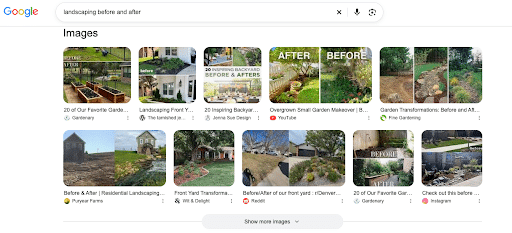
These results integrate grids, carousels, or previews of visual media into search results, helping all types of businesses appeal to users with images or video content on their website.
Everything from local service businesses and fashion brands to culinary businesses and software companies can optimize for these results, such as with images of their offerings or video tutorials published on YouTube.
Google needs to be able to discover and access your visual assets. For video features, the video should appear on an indexed watch page where watching it is the main purpose of the page. Adding a video to an ordinary blog post does not automatically make it eligible for video results.
Practical Steps for Optimization:
- Use descriptive alt text for images with relevant keywords, and optimize file names with hyphenated titles.
- Add accurate VideoObject markup, including the required name, thumbnailUrl, and uploadDate properties. Include relevant details such as duration, contentUrl or embedUrl, and creator or author information where available.
- In YouTube videos, include interactive timestamps and video chapter markers to help search engines find points within a video that apply to specific search queries.
7. Product Results and Review Stars
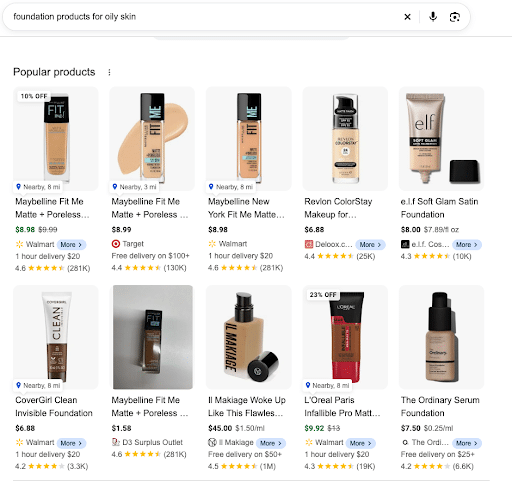
These include product snippets and merchant listings that can show information such as pricing, availability, ratings, shipping, and returns. Organic product listings are different from paid Shopping ads.
Online marketplaces, ecommerce stores, and direct-to-consumer (DTC) brands benefit from these features to enable customers to locate and shop for various products directly in Google.
You can provide product information through supported Product structured data, Merchant Center feeds, or both. Using both can improve eligibility across shopping experiences and help Google verify your data.
Practical Steps for Optimization:
- Use the markup that fits the page: product snippets for relevant review pages and merchant listings for pages where customers can buy. Include required properties and accurate offer details such as price, priceCurrency, and availability.
- Add AggregateRating only when genuine ratings are visible on the page and meet Google’s review guidelines. Do not add fake or undisclosed incentivized reviews. Reviews a business controls about itself are not eligible for LocalBusiness or Organization review stars, even through a third-party widget.
- Keep Merchant Center feeds and on-page product details in sync, including inventory, prices, shipping, and return policies.
8. Top Stories
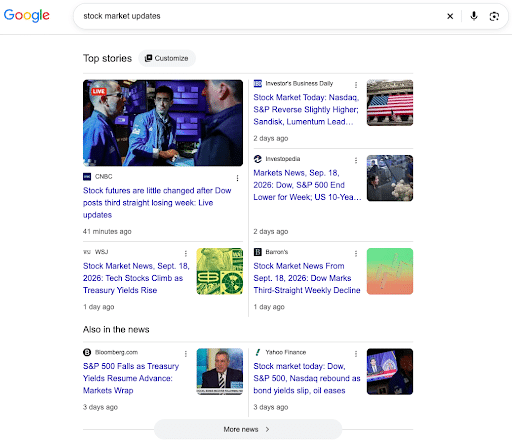
When users search certain news topics, they may see a “Top stories” section with news articles and live content updates.
If you have a niche publication, digital newspaper, media network, or financial or political blogs, you can appear for relevant current events with this feature.
Publishers are automatically considered for Top Stories when they produce high-quality news content and comply with Google News policies. Article markup can help Google understand the page, but it is not a requirement for Top Stories eligibility.
Practical Steps for Optimization:
- Add accurate Article or NewsArticle structured data with authors, relevant images, datePublished, and dateModified where appropriate. Show clear bylines and publication dates on the page.
- Optimize your site infrastructure to allow for fast indexing, optimal Core Web Vitals for a good user experience regardless of traffic spikes, and clean rendering paths.
- Focus news content on specific areas of industry expertise to help you build more topical authority.
9. Paid Search Results
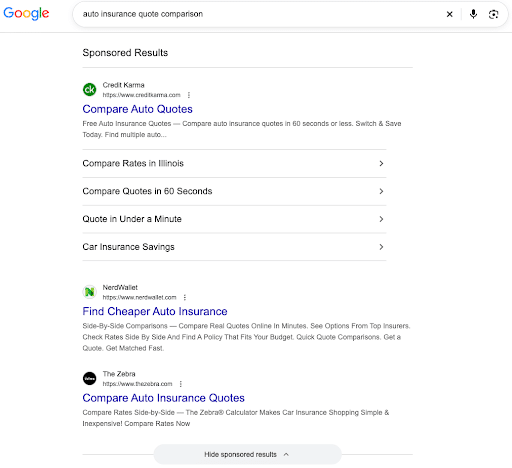
These are different from the previous features in that you pay for ad placements. Google groups text ads under a “Sponsored results” label, and ads can appear in different positions, including above or below AI Overviews and at the bottom of the page. Shopping ads can appear under “Sponsored products.”
If you’re in a highly competitive industry that makes it hard to outrank competitors organically, Paid Search is a potentially invaluable asset to supplement your SEO strategy.
You need an active Google Ads account and approved ads, but placement also depends on the ad auction. Ad Rank considers your bid, auction-time ad quality, competition, search context, and the expected impact of your assets.
Practical Steps for Optimization:
- Align target keywords with ad copy and landing page content. Use Quality Score to diagnose relevance and landing page issues; the score itself is not an input in the ad auction.
- Use all relevant ad assets to get found, including sitelink, callout, and structured snippet assets.
- Get the most from placements by including negative keywords for which you don’t want your ads to appear, honing your targeting.
Other Google SERP Features to Know
The main features above cover many marketing opportunities, but they are not the whole list. Depending on the search, you may also see:
| Feature | What It Shows | When It Matters |
| Discussions and forums | Community conversations and first-hand experiences | When customers want practical advice or product experiences |
| Recipe results | Recipe details and visual listings | For publishers with genuine recipe content |
| Event results | Upcoming events, dates, and locations | For businesses promoting eligible public events |
| Job results | Individual job openings and employer details | For employers and job publishers |
| Travel results | Flight, hotel, or vacation rental information | For travel businesses using the relevant integrations or supported markup |
| Related searches and refinement options | Suggestions that help people explore a topic | For researching follow-up questions and customer intent |
Some features have specific content, markup, or integration requirements. Others help people navigate Search and are not placements a brand can directly claim. Check Google’s current documentation before building a strategy around them.
How to Track SERP Features and Measure Results
If you want to learn how to track SERP features for effective performance measurement, take these steps:
- Use Semrush Organic Rankings to research opportunities. Enter your domain and relevant competitors, then review the Positions report and SERP feature filters. Compare the keywords where a feature appears with those where your domain appears within it. Treat Semrush’s traffic figures as estimates.
- Use Position Tracking for selected keywords, locations, and devices. Set up your priority keywords and target market, then use the SERP Features filter to review results such as Local Pack, Featured Snippets, and AI Overviews. Keep location and device settings consistent when comparing changes.
- Distinguish an appearing feature from your site appearing within it. A feature showing for a keyword does not mean your site is included. Check the linked URL, citation, or business listing, and review important results manually because layouts can change.
- Use Google’s generative AI performance report for AI visibility. In Search Console, check impressions from AI Overviews and AI Mode by page, country, device, and date. The report currently focuses on impressions, rather than providing separate click, CTR, or query metrics for these features. If it is missing, your site may not have enough AI impressions. You can also compare text-based and multimodal searches where those filters are available.
- Combine visibility with Search Console performance and conversion data. Use Search Console for search impressions, clicks, and CTR, and GA4 for on-site activity and key events. Add GBP performance for local customer actions and CRM data for lead quality and sales. Compare performance by landing page and market; these tools do not automatically tie every conversion to a specific SERP feature.
Common SERP Feature Mistakes
The following are some mistakes to avoid when trying to optimize and measure performance for SERP features in SEO:
- Treating schema as a placement guarantee. Schema structured data using JSON-LD linked data can help Google understand content and make pages eligible for certain rich results. It does not guarantee placement, and special schema is not required for AI Overviews or AI Mode. Misleading markup can cause rich-result eligibility problems.
- Pursuing irrelevant features or adding unnecessary FAQs. Businesses should only try to optimize for the features that actually matter based on their business type and content for better results, and they should avoid including any unnecessary FAQ sections or questions that might hurt the user experience or SEO through off-topic keywords or duplicate content.
- Using outdated screenshots and optimization advice. Refresh screenshots when layouts or products change so readers can follow your guidance. Check Google’s current feature requirements, and stop targeting retired enhancements such as FAQ rich results.
- Equating visibility with revenue. Just because your content ranks well for various features doesn’t mean it will drive traffic, let alone conversions and revenue. Connect Search Console visibility with GA4 activity and CRM outcomes so you can see which pages and markets generate qualified demand.
FAQs
1. Are SERP features and rich results the same?
Put simply, rich results are a specific type of SERP feature. They typically use supported structured data to show extra information, such as star ratings, recipe details, pricing, or event dates. Other SERP features include AI Overviews, Knowledge Panels, and People Also Ask.
2. Does schema guarantee placement?
No. Valid structured data can make a page eligible for supported rich results, but Google decides whether to display them. It does not guarantee rankings, a Featured Snippet, or an AI citation.
3. How do AI Overviews differ from Featured Snippets?
AI Overviews use generative AI to produce summaries from potentially multiple sources, while Featured Snippets pull direct quotes from a single webpage.
4. Can SERP features reduce website clicks?
Yes. Direct answers can let people complete a search without visiting a website. Visibility can still help customers recognize your brand, but more impressions do not guarantee more traffic. Track clicks, qualified leads, and sales alongside visibility.
5. Which features should local businesses prioritize?
Local businesses will benefit from optimizing primarily for Google Maps results and Google Business Profiles. To optimize for these, it’s important for every business location to have correct and up-to-date business names, addresses, business hours, phone numbers, and other relevant information about products or services offered.
6. How do I find SERP features by keyword?
Search the keyword in the market you want to reach, then use a rank tracking tool to monitor the features it triggers. In Semrush Position Tracking, the SERP Features filter helps you see both whether a feature appears and whether your domain ranks within it. Check important queries manually as well.
7. Is there a complete list of SERP features?
There is no fixed list that applies to every Google search. Features change and vary by query, country, and device. Google’s visual elements gallery and supported structured data gallery are useful starting points, alongside the results your customers actually see.
Optimize for Google SERP Features With Ignite Visibility
With the right experts behind your SERP feature strategy, you can significantly increase your chances of appearing for these elements in AI and traditional search results.
Ignite Visibility has the expertise to help you:
- Determine which features to target based on your business type and industry
- Develop high-quality, well-optimized content to help you rank for these features
- Correctly implement schema markup to structure content for rich results
- Consistently monitor performance for gradual improvement over time
- And more!
Learn more about our SEO services and AI SEO capabilities to build a SERP feature strategy around the searches that drive qualified leads and sales.
